Every form field, every user profile, every training record your organization collects adds to a growing pool of personal data, and with it, a growing pool of risk. Data minimization in data privacy is the principle that says you should only collect and keep what you actually need. It sounds straightforward, but putting it into practice requires deliberate planning, especially when regulations like the GDPR carry real enforcement consequences for getting it wrong.
For organizations that manage training programs, this principle hits close to home. Learner profiles, assessment scores, completion records, certification tracking, an LMS like Axis LMS processes significant amounts of personal data every day. At Atrixware, we build compliance training tools and data handling practices that help organizations meet standards like GDPR and FDA 21 CFR Part 11, so we think about data minimization not just as a legal checkbox but as a core operational discipline.
This article breaks down what data minimization actually means, why it matters for privacy compliance, how the GDPR codifies it, and what practical steps you can take to apply it across your organization. Whether you’re an HR manager tightening up employee data processes, a compliance officer preparing for an audit, or a training leader evaluating how your systems handle learner information, you’ll walk away with a clear, actionable understanding of how to collect less and protect more.
What data minimization means in practice
Data minimization in data privacy means collecting only the personal data that is directly necessary for a specific, defined purpose. No more, no less. In practical terms, that means before you collect a piece of information, you should be able to answer one clear question: why does this process need this specific data point? If you can’t answer that clearly, you shouldn’t collect it. This principle applies at every stage, from the moment you design a form or configure a system, to the ongoing management of records that accumulate over time.
The core test is simple: if removing a data field wouldn’t break the process, you probably shouldn’t be collecting it in the first place.
The three criteria: adequate, relevant, and limited
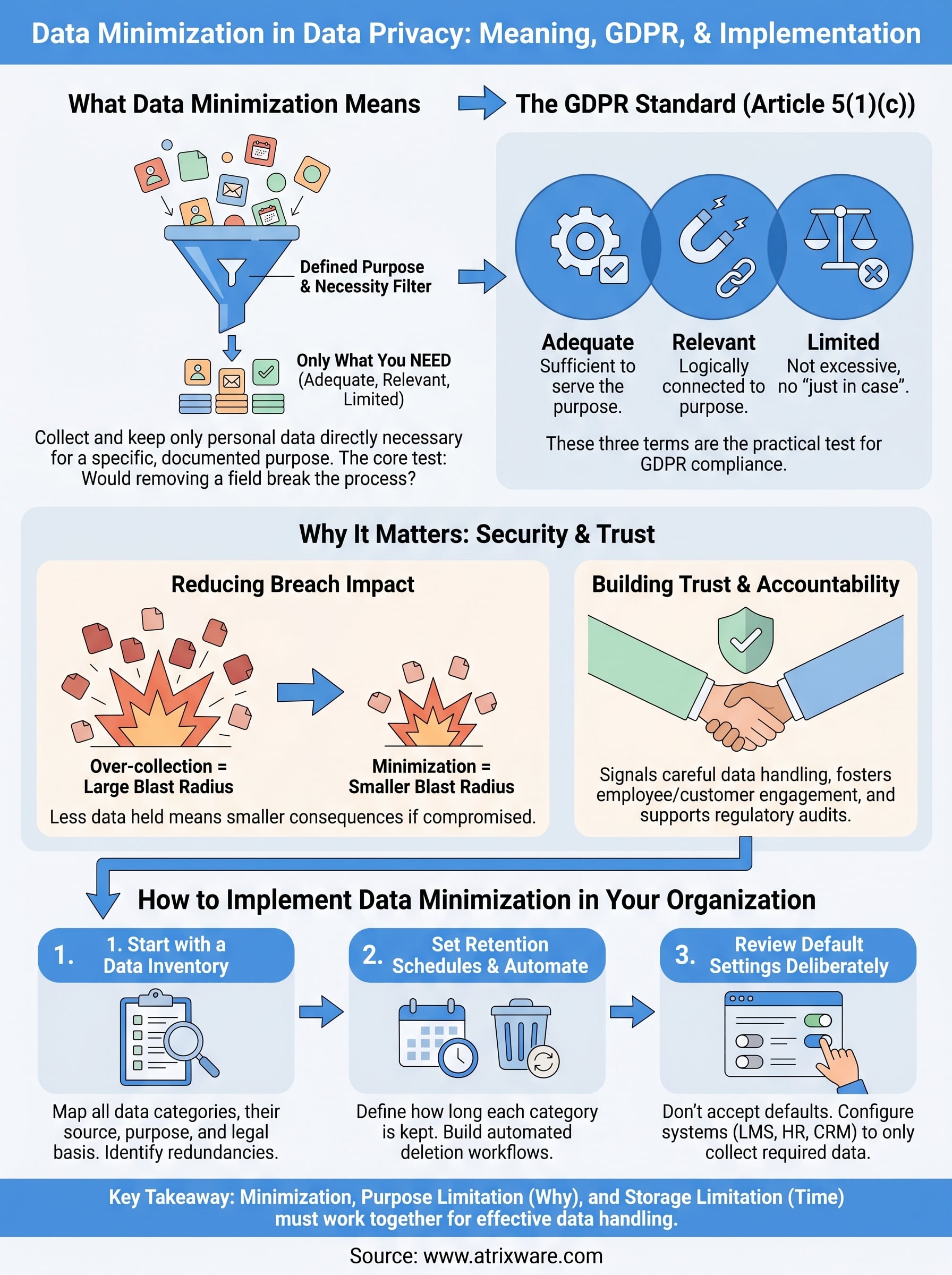
Most privacy frameworks describe data minimization through three connected criteria. Data must be adequate (sufficient to actually serve the purpose), relevant (logically connected to that purpose), and limited (not excessive beyond what the purpose requires). These three terms work together, not independently. A dataset can be adequate without being excessive, and it can be relevant without capturing unnecessary detail.

Think about a training completion record in an LMS. Storing that a learner completed a course on a specific date is adequate, relevant, and limited. Storing their location at the time of completion, their full device history, and every interaction during the course would go well beyond those criteria for most standard compliance use cases. The question isn’t whether you can collect more data; it’s whether doing so serves a documented, legitimate purpose.
How this plays out in data collection decisions
When you apply data minimization at the collection stage, you’re essentially auditing your own forms, systems, and workflows before they create a problem. Start by listing every data field you collect in a given process. For each field, ask what purpose it serves and whether that purpose would genuinely fail without it. You’ll often find fields that exist because they always have been there, not because they’re actually needed.
Your review is especially important when you build or configure software systems, including HR platforms, CRMs, and learning management systems. Pre-built forms and default settings often collect more data than your specific use case requires. Configuring a system to capture only what you need, rather than accepting defaults, is a direct application of the minimization principle.
What minimization looks like across the data lifecycle
Data minimization doesn’t stop at collection. You also have to think about how long you keep data and who can access it. A record that was necessary when a learner enrolled in a course may no longer be necessary two years after they left the organization. Keeping it doesn’t make you more informed; it increases your exposure without adding value.
Practically, this means building retention schedules into your data processes. Set defined periods for how long each category of data should be kept, and build automated deletion or anonymization into your systems wherever possible. Minimization also applies to access: not every team member needs visibility into every data field. Restricting access to sensitive data to only the people who need it for their specific role is another layer of minimization that reduces risk without reducing functionality.
Why data minimization matters for privacy and security
The case for data minimization in data privacy goes beyond regulatory compliance. When you collect less data, you reduce the consequences of a security incident. A breach that exposes 500 records causes less damage than one that exposes 50,000. That arithmetic is simple, but many organizations ignore it by defaulting to collecting everything they might ever need instead of only what they need right now.
Reducing your exposure to breaches
Every data field you store is a potential liability. Personal data that sits unused in a database still carries the same legal and reputational weight as data you actively rely on. If your systems are compromised, attackers get access to whatever you have stored, whether or not you ever intended to use it. The principle of minimization directly shrinks the scope of what can be stolen, leaked, or misused.
The less data you hold, the smaller the blast radius of any security incident.
This matters especially for organizations that manage sensitive training data. Learner records often include names, job titles, department details, assessment results, and sometimes health-related certifications. Storing only what your training program requires limits what an attacker can access and reduces the cost and complexity of any breach response you would need to carry out.
Building trust and demonstrating accountability
When you apply data minimization consistently, you signal to employees, customers, and regulators that your organization takes data handling seriously. Trust is harder to quantify than a breach cost, but it matters. Employees who know their personal information is handled with care are more likely to engage openly with HR and training systems. Customers who see disciplined data practices are less likely to view your organization as a risk.
Regulators look at data practices when they investigate complaints or conduct audits. Organizations that can demonstrate a clear, documented policy of collecting only what is necessary are in a much stronger position than those that admit to keeping data with no defined purpose. Minimization creates a record of intent and discipline that supports your compliance posture across multiple frameworks, not just GDPR. When the principle is embedded into how you build and configure systems rather than applied as an afterthought, it becomes a durable part of how your organization handles personal data at every level.
How GDPR defines data minimization
The GDPR codifies data minimization in Article 5(1)(c), which states that personal data must be "adequate, relevant and limited to what is necessary in relation to the purposes for which they are processed." This is one of six core data protection principles in the regulation, sitting alongside accuracy, storage limitation, and integrity. The GDPR doesn’t give you a formula or a specific checklist; it sets a standard you’re expected to apply with judgment based on your particular processing activities and documented purposes.
Article 5(1)(c) doesn’t define "necessary" for you, it places the burden on your organization to justify every data point you collect.
The "adequate, relevant, and limited" standard
Those three terms, adequate, relevant, and limited, form the practical test you apply when deciding what to collect. Adequate means the data is sufficient to fulfill the stated purpose. Relevant means there’s a direct, logical connection between the data and that purpose. Collecting job title to assign role-appropriate training is relevant; collecting home address for the same reason is not.
"Limited" is where many organizations fall short. It requires you to actively resist collecting data that might be useful someday but has no defined purpose right now. GDPR doesn’t reward you for keeping data just in case a need arises later. If you can’t articulate a current, lawful basis for holding a data point, the regulation expects you to either not collect it or remove it from your systems.
Who carries the responsibility under GDPR
The GDPR places primary responsibility for data minimization on the data controller, the entity that determines the purposes and means of processing personal data. If your organization decides what training data to collect and why, you are the controller, and the burden of demonstrating compliance rests with you, not your vendors or service providers.
Data processors, such as an LMS provider, operate under your instructions and the terms of a Data Processing Agreement. Even so, you still need to configure those systems in a way that reflects your minimization obligations. Selecting a platform that gives you granular control over which data fields are collected and how long records are retained is a direct part of meeting that obligation. Applying data minimization in data privacy under GDPR isn’t a passive exercise; the regulation requires you to actively justify what you collect and demonstrate that discipline if a regulator ever asks.
Data minimization vs purpose and storage limitation
Data minimization in data privacy is one of three closely related principles in the GDPR that work together to control how personal data is handled. Purpose limitation and storage limitation are the other two, and while all three connect logically, they each address a distinct question. Treating them as interchangeable leads to gaps in your compliance approach. Understanding where one ends and another begins helps you apply each one correctly.

Purpose limitation: why you collected it matters
Purpose limitation governs the reason you collect data in the first place. Under GDPR Article 5(1)(b), you must collect personal data for specified, explicit, and legitimate purposes, and you can’t process it later in a way that’s incompatible with those original purposes. This principle operates before and alongside data minimization: you first define the purpose, then minimization tells you to collect only what that purpose actually requires.
If you can’t state a clear purpose before collecting a data point, neither purpose limitation nor minimization will protect you.
A practical example: if you collect a learner’s job title to assign them the right training track, you’ve defined a clear purpose. Using that same job title later to build a marketing profile would likely violate purpose limitation, because that’s a different and incompatible use. The scope of what you’re allowed to do with data is bounded by what you told people when you collected it.
Storage limitation: how long you keep it matters
Storage limitation addresses the time dimension of data handling. GDPR Article 5(1)(e) requires that personal data be kept in a form that identifies individuals for no longer than necessary for the purposes it was collected. Once the purpose is fulfilled, you’re expected to delete or anonymize the data. This is where organizations most commonly fall short: they collect data responsibly but then retain it indefinitely with no defined end point.
Data minimization tells you not to collect excess data to begin with. Storage limitation tells you to actively remove data once it has served its purpose. Together, these two principles function as bookends: one at the front of the data lifecycle, one at the back. You need both in place to close the loop. Retention schedules, automated deletion workflows, and regular data audits are the operational tools that make storage limitation work in practice, and they pair directly with the minimization decisions you made at the collection stage.
Real-world examples of data minimization
Seeing data minimization in data privacy applied to specific scenarios makes the principle easier to implement. The following examples span common organizational contexts where over-collection is frequent and the consequences of getting it wrong are real.
Employee onboarding and HR systems
When you onboard a new employee, you need enough information to set up payroll, assign benefits, and verify their right to work. You don’t need their social media profiles, their full medical history, or details about family members beyond what a benefits election form requires. Collecting an employee’s emergency contact name and phone number is adequate and limited. Asking for that contact’s employer, income, and address exceeds what any reasonable HR process actually needs.
If you can’t tie a data field directly to a documented HR process, it shouldn’t be on your onboarding form.
Many organizations inherit HR forms that were built years ago and never reviewed. Auditing those forms against your current processes often reveals fields that serve no active purpose and should be removed entirely.
Training programs and LMS platforms
Learning management systems generate substantial amounts of learner data across enrollments, assessments, completions, and certifications. A well-configured LMS collects the data your training program requires, such as completion status, assessment scores, and certification expiry dates, without adding unnecessary detail. Storing a learner’s full browser history, keystroke patterns, or precise GPS location during a course goes beyond what standard compliance or performance tracking requires.

When you configure your LMS, review each data field against the specific purpose it serves. Does tracking time-on-task improve your training outcomes for a given course? If yes, collect it and document why. If the answer is uncertain, leave it out. The same logic applies to third-party integrations: when your LMS connects to an HR system, transfer only the fields that each system actually needs to function, not every available field because the API allows it.
Customer account registration
When a customer creates an account to access your products or services, you need enough information to authenticate them and fulfill transactions. Requiring a full mailing address during account creation for a digital-only product is a clear example of over-collection. Asking for a birthdate when age verification isn’t legally required is another. Each extra field you add to a registration form increases your data liability without improving the customer experience. Keeping registration forms to the minimum required fields is one of the simplest and most effective applications of the minimization principle.
How to implement data minimization in your organization
Applying data minimization in data privacy starts with understanding what data you currently hold and why. Before you can reduce collection, you need a clear picture of every data point flowing through your systems, from intake forms and HR platforms to your LMS and CRM integrations. Without that foundation, any minimization effort will miss significant gaps.
Start with a data inventory
A data inventory is a structured list of every category of personal data your organization collects, where it comes from, what it’s used for, and who has access to it. Mapping this out reveals redundancies, outdated fields, and data points with no documented purpose. It also gives you the baseline you need to make defensible decisions about what to keep and what to remove.
Your data inventory isn’t a one-time project. Review it whenever you add a new system, change a process, or connect a new integration.
Work through each system individually. For every data field, document the specific process it supports and the legal basis for collecting it. If you can’t complete those two entries, that field is a candidate for removal.
Set retention schedules and automate deletion
Once you know what you’re collecting and why, set defined retention periods for each data category based on the purpose it serves and any regulatory requirements that apply. A learner’s completion record may need to be kept for three years to satisfy a compliance audit window. Their pre-enrollment contact details likely have no reason to persist after they start a course.
Build automated deletion or anonymization workflows wherever your systems allow it. Manual deletion processes are inconsistent and easy to skip under operational pressure. Automation turns retention schedules into enforceable rules rather than intentions.
Review default settings in every platform you use
Most platforms default to collecting more data than you need. When you configure a new system, or audit an existing one, go through every data collection setting deliberately rather than accepting defaults. This applies to your LMS, HR system, CRM, and any third-party tool that processes personal data on your behalf.
Assign a specific team member or role to own data minimization decisions within each platform. When someone is directly accountable for reviewing what a system collects, those reviews actually happen on schedule rather than getting deferred indefinitely.
Key takeaways
Data minimization in data privacy means collecting only what you genuinely need, keeping it only as long as a specific purpose requires, and removing it once that purpose is fulfilled. The GDPR’s Article 5(1)(c) sets the standard: adequate, relevant, and limited. Purpose limitation defines why you collect data, storage limitation governs how long you keep it, and minimization controls how much you take in. These three principles work together, and you need all three operating simultaneously to close the loop on responsible data handling.
Practically, minimization starts with a documented data inventory, runs through deliberate system configuration, and depends on automated retention schedules to stay consistent over time. Every platform you use, including your LMS, needs direct attention rather than default settings. If you’re evaluating how well your current training systems handle learner data, take the Axis LMS readiness quiz to see where you stand.
