Manually grading quizzes, chasing down learners who stall halfway through a course, and building the same onboarding path for every new hire wastes hours you don’t have. That’s the gap an ai powered learning management system closes: it flags at-risk learners before they drop off, recommends the next course based on someone’s actual performance, and generates reports without you touching a spreadsheet.
If you’re comparing platforms right now, you want to know which ones actually deliver on the AI promise versus which just slap a chatbot on an old interface. This guide breaks down nine systems worth evaluating in 2026, looking at automated content recommendations, adaptive assessments, predictive analytics, and how well each one handles compliance tracking at scale.
We built this list from a practitioner’s view, the kind of person setting up training for a growing team or managing certification renewals across hundreds of employees. Each entry covers what the AI actually automates, who the platform fits best, and where it might fall short, so you can shortlist the right learning management system without demoing all nine yourself.
1. What is an AI-powered learning management system?
A regular LMS stores courses, tracks completions, and spits out a transcript when someone asks for it. An ai powered learning management system does all that, then layers in machine learning that watches how people actually learn and adjusts the experience in real time. Instead of every employee getting the same 12-module compliance path, the system might skip modules for someone who already passed a pre-assessment, or push extra practice to someone who’s clearly struggling with module 4.
The core AI capabilities that separate these platforms
Most of what vendors market as "AI" in 2026 falls into a handful of buckets. Knowing these categories helps you cut through marketing copy and ask sharper questions during a demo.
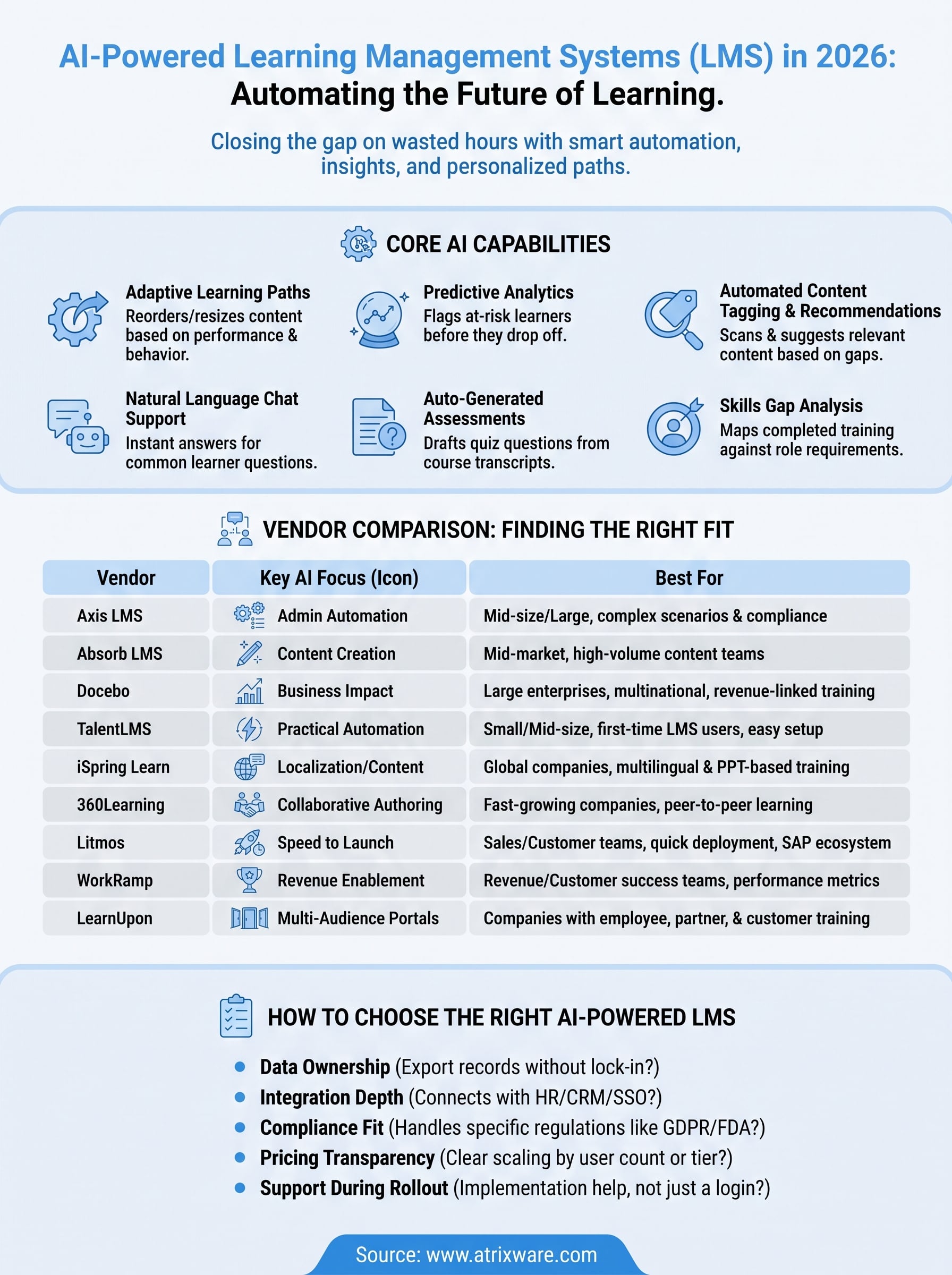
- Adaptive learning paths: the system reorders or resizes content based on quiz scores, time-on-task, or prior role data.
- Predictive analytics: models flag learners likely to fail a certification or drop out before it happens, so a manager can intervene early.
- Automated content tagging and recommendations: AI scans uploaded videos, PDFs, and SCORM packages, tags them by topic, and suggests them to learners with related gaps.
- Natural language chat support: a bot answers "where’s my certificate" or "how do I retake this quiz" without a support ticket.
- Auto-generated assessments: some tools can draft quiz questions from a course transcript, cutting authoring time significantly.
- Skills gap analysis: AI cross-references completed training against role requirements and highlights gaps at the team or department level.
The real test of an AI-powered LMS isn’t whether it has a chatbot, it’s whether it changes what a learner sees next based on how they’re actually performing.
Why this matters more in 2026 than it did five years ago
Compliance windows keep shrinking, workforces are more distributed, and training teams are running lean. Manually building a dozen learning paths for different roles, then re-checking them every time a regulation changes, isn’t realistic anymore. Predictive analytics and automation give a training manager back the hours they’d otherwise spend cross-referencing spreadsheets to figure out who’s behind.
That said, not every platform’s AI is equally mature. Some vendors bolted a generic chatbot onto a decade-old interface and called it AI. Others built adaptive logic and skills mapping into the core architecture years ago and have been refining it with real customer data since. As you go through this list, pay attention to whether the AI features are described in specific, testable terms, like "flags learners with under 60% quiz completion after 14 days," versus vague claims like "personalized learning experiences powered by AI." The specific ones are usually the real deal.
2. Axis LMS by Atrixware
Axis LMS built its reputation on flexibility long before AI became a checkbox feature, and that shows in how the automation layers into the platform rather than sitting on top of it. Axis LMS handles the full range of training use cases, employee onboarding, customer education, channel partner training, and compliance tracking, without forcing you into a rigid workflow designed for one scenario. Admins who need granular control over branding, user groups, and reporting tend to gravitate here because the interface doesn’t hide that control behind layers of menus.
Key AI features
The automation in Axis LMS focuses on cutting administrative grind rather than gimmicks:
- Automated learner communication: triggers reminders, escalations, and re-certification notices based on learner behavior, no manual follow-up needed.
- Smart reporting engine: generates on-demand and scheduled reports that surface at-risk learners and completion trends without manual filtering.
- Compliance automation: tracks CEU requirements and re-certification deadlines automatically, flagging gaps before an audit finds them.
- Integration-driven personalization: pulls HR and CRM data through its 5,000+ system integration builder to tailor assignments by role, department, or customer segment.
An LMS earns its AI label when it stops you from chasing spreadsheets, and that’s exactly where Axis LMS puts its automation to work.
Best for
Mid-size to large organizations running multiple training types at once, employee, customer, and compliance, especially teams that need heavy customization and are already using systems like Salesforce, ADP, or BambooHR. IT teams that want REST API and webhook access for custom builds will also find more room here than in more locked-down platforms.
Pricing
Axis LMS uses custom quote-based pricing tied to user count and feature tier, with options for both cloud-hosted and self-hosted deployments. Atrixware offers a free trial and demo, so you can test the reporting and automation features against your own data before committing to a contract.
3. Absorb LMS
Absorb LMS built its name on a clean, consumer-grade interface, and its AI layer, Absorb Intelligent Assist, follows that same philosophy. Rather than burying automation in admin settings, Absorb surfaces AI tools right where course creators and learners already spend their time, which makes adoption easier for teams that don’t have a dedicated LMS administrator. Absorb LMS leans heavily on generative AI for content creation, a different focus than platforms built primarily around adaptive learning paths.
Key AI features
Absorb’s AI centers on speeding up course production and surfacing insights admins would otherwise dig for manually:
- AI course creation assistant: generates quiz questions, course descriptions, and even full outlines from a document or prompt, cutting authoring time for new modules.
- Smart search: lets learners find relevant courses using natural language queries instead of browsing folders.
- Automated insights: surfaces trends in completion rates and engagement without building custom reports from scratch.
- Skills mapping: connects completed courses to skill tags so managers can see gaps at a glance.
Absorb’s AI shines brightest at the authoring stage, turning a blank course shell into a draft in minutes instead of hours.
Best for
Mid-market companies that create a high volume of original training content and want to shrink the time between "we need a course on this" and having something learners can take. Teams without a dedicated instructional designer benefit most, since the AI assistant fills part of that role. It’s less suited to organizations whose priority is deep compliance automation across multiple certification types, where more specialized tools pull ahead.
Pricing
Absorb LMS doesn’t publish flat pricing. Costs depend on active user count and selected modules, and quotes come through a sales consultation. Expect enterprise-level minimums, which puts it out of reach for very small teams, though Absorb does offer demos to evaluate the AI features firsthand.
4. Docebo
Docebo positions itself as the AI-first player in this list, and it backs that claim with a purpose-built engine called Docebo Shape and its Learning Impact suite rather than a bolted-on assistant. Docebo targets larger organizations that need AI woven into content creation, learner engagement, and business reporting all at once, not just one corner of the platform. If you’ve outgrown a simpler LMS and need something that scales with a global workforce, Docebo usually shows up on the shortlist.

Key AI features
Docebo’s automation spans the full training lifecycle, from building a course to proving its business value:
- Content auto-generation: converts existing documents, slide decks, or web pages into structured, ready-to-assign courses in minutes.
- AI-powered learner recommendations: suggests next courses based on role, past performance, and peer behavior patterns.
- Learning impact reporting: correlates training completion with business metrics like sales performance or support ticket resolution.
- Virtual coach chatbot: answers learner questions and nudges people back into unfinished courses.
Docebo’s strongest pitch isn’t automation for its own sake, it’s proving that training actually moves business numbers, not just completion rates.
Best for
Large enterprises and multinational teams that need AI-driven content scaling across dozens of departments or regions, plus leadership teams that want hard data tying training to revenue or retention outcomes. Smaller teams without dedicated L&D staff may find the platform more complex than they need, since much of its value depends on someone actively building out the reporting and content pipelines.
Pricing
Docebo doesn’t list public pricing. Quotes are based on active users and selected modules, and the sales process typically involves a demo and needs assessment. Expect enterprise-level costs that price out very small organizations, though Docebo offers a free trial for qualifying businesses to test the AI content tools before signing.
5. TalentLMS
TalentLMS built its reputation on simplicity, and that’s still the pitch even as it layers in AI. Where Docebo and Absorb chase enterprise-scale automation, TalentLMS aims at teams that want something they can set up in an afternoon without a training department behind them. The AI features here won’t win a features arms race, but they solve the everyday friction that eats up an admin’s week, especially for organizations running their first real ai powered learning management system rollout.
Key AI features
TalentLMS keeps its automation practical and easy to turn on without heavy configuration:
- AI course creation: generates a course outline, lessons, and quiz questions from a simple text prompt, useful for admins without instructional design experience.
- Smart categorization: automatically tags and organizes uploaded content so course libraries don’t turn into unsearchable folders.
- Automated notifications: sends reminders and deadline alerts based on learner progress, cutting manual follow-up.
- Performance dashboards: surface completion trends and at-risk learners without custom report building.
TalentLMS proves that AI in an LMS doesn’t need to be complicated to save real time, it just needs to remove the steps admins dread doing manually.
Best for
Small and mid-size businesses launching their first structured training program, particularly those without a dedicated L&D team. Startups and growing companies that need to onboard new hires fast, without hiring someone whose full-time job is managing the LMS, will find the setup curve shorter here than with enterprise-focused platforms.
Pricing
TalentLMS publishes tiered pricing based on active user count, starting with a free plan capped at a small number of users and courses. Paid tiers scale up from there, with AI content tools available starting at the mid-tier plans. A free trial lets you test the course generator before committing to a paid seat count.
6. iSpring Learn
Spring Learn built its name on fast course authoring through iSpring Suite, and its AI layer extends that same speed-first mindset into content creation and translation. Companies that already lean on PowerPoint-based training find the transition here smoother than switching to a platform that demands rebuilding everything from scratch. iSpring Learn targets teams that need to localize training across regions without hiring a translation team, which sets it apart from platforms focused mainly on adaptive learning paths or predictive analytics.
Key AI features
iSpring’s automation concentrates on content production and language reach rather than deep behavioral prediction:
- AI-powered course translation: converts existing courses into dozens of languages while preserving formatting, cutting weeks off localization projects.
- Automated voiceover generation: turns script text into natural-sounding narration, removing the need for voice actors on every update.
- Content authoring assistant: suggests quiz questions and course structure from uploaded slides or documents.
- Engagement analytics: flags drop-off points within a course so admins know exactly where learners lose interest.
When a training team spends more time translating slides than teaching, that’s the exact gap iSpring’s AI is built to close.
Best for
Global companies and training teams managing multilingual workforces, especially manufacturers, retailers, and distributors with employees spread across several countries. Teams already invested in PowerPoint-style authoring will find the learning curve shorter than switching to a platform built around a different content model entirely.
Pricing
iSpring Learn prices per active user with annual billing, and AI-powered translation and voiceover features come bundled into its higher tiers rather than sold separately. A free trial lets you test the translation quality on your own course content before locking into a yearly contract, which matters given how much this platform’s value depends on that one feature working well for your specific languages.
7. 360Learning
360Learning built its platform around peer-created content long before AI entered the conversation, and its automation still reflects that collaborative-learning DNA. Instead of centralizing course creation with one instructional designer, 360Learning uses AI to help subject-matter experts across a company turn their own knowledge into training material, then uses learner feedback loops to keep that content accurate over time. This makes it a different animal from platforms like Docebo or Absorb, which lean more on top-down content generation.
Key AI features
360Learning’s automation focuses on collaborative authoring and keeping content fresh through crowd input:
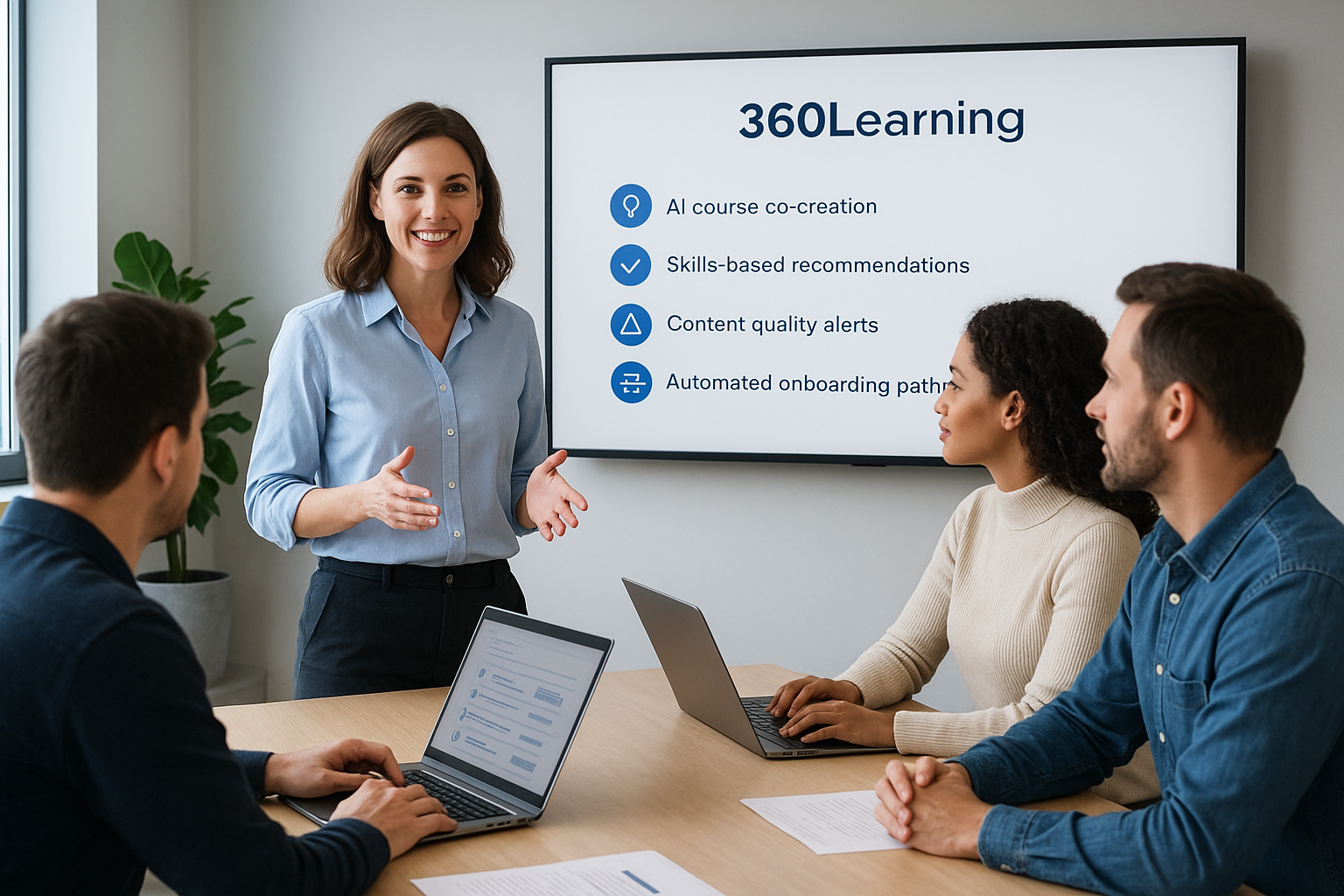
- AI course co-creation: generates a first draft of a course from a prompt or document, which subject-matter experts then refine collaboratively.
- Skills-based recommendations: matches learners to courses based on role and skill gaps rather than a fixed curriculum.
- Content quality alerts: flags outdated or low-rated courses based on learner feedback, prompting owners to update them.
- Automated onboarding pathways: assembles role-specific onboarding sequences pulled from existing course libraries.
When training content lives inside the heads of your best employees, 360Learning’s AI is built to extract it faster than a traditional course-building process ever could.
Best for
Fast-growing companies that rely on internal experts to train each other, particularly tech companies and scaleups where knowledge changes too quickly for a centralized L&D team to keep up. Organizations comfortable with a more decentralized content model, where managers and specialists contribute directly, will get more value here than teams wanting tight top-down control over every module.
Pricing
360Learning doesn’t publish flat pricing publicly. Quotes depend on user count and selected features, arranged through a sales consultation. The platform offers a demo so you can evaluate the collaborative authoring tools against how your own subject-matter experts actually work before signing a contract.
8. Litmos
Litmos built its brand on speed of deployment, and its AI features follow that same instinct toward getting training live fast rather than perfecting every module before launch. Litmos targets companies that need to stand up compliance or sales enablement training quickly across a distributed workforce, often inside a larger SAP ecosystem since Litmos integrates tightly with SAP SuccessFactors. Sales teams and customer-facing departments show up often among its customer base, since the platform’s roots are in commercial training rather than academic-style course design.
Key AI features
Litmos keeps its automation focused on content velocity and readiness signals rather than deep behavioral modeling:
- AI content authoring: converts documents and existing materials into structured courses, cutting the manual build time for compliance modules.
- Automated skills assessments: scores learner readiness and flags gaps tied to specific job roles.
- Video AI tools: auto-generates quiz questions from uploaded video content, useful for sales training that leans on recorded demos.
- Engagement scoring: ranks learners by activity level so managers can spot disengagement before a deadline hits.
Litmos treats speed to launch as the real metric, its AI exists to shrink the gap between deciding you need training and having learners inside it.
Best for
Sales enablement and customer training teams that need to push content out fast and already run on SAP tools. Companies in regulated industries needing quick compliance rollouts across large, distributed teams will also find the deployment speed here hard to match with slower, more configuration-heavy platforms.
Pricing
Litmos doesn’t publish flat pricing online. Quotes scale with active user count and selected AI modules, arranged through a sales team consultation. A demo is available to test the authoring and scoring tools against your own content, though smaller teams should expect pricing weighted toward mid-size and enterprise budgets rather than startups.
9. WorkRamp
WorkRamp built its platform around business outcomes rather than course completions, and its AI layer reflects that priority. WorkRamp positions itself as a revenue enablement tool as much as a training system, which explains why so many of its customers sit inside sales and customer success departments rather than traditional HR. Unlike platforms built primarily for compliance tracking, this one ties training directly to pipeline metrics and support ticket resolution, making it a favorite among revenue leaders who want proof that onboarding actually shortens ramp time.
Key AI features
WorkRamp concentrates its automation on connecting training activity to measurable business performance:
- AI content generation: builds course drafts, quizzes, and knowledge checks from uploaded sales decks or product documentation.
- Skill-based coaching insights: flags reps whose call scores or deal velocity suggest a training gap, prompting targeted follow-up.
- Automated onboarding tracks: assembles role-specific ramp plans pulled from existing content libraries, cutting manual setup for new hires.
- Performance correlation reporting: links completed training to revenue metrics like quota attainment, similar in spirit to what Docebo offers but scoped tighter to sales teams.
WorkRamp’s AI earns its place by answering one question every sales leader asks: did this training actually change a rep’s numbers?
Best for
Revenue and customer success teams at mid-size to large companies that need training tied directly to performance metrics rather than generic completion rates. Sales enablement leaders who already report to a CRO will find the reporting language here matches what leadership expects to see.
Pricing
WorkRamp doesn’t publish flat pricing. Quotes depend on active user count and selected modules, arranged through a sales consultation. Smaller teams without a dedicated enablement function should expect pricing weighted toward mid-market and enterprise budgets, though a demo is available to test the coaching insights firsthand.
10. LearnUpon
LearnUpon built its reputation on serving multiple audiences from a single account, and that structure shapes how its AI features get used in practice. LearnUpon lets you run separate portals for employees, partners, and customers without juggling separate logins, and the AI layer adapts recommendations differently depending on which audience a learner belongs to. Companies selling training as a product, or training channel partners alongside their own staff, tend to find this multi-audience design more useful than platforms built around one training type.
Key AI features
LearnUpon’s automation focuses on cutting setup time across multiple portals rather than deep predictive modeling:
- AI course builder: drafts lessons, quizzes, and course outlines from uploaded documents or a text prompt, speeding up content creation across portals.
- Smart enrollment rules: automatically assigns learners to the right courses based on group, role, or portal membership.
- Automated certification tracking: flags expiring certifications and triggers renewal reminders without manual list-checking.
- Engagement reporting: surfaces completion trends and drop-off points per portal, so partner training and employee training don’t get lumped into one confusing report.
LearnUpon’s real advantage shows up when you’re running training for three different audiences at once and still want one clean set of automation rules behind the scenes.
Best for
Companies running employee, partner, and customer training simultaneously, particularly software vendors and franchise businesses that need separate branded portals but shared backend reporting. Teams selling certification programs or paid courses alongside internal training will also find the e-commerce and multi-portal combination hard to replicate elsewhere.
Pricing
LearnUpon prices in tiers based on active users and number of portals, with AI content tools included starting at its mid-tier plan. Pricing isn’t fully public and typically requires a sales conversation for exact numbers, but LearnUpon does offer a demo so you can test multi-portal setup against your own use case before signing an annual contract.
11. How to choose the right AI-powered LMS
Narrowing nine platforms down to one starts with being honest about which problem actually costs you the most time. Compliance-heavy organizations need automated re-certification tracking more than a slick course builder, while a sales team drowning in onboarding needs an ai-powered learning management system that ties training to quota attainment, not one that generates pretty quiz questions. Write down your top three pain points before you take a single demo call, then filter vendors against that list instead of a generic feature checklist.

Buy for the problem you actually have, not the AI feature that demoed best on a sales call.
Match the AI to your workflow, not the marketing deck
Ask every vendor to show you the automation working on a scenario from your own training program, not a canned demo account. A platform that flags at-risk learners is only useful if it flags them early enough for a manager to act, so push for specifics like how many days of inactivity trigger an alert.
A quick evaluation checklist
- Data ownership: can you export learner records and reports without vendor lock-in?
- Integration depth: does it connect to your existing HR, CRM, or SSO tools out of the box?
- Compliance fit: does it handle your specific regulatory requirements, like GDPR or FDA 21 CFR Part 11?
- Pricing transparency: is cost tied to active users, total seats, or a flat tier, and does that scale sensibly as you grow?
- Support during rollout: does the vendor offer implementation help or just a login and a help center article?
Once you’ve filtered on these points, request a trial period with your own content loaded in. That’s the only way to see whether the AI behaves the way the sales pitch promised.
12. Frequently asked questions about AI-powered LMS platforms
Before you sign a contract, a handful of questions tend to come up again and again once teams start comparing vendors seriously. Here are the ones worth settling early.
Is an AI-powered LMS more expensive than a traditional LMS?
Not necessarily. Pricing usually ties to active users and feature tier rather than the presence of AI itself. Docebo and Absorb LMS price at the enterprise end regardless of which AI modules you enable, while platforms like Axis LMS or TalentLMS scale pricing to fit smaller budgets. The bigger cost driver is usually seat count, not the automation layer.
Can AI features replace an instructional designer entirely?
No. Auto-generated course drafts and quiz questions save hours, but someone still needs to review accuracy, tone, and whether the content actually matches your compliance requirements. Treat the AI as a first-draft generator, not a replacement for human review.
How accurate are predictive analytics for flagging at-risk learners?
Accuracy depends on how much historical data the platform has to work with. A brand-new rollout with little completion history will produce weaker predictions than an account that’s been running for a year or more. Ask vendors directly how many data points their model needs before it starts flagging reliably.
Does AI in an LMS raise data privacy concerns?
It can, especially if learner data trains models shared across customers. Ask vendors whether your data stays isolated to your account, and review their data handling policies against standards like the FTC’s guidance on AI and data privacy before signing anything involving sensitive employee records.
Do small businesses actually need AI features?
Often yes, just not the enterprise-grade version. Automated reminders and simple content tagging save real time even for a team of twenty, well before you need predictive modeling or skills-gap dashboards built for thousands of employees.
Making the right choice for your team
Every platform on this list treats AI differently, and that’s the point. Docebo and 360Learning chase content generation, WorkRamp and Litmos chase revenue metrics, and TalentLMS keeps things simple for teams without a dedicated admin. The right ai powered learning management system is the one that automates your actual bottleneck, not the one with the longest feature list.
Given that trade-off, start by mapping your top three pain points against the checklist from the last section before booking a single call. If compliance tracking, flexible branding, and integration depth top your list, Axis LMS earns a spot on your shortlist for good reason: it builds automation into administrative workflows rather than bolting on a chatbot.
Still unsure where your team sits in the buying process? Take the free LMS readiness quiz to figure out exactly what to evaluate next.
