Your new hire’s first ninety days decide whether they become a productive team member or another turnover statistic. Most managers wing it: a laptop, a login, a stack of PDFs, and a hope that everything sticks. Training new hire employees this way wastes weeks of ramp-up time and leaves people guessing about what actually matters in their role.
This guide gives you a new hire training process you can actually follow, not just a list of vague tips. You’ll get the specific steps to plan content, sequence it, deliver it, and check that it worked, from the offer letter through the first performance check-in.
We’ll walk through building a training checklist, choosing between live sessions and self-paced modules, and setting milestones that tell you if training the new hire is on track or falling behind. Because most of this training now happens through some kind of online system, we’ll also cover where a platform like an LMS fits into the process, so you can automate the repetitive parts and spend your time on what actually needs a human.
Why a structured training process matters for new hires
Skip the structure and you pay for it later, just not right away. Unstructured onboarding feels fine in week one because nobody’s tracking anything yet. By week six, the cracks show: the new hire is still asking basic questions, their manager is re-explaining the same workflow for the third time, and the rest of the team is quietly picking up slack. Gallup has found that only 12% of employees strongly agree their organization does a great job onboarding new employees, which means the vast majority of companies are running some version of the laptop-and-hope approach described above.
The real cost of skipping structure
Because ramp-up time is invisible on a spreadsheet, most leaders underestimate it. A new hire who takes four months to reach full productivity instead of two months has effectively cost you two extra months of salary for partial output. Multiply that across a hiring class of ten and you’re looking at a serious budget line nobody assigned a name to. Consider what happens without a defined new hire training process:
- Inconsistent knowledge transfer. Every manager trains differently, so two people in the same role end up with different skills and gaps.
- Slower time-to-productivity. Without milestones, nobody notices a new hire is behind until a deadline gets missed.
- Higher early turnover. New hires who feel lost in their first 90 days are far more likely to leave before the one-year mark.
- Compliance exposure. Skipped or undocumented training on safety, data handling, or regulatory topics becomes a liability the moment an audit or incident happens.
A new hire who doesn’t know what success looks like in week one will still be guessing in month three.
What structure actually buys you
Defined stages change the math. When you break training new hire work into clear phases with deadlines and owners, you get a repeatable system instead of a one-off improvisation every time someone joins. Managers stop reinventing onboarding for each new hire, HR gets consistent documentation for compliance purposes, and the new hire gets a roadmap instead of a guessing game. That predictability is what separates companies with a real bench of trained talent from companies that are perpetually retraining people who should already know the job.
Giving the process a clear shape also makes it measurable. You can’t improve what you never tracked, and a structured plan gives you checkpoints, completion rates, and quiz scores you can actually report on. That data matters when you need to justify a training budget or prove compliance coverage to an auditor.
| Approach | Time to full productivity | Consistency across hires | Measurable outcomes |
|—|—|—|
| Ad hoc, manager-led | 3-6 months, varies widely | Low | Rare, mostly anecdotal |
| Structured, checklist-driven | 4-8 weeks typical | High | Built in at each stage |
Onboarding research from the Society for Human Resource Management points to structured programs improving both retention and time-to-productivity, which tracks with what most experienced managers already know from watching two different hires go through the same job with wildly different ramp times (SHRM onboarding resources). The five-step process below gives you that structure without turning onboarding into a bureaucratic slog. Each step has a clear job to do, and together they cover everything from the first email you send before day one to the metrics you check three months in.
Step 1. Prepare everything before the new hire’s first day
Most bad first days come from missing logistics, not missing personality. Pre-boarding is the work you do between the signed offer and the actual start date, and skipping it is the single biggest reason day one turns into a scramble for a laptop password nobody remembers to set up. If you want the new hire training process to start on solid footing, the prep work needs to be done before the person walks in, not while they’re sitting there waiting.
Build the pre-day-one checklist
Treat this like a launch checklist, because that’s exactly what it is. Nothing here is optional if you want a smooth start.
- Accounts and access: email, HR system, LMS login, Slack or Teams, and any role-specific software
- Hardware: laptop, monitor, badge, and any equipment shipped in advance for remote hires
- Documentation: signed offer letter, tax forms, benefits enrollment, and company policies
- Training assignments: compliance courses, role-specific modules, and any pre-reading loaded into the LMS before day one
- People: manager introduction email sent, mentor assigned, team calendar invite for a welcome meeting
Nothing wastes a new hire’s first morning faster than a manager troubleshooting a login instead of teaching the job.
Get the training content staged, not scattered
Content that lives in five different folders and three different inboxes forces the new hire to hunt for basics instead of learning them. Staging everything in one place, ideally a single LMS where courses, videos, and quizzes sit together, means the new hire can log in on day one and see a clear sequence instead of a pile of loose files. Axis LMS lets you assign a pre-built onboarding track before someone’s start date even arrives, so their first login already shows a structured path instead of an empty dashboard.
Communicate before day one arrives
Silence between the signed offer and the start date breeds anxiety and, worse, second thoughts about the job. Sending a short welcome email a week out with the schedule, dress code, parking or remote setup instructions, and what to expect that first morning removes a surprising amount of first-day stress. Include one item that makes the new hire feel expected rather than processed, like a note from their future manager or a short video from the team. That small gesture, paired with the checklist above, sets the tone that this training new hire experience is organized rather than improvised.
Step 2. Run a clear orientation and set expectations
Orientation is where most companies default to a day of HR paperwork and a building tour, but that’s a wasted opportunity. Day one orientation should do two jobs at once: get the administrative boxes checked and give the new hire a real sense of what success looks like in the next 30, 60, and 90 days. If you only do the first job, you’ve filled a day without moving the training forward at all.

Cover the basics, then go further
Handle the required items quickly so they don’t eat the whole day. A tight checklist keeps this part short:
- Company overview: mission, org chart, and where the new hire’s role fits into it
- Policies and compliance: safety, harassment, data handling, and any regulatory training required for the role
- Tools walkthrough: quick tour of email, chat, project management software, and the LMS where their courses live
- Team introductions: names, roles, and who to ask when something breaks
Once the logistics are out of the way, spend real time on expectations. Vague statements like "we’ll figure it out as we go" leave new hires guessing, and guessing slows everyone down.
A new hire who leaves orientation without a written 30-60-90 plan is starting their job with no map.
Put expectations in writing
Verbal expectations evaporate by the second week. Writing them down, ideally inside the same system that hosts their training, gives the new hire something to reference and gives the manager something to measure against later. A simple 30-60-90 breakdown works well here:
| Timeframe | Focus | Example milestone |
|---|---|---|
| Days 1-30 | Learn systems and processes | Complete core LMS modules, shadow two team meetings |
| Days 31-60 | Apply skills with supervision | Handle assigned tasks with manager review |
| Days 61-90 | Work with growing independence | Own a small project end to end |
Tying these milestones to specific courses or assessments in an LMS means the new hire training process isn’t just a conversation that happened once. It becomes a tracked plan both sides can check against, which matters a lot more in week seven than it does on day one.
Step 3. Deliver role-specific, hands-on training
Generic onboarding content covers maybe a third of what a new hire actually needs. The rest has to come from role-specific training built around the exact tasks that person will perform, not a generic overview of the department. This is the step where training the new hire shifts from passive absorption to actual skill-building, and it’s where a lot of programs quietly fail because they stop at orientation and call it done.
Mix formats instead of defaulting to one
Don’t force every topic into the same format. Some things stick through video, others need live practice, and some are best learned by doing the work under supervision. A blended approach covers more learning styles and keeps engagement higher than five straight days of lecture-style sessions.
- Self-paced LMS modules for processes, software walkthroughs, and anything the new hire might need to reference again later
- Live or virtual classroom sessions for topics that need discussion, like handling difficult customer situations or navigating team workflows
- Job shadowing where the new hire watches an experienced employee handle real tasks
- Simulated tasks or sandbox environments for software-heavy roles, so mistakes happen in a safe space instead of in front of a client
Training that never touches the actual tools a person will use every day isn’t training, it’s a preview.
Sequence content so skills build on each other
Throw every course at a new hire in week one and you get overwhelm, not learning. Sequencing matters: foundational knowledge first, then applied practice, then increasingly independent tasks. Axis LMS supports this with structured learning paths and drag-and-drop course building, so you can lock later modules until earlier ones are complete, forcing a logical progression instead of letting someone skip straight to advanced material they’re not ready for.
Check understanding before moving on
Watching a video isn’t the same as knowing how to do the job. Build short quizzes or practical checkpoints into each module so you catch gaps immediately instead of discovering them during a client call three weeks later. A quiz score of 60% on a compliance module is a flag, not a formality, and catching it early costs a lot less than fixing the consequence after the fact. This checkpoint habit also feeds directly into the reporting you’ll rely on in Step 5, so build it in now rather than bolting it on later.
Step 4. Assign a mentor and build in regular feedback
Courses teach the material, but a mentor program teaches the culture, the unwritten rules, and the shortcuts nobody puts in a manual. Pairing a new hire with someone who already knows the job gives them a safe place to ask the questions they’d never bring to their manager, like why a certain process exists or which shortcuts are actually fine to use. Skip this step and the new hire either stays quiet about small confusions or interrupts their manager constantly, neither of which helps anyone.
Pick the right mentor, not just the available one
Availability isn’t the same as fit. A mentor needs patience, a decent handle on the role, and enough standing on the team that their guidance carries weight. Set expectations for the mentor relationship upfront so it doesn’t drift into an occasional lunch with no substance:
- Weekly check-ins for at least the first 60 days, even if they’re short
- A defined scope: what the mentor covers versus what goes to the manager
- Access to the same training content the new hire is working through, so the mentor can reference specific modules instead of speaking in generalities
- An end date or transition plan, so the relationship has a natural wind-down instead of fading out unnoticed
A mentor who checks in once and disappears isn’t mentoring, they’re just an extra name on the org chart.
Make feedback a habit, not an event
Annual reviews are too slow to help someone in their first 90 days. Feedback needs to happen weekly at minimum, and it works best when it’s tied to something concrete: a completed module, a handled task, a shadowed call. Structure beats spontaneity here.
- Review recent training progress together, using LMS completion data as the starting point for the conversation
- Ask what’s unclear, specifically, not just
Step 5. Track progress and measure training effectiveness
A training program without metrics is just a hope wearing a schedule. Tracking progress means more than checking a box that says "completed." You need to know whether the new hire actually retained the material, whether they’re hitting the milestones you set in Step 2, and whether the whole new hire training process is producing people who perform at the level you need by day 90. Guessing at any of this is how a struggling hire goes unnoticed until a client complains or a deadline slips.
Pick metrics that actually predict performance
Completion rates alone tell you almost nothing. Someone can click through every module and still not know how to do the job. Pair completion data with quiz scores, manager observations, and real task output to get a picture that means something.
| Metric | What it tells you | Where to pull it |
|---|---|---|
| Module completion rate | Whether training is happening on schedule | LMS dashboard |
| Assessment scores | Whether the material actually stuck | LMS quiz reports |
| Time to first independent task | Whether the ramp is faster or slower than average | Manager notes, project logs |
| 90-day manager rating | Whether performance matches expectations | Structured check-in form |
A completion certificate proves attendance, not competence, so measure both.
Automate the reporting instead of chasing it manually
Spreadsheets updated by hand fall behind within a week, and nobody notices until the data is useless. Axis LMS generates on-demand and automated reports that show exactly where each new hire stands, module by module, so managers get a real-time view instead of a guess pieced together from memory. Set up automatic alerts for missed deadlines or low quiz scores, and you catch problems while they’re still cheap to fix.
Close the loop with a formal 90-day review
Finally, bring everything together at the 90-day mark. Compare the plan from Step 2 against what actually happened: which milestones were hit, which slipped, and why. This review isn’t just a formality, it’s the data point that tells you whether training the new hire worked or whether the process itself needs adjusting before the next hire starts the same journey.
Setting your new hire up for long-term success
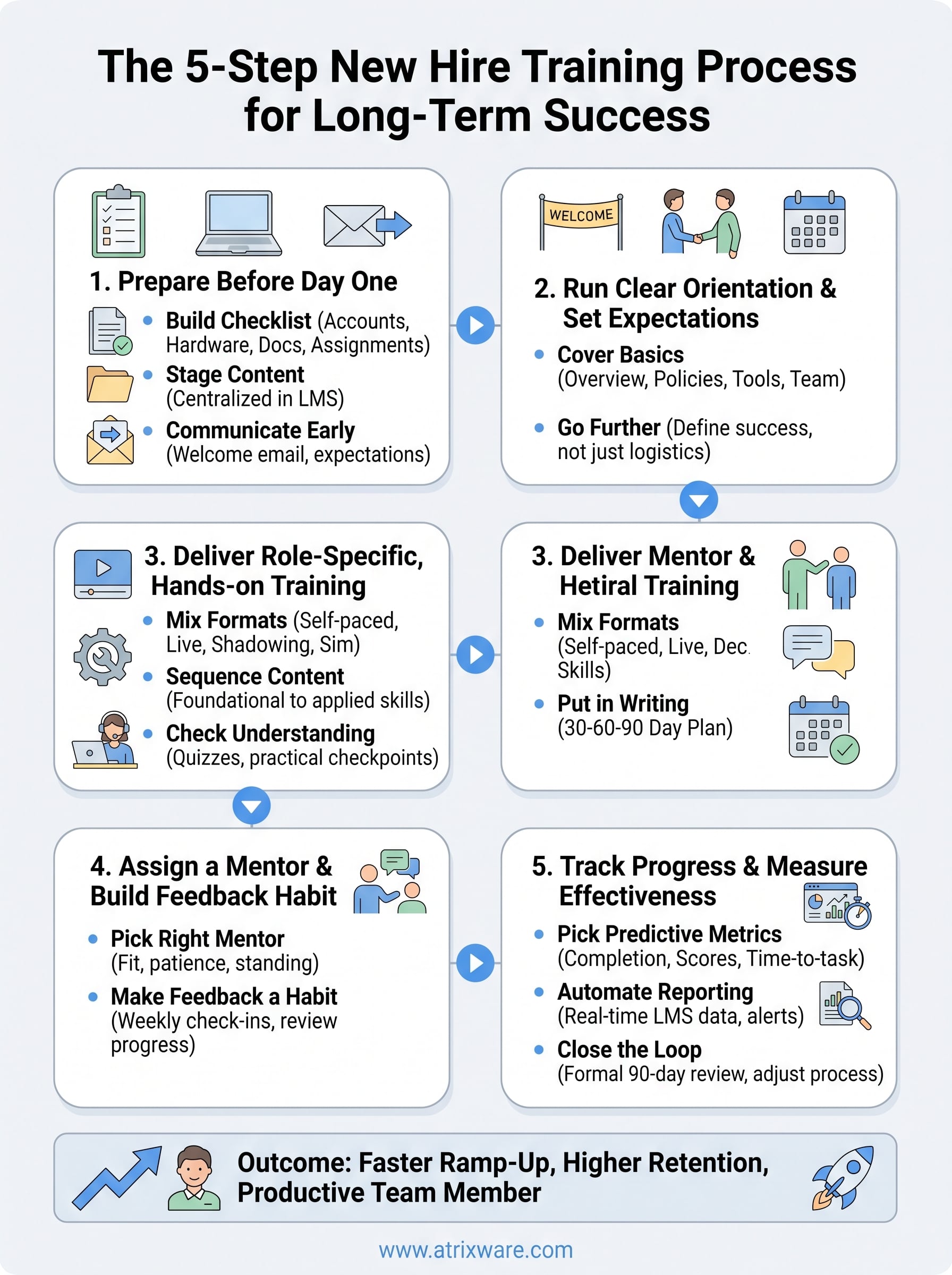
Good onboarding isn’t a single event, it’s five connected steps that build on each other: prep, orientation, hands-on training, mentorship, and measurement. Skip any one of them and the whole new hire training process gets shakier, because each step depends on the groundwork laid before it. Follow all five and you get faster ramp-up, fewer repeated questions, and a new hire who feels equipped instead of thrown in.
Running this manually across spreadsheets and email threads works for one hire. It falls apart at ten. That’s exactly the gap an LMS closes, giving you one place to stage content, track completion, and catch a struggling hire before day 90 instead of after. If you’re ready to see what that looks like for training new hire employees at your own company, try the Axis LMS admin demo and walk through the process yourself.
