Every organization stores training records, compliance certificates, learner progress data, and employee files, and every one of those records comes with a legal shelf life. Mismanage it, and you’re looking at regulatory fines, audit failures, or unnecessary storage costs. That’s exactly why data retention management software has become a priority purchase for compliance officers, IT teams, and HR leaders who need to automate retention policies across their systems.
At Atrixware, we build Axis LMS, a platform that generates and stores substantial volumes of learner data, compliance documentation, and certification records. We understand firsthand how critical it is to have the right tools governing what gets kept, what gets archived, and what gets deleted. Proper data retention management directly supports the compliance frameworks (like GDPR and FDA 21 CFR Part 11) that our customers already rely on within their training and development programs.
To help you find the right fit, we evaluated and compiled this list of the 10 best data retention management software tools for 2026. Each option is assessed on its policy automation capabilities, integration flexibility, compliance coverage, and ease of use, so you can make a decision based on what actually matters for your organization.
1. Exterro Data Retention
Exterro is a legal governance platform that includes a dedicated data retention management module built for organizations that need to enforce retention schedules at scale. It positions itself as a full legal operations suite, which means retention policy enforcement sits inside a broader framework covering e-discovery, privacy, and compliance workflows. That context matters when you’re evaluating whether it fits your organization’s structure.
How it handles retention and defensible disposal
Exterro automates the full retention lifecycle, from policy creation and application through to defensible disposition, which is the documented, legally defensible process of deleting data once its retention period ends. You build retention schedules based on record categories, jurisdictional requirements, or regulatory triggers, and the system applies them automatically across connected data sources. When deletion is due, Exterro generates a disposition certificate you can use as audit evidence.
Defensible disposal is one of the most overlooked requirements in data retention management software, and Exterro treats it as a first-class feature rather than an afterthought.
Best fit teams and industries
Legal, compliance, and IT teams at mid-to-large enterprises are Exterro’s natural home. It performs especially well in regulated industries like financial services, healthcare, pharmaceuticals, and government, where retention schedules are tied to specific regulatory frameworks such as HIPAA, SEC, or FINRA requirements.
Key features to evaluate
Exterro’s standout capabilities include automated litigation hold management that pauses retention clocks during active legal proceedings, a policy library with pre-built regulatory templates, and a searchable data inventory that maps records to their retention rules. You also get audit trails and reporting dashboards that document every retention and disposition decision, which is critical during regulatory reviews or internal audits.
- Automated litigation hold integration
- Pre-built regulatory retention templates
- Disposition certificate generation
- Policy-to-data mapping across connected systems
- Configurable retention triggers by jurisdiction
Integration and deployment notes
Exterro deploys as a cloud-based SaaS platform with options for on-premise or hybrid environments depending on your organization’s data sovereignty requirements. It integrates with major enterprise systems including Microsoft 365, Salesforce, and leading ECM platforms through native connectors and an open API framework.
Pricing and licensing
Exterro does not publish standard pricing publicly. Licensing is contract-based and quoted per organization, typically structured around the number of users, modules selected, and deployment type. Your best path forward is to request a formal demo and scoping call directly through Exterro’s sales team to get an accurate quote.
2. BigID
BigID is a data intelligence platform that approaches retention from a discovery-first angle. Before you can enforce retention rules, you need to know what data you have and where it lives. That’s the core problem BigID solves, making it a strong choice for organizations that need accurate data inventory as the foundation for their retention policy work.
How it handles discovery-led retention and deletion
BigID scans your data environment to classify and catalog sensitive data automatically, then ties those classifications to retention rules and deletion workflows. Rather than applying blanket schedules, it maps retention periods to specific data types and their regulatory context, so the right rules apply to the right records. This discovery-led approach makes BigID one of the more precise data retention management software options available for organizations with complex, distributed data.

If your data is scattered across cloud storage, databases, and SaaS tools, BigID’s discovery layer is what makes retention enforcement actually enforceable.
Best fit teams and industries
Privacy, compliance, and data governance teams at large enterprises benefit most from BigID. The platform fits well in technology, financial services, and healthcare sectors where sensitive data sprawl is a genuine operational challenge.
Key features to evaluate
BigID’s core value comes from connecting data classification directly to retention actions, rather than treating discovery and policy enforcement as separate processes. This tight link gives you visibility and control that tools handling disposition workflows in isolation simply can’t match.
- Automated data discovery and classification across structured and unstructured sources
- Retention policy automation tied to data type and jurisdiction
- Risk-based deletion workflows with audit logging
- Privacy rights fulfillment tied to retention schedules
Integration and deployment notes
BigID connects to cloud platforms, on-premise databases, and SaaS applications through a library of pre-built connectors. It deploys as a cloud-native platform with support for hybrid environments.
Pricing and licensing
BigID uses custom, contract-based pricing scoped to your data environment size and selected modules. You’ll need to contact their sales team directly for an accurate quote.
3. OneTrust Data Discovery
OneTrust is primarily known as a privacy management platform, but its data discovery and retention capabilities make it a serious contender as data retention management software for organizations that want retention enforcement embedded directly inside their existing privacy program. Rather than treating retention as a standalone process, OneTrust connects it to your broader data governance and compliance workflows.
How it operationalizes retention across privacy workflows
OneTrust maps personal data across your systems through automated discovery, then links those data assets to retention schedules tied to your privacy obligations. When a retention period expires, the platform routes disposition decisions through configurable workflows, so the right stakeholders approve deletions before they execute. This keeps retention decisions documented, repeatable, and audit-ready without relying on manual tracking.
OneTrust’s strength is that retention enforcement doesn’t live in isolation. It connects directly to your privacy risk assessments, data processing records, and consent management.
Best fit teams and industries
Privacy officers, legal teams, and compliance managers at organizations already using a consent or privacy operations platform will find OneTrust’s retention features a natural extension. It fits particularly well in retail, technology, and financial services where consumer data volumes are high and privacy regulations like GDPR and CCPA drive retention requirements.
Key features to evaluate
- Automated data discovery linked to retention schedules
- Configurable disposition workflows with approval routing
- Pre-built regulatory templates covering GDPR and CCPA
- Audit trail generation for every retention and deletion decision
Integration and deployment notes
OneTrust deploys as a cloud-based SaaS platform and connects to a wide range of enterprise data sources through native integrations and APIs.
Pricing and licensing
OneTrust uses module-based, contract pricing. Contact their sales team directly for a scoped quote based on your organization’s size and selected features.
4. Microsoft Purview Data Lifecycle Management
Microsoft Purview Data Lifecycle Management is Microsoft’s built-in solution for governing how long data lives inside your Microsoft 365 environment. If your organization already runs on Microsoft 365, this is likely the most practical data retention management software option for your tenant, since it operates directly on your existing data without requiring additional connectors or data movement.
How it applies retention across Microsoft 365 data
Purview lets you create retention policies and retention labels that apply across Exchange, SharePoint, OneDrive, Teams, and Viva Engage. Policies work at the container level, automatically covering content in designated locations, while labels let you apply more granular rules to specific documents or emails. When a retention period ends, Purview can trigger automatic deletion or flag content for manual review, depending on how you configure the disposition workflow.

Purview’s retention labels are particularly useful when different record types within the same SharePoint site need different retention periods applied at the item level.
Best fit teams and industries
Compliance officers and IT administrators at organizations standardized on Microsoft 365 will get the most direct value here. It fits well across regulated industries like financial services, healthcare, and government, where records retention requirements are strict and auditable disposition records are non-negotiable.
Key features to evaluate
- Retention policies applied at location or workload level
- Label-based retention for granular, item-level control
- Disposition review workflows with audit logging
- Adaptive policy scopes that update automatically based on user or site attributes
Integration and deployment notes
Purview is native to Microsoft 365 and requires no separate deployment. It connects seamlessly across all Microsoft 365 workloads through the Microsoft Purview compliance portal.
Pricing and licensing
Microsoft 365 E5 Compliance includes the full Purview Data Lifecycle Management feature set. Certain capabilities are available at lower tiers, but advanced retention and disposition features require an E5 or add-on compliance license.
5. Google Vault
Google Vault is Google’s native archiving and eDiscovery tool built specifically for Google Workspace environments. If your organization runs on Gmail, Drive, Chat, or Meet, Vault gives you direct retention policy control over that content without requiring a third-party connector or data migration.
How it manages retention for Google Workspace content
Vault lets you configure retention rules that apply to specific Google Workspace services, time windows, or organizational units. Rules run automatically, preserving content that meets your criteria even after users delete it from their own accounts. When the retention period ends, Vault purges the data according to your policy, keeping your storage lean and your compliance position defensible.
Google Vault is not a broad data retention management software platform, but for Google Workspace-heavy organizations, it covers your most critical data sources with minimal configuration overhead.
Best fit teams and industries
IT administrators and compliance teams at organizations standardized on Google Workspace will find Vault the most direct fit. It works well in education, professional services, and technology companies where Gmail and Drive hold the majority of the organization’s records.
Key features to evaluate
Vault’s feature set focuses on Google Workspace data governance rather than broad enterprise coverage. The core tools give compliance teams precise control over retention, holds, and exports for the content types that matter most in Google-first environments.
- Retention rules by service, date range, or organizational unit
- Legal hold capabilities that pause deletion during active litigation
- Audit reporting covering all Vault activity
- Export tools for eDiscovery and regulatory requests
Integration and deployment notes
Vault is native to Google Workspace and requires no separate deployment. You access it directly through the Google Workspace Admin console across Gmail, Drive, Chat, Groups, and Meet recordings.
Pricing and licensing
Google Vault is included in Google Workspace Business and Enterprise plans. It is not available on the base Workspace Essentials tier, so confirm your current plan includes Vault access before building retention workflows around it.
6. Iron Mountain Retention Policy Management
Iron Mountain is best known for physical records storage, but its digital governance services include retention policy management capabilities that help organizations design, document, and enforce how long they keep both physical and digital records. That dual-format coverage makes it a distinct option when your organization manages paper-based and electronic records under the same compliance framework.
How it supports policy design and retention governance
Iron Mountain’s approach centers on building structured retention schedules that align with regulatory and business requirements. Their platform and advisory services help you map record categories to specific retention periods, then govern those policies across physical storage locations and digital repositories. This combination of policy framework tools and managed services differentiates Iron Mountain from pure-software vendors focused solely on digital data.

Iron Mountain’s managed services layer is particularly valuable if your internal team lacks the bandwidth to build and maintain a defensible retention schedule from scratch.
Best fit teams and industries
Records managers, compliance officers, and legal teams at organizations managing large volumes of both physical and digital records are Iron Mountain’s strongest fit. It works well in healthcare, financial services, and government sectors where physical document retention remains a regulated requirement alongside digital data.
Key features to evaluate
Iron Mountain’s core tools focus on governance across the full records lifecycle, giving you structure for both policy design and ongoing enforcement. The platform supports teams that need data retention management software capabilities alongside physical records services.
- Retention schedule design and policy documentation
- Physical and digital records lifecycle management
- Disposition tracking with audit-ready reporting
- Regulatory compliance templates for key industries
Integration and deployment notes
Iron Mountain connects with enterprise content management systems and offers API access for integrating its retention capabilities with your existing digital platforms.
Pricing and licensing
Iron Mountain prices its services through custom contracts based on record volume, service scope, and deployment requirements. Contact their sales team directly for a tailored quote.
7. Access Unify Lifecycle
Access Unify Lifecycle is a records management platform built by Access, a company focused on information lifecycle governance. It handles both physical and digital records under a single framework, giving you structured retention schedule management alongside disposition workflows that meet audit requirements.
How it manages records lifecycle and retention schedules
Access Unify Lifecycle lets you build retention schedules based on record categories and regulatory requirements, then apply those schedules automatically as records move through their lifecycle. When a retention period expires, the platform routes disposition decisions through a configurable approval workflow before any deletion executes, which keeps your process documented and defensible. This structured approach makes it a practical choice if you need data retention management software that enforces policy consistently rather than relying on manual reminders.
The disposition approval workflow is a critical safeguard that separates well-governed retention programs from ones that create legal exposure.
Best fit teams and industries
Records managers and compliance teams at organizations managing large volumes of both physical and digital records will find Access Unify Lifecycle a natural fit. It performs well in legal, financial services, and healthcare sectors where retention schedules are complex and audit-readiness is non-negotiable.
Key features to evaluate
- Retention schedule creation and management across physical and digital records
- Configurable disposition workflows with approval routing and audit logging
- Compliance reporting tied to record category and retention status
Integration and deployment notes
Access Unify Lifecycle connects with enterprise content management systems and offers integration options for linking your existing document repositories to its retention engine.
Pricing and licensing
Access uses custom contract pricing based on your record volume and selected modules. Contact their sales team directly for a scoped quote.
8. PrivacyEngine Data Retention
PrivacyEngine is a privacy operations platform designed to help organizations build and manage a structured privacy program from end to end. Its data retention management module sits within that broader privacy framework, making it a practical fit for teams that want retention enforcement to operate as part of their compliance program rather than as a separate process they manage elsewhere.
How it supports retention within a privacy program
PrivacyEngine connects data retention schedules directly to your data processing activities, so the retention rules you define align with the legal basis and purpose for which you collected that data in the first place. You configure retention periods by data category, and the platform tracks each record against those schedules through your privacy workflow. This integrated approach reduces the risk of retention policy gaps between your privacy documentation and your actual deletion practices.
Treating retention as a standalone task disconnected from your data processing records is one of the most common compliance blind spots PrivacyEngine helps you close.
Best fit teams and industries
Privacy officers and compliance managers at small-to-mid-sized organizations building or maturing their privacy programs will find PrivacyEngine a strong fit. It works well in professional services, technology, and healthcare sectors where GDPR alignment is an ongoing operational requirement.
Key features to evaluate
- Retention schedule configuration tied to data processing records
- Deletion tracking with audit logging
- Pre-built GDPR compliance templates to accelerate setup
- Configurable retention workflows aligned to your data inventory
Integration and deployment notes
PrivacyEngine deploys as a cloud-based SaaS platform with integration support for connecting your existing data sources to its retention and privacy workflows.
Pricing and licensing
PrivacyEngine offers tiered subscription pricing based on organization size. Visit their website directly to review current plan options and request a quote.
9. Docsvault Records Retention Module
Docsvault is a document management system built for small and mid-sized organizations that need structured control over their documents without enterprise-level complexity. Its records retention module gives you automated retention scheduling and disposition workflows inside the same platform where your documents already live, which reduces the overhead of managing retention as a separate process.
How it automates retention and disposition in document control
Docsvault lets you set retention policies at the folder, cabinet, or document category level, so rules apply automatically as content enters the system. When a retention period expires, the platform triggers a configurable disposition workflow that routes deletion requests through approval steps before any records are removed. Every action generates an audit log entry, so your compliance team has a clear record of what was retained, reviewed, and deleted.
Having retention rules live inside your document management system rather than a separate tool means your policies actually apply to the records people are working with every day.
Best fit teams and industries
Records managers and compliance administrators at small-to-mid-sized organizations will find Docsvault the most practical fit. It works well in legal, accounting, and healthcare practices where document control and retention compliance are both daily operational priorities.
Key features to evaluate
- Automated retention scheduling at the folder and document category level
- Disposition workflows with approval routing and audit logging
- Version control tied to retention rules
Integration and deployment notes
Docsvault deploys as on-premise or cloud-hosted software, giving you flexibility if your organization has data sovereignty requirements. It connects with email clients and network file shares to pull documents into its retention framework.
Pricing and licensing
Docsvault offers tiered licensing based on user count and deployment type. Visit their website directly to review current pricing tiers and request a quote for your organization size.
10. Archer Data Retention Manager
Archer, part of the RSA Archer GRC suite, provides data retention management software capabilities embedded directly inside a broader governance, risk, and compliance framework. If your organization already runs Archer for risk management, adding retention automation inside the same platform eliminates the need to manage a separate tool.
How it automates retention using GRC reporting and workflows
Archer automates retention by connecting record categories and regulatory requirements to configurable workflows that enforce your policies across connected data sources. You define retention schedules, and Archer routes disposition approvals through the same GRC workflow engine your team already uses for risk and compliance tasks. Every action logs automatically, so your audit trail builds itself as retention decisions execute.
Embedding retention inside a GRC platform means your compliance and risk teams work from a single source of truth rather than reconciling data between disconnected systems.
Best fit teams and industries
Risk, compliance, and IT governance teams at large enterprises running the Archer GRC suite will get the most direct value here. The platform fits well in financial services, energy, and healthcare sectors where regulatory frameworks demand integrated risk and retention oversight.
Key features to evaluate
- Automated retention scheduling tied to GRC risk and compliance workflows
- Disposition approval routing with full audit logging
- Regulatory reporting dashboards covering retention status across record categories
- Policy documentation linked to risk assessments
Integration and deployment notes
Archer deploys as a cloud-based or on-premise platform depending on your organization’s requirements. It connects to enterprise data sources and existing GRC infrastructure through its native integration framework.
Pricing and licensing
Archer uses custom enterprise pricing based on modules selected and deployment scope. Contact the RSA Archer sales team directly to request a quote.
Next steps
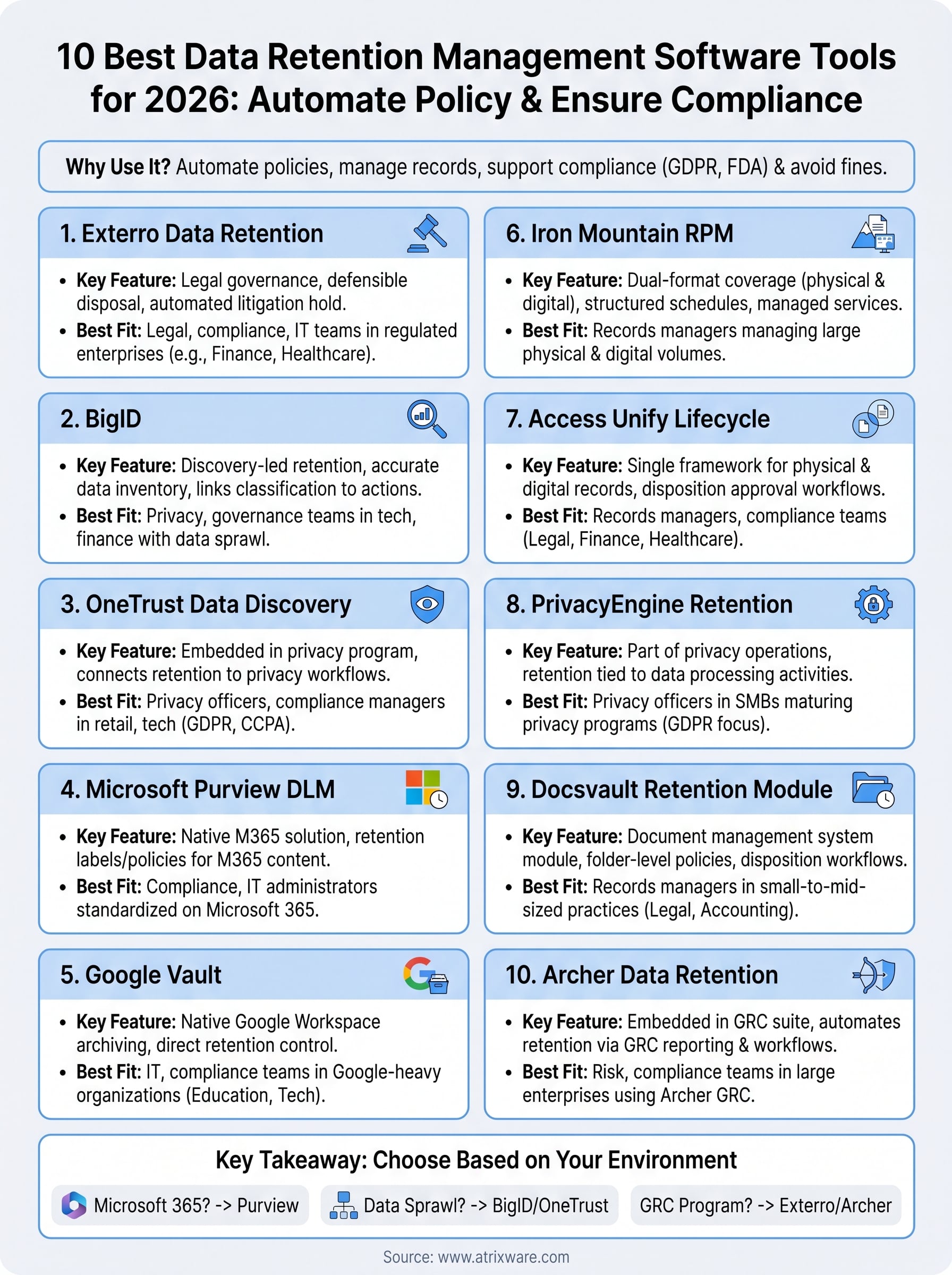
Each of the 10 tools on this list solves a real part of the data retention problem, but the right choice depends on where your data actually lives and what compliance frameworks you’re already working within. If you run Microsoft 365, Purview is the obvious starting point. If your challenge is data sprawl across cloud systems, BigID or OneTrust will give you better ground-level control. And if your retention requirements tie directly into a broader GRC program, Exterro or Archer will fit more naturally into how your team already operates.
Data retention management software works best when it connects to the platforms generating your records in the first place. For organizations managing learner data, compliance certifications, and training records, that means your LMS plays a direct role in your retention posture. If you’re evaluating whether your current training platform supports the compliance requirements your organization carries, take the LMS Readiness Quiz to find out where you stand.
