Every organization that collects names, email addresses, or employee records handles personally identifiable information (PII), whether they realize it or not. PII is any data that can identify a specific individual, and mishandling it can result in regulatory penalties, data breaches, and eroded trust with customers and employees alike.
PII reaches further than most people assume. Social Security numbers and home addresses obviously qualify, but so do IP addresses, login credentials, and training records tied to a specific person. If your organization uses a learning management system like Axis LMS to deliver and track training, you’re already collecting PII, from user profiles and assessment scores to course completion timestamps. Recognizing what qualifies as PII is the foundation of protecting it and staying compliant with regulations like GDPR and other data privacy frameworks.
This article defines what personally identifiable information actually means, walks through concrete examples of direct and indirect identifiers, and explains why accurate data classification matters for your organization’s security posture and compliance obligations.
Why PII matters for security and compliance
Understanding what is personally identifiable information (PII) is not just an academic exercise. The moment your organization collects a name paired with a job title or an email address tied to a training record, you take on legal and ethical responsibilities for how that data is stored, accessed, and eventually deleted. Regulators, auditors, and customers all expect you to know exactly what data you hold and what protections you have in place.
The regulatory landscape and what it demands
Data privacy laws have multiplied over the past decade, and most of them center on PII. GDPR in the European Union requires organizations to document what personal data they collect, justify why they collect it, and honor individuals’ rights to access or delete their own records. In the United States, sector-specific rules like HIPAA for health data and state laws like the California Consumer Privacy Act (CCPA) create overlapping obligations that can apply to your training programs, HR systems, and customer databases simultaneously.
Failing to identify PII accurately is one of the most common reasons organizations fail compliance audits, because you cannot protect data you have not classified.
These regulations share a common thread: ignorance is not a defense. If your learning management system stores employee assessment scores or tracks certification dates tied to individual users, that data falls under applicable privacy rules. You need to know it exists, control who can access it, and be able to produce records of your data handling practices when an auditor asks.
The real cost of a PII breach
A data breach involving PII carries consequences that go well beyond the immediate incident. Regulatory fines under GDPR can reach 4% of global annual turnover or 20 million euros, whichever is higher. CCPA violations can result in civil penalties up to $7,500 per intentional violation. Those numbers add up fast if thousands of training records are exposed.
Beyond fines, the reputational damage often outlasts the financial hit. Employees who learn their personal data was mishandled lose confidence in the organization managing it. Customers who trusted you with their contact details and purchase history become a liability rather than an asset when that trust breaks. Rebuilding credibility after a breach requires sustained effort over months or years, not a single press release.
PII in training and HR workflows specifically
Training platforms and HR systems are particularly dense with PII. A single employee profile in a learning management system might contain a full name, work email, department, manager assignment, training history, quiz scores, and completion certificates, all tied together in one record. That combination creates a detailed picture of an individual that bad actors or unauthorized internal users could misuse.
HR workflows compound this further by adding onboarding documents, performance reviews, and compliance certifications to the same data environment. Knowing which of these data points qualify as PII, and which combinations create additional sensitivity, is the starting point for building access controls, retention policies, and audit trails that hold up under scrutiny.
What counts as PII and what does not
Not every piece of data your organization collects qualifies as PII. The defining question is whether the information can identify a specific individual, either on its own or when combined with other data points you already hold. When you understand where that line sits, you can apply the right controls, retention policies, and access restrictions to the data that actually needs them.
Data that clearly qualifies as PII
Some data points leave no room for debate. A full name paired with a Social Security number, a home address, a date of birth, a driver’s license number, or a passport number each identify a real person on their own. The same applies to biometric data like fingerprints, facial recognition records, and retina scans, which are unique to each individual and increasingly common in access management and time-tracking systems.
If a data point can single out one person from everyone else without requiring any additional information, it is PII.
Medical record numbers and financial account numbers also fall squarely in this category. When your learning management system ties a training completion record to a named employee profile, that full record becomes PII because the combination points directly to one identifiable person.
Data that does not qualify as PII
Aggregate and anonymized data sit outside the scope of what is personally identifiable information (PII). A report showing that 68% of employees in a department completed a compliance course contains no individual identifiers, so it does not qualify. Truly anonymized data that has been stripped of all direct and indirect identifiers also loses its PII status, provided the anonymization is irreversible and cannot be reconstructed.
Job titles, department names, and general geographic regions like a state or country fall outside PII on their own. The caveat is that combining them with other data points can shift that status quickly. A job title alone is not PII, but a job title combined with a hire date and a work location can narrow the field to a single individual in smaller organizations, which pulls it back into PII territory.
Direct and indirect identifiers with examples
When you classify data inside your organization, the distinction between direct identifiers and indirect identifiers shapes how much protection each data point requires. Understanding this split is central to answering what is personally identifiable information (PII) in practical terms, because both categories carry real compliance weight even though they work differently.
Direct identifiers
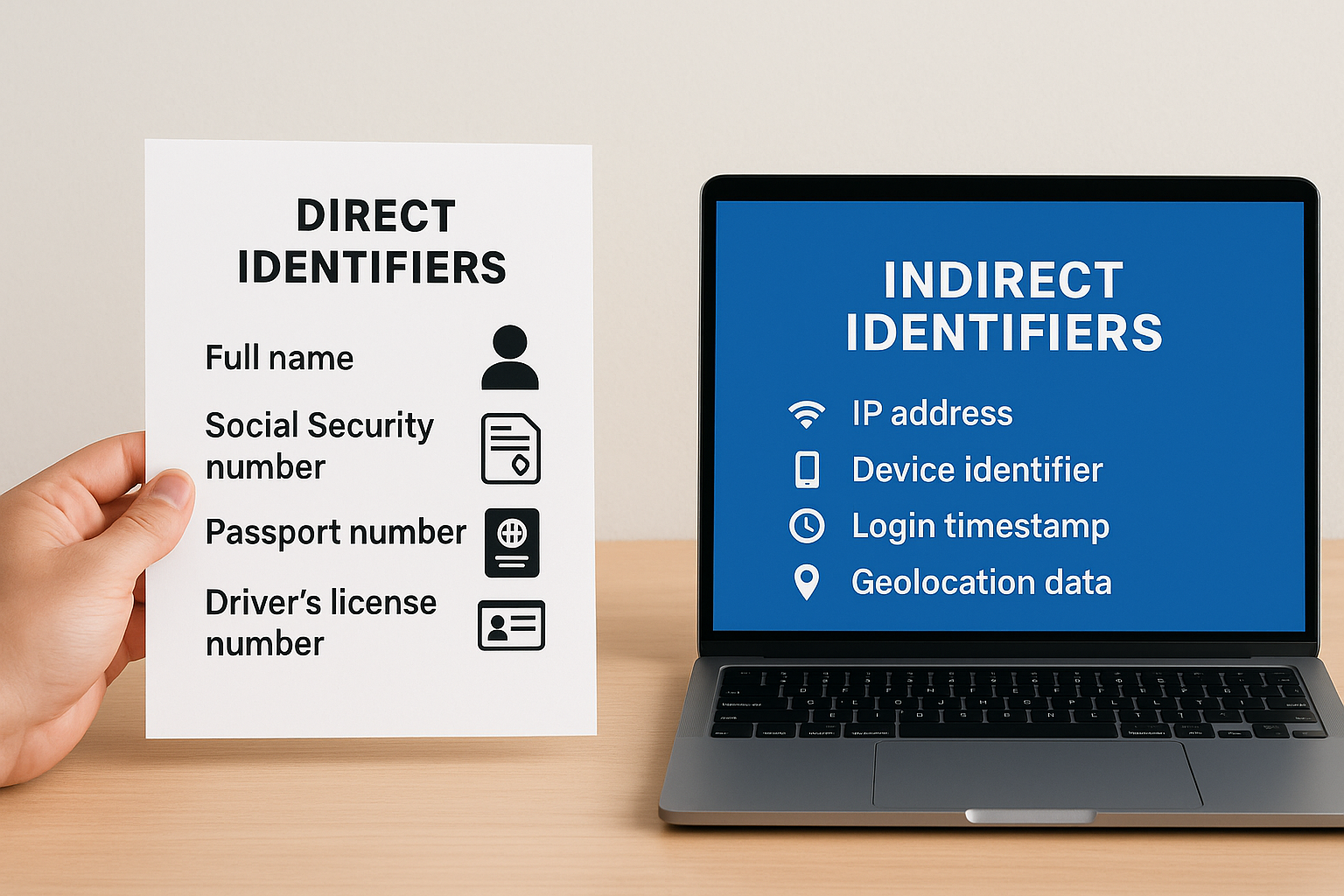
Direct identifiers are data points that single out a specific person without needing any other information to make the connection. A full name, Social Security number, passport number, driver’s license number, or biometric record each stand alone as PII. In a training or HR context, a work email address tied to a named employee also qualifies, since it points to one person by design.
If you can look at a single data field and name the individual it belongs to, you are holding a direct identifier.
The practical implication is clear: direct identifiers require the strictest access controls in your systems. Limit who can view them, encrypt them at rest and in transit, and maintain audit logs that record every access event. These fields should never appear in unsecured exports, open reports, or shared spreadsheets.
Indirect identifiers
Indirect identifiers do not reveal identity on their own, but they create a meaningful identification risk when combined with other data your organization already holds. A zip code alone tells you nothing about a specific person, but a zip code paired with a job title, employer name, and birth year can narrow a record to a single individual, especially in smaller organizations.
Common indirect identifiers include IP addresses, device identifiers, login timestamps, geolocation data, and training completion dates attached to a user account. In a learning management system, a course completion timestamp combined with a department name and course title can effectively identify someone even after you remove their name from a data export. Your data handling practices need to account for these combinations, not just the fields that look obviously sensitive at first glance.
Sensitive vs non-sensitive PII and gray areas
Not all PII carries equal risk. When you evaluate what is personally identifiable information (PII) inside your organization, you need to separate data that creates immediate harm if exposed from data that carries lower risk on its own. That distinction shapes your access controls, encryption requirements, and data retention policies at a practical level, and it prevents you from applying the same heavy-handed controls to every data field you collect.
Sensitive PII
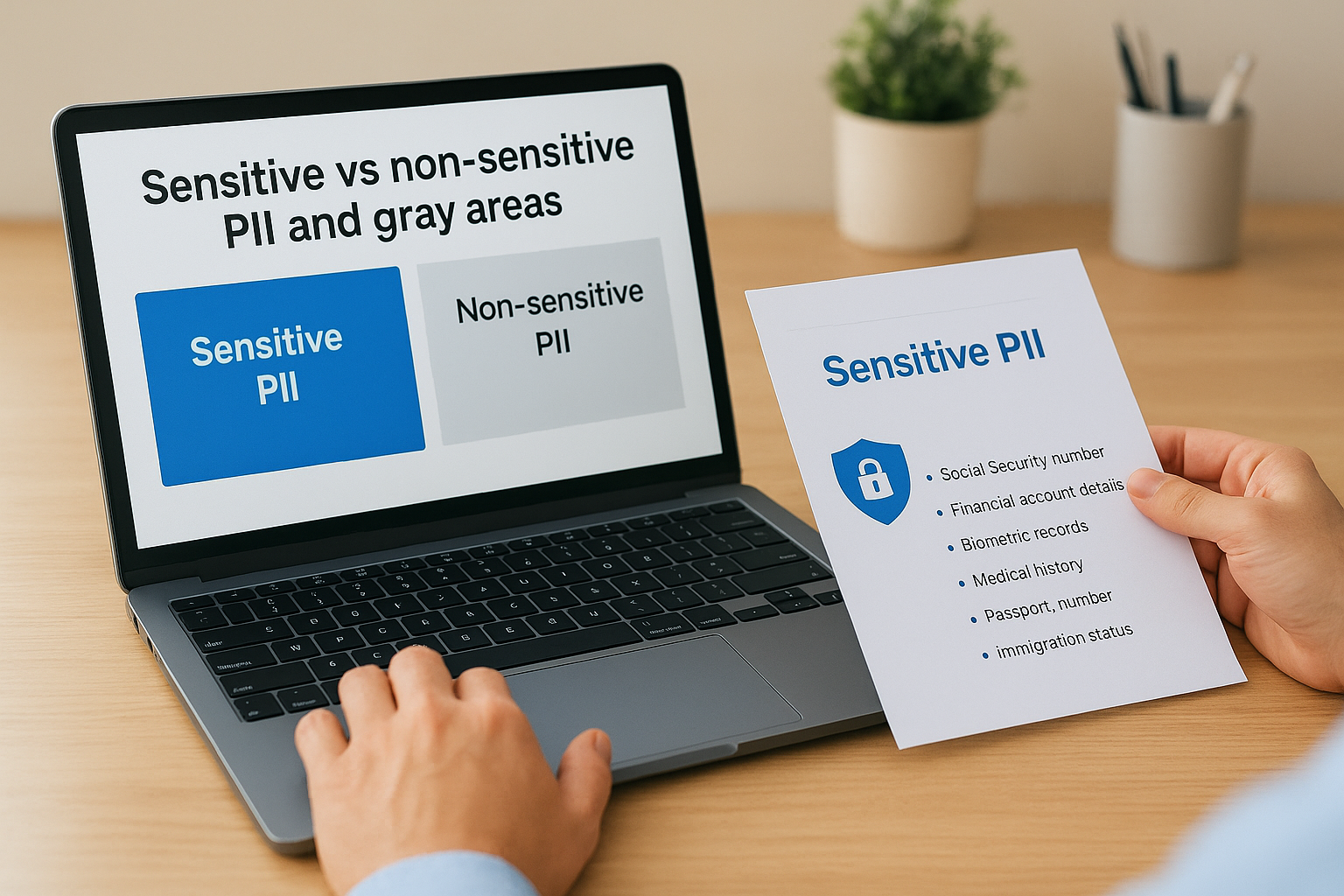
Sensitive PII is data that, if disclosed without authorization, could cause direct and significant harm to the individual it belongs to. Social Security numbers, financial account details, biometric records, medical history, passport numbers, and immigration status all fall into this category. Exposing this kind of data puts people at immediate risk of identity theft, discrimination, or physical harm, which is why regulations like GDPR and HIPAA impose the strictest handling requirements on it.
Sensitive PII requires encryption at rest and in transit, strict access controls, and documented retention and deletion schedules without exception.
Training and HR systems frequently collect sensitive PII without flagging it clearly. Disability accommodations, health-related leave records, and background check results stored alongside standard employee profiles qualify as sensitive PII and need separate handling procedures from routine course completion data.
Non-sensitive PII and the combination problem
Non-sensitive PII includes data that is publicly available or low-risk in isolation, such as names listed in a company directory, work email addresses, or general job titles. Exposure of this data alone rarely causes serious harm. However, non-sensitive PII becomes a problem the moment you combine it with other fields, because those combinations can reconstruct enough detail to enable real harm.
A work email address paired with a course completion record and a department assignment creates a profile that could expose an employee’s skill gaps or performance patterns to unauthorized parties. Gray areas emerge when individually benign data points aggregate into something sensitive. Your data classification process needs to evaluate fields in context rather than in isolation, so you catch these combinations before they create a compliance or security exposure.
How to protect PII in training and HR workflows
Once you understand what is personally identifiable information (PII), the next step is building concrete protections into the systems where that data actually lives. Training platforms and HR tools collect dense clusters of PII by design, so your protection strategy needs to be systematic rather than reactive, covering access controls, data minimization, and regular audits across every workflow that touches employee or learner data.
Limit access based on role
Role-based access controls ensure that only the people who need to see specific PII can actually view it. In a learning management system, your HR managers may need full employee profiles, while a department trainer only needs course completion status without access to personal contact details or sensitive accommodations data. Map out who needs what before you assign permissions, and review those assignments whenever someone changes roles or leaves the organization.
Assign the minimum level of access required for each role, and audit those assignments at least once per quarter to catch permissions that have drifted beyond what the role actually needs.
Your LMS should support configurable permission levels so you can enforce these boundaries without manual workarounds. If your current platform does not offer granular access controls, that gap is a compliance risk worth addressing directly.
Apply data minimization at the collection stage
Your organization should only collect PII that serves a defined, documented purpose. If your training platform does not need an employee’s home address to issue a course certificate, do not collect it. Reducing the volume of PII you hold directly reduces your exposure in the event of a breach, since data you never collected cannot be leaked or misused by unauthorized parties.
Build retention and deletion schedules
Holding PII longer than necessary increases both your compliance risk and your security exposure. Set defined retention periods for training records, assessment data, and HR documents, then enforce automated deletion or anonymization once those periods expire. Keep records of when data was deleted and why, because regulators can ask you to demonstrate that your actual deletion practices match your stated policies.
Pair these procedures with regular staff training on PII handling so everyone who touches training or HR data understands their individual responsibilities. Policies without informed people behind them do not hold under real-world conditions.
Key takeaways and next steps
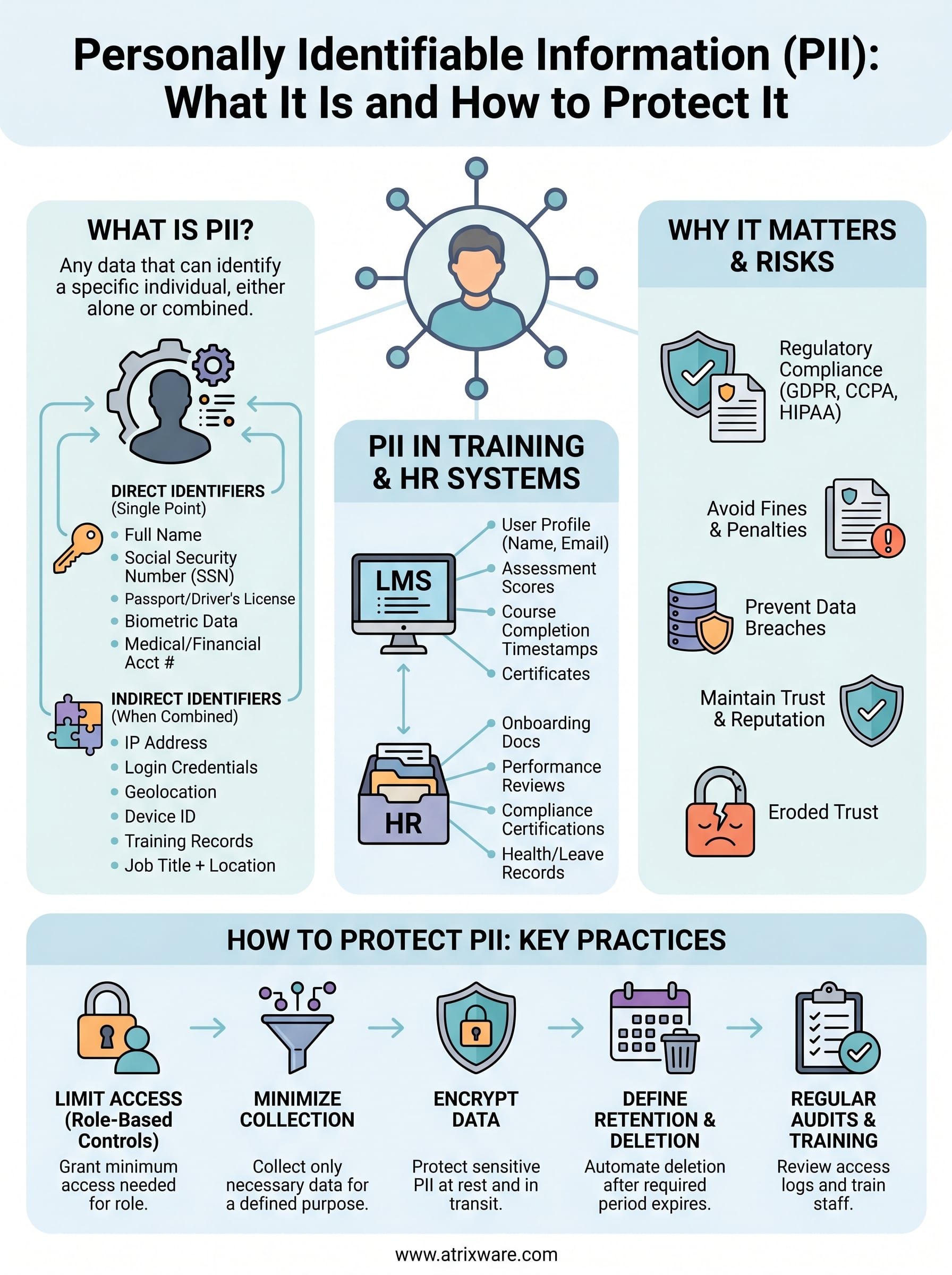
Understanding what is personally identifiable information (PII) starts with recognizing that identity is not just a name or a Social Security number. It extends to indirect identifiers, data combinations, and the training records your LMS generates every day. Every data point you collect that can link back to a specific person carries legal, ethical, and operational responsibilities that your organization needs to address through clear policies, access controls, and retention schedules.
Your next step is to audit the systems where PII currently lives, including your training platform and HR tools, and confirm that your access controls, data minimization practices, and deletion schedules are documented and enforced. If you are evaluating whether your current LMS setup can support those requirements, take the LMS readiness quiz to see where your organization stands and what changes would strengthen your data protection posture.
