Giving every user unrestricted access to your systems is a security incident waiting to happen. Role based access control tools solve this by letting you assign permissions based on job function, so people only access what they actually need. It’s one of the most effective ways to reduce risk without slowing teams down.
At Atrixware, we build Axis LMS, a platform where access control matters every day. Administrators, instructors, and learners all need different levels of permission to do their jobs effectively. From compliance training environments governed by regulations like GDPR and FDA 21 CFR Part 11 to multi-tenant setups serving channel partners and customers, controlling who sees and does what isn’t optional. It’s foundational.
Whether you’re locking down an LMS, protecting sensitive business data, or managing permissions across cloud infrastructure, the right RBAC tool makes the difference between a clean security posture and a mess of over-provisioned accounts. This guide breaks down 10 RBAC tools worth evaluating in 2026, covering their core features, strengths, and the specific use cases where each one fits best.
1. Axis LMS by Atrixware
Axis LMS is a learning management system built for businesses that need to deliver, track, and manage training across multiple user types. When you run training environments that serve employees, customers, and channel partners simultaneously, RBAC isn’t a nice-to-have. It’s the structural foundation that keeps each audience in its own lane.

What it controls with RBAC
Axis LMS uses role-based permissions to control access at every level of the platform. Administrators, instructors, managers, and learners each operate within a defined permission set, so no one can view, edit, or export data outside their scope. You can restrict which courses appear to which users, who can generate reports, and who has visibility into learner progress records.
In compliance-regulated training environments like those governed by GDPR or FDA 21 CFR Part 11, controlling exactly who can access learner data is a legal requirement, not just a preference.
Content visibility rules let you build multi-tenant setups where separate client groups or departments only see what’s relevant to them. This is especially useful if you sell training to external organizations and need clean separation between accounts.
Best for
Axis LMS fits organizations that center their security requirements around training delivery. If your compliance obligations require documented access logs, controlled content distribution, and strict role separation, this platform handles those requirements without custom development. It works well for HR and L&D teams managing role based access control tools alongside broader training workflows.
RBAC and security features to verify
- Granular role permissions across admin, instructor, and learner tiers
- Content and course visibility rules tied to user role or group
- Compliance-ready audit trails for regulated industries
- Configurable security settings and data redundancy
- Re-certification and CEU tracking with access-controlled records
Integrations to connect identity to roles
Axis LMS connects with major HR and CRM systems including ADP, Salesforce, BambooHR, and Zoho to sync user data and automate role assignments. For identity management, it supports SAML SSO providers such as Okta, Azure, and Ping Identity, which means user roles from your identity provider flow directly into the LMS without manual intervention. The REST API and webhook support extend this further for custom integrations.
Pricing
Axis LMS pricing is available directly from Atrixware and scales based on your organization’s size and feature requirements. Contact their team for a quote tailored to your training volume and compliance needs.
2. Okta
Okta is an identity and access management platform that businesses use to control who gets into their applications and what they can do once inside. Rather than managing permissions inside each individual app, Okta centralizes role assignments and access policies across your entire software stack.
What it controls with RBAC
The platform’s RBAC capabilities apply across SaaS applications, internal tools, and APIs. You assign roles to users or groups, and Okta enforces those roles through its integration layer. When someone’s job changes, you update their role in Okta and the change propagates across every connected system automatically.
This centralized approach cuts out the manual work of updating permissions in each individual application when roles shift.
Best for
Okta fits mid-sized to enterprise organizations that need a single control point for managing access across dozens of applications. It works especially well for IT and security teams that want to apply consistent role policies across both cloud and on-premises environments.
RBAC and security features to verify
- Group-based role assignments with policy inheritance
- Adaptive multi-factor authentication tied to role risk levels
- Lifecycle management to automate provisioning and deprovisioning
- Session policies and device trust enforcement
Integrations to connect identity to roles
The integration network spans thousands of applications, including HR systems like Workday and BambooHR, which feed role data directly into access policies. Support for SAML and SCIM protocols makes Okta one of the more versatile role based access control tools for organizations running mixed-vendor environments.
Pricing
Okta offers tiered Workforce Identity plans with costs based on your active user count. Visit Okta’s official site for current pricing that matches your organization’s size and feature requirements.
3. Microsoft Entra ID
Microsoft Entra ID (formerly Azure Active Directory) is Microsoft’s cloud-based identity and access management service. It gives you a centralized place to define who your users are, what roles they hold, and which resources they can reach across your Microsoft environment and beyond.
What it controls with RBAC
Entra ID applies role-based access control across Microsoft 365 apps, Azure resources, and thousands of connected third-party applications. You assign built-in or custom roles to users, groups, or service principals, and those roles determine what each identity can read, modify, or manage. Role assignments work at multiple scopes, from the entire tenant level down to a single resource or resource group.
This scope flexibility means you can give a team member admin rights over one specific app without touching their permissions anywhere else in your environment.
Best for
Entra ID is the natural fit for organizations already running on Microsoft infrastructure, including Microsoft 365 and Azure. IT teams that need to manage identity at scale across both cloud and hybrid on-premises environments get the most out of it as one of their core role based access control tools.
RBAC and security features to verify
- Conditional access policies that enforce role-specific login requirements
- Privileged Identity Management for just-in-time role activation
- Multi-factor authentication tied to user roles and risk signals
- Access reviews to periodically verify role assignments remain appropriate
Integrations to connect identity to roles
Entra ID connects directly with HR systems, SCIM-compliant apps, and SAML-based services. Microsoft’s integration catalog covers thousands of SaaS apps, and the Microsoft Graph API lets you automate role provisioning programmatically.
Pricing
Microsoft Entra ID offers a free tier with core identity features. Premium P1 and P2 plans unlock conditional access, PIM, and advanced reporting. Check Microsoft’s official pricing page for current rates.
4. AWS Identity and Access Management
AWS Identity and Access Management (IAM) is Amazon’s built-in access control service for managing who can interact with AWS resources and what actions they’re allowed to take. If your infrastructure runs on AWS, IAM is where every permission decision starts.
What it controls with RBAC
AWS IAM governs access to the full range of AWS services and resources, from S3 buckets and EC2 instances to Lambda functions and RDS databases. You define roles with specific permission policies attached, then assign those roles to users, groups, or AWS services themselves. This approach enforces the principle of least privilege at a granular level across your entire cloud environment.
Assigning roles to services, not just people, means your applications only carry the permissions they actually need to function.
Best for
AWS IAM fits engineering and DevOps teams building or operating workloads on Amazon Web Services. Organizations that need fine-grained control over cloud infrastructure permissions will find it one of the most precise role based access control tools available for cloud-native environments.
RBAC and security features to verify
The service includes a broad set of controls built directly into the platform. Key features to evaluate include:
- Policy-based permissions with both managed and inline policy options
- Service Control Policies for organization-wide permission guardrails
- Multi-factor authentication enforcement at the role or account level
- IAM Access Analyzer to flag overly permissive policies automatically
Integrations to connect identity to roles
AWS IAM integrates with AWS Organizations for multi-account role management and supports federation through SAML 2.0 and OpenID Connect. These protocols let you connect your existing corporate identity provider directly to AWS role assignments without maintaining a separate user directory inside AWS.
Pricing
AWS IAM is included at no additional cost with your AWS account. You pay only for the underlying AWS resources your roles access. See AWS IAM for full details.
5. Azure Role Based Access Control
Azure RBAC is Microsoft’s resource-level access control system built directly into Azure Resource Manager. Where Microsoft Entra ID handles identity and application access, Azure RBAC focuses specifically on who can manage and interact with Azure resources like virtual machines, storage accounts, and networking components.
What it controls with RBAC
Azure RBAC manages permissions across Azure subscriptions, resource groups, and individual resources. You assign built-in roles like Owner, Contributor, or Reader, or build custom roles that define exactly which operations a user or service principal can perform. Role assignments inherit downward through the resource hierarchy, so a role granted at the subscription level flows to every resource group and resource beneath it.
Setting permissions at the resource group level rather than individual resources saves significant administrative time as your Azure environment scales.
Best for
Azure RBAC fits cloud infrastructure teams running workloads on Azure who need precise, auditable control over resource management permissions. It’s one of the more targeted role based access control tools for teams that want to separate who can deploy resources from who can only monitor them.
RBAC and security features to verify
- Built-in and custom role definitions for granular permission scoping
- Deny assignments to block specific actions regardless of other role grants
- Activity log integration for auditing all role assignment changes
Integrations to connect identity to roles
Azure RBAC connects directly with Microsoft Entra ID for identity resolution and supports managed identities, which lets Azure services authenticate without stored credentials.
Pricing
Azure RBAC is included with your Azure subscription at no additional cost. Review Azure RBAC documentation for full details on role types and assignment limits.
6. Google Cloud Identity and Access Management
Google Cloud IAM is Google’s native access control system for managing permissions across Google Cloud Platform resources. It gives you a single place to define who can take action on which cloud resources, using a unified policy model that applies consistently across every GCP service you run.
What it controls with RBAC
Google Cloud IAM controls access to GCP resources like Compute Engine instances, Cloud Storage buckets, BigQuery datasets, and Pub/Sub topics. You assign predefined or custom roles to members, which include individual accounts, service accounts, and Google Groups. Permissions apply at the organization, folder, project, or individual resource level, giving you precise scope control without over-provisioning access.
Organizing resources into folders and applying role policies at the folder level lets you scale access control across dozens of projects without repeating assignments manually.
Best for
Google Cloud IAM fits engineering teams running workloads on GCP who need granular, auditable control over cloud resource permissions. It works especially well as one of your role based access control tools when you operate multi-project environments under a single organization hierarchy.
RBAC and security features to verify
- Predefined and custom roles with fine-grained permission definitions
- IAM Conditions for attribute-based access restrictions
- Policy Analyzer to audit what access identities actually hold
- Audit logging for all IAM policy changes
Integrations to connect identity to roles
Google Cloud IAM connects with Google Workspace for user identity and supports Workload Identity Federation, which lets external identities from other providers assume GCP roles without service account keys.
Pricing
Google Cloud IAM is included at no additional cost with your GCP account. Review the full details at Google Cloud IAM.
7. Kubernetes RBAC
Kubernetes RBAC is the native access control system built into Kubernetes that governs what users and applications can do within a cluster. Rather than relying on an external tool, you define roles and bind them to subjects directly through Kubernetes API objects, giving your engineering team precise control over cluster operations.

What it controls with RBAC
Kubernetes RBAC controls access to cluster resources like pods, deployments, services, secrets, and namespaces. You create Role or ClusterRole objects that define permitted actions, then bind them to users, groups, or service accounts using RoleBindings or ClusterRoleBindings. Namespace-scoped roles keep team permissions isolated, while cluster-level roles apply across the entire environment.
Scoping roles to specific namespaces prevents one team’s permissions from bleeding into another team’s workloads, which matters significantly in shared clusters.
Best for
Kubernetes RBAC fits DevOps and platform engineering teams running containerized workloads who need fine-grained control over cluster operations. It works well as one of your role based access control tools when you need to separate developer access from operations or restrict CI/CD service accounts to only the actions your pipelines require.
RBAC and security features to verify
- Namespace-scoped and cluster-wide role definitions for layered permission control
- Principle of least privilege enforcement through granular verb and resource targeting
- Audit logging for all API server requests
Integrations to connect identity to roles
Kubernetes RBAC connects with external identity providers through OIDC, letting you map existing corporate identities to cluster roles without managing a separate user list inside Kubernetes.
Pricing
Kubernetes RBAC is included with every Kubernetes installation at no additional cost. Review the official Kubernetes RBAC documentation for full configuration details.
8. Open Policy Agent
Open Policy Agent (OPA) is an open-source policy engine that decouples authorization decisions from your application code. Rather than hardcoding access rules inside each service, you write policies in OPA’s dedicated language, Rego, and enforce them consistently across your entire infrastructure stack.
What it controls with RBAC
OPA applies policy decisions across microservices, APIs, Kubernetes clusters, CI/CD pipelines, and data systems. You define rules that evaluate incoming requests against contextual data, user attributes, and role assignments, then OPA returns an allow or deny decision that your application enforces at runtime.
This separation of policy from code means you can update access rules without redeploying your services.
Best for
OPA fits engineering teams building distributed systems where access control logic would otherwise scatter across multiple services and codebases. It works well as one of your role based access control tools when you need a single, auditable policy layer across heterogeneous infrastructure components.
RBAC and security features to verify
- Rego policy language for expressive, testable role and attribute-based rules
- Policy bundling for centralized distribution and version control
- Decision logging for full auditability of every access decision
Integrations to connect identity to roles
OPA integrates with Kubernetes admission controllers, Envoy proxy, Terraform, and Kafka. Any system capable of making an HTTP call can send authorization queries to OPA, giving your teams a flexible enforcement point regardless of the underlying infrastructure you operate.
Pricing
OPA is free and open-source under the Apache 2.0 license. Commercial management layers exist from third-party vendors, but the core engine carries no licensing cost, making it accessible to teams of any size.
9. Casbin and OpenFGA
Casbin and OpenFGA are open-source authorization libraries that give developers fine-grained control over access decisions directly within their applications. Both tools let you define role-based and relationship-based access models in code, making them useful when you need authorization logic that goes beyond what a general-purpose identity provider handles out of the box.
What it controls with RBAC
Casbin controls access across APIs, microservices, and application-level resources using a flexible policy model that supports RBAC, attribute-based access control, and more. OpenFGA, developed by Auth0 and now maintained under the CNCF, focuses on relationship-based access control where permissions derive from how objects relate to one another, not just from static role assignments.
This relationship-aware model lets you answer questions like "can this user edit this specific document?" based on ownership or team membership, not just a broad role label.
Best for
These tools fit engineering teams building custom authorization into applications where standard identity provider capabilities fall short. They serve as focused role based access control tools for developers who need fine-grained, model-driven authorization at the application layer rather than at the infrastructure level.
RBAC and security features to verify
- Policy enforcement at the application layer with auditable decision logs
- Support for multiple access control models including RBAC and ABAC
- Casbin middleware adapters for popular frameworks like Gin, Echo, and Spring
Integrations to connect identity to roles
Both libraries connect with standard identity providers through JWT claims and token inspection, letting you map existing user attributes and groups into authorization decisions at runtime without rebuilding your identity stack.
Pricing
Casbin and OpenFGA are free and open-source. Your only costs come from the infrastructure you provision to host and operate them.
Next steps
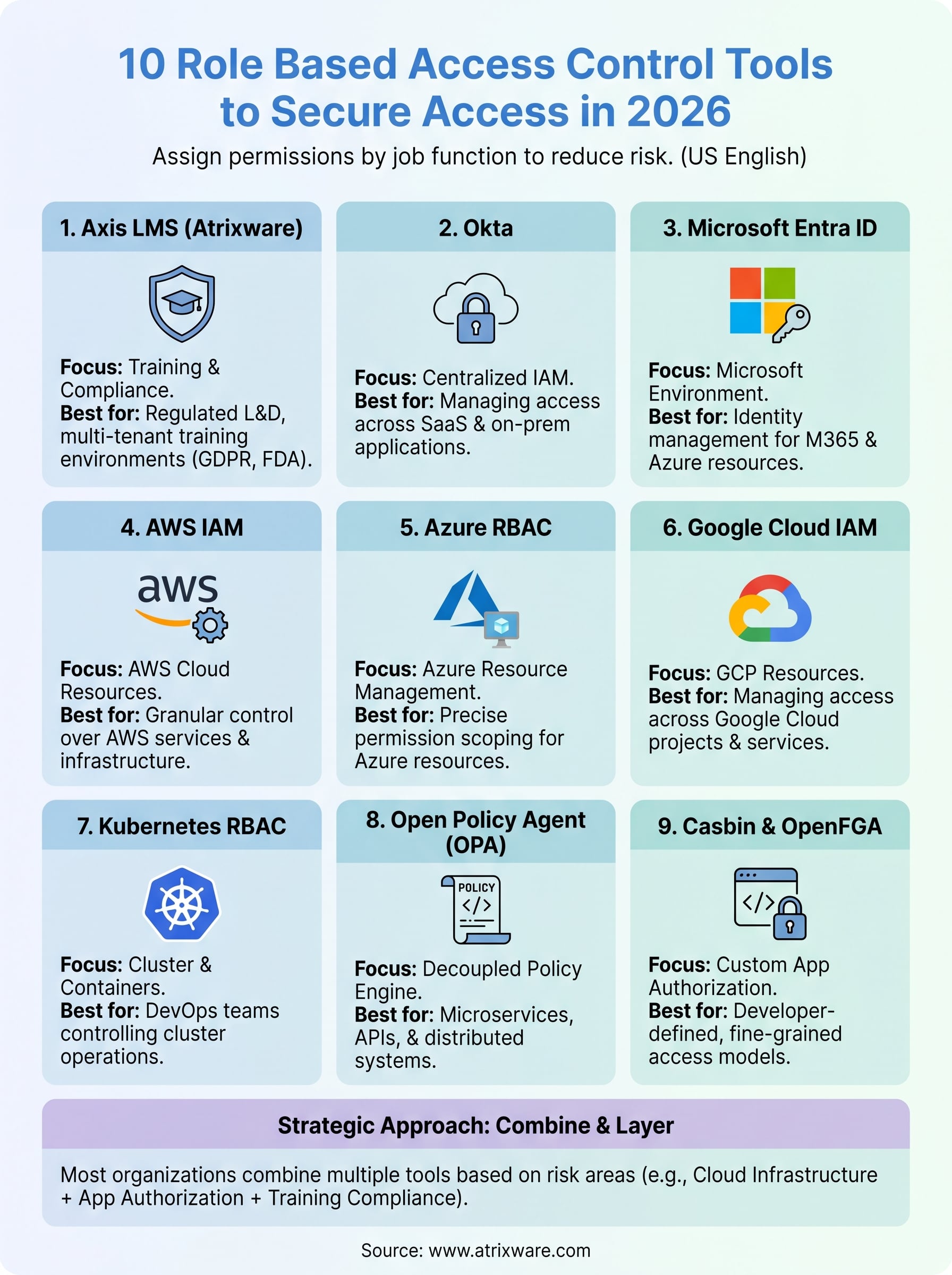
The right RBAC tool depends on where your permissions problem actually lives. Cloud infrastructure teams will lean toward AWS IAM, Azure RBAC, or Google Cloud IAM. Developer teams building custom authorization into applications will find Casbin or OPA more practical. And if your organization runs training programs that require strict access separation, compliance audit trails, and multi-tenant role control, Axis LMS handles those requirements without custom development.
No single tool on this list covers every scenario, which is why most organizations end up combining two or more role based access control tools layered across different parts of their stack. Start with the area where access risk is highest, get that locked down, then expand from there.
If training access control is your priority, take the LMS readiness quiz to see where Axis LMS fits your current setup and what steps make sense next.
