When hundreds or thousands of employees need access to training platforms, compliance records, and sensitive organizational data, managing individual permissions becomes impossible. Enterprise role based access control (RBAC) solves this by assigning permissions to roles, not people, so that access stays organized, predictable, and secure as your organization scales.
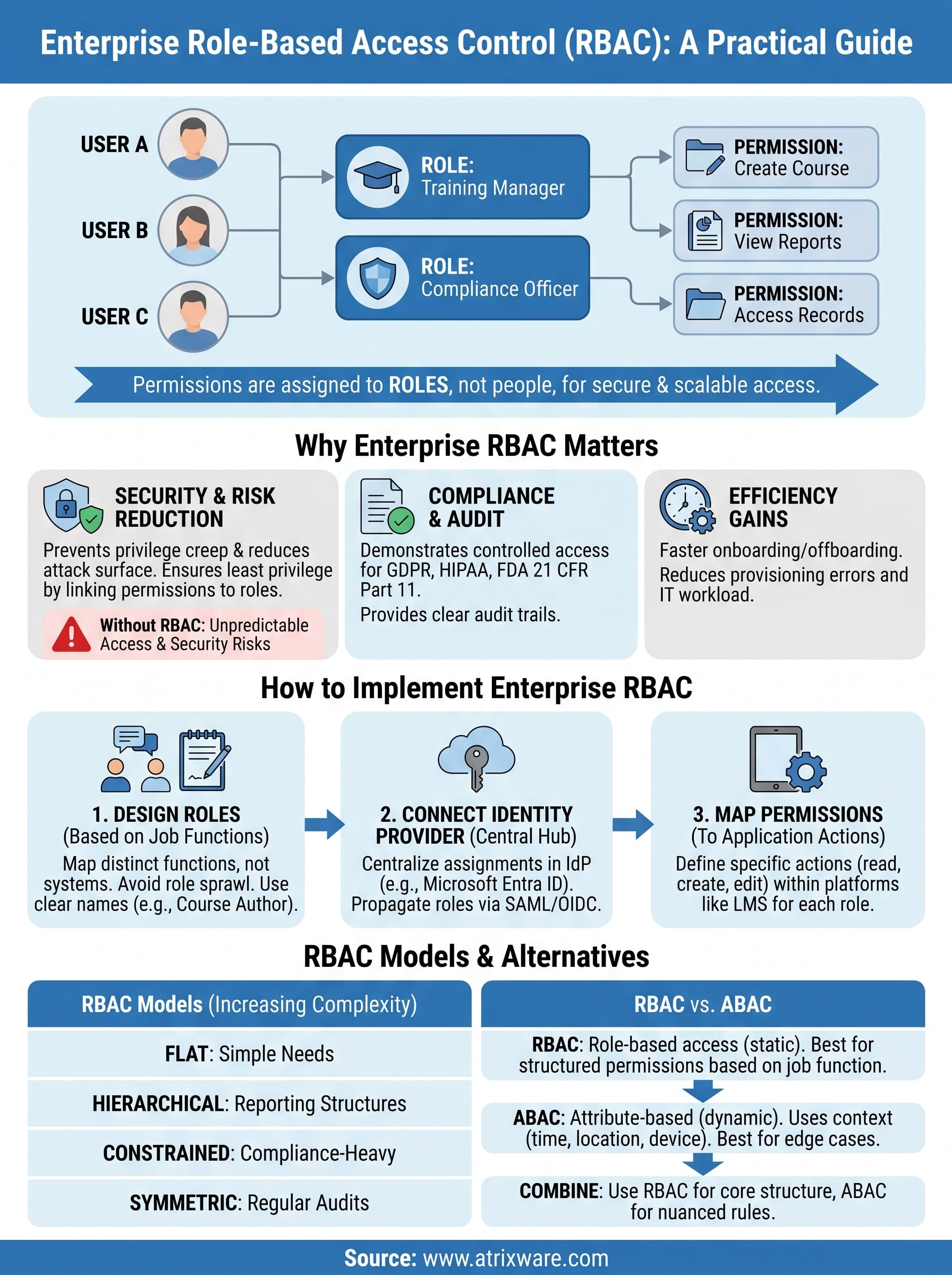
RBAC isn’t a new concept, but its importance grows with every system you add to your tech stack. At its core, the model works by grouping users into roles (like "Training Manager," "Compliance Officer," or "New Hire") and granting each role a specific set of permissions. Users get access based on what their role requires, nothing more, nothing less. This reduces the risk of unauthorized access, simplifies auditing, and makes onboarding and offboarding far less error-prone.
For organizations that rely on platforms like Axis LMS from Atrixware to deliver and manage training, RBAC is especially relevant. Controlling who can create courses, view reports, manage learners, or access compliance data isn’t optional, it’s foundational. A well-implemented RBAC model ensures that your training environment stays both functional and secure across departments, locations, and business units.
This guide breaks down how enterprise RBAC works in practice, walks through its core components and benefits, and shows you how to implement a model that fits your organization’s structure and security requirements.
Why enterprise RBAC matters
As organizations grow, so does the complexity of managing who can access what. A single misconfigured permission can expose sensitive employee records, compliance documentation, or financial data to people who have no business seeing it. Enterprise role based access control gives you a structured way to prevent that by defining access at the role level, not at the individual user level. Instead of chasing down permissions for each new hire or department transfer, you set the rules once and apply them consistently across your entire organization.
Security risks multiply without role controls
Without a role-based structure, access management tends to grow in unpredictable ways. Employees accumulate permissions over time, particularly after internal moves or promotions, and few organizations have a reliable process for removing access that is no longer needed. This pattern is known as privilege creep, and it creates a significant attack surface within your systems. If a compromised account holds excessive permissions, the damage an attacker can do grows proportionally with every extra access right attached to that account.
The more permissions a single account holds beyond its actual job function, the more damaging a breach becomes.
Least privilege, the principle of granting users only the access they need to perform their job, is the foundation of sound security design. RBAC enforces this principle automatically by linking permissions to roles rather than individuals. When someone changes roles within your organization, you update their role assignment and their access adjusts immediately, without manually reviewing a sprawling list of individual permissions across every system they touch.
Compliance and audit requirements demand structure
Regulated industries face additional pressure beyond general security hygiene. Healthcare, finance, and any organization subject to GDPR, HIPAA, or FDA 21 CFR Part 11 must demonstrate that data access is controlled, logged, and appropriate to each user’s function. Auditors want to see a clear link between a user’s job function and the data they can reach, and RBAC makes that connection explicit and verifiable on demand.
When you use a platform like Axis LMS to manage compliance training, RBAC lets you control which managers can view certification records, which instructors can edit course content, and which learners can see only their own progress. That separation means your audit reports reflect intentional access decisions, not accumulated permissions that nobody reviewed since the system launched.
Efficiency gains for HR and IT teams
Every time an employee joins, transfers, or leaves your organization, access needs to change. Without a structured model, your IT or HR team handles each case individually, which slows onboarding, increases provisioning errors, and creates gaps in offboarding that leave former employees with active credentials longer than they should. With RBAC in place, assigning a role is all it takes to grant the right access from day one.
Large organizations routinely manage thousands of users across multiple systems simultaneously. Role templates make that scale manageable by reducing provisioning work to a single assignment rather than a manual checklist. When a new training manager joins your team, you assign them the correct role and they inherit the right permissions across every integrated platform automatically, with no back-and-forth between departments required.
How to design enterprise RBAC roles
Designing roles well is the hardest part of deploying enterprise role based access control effectively. Most organizations make the mistake of building roles around the systems they already have rather than around what people actually need to do. Starting from the wrong foundation means you end up with roles that don’t reflect how work gets done, which leads to permission gaps and workarounds that undermine the model entirely.
Start with job functions, not system access
Your first step is to map out the distinct job functions in your organization before you touch a single permission setting. Interview managers, HR leads, and team members to understand what each role actually requires access to. A training coordinator needs to enroll users and run reports. A compliance officer needs to view certification records across departments. An executive might need read-only dashboards. Listing these functions explicitly gives you a clean foundation for defining roles without over-granting access from the start.
The best RBAC designs reflect how your organization actually operates, not how your software happens to be structured.
Group job functions into named roles that make intuitive sense to both IT and HR staff. Names like "Course Author," "Department Manager," and "Learner" communicate scope clearly and reduce confusion when assigning roles during onboarding or transfers.
Avoid role sprawl from the start
Role sprawl happens when organizations create a new role every time someone has a slightly different access need, and it quickly makes your model unmanageable and difficult to audit. Aim to keep your role library as small as possible while still covering your real access requirements. If two roles differ by only one or two permissions, consider whether a single role with a minor permission adjustment serves both needs.
Review your role list regularly and retire roles that no longer map to active job functions. A clean, well-maintained role library makes audits faster, reduces the risk of orphaned permissions, and keeps your access model aligned with how your organization actually works today.
How to implement RBAC in modern apps
Putting enterprise role based access control into practice requires more than defining roles on paper. You need a technical foundation that connects your identity layer to your applications and enforces access decisions consistently across every system your users touch. Getting the sequence right from the start saves significant rework down the line.
Connect your identity provider first
Your identity provider (IdP) is the central hub where roles get assigned and verified. Platforms like Microsoft Entra ID or similar enterprise IdPs let you define roles at the directory level and propagate them to connected applications through protocols like SAML or OpenID Connect. When a user logs in, the IdP passes their role claims to the application, which then applies the appropriate permissions without any manual intervention from your IT team.

Centralizing role assignments in your identity provider means a single update reaches every connected system simultaneously, which eliminates permission drift across platforms.
Integrate your learning management system, HR platform, and compliance tools with the same IdP so that role changes made in one place apply everywhere. When a training manager moves to a different department, updating their role in the IdP immediately adjusts their access in every connected application, with no manual cleanup required across individual systems.
Map roles to your application permissions
Once your identity layer is in place, the next step is translating your defined roles into concrete permission sets within each application. Work with system administrators to document what each role can read, create, edit, and delete inside the platform. In a training system, a "Course Author" might create and publish content but not view learner records, while a "Department Manager" can run progress reports but cannot modify course content.
Keep your permission mappings in a shared document that your IT and HR teams can both reference. This gives you a single source of truth during audits and makes it straightforward to onboard new applications into your RBAC model without starting the mapping process from scratch each time.
Core rules and common RBAC models
Enterprise role based access control isn’t a single fixed implementation; it exists along a spectrum of models that vary in complexity and capability. Before choosing which model fits your organization, you need to understand the foundational rules that all RBAC systems share and how the four main models differ in the constraints they enforce.
The three rules every RBAC system enforces
The NIST RBAC standard defines three rules that form the basis of any compliant implementation. First, role assignment states that a user can only exercise a permission if they have been assigned at least one role. Second, role authorization requires that a user’s active role must be one they are explicitly authorized to hold, which prevents users from self-activating roles they were never assigned. Third, transaction authorization means a user can only execute a specific action if that action is permitted for their currently active role.
These three rules work together to ensure that no user ever exercises a permission accidentally, and that every access event is traceable back to an intentional role assignment.
The four RBAC models and when to use each
Each model in the NIST framework builds on the previous one, adding layers of structure and control as your organizational complexity grows.

| Model | What it adds | Best suited for |
|---|---|---|
| Flat RBAC | Basic role-permission and user-role assignments | Small teams with simple access needs |
| Hierarchical RBAC | Role inheritance, where senior roles include junior role permissions | Organizations with clear reporting structures |
| Constrained RBAC | Separation of duty, preventing one user from holding conflicting roles | Compliance-heavy environments like finance or healthcare |
| Symmetric RBAC | Bidirectional review of role-permission and permission-role relationships | Large enterprises requiring regular access audits |
Hierarchical RBAC is the most common starting point for mid-size organizations because it reflects natural reporting structures without requiring a separate role definition for every seniority level. Constrained RBAC becomes essential the moment your compliance requirements demand that no single person can both approve and execute a sensitive transaction, such as publishing a compliance training course and certifying its own completion.
RBAC vs ABAC and other access controls
When evaluating enterprise role based access control, most organizations eventually encounter attribute-based access control (ABAC) as an alternative or complement. Understanding where each model excels helps you make a deliberate choice rather than defaulting to whatever your platform supports out of the box.
How ABAC differs from RBAC
RBAC grants access based on a user’s assigned role, while ABAC evaluates a broader set of attributes at the moment of each access request. Those attributes can include the user’s department, location, device type, or time of day, as well as the sensitivity classification of the resource being accessed. This makes ABAC more granular but also significantly more complex to configure and maintain.
ABAC works well when your access decisions depend on context that changes frequently, but that flexibility comes at the cost of much higher administrative overhead compared to RBAC.
A training platform that restricts access to sensitive compliance records based solely on job title is a natural fit for RBAC. If you also need that platform to block access when a user connects from an unmanaged personal device outside your network, you are adding attribute conditions that require ABAC logic or a hybrid approach.
When to combine access control models
Many mature organizations layer RBAC and ABAC together rather than treating them as mutually exclusive options. You can use RBAC as the primary structure to define broad permission boundaries by job function, then apply ABAC policies on top to handle edge cases that require contextual judgment. This keeps your core access model simple and auditable while still covering the nuanced scenarios your security team needs to address.
Other access control models, such as mandatory access control (MAC) and discretionary access control (DAC), appear in highly specialized environments like government systems or legacy platforms. For most corporate training and compliance use cases, RBAC or a targeted combination of RBAC with selective ABAC rules covers the full range of requirements without introducing unnecessary complexity. Choose the simplest model that fully satisfies your security and compliance obligations, and add complexity only when a real gap makes it necessary.
Next steps
Enterprise role based access control gives you a clear, scalable way to manage who accesses what across every system your organization relies on. You now have the building blocks: how to design roles around job functions, how to connect your identity provider, which RBAC model fits your structure, and where ABAC fills the gaps. The next move is applying this to your actual environment, starting with a role audit of your current systems to identify where permissions are inconsistent or over-assigned.
If your organization uses a learning management system to deliver training or manage compliance, your LMS is one of the first places where strong role design pays off immediately. Controlling who creates courses, who views reports, and who certifies completions protects your compliance records and keeps your training environment running cleanly. Take the Axis LMS readiness quiz to find out where your training setup stands today.
