
Every system that manages users, whether it’s an enterprise application, a cloud platform, or a learning management system like Axis LMS, needs a reliable way to control who can do what. That’s where understanding the role based access control definition becomes essential. RBAC is one of the most widely adopted security models in business software, and for good reason: it simplifies permissions by assigning access based on job function rather than configuring it user by user.
If you manage training programs, onboard employees, or oversee compliance workflows, you’ve likely encountered RBAC without even realizing it. It’s the mechanism that ensures a learner sees only their courses while an administrator can build content, pull reports, and manage users. At Atrixware, we built Axis LMS with granular role-based permissions because training environments handle sensitive data, completion records, compliance certifications, personal information, and the wrong person accessing the wrong data is a risk no organization can afford.
This article breaks down what RBAC actually is, walks through its core principles, provides real-world examples, and explains how it compares to other access control models like ABAC and ACL. By the end, you’ll have a solid working knowledge of RBAC and a clear sense of when and why to use it across your organization.
What RBAC is and how it works
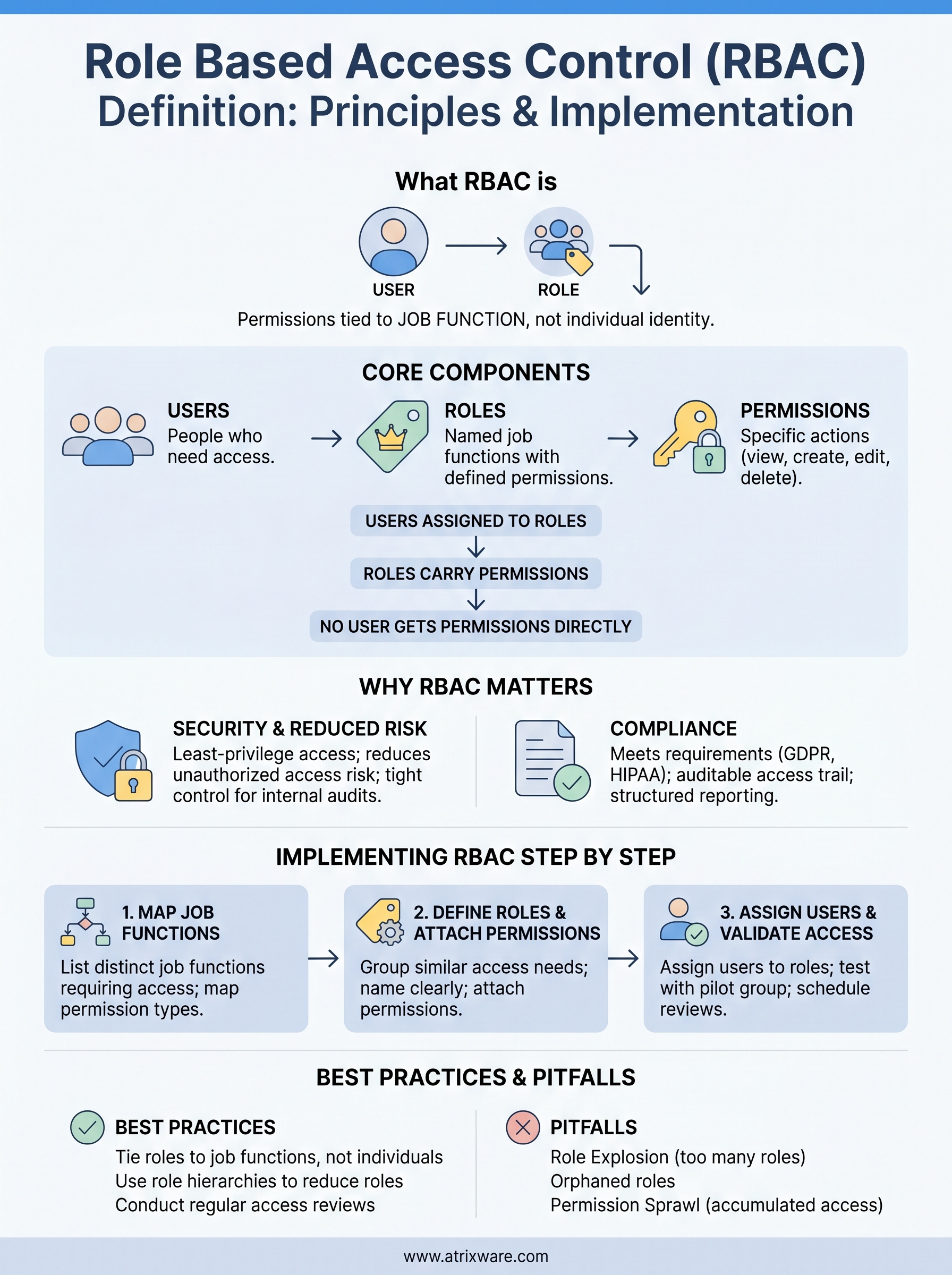
Role-Based Access Control is a security model that ties permissions to job roles rather than individual user accounts. Instead of granting a specific person access to a file or feature, you define a role, such as "Manager," "Auditor," or "Learner," and attach a set of permissions to that role. Any user assigned to the role automatically inherits those permissions. This is the clearest role based access control definition you’ll find: it’s about controlling access through roles, not identities.
The core components of RBAC
Every RBAC system is built from three foundational elements that work together. Understanding each one makes it easier to design a system that actually fits your organization.

| Component | What it means |
|---|---|
| Users | The people who need access to the system |
| Roles | Named job functions with a defined set of permissions |
| Permissions | Specific actions a role can perform, such as view, create, edit, or delete |
The relationship works like this: users get assigned to roles, and roles carry permissions. No user gets permissions directly. This separation is intentional, because it means you can update access rules for an entire group of people by editing one role, rather than combing through hundreds of individual accounts.
Keeping users, roles, and permissions distinct is what gives RBAC its scalability advantage over older access models.
How permissions flow through roles
When a user logs into a system, the application checks which roles that user belongs to, then loads the permissions attached to those roles. The user only sees and interacts with features their role allows. If they try to access something outside their role’s scope, the system blocks the request before it ever reaches the underlying data.
Role inheritance is an extension of this concept. Some RBAC implementations let you create role hierarchies, where a senior role automatically includes all the permissions of the roles beneath it. A Training Administrator in Axis LMS, for example, can do everything a standard Instructor can do, plus additional administrative tasks like generating compliance reports or managing user enrollments. This hierarchy reduces the number of roles you need to maintain while still giving you precise control.
A real-world RBAC example
Consider an organization using a learning management system to deliver compliance training. You might define four roles: Learner, Instructor, Manager, and System Administrator. A Learner can view assigned courses and submit assessments. An Instructor can build courses and view completion data for their assigned groups. A Manager can pull reports across their department. A System Administrator can configure the entire platform, manage integrations, and create new user accounts.
Each person in the organization gets assigned to one or more of these roles on day one. When an employee moves from individual contributor to manager, you change their role assignment, and access updates instantly across the system. No manual permission editing, no risk of leaving old access in place. This clean handoff between roles is exactly why RBAC scales so well in organizations with regular staff changes or complex team structures.
Why RBAC matters for security and compliance
Security breaches rarely start with a sophisticated attack. They often start with excessive access, where someone can reach data or features they never needed in the first place. RBAC directly addresses this problem by making least-privilege access the default, not an afterthought. When you tie permissions to roles instead of individuals, you dramatically shrink the surface area that attackers or careless insiders can exploit.
Reducing the risk of unauthorized access
The role based access control definition itself points to the key security benefit: permissions follow job function, so users never accumulate access beyond what their role requires. In practice, this means a new hire in your sales department can’t accidentally view payroll data, and a departing employee loses all system access the moment you remove their role assignment, without anyone having to track down individual permissions spread across dozens of systems.
The fewer permissions a user holds beyond their core responsibilities, the less damage any single compromised account can cause.
This tight control also makes internal audits far simpler. Instead of reviewing hundreds of individual accounts to understand who can access what, you review a handful of roles. Your security team can spot an over-permissioned role quickly and fix it across every user simultaneously by updating that one role definition.
Meeting compliance requirements
Regulations like GDPR, HIPAA, and FDA 21 CFR Part 11 share a common demand: organizations must demonstrate that sensitive data is accessible only to authorized personnel. RBAC gives you a structured, auditable way to satisfy that demand. You can document exactly which roles exist, what permissions each role carries, and which users belong to each role, producing a clear access trail that auditors can verify.
Compliance training environments have the same need. When you deliver certification programs or mandatory regulatory courses through a platform like Axis LMS, you need to prove that completion records were only modified by authorized administrators, not learners or outside parties. RBAC creates that paper trail automatically, because every permission is attached to a defined role with a documented scope, making compliance reporting straightforward rather than a manual reconstruction project.
How to implement RBAC step by step
Implementing RBAC is less about technology and more about understanding your organization’s structure before you touch any settings. Most failed rollouts happen because teams skip the planning phase and jump straight to creating roles in their software. Taking a structured, sequential approach upfront saves you from building a tangle of overlapping permissions that’s harder to manage than what you started with.
Map your organization’s job functions
Start by listing every distinct job function in your organization that requires system access. Don’t start with existing user accounts or current permission sets, because those often reflect accumulated access rather than what a role actually needs. For each job function, document exactly what that person needs to do in the system. Common permission types to map include:
- View: read-only access to records or reports
- Create: adding new content, users, or records
- Edit: modifying existing data
- Delete: removing records permanently
- Approve: signing off on submissions or completions
This list gives you the raw material for every role you’ll build.
The cleaner your job function map is, the fewer roles you’ll need to maintain over time.
Define roles and attach permissions
Once you have your job function map, group functions with identical or near-identical access needs into a single role. A useful rule: if two people always need the same access, they belong in the same role. Avoid creating roles for individuals, since that defeats the core role based access control definition of tying access to function rather than identity.
Name every role clearly so future administrators understand its scope without guessing. "Compliance Reviewer" communicates far more than "Role_7," and documented role descriptions prevent permission creep from building up over months of ad-hoc changes.
Assign users and validate access
Assign every user to at least one role, then test each role by logging in as a member of that role and attempting to reach features both inside and outside their permitted scope. If someone can access something they shouldn’t, tighten that role’s permissions before you go live.
Run this validation with a small pilot group first so edge cases surface before they affect the entire organization. After launch, schedule quarterly reviews to confirm that role assignments still reflect current job responsibilities.
RBAC role design best practices and pitfalls
Good role design is where the role based access control definition moves from theory to practice. If your roles don’t reflect how your organization actually works, you’ll end up with either too many roles that nobody can maintain or too few that force you to over-permission large groups. The goal is to build roles that stay accurate and useful as your organization grows and changes.
Keep roles tied to job functions, not individuals
The most common mistake in RBAC design is building a role around a specific person rather than a function. When you create access for one employee’s particular needs, that role becomes orphaned or misused the moment that person changes positions or leaves. Every role you define should describe a job function that multiple people could hold, now or in the future. Naming roles by function ("Compliance Reviewer" rather than "Sarah’s Access") keeps your role library clean and auditable over time.
A role that only one person uses is a sign you’ve confused identity-based access with role-based access.
Avoid role explosion
Role explosion happens when teams keep adding new roles for every minor variation in access needs, and it’s one of the fastest ways to undermine your RBAC system. When you have dozens of overlapping roles, auditing who has access to what becomes impractical, and administrators start stacking multiple roles onto single users just to patch access gaps. Before you create a new role, check whether an existing role covers the need with a small permission adjustment.

Role hierarchies are your best tool against explosion. When a senior role inherits the permissions of a base role and adds only what’s necessary at the higher level, you keep your total role count manageable without losing precision.
Conduct regular access reviews
Roles drift over time as employees get promoted, teams restructure, and new system features appear, each of which can make an existing role assignment inaccurate. Schedule a quarterly review to verify that every user’s role still matches their current job function and that no role carries more permissions than its members genuinely need.
During each review, check whether any role holds permissions nobody actively uses, whether any user carries more roles than their job requires, and whether new job functions emerged that no existing role covers. Catching these gaps on a regular cycle prevents your RBAC setup from sliding into permission sprawl that’s just as difficult to manage as the individual-account model it replaced.
RBAC vs ABAC, ACL, and other models
Access control isn’t a one-size-fits-all problem, and understanding the role based access control definition in relation to other models helps you choose the right approach for your environment. The three most common models you’ll encounter are RBAC, ACL (Access Control List), and ABAC (Attribute-Based Access Control). Each answers the same fundamental question, which is who should be allowed to do what, but they answer it in very different ways with very different trade-offs in complexity and scalability.
How RBAC compares to ACL
An Access Control List is one of the oldest permission models still in active use. An ACL attaches permissions directly to a specific resource, like a file, folder, or database table, and lists which users or groups can interact with it. This approach works reasonably well in small, stable environments where the user count stays low and the resource structure rarely changes.
Once your organization grows, ACLs become genuinely difficult to maintain. Updating access for a large team means editing permissions on hundreds of individual objects instead of adjusting a single role definition. RBAC centralizes that work, making it far more practical to manage access at scale without manual errors accumulating across every resource in your system.
When your user count grows past a small team, ACL maintenance becomes a persistent operational burden that RBAC solves at the design level.
How RBAC compares to ABAC
Attribute-Based Access Control takes a more dynamic approach than RBAC. Instead of routing permissions through predefined roles, ABAC evaluates a set of attributes at the exact moment someone requests access: the user’s department, the resource classification, the requested action, and environmental factors like time of day or device type. This gives ABAC fine-grained, context-sensitive control that RBAC cannot match without significant customization.
That flexibility comes with real costs in implementation complexity and ongoing maintenance. ABAC policies are harder to write, harder to audit, and harder for non-technical stakeholders to interpret. RBAC is the stronger default for most organizations because its permission structure is transparent and easy to verify. ABAC makes sense only when your access decisions genuinely depend on real-time conditions and your team has the technical depth to manage complex policy logic without introducing gaps.
Key takeaways
The role based access control definition comes down to one core idea: permissions follow job functions, not individual accounts. RBAC gives you a clean, scalable way to control system access by assigning users to roles that carry predefined permissions. This model reduces unauthorized access risk, simplifies compliance reporting, and cuts the administrative work of managing permissions at scale. When you design roles around actual job functions, avoid role explosion, and run regular access reviews, RBAC stays accurate and manageable as your organization grows and changes.
Compared to ACLs, RBAC scales without burying your team in manual edits. Compared to ABAC, it delivers clear, auditable permission structures without demanding complex policy logic. For most training environments, HR systems, and compliance-driven platforms, RBAC is the right default. If you want to see how role-based permissions work inside a training platform built for business, explore the Axis LMS admin demo and test the controls firsthand.
