Signing documents electronically has moved from convenience to expectation. Whether you’re closing deals, finalizing vendor agreements, or getting new hires to sign off on training policies, the right e-signature tool removes friction from the process. PandaDoc electronic signature is one of the more popular options on the market, offering document creation, tracking, and legally binding signatures in a single platform.
But before you commit to any tool, it helps to understand exactly what you’re getting. How does PandaDoc handle signature legality? What features set it apart? And how does the actual signing process work from both the sender’s and recipient’s side? These are the questions worth answering, especially if your organization relies on tools like Axis LMS from Atrixware to manage training workflows, where signed agreements, compliance acknowledgments, and certification documents are part of daily operations.
This article breaks down PandaDoc’s e-signature capabilities, covers its legal standing, and walks you through the steps to send and sign documents on the platform.
What PandaDoc electronic signature is
A PandaDoc electronic signature is a digital method of signing documents through the PandaDoc platform, which combines document creation, contract management, and e-signature collection in one place. Unlike standalone signature tools that require you to upload a finished file, PandaDoc lets you build the document, add signature fields, and collect signatures without switching between multiple applications. It works through a web browser or mobile device, so both senders and signers can complete the process from virtually anywhere.
At its core, PandaDoc captures intent to sign through a recorded action, such as clicking to apply a signature, drawing it freehand, or uploading an image of a handwritten signature. Each signed document gets tied to a verified audit trail that logs the signer’s email address, IP address, and timestamp. That record is what separates a legally meaningful signature from a simple typed name.
How PandaDoc handles the signing process
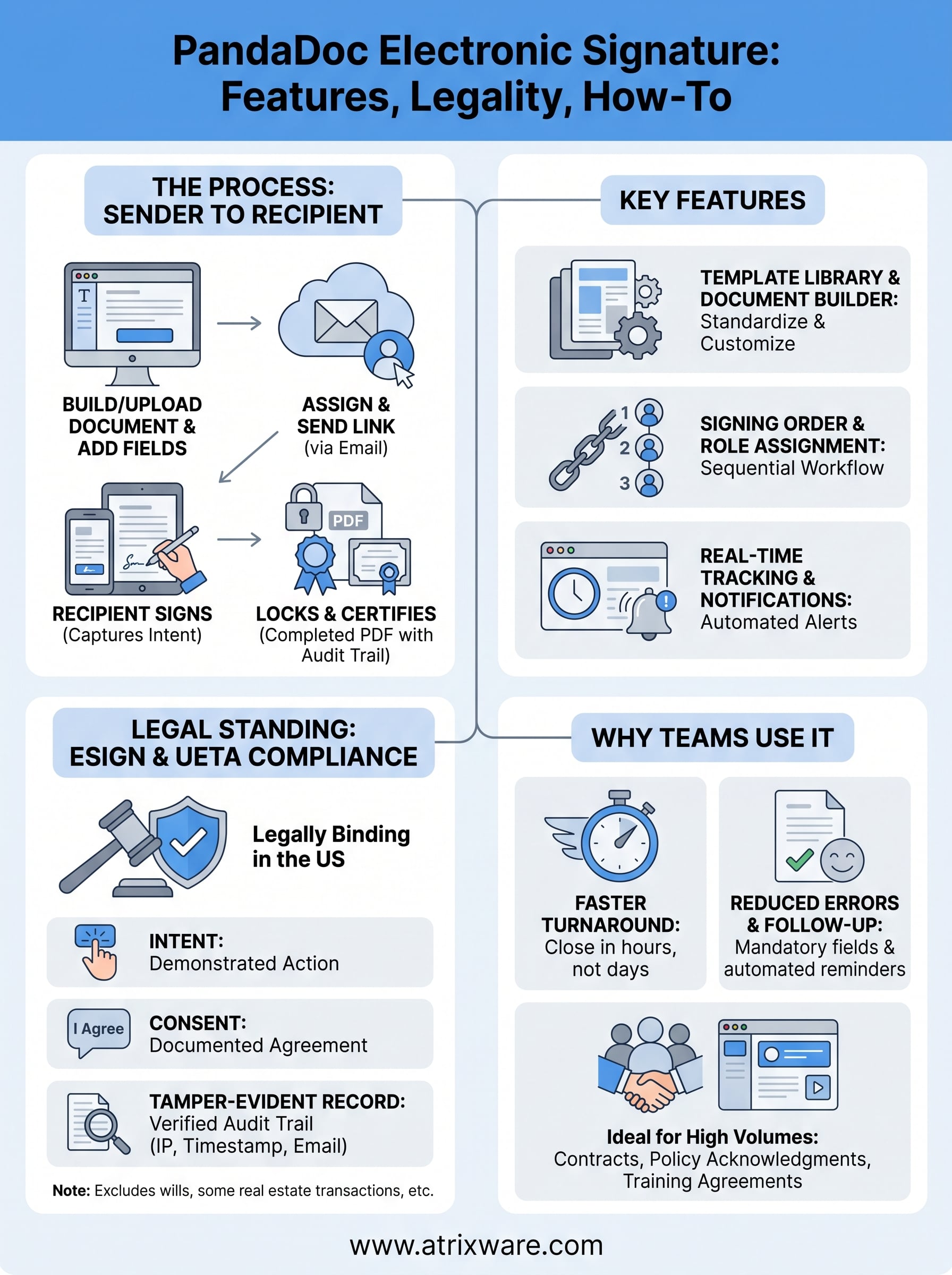
PandaDoc operates on a sender-recipient model. You create or upload a document, assign signature fields to the right people, and send a signing link directly to their email. Recipients do not need a PandaDoc account to sign; they click the link, review the document, and apply their signature where indicated.
The audit trail PandaDoc generates for each signed document is what gives the signature its legal weight, not the signature image itself.
Once all required parties have signed, PandaDoc locks the document and generates a completed PDF with the certificate of completion attached. That certificate includes the full signing history, so you have a clear record of who signed, when they signed, and from which IP address.
What types of signatures PandaDoc supports
PandaDoc gives signers three ways to apply a signature: they can type their name using an automated font style, draw their signature using a mouse or touchscreen, or upload a saved image of their handwritten signature. Each method carries the same legal validity because the enforceability comes from the audit trail and the signer’s demonstrated intent, not the format of the signature itself.

For more complex documents, you can add additional fields beyond the signature block. These include initials, dates, text fields, checkboxes, and dropdown menus, which lets you collect all necessary information in a single signing session rather than chasing signers for follow-up details.
Where PandaDoc fits within a broader workflow
PandaDoc is not just a signature collector; it functions as a document workspace. You can create proposals, contracts, NDAs, and policy acknowledgment forms directly inside the platform using its template library or a drag-and-drop editor. This matters if your organization needs to standardize documents across teams rather than letting each department create its own version of a contract or agreement.
For teams already using tools like CRMs, HR systems, or learning management platforms to track compliance and training completions, PandaDoc can serve as the signature layer that closes the loop on document-based workflows. Rather than printing, scanning, or emailing PDFs back and forth, you send one link and PandaDoc handles the rest from delivery to final storage.
Why teams use PandaDoc eSignatures
Teams choose PandaDoc for a practical reason: it reduces the time between creating a document and getting it signed. Instead of generating a PDF in one tool, formatting it in another, and sending it through a third, you handle the entire document lifecycle in one place. That consolidation saves significant time when your team manages high volumes of contracts, policy acknowledgments, or training agreements on a regular basis.
Faster turnaround on time-sensitive documents
When you need a signed NDA before a meeting or a training acknowledgment before a course starts, waiting days for a response is not realistic. PandaDoc lets you send a signing request in minutes, and recipients can sign on any device without creating an account. The result is that signature collection that used to take days can often close in hours. For compliance-driven organizations, that speed directly affects how quickly you can onboard employees, activate vendor relationships, or satisfy regulatory requirements.
Reducing the time between document creation and signed completion is one of the most direct ways PandaDoc adds value to document-heavy teams.
Reducing errors and follow-up
One of the more overlooked benefits of using a PandaDoc electronic signature workflow is how much it cuts down on incomplete submissions. When you build required fields into the document, signers cannot submit without filling them all in. You no longer receive documents missing a date, initials, or a secondary signature and then have to chase the signer for corrections.
PandaDoc also sends automated reminders to signers who have not completed their portion, so you do not have to manually track who has responded and who has not. That removes a recurring administrative task from your plate and keeps your documents moving through the approval process without bottlenecks.
Key features that matter in real workflows
PandaDoc includes several features that make a genuine difference once you move beyond occasional document signing and start handling regular, high-volume workflows. Knowing which features to use from the start saves setup time and prevents gaps that can slow down your team later.
Template library and document builder
The built-in template library covers common document types like NDAs, sales proposals, service agreements, and onboarding forms. You can customize each template to match your organization’s language and branding, then reuse it across as many deals or hires as you need. That consistency matters when multiple team members create documents independently, because a shared template ensures nothing critical gets left out.
The drag-and-drop editor lets you add signature blocks, text fields, checkboxes, and date fields to any document. You can also lock specific sections so recipients cannot edit protected content, while leaving designated areas open for required input.
Signing order and role assignment
When a document requires multiple signers, PandaDoc lets you define a specific signing order so each person only receives the document after the previous signer completes their portion. This keeps the approval chain intact and prevents a later signer from acting before an earlier one has reviewed it. You can also assign different roles and permissions to each participant, so one person fills in required fields while another only reviews and signs.
Setting a defined signing order is especially useful for compliance documents where an employee must sign before a manager countersigns.
Real-time tracking and notifications
A pandadoc electronic signature workflow gives you full visibility into where each document stands at any moment. PandaDoc shows you when a recipient opened the document and whether they have signed, which removes the guesswork from follow-up entirely.
Automated notifications alert you when a document is signed, declined, or left unopened past a threshold you set. Those alerts keep your team informed without requiring anyone to log in and manually check the status of every pending document in the queue.
Is a PandaDoc eSignature legally binding
PandaDoc eSignatures are legally binding in the United States under two federal laws: the Electronic Signatures in Global and National Commerce Act (ESIGN) and the Uniform Electronic Transactions Act (UETA). Both laws establish that an electronic signature carries the same legal weight as a handwritten signature, provided the signer demonstrates clear intent to sign and the document record is preserved in a way that can be reviewed later. A pandadoc electronic signature meets both of those requirements through its audit trail and documented consent process.
What laws govern electronic signatures in the US
The ESIGN Act, passed in 2000, applies at the federal level and confirms that contracts and records cannot be denied legal effect simply because they appear in electronic form. The UETA covers the same ground at the state level and has been adopted by 49 states. Together, these laws mean that a properly executed eSignature is enforceable in court in the vast majority of circumstances you will encounter in standard business operations.
A signed PandaDoc document backed by a complete audit trail satisfies the legal standards set by both the ESIGN Act and UETA.
What makes the signature enforceable
Three elements make an electronic signature legally enforceable: intent, consent, and a tamper-evident record. PandaDoc addresses all three. Before signing, recipients see a disclosure confirming they agree to use electronic signatures, which establishes consent. Clicking to apply the signature establishes intent. The certificate of completion that PandaDoc generates after signing captures the signer’s email address, IP address, and timestamp, creating a tamper-evident record that holds up if the document is ever challenged.
When eSignatures may not apply
Certain document types fall outside the scope of ESIGN and UETA. These include wills, trusts, and some real estate transactions that require notarization or wet signatures under applicable law. Court orders and specific government forms also sometimes sit in this category. If your organization handles any of these document types regularly, consult legal counsel before replacing a traditional signing process with a digital workflow.
How to sign and send documents in PandaDoc
Getting a pandadoc electronic signature workflow running does not take long. Whether you are sending a document for the first time or signing one as a recipient, the process is straightforward once you know where each step lives inside the platform.
Sending a document for signature
Start by logging into your PandaDoc account and either uploading an existing document or building one from scratch using the editor or template library. Once your document is open, drag the appropriate fields, such as signature blocks, initials fields, date fields, or checkboxes, onto the pages where each recipient needs to act. Assign each field to the correct recipient role so the system knows who is responsible for completing it.
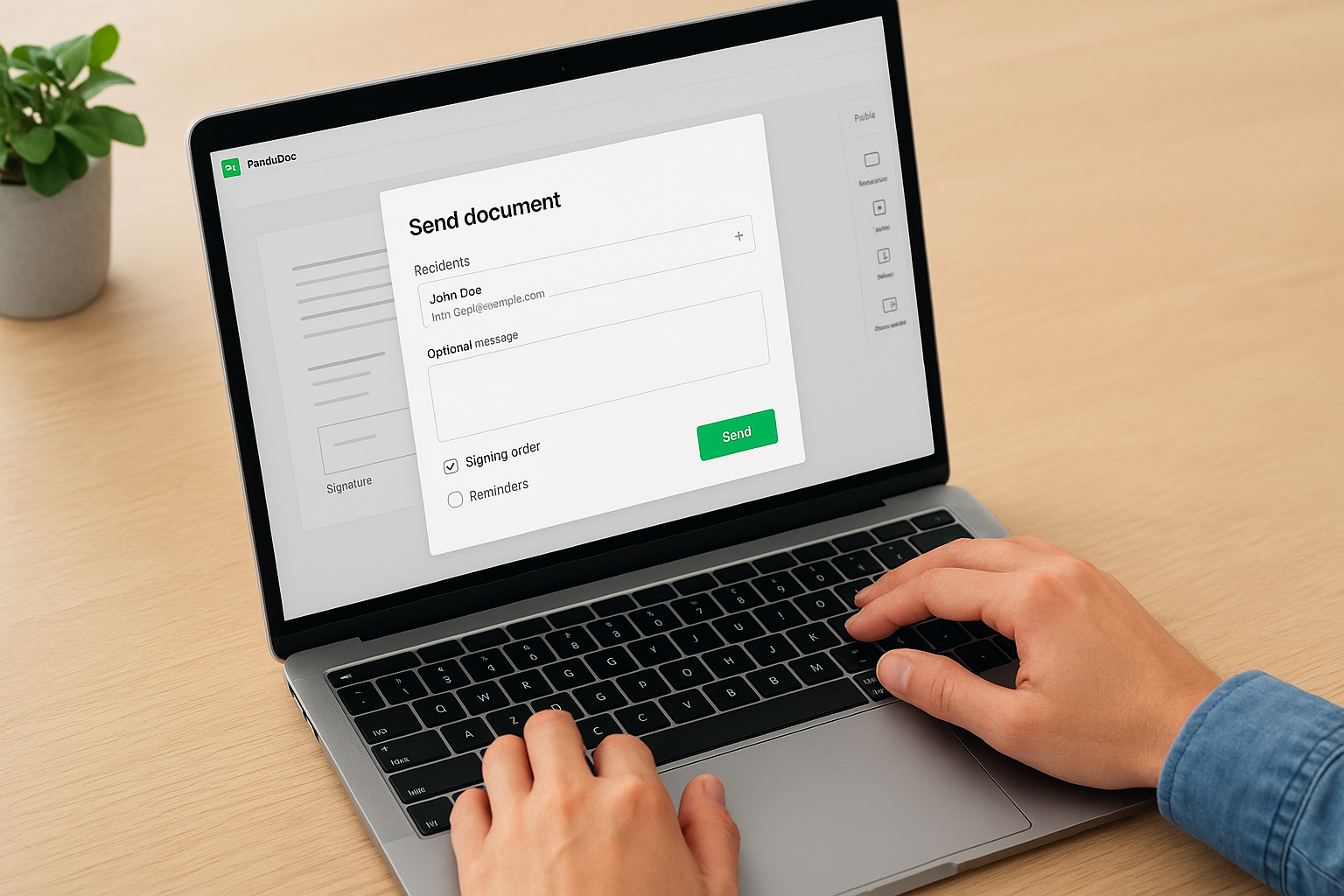
Assigning fields to specific recipients before sending eliminates the confusion that comes when multiple signers receive a document with no clear instructions on where to sign.
After placing your fields, click the Send button and enter each recipient’s name and email address. You can add a custom message to provide context, set a signing order if multiple people need to sign in sequence, and configure automated reminders so the document does not sit unread. PandaDoc sends each recipient a direct signing link by email, and you can monitor the document’s status in real time from your dashboard.
Signing a document as a recipient
When you receive a PandaDoc signing request, you open the email link on any browser or mobile device. No PandaDoc account is required. The platform walks you through the document and highlights every field that requires your input, so you do not miss anything.
You can apply your signature by typing your name, drawing it with a mouse or finger, or uploading a saved image. After filling in all required fields, click the Finish button to submit. PandaDoc notifies the sender immediately and generates a completed PDF with the certificate of completion attached. Both parties receive a copy, giving everyone a documented record of the signed agreement without any additional steps.
Final takeaways
A pandadoc electronic signature gives you a legally compliant, trackable way to collect signatures without the delays that come with paper-based processes. The platform covers the full document lifecycle, from building and sending to tracking and storing, so you do not need multiple tools to close out a signed agreement. Whether you handle sales contracts, vendor agreements, or compliance acknowledgments, the combination of audit trails, automated reminders, and flexible signing options makes PandaDoc a practical fit for most business workflows.
If your organization also manages training documentation or compliance certifications, the right systems working together can eliminate a significant amount of manual overhead. To find out whether your current setup supports that kind of streamlined approach, take the LMS readiness quiz and see where Axis LMS fits into your training workflow.
