Every LMS admin eventually hits the same wall: learner records, quiz attempts, and completion certificates pile up for years, and nobody has a clear rule for when to delete or archive any of it. That’s a compliance gap waiting to bite you during an audit. Solid data retention policy best practices turn that guesswork into a documented, defensible process.
If you’re searching for this topic, you probably need more than theory. You want a practical checklist you can hand to your compliance officer or IT team today, something that addresses regulatory requirements like GDPR and FDA 21 CFR Part 11 alongside real training-data scenarios like CEU tracking and re-certification history. That’s exactly what this guide delivers.
We pulled these nine practices from what actually works inside organizations managing employee, customer, and channel partner training records at scale. You’ll get guidance on setting retention schedules, classifying data by risk, automating deletion workflows, and documenting everything so you can prove compliance rather than just assume it. Whether you’re building a policy from scratch or patching holes in an existing one, these steps give you a compliant framework you can implement this quarter, not someday.
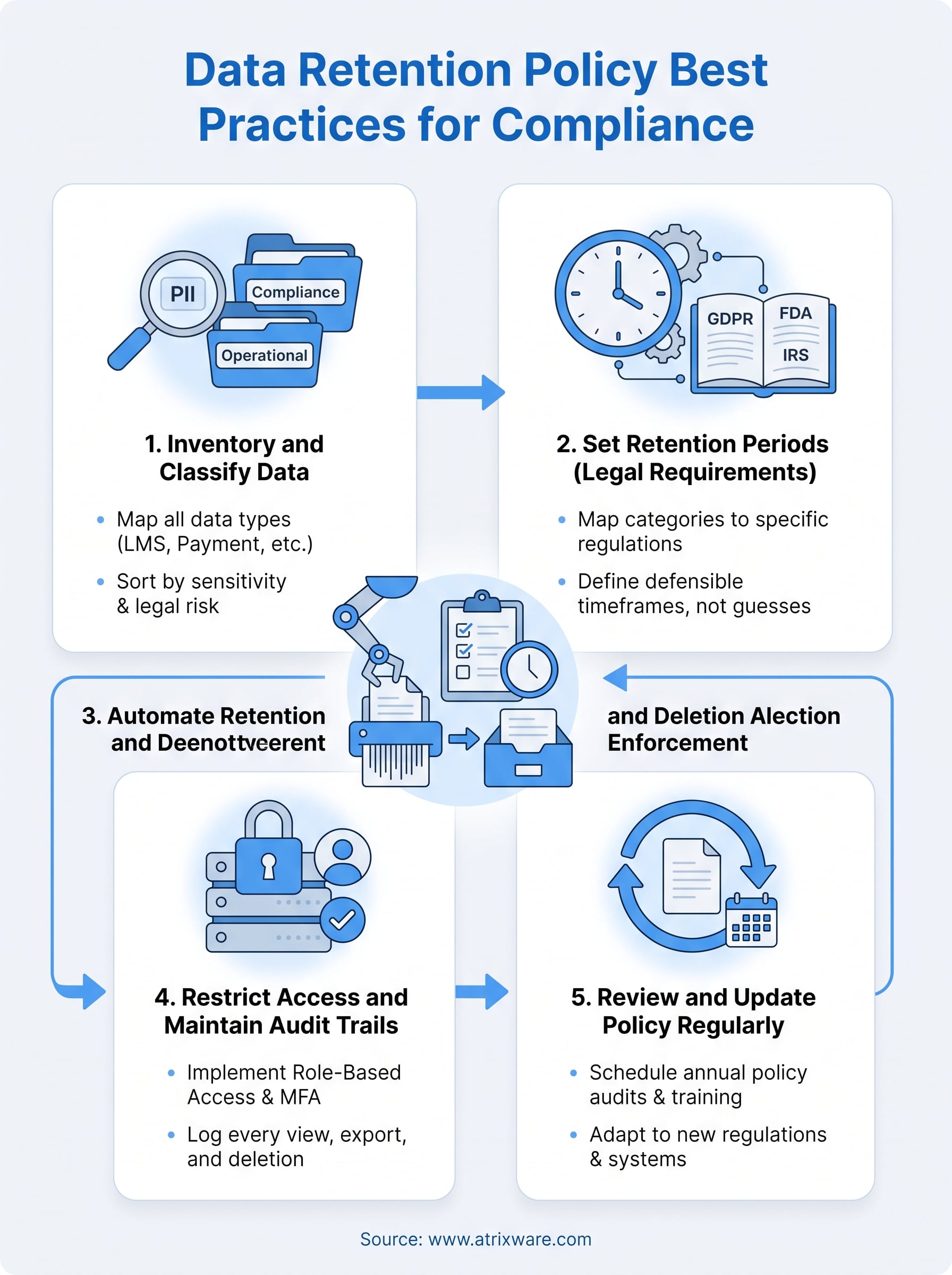
1. Inventory and classify all organizational data
You can’t retain or delete what you can’t find. Before you write a single retention rule, you need a full data inventory that maps every category of information your LMS touches, from learner transcripts to payment records to support tickets. Skipping this step is why so many retention policies fall apart the moment an auditor asks where a specific record lives.

How to implement it
Start by pulling a data map from every system that touches training records, not just your LMS. Then sort each category by sensitivity and legal exposure so your team knows what needs the tightest controls.
- Learner PII: names, emails, SSNs, payment details
- Compliance records: CEU history, certifications, FDA 21 CFR Part 11 audit logs
- Operational data: course content, quiz banks, discussion threads
- Communication logs: automated notifications, support tickets
Tag each category with an owner, a storage location, and a sensitivity level. Axis LMS’s reporting tools make this easier by letting you export learner activity and completion data into a structured format you can feed straight into your inventory.
Why it matters for compliance
Regulators don’t accept "we’re not sure what we have" as an answer. A documented data classification scheme proves you exercised due diligence, and it’s the foundation every other retention rule depends on.
You can’t build a defensible retention schedule on top of an inventory you never finished.
Without this groundwork, GDPR data subject requests and FDA audits turn into scrambles instead of routine tasks.
Common mistakes to avoid
Teams often treat inventory as a one-time project instead of a living document, so new integrations and data sources slip through unclassified. Others classify data too broadly, lumping sensitive certification records in with generic course metadata, which then makes it impossible to apply different retention rules where the law actually requires them.
2. Set retention periods based on legal requirements
Once your data is classified, the real work of data retention policy best practices starts: assigning an actual timeframe to each category based on what regulators require, not what feels convenient. Guessing here is risky, since retention periods vary wildly by industry, data type, and jurisdiction.
How to implement it
Map each data category from your inventory to the specific regulation that governs it, then set the retention clock accordingly.
| Data type | Governing rule | Typical minimum retention |
|---|---|---|
| FDA 21 CFR Part 11 training records | FDA | 5+ years post-employment |
| CEU and certification history | Accrediting bodies | Duration of certification cycle |
| GDPR personal learner data | GDPR | Only as long as necessary for purpose |
| Financial/payment records | IRS, state law | 3-7 years |
Document the source for every timeframe so you can defend it later.
Why it matters for compliance
Regulators expect defensible retention periods tied to specific legal citations, not arbitrary internal preferences.
A retention period without a legal citation behind it is just a guess dressed up as policy.
This documentation becomes your first line of defense during an audit or data subject request.
Common mistakes to avoid
Many teams default to "keep everything forever," which violates GDPR’s data minimization principle. Others apply one blanket retention schedule across all data types, ignoring that FDA records and marketing emails answer to entirely different rules.
3. Automate retention and deletion enforcement
Manual deletion never scales past a handful of learners. Once you have retention periods mapped, the next of the data retention policy best practices that actually protects you is building automated enforcement so records expire on schedule without someone remembering to click delete.
How to implement it
Configure your LMS to flag records automatically once they hit their retention deadline, then route them to either archival storage or permanent deletion based on the category.
- Set expiration rules per data category, not per system
- Trigger email alerts to record owners before automatic deletion runs
- Log every automated deletion event with a timestamp
- Route legally protected records to archive instead of deletion
Axis LMS’s automation and reporting tools let admins schedule these workflows directly against learner data, reducing the manual burden on compliance staff.
Why it matters for compliance
Auditors trust automated deletion workflows far more than manual promises, because automation removes the human error that turns a policy into paperwork nobody follows.
A retention policy that depends on someone remembering to delete a file isn’t a policy, it’s a hope.
Consistent enforcement also protects you when GDPR erasure requests arrive with a deadline attached.
Common mistakes to avoid
Teams frequently automate deletion but forget to build in legal hold exceptions, wiping records mid-litigation. Others test the automation once at launch and never audit it again, letting silent failures pile up unnoticed for months.
4. Restrict access and maintain audit trails
Retention rules mean nothing if anyone with a login can pull, copy, or delete records outside the schedule you built. Access control is what keeps your carefully mapped retention periods from becoming theoretical, and it’s one of the data retention policy best practices auditors check first.
How to implement it
Lock down who can view, export, or delete each data category based on the sensitivity tags from your inventory. Then make sure every touch of that data leaves a trace.
- Grant access by role, not by individual request
- Require MFA for anyone touching compliance or PII records
- Log every view, export, and deletion with a timestamp and user ID
- Review access lists quarterly, not just at onboarding
Axis LMS’s permission settings and reporting suite let admins assign role-based access and pull a full audit trail on demand, so you’re never reconstructing history from memory.
Why it matters for compliance
Regulators want proof that only authorized people touched sensitive records, and an audit trail is that proof.
If you can’t show who accessed a record and when, you can’t prove your retention policy actually worked.
GDPR and FDA audits both hinge on this kind of traceability, not just the existence of a policy document.
Common mistakes to avoid
Many organizations grant broad admin access for convenience and never revoke it after a project ends. Others keep logs but never review them, so unauthorized access goes unnoticed until it’s too late to matter.
5. Review and update your policy regularly
Laws change, business systems change, and the training data you collect today looks nothing like what you tracked five years ago. Treating your policy as a finished document is one of the fastest ways to fall out of compliance, which is why regular policy reviews round out these data retention policy best practices rather than sitting as an afterthought.
How to implement it
Schedule a formal review at least once a year, and add a trigger review whenever a regulation changes or you adopt a new system.
- Calendar an annual policy audit with compliance and IT together
- Re-check retention periods against current GDPR and FDA guidance
- Confirm new integrations were added to your data inventory
- Update the policy document and redistribute it to stakeholders
Axis LMS’s reporting dashboards make this easier, since you can pull a snapshot of stored learner data and compare it against your documented schedule during each review cycle.
Why it matters for compliance
Regulators expect a living retention policy, not a static PDF from three years ago.
A policy that never gets reviewed eventually protects nobody, including you.
Demonstrating regular updates shows auditors you’re actively managing risk, not just filing paperwork once and forgetting it.
Common mistakes to avoid
Organizations often skip reviews after the first year, assuming the original policy still fits. Others update the document but forget to retrain staff on what changed, leaving the old process running in practice.
Building a retention policy that lasts
None of these nine practices work in isolation. Inventory and classification give you the map, legal-based retention periods give you the timeline, and automation, access controls, and regular reviews keep the whole system running without constant babysitting. Skip any one piece and the rest of your policy loses its footing the moment an auditor starts asking questions.
Organizations that treat retention as an ongoing discipline, not a one-time document, are the ones that survive GDPR requests and FDA audits without scrambling. Your training records deserve that same discipline, especially when certifications, CEU history, and compliance logs carry real legal weight.
If you’re still managing learner data across spreadsheets and disconnected systems, that’s the gap to close first. See how Axis LMS handles retention, reporting, and access control together by scheduling an admin demo and walking through it with your own data in mind.
