Give someone too much access in your LMS and you’re one mis-click away from a compliance headache. Give them too little and they can’t do their job. That balancing act is exactly what role based access control best practices exist to solve, and most organizations get it wrong by treating permissions as a one-time setup task instead of an ongoing discipline.
If you’re managing training platforms, HR systems, or any tool that touches employee, customer, or partner data, you need a repeatable framework for deciding who sees what. That means mapping access to actual job functions, not job titles, and building in review cycles so permissions don’t quietly drift out of date as people change roles or leave the company.
This article breaks down nine practices that hold up in real deployments, from designing role hierarchies to auditing access regularly. Whether you’re setting up compliance training tracks, managing channel partner access, or configuring least privilege policies in a system like Axis LMS, these steps will help you build access control that’s secure without slowing your team down.
1. Ground roles in real job functions, not job titles
What it involves
Titles lie. A "Regional Manager" at one branch might approve budgets and edit compliance courses, while another with the exact same title only views reports. Grounding roles in job functions means you build permissions around what someone actually does all day, not what’s printed on their business card. You start by cataloging the tasks people perform in your LMS: uploading courses, grading assessments, pulling completion reports, managing enrollments, editing branding. Then you group those tasks into functional roles like "Course Author," "Compliance Reviewer," or "Enrollment Coordinator" and assign access based on that grouping instead of a department chart.
Why it matters
Organizations that default to title-based access end up with permission creep almost immediately. Someone gets promoted, keeps their old access, picks up new access for the new role, and now holds a stack of permissions nobody remembers granting. This is how a former sales rep still has edit rights on a compliance training module two years after switching teams. Function-based roles close that gap because access is tied to the actual work, so when the work changes, the access request is obvious rather than something that falls through the cracks during a rushed transfer.
Access should follow what someone does, not what their title says they do.
This approach also makes audits far less painful. When a compliance officer asks why a specific user can edit FDA 21 CFR Part 11 training records, you want an answer rooted in their function, not a shrug and a title lookup. Regulatory audits move faster when every permission traces back to a documented task.
How to put it into practice
Start with a functional access audit before you touch a single permission setting. Sit down with team leads, not just HR, and map out what people in each function actually need to do inside the LMS.
- List every distinct task performed in the system, from course creation to report exports.
- Group tasks into functional roles based on actual workflows, not org chart position.
- Assign each functional role the minimum permission set needed to complete its tasks.
- Document the mapping between functions and permissions so it’s auditable later.
- Re-map roles whenever job responsibilities shift, not just when titles change.
In Axis LMS, this looks like creating custom user roles tied to specific permission sets rather than relying on generic admin tiers. If you have channel partners who train their own staff, give them a "Partner Trainer" function with access scoped to their content only, separate from your internal "Corporate Trainer" function. That separation keeps partner-facing training isolated from internal compliance tracks, which matters a lot once you’re managing multiple audiences through one platform.
2. Apply the principle of least privilege
What it involves
Least privilege means every user gets the minimum access required to do their job, nothing extra, nothing "just in case." It’s the opposite of the common habit of granting broad admin rights because it’s faster than figuring out exactly what someone needs. In an LMS context, that might mean a course reviewer can approve content but can’t touch enrollment records, or a department manager can pull reports for their own team but not the entire organization’s completion data.
Why it matters
Broad access is the single biggest reason breaches spread further than they should. If one account gets compromised, the damage is capped by whatever that account can actually reach. A compromised low-privilege account might expose a handful of course records; a compromised admin account can expose everything, including HR-synced personal data pulled in through your integrations. Least privilege also limits accidental damage, since most data mishaps come from authorized users making mistakes inside permissions they never needed in the first place.
Every permission you don’t grant is one less thing you have to explain during an incident review.
How to put it into practice
Don’t guess at minimum access levels; derive them from the functional roles you built in step one. For each role, ask what’s the smallest set of permissions that still lets the person complete their tasks without friction.
- Default new accounts to the lowest applicable role, then escalate only with a documented reason.
- Separate "view" access from "edit" access wherever your platform allows it.
- Set time-bound access for temporary needs, like a project-based reporting request.
- Review any account with organization-wide visibility every quarter, since these are the highest-risk accounts by far.
3. Build a logical role hierarchy
What it involves
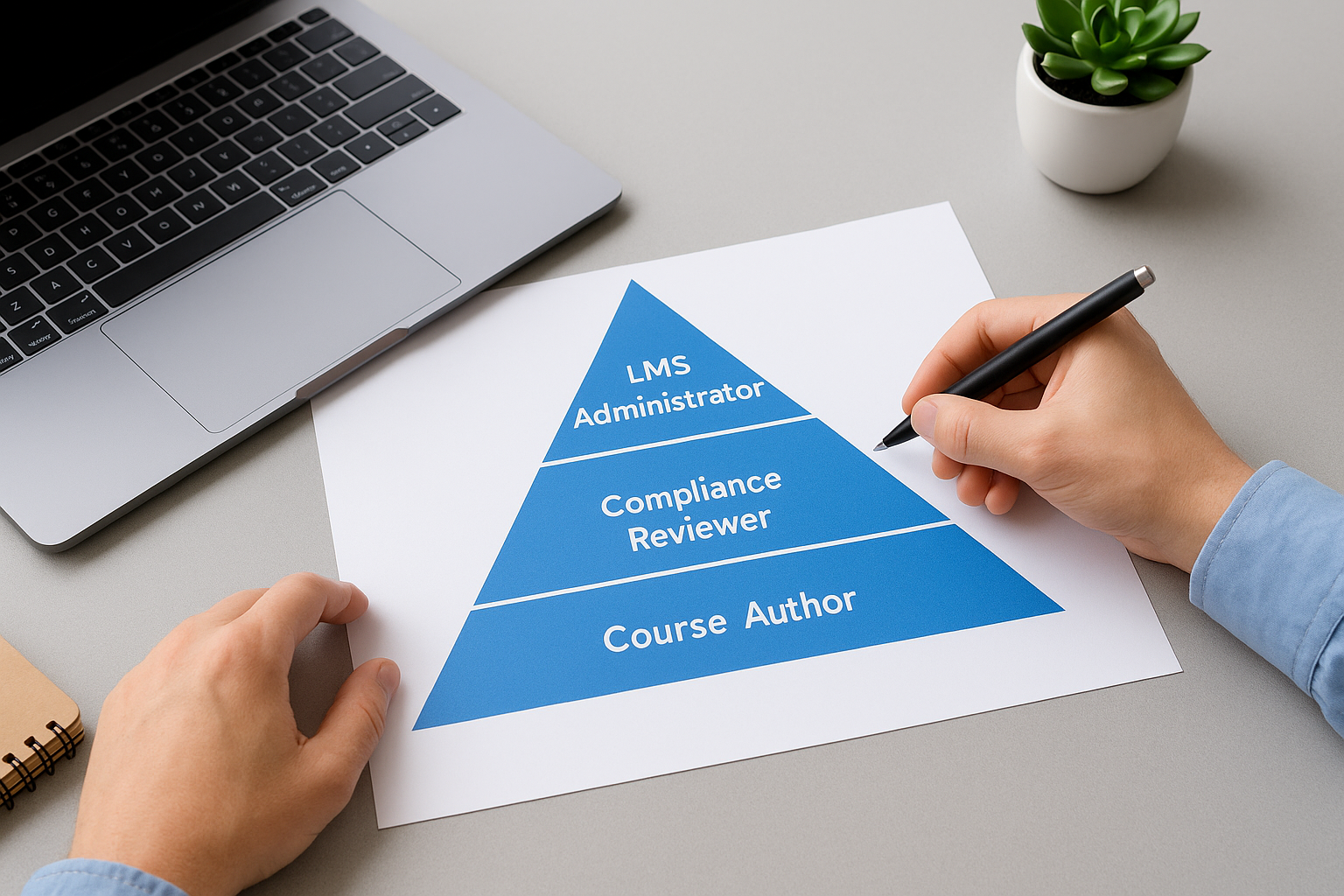
A role hierarchy organizes your roles into tiers so permissions inherit downward instead of being rebuilt from scratch for every position. Think of it like a pyramid: a Course Author sits below a Compliance Reviewer, who sits below an LMS Administrator, and each tier automatically includes the access granted to the tiers beneath it. Rather than assigning forty individual permissions to every new hire, you assign a tier and the system handles the rest. This structure is one of the core role based access control best practices because it turns a sprawling permission list into something you can actually visualize and explain in one diagram.
Why it matters
Flat permission structures collapse under their own weight once you pass a few dozen roles. Admins start copying permission sets from one user to another because it’s faster than building from scratch, and small differences compound into inconsistent access across supposedly identical roles. A hierarchy prevents that drift because every role’s access is defined relative to its position in the tier, not copied by hand.
A clear hierarchy turns permission chaos into something you can diagram on a whiteboard.
Hierarchies also make onboarding faster. New managers inherit everything their team members can do plus their own oversight permissions, so you’re not rebuilding access from zero every time someone moves up.
How to put it into practice
Map your hierarchy before you touch the platform:
- List every functional role from step one.
- Order them by scope of authority, from individual contributor to organization-wide admin.
- Define what each tier inherits from the one below it.
- Cap the number of tiers at four or five; more than that gets unmanageable.
In Axis LMS, build this using nested user groups so branding, course libraries, and reporting scope inherit cleanly across corporate, regional, and partner tiers.
4. Enforce separation of duties for sensitive tasks
What it involves
Separation of duties means no single person can complete a sensitive process from start to finish alone. In an LMS, that usually applies to actions like creating a certification exam and grading it, or building a compliance course and approving it for release. You split these tasks across two roles so one person’s mistake or bad intent can’t slip through unchecked. This is one of those role based access control best practices that sounds bureaucratic until you’ve watched what happens without it.
Why it matters
Unchecked authority creates opportunity for fraud and error, even from well-meaning employees. A single admin who builds and self-approves compliance training can quietly skip required content, and nobody would know until an auditor asks pointed questions. Separation of duties also protects your organization legally, since regulators reviewing FDA 21 CFR Part 11 or GDPR-related training programs often ask specifically whether approval workflows involve more than one person.
If one person can build it, approve it, and grade it, you don’t have a control, you have a liability.
Beyond compliance, this practice catches honest mistakes before they reach learners. A second reviewer often spots a broken quiz question or a mislabeled module that the original creator missed simply because they’d stared at it too long.
How to put it into practice
Identify every workflow in your LMS where one person currently holds end-to-end control, then split it deliberately.
- Require a second approver for any content tied to compliance or certification.
- Separate exam creation from grading wherever the platform allows role-based approval steps.
- Route enrollment changes for sensitive courses through a manager sign-off, not a single admin.
- Log every approval step so the split is visible during audits, not just assumed.
Axis LMS supports this through configurable approval workflows, letting you assign distinct roles for authoring and publishing without slowing down course delivery.
5. Automate role assignment and the user lifecycle
What it involves
Automated provisioning ties role assignment directly to events in your HR or CRM system instead of relying on someone remembering to update the LMS. When a new hire is added in BambooHR or a contract ends in ADP, that change should flow automatically into their LMS role, whether that’s granting access, adjusting it, or revoking it entirely. This covers the full user lifecycle, from day-one onboarding through role changes and, eventually, offboarding.
Why it matters
Manual provisioning is where most access control breaks down in practice. Someone leaves the company on a Friday, the offboarding ticket sits in a queue, and their account still has active access the following Monday. Delayed deprovisioning is one of the most common findings in security audits, and it’s entirely preventable with the right integration in place. Automation also removes the human bottleneck during busy hiring periods, when manual role assignment is most likely to get skipped or rushed.
An account that outlives someone’s employment is a door nobody remembered to lock.
How to put it into practice
Connect your LMS to your existing HR and identity systems rather than managing roles as a separate manual process.
- Sync role assignment with your HR system so job changes trigger automatic permission updates.
- Set offboarding triggers that revoke access the same day employment ends, not the same week.
- Use SSO integrations with providers like Okta or Azure AD to centralize authentication and cut down on orphaned accounts.
- Test the sync regularly, since a broken integration can fail silently for months.
Axis LMS supports this through user data synchronization with systems like Salesforce and BambooHR, plus SAML SSO, so lifecycle events trigger the right access changes without manual intervention.
6. Review and audit roles on a set schedule
What it involves

Scheduled access reviews mean someone actually checks, on a calendar, whether every role and permission still matches reality. This isn’t a one-off cleanup after an incident. It’s a recurring process where a manager or admin looks at each user’s access and confirms it still fits their current function. Quarterly reviews work well for most organizations, though high-risk roles like LMS administrators or compliance approvers deserve a monthly look.
Why it matters
Permissions drift even in well-run organizations. People change teams, projects wrap up, temporary access never gets revoked. Without a set review cadence, you only discover the problem when an auditor flags it or, worse, when someone misuses access they should’ve lost months ago. Scheduled audits catch this drift before it becomes a finding in a compliance report or a factor in a breach.
If nobody’s scheduled to check access, nobody’s actually checking it.
Regular reviews also build institutional memory. When the same manager reviews their team’s access every quarter, they notice patterns, like a role that keeps needing exceptions, which usually means your functional role definitions need adjusting.
How to put it into practice
Treat access reviews like a recurring task with an owner, not a favor someone does when they remember.
- Assign a specific person or team to own the review calendar.
- Pull a current access report before each review, not from memory.
- Flag any account with access beyond what its function requires.
- Document every change made during the review for audit trails.
- Escalate high-privilege accounts to a shorter review cycle than standard users.
Axis LMS’s reporting suite makes this practical by letting you pull on-demand access and role reports instead of manually cross-referencing spreadsheets, which is how most manual reviews quietly stall out.
7. Prioritize logging and continuous monitoring
What it involves
Continuous monitoring means you track access activity as it happens instead of relying on scheduled reviews alone to catch problems. Every login, permission change, course edit, and report export should generate a log entry tied to a specific user and timestamp. This isn’t the same thing as the quarterly audits from step six. Monitoring is the real-time layer that catches unusual behavior between those checkpoints, like a dormant account suddenly pulling bulk learner data at 2 a.m.
Why it matters
Scheduled reviews catch what’s wrong on a fixed date. Continuous monitoring catches what’s wrong the moment it happens, which is the difference between stopping a breach and explaining one after the fact. A compromised account behaves differently than the real user, logging in from a new location, requesting access outside its normal scope, exporting far more data than usual. Without logging, none of that stands out until someone goes looking, usually after damage is already done.
You can’t investigate what you never logged in the first place.
Monitoring also strengthens your compliance position. Regulators reviewing GDPR or FDA 21 CFR Part 11 programs often ask for activity logs directly, not just a snapshot of current permissions.
How to put it into practice
Build logging into your access control setup from day one rather than bolting it on after an incident.
- Enable activity logs for every role change, login, and content edit inside your LMS.
- Set alerts for high-risk events, like admin-level permission grants or bulk data exports.
- Retain logs long enough to support both audits and incident investigations, typically twelve months minimum.
- Assign someone to actually review flagged alerts, not just collect them.
Axis LMS’s reporting tools give you visibility into user activity and access changes on demand, so monitoring doesn’t depend on someone remembering to check a separate system.
8. Prepare an incident response plan for access issues
What it involves
An incident response plan for access issues spells out exactly what happens the moment someone notices a permission problem, whether that’s a compromised account, an accidental over-grant, or a former employee still logged into your LMS. It names who gets notified, who has authority to revoke access immediately, and what steps happen in what order. This isn’t the same document as your general security policy. It’s a specific, access-focused playbook that assumes something has already gone wrong and tells your team exactly how to contain it.
Why it matters
Without a plan, the minutes right after discovering an access problem get wasted figuring out who’s allowed to act. Someone notices a suspicious login, but they’re not sure if they can pull the account themselves or if they need to escalate first, so they wait. That hesitation is exactly when damage compounds, especially if the account touches HR-synced data or compliance training records.
The cost of an access incident is measured in the minutes before someone acts, not after.
A documented plan also protects you during regulatory review. Auditors examining GDPR or FDA 21 CFR Part 11 compliance often ask directly whether you have a formal response process for access violations, not just whether you caught the last one.
How to put it into practice
Write the plan before you need it, then test it like you’d test a fire drill.
- Name specific people with authority to revoke access immediately, no approval chain required.
- Define trigger conditions, like unusual login locations or bulk data exports, that require automatic escalation.
- Document containment steps: suspend the account, review recent activity, notify affected stakeholders.
- Run a tabletop exercise twice a year so the plan isn’t untested when it’s actually needed.
Axis LMS’s activity logs and reporting give your response team the evidence trail they need to act fast once a plan is triggered.
9. Extend RBAC governance to AI agents and bots
What it involves

AI agent governance means treating chatbots, automation scripts, and AI-powered integrations as accounts that need their own roles, not invisible processes running behind the scenes. If you’ve connected an AI assistant to pull learner data for a chatbot, or set up automation that syncs completion records to Salesforce, that connection has access just like a human user does. Most organizations skip this step entirely, letting service accounts and API keys carry broad, unreviewed permissions because nobody thought of them as a role based access control best practices problem in the first place.
Why it matters
Bots don’t slow down the way humans do when access is too broad. A misconfigured integration can pull thousands of learner records in seconds, and an AI agent with standing access to your LMS API can be manipulated through prompt injection or a compromised credential in ways a human account rarely faces. These accounts also tend to outlive their purpose. A service account built for a one-time data migration often keeps running long after the project ends, quietly holding access nobody remembers granting.
An AI agent with unchecked access is a permission problem that never sleeps.
How to put it into practice
Treat every bot, integration, and AI agent as a first-class identity in your access model, not an exception to it.
- Assign each integration its own scoped role, never a shared admin credential.
- Rotate API keys and tokens on a fixed schedule, not indefinitely.
- Log every API call the same way you log human activity.
- Set expiration dates on service accounts tied to temporary projects.
Axis LMS’s REST API and webhook framework let you scope integration permissions precisely, so an AI-driven tool built for reporting can’t also touch enrollment or compliance records it was never meant to reach.
Making RBAC a lasting habit, not a one-time project
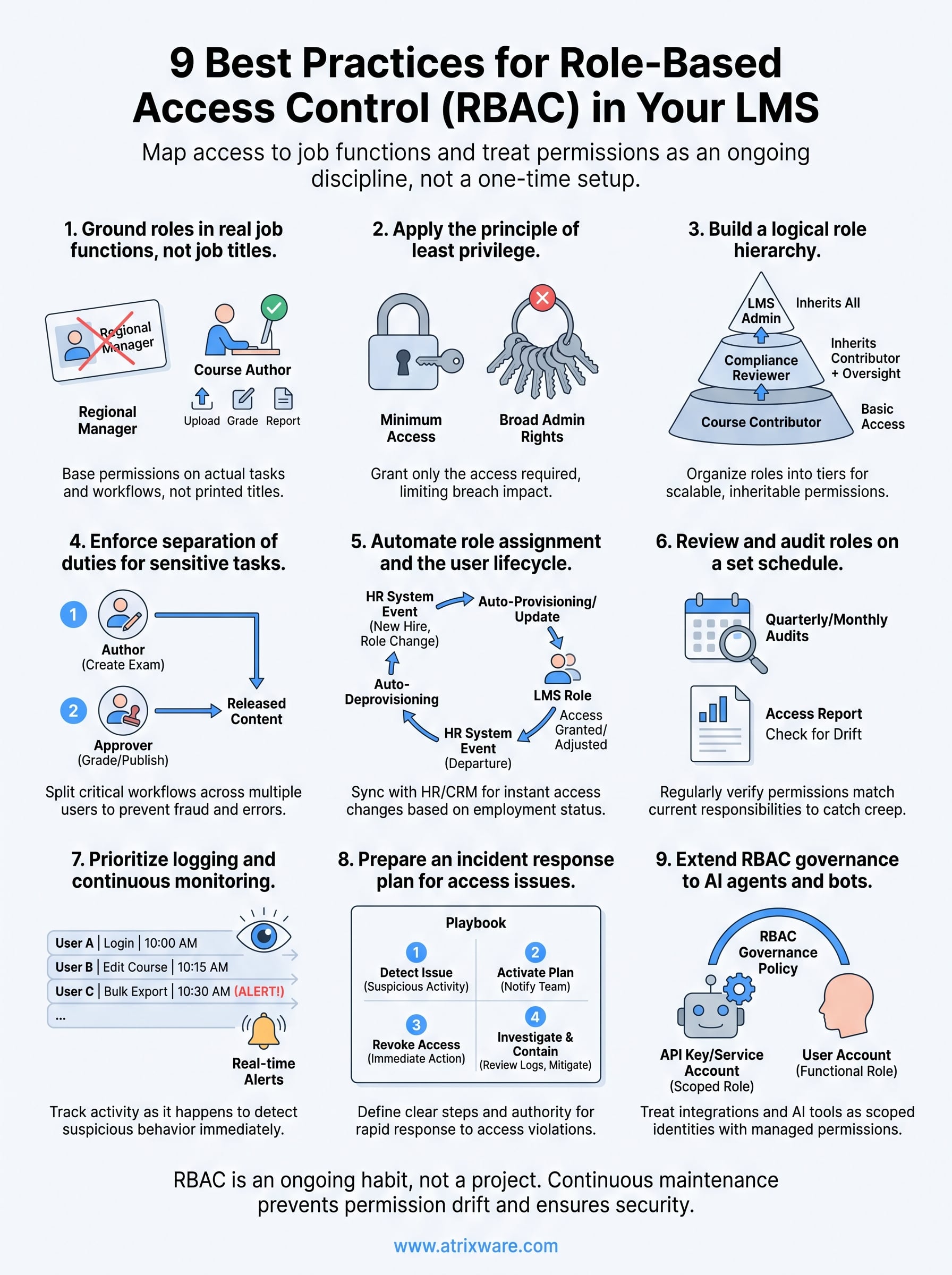
None of these nine practices work as a single setup task you check off and forget. Role based access control only holds up when it’s treated as an ongoing habit: roles get remapped as jobs change, reviews happen on a real calendar, and even your bots and AI integrations get scoped like any other user. Skip the maintenance and you’re back to permission creep within a year, no matter how clean your initial rollout was.
The organizations that get this right build access control into their platform choice from the start, not as an afterthought bolted onto a system that wasn’t built for it. If you’re evaluating whether your current LMS can actually support granular, auditable role structures, that’s worth answering before you invest more time patching around its limits. See how Axis LMS handles this in practice by starting an admin demo.
