New hires decide whether they’re staying long-term within their first 90 days on the job, and a clunky onboarding process is often the reason they walk. If your team is still juggling spreadsheets, PDFs, and one-off Zoom calls to get people up to speed, you already know how much time that wastes. The right lms for employee onboarding turns that chaos into a repeatable, compliant onboarding program that trains, tracks, and reports on every new employee automatically.
This article answers a specific question: which platforms actually handle onboarding well in 2026, not just generic course delivery. We looked at employee onboarding lms software built for fast course creation, automated workflows, and integrations with the HR and CRM tools you already use, since manually entering new hire data kills adoption fast.
Below you’ll find seven platforms worth your evaluation list, including where Axis LMS fits for teams that need compliance tracking and deep system integrations alongside onboarding. Each entry covers what the platform does well, where it falls short, and who it’s actually built for, so you can shortlist candidates without spending weeks in demo calls.
1. Axis LMS by Atrixware
Axis LMS is Atrixware’s flagship platform, built for organizations that need onboarding to scale without adding headcount to the training team. It’s designed for businesses that want a system administrators can run themselves, with drag-and-drop course building and automation rules that do the heavy lifting once a new hire is added to the roster.
How it handles onboarding
Once HR adds a new employee record, Axis LMS can automatically enroll them into a role-based learning path, trigger welcome emails, and assign deadlines for each module. Automated enrollment rules mean nobody on your team has to remember to manually assign the compliance module to every new hire in the sales department. Managers get notified when someone falls behind, and new hires see a branded portal that looks like it belongs to your company, not a generic vendor.

Automating enrollment and reminders is what turns onboarding from a manual chore into a system that runs itself.
Key features
- Drag-and-drop course authoring for building onboarding content fast, no developer required
- User data synchronization with HR and CRM systems like ADP, BambooHR, Salesforce, and Zoho
- SSO support through SAML with Okta, Azure, Ping Identity, and Salesforce
- Compliance tracking for certifications, re-certifications, and regulations like GDPR and FDA 21 CFR Part 11
- Integration Builder connecting to over 5,000 systems for HR, CRM, email, and e-commerce
- Extensive branding controls so the learner UI matches your company identity
Best for
Axis LMS suits mid-size to large organizations that need onboarding tied directly into existing HR and CRM systems, plus compliance officers who need audit-ready reporting on every completed module. It also fits companies running multiple training tracks at once, employee onboarding, customer training, and channel partner education, since one system handles all three without separate logins or licenses.
Pricing
Atrixware doesn’t publish flat rate cards because pricing depends on user count, hosting preference (cloud or on-premise), and which integrations you need. The company offers demos and custom quotes directly through its LMS pricing page, which is worth requesting if compliance tracking and deep system integrations are non-negotiable for your onboarding process.
2. Docebo
Docebo is an enterprise learning platform known for its AI-driven content tools and polished learner experience. It targets larger companies that already run structured L&D programs and want onboarding folded into a broader learning ecosystem rather than a standalone tool.
How it handles onboarding
New hires get pulled into automated learning paths based on role, department, or custom user fields synced from your HR system. Docebo’s Shape feature can generate onboarding content from existing documents using AI, which speeds up course creation if your team is starting from scratch. Managers can track completion through dashboards, though setting up the automation rules typically requires more configuration time than simpler platforms.
The more moving parts a platform has, the more setup time you should budget before your first new hire ever logs in.
Key features
- AI content generation through Shape
- Social and collaborative learning tools
- Learning Impact reporting tied to business outcomes
- Mobile app for on-the-go training
- Integrations with Salesforce, Microsoft Teams, and Slack
Best for
Docebo fits mid-size to large enterprises with dedicated L&D staff who need onboarding integrated with broader employee development and skills tracking, not just a first-week checklist.
Pricing
Pricing is quote-based and scales with active users, typically landing in enterprise territory. There’s no published flat rate, so budget for a sales conversation before you get real numbers.
3. TalentLMS
TalentLMS built its reputation on simplicity, and that’s still its main selling point for small and mid-size teams that need onboarding running in days, not months. It’s a cloud platform with a lighter footprint than Docebo or Axis LMS, which makes it attractive if your training team is one or two people wearing multiple hats.
How it handles onboarding
Onboarding here works through prebuilt course templates and automated user groups that assign content based on department or start date. New hires get a simple dashboard with progress bars and gamification elements like badges, which keeps early engagement up even without a dedicated training manager pushing reminders. Setup takes hours rather than weeks, but that speed comes with fewer options for deep customization once you outgrow the basics.
Simplicity gets new hires started fast, but it can leave you switching platforms once training needs grow more complex.
Key features
- Course templates and a drag-and-drop builder
- Gamification with badges, points, and levels
- Automated user group assignment
- Built-in video conferencing for live onboarding sessions
- Basic branding and custom domain options
Best for
TalentLMS suits small businesses and startups that need a fast onboarding setup without a dedicated administrator managing complex integrations, one of several training platforms aimed at smaller teams.
Pricing
Plans start around $89/month for up to 40 users, scaling up by user count. A free forever plan exists for up to five users, though it’s limited in features.
4. Moodle
Moodle is the open-source workhorse of the LMS world, and plenty of IT departments choose it because it’s free to install and infinitely customizable if you have developer resources on hand. It’s less a turnkey onboarding product and more a framework you build onboarding on top of, which changes who it actually suits.

How it handles onboarding
Out of the box, Moodle doesn’t ship with onboarding-specific automation, so role-based enrollment and welcome sequences get built through plugins or custom scripting. Admins can set up cohorts for new hires and assign courses manually or through CSV uploads synced from HR exports. It works, but expect a technical team member to own the setup rather than an HR generalist clicking through a wizard.
Moodle rewards teams with developer time to spare and punishes teams that just want onboarding running by Friday.
Key features
- Fully open-source codebase, self-hosted or cloud-hosted
- Massive plugin library for extending functionality
- Cohort-based enrollment for grouping new hires
- Custom reporting through third-party plugins
- Multi-language support out of the box
Best for
Organizations with in-house IT or developer support that want full control over hosting, data, and customization, and don’t mind trading convenience for flexibility.
Pricing
The core software is free, but hosting, plugins, themes, and support typically run through Moodle Partners, which can add up to costs comparable to commercial platforms once you factor in the real cost of implementing an LMS.
5. Trainual
Trainual built its whole platform around documenting how a company actually runs, then turning that documentation into onboarding content automatically. It’s less a traditional LMS and more a process documentation tool that doubles as training software, which makes it a natural fit for small businesses still writing their playbooks as they grow.
How it handles onboarding
New hires work through role-specific playbooks that combine SOPs, policies, and training videos into a single sequential path. Trainual’s embedded screen recorder lets managers capture a process once and turn it into a training step, so onboarding content grows naturally out of daily work instead of requiring a separate course-building project. Automated reminders nudge new hires who stall out, and completion tracking shows managers exactly where someone is stuck.
When onboarding content comes straight from your actual processes, new hires learn how your company really works, not a generic version of it.
Key features
- Built-in screen recorder for capturing processes as training content
- Org chart integration linking roles to specific training paths
- Automated reminders for stalled progress
- Embedded quizzes to confirm understanding
- Zapier integration for connecting to other business tools
Best for
Small to mid-size businesses that need to document processes and train new hires at the same time, especially teams without a dedicated instructional designer.
Pricing
Plans start around $299/month for small teams, scaling with user count and feature tier. There’s no free plan, but a trial period lets you test the workflow before committing.
6. 360Learning
360Learning built its reputation on collaborative, peer-driven learning, and that philosophy carries into how it handles onboarding. Instead of a training team writing every module from scratch, the platform leans on subject matter experts across your company to create and refine onboarding content, which keeps courses closer to how work actually gets done day to day.
How it handles onboarding
Once a new hire joins, 360Learning enrolls them into collaborative learning paths built by the teams they’re actually joining, not just HR. Peer contributors can flag outdated content and suggest edits directly in the platform, so onboarding material stays current without a dedicated instructional designer rewriting it every quarter. Managers get visibility into progress through skill-based dashboards tied to each new hire’s role.
Onboarding content built by the people doing the work stays accurate longer than content written once and forgotten.
Key features
- Collaborative course authoring open to any employee
- Skills-based learning paths tied to roles
- AI-powered content suggestions for course improvement
- Built-in academies for organizing onboarding by department
- Integrations with Salesforce, Workday, and LinkedIn Learning
Best for
Growing companies with subject matter experts willing to contribute to training content, especially ones that want onboarding to evolve alongside the business rather than sitting static in a course library.
Pricing
Pricing is quote-based and scales with the number of active users. Expect a sales call rather than a published rate card, and budget extra time if you want the collaborative authoring features fully configured.
7. D2L Brightspace
D2L Brightspace started in higher education and later expanded into corporate training, which shows in how much depth it offers for structured, multi-stage learning programs. Larger enterprises with complex compliance requirements or global workforces often land here once TalentLMS or Trainual feel too lightweight for what they need.
How it handles onboarding
New hires move through adaptive learning paths that adjust content based on quiz performance, so someone who already knows a topic skips ahead while someone struggling gets extra practice modules. Brightspace’s release conditions let admins gate content behind prerequisites, ensuring a new hire can’t jump to advanced compliance training before finishing the basics. Reporting dashboards track competency gaps across cohorts, which matters more once you’re onboarding hundreds of people per quarter rather than a handful per month.
Adaptive paths only pay off once your onboarding volume is high enough to justify the setup time behind them.
Key features
- Adaptive release rules based on quiz scores and prerequisites
- Competency and skills tracking across cohorts
- Built-in video and virtual classroom tools
- Insights dashboard for compliance and completion reporting
- Accessibility features meeting WCAG standards
Best for
Large enterprises and regulated industries that need granular reporting on onboarding progress across thousands of employees, not just a few dozen new hires a month.
Pricing
Brightspace is quote-based, with cost tied to user volume and modules enabled. Implementation typically involves a longer sales and configuration cycle than smaller onboarding-focused tools.
Choosing the right fit for your team
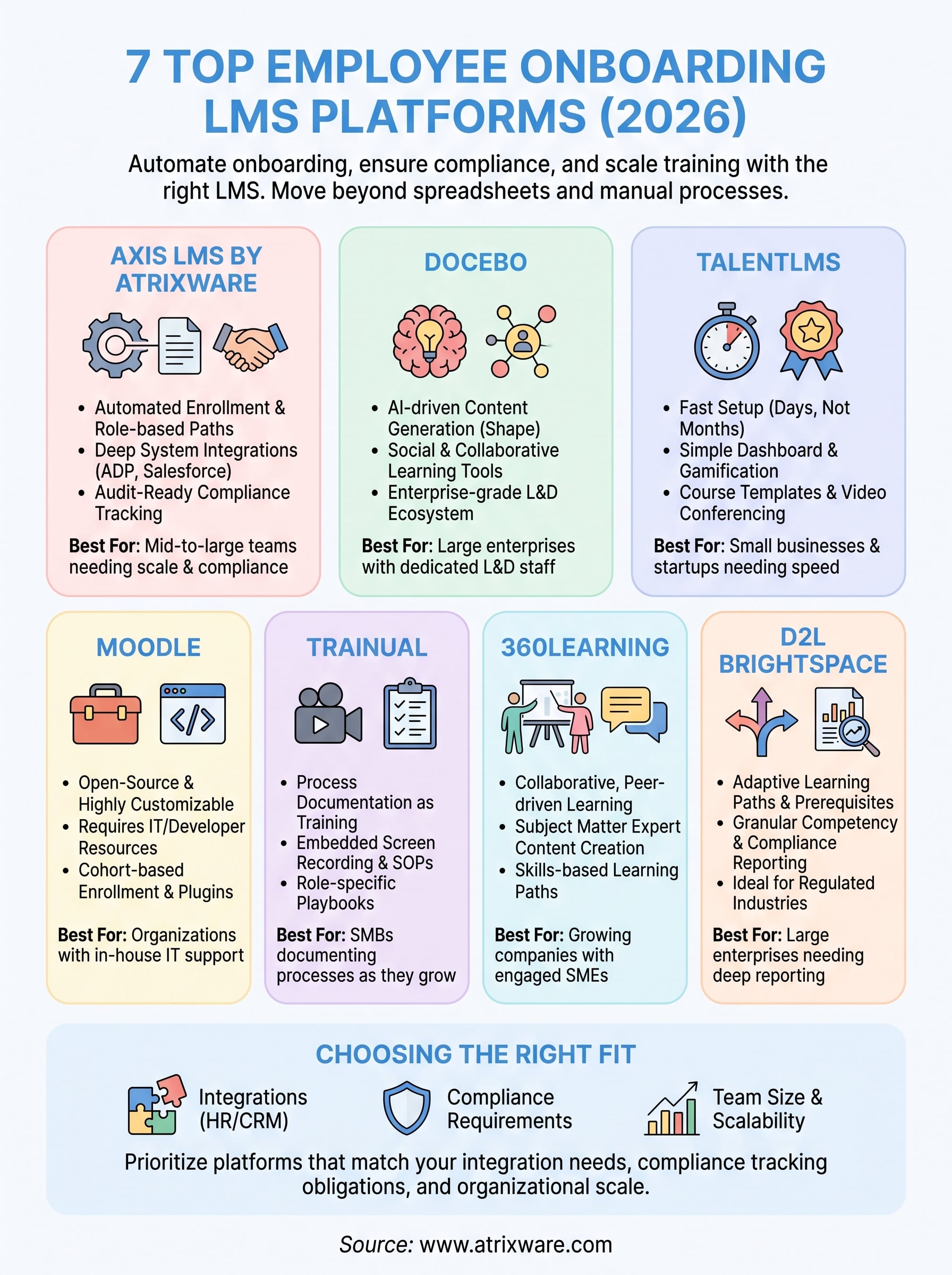
Matching the platform to your team size matters more than chasing the longest feature list. A five-person startup drowns in Brightspace’s configuration options, while a 2,000-employee company outgrows TalentLMS within a year. Match your integration needs first: if new hires already live in ADP, BambooHR, or Salesforce, pick a platform for connecting your LMS to CRM and HR systems automatically instead of one that makes you re-enter data by hand.
Compliance requirements should also narrow your list fast. If you’re tracking certifications, re-certifications, or regulations like GDPR, you need audit-ready compliance reporting, not a dashboard bolted on as an afterthought. That’s exactly where Axis LMS earns its place on this list, combining automated onboarding workflows with the compliance tracking and system integrations that growing organizations need as headcount scales.
Unsure which stage you’re actually at? Gauge your LMS readiness in a few minutes and get a clearer read on what to prioritize before you sit through another demo call.
