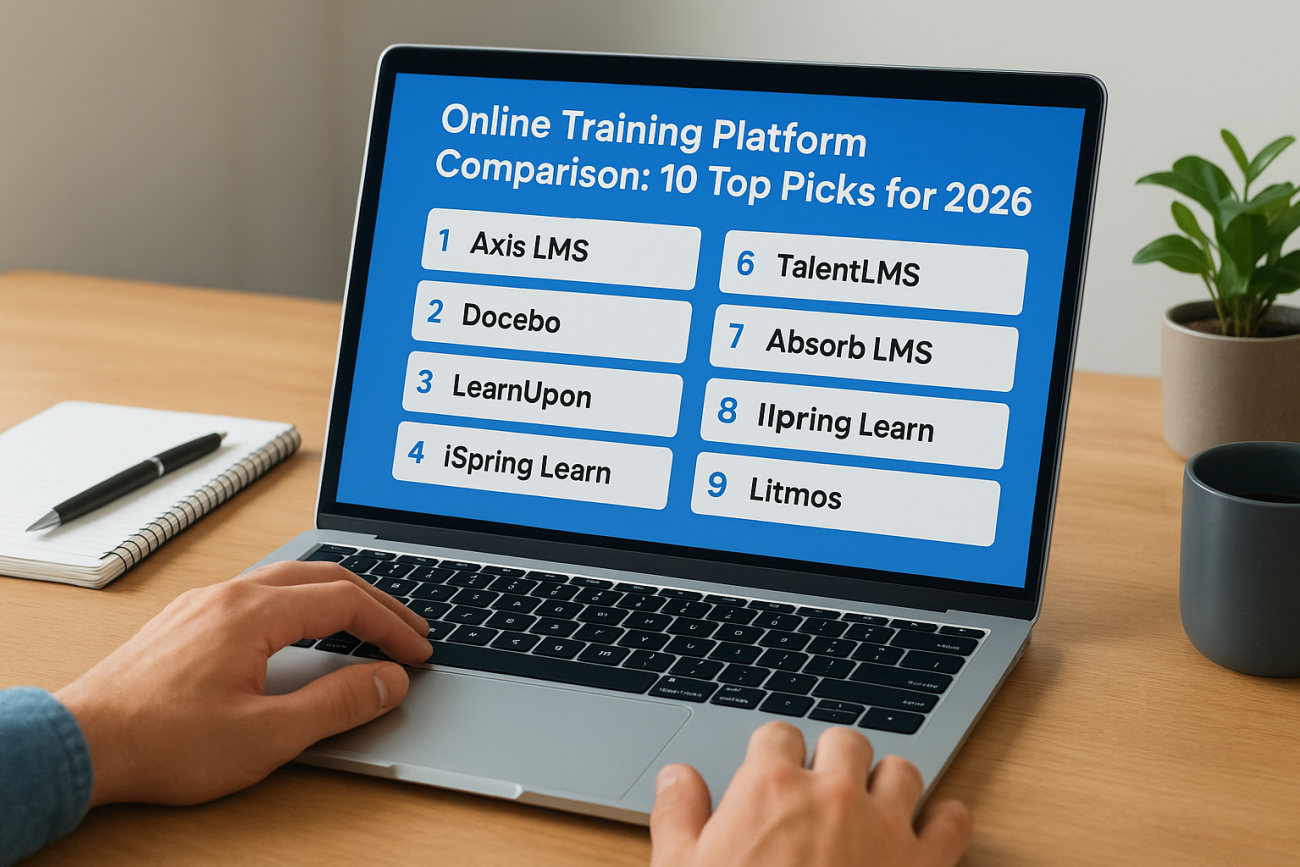
You’ve got a shortlist of platform names, a dozen open browser tabs, and a training program that needs to launch next month. Every vendor site claims to be the easiest, most powerful, most affordable option out there, which makes an honest online training platform comparison hard to find when everyone’s marketing copy sounds identical.
Here’s the direct answer: the best online training platform depends on whether you’re onboarding employees, certifying compliance, training customers, or selling courses to the public. A tool built for solo course creators won’t handle SSO integrations or CEU tracking, and an enterprise LMS with heavy compliance features can feel like overkill for a five-person team teaching product basics.
This guide breaks down 10 top online training platforms for 2026, comparing pricing, course-building tools, reporting depth, and integration options side by side. We’ll cover strong picks for live virtual training, IT certification programs, and large-scale corporate rollouts, so you can match the platform to your actual use case instead of guessing based on a homepage.
1. Axis LMS by Atrixware
Atrixware built Axis LMS for organizations that need more than a course player, they need a system that handles onboarding, compliance, customer education, and revenue-generating training all from one dashboard. It’s the platform we know best, and it’s designed to scale from a 20-person team to a multinational workforce without forcing you onto a different product tier that changes how the system behaves.
How it works
Admins build courses using a drag-and-drop course builder that supports SCORM, xAPI, video, and live virtual classroom sessions inside the same catalog. You assign training through automated rules based on job role, department, or hire date, so new employees land in the right learning path without manual assignment. Learners get a branded, self-service portal that reflects your company’s look and feel rather than a generic vendor template, and reporting updates in real time as learners progress, so managers aren’t waiting on end-of-month exports to see who’s behind.
Key features
Axis LMS covers the ground that most lightweight platforms skip, particularly around compliance and system integration:
- Compliance tracking for standards like GDPR and FDA 21 CFR Part 11, plus automated re-certification and CEU tracking for licensed professionals
- Live virtual classroom support built into the same catalog as self-paced courses, so blended programs don’t require a second tool
- REST API and webhooks for custom integrations, alongside a built-in integration builder connecting to over 5,000 systems
- SSO support through SAML, working with Okta, Azure, Ping Identity, and Salesforce
- HR and CRM data sync with platforms like ADP, BambooHR, and Zoho, so user records stay current without manual uploads
- E-commerce tools for selling courses to individuals or issuing seat licenses for B2B training sales
A platform that handles compliance, live training, and e-commerce in one system saves you from stitching together three vendors that don’t talk to each other.
Best for
Axis LMS suits mid-size to large organizations juggling multiple training types at once, employee onboarding, customer education, channel partner training, and compliance documentation, without wanting separate logins for each. It’s also a strong fit if you’re asking what the best online IT training platform looks like for internal certification tracks, since the CEU and re-certification tracking handles the audit trail automatically. Companies that need to sell training as a revenue stream, not just deliver it internally, benefit from the built-in e-commerce and seat-licensing tools that many competitors bolt on as an add-on. If you’re specifically hunting for the best platform for online live training blended with self-paced content, the combined virtual classroom and course catalog avoids the disconnect of running two separate systems.
Pricing
Atrixware doesn’t publish flat per-seat pricing because deployments vary so much between a 50-person compliance program and a 10,000-user customer training rollout. Instead, pricing is quoted based on user count, feature set, and whether you need cloud hosting or an on-premise deployment. You can request a personalized quote and demo directly from Atrixware to see pricing matched to your actual training volume rather than a generic tier that either underserves or overcharges you.
2. TalentLMS
TalentLMS built its reputation on simplicity, and that’s still the main reason small and mid-size teams pick it over heavier enterprise systems. It’s a cloud-based LMS aimed at companies that want to launch training fast without a lengthy implementation process, which makes it a common answer when someone searches for the best online training platform for a lean training team.
How it works
Setup happens through a template-driven course builder where you upload existing PDFs, videos, and presentations and TalentLMS converts them into trackable course modules. Gamification elements like badges, points, and leaderboards are baked into the base experience rather than sold as an add-on, which helps with learner engagement in shorter training programs. Admins manage users through groups and branches, letting a single account serve multiple departments or client accounts with separate reporting views.
Key features
Here’s what stands out in the core feature set:
- Course creation tools supporting SCORM, xAPI, and video content with quiz and survey builders
- Gamification including badges, levels, and points to drive completion rates
- Multi-branch structure for managing separate teams, clients, or departments under one account
- Basic e-commerce for selling courses through PayPal or Stripe integration
- Mobile app for iOS and Android with offline course access
Simplicity is TalentLMS’s strongest selling point, but that same simplicity means compliance-heavy programs often outgrow it fast.
Best for
Small to mid-size businesses running straightforward employee onboarding or product training programs get the most value here, the classic case for an LMS built for small business. Teams without dedicated IT support appreciate the fast setup, since most accounts go live within a day or two of signup. Companies needing deep compliance tracking, CEU management, or complex HR system synchronization tend to find TalentLMS’s feature set thinner than what enterprise-grade platforms offer.
Pricing
TalentLMS uses tiered pricing based on active user count, starting around $89 per month for up to 40 users on the Core plan, with higher tiers unlocking custom reporting, API access, and white labeling. A free plan exists for up to five users, which works for testing the platform before committing. Larger organizations negotiate custom Enterprise pricing once user counts climb into the thousands.
3. Docebo
Docebo positions itself as an AI-powered learning platform for enterprises that need to scale training across thousands of employees, partners, and customers at once. It’s a heavier system than TalentLMS, built for organizations where learning experience and content discovery matter as much as course delivery itself. Companies researching an online training platform comparison for large, multi-audience deployments usually run into Docebo somewhere on their shortlist.

How it works
Docebo’s engine relies on AI-driven content curation, which suggests relevant courses to learners based on their role, past activity, and skill gaps rather than forcing them through a fixed catalog. Admins can pull in content from external libraries, internal uploads, and even user-generated video, then let the recommendation engine surface what’s relevant to each learner. The interface leans toward a social, Netflix-style browsing experience rather than a traditional course list, which changes how learners find and start training.
Key features
Docebo’s platform centers on a few standout capabilities:
- AI-powered content recommendations based on learner behavior and role
- Multiple learning modalities, including formal courses, social learning, and virtual instructor-led sessions
- Content marketplace integrations pulling in third-party course libraries
- Advanced analytics with customizable dashboards for skill-gap reporting
- Multi-tenant portals for training different audiences, like employees, partners, and customers, from one backend
An AI recommendation engine only pays off once you have enough content and users to make personalization meaningful, small catalogs won’t see much benefit.
Best for
Docebo suits large enterprises with substantial content libraries and multiple learner audiences that need distinct portals under a shared administration layer. It fits organizations already investing heavily in a formal learning experience platform strategy rather than a straightforward course delivery tool. Smaller teams often find the AI features underused relative to the cost, since personalization needs volume and content variety to show real value.
Pricing
Docebo doesn’t publish public pricing, quoting instead based on active users and selected modules like the content marketplace or advanced analytics add-ons. Budgets typically start in the low five figures annually for smaller enterprise deployments, climbing significantly higher once you add multi-portal licensing and premium content integrations. Prospective buyers should expect a sales-driven demo process before receiving a firm quote.
4. Absorb LMS
Absorb LMS markets itself as a polished, enterprise-ready system built for organizations that want strong design alongside serious administrative depth. It’s a frequent name in any online training platform comparison aimed at mid-market and enterprise buyers who want a modern interface without sacrificing the reporting and automation that larger training teams depend on.
How it works
Administrators build courses through a visual authoring tool called Absorb Create, which lets non-technical staff assemble interactive lessons without touching code. Training assignments run on rule-based automation tied to user groups, so new hires, certified staff, and external partners each land on a learner path suited to their role. The admin dashboard centralizes reporting, course management, and e-commerce settings in one place, which cuts down on the tab-switching that slows down teams managing several training programs at once.
Key features
Absorb’s feature set leans toward polish and automation working together:
- Absorb Create, a built-in authoring tool for interactive course content
- AI-powered course tagging and search, helping learners find relevant training faster
- Automation rules for enrollment, notifications, and re-certification reminders
- E-commerce module for selling courses with coupon codes and bulk purchasing
- Custom reporting with scheduled report delivery to stakeholders
A clean interface matters less than whether your admin team can actually automate the repetitive parts of running training, and that’s where Absorb earns its price tag.
Best for
Mid-size to large organizations that want an enterprise-grade LMS without a clunky, dated interface tend to gravitate toward Absorb. Companies selling training externally appreciate the built-in e-commerce tools paired with strong branding controls. Teams that need heavy customization of workflows beyond what’s built into the automation engine sometimes find themselves relying on Absorb’s professional services team for setup.
Pricing
Pricing isn’t published publicly and gets quoted based on active user counts and selected modules, similar to most enterprise LMS vendors on this list. Deployments generally start in the low five figures annually, with e-commerce and advanced reporting add-ons pushing costs higher. Buyers should plan on a sales call and a scoped proposal before getting a firm number.
5. LearnUpon
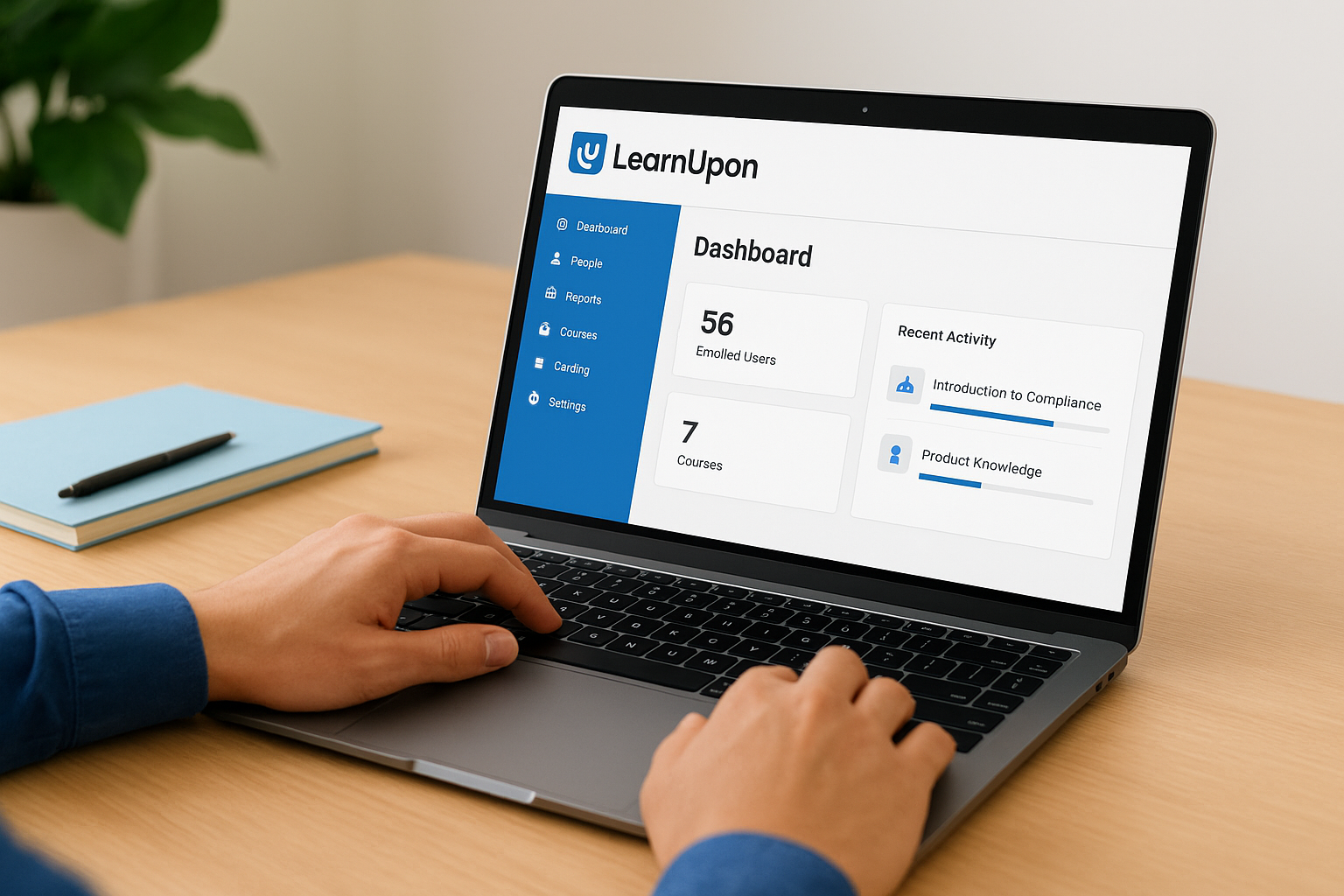
LearnUpon built its platform around a specific problem: companies that need to train employees, partners, and customers separately, but don’t want three different systems to manage it. It shows up often in an online training platform comparison for businesses running multi-audience training without enterprise-level budgets to match Docebo or Cornerstone.
How it works
Accounts run on a portal-based structure, where each audience, internal staff, resellers, or paying customers, gets its own branded portal tied back to a shared content library. Admins build courses once and assign them across multiple portals instead of duplicating content for every audience, which cuts down on the maintenance load as programs grow. Course creation happens through a straightforward builder supporting SCORM, video, and quizzes, without the steeper learning curve some enterprise tools carry.
Key features
LearnUpon’s strongest features center on managing distinct audiences without duplicating work:
- Multi-portal architecture for training employees, partners, and customers separately from shared content
- Salesforce integration built specifically for channel and customer training use cases
- Automated enrollment rules based on user groups, purchase history, or CRM data
- Certification and compliance tracking with expiration alerts
- Built-in e-commerce for selling courses directly through customer-facing portals
Managing three training audiences through one content library beats maintaining three separate systems that never sync properly.
Best for
Companies running partner or reseller training alongside internal onboarding get the clearest benefit from LearnUpon’s portal model. Organizations already using Salesforce find the native integration cuts down significantly on manual data entry for customer training programs. Businesses needing deep AI-driven personalization or content marketplace access, the kind Docebo offers, tend to find LearnUpon’s feature set more practical than flashy, which suits teams prioritizing function over experimentation.
Pricing
LearnUpon prices by active users rather than total registered accounts, with plans starting around $1,388 per year for smaller teams needing a single portal. Mid-tier plans add multiple portals and the Salesforce connector, pushing annual costs into the $5,000 to $15,000 range depending on user volume. Enterprise pricing for larger multi-portal deployments requires a custom quote, and LearnUpon doesn’t offer a free tier, though demos are available before signing.
6. iSpring Learn
iSpring Learn pairs a simple LMS with one of the more respected authoring toolkits on the market, iSpring Suite, which makes it a natural pick for teams that build a lot of their own course content in PowerPoint before moving it online. Many trainers already know the authoring tool from building quizzes and video lessons, so the LMS side feels like a natural extension rather than a separate system to learn.
How it works
Course creators build lessons in iSpring Suite, a PowerPoint add-in that turns slides into SCORM-compliant courses with quizzes, dialogue simulations, and screen recordings baked in. Once exported, content uploads directly into iSpring Learn, where admins assign courses to learning tracks and set completion deadlines. The learner side runs through a clean, mobile-friendly portal, and progress syncs automatically whether someone completes a module on a phone or a desktop browser.
Key features
iSpring Learn’s strength sits in how tightly the authoring and delivery pieces fit together:
- PowerPoint-based course authoring through iSpring Suite, included in most plan tiers
- Built-in video lessons and screen recording for software walkthroughs and product demos
- Automated learning paths that assign follow-up courses based on quiz scores
- Detailed quiz analytics, showing which questions learners miss most often
- Certificate generation for completed courses and compliance tracks
A tool built around PowerPoint sounds basic until you realize most corporate trainers already build content that way, and iSpring just makes it trackable.
Best for
Organizations with an existing library of PowerPoint-based training materials get the fastest path to a working LMS here, since conversion takes minutes rather than a rebuild from scratch. Trainers who prefer building courses themselves, rather than relying on a separate instructional design team, appreciate having the e-learning authoring tool and LMS under one subscription. Companies wanting deep HR system integrations or multi-portal structures for separate audiences will find iSpring’s feature set narrower than LearnUpon or Docebo.
Pricing
iSpring Learn charges annually based on active user count, starting around $2.87 per user per month when billed yearly for smaller teams. The plan includes the iSpring Suite authoring tool at no extra cost, which is unusual among competitors that charge separately for authoring software. Larger deployments negotiate custom pricing, and a 14-day trial lets teams test both the authoring and delivery sides before committing.
7. Litmos
Litmos, now part of SAP, built its name on speed of deployment and a library of pre-built content that many competitors don’t offer out of the box. Companies running an online training platform comparison for compliance-heavy industries like retail, healthcare, or manufacturing often shortlist Litmos because of its off-the-shelf course catalog covering topics like workplace safety and harassment prevention.
How it works
Admins upload their own SCORM or video content, or pull from Litmos’s content library, which includes thousands of ready-made courses licensed from third-party providers. Course assignment runs through teams and roles, letting managers automatically enroll new hires or role changes without manual list-building. Learners access training through a mobile-first interface, and Litmos supports offline course completion that syncs once a device reconnects, which matters for field teams and retail staff without steady wifi.
Key features
Litmos leans hard into pre-built content and mobile access as its differentiators:
- Pre-built course library covering compliance, sales, and soft-skills training across dozens of industries
- Mobile app with offline access, built for frontline and field employees
- Video-based assessments, letting managers review recorded responses for sales or customer-service training
- Salesforce and SAP SuccessFactors integrations for teams already inside that ecosystem
- Gamification including badges and leaderboards to boost completion rates
Buying pre-built compliance content off the shelf saves weeks compared to writing every course from scratch, but it also means less control over how the material fits your specific workflows.
Best for
Retail chains, healthcare networks, and manufacturers needing fast compliance rollouts across a distributed, often non-desk workforce find Litmos a practical fit. Teams already running SAP SuccessFactors for HR get a smoother data connection than most competitors offer. Organizations wanting deep custom API work or granular compliance audit trails similar to what Axis LMS provides may find Litmos’s customization options more limited once programs grow complex.
Pricing
Litmos prices per active user annually, with plans typically starting around $4 to $6 per user per month depending on content library access and user volume. Enterprise deployments needing SAP integration or the full content marketplace negotiate custom contracts. No public free tier exists, though Litmos offers demos and short trials for evaluation before purchase.
8. Cornerstone OnDemand
Cornerstone OnDemand serves the largest end of the market, the kind of company running talent management, succession planning, and compliance training as one connected system rather than separate tools. Any serious online training platform comparison for Fortune 500-scale organizations eventually lands on Cornerstone, since it’s less a course delivery tool and more a full talent suite with learning built in.
How it works
Cornerstone’s unified talent platform ties learning content to performance reviews, skill assessments, and career pathing, so a completed course can trigger a promotion eligibility flag or a new development plan automatically. Admins configure learning assignments through skill libraries mapped against job roles, and the system recommends content based on gaps identified in performance data rather than a static catalog. Content comes from a mix of internal uploads and Cornerstone’s own content marketplace, which licenses courses from providers like OpenSesame and LinkedIn Learning.
Key features
Cornerstone’s depth shows up most in how learning connects to broader HR processes:
- Skills-based learning paths tied to job roles and internal skill libraries
- Performance management integration, linking training completion to reviews and career development
- Content marketplace aggregating third-party course providers into one catalog
- Compliance tracking with audit trails suited to regulated industries
- Multi-language support across dozens of languages for global workforces
Learning tied directly to performance data changes how training gets prioritized, but it only makes sense once you’re already running Cornerstone’s broader talent suite.
Best for
Large, global enterprises already using Cornerstone for talent management get the most value, since the learning module plugs into systems they’ve already invested in, though much of the work still sits in implementing a corporate LMS at that scale. Organizations without an existing HR tech stack built around Cornerstone often find the platform heavier and pricier than the training-only alternative they actually need. Companies asking what the best online training platform looks like for a standalone LMS, without the talent management layer, usually find better value elsewhere on this list.
Pricing
Cornerstone doesn’t publish pricing, and quotes depend heavily on which modules you license beyond core learning, like performance management or succession planning. Costs typically start in the mid five figures annually and climb fast once you add the full talent suite across a large workforce. Expect a lengthy sales cycle with multiple stakeholders involved before a final contract gets signed.
9. Moodle
Moodle sits apart from every other name on this list because it’s open-source, free to download, and run on your own servers if you have the technical staff to manage it. Educational institutions and budget-conscious organizations have relied on it for two decades, and it still shows up in nearly every online training platform comparison aimed at readers who want full control over their LMS rather than a locked-down vendor product.

How it works
Institutions or IT teams install Moodle on their own hosting environment, or pay for Moodle Cloud hosting if self-hosting isn’t practical. Course creation happens through a modular structure where admins add activities, quizzes, forums, assignments, one at a time, building a course page that looks more like a syllabus than a slick course player. Because the source code is open, developers can modify nearly any part of the system, from grading logic to the user interface, which explains why so many universities run heavily customized versions.
Key features
Moodle’s strength comes from flexibility and a massive plugin ecosystem built by its user community:
- Open-source codebase, free to download, modify, and self-host
- Plugin directory with thousands of community-built extensions for quizzes, forums, and grading tools
- SCORM and xAPI support for standard course content
- Granular permission settings for instructors, teaching assistants, and students
- Active global community providing documentation, forums, and third-party developer support
Free software still costs money once you factor in hosting, maintenance, and the developer time needed to keep plugins working.
Best for
Schools, universities, and nonprofits with in-house technical staff or a modest development budget get the most out of Moodle’s flexibility. Corporate teams researching what is the best online training platform for a highly customized, budget-limited deployment sometimes choose Moodle, but only when someone on staff can handle server maintenance and plugin updates. Businesses wanting a polished, ready-to-use system without ongoing IT overhead usually find Moodle’s setup requirements heavier than they expected.
Pricing
The core software is free, but Moodle Cloud hosting starts around $130 per year for small user counts, scaling up with enrollment numbers. Self-hosting shifts costs to server infrastructure and staff time instead of a subscription fee, which can end up cheaper or more expensive depending on your existing IT capacity.
10. LinkedIn Learning
LinkedIn Learning takes a different approach from everything else on this list: it’s a video course library first and an LMS second, built on top of the professional network most of your employees already use. Companies that want to supplement internal training with polished, expert-led content on soft skills, software tools, and leadership topics often add it alongside a dedicated LMS rather than using it as their only system.
How it works
Access runs through a subscription-based content library containing thousands of video courses taught by industry practitioners, covering everything from Excel formulas to management fundamentals. Learners browse and enroll themselves, or admins assign specific courses through LinkedIn Learning Hub, which layers basic tracking and reporting on top of the content catalog. Progress and completions can sync into a company’s primary LMS through integrations, so the video library becomes one content source rather than a standalone system employees have to check separately.
Key features
LinkedIn Learning’s value sits almost entirely in its content depth and the professional network tied to it:
- Thousands of expert-led video courses across business, tech, and creative skills
- Skill assessments that recommend courses based on gaps identified in testing
- LMS integrations with platforms like Cornerstone and Axis LMS for centralized reporting
- Certificates that post directly to a learner’s LinkedIn profile
- Learning paths curated around specific job roles or career transitions
A content library this deep works best as a supplement to a real LMS, not a replacement for one, since it lacks the compliance and custom course-building tools most businesses need.
Best for
Companies wanting to round out internal training with professional development content, without building every soft-skills course from scratch, get the clearest value here. HR teams researching the best online training platform for career development programs often pair LinkedIn Learning with a system like Axis LMS to combine polished content with compliance tracking. Businesses needing custom course authoring, SCORM uploads, or compliance documentation won’t find those tools inside LinkedIn Learning itself.
Pricing
Individual subscriptions run about $39.99 per month or roughly $299 annually, while business plans require a custom quote based on seat count. Organizations already paying for a LinkedIn Recruiter or Sales Navigator license sometimes get bundled pricing on Learning as part of a broader LinkedIn subscription package.
11. How to choose the right training platform
Start by naming the training type you run most often, employee onboarding, customer education, compliance, or channel partner training, because that single answer eliminates half this list before you book a single demo. A company doing an online training platform comparison for compliance audits needs certification tracking and audit trails, while a startup selling courses to the public needs e-commerce tools and a storefront more than a talent-management integration.

Budget shapes the shortlist just as much as features do. Platforms like Moodle look free until you count hosting and developer time, while enterprise systems like Cornerstone or Docebo quote five-figure annual contracts before you’ve added a single custom module. Matching your actual training volume to a pricing model, per-user, tiered, or custom-quoted, keeps you from overpaying for capacity you won’t use or hitting a wall at 500 users on a plan built for 50.
The right platform isn’t the one with the most features, it’s the one that matches your training type, your budget, and your growth curve without forcing a mid-year migration.
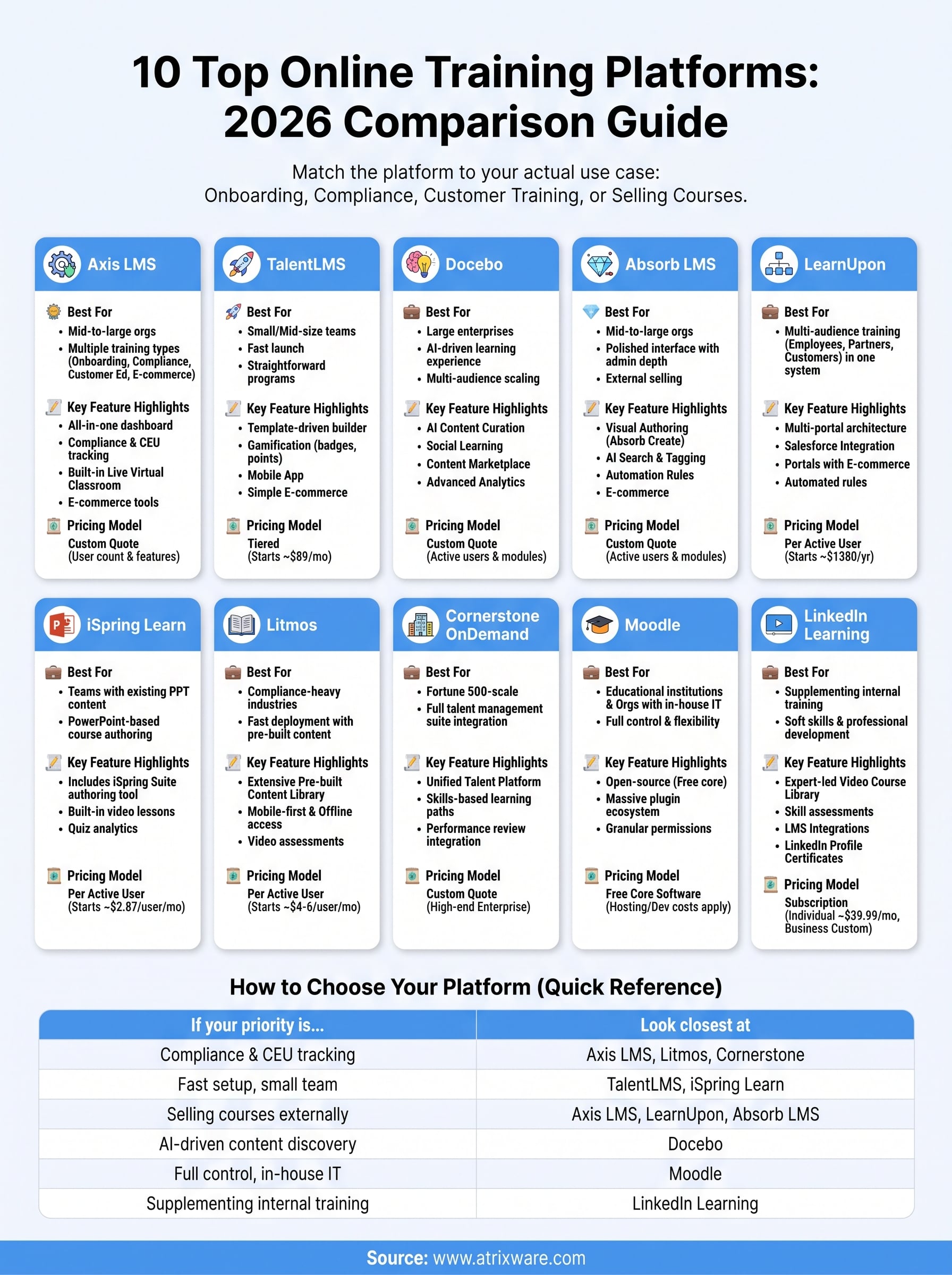
Here’s a quick reference for narrowing the field by primary use case:
| If your priority is… | Look closest at |
|---|---|
| Compliance and CEU tracking | Axis LMS, Litmos, Cornerstone |
| Fast setup, small team | TalentLMS, iSpring Learn |
| Selling courses externally | Axis LMS, LearnUpon, Absorb LMS |
| AI-driven content discovery | Docebo |
| Full control, in-house IT | Moodle |
| Supplementing internal training | LinkedIn Learning |
Before you sign anything, know what to look for in LMS integrations. If your HR data lives in BambooHR or your sales data sits in Salesforce, confirm the LMS syncs natively rather than relying on a manual export every quarter. Testing matters too, most vendors on this list offer a trial or live demo, and running your actual course content through that trial beats reading another spec sheet, especially alongside a step-by-step guide to comparing LMS platforms. Whatever platform you pick, make sure someone on your team can speak to why it fits your training goals specifically, not just why it ranked well in someone else’s list.
Picking the platform that fits your training goals
Ten platforms, one decision: match the tool to the training you actually run, not the one with the flashiest demo. If you’re juggling onboarding, compliance, and customer education under one roof, a standalone LMS built for that mix beats stitching together three specialized tools that don’t share data. If you’re a five-person team selling one course, most of this list is overkill.
The online training platform comparison above should narrow your shortlist to two or three real contenders instead of ten open tabs. From here, the fastest way forward is hands-on testing, not more spec sheets. If compliance tracking, live virtual classrooms, and built-in e-commerce are all on your requirements list, take the LMS readiness assessment to see exactly where your organization stands before you book a single demo.
