Regulators don’t care that your training slides are outdated or that half your staff clicked through the last module without reading a word. A weak corporate compliance training program leaves you exposed to fines, lawsuits, and the kind of audit findings that keep compliance officers up at night. If you’re staring down a deadline to fix your program, or building one from scratch, you need a plan that actually holds up under scrutiny.
Building an effective program isn’t about buying software and uploading PDFs. It requires mapping your regulatory requirements, designing content people retain, and tracking completion in a way you can defend if an auditor asks. The organizations that get this right treat compliance training as an ongoing system, not a once-a-year checkbox exercise.
This guide walks through the concrete steps: identifying what your industry actually requires, structuring courses so employees remember the material, automating reminders and re-certifications, and generating audit-ready reports on demand. We’ll also cover where a platform like an LMS handles the heavy lifting, so your team spends less time chasing spreadsheets and more time closing gaps before they become violations.
What makes a compliance training program effective
Effective compliance training does one thing badly-designed programs never manage: it changes behavior before a regulator or a lawsuit forces the issue. A program that generates completion certificates without changing how people actually handle harassment complaints, data requests, or safety incidents hasn’t done its job. Real effectiveness shows up in the numbers you don’t want to need: fewer incident reports, cleaner audits, and a documented paper trail that holds up when someone asks "can you prove this employee knew the policy?"
Beyond completion certificates
Many organizations confuse activity with results. They track how many employees clicked "finish" on a module and call it done. But a 2023 Gartner analysis of workplace risk found that organizations relying purely on completion metrics still saw compliance violations at nearly the same rate as those with no formal training at all. Knowing that someone opened a course tells you nothing about whether they retained the material or would apply it under pressure. Strong programs measure eLearning effectiveness through scored assessments, scenario-based questions, and periodic refreshers, not just a checkbox next to a course title.
A compliance program only works if it changes what people do, not just what they’ve clicked through.
The core components of a strong program
A handful of elements separate programs that survive scrutiny from ones that collapse under it. Skipping any of these creates a gap an auditor or plaintiff’s attorney will find eventually.
| Component | Weak program | Effective program |
|---|---|---|
| Content relevance | Generic, off-the-shelf modules | Tailored to your industry, roles, and actual risk exposure |
| Assessment | Pass/fail with no retention check | Scored quizzes, scenario-based questions, periodic retesting |
| Recordkeeping | Spreadsheet updated manually | Automated, timestamped, exportable audit trails |
| Frequency | Annual, one-time | Ongoing, with automated re-certification reminders |
| Accountability | No manager visibility | Real-time dashboards for managers and compliance officers |
Each row on that table maps to a real audit question. Regulators and internal auditors alike want to see that training isn’t just delivered, it’s trackable compliance training, reinforced and tied to specific job roles.
Documentation your auditors will actually accept
Documentation is where most compliance programs quietly fail. It’s not enough to say "we trained everyone on GDPR last year." You need timestamped training records showing who completed which module, what score they earned, and when their certification expires. Under regulations like FDA 21 CFR Part 11 recordkeeping, that record has to be tamper-evident and retrievable on demand, not buried in someone’s inbox. If your current system can’t prove compliance during a surprise inspection in under five minutes when an auditor asks, you already have a gap worth fixing before you build anything else.
Roles matter here too. A warehouse supervisor and a payroll clerk face entirely different compliance risks, so their training and their records should look different from day one. Segmenting your audience by role, department, or risk level keeps the content relevant and keeps your audit trail clean, because you can show exactly why each group received the training they did. Software like Atrixware’s Axis LMS builds this segmentation and automated reporting directly into the platform, so you’re not stitching together spreadsheets after the fact.
Sustainable programs also build in review cycles. Regulations change, and a course written for last year’s requirements can quietly become a liability. Treat your compliance content the way you’d treat a security patch: scheduled reviews, version tracking, and a clear owner responsible for catching updates before they become gaps.
Step 1. Identify your organization’s compliance risks
Before you build a single course, figure out what could actually get you fined, sued, or shut down. A compliance risk assessment starts with mapping every regulation that applies to your industry, then layering in the risks specific to your workforce, locations, and business model. Skipping this step is how companies end up training everyone on generic harassment modules while missing the OSHA training requirements that apply in their warehouse.
Audit your regulatory obligations
Gather every regulation, contract clause, and industry standard that touches your operations. Healthcare organizations answer to HIPAA training obligations for employees, manufacturers to OSHA, financial firms to SEC and FINRA rules, and any company handling EU customer data to GDPR. Pull your last three years of audit findings, incident reports, and legal complaints. Patterns in that history tell you where your actual exposure sits, not where you assume it does.
Talk to the people who see the risk firsthand
Interview department heads and frontline supervisors before you finalize anything. HR knows where harassment complaints cluster. Safety officers know which equipment causes near-misses. IT knows where data handling gets sloppy. These conversations surface risks that never show up in a policy manual, and they give you the specifics needed for role-based training later in the process.
You can’t train away a risk you haven’t identified yet.
Rank risks by likelihood and impact
Once you’ve gathered obligations and frontline input, score each risk so you know where to spend your training budget first.
| Risk area | Likelihood | Potential impact | Priority |
|---|---|---|---|
| Data privacy violations | Medium | Severe (fines, lawsuits) | High |
| Workplace harassment | Medium | High (legal, reputational) | High |
| Safety incidents | High | High (injury, OSHA fines) | High |
| Outdated certifications | High | Medium (audit findings) | Medium |
| Vendor contract compliance | Low | Medium (financial penalty) | Low |
This kind of table isn’t busywork. It becomes the backbone of your training calendar and the document you hand an auditor when they ask how you decided what to prioritize.
Wrap up this step with a written risk register, even a simple spreadsheet works, that lists each risk, its owner, and the regulation behind it. That register feeds directly into Step 2, where you’ll turn each identified risk into a concrete training goal and topic instead of a vague good intention.
Step 2. Define goals and choose your training topics
Your risk register from Step 1 is only useful if you translate it into training goals someone can actually measure. "Improve compliance awareness" isn’t a goal, it’s a wish. A real goal reads more like "reduce harassment complaints by 20% within 12 months" or "achieve 100% completion of GDPR training for all customer-facing staff before the next audit cycle." Setting measurable learning outcomes now gives you a benchmark to report back to leadership and regulators later.
Convert each risk into a SMART objective
Go line by line through your risk register and assign a specific, time-bound goal to each item. Use this format as a starting template:
Risk: [name from risk register]
Goal: Reduce/Achieve [specific outcome]
Metric: [percentage, count, or score]
Deadline: [date]
Owner: [department or role]
Apply that template to every high-priority risk before you write a single course. Doing this early keeps your content development focused on outcomes instead of generic module libraries nobody asked for.
Match topics to the people who need them
Not every employee needs every course. A role-based training structure keeps content relevant and keeps completion records defensible if someone challenges why a particular group was or wasn’t trained on a topic.
| Role | Priority topics |
|---|---|
| Frontline managers | Harassment prevention, reporting procedures, safety protocols |
| Finance and accounting | Anti-fraud, SEC/FINRA rules, data handling |
| IT and data teams | GDPR, cybersecurity, access controls |
| Warehouse and operations | OSHA safety, equipment certification |
| All staff | Code of conduct, anti-harassment basics |
Training that isn’t tied to a specific role or measurable outcome rarely survives an audit.
Set the cadence before you build anything
Decide how often each topic needs a refresher before you assign it. Annual training suits general code-of-conduct topics, but high-risk areas like data privacy or safety often need quarterly touchpoints or event-triggered retraining after an incident. Recording that cadence now saves you from retrofitting a schedule later, and it gives your compliance officers a clear justification for every reminder the system sends. Once your goals, topics, and cadence are locked in, you’re ready to evaluate the platform that will actually deliver, track, and report on all of it.
Step 3. Choose the right learning management system
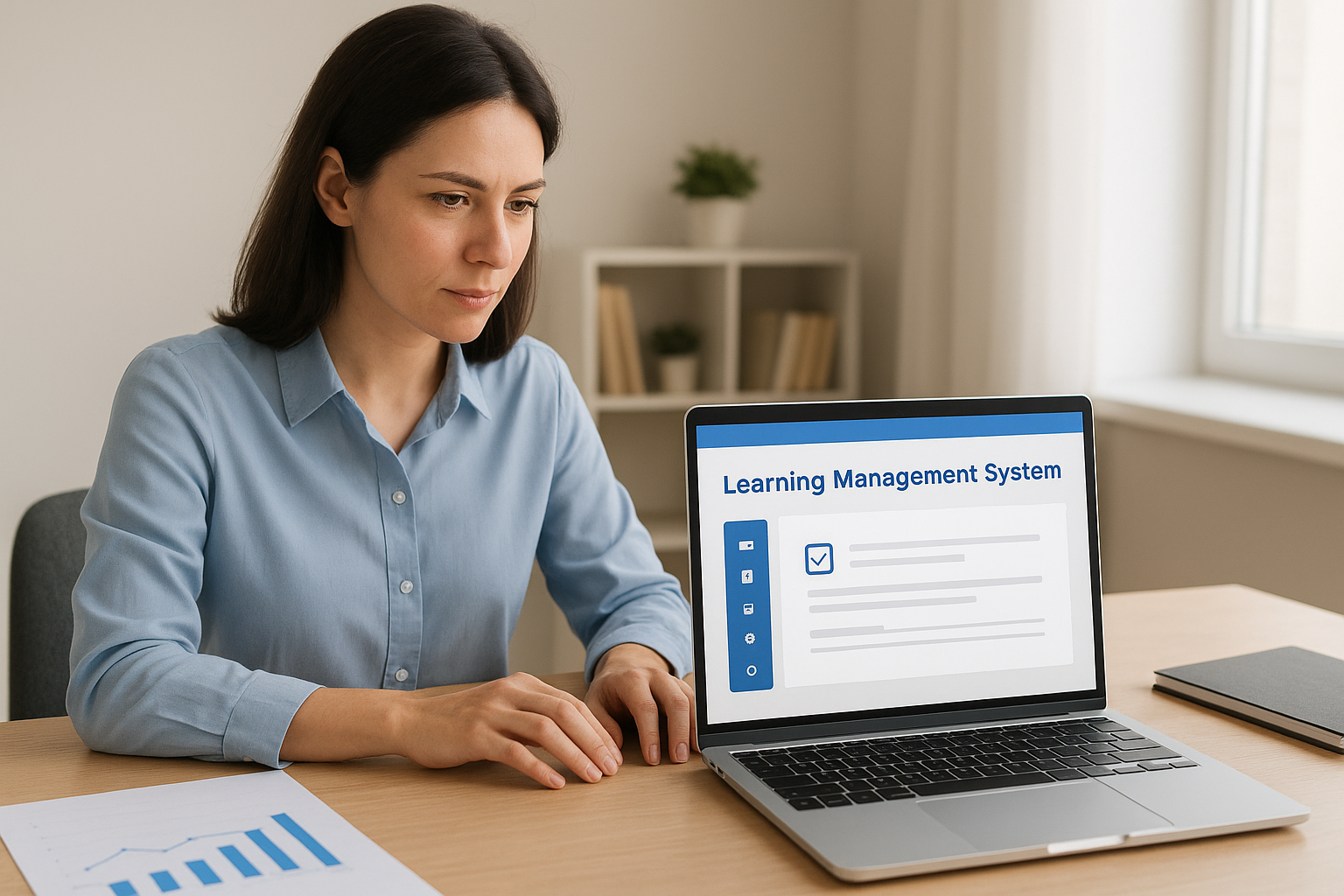
Once your goals and topics are locked in, the platform you pick determines whether any of it actually gets delivered, tracked, and defended. A learning management system built for compliance work looks different from one built for general employee onboarding, and picking the wrong one means rebuilding your whole program in two years. Look for a system that handles automated re-certification, role-based assignment, and audit-ready reporting out of the box, not as a bolt-on feature you pay extra for later.
Non-negotiable features for compliance work
Before you sign a contract, compare LMS platforms side by side against the features your program actually needs. Missing any of these means manual workarounds down the line.
| Feature | Why it matters |
|---|---|
| Automated re-certification reminders | Keeps expiring certifications from slipping through the cracks |
| Role-based course assignment | Matches content to the risk profile of each job function |
| On-demand audit reports | Produces timestamped records in minutes, not days |
| SSO and HR/CRM integration | Syncs new hires and role changes without manual entry |
| Tamper-evident recordkeeping | Meets standards like FDA 21 CFR Part 11 |
If your LMS can’t produce an audit report in five minutes, it’s not a compliance tool, it’s a course library.
Match the platform to your regulatory environment
Healthcare organizations need validated recordkeeping for FDA requirements. Financial firms need reporting that satisfies SEC and FINRA examiners. Global companies handling EU data need a system with GDPR-compliant data handling built in, not promised as a future update. A platform like Axis LMS is built around exactly this kind of compliance-specific segmentation, automated reporting, and integration with the HR systems you already run, so you’re not stitching together spreadsheets to prove what the system should already show you.
Test it before you commit
Run a pilot with one department before rolling the system out company-wide. Assign a real course, trigger a re-certification reminder, and pull an audit report exactly the way you would during a real audit. If the report takes more than a few clicks or requires IT support to generate, that’s a warning sign worth heeding before you migrate your entire training history onto the platform. A short pilot costs you a few weeks; a bad platform choice costs you a rebuild during your next audit cycle.
Step 4. Develop and assign your training content
With your platform chosen and your topics mapped to roles, it’s time to actually build the courses. Content development is where most compliance programs either earn trust or lose it, because employees can tell the difference between a course written by someone who understands their job and a generic module bought off a shelf. Decide upfront whether you’re building in-house, licensing off-the-shelf compliance libraries, or blending both, since each option changes your timeline and your budget significantly.
Build, buy, or blend
Off-the-shelf courses cover broad topics like anti-harassment basics or general data privacy quickly, but they rarely reflect your specific policies, equipment, or incident history. Custom-built content takes longer but ties directly to the risks you identified in Step 1. Most organizations land on a blend: licensed content for universal topics, custom modules for anything tied to your specific workflows or past incidents.
Content type: [licensed / custom / blended]
Topic: [from your risk register]
Format: [video, scenario-based quiz, microlearning]
Owner: [department responsible for accuracy]
Review date: [next scheduled update]
Design for retention, not just delivery
Long, text-heavy modules get clicked through and forgotten. Break content into short segments, five to ten minutes each, built around real scenarios your employees actually face, which is one of the core e-learning content best practices. A warehouse safety course should show your equipment, not stock photos. A harassment module should walk through your actual reporting process, not a generic flowchart. Scenario-based questions that force a decision, rather than a simple true-false quiz, do far more to test whether someone would apply the policy under pressure.
Content that mirrors an employee’s actual job sticks; generic content gets forgotten by lunch.
Assign by role, not by department alone
Use the role-based learning paths structure from Step 2 to automate assignment rules inside your LMS. New hires in finance should automatically receive anti-fraud and SEC training the day they’re added to the system, not whenever someone remembers to enroll them. Axis LMS lets you build these assignment rules once and connect them to your HR system, so automating online training triggers off a role change or new hire event instead of a manual checklist. That automation is also what keeps your audit trail clean, since every assignment carries a timestamp tied to a specific trigger, not a guess about when someone should have started training.
Step 5. Launch, track, and continuously improve
Rolling out training company-wide is where a lot of programs stall, because the LMS launch and adoption plan matters just as much as the content does. Announce the rollout with a clear deadline, a named point of contact for questions, and a short explanation of why each role is seeing the courses assigned to them. Corporate compliance training lands better when employees understand it’s tied to a real risk in their job, not a generic mandate from legal.

Watch the numbers that actually predict trouble
Dashboards only help if you’re checking the right numbers when you track employee training progress. Completion rate tells you almost nothing on its own, so pair it with scores, time-to-complete, and department-level drop-off.
| Metric | What it tells you |
|---|---|
| Completion rate | Whether people are starting and finishing on time |
| Assessment scores | Whether the material is actually landing |
| Time-to-complete | Whether employees are rushing through without reading |
| Overdue re-certifications | Where your audit exposure is building right now |
| Department drop-off | Which teams need a manager nudge or a content fix |
Review this table monthly, not once a year. A department with low scores and fast completion times is telling you something specific: people are clicking through without absorbing anything.
A dashboard that only shows completion percentages is hiding the metrics that actually predict a violation.
Automate the reminders you’d otherwise forget
Expired certifications cause more audit findings than missing content ever does. Set automated reminders to fire 30, 14, and 3 days before a certification lapses, and escalate to a manager if the employee still hasn’t acted. Axis LMS handles this natively, so automated re-certification runs in the background instead of relying on someone remembering to check a spreadsheet every quarter.
Build in a real feedback loop
Survey employees after each course, ask what was confusing, and check that feedback against your assessment scores. If a module consistently produces low scores or complaints about clarity, that’s a content problem, not a compliance problem, and it needs a fix before the next assignment cycle. Quarterly reviews of your risk register, cross-referenced against actual incident reports, tell you whether your program is closing gaps or just generating paperwork. Treat that review as part of the job, not an optional extra, because regulations and risks shift faster than most training calendars account for.
Keeping your compliance program on track
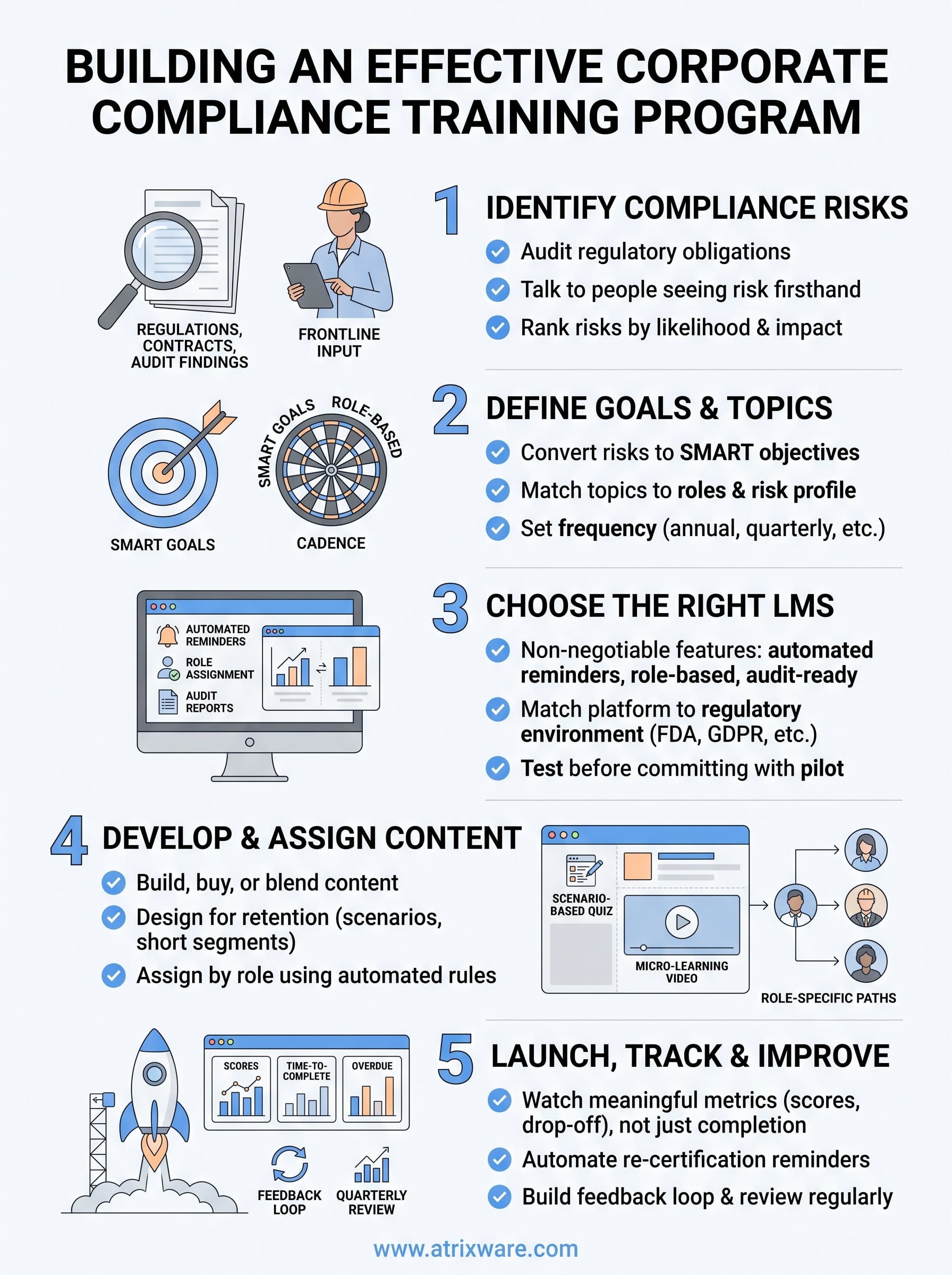
A strong corporate compliance training program isn’t a project you finish once and file away. It’s a cycle: identify risks, set measurable goals, pick a platform that can prove what happened, build content people actually remember, then track and adjust as regulations and incidents shift. Skip any one of those steps and you’re back to spreadsheets and guesswork the moment an auditor asks a hard question.
Getting the platform right makes every other step easier, since automated reminders, role-based assignment, and on-demand reporting turn a manual scramble into a system you can defend without notice. If you’re not sure whether your current setup can handle that, find out if you’re ready for an LMS and see exactly where the gaps are before your next audit cycle finds them for you.
