Not every training program fits neatly into a single delivery format. Some topics work best as self-paced online modules, while others need a live instructor to land. That’s exactly why blended learning models exist, they combine online and in-person (or synchronous and asynchronous) elements into a single training experience. The challenge isn’t whether blending works. Research and real-world results have already settled that. The challenge is picking the right model for your learners, your content, and your organizational goals.
The problem is that "blended learning" gets treated like one thing when it’s actually many. A flipped classroom looks nothing like a flex model. A rotation model serves different needs than an enriched virtual approach. Choosing the wrong structure can leave learners confused, administrators overwhelmed, and training budgets wasted on a format that doesn’t match the content. Understanding the distinctions between models is what separates a program that actually drives results from one that just checks a box.
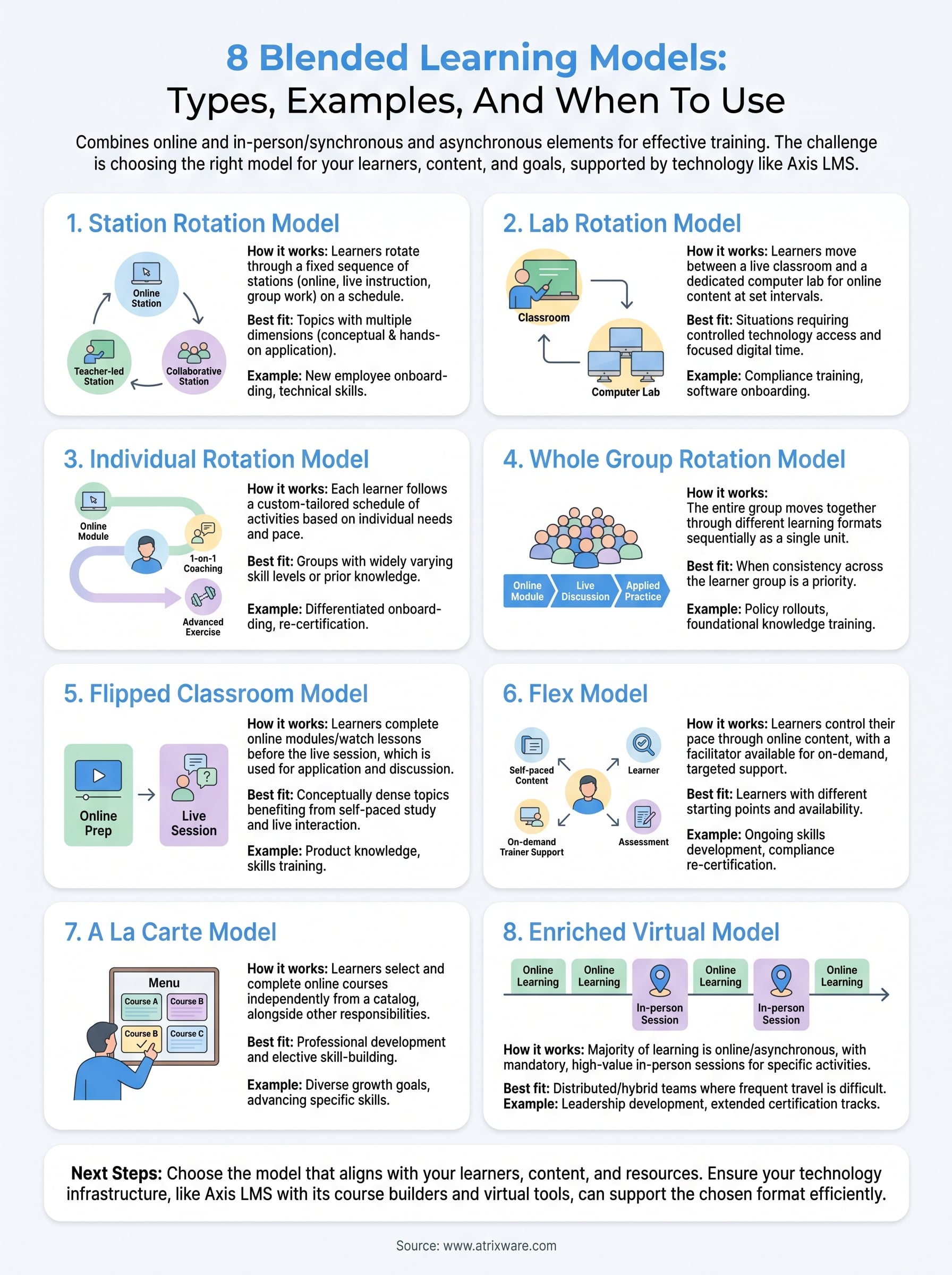
This article breaks down eight blended learning models, what each one looks like, where it works best, and when to use it. Whether you’re building employee onboarding, compliance training, or customer education, you’ll walk away knowing which model fits your situation. And if you’re running training through a platform like Axis LMS from Atrixware, you’ll see how features like course builders, automated workflows, and virtual classroom tools make it possible to implement these models without starting from scratch.
1. Station rotation model
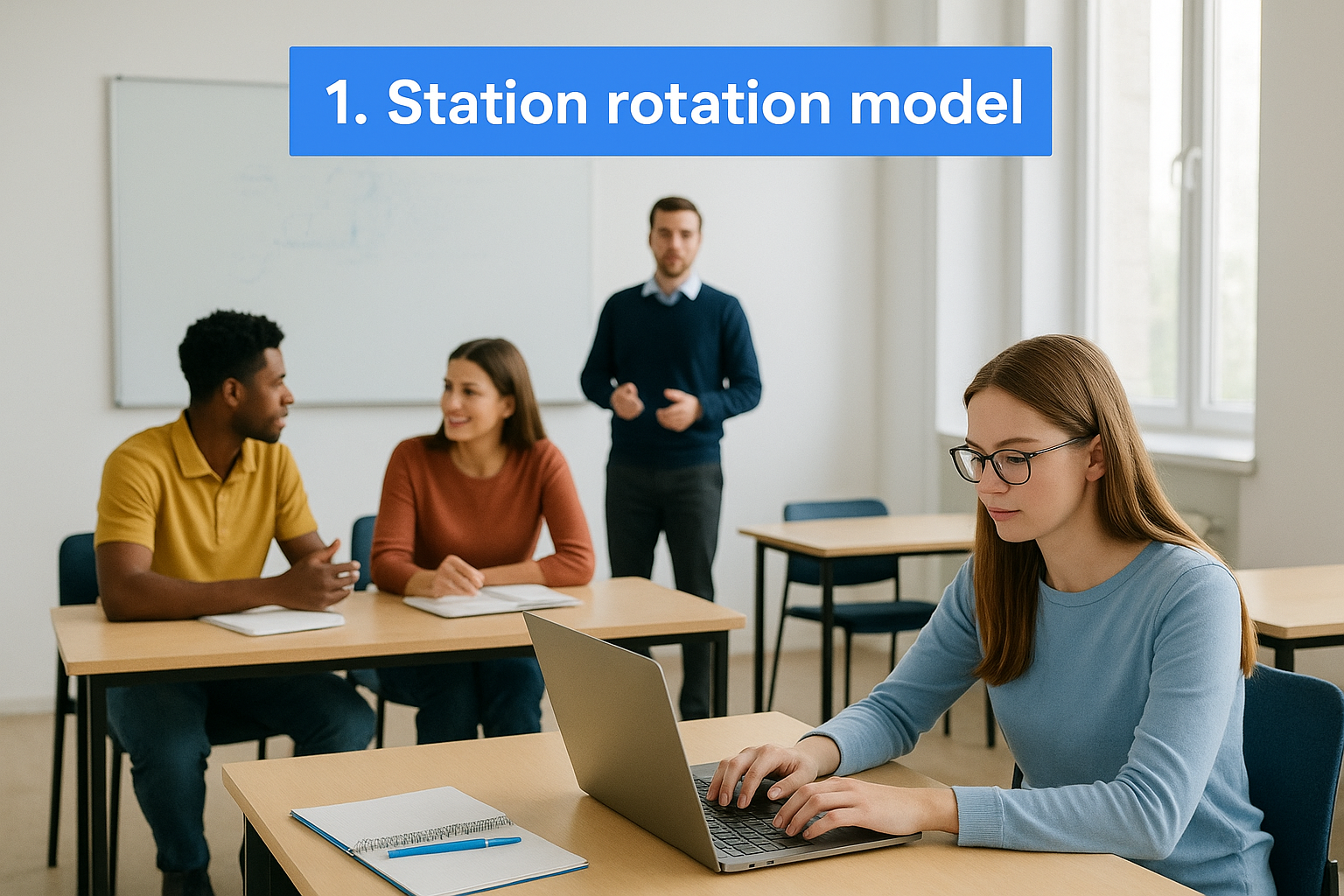
The station rotation model is one of the most structured blended learning models available, and it’s also one of the most practical to implement. Learners move through a fixed sequence of stations during a single session, with each station delivering a different type of learning activity. Some stations are online and self-directed; others involve live instruction or group collaboration.
How the model works
In a station rotation setup, you divide learners into small groups and assign each group to a starting station. Each station has a specific task, whether that’s watching a video, completing an online quiz, discussing with peers, or getting direct instruction from a trainer. Groups rotate on a set schedule until everyone has completed every station.
Best fit for learning goals
This model works best when your content covers multiple dimensions that a single format can’t handle alone. It’s especially effective for topics that require both conceptual explanation and hands-on application, like new employee onboarding, compliance training with scenario-based exercises, or technical skills development.
If your training mixes theory with practice, station rotation gives you a clean structure to deliver both without sacrificing either.
Example flow for a 60 minute session
Here’s what a three-station session of roughly 20 minutes each looks like:
| Station | Format | Activity |
|---|---|---|
| Station 1 | Online, self-paced | Watch a course module and complete a short quiz |
| Station 2 | Live instruction | Trainer-led discussion or demonstration |
| Station 3 | Collaborative | Group case study or role-play exercise |
What you need to implement it
To run this model, you need a dedicated space (physical or virtual) where groups can work in parallel without disrupting each other. You also need pre-built online content for the self-paced station, a timer to manage transitions, and a facilitator to run the live instruction portion.
How to support it in Axis LMS
Axis LMS lets you build and deploy online station content using its drag-and-drop course builder, so the self-paced portion is ready before your session begins. You can also use virtual classroom tools to run the live instruction station remotely for distributed teams, and set up automated completion tracking to see exactly who finished what.
Pitfalls to avoid and how to fix them
The biggest issue is uneven station timing. If one group finishes early and another runs long, the rotation breaks down. Fix this by running a pilot session to test your timing estimates, and building a short buffer activity into each station for fast finishers.
Metrics to track
Track quiz scores and completion rates from the online station to measure knowledge retention. Also monitor peer participation rates from the collaborative station and facilitator notes from live instruction to get a full picture of learner engagement across all three formats.
2. Lab rotation model
The lab rotation model is part of the rotation family of blended learning models, but it differs in one important way: online learning happens in a dedicated computer lab, separate from the main instruction space. Learners move between live instruction and the lab on a set schedule rather than rotating through multiple simultaneous stations.
How the model works
One group works with a live instructor while another completes self-paced digital content in the lab. The groups swap at a set interval, so every learner experiences both formats within the same session.
Best fit for learning goals
This model fits situations where you need controlled access to technology. It works well for compliance training, software onboarding, or any topic where learners need focused, uninterrupted time with a digital module.
If your learners get distracted when devices are present during live instruction, lab rotation solves that by separating the two environments completely.
Example flow for a 60 minute session
A two-group split keeps the session simple and manageable for most training teams. Adjust the rotation interval to match your content depth.
| Time | Group A | Group B |
|---|---|---|
| 0-30 min | Live instruction with trainer | Self-paced online module in lab |
| 30-60 min | Self-paced online module in lab | Live instruction with trainer |
What you need to implement it
You need a dedicated lab space with reliable devices and pre-built online content, plus a facilitator to manage live instruction while the other group works independently.
How to support it in Axis LMS
Axis LMS lets you pre-load course content so learners access their module the moment they sit down. Automated progress tracking shows where each learner stopped, so you never lose visibility between rotations.
Pitfalls to avoid and how to fix them
Thin online content is the most common issue. If the digital module is too short, learners finish early and sit idle. Build enough interactive elements into each module to fill the full rotation window.
Metrics to track
Track module completion rates and time-on-task from the lab to confirm learners are engaging rather than clicking through. Pair that with facilitator notes from the live side to get a complete picture of session effectiveness.
3. Individual rotation model
The individual rotation model is the most personalized of the rotation-based blended learning models. Instead of moving every learner through the same sequence, each person follows a custom rotation path built around their specific needs, gaps, or pace.
How the model works
A trainer or administrator assigns each learner a unique schedule that determines which stations or activities they complete and in what order. One learner might start with remedial online content while another moves straight to an advanced exercise. No two learners follow the same path within a single session.
Best fit for learning goals
This model works best when your learner group has widely varying skill levels or prior knowledge. It fits differentiated onboarding, re-certification programs, or any training where a single sequence would slow down experienced learners or overwhelm newer ones.
If advanced learners disengage while beginners catch up, individual rotation directly solves that gap.
Example flow for a 60 minute session
| Learner | Activity 1 (0-30 min) | Activity 2 (30-60 min) |
|---|---|---|
| New hire | Foundational online module | Trainer-led Q&A |
| Experienced employee | Advanced scenario exercise | Peer coaching session |
What you need to implement it
You need pre-built content at multiple difficulty levels and a clear system for assigning each learner to the right path. A facilitator should also be available to redirect learners who move faster or slower than expected.
How to support it in Axis LMS
Axis LMS supports learner-specific course assignments, so each person sees only the content relevant to their path. Automated progress tracking gives administrators real-time visibility without manually checking in with every individual.
Pitfalls to avoid and how to fix them
Managing too many individual paths at once can overwhelm your facilitation team. Limit your model to two or three distinct learner tracks rather than building fully custom paths for every person in the session.
Metrics to track
Track completion rates by learner track to see whether each path is calibrated correctly. Also monitor time-on-task data to catch paths where learners are consistently rushing or stalling, which usually signals that a content adjustment is needed.
4. Whole group rotation model
The whole group rotation model takes a different approach than the other rotation-based blended learning models because the entire group moves together rather than splitting into smaller clusters. Every learner experiences the same activity at the same time, which simplifies facilitation and keeps the session synchronized from start to finish.
How the model works
In this model, the full group rotates between two or more formats as a unit. For example, everyone completes an online module together, then the group shifts to a live discussion or hands-on activity before rotating to a final format. There are no parallel tracks running simultaneously, just one cohort moving through a structured sequence.
Best fit for learning goals
This model works best when consistency across your learner group is a priority. It’s a strong fit for compliance training, policy rollouts, or any topic where every participant needs to receive the same information in the same order.
If your training involves content that builds directly on itself, the whole group format prevents learners from encountering later material before they’re ready.
Example flow for a 60 minute session
| Time | Format | Activity |
|---|---|---|
| 0-20 min | Online, self-paced | All learners complete a digital module |
| 20-40 min | Live instruction | Trainer-led debrief and discussion |
| 40-60 min | Applied practice | Group exercise or scenario walkthrough |
What you need to implement it
You need pre-built digital content that the full group can access simultaneously, plus a live facilitator to lead the instructor-led portion. Reliable technology access for every learner at the same time is non-negotiable here.
How to support it in Axis LMS
Axis LMS lets you assign the same course module to your entire learner group with one action, and its reporting dashboard shows real-time completion so you know when the group is ready to rotate.
Pitfalls to avoid and how to fix them
The biggest risk is pacing mismatch. Fast learners finish the online segment early and lose momentum while others catch up. Build a short supplementary activity into the digital module to keep early finishers engaged without breaking the rotation schedule.
Metrics to track
Track group-level completion rates and average time-on-task for each station to confirm the pacing works. Also compare assessment scores before and after the session to measure whether rotating through multiple formats improved knowledge retention across the cohort.
5. Flipped classroom model
The flipped classroom is one of the most widely recognized blended learning models, and for good reason. It reverses the traditional sequence of instruction by moving direct teaching online and reserving live session time for deeper application and discussion.

How the model works
Learners watch recorded lessons or complete online modules before the session begins. When they arrive for the live portion, they already have baseline knowledge and can spend that time on questions, practice, and problem-solving with trainer support rather than passive listening.
Best fit for learning goals
This model works best for conceptually dense topics where learners benefit from revisiting material at their own pace. It suits skills training, product knowledge, or any content where live discussion adds more value than initial delivery.
If your live sessions are mostly spent presenting slides, the flipped classroom frees that time for the conversations that actually drive learning.
Example flow for a 60 minute session
| Phase | Format | Activity |
|---|---|---|
| Pre-session | Online, async | Watch module, complete reflection questions |
| 0-60 min | Live | Group discussion, Q&A, applied scenarios |
What you need to implement it
You need pre-recorded or structured online content learners can access before the session, plus a facilitator prepared to lead application-focused activities rather than a lecture during the live block.
How to support it in Axis LMS
Axis LMS lets you assign pre-session modules with due dates so learners arrive prepared. Automated completion tracking confirms who finished the content before the live session begins, saving you from guessing.
Pitfalls to avoid and how to fix them
The biggest risk is learners skipping the pre-work. Add a short required assessment at the end of the online module to confirm comprehension before the live session starts.
Metrics to track
Track pre-session completion rates to confirm learners arrive prepared, and monitor participation quality during the live portion to measure whether the flipped format is driving deeper engagement across your group.
6. Flex model
The flex model puts learner control at the center of the training experience. Unlike other blended learning models where the schedule dictates the sequence, the flex model gives each learner the freedom to move through online content at their own pace, with a facilitator available on-demand rather than leading the group from a fixed agenda.
How the model works
In a flex setup, online learning serves as the primary delivery mechanism. Learners work through digital modules, videos, or assessments independently, and a trainer circulates or stays available to provide targeted support when a specific learner needs it. The facilitator does not lead the group as a whole but responds to individual needs as they arise.
Best fit for learning goals
This model works best when your learners have different starting points and different amounts of time available. It suits ongoing skills development, product training, or compliance re-certification where learners don’t all need to start and finish at the same time.
If you’re managing a team with mixed schedules and varying experience levels, the flex model removes the bottleneck of synchronized delivery.
Example flow for a 60 minute session
| Learner Activity | Trainer Role |
|---|---|
| Works through assigned digital modules | Available for questions, not lecturing |
| Flags a concept that needs clarification | Provides one-on-one explanation |
| Completes an assessment when ready | Reviews results and adjusts next steps |
What you need to implement it
You need robust self-paced content that learners can work through without constant guidance, plus a facilitator comfortable with a support-not-lead role during the session.
How to support it in Axis LMS
Axis LMS makes flex delivery practical by letting you assign modular content that learners access on their own schedule. Automated progress reporting gives your team full visibility without requiring a facilitator to track everyone manually.
Pitfalls to avoid and how to fix them
The most common issue is learners stalling without self-direction skills. Add clear milestone prompts inside each module to keep learners moving when no one is actively directing them.
Metrics to track
Track time-on-task and completion rates per module to see where learners are moving efficiently and where they’re getting stuck. Also monitor facilitator intervention frequency to identify content sections that consistently require extra explanation.
7. A la carte model
The a la carte model gives learners more individual control than any of the other blended learning models in this list. Rather than rotating through stations or attending scheduled sessions, each learner selects online courses from a catalog and completes them independently, on their own schedule, alongside any in-person responsibilities they have.
How the model works
Learners browse a course catalog and choose what they want to complete, either based on personal development goals or recommendations from a manager. There is no fixed group sequence, so each person moves through content at their own pace without waiting on others.
Best fit for learning goals
This model suits professional development and elective skill-building over mandatory compliance training. It works best when your team has diverse growth goals and forcing everyone through the same curriculum would waste time for experienced learners.
If your learners already have baseline knowledge but need different skills to advance, a la carte lets each person close their own specific gaps.
Example flow for a 60 minute session
| Phase | Learner Activity |
|---|---|
| Selection | Browses catalog and picks a course |
| Active learning | Completes module at their own pace |
| Reflection | Submits a short assessment or summary |
What you need to implement it
You need a well-organized course catalog with clear descriptions so learners can identify what’s relevant. Without that structure, learners often choose by convenience rather than by actual skill gaps.
How to support it in Axis LMS
Axis LMS lets you build a browsable course library where learners self-enroll. You can also configure recommended learning paths alongside open options, giving learners both direction and autonomy within the same platform.
Pitfalls to avoid and how to fix them
Low completion rates are the biggest risk when learners have full control but no accountability structure. Add manager check-ins or completion deadlines to keep momentum without removing the autonomy that makes this model effective.
Metrics to track
Track self-enrollment rates and course completion percentages to identify which content resonates. Pair that with assessment scores to confirm that the courses learners choose are actually closing their skill gaps.
8. Enriched virtual model
The enriched virtual model is the most remote-friendly of all the blended learning models on this list. It delivers the majority of learning online while keeping mandatory in-person sessions reserved for experiences that genuinely require physical presence, like hands-on labs, capstone discussions, or high-stakes assessments.
How the model works
Learners complete most of their coursework online, asynchronously, and meet in person only at designated points in the program. Those in-person touchpoints are intentional and content-specific, not routine weekly check-ins.
Best fit for learning goals
This model suits distributed or hybrid teams where gathering everyone in one place is costly or logistically difficult. It works well for extended programs like leadership development or technical certification tracks that span multiple weeks.
If your team is spread across multiple locations, the enriched virtual model gives you the structure of a full program without requiring constant travel.
Example flow for a 60 minute session
| Phase | Format | Activity |
|---|---|---|
| Async (pre-session) | Online | Complete assigned modules and reflection tasks |
| In-person | Live | Capstone discussion or hands-on application |
What you need to implement it
You need a complete library of self-paced online content plus clearly defined criteria for when in-person sessions are required rather than simply optional for learners to skip.
How to support it in Axis LMS
Axis LMS lets you structure multi-week learning programs with a mix of online modules and scheduled live events tracked in one dashboard, so learners and administrators always know exactly what comes next.
Pitfalls to avoid and how to fix them
The most common problem is in-person sessions feeling disconnected from the online content. Map each live session directly to specific online modules so learners arrive with the right context already in place.
Metrics to track
Track module completion rates before each in-person session to confirm learners arrive prepared. Also monitor post-session assessment scores to measure whether the live touchpoints are reinforcing what the online content established.
Next steps
You now have a clear picture of eight distinct blended learning models and where each one fits your situation. The right model depends on your learner population, your content type, and the resources your organization can realistically support. Start by identifying which format aligns with your most pressing training need, then build from there rather than trying to redesign your entire program at once.
Picking the right model is only part of the work. Your technology infrastructure needs to support whatever format you choose, which means having a platform that handles both online and live components without requiring multiple disconnected tools. Axis LMS gives you drag-and-drop course building, automated progress tracking, and virtual classroom support all in one place. If you’re ready to see how it fits your specific situation, take the LMS readiness quiz to find out exactly where you stand and what your next move should be.
