Most new hires decide whether they’re staying or leaving within their first 90 days. And yet, many companies still rely on slide decks and policy documents to welcome them aboard. That’s where gamification for onboarding comes in, applying game mechanics like points, badges, challenges, and leaderboards to turn a forgettable first week into something people genuinely engage with.
The idea isn’t about turning work into a video game. It’s about leveraging the same psychological drivers, progress, recognition, competition, that keep people motivated. Gamified onboarding cuts time-to-productivity, builds confidence faster, and gives new employees a reason to actively participate instead of passively clicking through screens. Organizations that structure onboarding with engagement in mind consistently report stronger retention and faster ramp-up times.
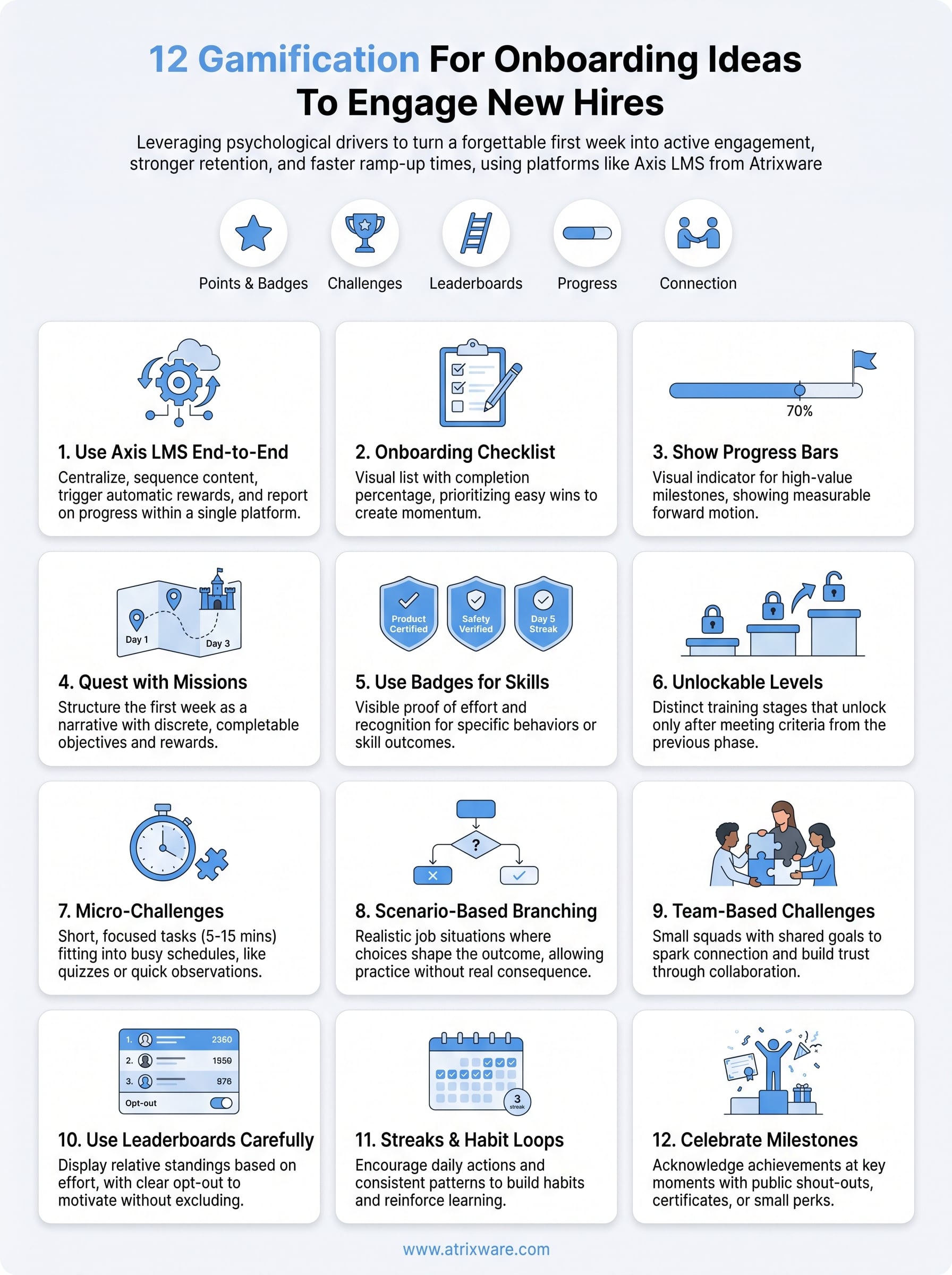
This article covers 12 practical gamification ideas you can apply to your onboarding program starting now. Whether you’re bringing on five people or five hundred, these strategies scale across roles and industries. And if you’re running your training through Axis LMS from Atrixware, many of these mechanics, badges, progress tracking, leaderboards, automated workflows, are already built into the platform, so implementation becomes a matter of configuration, not custom development.
1. Use Axis LMS to run gamified onboarding end to end
Running gamification for onboarding well requires more than creative ideas on a whiteboard. You need a platform that can sequence content, trigger rewards automatically, and report on progress without someone manually tracking it all. Axis LMS from Atrixware handles each of those functions inside one system, which is why it belongs at the center of your onboarding strategy.
What this approach is
This approach means treating Axis LMS as the operational backbone of your entire gamified onboarding program, not just a place to host videos. Instead of patching together separate tools for badges, progress bars, and course delivery, you configure everything inside a single connected system where game mechanics and learning content work together by design.
How to set it up in Axis LMS
Start by building your onboarding path as a structured learning track inside Axis LMS. Assign modules in sequence so learners unlock the next piece of content only after they complete the previous step. Then configure badges and point awards to trigger automatically when a learner finishes a module, passes a quiz, or logs in on consecutive days. Axis LMS also lets you set up automated congratulatory notifications at key milestones, so momentum keeps going without requiring an admin to watch it manually.
The more gamification logic you automate inside one platform, the less likely your program is to break down as your team scales.
Where it fits best in employee onboarding
Axis LMS works especially well for role-based onboarding, where sales, operations, and customer support teams each need a different training sequence with its own unlockable content and rewards. It also handles compliance-heavy programs cleanly, since you can gate certification modules behind completion requirements and pull audit-ready reports on demand.
What to track to prove it works
Use Axis LMS’s built-in reporting suite to monitor completion rates per module, average time to finish the full onboarding track, and quiz scores across cohorts. Set a baseline before you launch the gamified version so you can show leadership a clear before-and-after comparison. Login frequency during the first 30 days is another useful signal, since consistent logins indicate active engagement rather than passive dropout.
2. Add an onboarding checklist that creates momentum
A checklist sounds simple, but when you design it with clear intent, it becomes one of the most effective tools in gamification for onboarding. Each item a new hire checks off delivers a small but real sense of forward progress, and that feeling keeps people coming back to complete the next step.
What this idea is
An onboarding checklist is a visible list of tasks your new hire completes in sequence during their first days or weeks. Unlike a static to-do list, a gamified checklist shows completion percentage and rewards progress visually, so finishing one item creates the pull to start the next.
How to structure the checklist for quick wins
Put your easiest tasks first, like watching a welcome video or completing a profile. These small wins build confidence before harder tasks like role-specific training or compliance modules. Group tasks into daily or phase-based clusters so the list never feels overwhelming.
A new hire who finishes three tasks on day one is far more likely to return on day two than one who stares at a long, undivided list.
Common mistakes to avoid
Avoid loading the checklist with administrative paperwork that has nothing to do with role readiness. If every item feels like a bureaucratic obligation, the checklist loses its motivating effect. Also skip tasks that are missing clear instructions, since confusion kills momentum faster than almost anything else.
What to measure
Track the percentage of checklist items completed by the end of day one and the end of week one. Compare completion rates across cohorts to identify exactly where new hires consistently drop off and adjust your sequencing from there.
3. Show a progress bar for every step that matters
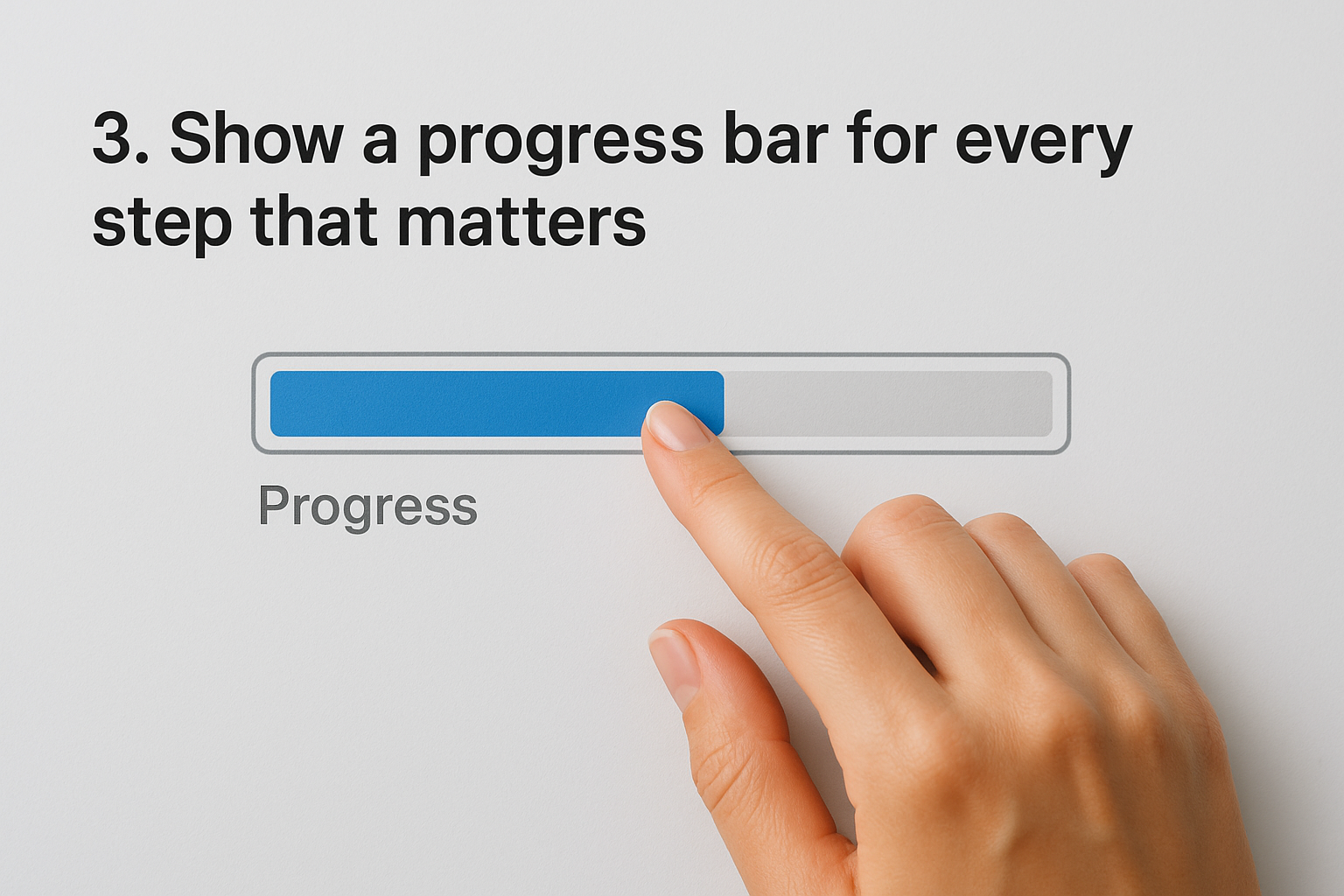
A progress bar is one of the most psychologically powerful tools in gamification for onboarding because it turns an invisible journey into something you can actually see moving. When new hires know exactly how far they’ve come and how much remains, they feel a pull to finish what they started instead of quietly disengaging.
What this idea is
Your new hire can’t feel progress if they can’t see it. A progress bar is a visual indicator that shows how much of a training track a learner has completed at any given moment. Rather than presenting someone with a flat list of tasks, a progress bar gives learners a measurable sense of forward motion that encourages continued participation.
How to choose the right progress moments
Not every action deserves its own bar. Focus progress tracking on high-value milestones like completing a core module, passing an assessment, or finishing a full role-specific training path. Tie the bar to outcomes that actually signal readiness, not just administrative checkboxes, so the visual progress reflects real learning.
If your progress bar moves every time someone opens a file without finishing it, the metric becomes meaningless fast.
Common mistakes to avoid
Avoid showing a single overall bar that covers the entire onboarding period, since watching it crawl from 0% to 100% over 90 days creates discouragement rather than momentum. Breaking progress into phase-specific bars keeps wins frequent and visible throughout the critical first weeks.
What to measure
Track average bar completion at the end of each defined phase, such as day seven and day thirty. Flag any learner whose bar stalls at the same point across multiple cohorts, since that pattern typically signals a content or clarity problem worth fixing immediately.
4. Turn the first week into a quest with missions
Framing your first week as a quest with defined missions shifts how new hires experience onboarding entirely. Instead of working through a generic agenda, they’re progressing through a structured narrative where each completed mission moves them closer to a clear finish line.
What this idea is
A mission-based onboarding structure breaks the first week into discrete, completable objectives grouped by theme or timeline, such as "Day 1: Learn the tools," or "Day 3: Shadow a teammate." Each mission has a defined goal, a clear action, and a visible reward upon completion, which gives the whole week a sense of purpose and direction rather than drift.
How to design missions by role
Build separate mission sets for each major role you hire into, since a sales rep and a customer success manager have entirely different ramp-up priorities. Assign missions that directly connect to real job outcomes, like completing a product demo walkthrough or submitting a first mock report, so the quest feels relevant rather than generic.
Missions tied to actual job tasks teach skills and build confidence at the same time, which a generic orientation schedule rarely achieves.
Common mistakes to avoid
Avoid assigning too many missions per day. Overloading new hires with five or six objectives before they’ve found the bathroom creates anxiety, not engagement. Also skip missions with vague completion criteria, since "get familiar with the company culture" gives no one a clear action to take.
What to measure
Track mission completion rates by day and flag any mission that fewer than 70% of hires finish on schedule. That threshold usually surfaces content gaps or unclear instructions worth addressing before the next cohort starts.
5. Use badges to reinforce key behaviors and skills
Badges give new hires visible proof of effort and recognition for completing specific actions throughout onboarding. When someone earns a badge for finishing their first compliance module or completing a product walkthrough, that signal motivates them to repeat the behavior rather than drift past it.
What this idea is
A badge is a digital award that triggers automatically when a learner completes a defined action, like finishing a training module or passing a quiz above a set score. In gamification for onboarding, badges function as lightweight but meaningful recognition that marks real skill milestones rather than just participation.
How to design badges people actually want
Tie every badge to a specific behavior or skill outcome so earning one feels like genuine achievement. Give badges descriptive names that connect to real job skills rather than generic labels. Here are three examples:
- Product Certified: awarded after completing the full product training path
- Safety Verified: earned when a learner passes the compliance assessment
- Day 5 Streak: triggered after five consecutive days of login activity
Common mistakes to avoid
Avoid creating badges for every minor action a new hire takes, since overuse quickly dilutes the value of each one. Also skip badges with no clear criteria, since learners need to know exactly what they did to earn recognition before the reward feels meaningful.
Badges tied directly to job-relevant skills carry far more meaning than ones handed out simply for showing up.
What to measure
Track badge earn rates by module to identify which skills new hires master quickly and which ones they skip. A badge that fewer than half your cohort earns signals a content gap worth addressing before it becomes a performance issue on the floor.
6. Create levels that unlock the next training path
Levels give your onboarding program a clear structure of progression, where completing one phase earns access to the next. That sequence creates anticipation rather than overwhelm, which keeps new hires moving through training with a sense of earned advancement instead of aimless clicking.
What this idea is
A level system divides your onboarding content into distinct stages, each unlocking only after the learner meets defined completion criteria from the stage before it. In gamification for onboarding, this approach mirrors how skills actually build, where foundational knowledge must come before advanced application, and where each unlocked path feels like a reward for the progress already made.
How to build level gates without slowing people down
Set your level gates at natural skill transitions rather than arbitrary time delays. For example, Level 1 might cover company tools and communication basics, while Level 2 unlocks role-specific product training only after a short competency check. Keep the gate requirements achievable within two to three days so learners reach each new level before motivation drops.
The goal of a level gate is to confirm readiness, not to manufacture friction.
Common mistakes to avoid
Avoid gating levels behind excessive quiz retakes or multi-step approvals that slow the learner down with no educational benefit. Also skip the temptation to create too many levels, since five or more stages in a two-week onboarding window dilutes the sense of advancement each level is meant to deliver.
What to measure
Track average time between level completions to identify where learners stall longest. A consistent bottleneck at the same gate across multiple cohorts signals that the content or the gate criteria needs adjustment before it affects your ramp-up timeline.
7. Run micro-challenges that fit into busy schedules
New hires rarely sit through an 8-hour training block. They field questions, shadow colleagues, and juggle setup tasks all at once. Micro-challenges solve this by delivering short, focused tasks that fit into gaps in the day rather than demanding large uninterrupted blocks of attention.
What this idea is
A micro-challenge is a single, completable task taking five to fifteen minutes, such as answering three product knowledge questions or watching a two-minute process video. In gamification for onboarding, micro-challenges keep learning active across the first 30 days without pulling new hires away from real work.
How to plan daily or weekly challenges
Assign challenges that connect directly to job tasks your new hire will face that week. A daily structure works for the first two weeks, then shift to two to three per week as onboarding slows and independent work picks up. Consider these formats:
- Quiz prompt: three knowledge questions tied to a recent module
- Observation task: identify one example of a company value in action
- Skill drill: complete a short practice scenario in your LMS
Design each challenge around one specific skill or piece of knowledge, not a cluster of loosely related topics.
Common mistakes to avoid
Avoid making micro-challenges optional without a visible consequence, since learners skip them when they feel like extras rather than core steps.
Also avoid challenges that repeat content from longer modules without adding a new angle, since repetition without purpose frustrates more than it reinforces.
What to measure
Track challenge completion rates by day to see where engagement drops and adjust your challenge difficulty accordingly.
Compare end-of-week assessment scores between cohorts that received micro-challenges and those that did not. A consistent score gap signals real retention, not just surface-level activity.
8. Use scenario-based branching to make training feel real
Standard training tells new hires what to do. Scenario-based branching shows them what happens when they make a specific choice, which creates a fundamentally different kind of learning experience. This format puts learners inside realistic job situations where their decisions shape the outcome, so they practice judgment before they ever face a real consequence.

What this idea is
Branching scenarios present your new hire with a realistic work situation and ask them to choose between two or three possible responses. Each choice leads to a different outcome, and the learner sees the result of their decision immediately. In gamification for onboarding, this approach replaces passive reading with active problem-solving that mirrors real work.
Scenarios where a wrong choice reveals a realistic consequence teach more than a paragraph explaining the correct policy ever will.
How to build scenarios around real job decisions
Pull your scenarios from actual situations your team encounters, like handling a frustrated customer, escalating a technical issue, or navigating a compliance edge case. Build each branch around choices your new hire will realistically face in their first 60 days so the training feels directly relevant rather than hypothetical.
Common mistakes to avoid
Avoid making one answer obviously correct and the others absurd, since that removes the thinking required and turns the scenario into a quiz with extra steps. Also skip scenarios that cover too many variables at once, because complexity without focus confuses more than it teaches.
What to measure
Track scenario retry rates to see which decisions trip up new hires most often. High retry counts on the same branch point to a knowledge gap worth addressing in your core training content before the next cohort starts.
9. Build team-based challenges to spark connection fast
Most new hires don’t just need skills. They need relationships built fast, and that’s difficult when your onboarding structure keeps everyone working in isolation. Team-based challenges give your new hires a structured reason to collaborate with colleagues early, turning training from a solo task into a shared experience that builds trust alongside real competency.
What this idea is
A team-based challenge groups your new hires into small squads and assigns them a shared goal to complete together during onboarding, like finishing a collaborative project, scoring collectively on a quiz, or working through a multi-step scenario. In gamification for onboarding, this approach layers social accountability on top of individual learning, giving people a direct reason to show up consistently for each other.
How to set up squads and shared goals
Keep your squads small, between three and five people, so every member has a visible role in the outcome. Assign goals that require genuine coordination, like each person covering a different module and then teaching their section to the group. Avoid goals where one person can carry the whole team with minimal input from the rest.
When each squad member depends on the others to complete a goal, participation stops being optional.
Common mistakes to avoid
Avoid creating squad goals that are purely competitive without a collaborative element, since competition without cooperation rarely builds the team trust you’re trying to establish in the first week. Also skip goals that rely on tools your new hires haven’t learned yet, since setup friction derails participation before the challenge even starts.
What to measure
Track squad completion rates alongside individual completion rates to see whether team accountability actually lifts overall engagement. Monitor whether the new hires who participated in team challenges show stronger 30-day retention scores than those who completed onboarding solo.
10. Use leaderboards carefully to motivate without backfiring
Leaderboards can accelerate engagement and healthy competition, but they can also demoralize the bottom half of your cohort before they ever find their footing. Handled well, a leaderboard gives people a real-time benchmark to measure themselves against. Handled poorly, it turns your onboarding into a public ranking that punishes slower learners for being new.

What this idea is
A leaderboard displays relative standings among participants based on points, completed tasks, or quiz scores. In gamification for onboarding, leaderboards create visible social proof that learning is happening across the group, which nudges competitive individuals to stay active. The challenge is designing one that motivates without excluding the people who need the most support.
How to design fair leaderboards and opt-outs
Build your leaderboard around effort-based metrics like tasks completed or logins maintained, not just raw quiz scores, since raw performance rankings punish people who came in with less prior knowledge rather than less effort. Give every participant a clear opt-out toggle so those who find rankings demotivating can remove themselves without consequence.
A leaderboard that lets participants opt out actually increases voluntary participation because it removes the fear of public failure.
Common mistakes to avoid
Avoid displaying bottom-ranked names publicly, since showing who is last creates shame rather than motivation. Also skip leaderboards that reset too frequently, as weekly resets prevent slower learners from ever building enough momentum to move up the board.
What to measure
Track whether completion rates improve among cohorts using leaderboards compared to those without them. Monitor whether opt-out rates stay low over time, since rising opt-outs signal the competition is doing more harm than good.
11. Add streaks and habit loops for the first 30 days
The first 30 days of a new hire’s experience set the behavioral patterns they carry into the rest of their tenure. Streaks and habit loops give you a structured way to build those patterns deliberately, using consistent daily actions that reinforce learning rather than letting engagement trail off after week one.
What this idea is
A streak is a consecutive-day count that resets when a learner misses a session. In gamification for onboarding, streaks tap into a well-documented psychological pattern: once someone builds a run, breaking it feels like a genuine loss, which motivates continued participation without requiring external pressure.
How to create streaks that support learning
Tie your streaks to meaningful daily actions like completing a short module, answering a practice question, or reviewing a key concept. Avoid requiring a full training session every day during the first week, since that pace burns people out before the streak has time to take hold. Instead, keep daily streak requirements short enough to complete in under ten minutes.
A streak that requires five minutes of focused effort will outlast one that demands an hour every single day.
Common mistakes to avoid
Avoid resetting streaks without any grace period, since one missed day due to a meeting or travel shouldn’t erase two weeks of consistent effort. Also skip streaks tied to passive actions like simply logging in, because opening an app without learning anything builds the wrong habit entirely.
What to measure
Track streak length distributions across your cohort at the 7-day, 14-day, and 30-day marks. Compare assessment scores between learners who maintained streaks and those who did not to confirm the habit loop is producing real knowledge retention.
12. Celebrate milestones with recognition and small perks
Recognition at key moments keeps new hires motivated to push through the full onboarding journey rather than treating completion as a formality. In gamification for onboarding, milestone celebrations signal that your organization pays attention to progress and values the real effort behind it.
What this idea is
A milestone celebration is a deliberate acknowledgment of a specific achievement, triggered at meaningful points like finishing week one, passing a certification, or completing the full onboarding track. These recognitions can take the form of public shout-outs, digital certificates, or small tangible perks like a gift card or company swag, each reinforcing that progress matters.
How to tie rewards to outcomes and values
Align every reward with a specific outcome or company value so recognition feels earned rather than arbitrary. For example, if your company values continuous learning, award a book credit when a new hire completes their first advanced module. Tie perks to behaviors you want repeated, not just to time spent in the system.
Recognition that connects directly to a company value teaches culture faster than any orientation slide deck can.
Common mistakes to avoid
Avoid giving the same reward to everyone regardless of effort or achievement level, since that approach eliminates the incentive to push further. Skip recognition that arrives days after the milestone occurs, because delayed acknowledgment loses its motivational impact almost entirely.
What to measure
Track redemption rates on any reward you offer to confirm the perk actually motivates your hires. Compare time-to-full-completion between cohorts that received milestone celebrations and those that did not to see whether recognition drives measurable results across your program.
Bring it all together
Gamification for onboarding works because it aligns with how people actually build habits and confidence, through small wins, visible progress, and consistent recognition. The 12 ideas in this article each address a different point in the new hire journey, from the first checklist item to the final milestone celebration. You don’t need to implement all of them at once. Start with two or three that match your current onboarding structure and add more as you see results.
The platform you use matters as much as the strategy behind it. Axis LMS from Atrixware gives you the tools to run badges, progress tracking, leaderboards, and automated workflows inside a single system, so your program stays consistent as your team grows. If you’re ready to see how it fits your organization, take the LMS readiness quiz to find out exactly where you stand and what to build next.
