If you manage an LMS, an HR system, or any platform with sensitive learner and employee data, you’ve probably asked who actually has access to what, and why. Identity and access management basics start with one simple question: how do you prove someone is who they claim to be, and then control exactly what they can touch once they’re inside? Get this wrong and you’re looking at compliance violations, data breaches, or training records that anyone can edit.
This article gives you a straight, no-fluff explanation of IAM: authentication versus authorization, the difference between roles and permissions, and how systems like single sign-on and multi-factor authentication fit together to secure access. You’ll walk away knowing exactly how these pieces work as a system, not just as buzzwords.
We’ll cover the core components of IAM, the principles that guide good access control like least privilege, and practical examples of how this plays out in real platforms, including training and compliance software where user permissions and audit trails matter just as much as course content.
Why identity and access management matters
Every breach headline you read usually traces back to the same root cause: someone accessed something they shouldn’t have. Whether it’s a stolen password, an overprivileged account, or a former employee whose login never got deactivated, the pattern repeats because most organizations still treat access as an afterthought instead of a system. Identity and access management basics exist precisely to close that gap, giving you a structured way to verify who’s requesting access and decide what they’re allowed to do once they’re in.
The cost of getting access wrong
Falling short here isn’t a theoretical risk. Weak access controls show up in real financial terms, from regulatory fines to the direct cost of investigating and remediating a breach. The National Institute of Standards and Technology, which publishes the federal government’s digital identity guidelines, treats identity verification and access control as foundational security requirements precisely because so many incidents start with an identity failure rather than a technical exploit (NIST SP 800-63). Attackers don’t need to break through a firewall if they can simply log in with credentials nobody bothered to revoke.
If you can’t answer who has access to what right now, you don’t have an access control system, you have a liability.
Compliance requirements you can’t ignore
Regulators care about this exact question. Frameworks like GDPR, HIPAA, and FDA 21 CFR Part 11 all require organizations to prove that only authorized people touched sensitive data, and that every access event is logged and traceable. For a training platform tracking employee certifications or a healthcare provider managing course completions tied to licensure, an auditor asking "who approved this access" needs a real answer backed by records, not a guess. Without a working IAM structure, you can’t produce that evidence, and that failure alone can trigger fines regardless of whether any actual harm occurred.
Governing access properly also protects you during audits that have nothing to do with a breach. Routine compliance reviews increasingly ask for access logs, role assignments, and proof that permissions get reviewed on a schedule rather than set once and forgotten. Organizations that already have IAM basics in place answer these requests in minutes. Everyone else scrambles to reconstruct who had access to what, often discovering gaps they didn’t know existed.
Efficiency gains beyond security
Security and compliance get most of the attention, but IAM also solves a quieter, everyday problem: wasted time. Employees who can’t get into the systems they need file help desk tickets. IT teams spend hours manually provisioning and deprovisioning accounts across a dozen disconnected tools. New hires sit idle waiting for access that should have been automatic on their first day. A properly built IAM setup, with role-based provisioning and single sign-on, removes most of that friction by granting the right access automatically based on a person’s role.
Scaling an organization without IAM basics in place gets painful fast. Manual access management works fine with twenty employees and three systems. It falls apart at two hundred employees and fifteen systems, especially once you add contractors, partners, and customers who all need different levels of access to different parts of your platform. Getting the fundamentals right early means you’re building on a system that scales with you, rather than retrofitting security controls onto a mess of ad hoc permissions later, which is always more expensive and more error-prone than doing it right the first time.
How identity and access management works
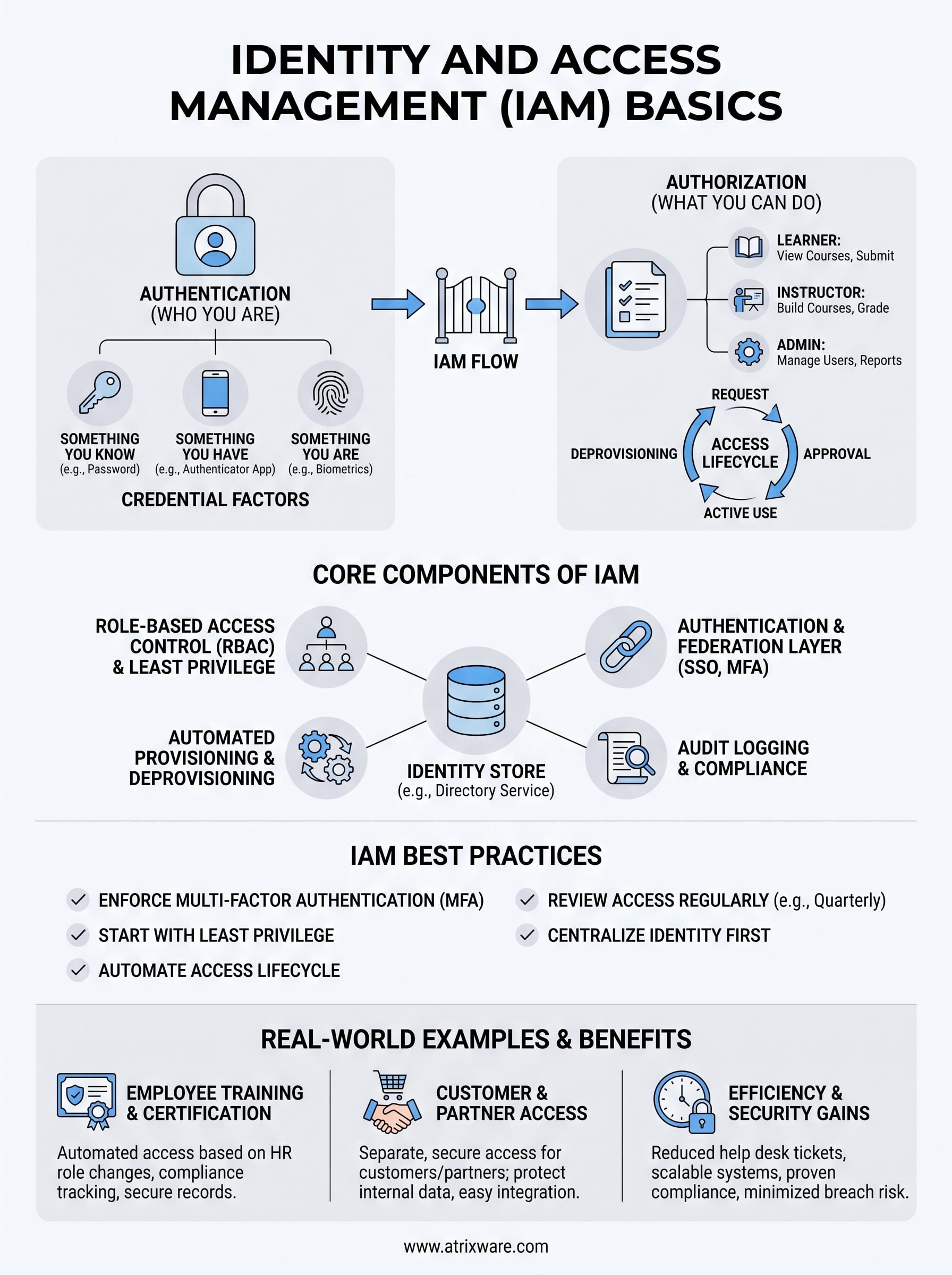
IAM works as a two-step gate: first the system verifies who you are, then it decides what you’re allowed to do. Every login, every API call, and every file request runs through this same authentication and authorization sequence, whether it’s a learner opening a course or an admin pulling a compliance report. Understanding this flow matters because it’s where identity and access management basics stop being abstract and start being a set of decisions you can actually design and audit.
Authentication: proving who you are
Authentication answers one question: are you really who you claim to be? Systems verify this through credential factors, and the strongest setups combine more than one type rather than relying on a password alone.

| Factor Type | Example | Strength |
|---|---|---|
| Something you know | Password, PIN | Weakest alone |
| Something you have | Authenticator app, security key | Strong when paired with a password |
| Something you are | Fingerprint, face scan | Strong, hard to steal remotely |
Combining two of these, known as multi-factor authentication, is why a stolen password alone rarely gets an attacker anywhere anymore.
Authorization: deciding what you can do
Once identity is confirmed, authorization takes over and checks that identity against a set of rules. Those rules typically map to a role, such as learner, instructor, or admin, and each role carries a defined set of permissions dictating which records, courses, or reports that person can view, edit, or delete. This is why two employees can log into the same LMS with identical credentials processes but land in completely different experiences depending on their job function.
The access lifecycle from request to revocation
Access isn’t a one-time grant, it’s a lifecycle that starts when someone requests access and ends when that access gets revoked. A well-run IAM setup tracks four stages: request, approval, active use, and deprovisioning, with every step logged for audit purposes.
Access management isn’t finished when you grant permission, it’s finished when you can prove you removed it.
Skipping that last stage is where most organizations quietly accumulate risk. Former employees, expired contractors, and old vendor accounts pile up with active credentials nobody remembered to shut off, and each one is a door left unlocked.
Core components of an IAM framework
A working IAM setup isn’t one tool, it’s a handful of components that work together to verify identity, enforce rules, and leave a paper trail. Any solid identity and access management framework needs an identity store, a permissions structure, a way to authenticate across systems, and an automated process for adding and removing access. Miss one piece and the whole chain weakens, no matter how strong the other parts are.
The identity store
Every IAM framework starts with a central directory that holds the authoritative record of who exists in your system, things like usernames, roles, department, and status (active, suspended, terminated). This is often a directory service like Microsoft Active Directory or Azure AD, or it’s built into the platform itself. Without a single source of truth for identity, you end up with duplicate accounts, stale records, and no reliable answer to a basic question: who is actually in this system right now?
Role-based access control
Once identity is established, role-based access control (RBAC) determines what each identity can do. Instead of assigning permissions person by person, you define roles and attach permission sets to them, so access scales predictably as people join, move, or leave.
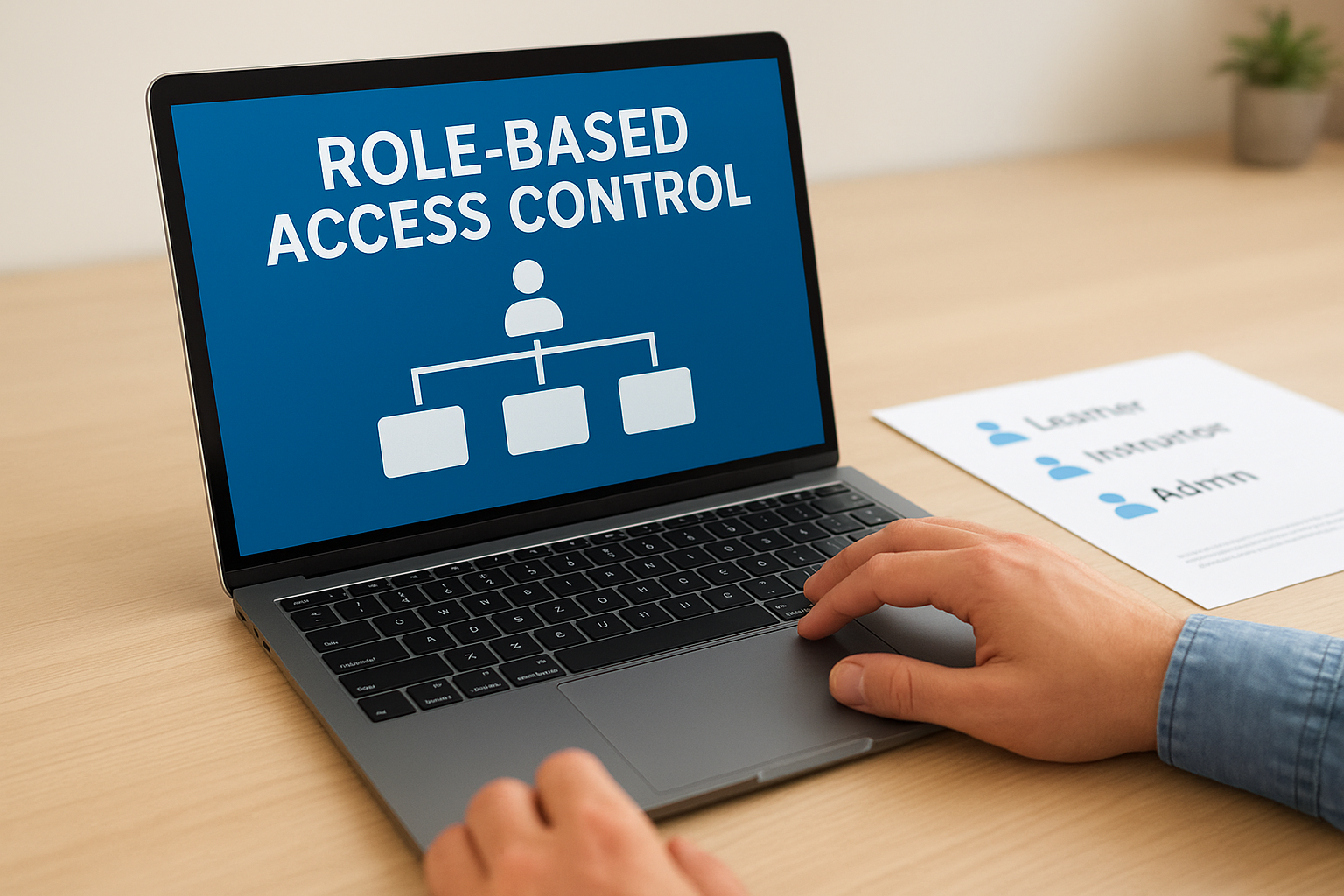
- Learner role: view assigned courses, submit assessments, download certificates
- Instructor role: build courses, grade submissions, view learner progress
- Admin role: manage users, configure integrations, pull compliance reports
The strength of RBAC isn’t in what it allows, it’s in everything it quietly denies by default.
This default-deny posture is what security teams call least privilege, and it’s the single most effective habit in any access control strategy.
Authentication and federation layer
This component handles the actual login process, including password checks, multi-factor prompts, and single sign-on connections to identity providers like Okta or Ping Identity. Federation lets one verified identity work across multiple connected systems, so a user doesn’t need separate credentials for the LMS, the CRM, and internal HR tools.
Provisioning, deprovisioning, and audit logging
The last piece automates the lifecycle actions discussed earlier, granting access when someone’s role qualifies them and revoking it the moment they leave or change positions. Paired with this is audit logging, which records every access event, approval, and permission change. Together, these two functions turn IAM from a one-time setup into a system you can actually govern, review, and defend during a compliance audit.
Common IAM standards and protocols
Understanding identity and access management basics means knowing the protocols that actually make cross-system login possible. These standards exist because no single vendor should have to reinvent authentication from scratch, and because interoperability between an LMS, an HR system, and a CRM depends on everyone speaking the same technical language. Without shared protocols, every integration becomes a custom, brittle project instead of a configuration you can set up in an afternoon.
SAML: the enterprise SSO workhorse
Security Assertion Markup Language, or SAML, has powered enterprise single sign-on for two decades and remains the default choice for connecting corporate identity providers like Okta, Azure AD, or Ping Identity to business applications. It works by having the identity provider issue a signed XML assertion confirming a user’s identity, which the application then trusts without asking for a password directly. The Organization for the Advancement of Structured Information Standards maintains the official specification, and most enterprise buyers still expect SAML support as a baseline requirement before they’ll even evaluate a platform (OASIS SAML Wiki).
OAuth 2.0 and OpenID Connect
While SAML dominates enterprise SSO, OAuth 2.0 handles a different problem: letting one application access resources on another system without handing over a password. Layered on top of it, OpenID Connect adds an identity layer, making it the standard behind most "log in with Google" or "log in with Microsoft" buttons you see today.
Pick the wrong protocol for the job and you either lock out enterprise customers or expose more data than the integration actually needs.
SCIM: automating provisioning at scale
System for Cross-domain Identity Management, or SCIM, solves the provisioning problem rather than the login problem. It gives systems a standard way to automatically create, update, and deactivate user accounts when something changes in the source system, like a new hire in the HR platform or a terminated contractor.
| Protocol | Primary Job | Common Use Case |
|---|---|---|
| SAML | Authentication | Enterprise SSO into business apps |
| OAuth 2.0 | Authorization | Granting limited API access without sharing passwords |
| OpenID Connect | Identity layer on OAuth | Consumer and business "log in with" flows |
| SCIM | Provisioning | Automatic account creation and deactivation |
Together, these four standards cover almost every real-world IAM integration you’ll encounter, and recognizing which one solves which problem saves you from asking a vendor for the wrong feature entirely.
Best practices for implementing IAM
Knowing how IAM works is one thing. Rolling it out without creating chaos is another. Implementing identity and access management basics successfully comes down to a handful of disciplined habits, not a single big software purchase, and skipping any one of them tends to reintroduce the exact risks IAM is supposed to eliminate.
Start with least privilege by default
Grant new accounts the minimum access they need to do their job, nothing more, and require a specific approval to add anything beyond that baseline. Default-deny access stops the slow creep of permissions that happens when admins grant broad access "just in case" someone needs it later. Reversing an overprivileged account after the fact is far harder than never granting the excess access in the first place.
Automate the access lifecycle
Manual provisioning and deprovisioning is where most access failures start. Connect your IAM setup to your HR system or CRM so that role changes, terminations, and new hires trigger access updates automatically instead of relying on someone remembering to file a ticket.
- Provision access the moment a role is confirmed, not days later
- Deprovision immediately on termination, same day, not end of month
- Review dormant accounts quarterly and disable anything unused for 90+ days
- Log every provisioning and deprovisioning event for audit purposes
Enforce multi-factor authentication everywhere it matters
Passwords alone are not a serious defense anymore. Multi-factor authentication should be mandatory for any account with admin rights, access to compliance records, or the ability to export learner and employee data. Treat MFA as a baseline requirement, not an optional upgrade for security-conscious users.
The best IAM implementation is the one nobody notices, because access just works and nothing slips through unnoticed.
Review access on a fixed schedule
Permissions drift over time as people change roles, take on temporary projects, or move departments without ever losing their old access. Scheduled access reviews, ideally quarterly, catch this drift before it becomes an audit finding. Assign a specific owner to each review cycle so it actually happens instead of getting quietly skipped when things get busy.
Centralize identity before adding more integrations
Adding SSO, SCIM provisioning, or a new CRM integration on top of scattered, duplicate identity records only multiplies the mess. Fix your identity store first, consolidating duplicate accounts and confirming every active user maps to one authoritative record, before layering on more connected systems. Every integration you add afterward inherits whatever mess exists at the identity layer, so cleaning it up early saves rework later.
Real-world examples of IAM in action
Abstractions about roles and permissions only click once you see them applied to an actual system. Training platforms are a good testing ground because they combine multiple audiences, employees, customers, and partners, all needing different levels of access to the same underlying content. Looking at how IAM plays out in a real LMS deployment shows exactly why identity and access management basics aren’t just an IT concern, they’re a training and business operations concern too.
Employee training and certification tracking
Consider a manufacturing company running safety and compliance training through an LMS. New hires get provisioned automatically the moment HR marks them active, pulling their department and job title to assign the correct learner role and required course list without an admin lifting a finger. When an employee moves from the warehouse floor to a supervisor position, their role updates and they instantly gain access to supervisor-level safety modules and reporting dashboards. Audit logging captures every certificate issued and every course completion, so when an OSHA auditor asks who completed fall-protection training last quarter, the answer is a report, not a scramble through email threads.
Customer training and e-commerce access
Now picture a software company selling product certification courses to customers. Customer accounts authenticate through the same platform but carry entirely different permissions than employee accounts, limited strictly to the courses they purchased, with no visibility into internal compliance records or employee data. Payment confirmation through the e-commerce layer triggers automatic provisioning, granting course access within seconds of checkout rather than requiring manual approval. This separation matters because a single identity breach on the customer side should never expose employee certification records, and proper role isolation is what keeps those two worlds from touching.
Channel partner and B2B training
Finally, think about a distributor training its network of reseller partners on new product lines. Partner organizations each get a distinct set of seat licenses and a designated admin who manages their own users, while the vendor retains oversight through federated single sign-on tied to each partner’s own identity provider.
Good IAM design means three completely different audiences can use the same platform without ever seeing each other’s data.
| Audience | Access Scope | Provisioning Trigger |
|---|---|---|
| Employees | Internal courses, compliance reports | HR system role change |
| Customers | Purchased courses only | E-commerce checkout |
| Channel partners | Assigned product training | Partner admin invite |
Each scenario uses the same underlying framework, just configured differently, which is exactly the point of building IAM basics right the first time.
Putting IAM basics into practice
Identity and access management basics boil down to two questions asked over and over: who is this person, and what should they be allowed to touch? Get authentication and authorization right, back them with role-based access control and a clean identity store, and most of the security and compliance headaches covered above simply stop happening. The organizations that struggle with audits, breaches, and access chaos are almost always the ones that never built these fundamentals in the first place.
You don’t have to guess how this looks inside a real training platform. Axis LMS applies these exact principles, role-based permissions, SSO, automated provisioning, and audit logging, to employee, customer, and partner training alike. If you’re evaluating whether your current setup measures up, try the admin demo and see how access control works when it’s built in from the start, not bolted on after a problem forces your hand.
