SSO gives your users one set of credentials to access multiple systems, your LMS, CRM, HR platform, and more, without logging in separately each time. That’s a major convenience win. But it also means a single compromised account can unlock everything. Getting single sign-on security best practices right isn’t optional; it’s the difference between streamlined access and a wide-open attack surface.
At Atrixware, we build Axis LMS with SAML SSO support baked in, connecting to identity providers like Okta, Azure AD, Salesforce, and Ping Identity. We’ve seen firsthand how organizations roll out SSO to simplify training access for employees, customers, and partners, and we’ve also seen what happens when the security side gets overlooked. Misconfigured sessions, missing MFA, and loose access policies can quietly erode the protection SSO is supposed to provide.
This guide breaks down eight specific, actionable practices to harden your SSO implementation. Whether you’re setting up SSO for the first time or tightening an existing deployment, these steps cover the technical controls and policies that actually reduce risk, from protocol selection and session management to monitoring and incident response.
1. Implement SSO in Axis LMS with a trusted IdP
Your SSO setup is only as strong as the identity provider (IdP) sitting behind it. Axis LMS supports SAML SSO natively with providers like Okta, Azure AD, Salesforce, and Ping Identity, which gives you solid options, but you still need to configure everything correctly to follow single sign-on security best practices from the start.
What to do
Choose an enterprise-grade IdP that supports both SAML 2.0 and OAuth 2.0/OIDC, and configure it as the single authority for all authentication decisions. Connect your Axis LMS instance directly to that IdP so users authenticate through one controlled gateway rather than through separate credential stores.
Why it matters
When every authentication event flows through one trusted IdP, you get a central point to apply policies, audit access, and respond to incidents. A compromised local password in your LMS matters far less when the IdP is the enforcer.
A single trusted IdP means one place to enforce policy, one place to audit logins, and one place to cut access when something goes wrong.
How to implement in SAML
In your IdP, create a SAML 2.0 application for Axis LMS and download the metadata XML. Inside Axis LMS, upload that metadata under your SSO configuration settings. Set the NameID format to persistent or email, and confirm that the assertion consumer service URL matches your Axis LMS domain exactly.
How to implement in OAuth and OIDC
Register Axis LMS as a confidential client in your IdP’s OAuth/OIDC application directory. Use the authorization code flow rather than the implicit flow, store the client secret server-side, and lock redirect URIs to your exact Axis LMS domain with no wildcards.
Mistakes to avoid
- Leaving a local admin account active after enabling SSO
- Using a self-signed certificate in production for the SAML metadata exchange
- Allowing wildcard redirect URIs in your OAuth/OIDC configuration
- Skipping regular reviews of which apps are connected to the IdP
Quick checklist
- Enterprise IdP selected and fully configured
- SAML metadata exchanged or OAuth/OIDC client registered
- Local fallback accounts removed or restricted to break-glass use only
- NameID format and redirect URIs locked to your Axis LMS domain
- IdP application reviewed and approved by your security team
2. Require phishing-resistant MFA everywhere
SSO condenses all your access into one login, which makes that login an obvious target. Requiring phishing-resistant multi-factor authentication (MFA) at the IdP level is one of the most impactful single sign on security best practices you can apply, because it stops credential theft from translating into full account compromise across every connected system.
What to do
Configure your IdP to require hardware security keys (FIDO2/WebAuthn) or passkeys as the required second factor. Drop SMS OTP and email-based codes entirely, as both are vulnerable to real-time phishing and interception.
Why it matters
Standard TOTP codes can be captured by a phishing page and replayed instantly against your IdP. FIDO2-based authenticators are cryptographically bound to the specific origin domain, so even a stolen password cannot produce a valid authentication without physical access to the registered hardware key.
A stolen password combined with FIDO2 MFA gives an attacker nothing, because they cannot produce a valid response without the registered physical device.
How to implement in SAML
Add an MFA policy at the IdP application level for your Axis LMS SAML app. Set that policy to require a phishing-resistant factor before the IdP issues any SAML assertion, regardless of how recently the user last authenticated.
How to implement in OAuth and OIDC
Use the acr_values parameter in your authorization request to demand a specific authentication assurance level. Verify the returned acr claim in the ID token server-side before granting access to any protected resource.
Mistakes to avoid
Watch for these common gaps that undermine your MFA requirement:
- Accepting SMS OTP as a valid MFA factor
- Allowing users to skip MFA enrollment during initial onboarding
- Applying MFA only to admins and leaving standard learner accounts unprotected
Quick checklist
Use this list to confirm your MFA setup is solid before go-live:
- FIDO2/WebAuthn or passkeys enforced at the IdP
- SMS and email OTP removed as accepted factors
- MFA policy scoped directly to the Axis LMS application
acrclaim validated server-side in OIDC token responses
3. Lock down identity provider administration
Your IdP admin console controls every authentication policy, every connected application, and every user account in your environment. If an attacker gains IdP admin access, your entire SSO setup is compromised regardless of how well you’ve hardened everything else.
What to do
Restrict IdP administrative access to the smallest possible group of people, and require a dedicated admin account that is completely separate from each person’s standard user account. Never let administrators use their day-to-day credentials to access administrative functions.
Why it matters
Admin-level access lets someone change MFA policies, register new SSO applications, or create backdoor accounts without triggering obvious alerts. A single compromised admin account can undo every security control you’ve built, including the ones covered throughout these single sign on security best practices.
One compromised IdP admin account can silently disable MFA, register rogue applications, and create backdoor access across every connected system.
How to implement in SAML
Set up a separate privileged role inside your IdP that is never used for standard activity. Require step-up authentication before any SAML application configuration, metadata, or certificate can be modified.
How to implement in OAuth and OIDC
Restrict OAuth management API access using scoped service accounts with the minimum permissions needed. Require re-authentication before any client application settings can be changed, and audit every registered OAuth client on a fixed schedule.
Mistakes to avoid
- Using your standard user account as an admin account
- Skipping MFA enforcement on admin-level roles
- Granting permanent admin access instead of time-limited, just-in-time provisioning
Quick checklist
Confirm these controls before considering your IdP administration secure:
- Dedicated admin accounts separated from standard user accounts
- Phishing-resistant MFA enforced on all IdP admin roles
- Admin activity logged and reviewed on a regular schedule
- Time-limited access enabled for privileged operations where your IdP supports it
4. Enforce least privilege across apps, roles, and scopes
SSO makes access convenient, but convenience without control breeds over-permissioned accounts. Least privilege means every user, role, and application gets only the access they need to do their job, nothing more. Apply this principle consistently across your entire SSO environment as part of your single sign-on security best practices.
What to do
Map every user group to a specific role in Axis LMS and mirror that structure in your IdP. Assign scopes and claims based on job function, not on what might be useful someday. Audit role assignments on a regular schedule and remove access that is no longer justified.
Why it matters
Over-permissioned accounts are a force multiplier for attackers. If a learner account has admin-level attributes pushed through an SSO assertion, a single credential compromise exposes far more than it should.
The broader an account’s permissions, the more damage a single compromised login can do across every connected system.
How to implement in SAML
Use SAML attribute statements to pass role claims from your IdP to Axis LMS. Define discrete attribute values for each role, such as learner, manager, or admin, and configure Axis LMS to map those values to specific permission tiers rather than granting broad defaults.
How to implement in OAuth and OIDC
Request only the OAuth scopes your application genuinely needs and reject tokens that include unexpected scopes. Validate role claims inside the ID token or userinfo endpoint response before granting access to any protected functionality.
Mistakes to avoid
- Requesting broad scopes like
adminwhen read-only access is sufficient - Assigning default roles that include write or delete permissions for new users
- Skipping periodic access reviews after organizational changes
Quick checklist
- Role-to-attribute mapping defined in the IdP and Axis LMS
- Scopes limited to the minimum required per application
- Access reviews scheduled at least quarterly
- Unexpected role claims flagged or rejected at the application layer
5. Validate assertions and tokens on every sign-in
Receiving a SAML assertion or an OAuth token is not the same as trusting it. Skipping or shortcutting validation hands attackers a straightforward path to forge credentials or replay captured tokens, making proper validation a cornerstone of single sign-on security best practices.
What to do
Your application must verify every assertion and token on every request, not just at initial login. Check the cryptographic signature, confirm the issuer matches your expected IdP, and reject anything that fails.
Why it matters
An unvalidated assertion can be replayed by an attacker who intercepts it in transit. Token injection attacks exploit services that blindly accept any well-formatted response without checking its origin or integrity.
Skipping signature verification is equivalent to accepting an ID without checking the photo.
How to implement in SAML
Verify the XML digital signature on every SAML response and assertion using your IdP’s published public key. Confirm the Audience restriction matches your Axis LMS entity ID exactly, and reject assertions where NotOnOrAfter has passed.
How to implement in OAuth and OIDC
Validate the JWT signature using keys retrieved from your IdP’s JWKS endpoint. Check the iss, aud, and exp claims on every token, and reject any token where those values differ from what your application registered.
Mistakes to avoid
- Accepting unsigned SAML assertions from any source
- Skipping expiry checks because clock drift feels like a minor concern
- Trusting role or scope claims without first verifying the token signature
Quick checklist
- Signature validated against IdP public key on every assertion and token
- Audience and issuer claims checked before granting access
- Expired tokens rejected with no grace period exceptions
- JWKS endpoint cached with automatic key refresh enabled
6. Tighten sessions, timeouts, and logout behavior
A long-lived session is a standing invitation for unauthorized access. Once a user authenticates through SSO, the session token becomes the key to every connected application, and leaving that session open indefinitely multiplies your exposure across every integrated system, including Axis LMS.
What to do
Set short absolute session lifetimes at the IdP level and configure idle timeouts that expire inactive sessions quickly. Implement single logout (SLO) so that signing out of one application terminates the session across every connected service simultaneously.
Why it matters
Session hijacking is a realistic threat when tokens stay valid for hours or days. An attacker who captures a valid session cookie gains access to every SSO-connected system without credentials, making tight session controls a central part of single sign-on security best practices.
A stolen session token is as dangerous as a stolen password if your timeout and logout policies leave it valid for too long.
How to implement in SAML
Configure the SessionNotOnOrAfter attribute in your SAML assertions to enforce a hard expiry. Register the SLO endpoint in Axis LMS so logout propagates to all service providers the moment a user signs out.
How to implement in OAuth and OIDC
Issue short-lived access tokens (15 minutes or less) paired with expiring refresh tokens. Implement token revocation using RFC 7009 so you can invalidate sessions immediately when a user logs out or an incident is detected.
Mistakes to avoid
- Setting session timeouts longer than eight hours for any user role
- Skipping SLO configuration and leaving orphaned sessions active after logout
- Issuing refresh tokens with no expiry or rotation policy
Quick checklist
- Absolute session lifetime configured at the IdP
- Idle timeout set and tested across all connected apps
- SLO endpoints registered and verified in Axis LMS
- Access token lifetime capped at 15 minutes or less
7. Automate provisioning and deprovisioning with SCIM
Manual account management creates gaps. When someone leaves your organization or changes roles, a human-driven offboarding process often lags by hours or days, leaving active SSO access in place long after it should be gone. Automating that lifecycle with SCIM (System for Cross-domain Identity Management) closes that window reliably.

What to do
Configure your IdP to push user provisioning and deprovisioning events directly to Axis LMS via SCIM 2.0. When HR terminates an employee in your source system, that event should trigger automatic account suspension in every connected application without any manual steps.
Why it matters
Orphaned accounts are one of the most common and preventable access risks in any SSO environment. A former employee whose Axis LMS account remains active after departure still carries valid credentials that can be exploited, either by the person directly or by an attacker who compromises that dormant account.
Automated deprovisioning eliminates the human delay that turns a two-minute termination into a two-week access window.
How to implement in SAML
SAML does not carry lifecycle events natively, so pair your SAML authentication setup with a SCIM 2.0 channel running alongside it. Your IdP handles authentication through SAML while SCIM manages account creation, updates, and deletion independently.
How to implement in OAuth and OIDC
Use your IdP’s SCIM provisioning connector to sync user attributes and group memberships into Axis LMS. Revoke active OAuth tokens immediately when a deprovisioning event fires so existing sessions cannot outlive account termination.
Mistakes to avoid
- Relying on manual deprovisioning tickets instead of automated SCIM events
- Failing to test deprovisioning flows before go-live
Quick checklist
- SCIM 2.0 enabled between your IdP and Axis LMS
- Deprovisioning tested end-to-end with a real account
- Token revocation confirmed to fire on account deletion
8. Rotate keys and certs, monitor events, and plan recovery
Cryptographic keys and certificates age out of trust over time, and unmonitored SSO environments give attackers room to move undetected. Combining scheduled key rotation, real-time event monitoring, and a tested recovery plan turns these three disciplines into one coherent defense layer.
What to do
Rotate your signing keys and TLS certificates on a fixed schedule, at least annually, and immediately after any suspected compromise. Set up automated alerts for anomalous login patterns, failed authentication spikes, and any IdP configuration change that happens outside a change window.
Why it matters
An expired or leaked signing key lets an attacker forge valid SAML assertions or OAuth tokens with no way for your application to detect the fraud. Proactive monitoring catches incidents before they escalate, while a tested recovery plan limits damage when something does go wrong.
Unrotated keys are silent liabilities; you won’t know they’ve been stolen until the damage is done.
How to implement in SAML
Update your SAML signing certificate in the IdP and push the new metadata to Axis LMS before the old cert expires. Overlap both certs briefly during the transition to avoid a service outage.
How to implement in OAuth and OIDC
Publish new keys through your JWKS endpoint and use key IDs (kid) so clients can automatically pick up the rotation without downtime or manual intervention.
Mistakes to avoid
- Letting signing certificates expire without a renewal process in place
- Storing recovery credentials in the same system you’re trying to recover
Quick checklist
- Key rotation schedule documented and assigned to a named owner
- Anomaly alerts active in your IdP
- Recovery runbook tested at least once per year against these single sign on security best practices
Next steps
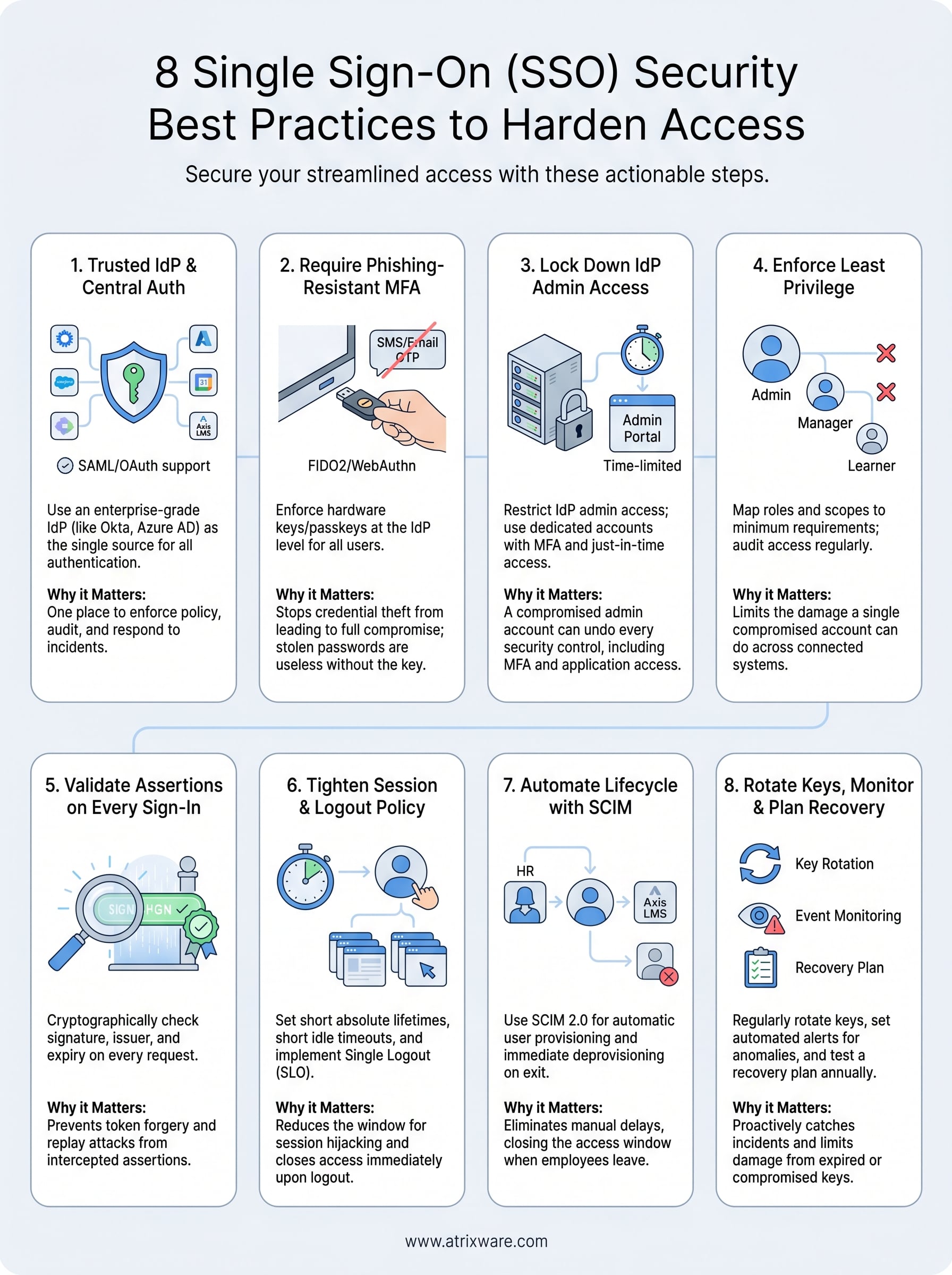
These eight practices give you a complete framework for applying single sign-on security best practices across every layer of your deployment, from IdP selection and MFA enforcement to session control and automated deprovisioning. Working through them in order, rather than skipping the steps that feel less urgent, closes the gaps that attackers look for most consistently.
Your training platform needs to support this kind of secure SSO configuration without requiring custom workarounds on top. Axis LMS connects natively with Okta, Azure AD, Salesforce, and Ping Identity through SAML SSO, so you get a tested and documented foundation from day one. Security is built into the platform, which means your IT and security teams spend less time patching gaps and more time on higher-value work across your organization.
Take the LMS readiness quiz to see where your organization stands and what to address next.
