
Every business runs on processes, onboarding new hires, managing compliance training, routing approvals, delivering reports. When those processes are manual, they eat up hours, introduce errors, and slow everything down. That’s exactly why workflow automation best practices matter: they give you a framework for replacing repetitive tasks with systems that execute consistently, every single time.
But automation isn’t just about flipping a switch and walking away. Poorly planned automation creates its own mess, broken handoffs, data silos, and processes nobody trusts. The difference between automation that works and automation that frustrates comes down to how you design, implement, and refine it. At Atrixware, we’ve built Axis LMS around this principle, giving organizations the tools to automate training workflows like course assignments, compliance tracking, and learner communications without sacrificing control or visibility.
This article breaks down six proven practices that will help you automate smarter, whether you’re streamlining employee training or optimizing operations across departments. Each one is actionable, grounded in real operational needs, and designed to help you avoid the common pitfalls that derail automation projects before they deliver results.
1. Automate training workflows in your LMS
Training is one of the highest-volume, most repetitive workflow categories in any organization. When you manage it manually, every new hire, every compliance deadline, and every course update turns into a task someone has to handle by hand. Automating your training workflows inside an LMS is one of the most direct workflow automation best practices you can act on today.
What this best practice solves
Manual training management creates delays and inconsistency. A new employee might wait days before receiving their onboarding course, or a compliance deadline might get missed because nobody remembered to send a reminder. Automation removes the dependency on human memory by triggering the right actions at the right time, such as enrolling learners when they join a group, sending reminders before a certification expires, or assigning follow-up courses after a learner completes a module.
Consistent, timely training delivery directly reduces compliance risk and shortens the time it takes new employees to become productive.
How to apply it in Axis LMS
Axis LMS gives you automation tools built directly into the platform, so you don’t need a separate system. Enrollment rules, automated notifications, and scheduled reports can all be configured without writing code. Here’s how to put them to work:
- Set auto-enrollment triggers based on user attributes like department, job title, or hire date
- Configure automated email notifications for course assignments, reminders, and completions
- Schedule reports to run and deliver automatically to managers on a set cadence
- Use re-certification rules to re-enroll learners before their compliance window closes
Metrics to track
Once automation is running, you need numbers to confirm it’s working. Completion rates and time-to-completion tell you whether learners are receiving and finishing training on schedule. Also track overdue assignment rates to catch gaps in your enrollment logic before they turn into compliance problems.
Mistakes to avoid
The most common mistake is automating a broken process. If your manual enrollment logic is inconsistent, automation just makes the inconsistency faster. Clean up your user data and define clear enrollment rules before you activate anything. Also avoid setting up notifications without testing them first, because a flood of redundant or misfired emails will frustrate learners and undermine trust in your entire training program.
2. Map the workflow before you automate
You can’t automate what you don’t fully understand. Before touching any automation tool, document the process as it actually runs today and identify every decision point and handoff along the way. Skipping this step is one of the most common reasons automation projects stall before they deliver any value.

What this best practice solves
Jumping straight into automation without mapping leads to automated versions of broken processes. You end up encoding bad handoffs and unclear ownership into your system, where they become harder to spot and fix than they ever were in a manual workflow.
Mapping forces you to confront process gaps before they become permanent fixtures in your automation logic.
How to apply it in real workflows
Start by walking through the process step by step with the people who actually do it. Write down every action, trigger, and system involved, then identify which steps are repetitive and rules-based before deciding what to automate first.
- List every trigger, action, and outcome in the process
- Identify decision points that require human judgment versus those that follow a fixed rule
- Flag steps where data moves between systems, since those are common failure points
Metrics to track
Track process cycle time before and after automation to confirm you’re cutting time. Also monitor error rates at each step to verify that automation reduces mistakes rather than shifting them somewhere else in the workflow.
Mistakes to avoid
Avoid mapping only the ideal path. Edge cases and exceptions are where most manual processes break down, and your workflow map needs to capture them. Ignoring exceptions means your automation will hit them and fail or produce incorrect outputs, which is a core workflow automation best practices principle that applies across every department.
3. Standardize data and rules
Automation depends on consistent inputs. When data formats vary across systems or business rules differ by team, your automated workflows will produce unpredictable results, miss triggers, or route tasks to the wrong place. Standardization is the foundation that makes automation reliable at every step.
What this best practice solves
Inconsistent data is one of the leading causes of automation failures. If one system stores job titles as "HR Manager" and another stores "hr mgr," an enrollment rule built on that field will miss half your users. Standardizing data formats and defining clear, documented rules eliminates ambiguity before it breaks your workflows.
Clean, consistent data is what separates automation that runs reliably from automation that requires constant manual correction.
How to apply it in real workflows
Start by auditing the data fields your workflows depend on. Define accepted values for each field and enforce them at the point of entry. Then document your business rules in plain language so anyone configuring automation works from the same source of truth.
- Align field names and formats across connected systems
- Define trigger conditions explicitly, such as exact role names, status values, or date formats
- Review rules with stakeholders before locking them into any automation logic
Metrics to track
Monitor trigger failure rates to catch data mismatches early. Also track the percentage of records that meet your standardization criteria over time to confirm data quality is improving steadily.
Mistakes to avoid
Avoid letting each department define its own data conventions. Fragmented naming conventions are one of the most consistent violations of workflow automation best practices, and they compound as you add more integrations. Establish a single data governance standard and apply it across all systems from the start.
4. Start small and design for scale
Trying to automate everything at once is a reliable way to create chaos. Starting with a single, well-defined workflow lets you prove value quickly, learn from real results, and build a foundation that can grow without breaking. The key is choosing a workflow that is bounded, repetitive, and low-risk so early mistakes don’t cause significant damage.
What this best practice solves
Large automation rollouts often collapse under their own complexity. When too many workflows go live at once, troubleshooting becomes nearly impossible because you can’t isolate which part of the system caused a failure. Starting small gives you a controlled environment to test your logic, validate your data, and confirm that your automation behaves exactly as designed before you expand it.
One well-automated workflow you trust is worth more than ten partially automated ones you constantly have to fix.
How to apply it in real workflows
Pick one high-frequency, rules-based process to automate first. Design it with future growth in mind by using modular logic that you can replicate or extend later.
- Choose a process with clear inputs and outputs and no ambiguous decision points
- Build triggers and actions that can accept new user groups or conditions without being rebuilt from scratch
- Document the logic so your team can maintain and scale it independently
Metrics to track
Measure time saved per execution and track how often the workflow runs without requiring manual intervention. Both metrics confirm whether your initial design holds up.
Mistakes to avoid
Avoid building rigid, one-off automations that only work for a single use case. This is one of the most common violations of workflow automation best practices because it forces you to rebuild from scratch every time your business changes rather than simply expanding what you already have.
5. Connect systems with integrations and APIs
Your automation only works as well as the connections between your tools. When your LMS, HR system, and CRM don’t share data, you end up with manual re-entry and sync errors that break the workflows you built. Integrations and APIs close those gaps so data flows automatically across every system that needs it.

What this best practice solves
Disconnected systems force people to move data by hand, which reintroduces the exact errors automation is meant to eliminate. When your HR platform triggers a course enrollment automatically or your CRM syncs user records in real time, you eliminate duplicate work and keep every system aligned.
Integrated systems remove the human bottleneck between tools and let automation run end-to-end.
How to apply it in real workflows
Map the data flows between each system before you configure any connection, and define which platform owns each record type. Axis LMS connects with over 5,000 systems through its Integration Builder and supports REST API and webhooks for custom setups.
- Sync user data with HR tools like ADP or BambooHR to automate enrollment
- Use webhooks to trigger real-time actions when a learner completes a course or changes roles
- Apply SSO through Okta or Azure to remove login friction across platforms
Metrics to track
Monitor sync error rates across connected systems and track how often records fail to update as expected. Rising errors signal a misconfigured integration or a data format mismatch that needs correction.
Mistakes to avoid
One of the most overlooked workflow automation best practices is validating integration logic before going live. Test the exact data paths your workflows depend on and confirm that field mappings and trigger conditions hold up under real user activity, not just controlled test scenarios.
6. Measure, secure, and iterate
Automation requires ongoing attention to stay effective. Unchecked workflows drift over time as your business changes, and security gaps grow quietly if nobody is watching access controls and data handling. Treating measurement and security as afterthoughts is one of the fastest ways to erode confidence in your automation systems.
What this best practice solves
Static automation breaks down when business rules evolve and nobody updates the workflows to match. Measuring performance and locking down access lets you catch problems early and keep your automation aligned with how your organization actually operates today.
How to apply it in real workflows
Review your automated workflows on a scheduled cadence rather than only when something breaks. Audit who has access to configure and trigger automations, and restrict permissions to roles that genuinely need them.
Automation that nobody monitors eventually becomes automation that nobody trusts.
- Track performance metrics against the baselines you set at launch
- Audit user access and permission settings quarterly
- Log changes to workflow configurations so you can roll back if needed
Metrics to track
Monitor workflow success rates and exception counts to identify where automation is failing silently. Also track how long it takes your team to resolve automation errors when they occur, since that number tells you whether your documentation and monitoring tools are adequate.
Mistakes to avoid
Skipping regular reviews is one of the most common violations of workflow automation best practices. Your business changes, and your automation needs to change with it. Locking down workflows and treating them as finished products leads to outdated logic that costs more to fix than it would have to maintain incrementally.
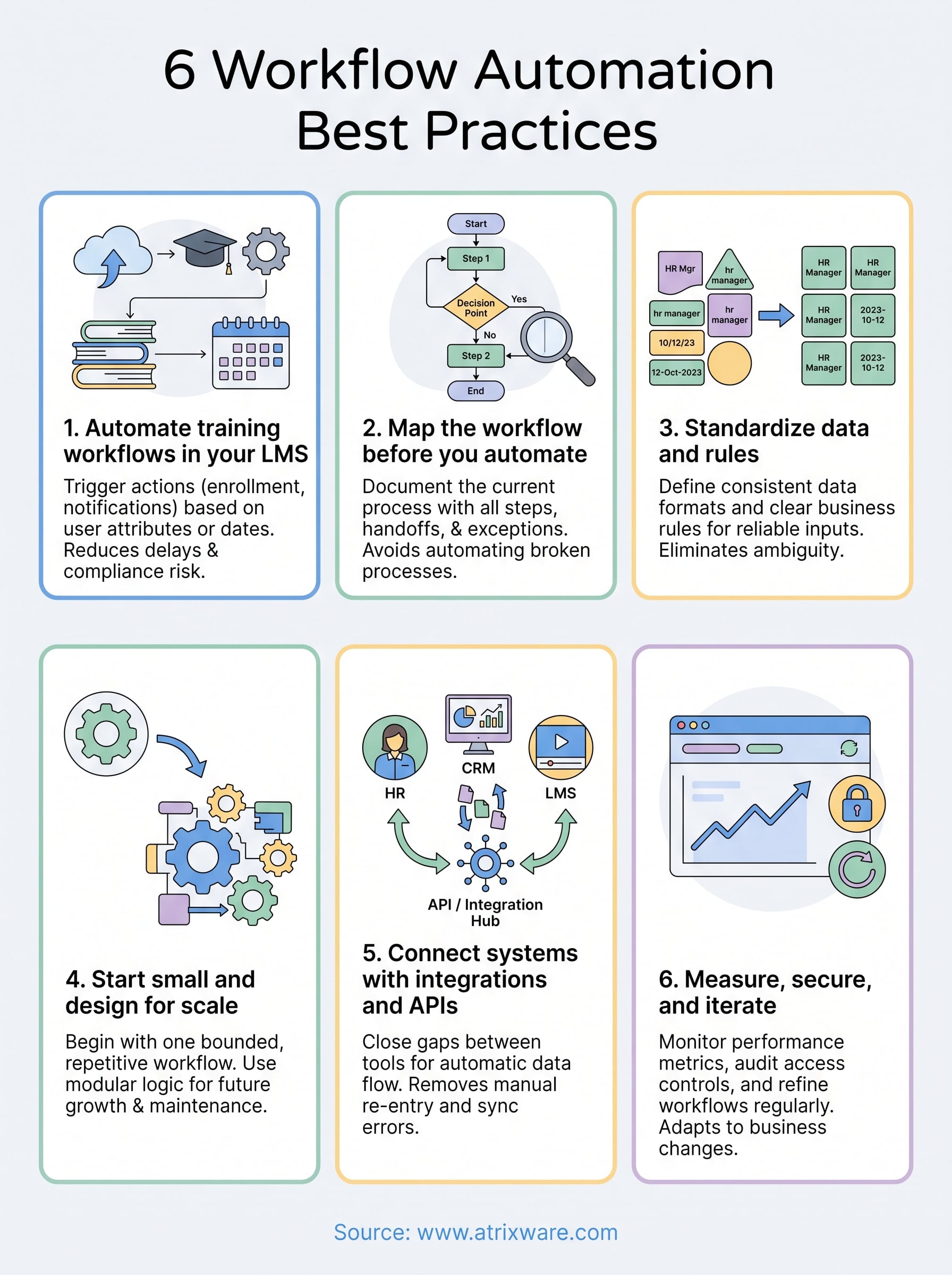
Put it into practice
These six workflow automation best practices give you a clear path from scattered manual processes to systems that run consistently and scale with your business. The practices build on each other: mapping and standardizing first, then automating specific workflows, connecting your tools, and measuring results over time. Each step reduces the room for error and gives your team more time to focus on work that actually requires human judgment.
Training workflows are one of the best places to start because the triggers are predictable, the rules are clear, and the impact is visible fast. If you’re managing employee onboarding, compliance training, or customer education, Axis LMS gives you the automation tools to handle those workflows without adding administrative overhead. Take the Axis LMS admin demo to see how the platform handles real training automation so you can evaluate it against your own workflows.
