
Every team has processes that eat up hours each week, approvals that sit in someone’s inbox, onboarding steps that get missed, reports that someone has to manually pull every Monday morning. These aren’t complex problems. They’re repetitive ones. And repetitive problems are exactly what workflow automation examples can help you solve, once you see how other teams have already done it.
The challenge isn’t usually convincing people that automation is worthwhile. Most teams already know they’re wasting time on tasks a system could handle. The real blocker is figuring out where to start. Which processes actually benefit from automation? What does a well-built workflow look like in practice? And how do you move from "we should automate that" to something that’s actually running?
At Atrixware, we build Axis LMS, a platform that helps organizations deliver, track, and manage training programs. Automation is baked into how it works, from triggering course enrollments based on role changes to generating compliance reports without anyone lifting a finger. We’ve seen firsthand how the right automated workflows can cut hours of admin work down to minutes, especially across training, onboarding, and compliance teams. That experience shapes the examples we’ve put together here.
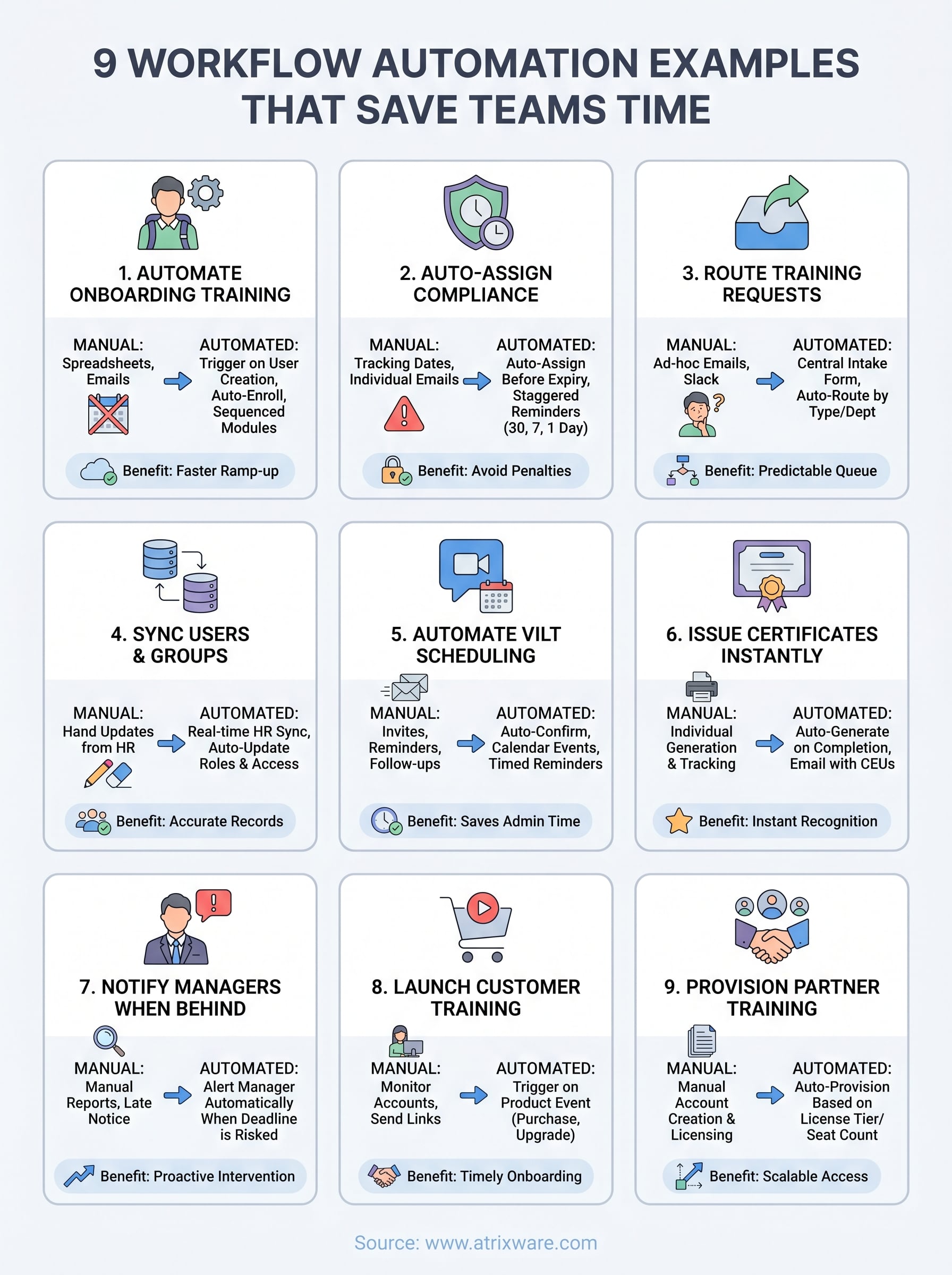
This article breaks down nine practical workflow automation examples spanning HR, sales, marketing, training, and operations. Each one includes what the workflow does, why it matters, and how teams are putting it to work right now. No theory, no fluff, just patterns you can adapt to your own processes starting this week.
1. Automate onboarding training in Axis LMS
Onboarding is one of the highest-impact workflow automation examples you can implement because the stakes are real: new hires who don’t get the right training early tend to ramp slower and make more preventable mistakes. Axis LMS lets you build an automated onboarding training flow that triggers the moment a new user is added, so nothing falls through the cracks without anyone manually chasing completions.

The goal and the manual work it replaces
The goal is straightforward: every new employee receives the right training on day one, without an L&D manager sending emails or manually enrolling people course by course. Right now, many teams manage this with spreadsheets and calendar reminders, relying on someone to check in every few days to confirm courses were completed. That process works until hiring volume spikes or someone gets pulled into other priorities.
Common tasks this workflow replaces:
- Manually enrolling new hires into course catalogs by department
- Sending login credentials and welcome instructions
- Following up on overdue or incomplete modules
Trigger, rules, and actions to set up
Your trigger is user creation in Axis LMS, either manually entered or pushed in via an HR integration. From there, rules fire based on attributes like department, role, or location. The key actions include auto-enrolling the user in a course sequence, sending a welcome email with login instructions, and scheduling follow-up reminders if modules aren’t completed within a set window.
Setting a hard deadline with an automated reminder at 48 hours before due keeps completion rates high without any manual follow-up.
Data and integrations that make it work
Axis LMS connects with HR systems like ADP, BambooHR, and Salesforce so user data flows in automatically. When a new employee record is created in your HR platform, the sync adds that user to Axis LMS and triggers the onboarding workflow without anyone touching it.
Role-based group rules inside Axis LMS then ensure the right courses go to the right people, so a new sales rep doesn’t receive compliance modules meant for warehouse staff.
Metrics to watch and common pitfalls
Track time-to-completion for each onboarding module and overall completion rate by cohort or department. The most common pitfall is building one large course instead of a sequenced curriculum with checkpoints, which overwhelms new hires and causes disengagement.
Break content into short focused modules, set milestone triggers between them, and your completion numbers will reflect the difference.
2. Auto-assign compliance training and recertification
Compliance training is one of the most time-sensitive workflow automation examples in any regulated industry. Missing a recertification window isn’t just an inconvenience: it can expose your organization to audits, fines, or liability. Automating this process means deadlines are never missed because a calendar reminder slipped through.
The goal and the manual work it replaces
The goal is to ensure every employee receives required compliance training on schedule and gets automatically re-enrolled when their certification window opens. Without automation, someone on your team is manually tracking expiration dates in a spreadsheet and sending individual emails, a process that breaks down fast when headcount grows.
Trigger, rules, and actions to set up
Your trigger is either a new user assignment to a compliance-required role or a date-based rule firing 30 to 60 days before a certification expires. Axis LMS then auto-enrolls the learner into the correct course, sends a notification with the deadline, and escalates reminders as the due date approaches.
Staggering reminders at 30 days, 7 days, and 1 day before expiration keeps completion rates high without flooding inboxes.
Data and integrations that make it work
Role and department data from your HR system drives which compliance courses apply to which employees. Axis LMS pulls this through integrations with platforms like BambooHR or ADP, so changes in role automatically trigger the right training reassignment without manual input.
Metrics to watch and common pitfalls
Track on-time completion rate and the number of lapsed certifications per quarter. The most common mistake is setting reminders too late, giving learners only a few days to complete multi-module content.
3. Route training requests with an intake form workflow
Training requests without a structured intake process create a pile of one-off emails, Slack messages, and ad-hoc conversations that are nearly impossible to track. This is one of the most underrated workflow automation examples for L&D teams because it turns a chaotic request system into a predictable, trackable queue that routes itself.
The goal and the manual work it replaces
The goal is to capture every training request through a single intake form and automatically route it to the right person or team based on request type, department, or priority. Without this, training managers spend significant time sorting requests manually, following up on missing details, and deciding who handles what. A structured workflow eliminates that sorting entirely.
Trigger, rules, and actions to set up
Your trigger is a form submission, which fires a routing rule based on fields like request type or business unit. Axis LMS can enroll the requester in existing content immediately or send the request to an admin queue for review if new content is needed.
Requiring a manager approval field on the form prevents low-priority requests from consuming your team’s build time.
Data and integrations that make it work
Connecting your intake form to Axis LMS via webhooks or the REST API means submission data populates learner records automatically. Integration with tools like Salesforce or Zoho lets you tie requests back to specific accounts or teams without manual data entry.
Metrics to watch and common pitfalls
Track request volume by department and average time from submission to course assignment. The most common pitfall is building a form with too many optional fields, which leads to incomplete submissions and delays.
4. Sync users and groups from your HR system automatically
Every time someone joins, changes roles, or leaves your organization, your LMS needs to reflect that. Managing those updates manually means someone on your team is regularly cross-referencing HR records against the LMS user list and making changes by hand. This is one of the most error-prone processes in training administration, and it’s a strong candidate for workflow automation examples that run silently in the background.
The goal and the manual work it replaces
The goal is to keep your LMS user base perfectly in sync with your HR system without anyone triggering updates manually. When an employee moves to a new department, their group assignments and course access should update automatically. Without this, stale user records pile up and learners either miss required training or retain access they no longer should have.
Trigger, rules, and actions to set up
Your trigger is a change event in your HR platform, such as a new hire, a role change, or a termination. Axis LMS receives that data and either creates, updates, or deactivates the corresponding user record. Group membership rules then fire automatically based on the updated attributes.
Deactivating users automatically on their last day prevents former employees from retaining access to your training content.
Data and integrations that make it work
Axis LMS connects directly with ADP, BambooHR, and Salesforce, pulling employee attributes like department, title, and location to drive group assignments without manual input. Those attributes also control which courses each user sees, keeping your catalog organized by audience.
Metrics to watch and common pitfalls
Track sync error rates and audit user group accuracy quarterly. The most common pitfall is configuring a one-way sync that does not handle role changes, which leaves users in outdated groups long after their position changed.
5. Automate virtual instructor-led training scheduling and reminders
Virtual instructor-led training sessions create a scheduling burden that grows with every session you add to the calendar. Coordinating registrations, calendar invites, and reminder sequences manually takes time that your training team could spend building better content instead. Among all workflow automation examples tied to live training delivery, this one consistently delivers the fastest return on setup time.
The goal and the manual work it replaces
The goal is to handle every step of VILT logistics automatically, from registration confirmation through post-session follow-up, without anyone sending emails by hand. Before automation, training coordinators typically managed a separate process for each session: confirming registrations, sending links, chasing no-shows, and distributing recordings afterward.
Trigger, rules, and actions to set up
Your trigger is a learner registering for a scheduled VILT session in Axis LMS. The workflow then fires a confirmation email with the session link, adds a calendar event, and queues a reminder sequence at 24 hours and 1 hour before the session starts.
Adding an automated follow-up email with session materials and a completion survey immediately after the session ends captures feedback while it is still fresh.
Data and integrations that make it work
Axis LMS connects with calendar and communication tools through its integration builder, so session details flow into learner inboxes without manual copying. Learner group and role data ensures reminders go only to registered participants, not your entire user base.
Metrics to watch and common pitfalls
Track attendance rate versus registration rate to spot drop-off patterns by session type or time of day. The most common pitfall is sending reminders too far in advance, where a single 48-hour notice gets ignored and attendance suffers.
6. Issue certificates, CEUs, and completion emails automatically
Issuing certificates and continuing education units (CEUs) by hand after every course completion is a slow, error-prone task that scales poorly. This is one of the most satisfying workflow automation examples to implement because learners get instant recognition and your team never has to touch the process.
The goal and the manual work it replaces
Your goal is to deliver a personalized completion certificate, CEU credit, and a confirmation email the moment a learner finishes a course, without any manual intervention. Before automation, training administrators had to verify completions, generate certificates one by one, and track CEU totals in a separate spreadsheet.
Trigger, rules, and actions to set up
Your trigger is a course completion event in Axis LMS. Once fired, the workflow generates a branded certificate, logs the CEU credit to the learner’s record, and sends a completion email with the certificate attached. Rules let you vary the output based on course type, so a compliance course issues a different certificate than a professional development module.
Setting a minimum passing score as a condition before the certificate trigger fires ensures only qualified completions count toward certification.
Data and integrations that make it work
Learner profile data, including name, completion date, and course title, populates the certificate automatically. Axis LMS pushes completion records to connected HR platforms like BambooHR or ADP, keeping employee training histories accurate without manual data entry.
Metrics to watch and common pitfalls
Track certificate issuance rate against completion rate to confirm the workflow fires consistently. The most common pitfall is using a certificate template with fields that break when learner names are long, which produces unprofessional output.
7. Notify managers when training falls behind
When employees fall behind on required training, managers are often the last to know. By the time someone flags the issue, a deadline has already passed. Among the workflow automation examples that protect your team’s compliance posture, automated manager notifications are one of the simplest and most effective to configure.
The goal and the manual work it replaces
The goal is to alert the right manager automatically when a direct report misses a training deadline or drops below a required completion threshold, without a training coordinator pulling reports and writing individual emails. Before automation, identifying at-risk learners meant running manual reports and cross-referencing them against a manager roster, a process that happened too infrequently to prevent problems.
Trigger, rules, and actions to set up
Your trigger is a date-based rule that fires when a learner has not completed a required course by a set point before the deadline. Axis LMS then sends a notification directly to the assigned manager’s email, including the learner’s name, the course in question, and how many days remain. Rules let you escalate the alert to a department head if the original notice goes unaddressed.
Keeping the notification short and actionable, with one clear next step, increases the chance a manager actually follows up.
Data and integrations that make it work
Manager-employee relationships stored in your HR system feed into Axis LMS through integrations with platforms like BambooHR or ADP. That data ensures notifications reach the correct manager without manual mapping.
Metrics to watch and common pitfalls
Track completion rate changes after notifications go out to confirm managers are acting on them. The most common pitfall is notifying managers too late, leaving no realistic time for the employee to complete the course.
8. Launch customer training when a product event happens
Customer training that arrives too late does more harm than good. When someone purchases your product, upgrades their plan, or activates a new feature, the window for effective onboarding is short. Among workflow automation examples tied to customer success, triggering training based on real product events keeps that window from closing before your customer gets the value they paid for.

The goal and the manual work it replaces
Your goal is to deliver the right training content automatically the moment a customer takes a specific action, without your customer success team manually tracking every new purchase or feature activation. Without this, someone on your team monitors new accounts and sends training links individually, a process that breaks down fast when account volume grows.
Trigger, rules, and actions to set up
The trigger is a product or CRM event, such as a new subscription, a feature unlock, or a plan upgrade, pushed into Axis LMS via webhook or API. The workflow then enrolls the customer in the relevant course sequence and sends a welcome email with clear next steps immediately after the event fires.
Tying your training trigger directly to the product event removes the lag between purchase and learning, which is when motivation is highest.
Data and integrations that make it work
Axis LMS connects with Salesforce and Zoho to pull customer account data and map it to the correct training track based on product tier or feature set, so the right content reaches the right customer automatically.
Metrics to watch and common pitfalls
Track course activation rate alongside product adoption metrics to confirm training is driving actual usage. The most common pitfall is building one generic onboarding course for all customers instead of segmenting by product tier, which produces low relevance and weak completion numbers.
9. Provision partner training and seat licenses at scale
Channel partners need training just as much as internal employees, but managing their access manually creates a constant administrative backlog. Among workflow automation examples tied to revenue-generating programs, provisioning partner training and seat licenses automatically is one of the highest-leverage setups you can build in Axis LMS.
The goal and the manual work it replaces
Your goal is to deliver the correct training content and seat license access to a new partner the moment they enter your system, without anyone manually creating accounts or assigning licenses. Without automation, your team tracks partner agreements in one place, license counts in another, and course access in a third, creating gaps where partners wait days to get started.
Trigger, rules, and actions to set up
Your trigger is a new partner account creation or a seat license purchase event pushed into Axis LMS via webhook or API. The workflow provisions user accounts up to the purchased seat count, enrolls them in the partner-specific course track, and sends each learner a welcome email with login details.
Building a hard cap on provisioned seats tied to the license tier prevents over-enrollment before a partner upgrades their agreement.
Data and integrations that make it work
Axis LMS connects with Salesforce and e-commerce platforms to pull partner tier and seat count data automatically. That data drives group assignments and content visibility rules, so a bronze-tier partner sees a different catalog than a platinum-tier partner without any manual configuration.
Metrics to watch and common pitfalls
Track seat utilization rate alongside course completion to confirm partners are actually using the access you provision. The most common pitfall is provisioning all seats at once for large partners, which floods your system with inactive accounts and distorts your completion reporting.
What to automate next
These nine workflow automation examples cover the highest-impact processes across training, compliance, and partner management, but they also point to a broader pattern. Any process that repeats on a schedule or fires after a predictable event is a candidate for automation. The question is not whether to automate, but which process costs your team the most time right now.
Start with one workflow. Pick the process that creates the most friction, map out its trigger and actions, and build it before moving on to the next. Teams that automate one thing well consistently find two or three more opportunities immediately after, because the first success makes the pattern obvious.
If you are not sure where Axis LMS fits into your current training setup, take the LMS readiness quiz to find out exactly where you stand and what to build first.
