A DocuSign electronic signature lets you sign and send documents digitally, no printing, scanning, or mailing required. Whether you need a new hire to acknowledge a training policy, a partner to sign a compliance agreement, or a customer to confirm a certification, DocuSign handles it in minutes. For organizations that manage training through platforms like Axis LMS by Atrixware, electronic signatures fit naturally into workflows where documentation and compliance tracking already matter.
But how does DocuSign actually work? Can you sign documents for free? And what features come with paid plans versus the basic experience? These are common questions, especially if you’re evaluating e-signature tools for the first time or comparing them against alternatives. The answers are more straightforward than you might expect.
This article breaks down how DocuSign’s electronic signature process works from both the sender and signer side, covers the free signing option, walks through key features, and helps you decide whether it’s the right fit for your organization’s document and training-related signing needs.
Why businesses use DocuSign electronic signatures
Companies across nearly every industry rely on DocuSign for one core reason: it removes the friction from getting documents signed. When you’re waiting on a signature to close a deal, onboard a new employee, or confirm a compliance acknowledgment, every hour of delay costs something, whether that’s momentum, productivity, or a missed regulatory deadline. DocuSign solves this by letting both senders and signers complete the process from any device in a matter of minutes.
Speed and operational efficiency
When your team sends contracts by mail or waits on physical signatures, the process can take days or even weeks. With a DocuSign electronic signature, that same process takes minutes. You send the document, the recipient gets an email, clicks a link, and signs without needing to create an account or install anything. Turnaround times drop significantly, and your staff spends less time chasing paperwork.
Beyond raw speed, DocuSign also reduces the back-and-forth that comes with manual document handling. You can set a signing order so documents move through an approval chain automatically, which is especially useful for multi-step processes like new hire onboarding or vendor agreements.
Compliance and audit trails
One area where DocuSign stands out is its ability to create a verifiable record of every signing event. Each completed document includes an audit trail that logs who signed, when they signed, and from what IP address. For businesses operating in regulated industries such as healthcare, finance, or education, this level of documentation matters.
When compliance is part of your business, a reliable audit trail is the difference between passing and failing an inspection.
You can store these records securely and retrieve them when needed, which supports obligations under frameworks like GDPR and other data protection regulations that require proof of consent or acknowledgment.
Training and onboarding workflows
For organizations that manage structured training programs, DocuSign fits directly into the process. When you require learners to sign policy acknowledgments, compliance agreements, or certification records, you can tie those signatures to specific training milestones. This creates a clear, documented link between course completion and formal sign-off.
Your HR and compliance teams benefit from having centralized records they can pull at any time, rather than hunting through email threads or filing cabinets for a signed copy that may or may not exist.
How DocuSign electronic signatures work
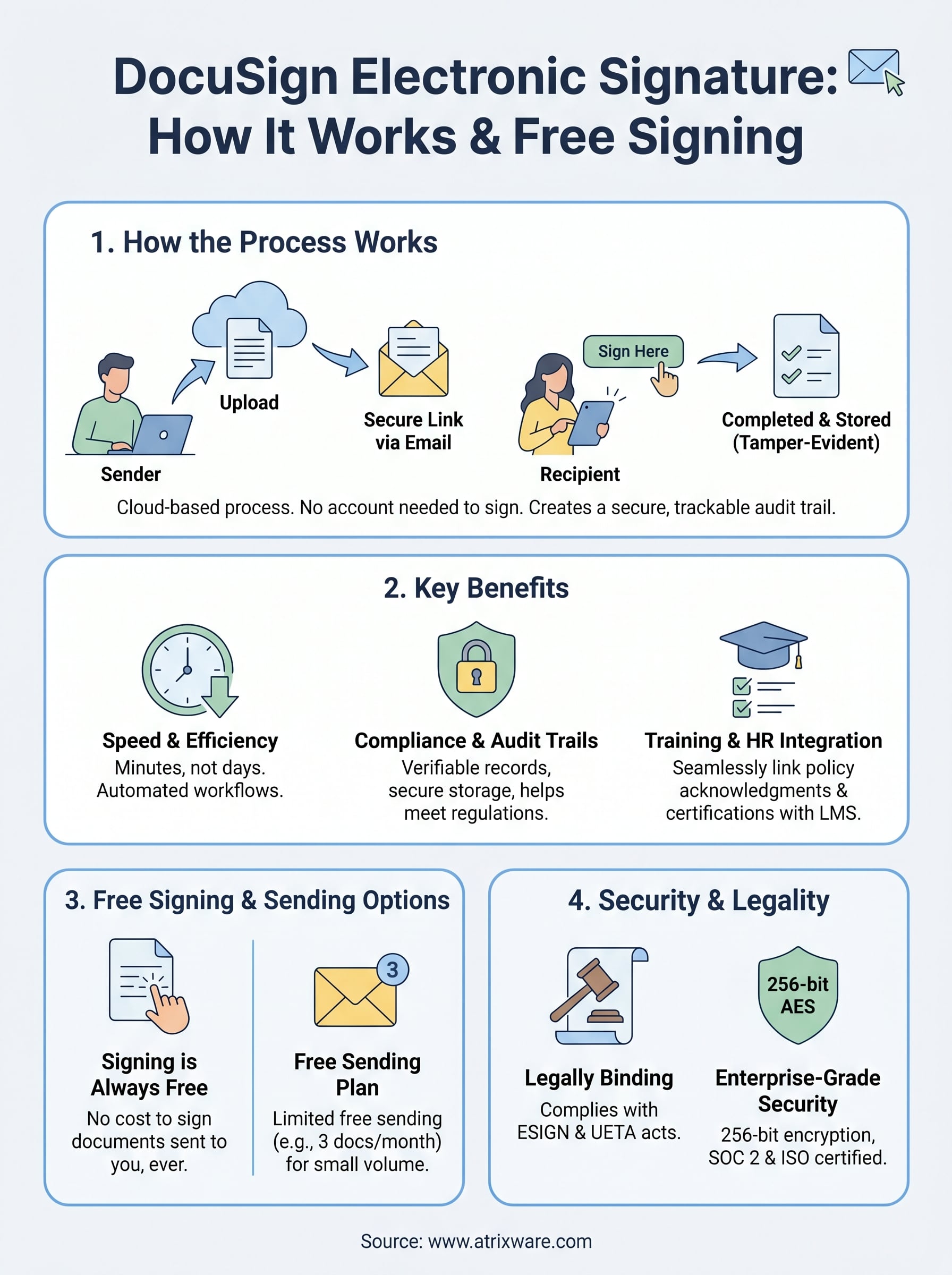
At its core, DocuSign uses a cloud-based platform to facilitate the entire signing process digitally. When you send a document through DocuSign, the platform converts it into a secure, trackable envelope that routes to each recipient via email. No one needs to print, scan, or physically handle the document at any point.
The sending and signing process
When you upload a document and add signature fields, you assign them to specific recipients. DocuSign sends each person an email with a unique link tied to that envelope. Recipients open the link in any browser, review the document, and click to apply their electronic signature without creating an account. Once all parties sign, everyone receives a completed copy automatically.
The process moves in the order you configure, so if you have multiple signers, the second person only receives the document after the first one finishes. This keeps the workflow moving without manual follow-up from your team.
What happens behind the scenes
Every DocuSign electronic signature generates a unique digital fingerprint called a hash, which attaches to the document. If anyone modifies the document after signing, the hash changes and the signature becomes invalid. This tamper-evident process is what gives DocuSign signatures their legal standing.
The combination of audit trails and cryptographic validation makes DocuSign signatures more verifiable than wet ink in most use cases.
DocuSign also stores your completed documents in a secure cloud repository, so you can retrieve them any time without relying on local storage or scattered email threads.
How to sign a document for free with DocuSign
DocuSign lets you sign documents for free without creating a paid account. When someone sends you a document through DocuSign, you can open it, review it, and apply your electronic signature at no cost. The free signing experience works in any browser on any device, so you do not need to install an app or pay for a subscription to receive and sign documents sent to you.
What the free option includes
The free tier covers signing documents others send to you, but it also includes a limited sending plan if you register for a DocuSign account. With the free account, you get a small number of free signature requests per month, which works well for individuals or small teams with light document volumes. Here is what the free plan typically covers:
- Signing documents sent to you at no cost, always
- Sending up to three documents per month for signature
- Access to basic signature field types including signature, initials, and date
- Mobile access through the DocuSign app or browser
Steps to sign for free
When you receive a signing request, the process is straightforward. You do not need an account to complete it as a signer.
DocuSign never requires recipients to pay or create an account just to sign a document someone sends them.
First, open the email from DocuSign and click the link. Then review the document, click each required field, and apply your signature or initials using the guided prompts. Once you finish, DocuSign sends a completed copy to all parties automatically.
How to send documents for signature in DocuSign
Sending a document through DocuSign follows a clear, repeatable process that takes only a few minutes once you know the steps. You start from your DocuSign account dashboard, upload the file you need signed, and configure everything before sending. The platform supports PDFs, Word documents, and other common formats, so you rarely need to convert files before uploading.
Preparing and uploading your document
When you log into your DocuSign account, click New and select "Send an Envelope" to start. You then upload your document directly from your computer, a cloud storage service, or a template you have saved previously. Once uploaded, DocuSign displays the document so you can add the required fields before it goes out.
Getting your fields placed accurately before sending saves you and your recipients from having to void and resend the envelope later.
The platform lets you add signature fields, initials, date fields, text boxes, and checkboxes by dragging them directly onto the document. You assign each field to a specific recipient so DocuSign knows who fills in what.
Configuring recipients and signing order
After placing your fields, you add each recipient’s name and email address in the recipient section. You also set the signing order here, which controls whether people sign simultaneously or in a specific sequence. This step is especially useful when a docusign electronic signature process involves managers reviewing a document before it moves to a final approver.
Once you confirm your settings, click Send, and DocuSign handles delivery and follow-up notifications automatically.
Security, legality, and compliance basics
Before you commit to using a docusign electronic signature for business-critical documents, it helps to understand where the legal and security foundations stand. DocuSign does not just make signing convenient; it builds in protections that make those signatures enforceable and verifiable in most legal contexts.
Legal standing of electronic signatures
Electronic signatures carry legal weight in the United States under the Electronic Signatures in Global and National Commerce Act (ESIGN) and the Uniform Electronic Transactions Act (UETA). Both laws establish that a valid electronic signature holds the same legal status as a handwritten one, provided all parties agree to sign electronically and the process creates a reliable record.
Most standard business agreements, employment documents, vendor contracts, and compliance acknowledgments qualify for electronic signature under these laws.
DocuSign complies with both frameworks, which means documents you send and receive through the platform hold up in legal disputes and regulatory reviews, as long as your use case falls within the scope these laws cover. Certain document types, such as wills or court orders, still require wet signatures in many jurisdictions.
How DocuSign protects your documents
DocuSign secures your documents using 256-bit AES encryption, the same standard used in banking and government systems. Each completed envelope includes a tamper-evident seal that detects any unauthorized changes after signing, making it impossible to alter a document without invalidating the signatures attached to it.
Your data also benefits from SOC 2 Type II certification and ISO 27001 compliance on DocuSign’s infrastructure, which means independent auditors regularly verify that security controls meet recognized standards. For organizations in regulated industries, this documentation supports your own compliance reporting requirements.
Next steps
You now have a clear picture of how a docusign electronic signature works, what the free plan covers, and what protections back your signed documents legally and technically. The process is straightforward whether you are signing a single document or building a multi-step workflow for your entire team.
If your organization uses a learning management system to deliver training, electronic signatures fit directly into how you handle compliance records, policy acknowledgments, and certification sign-offs. Connecting your document workflows to your training platform helps you keep everything in one traceable system rather than managing records across separate tools.
Before you invest in any new software, it helps to understand where your current training setup stands. Take a few minutes to work through the LMS readiness quiz to find out exactly what stage you are at and what your next move should be.
