If your organization runs high-stakes assessments, compliance exams, certifications, or licensing tests, you’ve likely come across Honorlock online proctoring as an option for securing those exams remotely. It’s one of the more widely adopted proctoring tools, but figuring out exactly what it monitors, what triggers a flag, and how it handles test-taker privacy can be harder to pin down than it should be.
At Atrixware, we build Axis LMS to help businesses deliver and manage training programs that actually stick. Proctoring is a critical piece of that puzzle, especially when exam integrity directly impacts compliance or professional credentials. Understanding how tools like Honorlock work helps you make smarter decisions about your assessment strategy, whether you’re vetting proctoring options or preparing learners for what to expect.
This article breaks down how Honorlock operates from start to finish: the technology behind its monitoring, the specific behaviors it flags, what happens with recorded data, and how both administrators and test-takers can set themselves up for a smooth exam experience.
Why online proctoring exists in the first place
Online proctoring exists because testing moved off campus long before most organizations were ready to secure it. As remote work expanded and digital learning became standard, the gap between "you can take this exam from anywhere" and "we can verify you’re the one taking it" became a real problem. Tools like honorlock online proctoring stepped in to close that gap without requiring test-takers to show up in person.
The shift to remote testing
The numbers tell a straightforward story. Remote and hybrid work arrangements pushed companies to rethink every in-person process, including training assessments and certification exams. Employees working across different time zones could not easily gather in one location for a supervised session, and organizations needed a scalable way to maintain exam standards without sacrificing flexibility. That demand drove rapid adoption of browser-based proctoring tools across corporate training, higher education, and professional licensing.
When an exam can be taken from any device and any location, the only reliable way to preserve its integrity is to bring the oversight to the test-taker rather than the other way around.
What’s at stake when exams are unsecured
Unsecured online exams carry real consequences. If a compliance certification can be passed by looking up answers or having someone else take the test, that certification loses its meaning. In regulated industries like healthcare, finance, and manufacturing, a compromised credential is not just an ethical issue; it creates direct liability for your organization. Regulatory bodies can audit training records, and if certifications were obtained without genuine competency, the legal and financial exposure can be significant.
Your assessment data also loses its value when results cannot be trusted. If you use test scores to make decisions about readiness, promotion, or role assignment, those decisions are only as reliable as the exam itself. Proctoring protects not just the exam, but the entire decision-making process that depends on it.
How Honorlock online proctoring works step by step
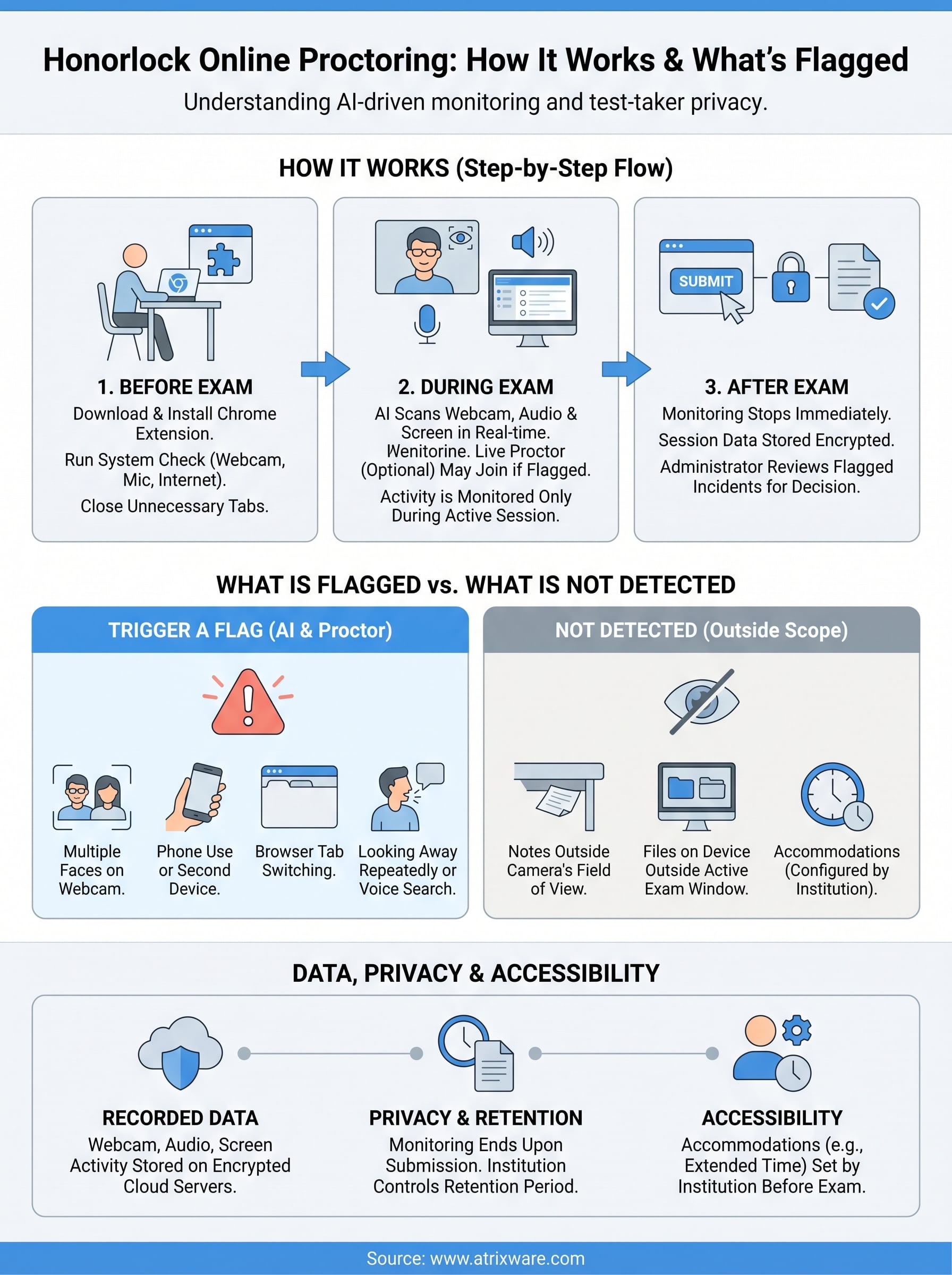
Honorlock online proctoring runs entirely through the Google Chrome browser via a dedicated extension. Before your exam begins, you download and install the extension, and Honorlock walks you through a pre-exam environment check that confirms your webcam, microphone, and internet connection are all functioning. Once you launch the exam, the software activates automatically without any additional steps.

What happens during the exam
During the session, Honorlock uses a combination of AI-driven monitoring and optional live proctor review to watch for irregular behavior. The AI scans your webcam feed, microphone audio, and screen activity in real time. If the system detects something that falls outside normal exam behavior, it flags the moment and can escalate to a live proctor who joins the session to assess the situation directly. You do not interact with the proctor unless they initiate contact through a chat window.
Honorlock captures footage only during the active exam session, which ties the data footprint directly to the test window rather than your broader device activity.
After you submit your exam, the session ends and the extension stops monitoring entirely. Your institution or administrator then reviews any flagged incidents through the Honorlock dashboard before making decisions about your results.
What Honorlock can flag and what it cannot detect
Honorlock online proctoring monitors a specific set of behaviors, and knowing which ones trigger a flag helps you prepare your learners accurately. The system is not a catch-all surveillance tool; it targets observable, session-level activity that suggests a test-taker may be compromising the exam’s integrity.
Behaviors that trigger a flag
The system flags a defined list of actions during the exam window. Multiple faces appearing in the webcam frame, a test-taker looking away from the screen repeatedly, the use of a second monitor, and browser tab switching all register as suspicious. Honorlock also detects when someone enters the room, picks up a phone, or uses voice search to query answers aloud.

The flagging system records timestamps tied to each incident, giving your administrator a specific moment to review rather than an entire session replay.
What falls outside its detection range
Honorlock cannot see what sits physically outside the camera’s field of view. If a test-taker places notes below the desk or keeps a second device completely off-screen, the system has no way to detect either. It also does not monitor general device activity outside the active Chrome exam window, so files stored elsewhere on the machine stay private and untouched by the session.
Privacy, data retention, and accessibility basics
Honorlock online proctoring collects data only within your active exam session. The system records your webcam footage, audio, and screen activity during the test window, but it stops the moment you submit. Your institution controls how long that footage is stored, and many schools or organizations set retention periods that align with their own data governance policies.
How Honorlock handles your recorded data
Honorlock stores session recordings on encrypted cloud servers, and access is limited to authorized administrators and proctors. You do not need to worry about your footage circulating outside of the exam review process. The recordings stay tied to your specific session and are not shared with third parties beyond what your institution’s agreement with Honorlock permits.
Your administrator, not Honorlock, sets the retention period for session data, so check with your institution if you have specific questions about how long your recording is kept.
Accessibility accommodations
If you require extended time or other testing accommodations, Honorlock supports those adjustments within the platform. Your institution configures these settings on the administrative side before the exam launches, so you do not need to contact Honorlock directly. Alert your training coordinator in advance so the correct accommodations are applied before your session begins.
Test-day setup, common issues, and best practices
Getting your environment right before the exam starts saves you time and frustration during the session. Honorlock online proctoring runs through Chrome, so make sure your browser is fully updated and that no conflicting extensions are active. Close all unnecessary tabs and applications before you launch the exam to reduce the chance of a false flag from background activity. Keep your desk clear of unauthorized materials and make sure your face is centered in the webcam frame.
Before the exam starts
Run the system compatibility check that Honorlock provides before your actual exam day. This confirms your webcam, microphone, and internet connection all meet the minimum requirements. Sit in a well-lit room with your face clearly visible to the camera, and remove any objects from your desk that you are not permitted to use during the test.
Testing your setup 24 hours in advance gives you enough time to fix hardware or browser issues without the pressure of an active exam window.
Handling common technical problems
If your camera or microphone fails to initialize, restart Chrome and recheck your device permissions in your operating system settings. Connection drops during a session will not automatically disqualify you; contact your administrator immediately so they can document the interruption and determine next steps based on your institution’s policy.
Key takeaways
Honorlock online proctoring monitors your webcam, audio, and screen activity during an active exam session and stops the moment you submit. It flags specific behaviors like browser tab switching, multiple faces on camera, and phone use, but it cannot see outside your camera’s field of view or access files beyond the active Chrome window. Your administrator controls how long session data is stored, and accommodations like extended time are configured on the institutional side before your exam launches.
Setting up correctly before exam day, running the compatibility check in advance, and keeping your desk clear of unauthorized materials significantly reduces your chance of a false flag. Exam integrity protects not just the certification itself but the entire training and compliance process that depends on trustworthy results. Getting your assessment strategy right from the start saves time and avoids costly re-testing.
If you’re building a training program that includes secure assessments, take the LMS readiness quiz to see where Axis LMS fits your current needs.
