A single compromised credential can expose an entire organization’s data, systems, and reputation. That’s not hypothetical, it’s the reality behind the majority of breaches reported year after year. The difference between organizations that contain these threats and those that don’t often comes down to how well they’ve implemented access control best practices. Getting access control right means more than locking doors; it means building a system where the right people reach the right resources, and everyone else is kept out.
For organizations using platforms like Axis LMS to deliver training, manage compliance, and handle sensitive learner data, access control isn’t optional, it’s foundational. Axis LMS supports configurable security settings, SSO through providers like Okta and Azure, and compliance features for standards like GDPR and FDA 21 CFR Part 11. But technology alone isn’t enough. Your team needs to understand and follow the policies that make these tools effective, which is exactly where structured compliance and security training closes the gap.
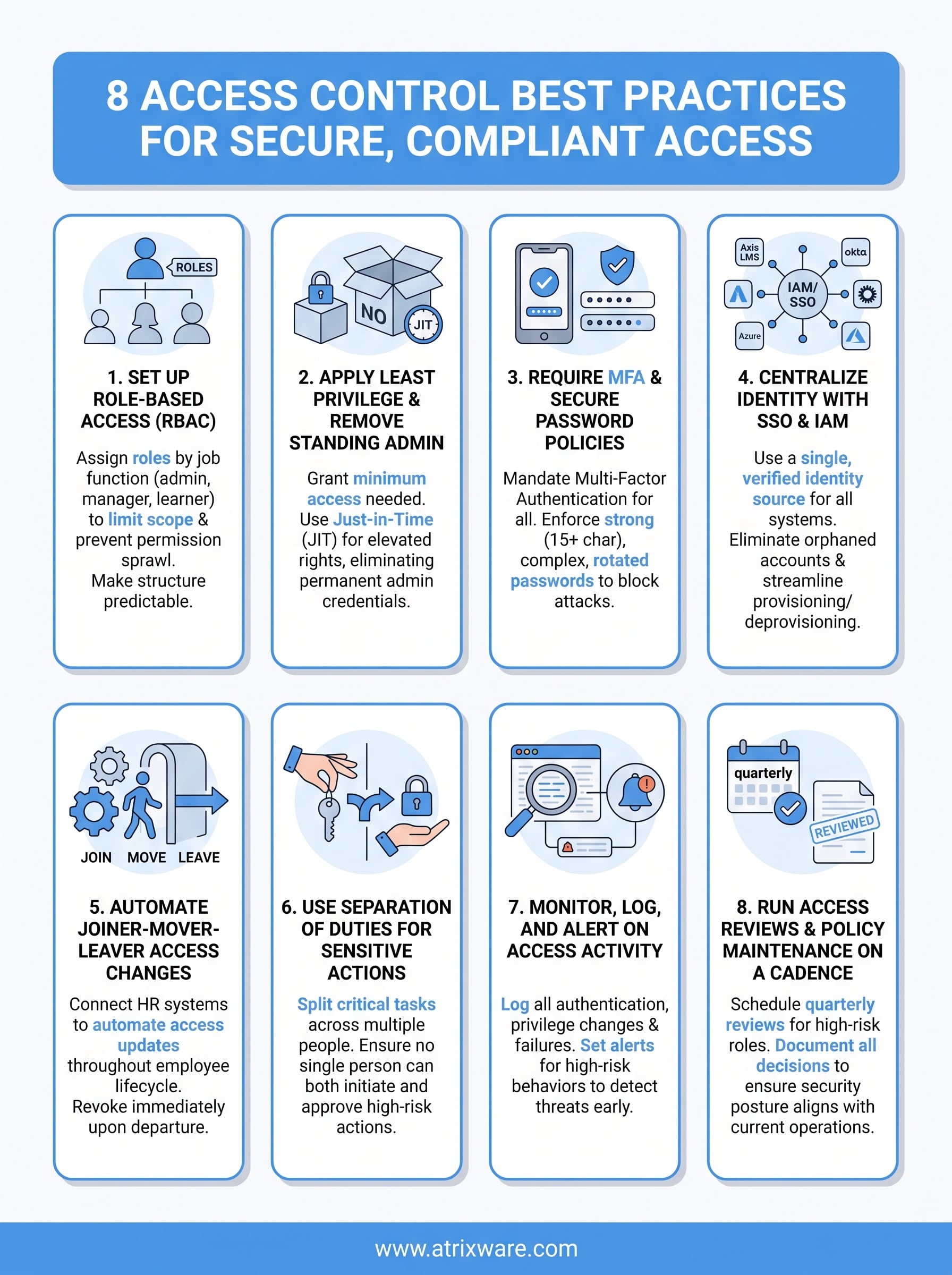
This article breaks down eight proven access control practices, from Zero Trust and Least Privilege to Multi-Factor Authentication and regular access reviews, that you can put to work immediately. Each one is actionable and grounded in real-world application, not abstract theory. Whether you’re tightening security across a growing workforce or preparing for your next compliance audit, these practices give you a clear framework to reduce risk and maintain control over who accesses what.
1. Set up role-based access in Axis LMS
Role-based access control (RBAC) is the foundation of every effective access management strategy. In Axis LMS, you can assign specific roles to administrators, managers, and learners, which means each user only interacts with the parts of the system they need. Without this structure, permissions sprawl quickly and your risk exposure grows with every new user you add.
Why it matters
When you define roles clearly, you reduce the surface area for both accidental and intentional misuse. A learner who can’t see admin reports can’t leak them. A manager scoped to their own team can’t accidentally delete another department’s course data. Role-based access control aligns directly with access control best practices recommended by frameworks like NIST, because it makes your permission structure predictable and auditable.
Poorly defined roles are one of the leading causes of over-permissioned accounts, which attackers and insiders exploit most often.
How to implement it
Start by mapping your organization’s structure before touching any settings in Axis LMS. List every job function that needs system access and define what each one should see, edit, and report on. Then build roles in Axis LMS that reflect those definitions, assigning them during user onboarding rather than granting access ad hoc. Apply Axis LMS’s configurable security settings to restrict admin-level capabilities to only the accounts that require them by job function.
Common pitfalls to avoid
The most common mistake is creating roles reactively, adding permissions one by one when users complain they can’t access something. This approach produces bloated, inconsistent roles over time that are difficult to audit. Another frequent issue is failing to reassign or revoke roles when someone changes positions, leaving them with permissions from their previous role stacked on top of their new ones.
Quick checklist
- Document every role before you configure it in the system
- Assign roles at the point of user creation, not after the fact
- Limit admin roles to the smallest possible group
- Test each role by logging in as a sample user to verify the correct access scope
- Schedule role reviews quarterly or after any organizational restructure
2. Apply least privilege and remove standing admin
Least privilege means every user and system account gets the minimum access required to do their job, nothing more. This principle pairs with removing standing admin accounts, which are permanent elevated credentials that stay active whether or not someone needs them at any given moment.
Why it matters
Standing admin accounts are a high-value target for attackers because they never turn off. Every hour an elevated account exists unnecessarily, it represents exposure. Least privilege limits the blast radius if a credential is compromised, because a restricted account can only do limited damage.
The fewer permanently elevated accounts you maintain, the smaller the window attackers have to exploit them.
How to implement it
Start by auditing every admin account in your systems and asking whether each one needs constant elevated access. Replace standing admin with just-in-time (JIT) access, where privileges are granted on request and automatically expire. Enterprise identity platforms like Microsoft Entra ID support privileged identity management to enforce this pattern directly.
Common pitfalls to avoid
Teams often resist removing standing admin access because it feels inconvenient, but that friction is intentional and protective. Another frequent mistake is ignoring service accounts, which regularly carry excessive permissions and rarely get reviewed alongside standard user accounts.
Quick checklist
Apply these steps to keep your least privilege posture aligned with access control best practices over time.
- Audit all admin accounts and flag unnecessary standing access
- Implement JIT access for elevated privileges
- Apply least privilege to service accounts as well as user accounts
- Review privilege levels during every access audit cycle
3. Require MFA and secure password policies
Passwords alone no longer provide adequate protection. Multi-factor authentication (MFA) and strong password policies together form a critical layer of defense that makes credential-based attacks significantly harder to execute. Both belong in any set of access control best practices you implement across your organization.
Why it matters
A stolen password grants immediate access when MFA is absent. With MFA in place, an attacker needs a second factor, typically a device or biometric confirmation, that they don’t have. The impact is substantial: Google’s research found that on-device prompts block nearly 100% of automated bot attacks and 99% of bulk phishing attacks.
MFA is one of the single highest-impact controls you can enable, and it costs far less than recovering from a breach.
How to implement it
Enable MFA for all user accounts, prioritizing admin and privileged roles first. Pair this with password policies that enforce minimum length, complexity, and regular rotation. Platforms like Microsoft Entra ID provide built-in conditional access policies that let you require MFA based on user role, location, or device trust level.
Common pitfalls to avoid
Many organizations enable MFA but allow users to opt out or bypass it for convenience. That exception defeats the control entirely. Another common gap is setting weak password minimums, such as eight characters, when current guidance from NIST SP 800-63B recommends a minimum of 15 characters for memorized secrets.
Quick checklist
- Require MFA for every account, no exceptions for senior staff
- Set minimum password length to 15 characters or more
- Block commonly used and previously breached passwords
- Disable SMS-only MFA where possible and prefer authenticator apps
4. Centralize identity with SSO and IAM
Managing identities across multiple disconnected systems creates gaps that attackers exploit. Single Sign-On (SSO) combined with a centralized Identity and Access Management (IAM) solution lets you control who can access what from one place, reducing both administrative overhead and security risk. Axis LMS supports SSO through providers like Okta, Azure, Salesforce, and Ping Identity, making it straightforward to plug your LMS into your broader identity infrastructure.
Why it matters
When users authenticate through a single, verified identity source, you eliminate orphaned accounts, inconsistent password policies, and access that lingers after someone leaves. Centralized IAM directly supports access control best practices because it gives you one point of control for provisioning and deprovisioning across every connected system.
One identity source means one place to revoke access when something goes wrong.
How to implement it
Connect Axis LMS to your SAML-based SSO provider using its built-in integration support. Then configure your IAM platform to enforce MFA and conditional access policies before users reach any connected system. Microsoft Entra ID provides enterprise-grade identity governance tools that integrate well with most LMS and business platforms.
Common pitfalls to avoid
Teams often configure SSO but leave local accounts active as a fallback, which defeats the control entirely. Another gap is failing to sync role changes from your IAM system to connected platforms in real time, leaving users with stale permissions.
Quick checklist
- Connect Axis LMS to your SSO provider using SAML
- Disable local account logins once SSO is fully live
- Enforce conditional access policies through your IAM platform
- Confirm that role changes sync automatically across all connected systems
5. Automate joiner-mover-leaver access changes
When someone joins, moves to a new role, or leaves your organization, their access needs to change immediately. Manual processes introduce delays that create real security exposure. Connecting Axis LMS to your HR system through integrations with ADP, BambooHR, or Zoho lets you automate these lifecycle events so access updates fire without human intervention.
Why it matters
Every day a former employee retains active credentials is a day your data sits exposed. Automated joiner-mover-leaver (JML) processes ensure access follows the employee lifecycle precisely, which sits at the core of any set of access control best practices your organization implements.
A terminated employee with active credentials is not a hypothetical risk; it is an open door.
How to implement it
Configure triggers in Axis LMS so that when HR marks someone as terminated or transferred, access updates propagate automatically across connected systems. Microsoft Entra ID provides lifecycle workflow automation that handles provisioning and deprovisioning at scale, integrating directly with most HR platforms.
Common pitfalls to avoid
The most frequent gap is relying on manual IT tickets to process offboarding, which adds hours or days of unnecessary exposure. Teams also routinely forget contractor and vendor accounts, which sit outside the standard HR workflow and accumulate unchecked over time.
Quick checklist
Use this checklist to verify your JML process covers every gap.
- Connect your HR system to Axis LMS for automated provisioning
- Configure termination triggers that revoke access on the offboarding date
- Include contractor and vendor accounts in your JML workflow
- Test every trigger in a staging environment before going live
6. Use separation of duties for sensitive actions
Separation of duties (SoD) means no single person can complete a sensitive action alone. You split critical tasks across at least two people so that any fraud or error requires collusion to succeed. This principle is a cornerstone of access control best practices in any compliance-conscious organization.
Why it matters
When one person controls both approval and execution of a sensitive action, the risk of undetected abuse rises sharply. SoD eliminates that single point of failure by requiring a second party to verify or authorize. Financial controls, data exports, and admin account creation are common examples where this layer directly prevents insider threats and accidental damage.
If one account can both approve and execute a high-risk action, you have eliminated your own safety net.
How to implement it
Start by identifying every sensitive action in your systems, including admin account provisioning, bulk data exports, and permission changes. Then assign those actions to separate roles so that the person who initiates a task cannot also approve it. Role configuration in Axis LMS lets you scope administrative permissions precisely enough to enforce this split across your training platform.
Common pitfalls to avoid
Small teams often exempt themselves from SoD because staffing feels too thin to split duties. That reasoning leaves your most sensitive actions unprotected. Another common gap is applying SoD to financial systems but ignoring it entirely within your LMS and HR platforms, where data sensitivity is equally high.
Quick checklist
- Map every high-risk action and identify who currently controls it end to end
- Assign initiation and approval roles to separate user accounts
- Document SoD policies so auditors can verify your controls
- Review SoD assignments whenever roles change
7. Monitor, log, and alert on access activity
You cannot defend what you cannot see. Logging and monitoring every access event gives you visibility into who accessed what and when, which is the foundation for detecting threats before they cause serious damage. Without this layer, even the strongest access control best practices leave you blind to misuse happening inside your own perimeter.

Why it matters
Attackers rarely trigger obvious alarms. They move slowly, testing access and escalating privileges over time. Continuous monitoring catches these patterns that a one-time audit would miss entirely. Logs also serve as critical evidence during incident response and compliance audits, making them non-negotiable for any regulated environment.
The absence of logs doesn’t mean nothing happened; it means you have no way to prove it.
How to implement it
Configure your systems to log all authentication events, privilege changes, and failed access attempts. Route those logs to a centralized SIEM platform and set automated alerts for high-risk behaviors like repeated login failures, off-hours access, or bulk data exports. Microsoft Sentinel provides enterprise-scale threat detection that integrates with most identity and access platforms.
Common pitfalls to avoid
Most teams collect logs but never configure alerts, leaving valuable data sitting unread. Another frequent gap is retaining logs for too short a period, which becomes a serious problem when an investigation requires activity records from months earlier.
Quick checklist
- Enable logging for all authentication and admin events
- Set automated alerts for failed logins and privilege escalations
- Route logs to a centralized platform for analysis
- Define a retention policy that satisfies your compliance requirements
8. Run access reviews and policy maintenance on a cadence
Access control isn’t a one-time configuration. Roles evolve, teams grow, and policies drift unless you review them on a fixed schedule. Building a recurring cadence for access reviews keeps your security posture aligned with how your organization actually operates today, not how it looked when you first set things up.
Why it matters
Permissions accumulate silently over time. Users gather access they no longer need, and policies written years ago stop reflecting current risks. Regular reviews surface these gaps before an auditor or attacker does, which is why scheduled reviews are central to access control best practices across every major compliance framework.
An access review you skip is a permission problem you’re choosing to keep.
How to implement it
Schedule formal access reviews quarterly for high-risk roles and annually for standard accounts. Assign ownership for each review to a specific manager or team lead so accountability is clear. Document every decision, including why access was retained or removed, to support audit trails.
Common pitfalls to avoid
Most teams treat reviews as a checkbox exercise, approving everything without actually verifying whether access is still required. Another common gap is reviewing user accounts but ignoring service accounts and API credentials, which carry significant risk if left unchecked.
Quick checklist
- Schedule quarterly reviews for admin and privileged roles
- Assign a named owner to each access review
- Document approvals and removals for every account reviewed
- Include service accounts and API keys in every review cycle
Wrap up
These eight access control best practices give you a clear, actionable path from scattered permissions to a structured, auditable security posture. Each practice builds on the others: strong roles set the foundation, least privilege narrows the blast radius, MFA and SSO lock down authentication, automation keeps access current, and monitoring plus regular reviews catch what everything else misses. No single control solves the problem on its own, but together they create a system that holds up under pressure and scrutiny.
Your training platform sits at the center of all of this. When your team actually understands why these controls exist, they follow them consistently instead of working around them. Axis LMS gives you the tools to deliver that security training at scale, track completion, and maintain the compliance records you need when audits come. If you’re ready to see how it fits your organization, start your free Axis LMS admin demo today.
