Every new hire’s first 90 days set the tone for how long they stay and how fast they get productive. Yet most managers still cobble together onboarding from old emails, sticky notes, and whatever the last hire’s manager remembered to do. If you’re hunting for new hire training templates that actually save time instead of creating more busywork, you’re in the right place.
This article gives you exactly what you searched for: ready-to-use templates and checklists for planning and structuring new employee training, no guesswork required. Each one covers a different piece of the onboarding puzzle, from pre-boarding checklists to 30-60-90 day plans, so you can grab what fits your situation and skip the rest.
Below you’ll find 9 templates pulled from real onboarding practice, along with notes on when to use each one and how to adapt it for your team. Whether you’re onboarding a single hire or building a repeatable process for dozens of new employees a year, these formats give you a solid starting point. And once your training structure is in place, tools like Axis LMS can help you deliver and track it at scale instead of managing everything by hand.
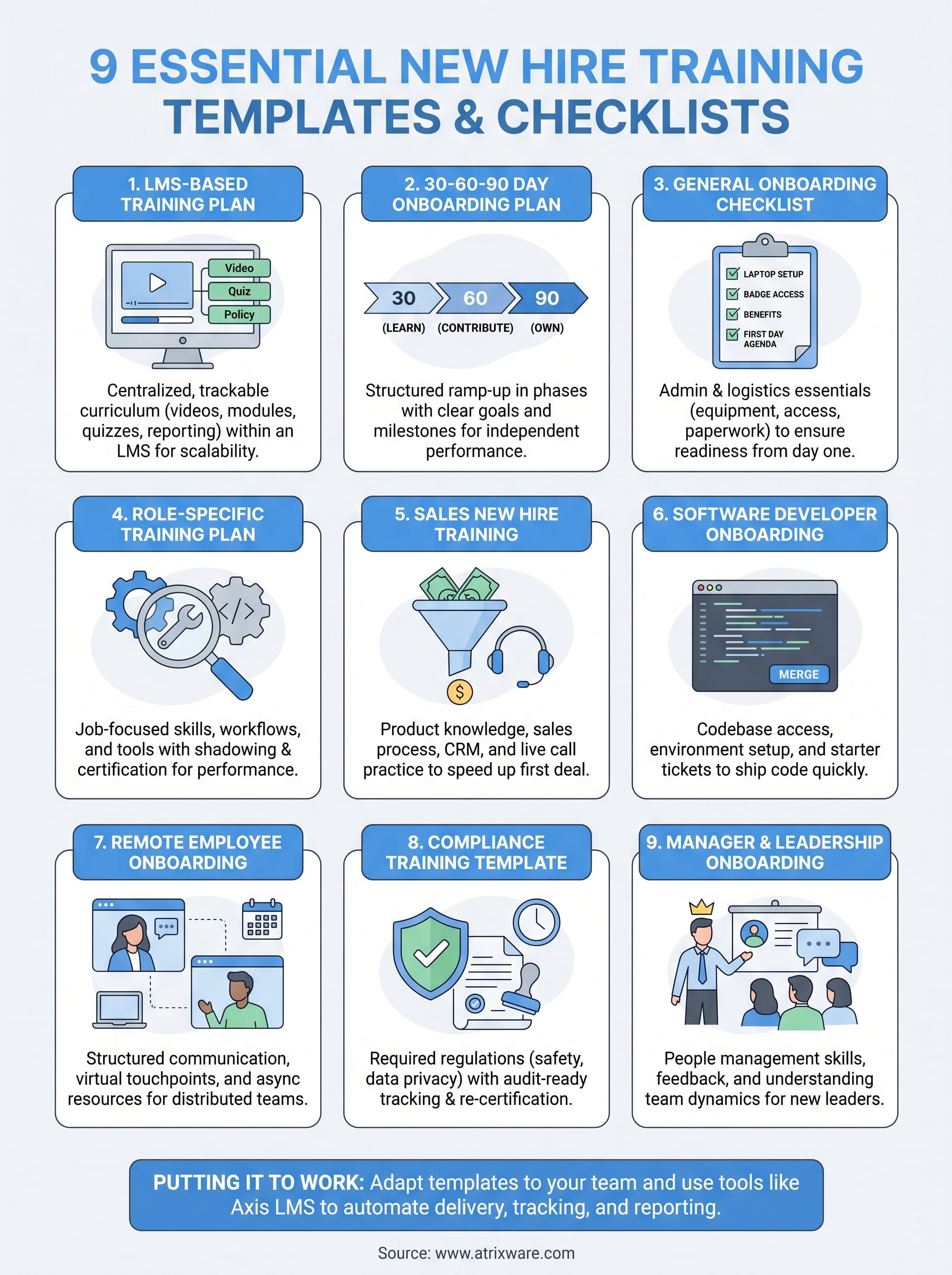
1. LMS-based new hire training plan
An LMS-based training plan turns your onboarding content into a structured, trackable course inside a learning management system rather than a folder of PDFs and slide decks. Instead of emailing a new hire ten attachments and hoping they read all of them, you build a sequenced curriculum: welcome video, policy modules, role-specific lessons, and quizzes that confirm the material actually landed. This is the template that scales, because once it’s built, it runs the same way for hire number 2 and hire number 200 without you lifting a finger each time, and the best practices for onboarding training in an LMS stay consistent for everyone.
A training plan you have to manually re-send to every new hire isn’t a system, it’s a chore waiting to be automated.
What it includes
A solid LMS-based plan typically bundles the following pieces into one enrollment path:
- Welcome module: company overview, mission, org chart, and a video message from leadership
- Policy and compliance courses: handbook acknowledgment, safety training, harassment prevention
- Role-specific lessons: job-specific procedures, software walkthroughs, and reference material
- Knowledge checks: short quizzes after each module to confirm comprehension, not just completion
- Automated reminders: nudges for modules left unfinished after a set number of days
- Completion reporting: a dashboard showing exactly where each new hire stands
The key difference from a checklist in a spreadsheet is that everything here lives in one place, and progress updates itself as the learner moves through it.
Who it’s best for
Companies hiring more than a handful of people per quarter get the most out of this format. If you’re bringing on one person every few months, a checklist might be enough. But once you’re onboarding regularly, whether that’s 5 hires a month or 500 across multiple locations, manual tracking starts to break down fast. HR teams juggling compliance deadlines also benefit, since an LMS can flag exactly who hasn’t finished mandatory training and when their certification expires. Organizations with remote or distributed teams lean on this format too, since it removes the need for a live trainer to walk each person through the same material one at a time.
How to build it
Building this out doesn’t require a developer or a six-month rollout. Here’s the practical sequence:
- Inventory your existing onboarding content (documents, videos, slide decks) and identify gaps
- Break content into short modules, ideally 10-15 minutes each, using a drag-and-drop course builder
- Add quizzes or knowledge checks after each module to confirm retention
- Set up automated enrollment so new hires are added the moment HR marks them as hired
- Configure completion reports and deadline alerts so managers see status without asking
Platforms like Axis LMS support this exact workflow as a training platform for new employees, with drag-and-drop course building, automated communication tools, and reporting that shows completion status without you chasing anyone down. If your onboarding content already exists somewhere, half the work here is just reorganizing what you have, not creating it from scratch.
2. 30-60-90 day onboarding training template
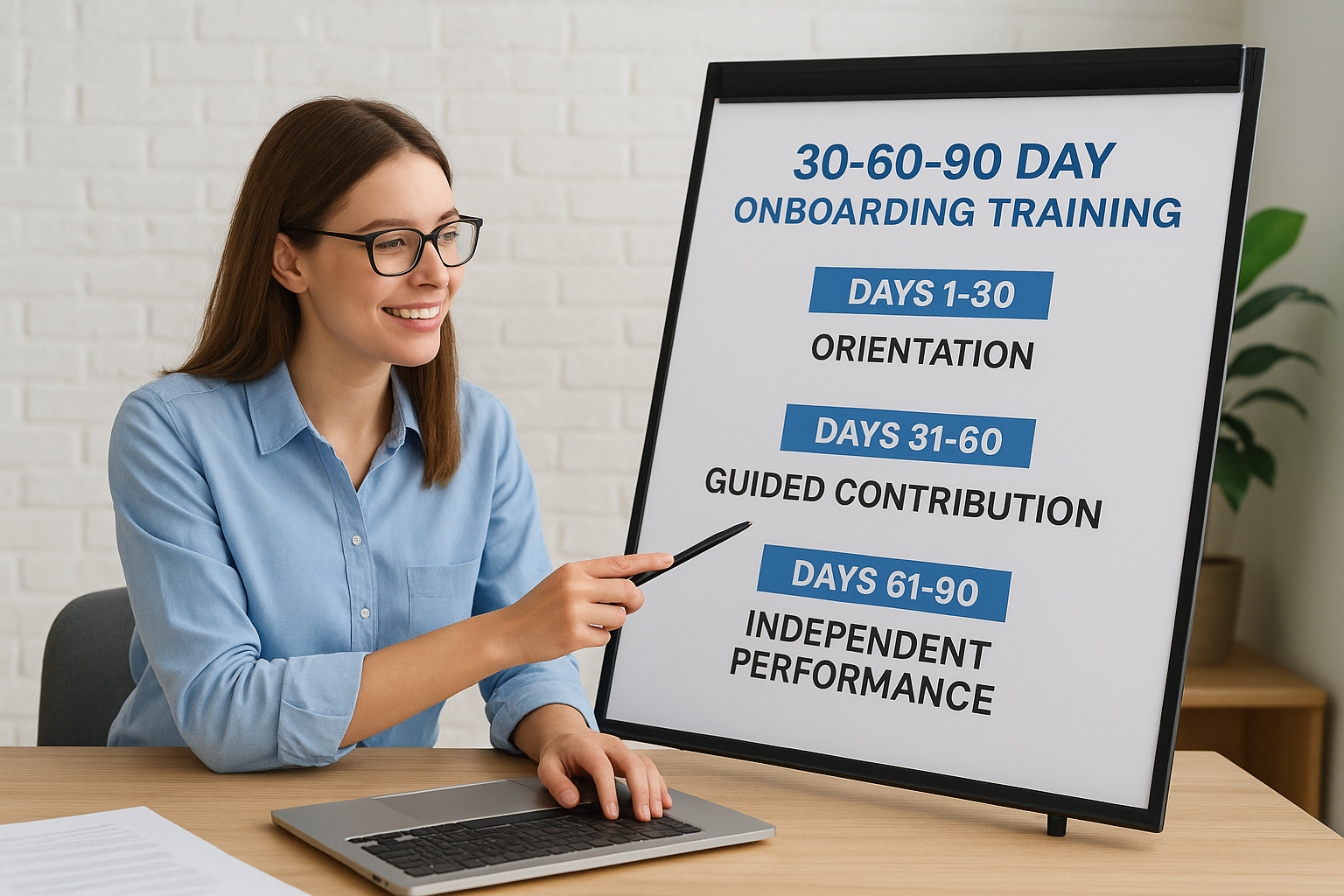
A 30-60-90 day plan breaks a new hire’s first three months into distinct phases, each with its own goals and success markers. Rather than dumping every responsibility on someone in week one, you spread expectations out: learn and observe in the first 30 days, start contributing in the next 30, and operate independently by day 90. This new hire training template works because it gives both the employee and manager a shared timeline to measure progress against, instead of a vague sense that things are "going fine."
A new hire without a 90-day roadmap is guessing at what success looks like, and so is their manager.
What it includes
Most versions of this template are built around three clear phases:
| Phase | Focus | Sample milestone |
|---|---|---|
| Days 1-30 | Orientation, tools, shadowing | Complete required training modules |
| Days 31-60 | Guided contribution | Handle tasks with light supervision |
| Days 61-90 | Independent performance | Own a project or account solo |
Each phase also includes checkpoint conversations, usually a 15-minute check-in at day 30, 60, and 90, where the manager and employee compare notes against the plan, which is the same logic behind using micro-milestones to drive new hire retention.
Who it’s best for
Managers hiring for individual contributor roles get the most value here, especially in sales, marketing, and operations positions where ramp-up time varies by person. It also suits companies without a full LMS deployment yet, since this template runs fine as a shared document or spreadsheet. Startups and small teams often reach for this format first because it requires no software investment and still gives structure to an otherwise informal process.
How to build it
Start by defining what "successful at day 90" actually means for the role, then work backward, using a blueprint for getting new hires job-ready faster as your reference point. List the skills, tools, and relationships the person needs by each checkpoint, assign an owner for each item, and schedule the three check-in meetings before the hire’s first day. Keep the plan to one page; if it’s longer, it won’t get used.
3. General employee onboarding checklist template
A general onboarding checklist covers the administrative and logistical basics that every new hire needs, regardless of role or department. Think laptop setup, badge access, benefits enrollment, IT accounts, and the first-day agenda. This is the new employee onboarding checklist most companies start with because it’s simple, it’s tactical, and it catches the small stuff that otherwise falls through the cracks, like a new hire showing up to a desk with no working login.
The fastest way to lose a new hire’s confidence is a first day where nothing is actually ready for them.
What it includes
A typical checklist splits tasks by timing so nothing gets missed:
- Pre-boarding: offer letter signed, equipment ordered, accounts provisioned before day one
- Day one: desk setup, ID badge, building tour, team introductions
- Week one: benefits enrollment, handbook review, required paperwork submitted
- First month: initial performance conversation, department overview sessions
Each item usually has a single owner, whether that’s HR, IT, or the hiring manager, so nobody assumes someone else is handling it.
Who it’s best for
Small to mid-sized companies without a dedicated onboarding system rely on this template most, since it doesn’t require any software beyond a shared spreadsheet or document. HR teams managing hires across multiple departments also use it as a baseline, layering role-specific content on top once the basics are covered. If you’re hiring infrequently, or you just need a reliable safety net to make sure nothing administrative gets forgotten, this is the template to start with before building anything more elaborate.
How to build it
Listing every task a new hire and their manager need to complete in the first 30 days is step one; group items by day one, week one, and month one. Assign an owner to each line, add a due date, and share the checklist with both HR and the hiring manager so responsibility doesn’t default to whoever remembers first. Keeping it in a shared, editable format means it gets updated as your process changes instead of going stale in a drawer, which is the first step toward a repeatable, compliant onboarding program.
4. Role-specific training plan template
A role-specific training plan zooms in on the technical and functional skills a person needs to actually do their job, separate from the general onboarding paperwork. Where a checklist covers badge access and benefits, this template maps out the tools, workflows, and knowledge specific to one position, whether that’s a customer support rep learning your ticketing system or a warehouse associate learning safety protocols. Among new hire training templates, this one does the heaviest lifting for job performance, since it’s the piece that actually teaches someone how to work, not just where to sit.
Generic onboarding gets someone through the door; a role-specific plan gets them doing the job.
What it includes
Most role-specific plans organize around three elements:
- Core competencies: the specific skills, software, or procedures tied to the role
- Shadowing schedule: sessions paired with a peer or mentor for hands-on exposure
- Certification or sign-off points: manager confirmation that the person can perform key tasks independently
Unlike a general checklist, this document changes completely from one department to another, so a version built for accounting won’t transfer to a warehouse floor.
Who it’s best for
Companies with multiple distinct job functions benefit most, especially when the same generic onboarding process is currently being stretched across roles it wasn’t designed for. Training managers responsible for technical or specialized positions, like machine operators, engineers, or licensed professionals, need this level of detail because a one-size-fits-all checklist simply skips the parts that matter most for the job.
How to build it
Start by interviewing your best-performing employee in the role and documenting what they actually do day to day. Translate that into a skills list, assign a mentor for shadowing, and set a target date for full independence. Building it inside a role-specific training module in an LMS lets you reuse the plan for every future hire in that same position, since role-based learning paths can be assembled in minutes.
5. Sales new hire training template
A sales onboarding template focuses on getting a rep to their first closed deal as fast as possible, without skipping the product knowledge that keeps them from overpromising. Ramp time in sales gets measured in dollars, not just days, so this new hire training template usually compresses learning into a tighter window than other roles get. It blends product training, competitive positioning, and live call practice into one sequence instead of treating them as separate onboarding tracks.
A sales rep who doesn’t know the product cold will lose the deal before the pitch even starts.
What it includes
Most sales onboarding plans cover these pieces in roughly this order:
- Product and pricing training: features, packages, and common objections
- Sales methodology: your specific process, from discovery call to close
- CRM training: pipeline stages, logging activity, forecasting fields
- Call shadowing and role-play: listening to recorded calls, then practicing live with a manager
- Ramp quota: a reduced target for the first 60-90 days that scales to full quota
Certification checkpoints, like a mock pitch a manager has to sign off on, usually gate the rep from taking live calls solo.
Who it’s best for
Sales managers and revenue operations teams get the most out of this format, particularly in organizations replacing reps regularly enough that ramp time directly affects revenue. It also suits teams selling technical or complex products, where a rep genuinely can’t fake their way through a discovery call without real product training first.
How to build it
Pull your top performer’s actual call recordings and use them as training material instead of generic scripts. Sequence product training before role-play, set a ramp quota with clear dates, and require a recorded practice pitch before a rep gets live leads. Track certification and quota progress in sales training software so managers see who’s ready without pulling reports manually.
6. Software developer onboarding template
Getting a new engineer to their first merged pull request fast matters more than any slide deck about company values. A developer onboarding template focuses on codebase access, tooling setup, and a structured path from reading code to shipping it, since developers learn best by doing rather than watching. This kind of new hire training template works differently than others on this list because half of it is technical setup, not training content in the traditional sense.

A developer who can’t run the codebase locally by day three isn’t ramping, they’re stuck.
What it includes
Most developer onboarding plans bundle these pieces together:
- Environment setup guide: repo access, local build instructions, required tools and credentials
- Codebase walkthrough: architecture overview, key services, internal documentation links
- Starter tickets: small, low-risk bugs or tasks assigned in the first week to build familiarity
- Code review pairing: a senior engineer reviewing early pull requests closely, then loosening over time
- On-call or deploy training: once relevant, how releases and incident response actually work
Unlike a general checklist, this template lives partly in your codebase and internal wiki, not just in HR software.
Who it’s best for
Engineering managers and team leads at companies with any real technical stack rely on this format, especially teams hiring multiple developers a year across different specialties like frontend, backend, or infrastructure. Startups scaling their engineering headcount benefit too, since a documented ramp process prevents each new hire from depending entirely on tribal knowledge held by whoever happens to be free that week.
How to build it
Document your local setup process yourself, step by step, then have a recent hire test it blind and flag every place it breaks. Curate a short list of starter tickets tagged for new hires, pair each one with a reviewer for the first month, and slot them into a broader technical skills curriculum that builds on itself. Housing the written parts, architecture docs, security policies, and process guides inside an LMS keeps them versioned and searchable instead of scattered across outdated wiki pages.
7. Remote employee onboarding template
Onboarding someone who’s never set foot in your office means every handshake, hallway introduction, and "come grab me if you have questions" has to be replaced with something deliberate. A remote employee onboarding template exists to close the distance gap, structuring communication, tool access, and social connection so a remote hire doesn’t spend their first month feeling invisible. Among the various new hire training templates on this list, this one leans hardest on scheduled human contact, since nothing happens by accident when nobody’s in the same room.
Remote onboarding fails when connection is left to chance instead of the calendar.
What it includes
A remote-focused plan typically layers these elements on top of standard training content:
- Tech and access checklist: VPN, laptop shipping, software logins configured before day one
- Structured video check-ins: daily for week one, tapering to weekly by week four
- Virtual buddy system: a peer assigned specifically for informal questions
- Async documentation: recorded walkthroughs and written guides for time zone flexibility
- Deliberate social touchpoints: virtual coffee chats or team intros scheduled, not left to happen naturally
Who it’s best for
Companies with fully distributed teams or hybrid setups where new hires rarely visit an office need this template most. It also suits organizations hiring across multiple time zones, where a single live orientation session simply can’t reach everyone at a reasonable hour. If your current onboarding assumes someone can walk over and ask a coworker a question, this is the template that fixes the gap for people who can’t.
How to build it
Ship equipment early enough that it arrives before day one, not on it. Record your standard orientation sessions once so remote hires in any time zone can watch on their own schedule, then build a daily check-in cadence into the manager’s calendar before the hire starts. Hosting recorded content and progress tracking in an LMS keeps everything centralized for remote workforce training, since a remote hire shouldn’t need five different logins just to find their training material.
8. Compliance training template
Compliance training exists to prove, not just teach, that a new hire understands the rules they’re legally or contractually bound to follow. A compliance training template covers things like data privacy, workplace safety, anti-harassment policy, and industry-specific regulations, and it needs an audit trail showing exactly who completed what and when. Unlike most other new hire training templates on this list, getting this one wrong doesn’t just slow someone’s ramp, it can expose the company to fines or legal liability.

If you can’t prove a new hire completed compliance training, regulators will treat it as if they never did.
What it includes
A solid compliance plan usually bundles these pieces:
- Regulation-specific modules: GDPR, FDA 21 CFR Part 11, OSHA, or industry rules that apply to the role
- Policy acknowledgments: signed confirmation the hire read and understood each policy
- Timed re-certification: recurring training tied to expiration dates, not a one-time event
- Audit-ready reporting: timestamped records showing completion, scores, and sign-off
Who it’s best for
Regulated industries, healthcare, finance, manufacturing, and any organization handling sensitive customer data, need this template built into day one, not added later. Compliance officers and HR teams facing external audits rely on it heaviest, since a spreadsheet tracking dozens of expiration dates by hand becomes unmanageable past a handful of employees, and keeping training records audit-ready is the whole point.
How to build it
Start by listing every regulation that actually applies to your industry and each role within it, then map training modules to each requirement. Set automatic re-certification reminders before deadlines lapse, not after. Building this inside a compliance training platform with dedicated compliance management features, like Axis LMS, means completion records, quiz scores, and re-certification dates get tracked automatically instead of chased down manually before an audit.
9. Manager and leadership onboarding template
Promoting someone into their first management role, or hiring an outside leader, requires a completely different onboarding path than the one you’d hand an individual contributor. A manager and leadership onboarding template covers how to run one-on-ones, deliver feedback, handle performance issues, and read the team’s existing dynamics before making changes. Skipping this step is how you end up with a great performer turned into a struggling manager, simply because nobody ever taught them the actual mechanics of leading people.
Promoting your best performer without training them to manage just moves your best performer’s talent into a job they haven’t learned yet.
What it includes
A leadership onboarding plan typically covers:
- People management basics: running effective one-on-ones, giving feedback, documenting performance
- Team assessment period: structured time to observe before making organizational changes
- Company leadership norms: how promotions, budgets, and cross-team decisions actually get made here
- Peer mentor pairing: an experienced manager available for questions the new leader won’t ask their own boss
Who it’s best for
Companies promoting individual contributors into their first management role need this template most, since technical skill and leadership skill rarely overlap without direct coaching. It also suits organizations hiring external leadership, like a new department head, where understanding internal politics and existing team relationships matters as much as the job description itself. HR teams building a leadership bench for future promotions benefit from having this ready before it’s urgently needed.
How to build it
Pair every new manager with a mentor one or two levels above them for the first 90 days, and schedule biweekly check-ins specifically about people management, separate from regular business updates. Include a module on your specific performance review process and compensation guidelines, since these vary company to company. Delivering the people-management curriculum through a leadership development program in an LMS keeps it consistent for every future promotion instead of relying on whichever mentor happens to be available.
Putting your training template to work
Picking the right template is only step one. The real payoff comes from actually using it consistently, updating it as roles change, and tracking whether new hires are finishing what you’ve assigned them. A new hire training template sitting in a shared drive doesn’t onboard anyone by itself; someone still has to assign it, chase completions, and prove compliance when an auditor asks. That’s the gap an LMS closes, turning any of these nine formats into a self-running process instead of another manual task on your plate.
If you’re still deciding whether your team actually needs software to manage this, start by figuring out where you stand. Take the free LMS readiness assessment to see whether you’re ready to move your onboarding templates into a system built to run them automatically, complete with reporting, reminders, and role-based training paths already built in.
