A bad onboarding experience costs you more than a confused new hire. It costs you retention, ramp-up time, and eventually money, since employees who go through structured onboarding built on LMS best practices are far more likely to stay past their first year. If you’re evaluating new hire training software right now, you’re probably tired of scattered PDFs, one-off Zoom calls, and no real way to prove training actually happened. That’s the gap the right platform closes, with automated workflows that get people productive faster.
This article answers the question directly: which platforms actually deliver for onboarding in 2026, and why. We used the same criteria you would compare learning management systems with: course-building tools, reporting depth, integration options with HR systems like BambooHR and ADP, and how each platform handles compliance tracking, because a system that can’t prove completion isn’t doing its job.
Below you’ll find 10 platforms worth your shortlist, including where Axis LMS fits for organizations that need strong branding control alongside serious reporting and SSO support. Each entry covers what the platform does well, where it falls short, and who it’s actually built for, so you can pick based on your team’s size and needs rather than marketing copy.
1. Axis LMS by Atrixware for compliance-ready training
If your new hire training program has to hold up under an audit, Axis LMS is built for exactly that pressure. Atrixware designed it around organizations that can’t afford a shrug when someone asks whether an employee completed required training. The platform handles both self-paced course delivery and live virtual classroom sessions, so you’re not stuck choosing one format for every new hire. Compliance officers and training managers who need documented proof of completion for regulated training, not just a checklist, tend to land here first.
Key features
Axis LMS packs in the reporting depth and administrative control that larger onboarding programs need without forcing you into a clunky interface to get it.
- Drag-and-drop course builder for assembling onboarding paths without touching code
- Automated compliance tracking for standards like GDPR and FDA 21 CFR Part 11, including re-certification alerts
- On-demand and scheduled reporting so managers can pull learner progress without waiting on IT
- SSO support through SAML providers including Okta, Azure, and Ping Identity
- Deep branding customization so the learner portal looks like your company, not a generic vendor tool
- REST API and workflows and webhooks that automate training, plus an integration builder connecting to over 5,000 systems including ADP, Salesforce, BambooHR, and Zoho
That combination matters because most new hire training software forces a trade-off between ease of use and administrative depth. Axis LMS doesn’t make you pick.
A training platform that can’t prove completion under audit isn’t a compliance tool, it’s a liability.
Who it’s best for
Organizations with real compliance stakes get the most out of Axis LMS. Think healthcare groups tracking CEU renewals, financial services firms documenting regulatory training, or manufacturers proving safety certification across shifts. Mid-sized to large companies onboarding across multiple departments benefit from the reporting granularity, since a training manager can filter completion data by team, location, or course without exporting a spreadsheet first. Businesses that already run HR or CRM systems like BambooHR or Salesforce also fit well, since the user data synchronization keeps new hire records current without manual entry.
Smaller teams onboarding a handful of people a month may find some of the compliance and reporting depth more than they need right now, though the platform scales down fine for that use case too. Where Axis LMS really earns its keep is anywhere HR, compliance, and IT all need visibility into the same onboarding data, since the SSO and API options mean IT doesn’t have to build workarounds to make the LMS talk to the rest of the stack.
Pricing
Atrixware doesn’t publish flat public pricing, and that’s by design. Axis LMS pricing depends on active user count, hosting preference (cloud or self-hosted), and which modules you need, such as the e-commerce functionality for selling training externally. That structure means a 50-person team and a 5,000-person enterprise aren’t paying for the same feature set they don’t use.
| Factor | Impact on cost |
|---|---|
| Active user count | Primary driver of licensing cost |
| Hosting type | Cloud vs. self-hosted changes infrastructure pricing |
| Compliance modules | CEU tracking, certification management priced separately |
| Integration needs | Custom API work may add setup cost |
| Branding depth | Advanced UI customization can affect tier |
Requesting a quote gets you a number based on your actual training program instead of a generic per-seat rate that doesn’t reflect what compliance-heavy onboarding actually requires.
2. TalentLMS for fast, easy setup
TalentLMS built its reputation on getting a training program live in an afternoon, not a quarter. If you need new hire training software that a non-technical HR person can configure without a vendor call, this is the one that gets mentioned most often in that context. The interface leans on templates and a simplified course builder, so you’re publishing your first onboarding module the same day you sign up rather than scheduling a kickoff call with an implementation team.
Key features
Speed of deployment is the whole pitch, and the feature set backs it up.
- Pre-built course templates for common onboarding topics like harassment training and safety basics
- Gamification tools, including badges and levels, to keep new hires engaged past week one
- Bulk user import via CSV for onboarding a full cohort at once
- Mobile app for learners who need to complete modules outside a desk setup
- Basic reporting dashboard covering completion rates and quiz scores
Those pieces work together well for straightforward onboarding, though the reporting stays fairly surface-level compared to platforms built around compliance documentation.
If your onboarding needs can fit in a template, TalentLMS gets you live faster than almost anything else on this list.
Who it’s best for
Small to mid-sized businesses without a dedicated LMS administrator, the same group that shops for an LMS built for smaller teams, fit TalentLMS best. Teams onboarding a steady but modest number of new hires each month, without heavy regulatory tracking requirements, get most of the platform’s value without paying for depth they won’t use. Startups building their first formal onboarding process also do well here, since the learning curve for admins is short enough that HR can own the system without pulling in IT. Companies with strict compliance obligations, like healthcare or financial services tracking certifications, tend to outgrow the reporting layer once auditors start asking specific questions.
Pricing
TalentLMS prices by active user tiers rather than a flat seat count, with a free plan available for very small teams under a low user cap. Paid tiers scale up based on how many active users you have in a given month, and higher tiers unlock features like custom reports and API access. This works fine if your headcount is stable, but organizations with seasonal hiring spikes should model out what a busy month does to the bill before committing, since active user pricing can swing month to month in a way flat per-seat pricing doesn’t.
3. BambooHR for all-in-one HR and onboarding
BambooHR started as an HR information system and added onboarding features on top, which shows in how the platform works. Instead of standing alone as new hire training software, it folds training tasks into the same record where you already store offer letters, tax forms, and PTO balances. If your onboarding problem is really an HR data problem, meaning new hire information lives in three disconnected spreadsheets, BambooHR solves that first and treats training as one piece of a bigger onboarding checklist rather than the main event, which is a different approach than folding a training platform into your HR roadmap.
Key features
BambooHR’s onboarding module ties directly into its core HR database, so nothing about training happens in isolation from employee records.
- Onboarding task checklists that assign paperwork, equipment requests, and training modules to new hires and managers automatically
- E-signature collection for offer letters and policy acknowledgments before day one
- Preboarding packages that give new hires access to company info before their start date
- Basic training tracking for required reading, video modules, and simple quizzes
- Employee self-service for updating personal information without HR intervention
Those features work best as a package deal. Pulling just the training piece out and expecting LMS-level depth will leave you disappointed.
BambooHR treats training as one task on an onboarding checklist, not a system built to run a training program on its own.
Who it’s best for
Companies without a separate LMS, or that never grew past basic onboarding needs, get the most value here. HR teams that want one login for personal data, time off, performance reviews, and onboarding tasks avoid juggling multiple vendors. Small and mid-sized businesses with straightforward compliance requirements, think a handful of policy acknowledgments rather than CEU tracking or FDA documentation, fit comfortably within what BambooHR offers. Organizations with real training complexity, multiple departments running different curricula or regulated industries needing detailed completion audits, usually need a dedicated LMS alongside or instead of BambooHR’s built-in tools.
Pricing
BambooHR doesn’t publish flat pricing publicly. Costs depend on employee headcount and which product tier you choose, since onboarding and performance management modules sit in different pricing bands. Getting a quote means talking to sales directly, and smaller companies often find the core HR platform pricing reasonable while the added training depth still lags behind a purpose-built LMS.
4. Continu for interactive onboarding journeys
Continu builds onboarding around individual learning paths rather than a stack of standalone modules, which makes it a strong fit for companies that think of employee onboarding software as a journey with stages, not a single orientation day. New hires move through curated content, mentor check-ins, and skill assessments in a sequence you design, so the platform tracks progress against a roadmap instead of just a completion percentage. Managers get visibility into where each hire sits in that journey, which helps catch someone falling behind before their 90-day review instead of after.

Key features
Journey-based design shows up throughout the feature set, not just in the marketing.
- Learning path builder that sequences content, mentor tasks, and check-ins across weeks or months
- Content curation tools pulling in video, documents, and external resources into one path
- Mentor and buddy assignment built into the onboarding workflow itself
- Skills tracking that ties onboarding completion to competency milestones
- Integration with Slack and Microsoft Teams for nudges and reminders inside tools employees already use
Those pieces combine to keep onboarding feeling like an ongoing relationship rather than a one-time event.
Onboarding that ends after week one isn’t onboarding, it’s orientation.
Who it’s best for
Mid-sized companies with a defined onboarding culture, particularly ones that already lean on mentorship or buddy systems, get the most out of Continu. Teams that care about the experience new hires have, not just whether they clicked through a compliance module, find the journey structure worth the setup time. Organizations spread across departments with different onboarding needs, like sales versus engineering, can build separate paths without duplicating a whole course library. Companies whose main requirement is heavy regulatory documentation, rather than a polished learning experience, will find better reporting depth elsewhere on this list.
Pricing
Continu doesn’t list public per-seat pricing on its site, and quotes come from a sales conversation based on headcount and which modules you need active. Smaller teams should expect the platform to price toward the higher end compared to simpler onboarding checklists, since you’re paying for the path-building and content curation layer on top of basic tracking. Budgeting a demo call before committing makes sense here, since the value depends heavily on how much you actually use the journey-building tools rather than treating Continu as a plain course repository.
5. Enboarder for AI-driven onboarding experiences
Enboarder treats onboarding as an experience to design, not a checklist to complete, and it leans on AI to personalize that experience for every new hire. Rather than pushing the same static modules to everyone, the platform triggers personalized nudges based on role, location, and start date, so a remote sales hire and an in-office engineer get different journeys from day one. This makes Enboarder less of a traditional new hire training software platform and more of an orchestration layer that pulls in content, people, and timing to make onboarding feel human even at scale.
Key features
Enboarder’s feature set centers on automation that reacts to context rather than a fixed schedule.
- AI-generated workflows that adjust onboarding steps based on role, department, and manager input
- Manager and buddy nudges delivered via Slack, Teams, or email at the right moment in the journey
- Sentiment tracking through pulse surveys to catch disengagement early
- Pre-boarding automation that starts before the official start date
- Journey analytics showing where hires stall or drop off in the process
Those tools work best when a company already has onboarding content built and needs a smarter way to deliver it, rather than a place to build that content from scratch.
Automation only helps onboarding if it delivers the right message at the right moment, not just more messages.
Who it’s best for
Companies with a people-first culture and enough hiring volume to justify automation get the most value here. HR teams juggling onboarding across multiple offices or time zones benefit from workflows that adjust automatically instead of manual scheduling for each hire. Organizations that already have training content living elsewhere, in an LMS or content library, and just need better delivery and engagement tracking fit well too. Businesses needing deep compliance reporting or CEU tracking should look elsewhere, since Enboarder focuses on experience and engagement rather than audit-ready documentation.
Pricing
Enboarder doesn’t publish public pricing, and quotes depend on employee headcount and which automation modules you activate. Expect a sales conversation before getting a number, since pricing scales with how many workflows and integrations you run rather than a flat per-seat rate. Smaller teams without much onboarding complexity may find the cost hard to justify against the AI-driven personalization they’d actually use, while larger, distributed organizations tend to see the automation pay off faster.
6. Connecteam for deskless and frontline teams
Connecteam builds for the workforce most onboarding software ignores: people who don’t sit at a desk. If your new hires clock in at a warehouse, drive a delivery route, or work a retail floor, mobile-first onboarding and training frameworks adapted for the deskless workforce matter more than a polished web dashboard nobody at your company opens on a laptop. The entire platform runs through a phone app, so training modules, scheduling, and company updates reach a new hire the same way a shift reminder would. That focus makes Connecteam less of a traditional new hire training software platform and more of an operations hub that happens to include training.

Key features
Connecteam’s feature set reflects its frontline roots, bundling training with the tools those teams already rely on daily.
- Mobile course builder for creating bite-sized training content viewable entirely on a phone
- Digital forms and checklists for onboarding paperwork, safety acknowledgments, and equipment sign-off
- Built-in scheduling and time tracking tied to the same employee profile as training records
- In-app chat and updates for reaching frontline staff without relying on email
- Quizzes and knowledge checks to confirm training actually landed before someone starts a shift
Those pieces matter less if your workforce sits at desks all day, but they solve a real gap for anyone managing shift-based teams.
Onboarding software that assumes everyone has a laptop already failed half the workforce.
Who it’s best for
Retail chains, restaurants, logistics companies, and healthcare facilities with frontline shift workers get the clearest value from Connecteam. Businesses that already struggle to reach staff through email, because half the team doesn’t have a company inbox, benefit from an app-based approach that meets people where they actually work. Small and mid-sized operations running multiple locations find the combination of scheduling, communication, and training in one app worth the switch from juggling separate tools. Companies needing deep compliance reporting for regulated industries, or complex course-building for technical training, will find Connecteam’s training module thinner than a dedicated LMS built specifically for that job.
Pricing
Connecteam prices per user with a small business plan available at no cost for teams under a low headcount cap. Paid tiers scale by employee count and unlock deeper features like custom forms, advanced scheduling, and expanded storage for training content. A free plan makes this an easy platform to trial before committing, though growing companies should check how pricing scales past the free tier before their frontline headcount doubles and the bill catches up with it.
7. Trainual for documenting SOPs and processes
Trainual solves a specific problem: most companies onboard new hires with knowledge trapped in someone’s head, not written down anywhere a new employee can reference later. The platform functions as a living playbook for company processes, where you document every role, policy, and workflow once, then assign it as training when someone new joins. This makes Trainual less of a course-authoring tool and more of an onboarding checklist builder tied directly to the actual SOPs your team follows. If your current onboarding involves shadowing a coworker for two weeks, Trainual turns that tribal knowledge into something repeatable.
Key features
Trainual’s feature set centers on documentation first, training delivery second.
- Process and SOP templates covering common roles and departments to speed up initial setup
- Org chart and role mapping that ties training content directly to job responsibilities
- Embedded quizzes to confirm a new hire actually absorbed a documented process
- Automated assignment that triggers relevant SOPs based on role or department
- Version tracking so updates to a process automatically flag anyone trained on the old version
That last point matters more than it sounds. Processes change, and Trainual keeps training current instead of letting outdated documentation quietly sit unused.
Onboarding built on tribal knowledge collapses the moment the one person who knows the process leaves.
Who it’s best for
Small and mid-sized businesses without formal documentation get the most immediate value from Trainual, especially companies scaling past the point where founders can personally train every new hire. Service businesses, agencies, and franchises with repeatable processes across locations benefit from having one source of truth that every new employee references the same way. Teams that already struggle with inconsistent onboarding, where two new hires in the same role get different training depending on who trained them, find Trainual closes that gap directly. Organizations needing deep compliance reporting for regulated industries, where training records have to stay audit-ready, or advanced integrations with HR and CRM systems, will find Trainual thinner on that front than a dedicated LMS.
Pricing
Trainual prices by active user tiers with published starting rates on its site, which makes budgeting more predictable than vendors requiring a sales call for every quote. Higher tiers unlock features like advanced reporting, more integrations, and additional admin seats. Smaller teams can start lean and add users as headcount grows, though companies with complex compliance needs should confirm the reporting depth matches what auditors will actually ask for before committing.
8. Docebo for AI-powered enterprise training
Docebo targets a different problem than most platforms on this list: not how to onboard ten new hires, but how to run learning across a workforce of ten thousand without the system collapsing under its own complexity. The platform leans heavily on AI tools built into the LMS to automate the grunt work of course tagging, content recommendations, and skills mapping, which matters once your new hire training software has to serve dozens of departments each with different curricula. Docebo positions itself as an enterprise learning platform first and an onboarding tool second, so new hire training becomes one use case running alongside compliance refreshers, leadership development, and partner training.
Key features
Docebo’s feature set reflects its enterprise focus, with automation layered on top of a fairly deep course catalog structure.
- AI-powered content tagging that automatically categorizes and recommends courses based on role and skill gaps
- Learning impact reporting connecting course completion to measurable business outcomes
- Multi-language support for global workforces onboarding across regions
- Content marketplace integration pulling in third-party courses without manual uploads
- Mobile app for learners completing modules outside a desk environment
Those capabilities pay off once you’re managing learning at scale, though a five-person HR team onboarding a handful of hires a month will find most of this overhead they never touch.
Enterprise learning tools earn their price tag through scale, not through features a small team will ever open.
Who it’s best for
Large enterprises with learning and development teams dedicated to managing training across thousands of employees fit Docebo best. Companies running onboarding alongside broader employee onboarding software needs, like leadership pipelines or partner certification programs, benefit from having one platform handle all of it rather than stitching together separate tools. Organizations with the internal resources to configure AI-driven recommendations and content tagging properly get real value from the automation. Smaller businesses or teams without a dedicated LMS administrator usually find Docebo’s depth outpaces what a straightforward new hire onboarding program actually requires, and the learning curve for admins runs steeper than simpler tools on this list.
Pricing
Docebo doesn’t publish flat pricing, and quotes come from a sales conversation based on active user count and which modules, like the content marketplace or advanced analytics, you activate. Enterprise contracts typically involve annual commitments rather than month-to-month billing. Smaller organizations evaluating Docebo should weigh the cost against how much of the AI and reporting depth they’ll genuinely use, since the platform prices toward the enterprise end of this list rather than competing on affordability.
9. 360Learning for collaborative peer training
360Learning flips the usual model where a training team builds courses top-down and everyone else consumes them. Instead, the platform is built around peer-created content, letting subject matter experts across departments author onboarding material directly rather than routing every module through L&D. If your new hires learn best from the people actually doing the job, not a generic slide deck, this collaborative approach makes 360Learning stand out among new hire training software built around a single admin authoring everything alone. The idea is that the salesperson who closes the most deals should be the one teaching new sales hires, not a training manager translating secondhand knowledge into a course.
Key features
360Learning’s feature set centers on making course creation a shared responsibility instead of a bottleneck.
- Collaborative course authoring letting any employee build and edit training content with review workflows, much like the e-learning authoring tools corporate trainers use
- Peer feedback loops where learners can comment, ask questions, and flag outdated content directly inside a course
- Skills-based learning paths that route new hires toward relevant content based on role and gaps
- AI-assisted course creation that turns existing documents or recordings into structured lessons
- Engagement analytics tracking completion alongside how much learners actually interact with content
That feedback loop matters because it keeps onboarding material current without waiting on a formal content review cycle.
Training built by the people doing the work stays accurate longer than training built by people describing the work secondhand.
Who it’s best for
Companies with strong internal expertise spread across departments, rather than centralized in one training team, get the most out of 360Learning. Fast-growing companies where processes change often benefit from the collaborative model, since updating a course doesn’t require funneling every change through a single content owner. Organizations that already run a culture of internal knowledge sharing, like regular lunch-and-learns or documented playbooks, find the platform extends something they’re already doing rather than introducing a new workflow from scratch. Businesses that need tight top-down control over training accuracy, particularly in regulated industries where content must go through formal approval before release, may find the open authoring model harder to govern than a locked-down LMS.
Pricing
360Learning doesn’t publish flat public pricing, and quotes depend on active user count and which modules, like advanced analytics or extended integrations, you need active. Sales conversations typically scope pricing around headcount and how many people will actively author content versus just consume it. Smaller teams should factor in that the collaborative authoring tools are the main value driver here, so a company that won’t use peer-created content much may be better served by a simpler, cheaper platform on this list.
10. Rippling for combined HR and IT onboarding
Rippling solves a problem most new hire training software never touches: the laptop that hasn’t shipped, the Slack account that doesn’t exist yet, and the payroll setup nobody finished before day one. The platform combines HR, IT, and payroll into a single system, so device provisioning and account creation happen automatically the moment someone accepts an offer. Training modules sit inside that same workflow rather than as a separate tool, which means a new hire’s first login can already have their apps, benefits enrollment, and orientation content waiting in one place. For companies where IT delays are the actual bottleneck in onboarding, not a lack of course content, Rippling addresses the root cause instead of adding another dashboard.

Key features
Rippling’s onboarding tools work as one piece of a much larger operations platform, not a standalone module.
- Automated device and app provisioning that triggers the moment a new hire’s start date is confirmed
- Unified employee record connecting payroll, benefits, IT permissions, and training completion in one profile
- Custom onboarding workflows that assign tasks to HR, IT, and managers with built-in deadlines
- Basic training and policy acknowledgment tracking for required reading and compliance sign-offs
- Global payroll and compliance support for companies hiring across multiple countries
Those pieces matter most for companies where onboarding delays trace back to app access and equipment, not course content quality.
Onboarding stalls just as often on a missing laptop as on missing training content.
Who it’s best for
Growing companies managing HR and IT onboarding through separate, disconnected systems get the clearest benefit from switching to Rippling. Businesses hiring remotely or internationally, where shipping equipment and setting up compliant payroll adds real complexity, find the unified workflow saves days of manual coordination between departments. Organizations that need training as part of a broader onboarding process, rather than a dedicated learning program with deep course-building and reporting, fit well here too. Companies needing robust course authoring, CEU tracking, or detailed compliance certification reporting should treat Rippling’s training layer as a supplement, not a replacement for a purpose-built LMS.
Pricing
Rippling starts pricing around a base platform fee plus per-employee costs, with modules like IT management, payroll, and benefits priced separately depending on which you activate. Quotes require a sales conversation since the final cost depends heavily on which modules a company bundles together. Smaller businesses evaluating Rippling should confirm whether they actually need the IT and payroll consolidation, since paying for the full platform just to get basic onboarding checklists rarely makes financial sense.
Finding the right fit for your team
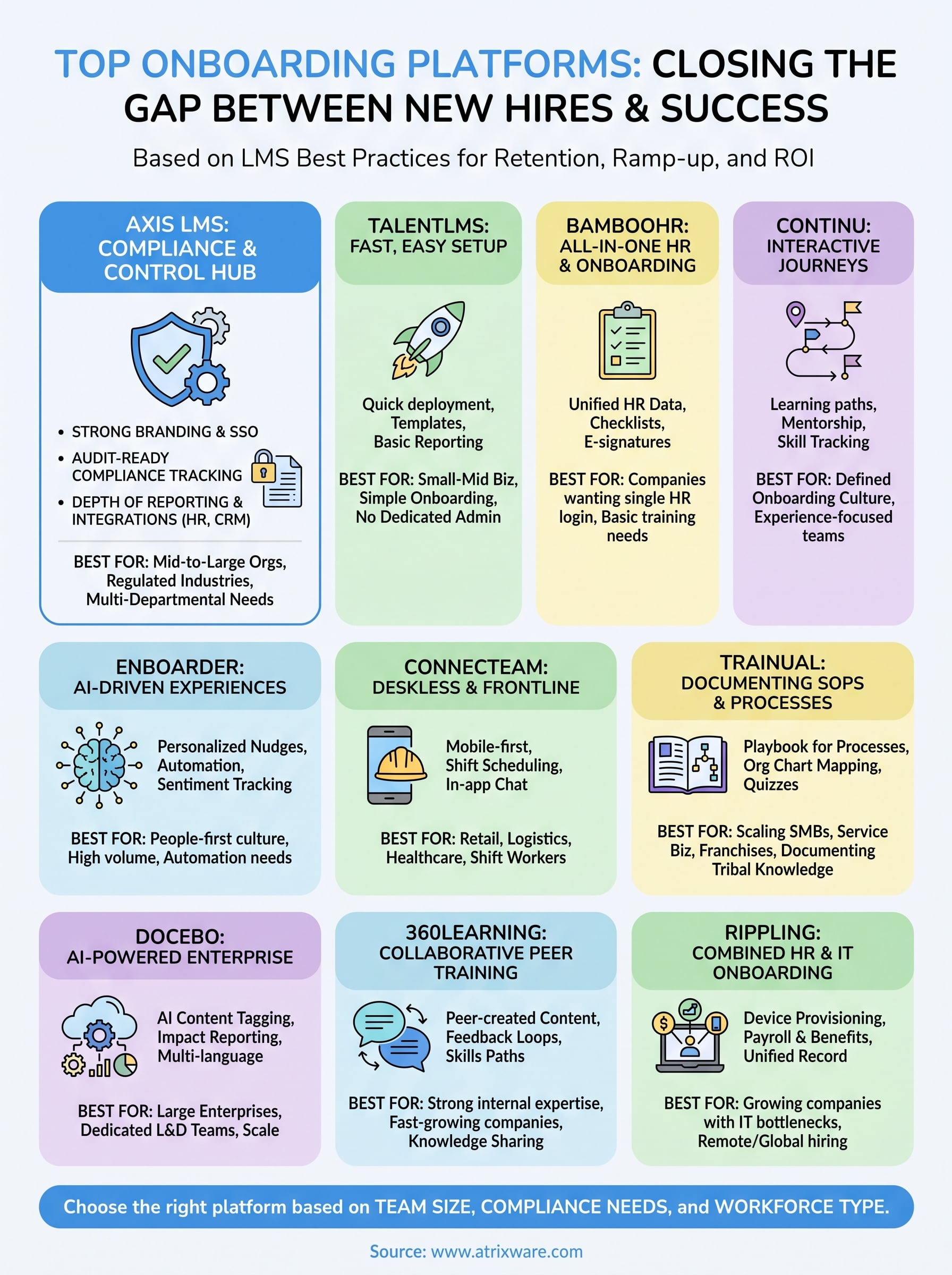
Most of the platforms above solve a narrow piece of the onboarding puzzle well. TalentLMS gets you live fast, Rippling fixes IT bottlenecks, Trainual documents tribal knowledge. But if your organization needs new hire training software that holds up when auditors start asking questions, and your HR, compliance, and IT teams all need visibility into the same data, the shortlist gets a lot shorter. That’s the gap Axis LMS was built to close, with reporting depth and SSO support that don’t force a trade-off against ease of use.
No comparison article replaces actually testing a platform against your own onboarding content and reporting requirements. If compliance tracking, branding control, or integration depth matter to your program, spin up the Axis LMS admin demo and see how it handles your actual training data before you commit to anything.
