Picking a cloud based learning management system shouldn’t feel like a shot in the dark, but with dozens of platforms making the same promises, most buyers end up guessing. You need something that runs training without server headaches, scales as your team grows, and doesn’t require a six-month implementation just to launch your first course.
A cloud-based learning management system hosts your courses, learner data, and reporting off-site, so your team logs in from anywhere without IT maintaining hardware, which is one of the main benefits of hosting your training in the cloud. That’s the direct answer, but the harder question is which platform actually fits your training goals, whether that’s onboarding new hires, running compliance training, or selling courses to customers.
This list breaks down nine platforms worth considering for 2026, including where Axis LMS fits for organizations that need strong branding control, deep integrations, and reporting built for compliance-heavy industries. You’ll get a straight comparison of features, pricing models, and ideal use cases, so you can match a system to your actual requirements instead of a sales pitch.
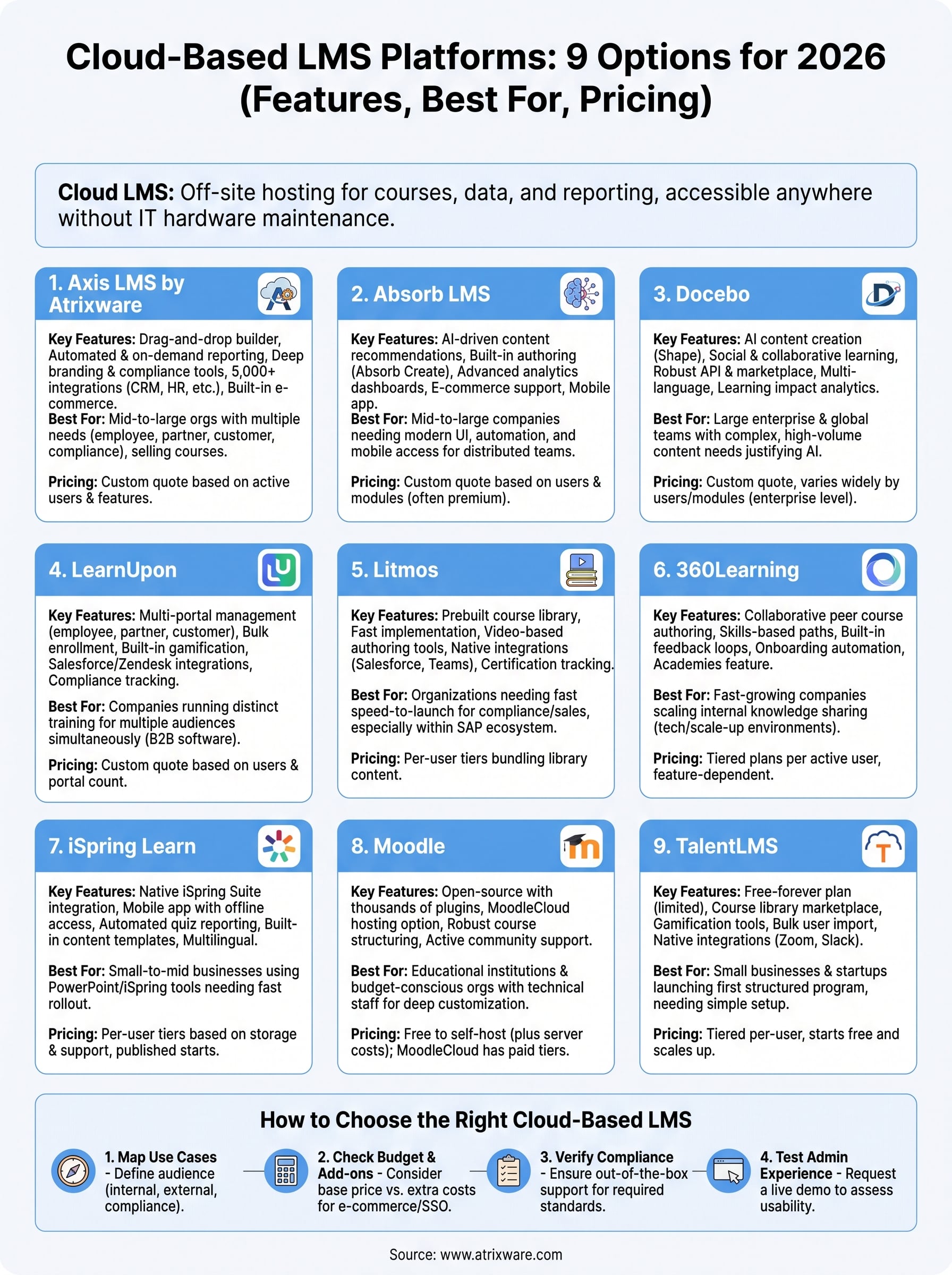
1. Axis LMS by Atrixware
Axis LMS is a cloud-based learning management system built for organizations that need more than a basic course catalog. Atrixware designed it to handle the full range of corporate training use cases, from onboarding to channel partner education to selling courses externally, without forcing you to bolt on separate tools for reporting, e-commerce, or compliance tracking. It’s the platform we’re most familiar with, and it consistently stands out for how much control it gives administrators over both the learner experience and the back-end reporting.

Key features
Organizations pick Axis LMS when they need a system that flexes with their structure rather than the other way around, and the full Axis LMS feature set reflects that. Standout capabilities include:
- Drag-and-drop course builder for rapid content creation without developer help
- Automated and on-demand reporting covering learner progress, completion rates, and training ROI
- Deep branding customization so the learner portal matches your organization’s identity
- Compliance management tools built for standards like GDPR and FDA 21 CFR Part 11, including CEU and re-certification tracking
- Integration builder with over 5,000 connections to CRM, HR, email, and e-commerce systems, plus REST API, webhooks, and SAML SSO support for tools like Okta and Azure
- Built-in e-commerce for selling individual courses or seat licenses to other businesses
A cloud LMS earns its keep when it replaces five separate tools instead of adding a sixth.
Best for
Pricing flexibility aside, Axis LMS fits best with mid-size to large organizations juggling multiple training needs at once, think regulated industry compliance training in healthcare, manufacturing, and finance, plus companies that train employees, customers, and channel partners from the same account. Compliance officers and training managers who need audit-ready reporting without building custom dashboards tend to get the most value here. It also suits businesses that want to sell courses and training online, since the e-commerce functionality is native rather than an add-on.
Pricing
Since training programs vary so much in size and complexity, Axis LMS doesn’t publish a flat rate. Instead, how Axis LMS pricing works depends on active users and the specific features your organization needs, including whether you require the e-commerce module, custom integrations, or advanced compliance tools. Atrixware offers a live demo so you can see the admin and learner experience before committing, and quotes are built around your actual user count and feature set rather than a one-size-fits-all tier.
2. Absorb LMS
Absorb LMS has built a strong reputation among mid-market and enterprise buyers who want a polished, AI-powered cloud learning management system without a steep learning curve. The platform leans heavily on automation, from course recommendations to administrative workflows, which cuts down on the manual busywork that eats up an admin’s week. It’s a frequent name on analyst shortlists, and its interface feels modern compared to some of the older platforms still running on dated UI frameworks.
Key features
Absorb’s strengths center on ease of use paired with enterprise-grade reporting:
- AI-driven content tagging and recommendations to personalize learner paths
- Absorb Create, a built-in authoring tool for quick course development
- Advanced analytics dashboards with customizable reports
- E-commerce support for selling courses externally
- Mobile app for offline and on-the-go learning
The best cloud LMS platforms automate the busywork so admins can focus on training strategy, not spreadsheets.
Best for
Absorb suits mid-size to large companies that want a modern learner experience and don’t mind paying a premium for polish and automation. It works particularly well for organizations with a distributed workforce that needs mobile-first access to training.
Pricing
Absorb doesn’t publish public pricing. Quotes are based on active users and selected modules, and most reviews peg the platform on the higher end of the market, so budget-conscious teams should request a demo and compare total cost against feature depth before committing.
3. Docebo
Docebo built its reputation as an AI-powered learning management system aimed squarely at enterprise learning and development teams. The platform’s Shape and Content Discovery tools use machine learning to auto-generate course content and suggest relevant materials, which appeals to large organizations running high-volume training programs across multiple departments. Analysts frequently rank it among the top enterprise LMS platforms, though that reputation comes with enterprise-level pricing.
Key features
Docebo’s automation layer sets it apart from simpler cloud LMS options:
- AI content creation tool (Shape) that turns existing documents into structured courses
- Social and collaborative learning features for peer-to-peer knowledge sharing
- Robust API and integration marketplace connecting to Salesforce, Microsoft Teams, and other enterprise systems
- Multi-language support built for global workforces
- Detailed learning impact analytics tied to business outcomes
Automation only pays off when your team actually has enough content volume to justify it.
Best for
Docebo fits large enterprises with global teams and complex content libraries that need AI to manage scale. Smaller organizations without a heavy training volume often find the automation underused relative to the cost.
Pricing
Docebo doesn’t list public pricing, and quotes vary widely based on active users, modules, and support tier. Most buyer reports place it among the pricier enterprise options, so smaller teams should weigh the AI features against simpler, lower-cost alternatives before signing a contract.
4. LearnUpon
LearnUpon markets itself as a multi-tenant cloud learning management system built for companies training more than one audience at once, employees, channel partner training, and customers, all from a single account. The platform organizes each audience into its own portal, so a channel partner never sees internal onboarding content and a customer never stumbles into employee compliance modules. That separation is the main reason it shows up on shortlists for companies juggling multiple training programs under one roof.

Key features
LearnUpon’s portal structure drives most of its appeal:
- Multi-portal management for separate employee, partner, and customer training spaces
- Bulk enrollment tools for onboarding large groups quickly
- Built-in gamification with badges and certificates to boost completion rates
- Salesforce and Zendesk integrations for customer training tied to support workflows
- Detailed compliance and certification tracking
A single LMS account can serve three different audiences without three different logins if the portal structure is built for it.
Best for
Companies running employee, partner, and customer training simultaneously get the most out of LearnUpon, especially B2B software companies that need to educate external users without exposing internal content. Teams already invested in Salesforce tend to find the integration particularly useful for running a customer education platform alongside support tickets.
Pricing
Quotes come custom, based on active users and the number of portals needed. Reviews suggest LearnUpon sits in the mid-range compared to enterprise platforms like Docebo, but multi-portal setups can push costs higher than a single-audience LMS, so confirm portal pricing upfront before comparing totals.
5. Litmos
Litmos positions itself as a cloud-based learning management system built for speed, both in deployment and in content creation. SAP owns the platform now, which gives it enterprise backing while it still targets the same mid-market buyers who want a system running within weeks, not months. Its content library, stocked with thousands of off-the-shelf courses covering compliance, sales, and soft skills, is often the deciding factor for teams that don’t want to build a curriculum from scratch.
Key features
Litmos leans on ready-made content and quick setup more than deep customization:
- Prebuilt course library covering compliance, sales enablement, and professional skills
- Fast implementation with minimal IT involvement required
- Video-based authoring tools for quick internal content creation
- Native integrations with Salesforce, Microsoft Teams, and Slack
- Certification and compliance tracking for regulated industries
A prebuilt content library saves months of development time if your training needs match what’s already on the shelf.
Best for
Organizations that need compliance and sales training live fast, without building custom courses first, tend to gravitate toward Litmos. It also suits companies already inside the SAP ecosystem, since the integration story there is tighter than with most competitors.
Pricing
SAP Litmos prices by active user count, with tiers that bundle in different amounts of the prebuilt course library. Smaller teams report reasonable entry pricing, but costs climb once you add advanced reporting or additional content packs, so weigh the true costs of implementing an LMS and confirm which library tiers are included before comparing quotes.
6. 360Learning
360Learning takes a different approach than most platforms on this list by centering everything on peer-created content instead of top-down course design. The idea is simple: employees who already know the material build the courses, and the platform’s collaborative tools handle feedback, reviews, and updates without a dedicated instructional design team. It’s a cloud learning management system built specifically for companies that want to scale internal knowledge sharing rather than rely on a library of generic, off-the-shelf courses.
Key features
360Learning’s collaborative approach to course authoring drives most of its differentiation:
- Collaborative course authoring where subject matter experts build and edit content together
- Skills-based learning paths that adapt based on role and performance gaps
- Built-in feedback loops letting learners comment and suggest edits on courses
- Onboarding automation for structured new-hire programs
- Academies feature for organizing content by team or department
Peer-built training only works if your subject matter experts actually have time to build it.
Best for
360Learning suits fast-growing companies with strong internal expertise they want to formalize into training, particularly tech and scale-up environments where processes change often and centralized course design can’t keep pace. It’s less useful for organizations that expect to buy a finished content library rather than build one internally.
Pricing
360Learning charges per active user with tiered plans based on feature depth, including collaborative authoring tools and advanced analytics. Reviews note pricing sits in the mid-market range, though costs can rise once you add onboarding automation or skills tracking modules, so confirm which tier includes those before comparing quotes.
7. iSpring Learn
iSpring Learn built its name on simplicity, pairing a cloud-based learning management system with the well-known iSpring Suite authoring tools that many training teams already use to build PowerPoint-based courses. The platform skips the enterprise bloat found elsewhere on this list, favoring a clean interface that admins can set up in days rather than weeks. Teams already using iSpring’s authoring software for quizzes and video content find the LMS side integrates without any extra configuration work.
Key features
Simplicity and fast content creation drive most of what iSpring Learn offers:
- Native integration with iSpring Suite for importing quizzes, video lectures, and interactive courses
- Mobile app with offline access so learners can complete courses without a connection
- Automated reporting on quiz scores, completion rates, and time spent per course
- Built-in content library with templates for onboarding and compliance topics
- Multilingual interface supporting global teams without custom translation work
A learning management system only earns its price tag if your team can launch a course without a training manual of its own.
Best for
Small to mid-size businesses that already rely on PowerPoint-based training or the iSpring authoring tools get the most value here, especially teams shopping for an LMS for small and mid-size companies without a dedicated instructional design department. It also suits organizations prioritizing fast rollout over deep customization or complex multi-portal setups.
Pricing
iSpring Learn prices per active user with tiers based on storage and support level, and it publishes starting rates rather than hiding everything behind a quote request. Reviews consistently place it among the more affordable options on this list, making it a reasonable starting point for teams testing their first cloud LMS.
8. Mo od le
Mo od le stands apart from every other platform on this list because it started as open-source software, and that history still shapes how it works today. Universities and nonprofits built much of the original codebase, which explains why Mo od le feels less polished than commercial competitors but offers a level of customization few paid systems match. Organizations that need a cloud learning management system without vendor lock-in often land here first, since you can self-host it or run it through Mo od leCloud, the official hosted version.

Key features
Mo od le’s plugin ecosystem drives most of its flexibility:
- Thousands of community-built plugins covering everything from video conferencing to advanced grading
- Open-source codebase allowing full customization for developers
- Mo od leCloud hosting option for teams that want cloud delivery without managing servers
- Robust course structuring tools built for academic and multi-module training
- Active global community contributing translations, themes, and support forums
Open-source flexibility only pays off if someone on your team has the technical skill to use it.
Best for
Educational institutions running an eLearning platform and budget-conscious organizations with in-house technical staff get the most value from Mo od le. It also suits businesses that want deep customization and don’t mind a steeper setup curve compared to out-of-the-box commercial platforms.
Pricing
Mo od le itself is free to download and self-host, though you’ll cover your own server and IT costs. Mo od leCloud charges based on number of users and storage, with published starting tiers, making it one of the more transparent pricing models on this list.
9. TalentLMS
TalentLMS built its reputation on being the easiest cloud-based learning management system to set up and use, targeting small and mid-size businesses that don’t have a dedicated L&D department to manage a complex platform. Epignosis owns the product now, but it still keeps the free-forever plan that made it popular with startups testing their first formal training program. The interface favors simplicity over depth, which makes it a fast pick for teams that need something running this week, not next quarter.
Key features
TalentLMS keeps its feature set approachable without skimping on the basics most small teams need:
- Free-forever plan for up to five users and ten courses, useful for testing before committing
- Course library marketplace with prebuilt content on compliance, sales, and soft skills
- Gamification tools including points, badges, and leaderboards to drive engagement
- Bulk user import and automated notifications for onboarding at scale
- Native integrations with Zoom, Slack, and Salesforce for common workflow needs
A free tier only matters if it still handles the reporting you’ll need once your training program grows.
Best for
Small businesses and startups launching their first structured training program get the most out of TalentLMS, especially teams following LMS adoption strategies for small businesses that avoid a steep learning curve or lengthy onboarding process. It also suits organizations that need to test an LMS quickly before justifying a bigger budget for something more robust.
Pricing
TalentLMS publishes tiered pricing based on active user count, starting with a free plan and scaling into paid tiers that unlock advanced reporting, custom branding, and API access. Costs stay lower than most enterprise platforms on this list, though larger organizations may outgrow its reporting depth as training programs get more complex.
10. How to choose the right cloud-based LMS for your team
Narrowing nine platforms down to one starts with an honest look at what your training program actually needs, not what a vendor’s demo makes you want, and a step-by-step LMS comparison process keeps that honest. Start by mapping your use cases: are you onboarding employees, training customers, managing compliance, or selling courses externally? A cloud based learning management system built for one use case often struggles with the others, which is why platforms like Axis LMS or LearnUpon that handle multiple audiences from one account save you from running separate tools later.
Budget matters just as much as features, but the real cost hides in add-ons. Most vendors quote a base price per user, then charge extra for e-commerce, advanced reporting, or SSO, the exact features compliance-heavy teams usually need on day one. Before you sign anything, run through this checklist:
- Does it handle your compliance requirements out of the box, including CEU tracking or standards like GDPR?
- Can it scale without a re-platform if your user count doubles next year?
- Does the branding and portal structure match how many audiences you’re training?
- What standard LMS integrations come included versus requiring custom development?
- Is reporting built-in or does it require exporting data to another tool?
The right cloud LMS is the one that fits your compliance and reporting needs today, not the one with the longest feature list.
Request a live demo from your top two or three choices, and test the admin side yourself. A platform that looks simple for learners but frustrates your training team won’t last past year one.
Choosing the right platform for your team
Every platform on this list can host courses and track completions, but that’s the easy part. The real difference shows up in compliance reporting, branding control, and how well a system handles more than one training audience without duct tape and workarounds. A cloud based learning management system earns its cost when it removes work from your team’s plate instead of adding another dashboard to check.
If your organization trains employees, customers, and partners from one account and needs audit-ready reporting without custom dashboards, Axis LMS was built for exactly that. Rather than guessing from a features page, see the admin experience firsthand. Try the Axis LMS admin demo and test whether it actually fits the training program you’re running, not just the one a sales deck describes.
