Every new hire’s first weeks set the tone for how long they stay and how fast they get productive. If you’re piecing together onboarding from scattered checklists and old slide decks instead of a repeatable onboarding program, you already know the problem: nothing lines up, managers skip steps, and new employees end up confused instead of confident. A solid new hire training program template fixes that by giving every department the same structure to work from.
This guide shows you exactly how to build one, not just where to download a generic file. You’ll get a practical new hire training plan template structure you can adapt in a spreadsheet or inside a learning platform, plus a new hire training schedule template that breaks the first 30, 60, and 90 days into clear milestones instead of a vague list of tasks.
We’ll walk through each section step by step: setting goals, mapping out training content, assigning owners, and building in checkpoints to measure progress. Along the way, you’ll see a new hire training plan example you can copy directly, along with notes on how to turn a static document into an onboarding new employee training plan template that tracks completion automatically once you’re managing more than a handful of hires at once.
What a new hire training program template should include
A good new hire training program template isn’t a single document, it’s a framework with several moving parts that all connect to the same timeline. Skip one piece and you end up with gaps: a manager who doesn’t know when to schedule a check-in, or a new hire who finishes week one without touching the tools they need for their actual job, and those are exactly the training design flaws worth avoiding. Before you build anything, get clear on the components that need to show up every time, regardless of department or role.
The core sections every template needs
Every version of your template, whether it’s for a warehouse hire or a sales rep, should carry the same skeleton. That consistency is what lets HR compare progress across departments and lets managers hand off training without reinventing it each time.
| Component | What it captures |
|---|---|
| Role and department | Who the plan is for and which manager owns it |
| Training goals | The specific skills or knowledge the hire needs by day 90 |
| Schedule | Tasks mapped to days, weeks, or the 30-60-90 framework |
| Content and resources | Courses, documents, videos, or shadowing sessions assigned |
| Trainer or owner | Who delivers or supervises each piece of training |
| Delivery method | Self-paced, instructor-led, on-the-job, or blended |
| Completion tracking | Sign-off fields, quiz scores, or automated status |
| Feedback checkpoints | Scheduled 1:1s or surveys to catch problems early |
A training plan that lacks even one of these fields turns into a document nobody trusts to be complete.
Fixed fields versus flexible content
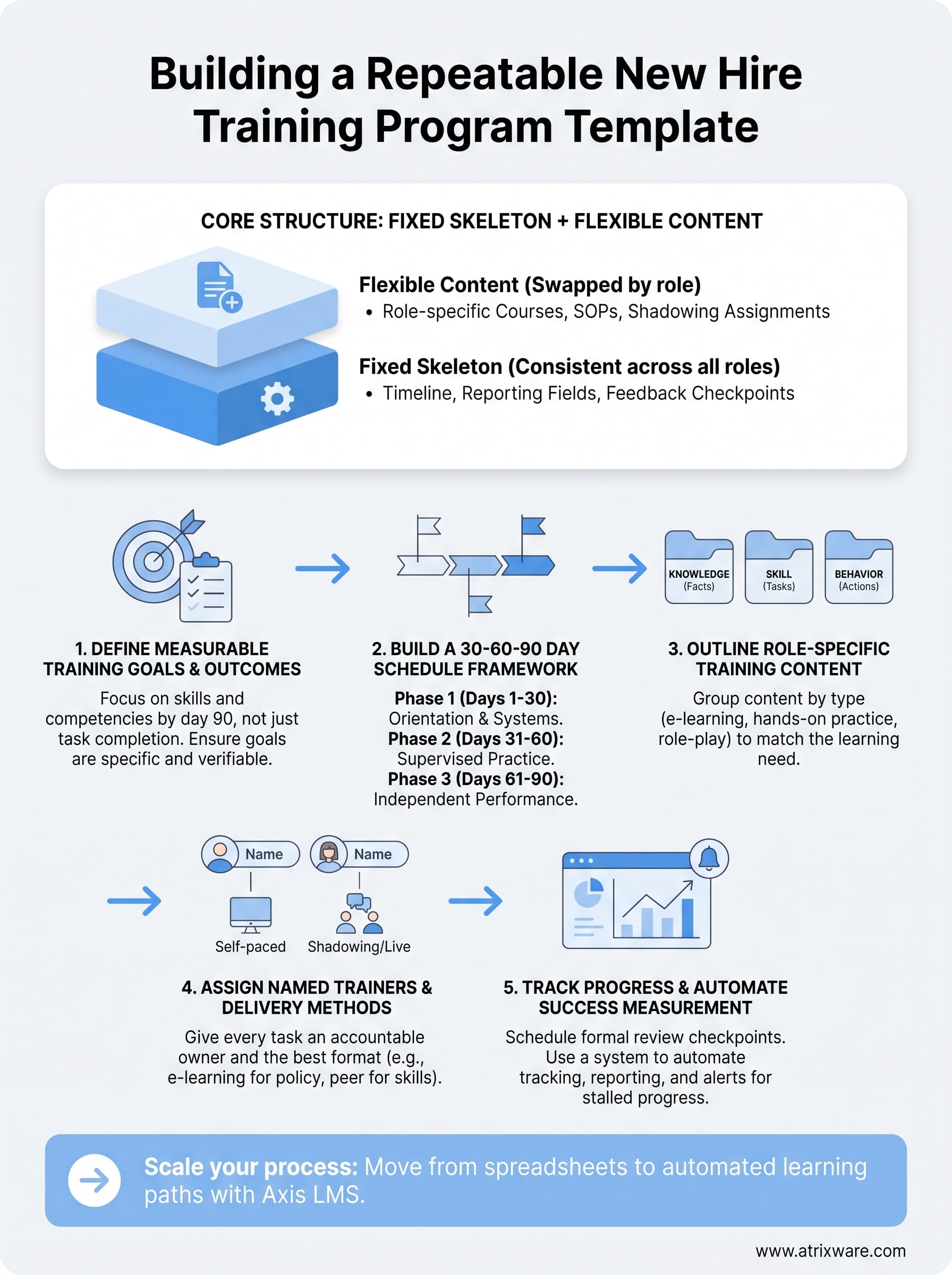
Split your template into two layers, the same way you’d build consistency with reusable templates: the fixed structure that never changes and the flexible content that gets swapped in per role. The fixed layer includes your timeline, your reporting fields, and your feedback checkpoints. The flexible layer includes the actual courses, SOPs, and job shadowing assignments tied to a specific position. This separation matters because it’s what lets you reuse the same new hire training plan template across ten different roles without rebuilding it from scratch each time. When someone in engineering needs a different curriculum than someone in customer support, only the content layer changes. The scaffolding, the milestones, the reporting fields, all stay identical.
Building it as a document versus building it in a system
Spreadsheets and shared docs work fine when you’re onboarding one or two people a month. Add a column for tasks, one for due dates, one for who signs off, and you’ve got a workable new hire training schedule template. The trouble starts once you’re hiring across multiple departments at once: someone forgets to update the sheet, a manager loses track of which version is current, and nobody has a clean way to see completion rates across the company.
That’s the point where it makes sense to move the same structure into a system built for it. Axis LMS lets you build this template once as a structured onboarding course path, then assign it automatically to every new hire based on role or department. Progress updates in real time, managers get notified when a task is overdue, and reporting rolls up automatically instead of living in someone’s inbox. You don’t lose any of the structure from the spreadsheet version, you just stop manually chasing it.
Whichever format you choose for now, the goal is the same: a repeatable structure that any manager can pick up and run with, without guessing what belongs in week one versus week eight. The next five steps walk through how to fill in each of these components, starting with the part most templates get wrong first: setting goals that are specific enough to actually measure.
Step 1. Define your training goals and outcomes
Most training plans skip straight to scheduling tasks without answering the harder question first: what should this person be able to do by day 90? Without that answer, your new hire training plan template turns into a checklist of activities instead of a plan that produces a competent employee. Start every template by writing down three to five outcomes that describe skills, not just completed tasks.
Write outcomes you can actually measure
Swap vague goals like "understand our sales process" for measurable training outcomes you can check off with evidence. A measurable version reads more like "can run a full product demo without a script by day 45" or "processes 20 support tickets per shift with under 5% escalation by day 60." Tie each outcome to a specific day or week so it lines up with the schedule you’ll build in Step 2.
If you can’t measure whether someone hit a training goal, it wasn’t really a goal, it was a hope.
Separate role goals from company-wide goals
Every onboarding new employee training plan template should carry two tiers of goals. Company-wide goals apply to everyone regardless of department: knowing where to find the employee handbook, completing compliance training, understanding reporting structure. Role-specific goals belong to the job itself: a support rep learning your ticketing software, a warehouse hire passing a forklift certification. Keep these two tiers in separate rows or sections of your template so managers don’t have to sort through irrelevant items when they fill in a new hire’s plan.
A short goal-setting checklist
Run through this list before you move on to scheduling:
- List 3-5 outcomes tied to specific days or milestones, not vague timeframes like "eventually"
- Separate company-wide goals from role-specific ones in your template
- Attach a way to verify each goal: a quiz score, a manager sign-off, a completed shadow shift
- Confirm the goal matches something the hire’s manager actually cares about, not just HR paperwork
- Review goals with the hiring manager before finalizing the template, since they know the role’s real demands better than a generic job description does
Goals set here become the backbone of everything else in your template. The schedule in Step 2 exists to hit these outcomes on time, the content in Step 3 exists to teach the skills behind them, and the tracking in Step 5 exists to prove they were actually met. Skip this step or write goals too loosely, and every later step inherits the same vagueness.
Step 2. Build a 30-60-90 day training schedule
With goals defined, the next job is translating them into a timeline. A 30-60-90 day training schedule breaks the process into three phases, each with a different focus, so nobody tries to teach everything in week one. This structure works because it matches how people actually absorb new information: orientation and basics first, then applied practice, then independence. Building this into your new hire training plan template means every manager fills in the same three columns instead of inventing their own pacing.
What belongs in each 30-day block
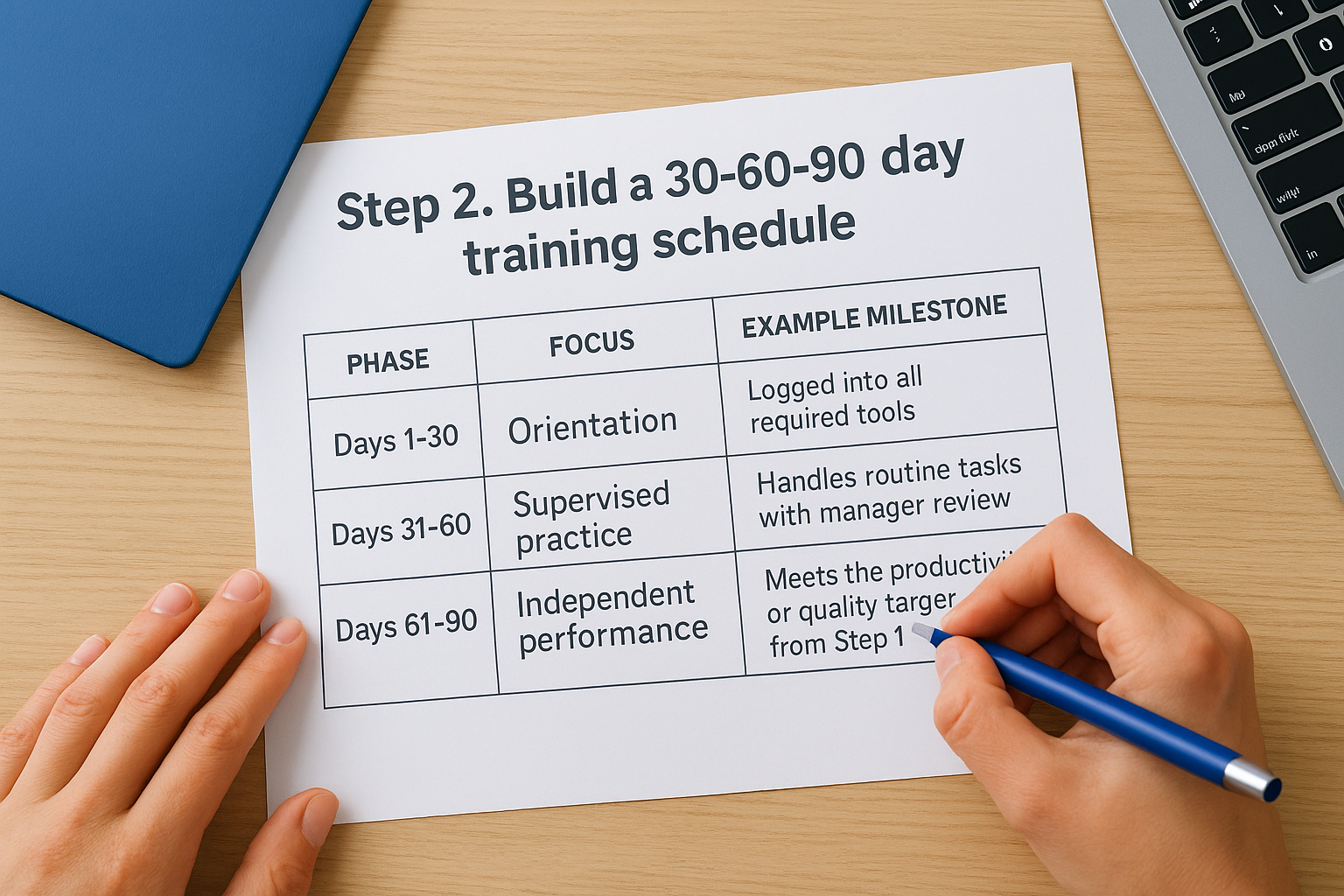
Each phase should map directly to the outcomes you wrote in Step 1. Days 1-30 cover orientation, tools, and shadowing. Days 31-60 shift toward supervised practice with real tasks. Days 61-90 push toward full independence and hitting the performance targets you defined earlier.
| Phase | Focus | Example milestone |
|---|---|---|
| Days 1-30 | Orientation, systems access, shadowing | Logged into all required tools, completed compliance modules |
| Days 31-60 | Supervised practice on real work | Handles routine tasks with manager review |
| Days 61-90 | Independent performance | Meets the productivity or quality target from Step 1 |
A schedule that only says "month one" and "month two" isn’t a schedule, it’s a rough guess dressed up as a plan.
Mapping goals to specific days, not just phases
Breaking things into three big phases still leaves too much room for drift. Push further and assign weekly checkpoints inside each phase, scheduling training automatically for what should be done by day 7, day 14, day 45, day 75. Specific dates give managers a clear signal when someone is behind, instead of discovering the gap at day 89. This level of detail is also what separates a real new hire training plan example from a template that just lists tasks with no timeline attached.
Schedules built this way also make it easier to spot patterns across hires. If everyone stalls at the same point, say, day 40 when supervised practice starts, that’s a signal the training content itself needs work, not just the individual employee. Keep that pattern-spotting in mind, because it becomes central once you get to tracking in Step 5. For now, the schedule just needs to exist in enough detail that a manager can open the template on any given day and know exactly what should be happening.
Step 3. Outline role-specific training content
Once the schedule exists, you need to fill it with the actual material that teaches the job. This is where a generic new hire training plan template breaks down fastest, because a warehouse picker and an account executive need almost none of the same content, even if they share the same 30-60-90 skeleton, which is why role-based learning paths matter. Treat this step as building the content layer described earlier: swap in role-specific material while keeping the timeline and tracking fields untouched.
Sort content into three buckets
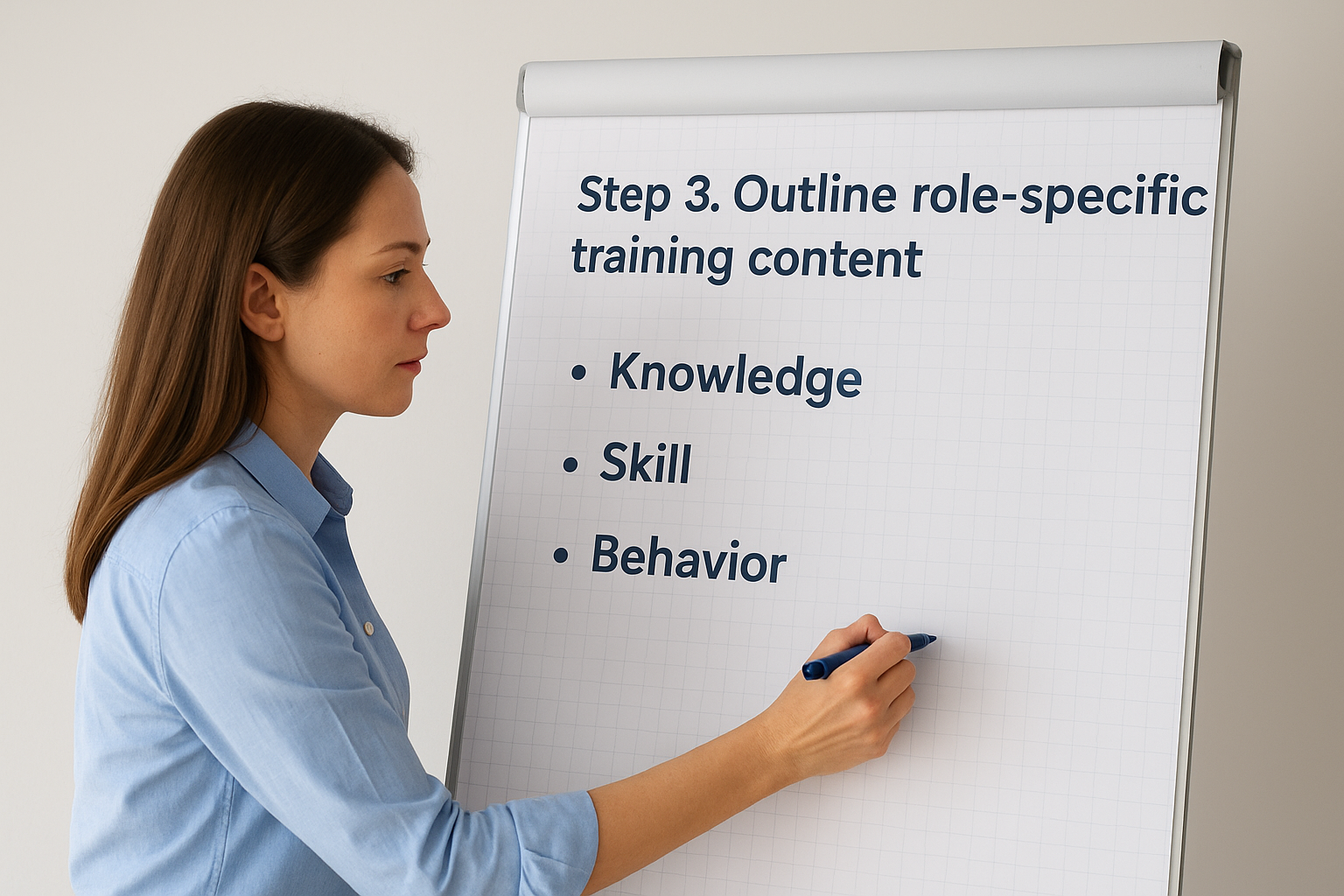
Group everything a new hire needs to learn into knowledge, skill, and behavior categories before you assign it to a day. Knowledge covers facts they need to recall, like product specs or policy details. Skill covers tasks they need to perform, like running a report or operating equipment. Behavior covers how they’re expected to act, like handling an escalated customer call or following safety protocol on the floor. Sorting content this way keeps you from cramming a template full of reading material when the hire actually needs hands-on practice.
Content without a clear category almost always ends up as a PDF nobody opens twice.
Match format to what’s being taught
Different categories call for different formats, so don’t default to slide decks for everything, and keep e-learning content best practices in mind as you build:
- Knowledge: short e-learning modules, quizzes, reference documents
- Skill: job shadowing, guided practice, hands-on simulations
- Behavior: role-play scenarios, recorded call reviews, mentor check-ins
Assign each piece of content to a specific day or week from your Step 2 schedule, not a loose phase. A new hire training schedule template that says
Step 4. Assign trainers and choose delivery methods
Content means nothing if nobody owns delivering it. This step assigns a name, not just a department, to every line in your new hire training plan template, and pairs that name with a delivery method that fits the material. Skip this and you get the most common onboarding failure: a manager assumes someone else is covering orientation, and the new hire sits idle for half a day waiting on access nobody granted.
Decide who owns each piece of training
Give every task in your schedule a single accountable owner, whether that’s the direct manager, a peer mentor, an HR rep, or a subject matter expert from another team. Spreading ownership across "the team" without naming a person is how tasks fall through. For role-specific skill training, pull in whoever actually does the job well, not just whoever has time. A senior rep training a new account executive teaches habits a manager sitting in an office rarely sees on the floor.
If a training task doesn’t have a name attached, assume it won’t get done.
Match delivery method to content type
Don’t default to one format for everything, and it helps to start by comparing training delivery methods. Knowledge-based material usually works fine self-paced, while skill and behavior training need a live component.
| Content type | Best delivery method | Who typically leads it |
|---|---|---|
| Company policy, compliance | Self-paced e-learning | HR or compliance officer |
| Software or tool training | Guided walkthrough, then self-paced practice | IT or direct manager |
| Job-specific skills | Shadowing, hands-on practice | Peer or senior team member |
| Customer or client interaction | Role-play, recorded call review | Manager or team lead |
This is also where an onboarding new employee training plan template benefits from moving into a real system rather than staying a spreadsheet. Axis LMS supports both instructor-led sessions and self-paced course delivery inside the same learner path, so a new hire can complete e-learning modules on their own schedule while shadowing sessions and manager check-ins still get logged against the same timeline.
Avoid the single-trainer bottleneck
Relying on one manager to deliver every piece of training doesn’t scale past a handful of hires, and it breaks completely the week that manager is out sick or on vacation. Build in at least one backup trainer per role, and note that backup directly in the template so nobody has to guess who covers a session when the primary owner is unavailable.
Step 5. Track progress and measure success
Goals only matter if you check whether people hit them. This step closes the loop on the whole new hire training program template by turning the outcomes from Step 1 into data you can actually pull up, instead of a memory a manager has to rely on. Without this step, you can run the same broken onboarding for a year and never know it, because nobody’s collecting the evidence that would show you.

Build in checkpoints, not just deadlines
Schedule a formal review at each phase boundary of your new hire training schedule template, not just a due date buried in a task list. Each checkpoint should ask the same three questions: did the hire hit the goal, what’s blocking them if they didn’t, and does the plan need adjusting for the next phase. Use these checkpoint types as a baseline:
- Day 30 review: confirms orientation tasks and system access are complete
- Day 60 review: checks progress against skill-based goals from Step 1
- Day 90 review: confirms independence and full performance targets
- Ad hoc check-ins: triggered when a manager flags a stalled task early
A goal nobody checks on isn’t a goal, it’s a line item that got forgotten.
Turn plan data into reporting you can act on
Manually chasing sign-offs across a spreadsheet works until you’re running training for more than a few people at once, and then it quietly stops working without anyone noticing, which is the point to start tracking employee training progress in a platform. Reporting on paper also makes it nearly impossible to spot the pattern you’re actually looking for: are new hires in one department consistently stalling at the same checkpoint, which points to a content problem rather than an individual one. Axis LMS solves this with automated training reports generated as soon as a hire completes or misses a milestone, so you see completion rates by role, department, or trainer without pulling anything together by hand. Overdue tasks trigger notifications to the manager automatically, which catches the stalled new hire on day 40 instead of day 89. Reviewing this data monthly across all active onboarding plans also tells you whether your template itself needs revision, not just whether one employee is behind schedule.
Putting your training plan to work
A new hire training program template only earns its keep once managers actually open it on day one instead of improvising. You’ve now got the full structure: goals that are measurable, a 30-60-90 schedule, role-specific content, named trainers, and checkpoints that catch problems early instead of at day 89. Build it in a spreadsheet first if you’re onboarding a handful of people a month, but watch for the signs it’s time to move on: missed sign-offs, stale versions, no clean way to see who’s behind.
When that happens, don’t keep patching a document that was never built to scale. See how the same structure runs itself inside a real system: try Axis LMS free and watch a training plan track its own progress instead of you chasing it down.
