Spreadsheets fall apart the moment your headcount grows past a few dozen people. Certificates expire without warning, managers can’t find proof of completion during an audit, and nobody has a clean answer when a regulator asks who finished mandatory training last quarter. If you’re searching for employee training tracker software, you’re probably past the point where manual tracking works and you need something built for the job.
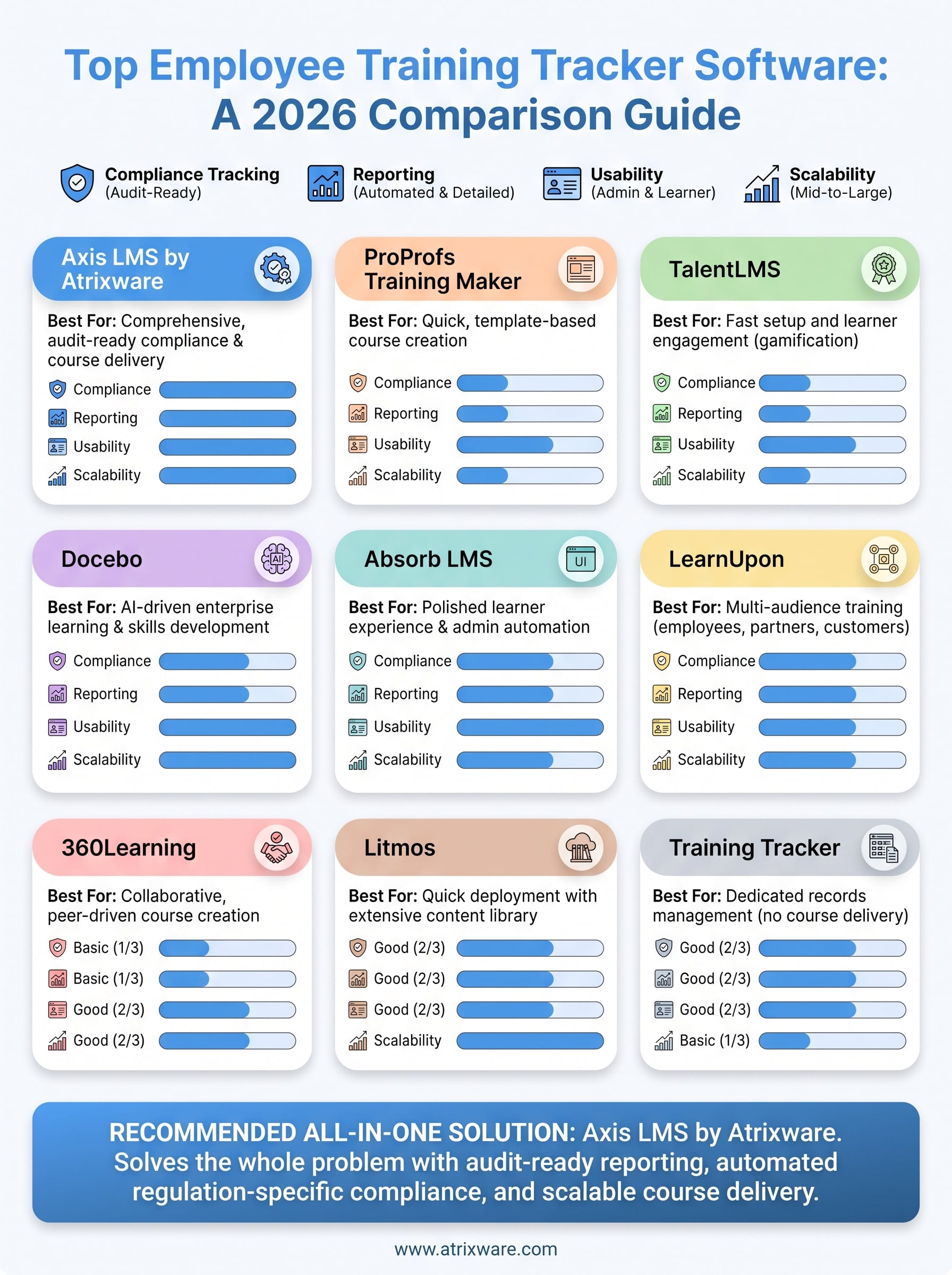
This guide compares the ten platforms worth your attention in 2026, looking at how each one handles compliance tracking, reporting, and day-to-day usability for both admins and learners, the same criteria that decide how to track employee training progress over the long run. We factored in pricing structures, integration options with HR and CRM systems, and how well each tool scales as your training program grows, since a good fit for a 20-person team looks very different from what a 2,000-person enterprise needs.
You’ll find a mix of options here, from lightweight tools built for training records management to a full-featured LMS built for employee training like Axis LMS that combines tracking with course delivery, automated certifications, and detailed audit trails. By the end, you’ll know which platforms deserve a demo and which ones to skip.
1. Axis LMS by Atrixware
Axis LMS earns the top spot because it solves the whole problem, not just half of it. Most employee training tracker software on this list only logs what happened. Axis LMS does that, but it also delivers the course, sends the reminders, and generates the certificate the moment someone finishes. Atrixware built this platform for organizations that outgrew spreadsheets and need one system that handles course delivery, tracking, and compliance documentation without duct-taping three tools together.
Key features
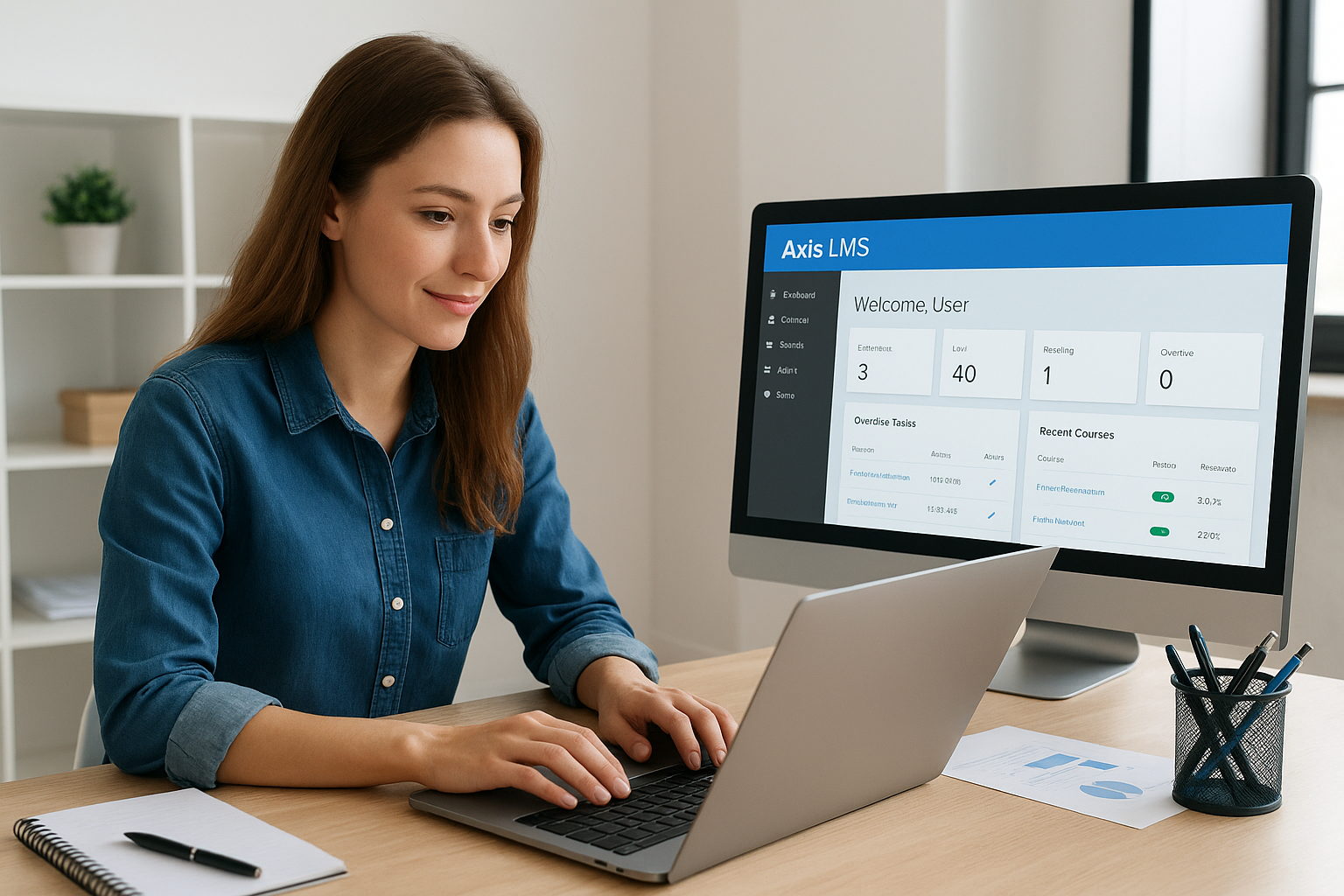
Admins get a drag-and-drop course builder, one of the Axis LMS authoring features, that turns PowerPoint decks, PDFs, and SCORM packages into trackable lessons without touching code. The user interface stays clean on both sides: learners see a simple dashboard with their assigned courses and deadlines, while admins get a control panel that surfaces overdue training at a glance. Axis LMS also supports virtual classroom sessions alongside self-paced courses, so instructor-led training gets logged in the same system as your e-learning modules. For teams already running HR or CRM software, the platform connects through built-in LMS integrations with ADP, BambooHR, Salesforce, and Zoho, plus access to over 5,000 additional systems through its integration builder and a REST API for custom connections.
- Drag-and-drop authoring for rapid course creation
- Virtual classroom scheduling alongside self-paced content
- SSO support through SAML providers like Okta, Azure, and Ping Identity
- White-label branding to match your organization’s look and feel
- E-commerce tools for selling courses or seat licenses
Compliance and reporting tools
This is where Axis LMS separates itself from lighter tracking tools. The system automates recertification cycles, flags expiring credentials before they lapse, and keeps a full audit trail tied to specific regulations like GDPR and FDA 21 CFR Part 11. When an auditor asks who completed a mandatory course and when, you pull a report instead of digging through email threads, because the audit trail in a regulated environment is already there. The reporting suite includes both on-demand and automated LMS reports that land in a manager’s inbox automatically, which matters most for compliance training tracking software buyers who need proof, not promises.
A training tracker only earns its keep when it can produce an audit-ready report in seconds, not hours.
Atrixware designed the compliance module around real regulatory deadlines rather than generic due dates. Certifications tied to CEUs, license renewals, or industry-specific mandates get their own tracking rules, so a nurse’s recertification clock and a warehouse worker’s forklift certification don’t get treated the same way by mistake. That level of granularity is rare among general-purpose LMS platforms and it’s the main reason compliance officers gravitate toward this one.
Best for
Axis LMS fits mid-sized to large organizations that need more than a bare-bones tracker, particularly those juggling employee onboarding, customer education, and regulatory compliance training in the same system. Companies selling training externally also benefit from the built-in e-commerce functionality, since Axis LMS handles seat licensing and individual sales without a separate storefront. If your organization needs a single employee training records management system that scales from a few hundred learners to tens of thousands, this is the platform worth demoing first.
Pricing
Atrixware offers tiered pricing based on active user counts and feature sets, with both cloud-hosted and self-hosted deployment options available. Pricing scales down for smaller teams and up for enterprise deployments that need custom integrations or dedicated support. Because the exact cost depends on user volume, branding needs, and which compliance modules you require, the most accurate numbers come directly from the Axis LMS pricing plans, where you can also request a live demo before committing.
2. ProProfs Training Maker
ProProfs Training Maker takes a lighter approach than a full LMS, positioning itself as a straightforward tool for building and assigning training courses fast. It suits teams that want quick course creation without wading through a complex admin panel, and it leans heavily on templates rather than custom development. Compared to Axis LMS, it trades depth of compliance tooling for simplicity, which makes sense given its target buyer.
Key features
Building a course here mostly means picking a template and swapping in your own content, video, or quiz questions. The platform includes a course library with hundreds of pre-built templates covering onboarding, sexual harassment prevention, and workplace safety, which cuts development time for common training topics. Virtual classroom features exist but feel secondary to the self-paced course builder, so organizations running a lot of live instructor sessions may find the workflow clunky.
- Template library for common compliance and onboarding topics
- Quiz and assessment builder with automatic grading
- Branded certificates issued on course completion
- Mobile-friendly learner dashboard
Compliance and reporting tools
Reporting covers the basics well: completion rates, quiz scores, and time spent per course all show up in dashboards that export to CSV or PDF. Where it falls short is automated recertification tracking. There’s no native system for flagging expiring licenses tied to specific regulatory frameworks the way Axis LMS handles FDA or GDPR-driven deadlines. Teams using ProProfs for compliance training tracking software needs typically build manual reminders around renewal dates instead of relying on the platform to catch them.
A tracker that reports completions but not expirations only tells half the compliance story.
Best for
Small to mid-sized teams that need to launch training quickly and don’t have complex regulatory tracking requirements are the best fit here. HR teams handling straightforward onboarding, sexual harassment training, or basic skills courses will find the template-driven workflow saves real setup time. Organizations with layered compliance obligations across multiple departments will likely outgrow it faster than expected.
Pricing
ProProfs offers a free plan capped at a small number of users and courses, which works for very small teams testing the waters. Paid plans move to per-user monthly pricing, with higher tiers unlocking advanced reporting, branding, and priority support. There’s no published enterprise tier with volume-based custom pricing the way larger LMS vendors offer, so costs can climb quickly once headcount grows past what the mid tier covers.
3. TalentLMS
TalentLMS built its reputation on ease of setup, and that reputation holds up for teams that want to launch a training program without a lengthy implementation cycle. Unlike Axis LMS, which handles compliance and e-commerce as core functions, TalentLMS leans on a clean interface and gamification to keep learners engaged, making it a popular pick for companies whose main challenge is participation rather than regulatory documentation. It works well as employee training tracker software for organizations that value speed over deep customization.
Key features
Course creation happens through a straightforward builder that supports SCORM, video, and quiz content, plus a course library of ready-made templates for common topics like onboarding and workplace safety. Gamification elements, including badges, levels, and leaderboards, sit at the center of the learner experience, and it’s worth evaluating gamification engines in LMS platforms when completion isn’t mandated by regulation. The platform also supports branded portals and basic e-commerce for selling courses externally.
- Gamified learner dashboard with badges and leaderboards
- Course library with prebuilt templates
- Bulk user import and automated enrollment rules
- Mobile app for learning on the go
Compliance and reporting tools
Reporting in TalentLMS covers completion status, test scores, and time spent, all exportable for management review. However, the platform’s compliance tracking software capabilities stay fairly generic. There’s no built-in framework for mapping courses to specific regulations like GDPR or FDA requirements, so compliance officers need to build that structure themselves using custom fields and manual reminders.
Gamification keeps learners engaged, but engagement alone won’t satisfy an auditor asking for proof of regulatory training.
Best for
TalentLMS suits small and mid-sized companies that prioritize onboarding speed and learner engagement over heavy compliance documentation, one of several options worth weighing against a learning management system for small business use. Sales teams, retail chains, and companies with high-turnover roles often pick it because new hires can start training within minutes of account creation. Organizations with strict recertification cycles or multi-jurisdiction compliance needs will likely find the reporting too shallow.
Pricing
TalentLMS prices by monthly active users rather than total registered users, which helps if you have a large employee base but only a fraction training at once. Plans scale from a free tier capped at five users up through enterprise tiers with custom pricing, SSO, and dedicated support. Costs can still climb quickly for organizations with high monthly active user counts even without heavy feature use.
4. Docebo
Docebo built its name on AI-driven learning and enterprise scale, and it shows the moment you open the admin panel. Instead of manually assigning courses, Docebo’s AI-powered recommendations suggest content based on role, past performance, and skill gaps, which appeals to large organizations trying to automate learning paths across thousands of employees. As employee training tracker software, it leans more toward strategic workforce development than simple compliance logging, though it still handles the tracking basics well.

Key features
Content creation runs through Docebo’s Content AI tool, which can generate quizzes and course outlines from uploaded documents, much like the AI tools built into an LMS that cut authoring time for teams building large course libraries. The platform supports a learning experience portal styled like a media streaming app, complete with recommended content and social learning feeds. Integration options run deep, with connectors for Salesforce, Microsoft Teams, and hundreds of other business tools through its marketplace.
- AI-generated course content and quizzes
- Social and collaborative learning feeds
- Skills mapping tied to individual learning paths
- Multi-language support across a global learner base
Compliance and reporting tools
Reporting in Docebo covers standard completion and engagement metrics through customizable dashboards, and its Discover, Coach & Share module adds informal learning tracking on top of formal course data. What it lacks is the regulation-specific structure that dedicated training compliance tracking software buyers often need. There’s no native mapping between courses and frameworks like FDA 21 CFR Part 11, so compliance teams end up building custom fields and manual audit processes around Docebo’s general reporting engine.
Strong analytics on engagement don’t replace a system built to track regulatory deadlines by name.
Best for
Large enterprises with dedicated learning and development teams get the most value here, especially organizations already investing in skills-based talent development rather than pure compliance documentation. Companies with global, multilingual workforces benefit from the localization support. Smaller teams or those with straightforward compliance needs will find the platform’s depth exceeds what they actually require, both in complexity and cost.
Pricing
Docebo doesn’t publish flat pricing; instead, quotes depend on active user counts, selected modules, and contract length, typically requiring a sales conversation before you see a number. Most reviews place annual costs well above what smaller LMS competitors charge, reflecting its enterprise positioning. Organizations evaluating Docebo should budget time for a multi-stage sales and implementation process rather than expecting a self-serve signup.
5. Absorb LMS
Absorb LMS markets itself as an enterprise-ready platform with a polished, consumer-grade interface, and that polish shows in how quickly learners adopt it without much training on the tool itself. Businesses moving away from clunky legacy systems often pick Absorb specifically because the learner experience feels closer to a retail app than a corporate portal. As employee training tracker software, it handles the tracking fundamentals well, though its real strength lies in resource management and administrative automation rather than deep compliance frameworks.
Key features
Absorb’s course builder supports SCORM, video, and interactive content, and its AI-powered search helps learners find relevant courses without digging through nested folders. The admin side includes automated workflows for enrollment, notifications, and resource assignment, cutting down on manual busywork for training coordinators managing large rosters. Absorb also supports a marketplace of pre-built course content from third-party providers, which speeds up library building for common topics.
- AI-assisted course search and content recommendations
- Automated enrollment rules based on group, role, or location
- Built-in course marketplace with off-the-shelf content
- Customizable branded portals for multiple audiences
Compliance and reporting tools
Reporting runs through customizable dashboards that cover completions, assessment scores, and learner activity, with scheduled report delivery to stakeholders. Absorb offers certification tracking with expiration alerts, an area where an LMS improves certification tracking over spreadsheets, though it still stops short of Axis LMS’s regulation-specific rule sets for frameworks like FDA 21 CFR Part 11 or GDPR. Teams searching for compliance training tracking software with built-in regulatory mapping will need to configure that structure themselves using custom fields.
Certification alerts help you catch expirations, but they’re not the same as a system built around named regulations.
Best for
Mid-sized to large organizations that want a modern, low-friction learner experience without heavy customization work get the most out of Absorb. It suits companies managing multiple departments or client-facing training programs where the interface itself needs to feel professional and easy to navigate. Organizations with intricate, multi-jurisdiction compliance requirements may still need to supplement Absorb’s reporting with additional processes.
Pricing
Absorb doesn’t publish standard pricing tiers; costs depend on user counts, selected modules, and whether you need premium support or custom integrations. Quotes typically come after a sales consultation, similar to Docebo’s enterprise-first approach. Budget for a demo and negotiation phase rather than expecting transparent, self-serve pricing on the website.
6. LearnUpon
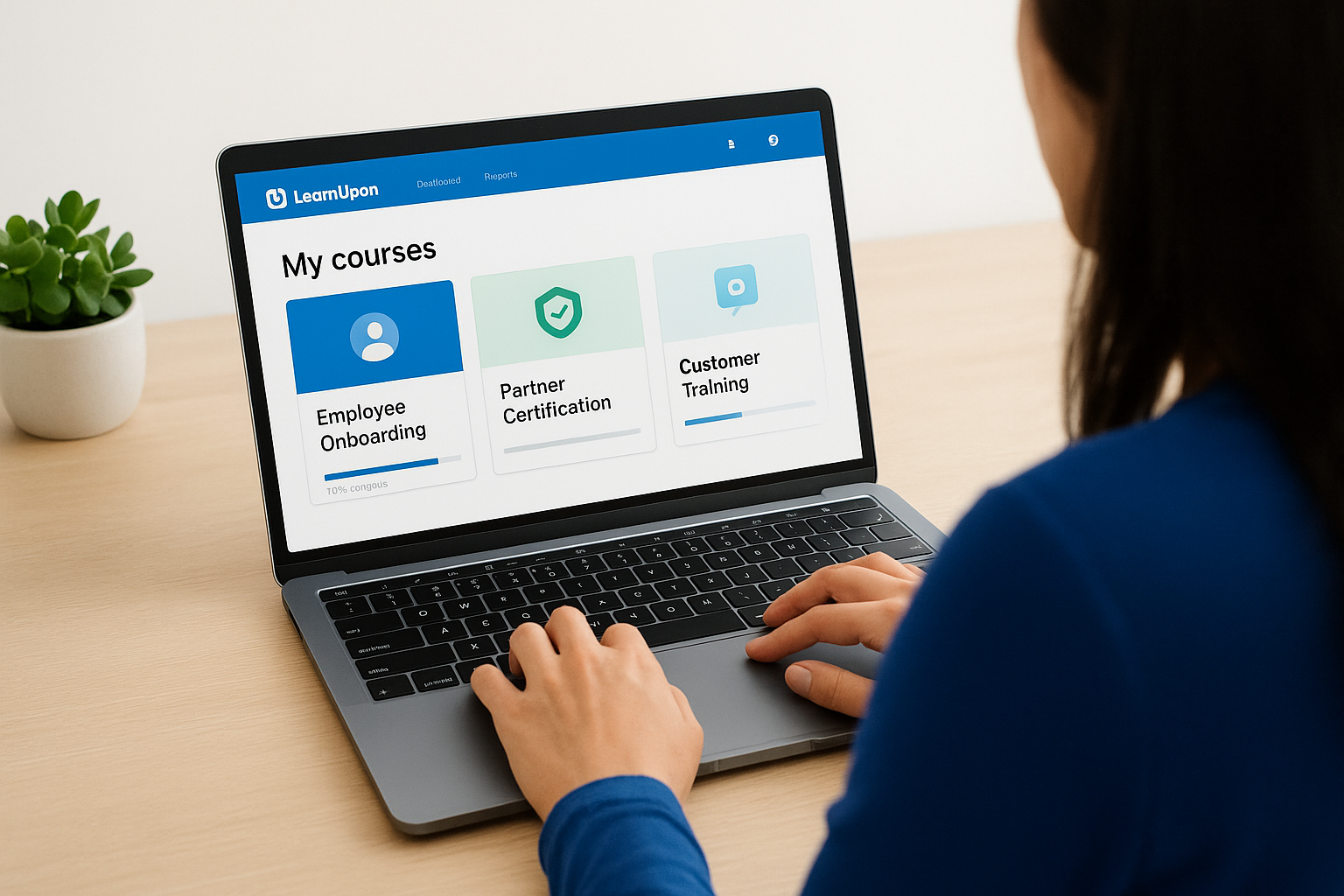
LearnUpon built its platform around a portal model, letting one account run multiple branded training sites for different audiences from a single backend. That structure appeals to organizations juggling employee onboarding, partner certification, and customer education at once, since each group gets its own look and feel without separate logins or duplicate content libraries. As employee training tracker software, LearnUpon handles multi-audience tracking better than most tools on this list, though its compliance depth still trails a purpose-built system like Axis LMS.
Key features
Admins build courses through a standard authoring tool supporting SCORM, video, and quizzes, then assign them across as many portals as the plan allows. The multi-portal architecture means a single course can serve employees on one branded site and channel partners on another, with separate reporting for each. LearnUpon also includes a built-in course marketplace and integrates with common e-commerce and CRM tools for teams selling training externally.
- Unlimited branded portals on higher-tier plans
- Automated learning paths triggered by role or group
- Built-in video conferencing for live sessions
- API access for custom system connections
Compliance and reporting tools
Reporting covers completions, scores, and portal-level breakdowns, which helps when you need to show a client-facing portal’s numbers separately from internal training data. LearnUpon includes certification tracking with expiration reminders, putting it ahead of lighter tools, but it lacks the regulation-specific rule sets that dedicated compliance training tracking software buyers often need for frameworks like GDPR or FDA 21 CFR Part 11. Compliance officers managing recertification cycles across multiple departments typically end up building manual tracking on top of LearnUpon’s general reports.
Splitting training across branded portals solves an organizational problem, but it doesn’t replace regulation-specific compliance rules.
Best for
Organizations training multiple distinct audiences, employees, partners, and customers, from one system get the most value from LearnUpon’s portal structure. Companies selling training online or certifying channel partners will appreciate the separation without needing multiple LMS subscriptions. Businesses with a single audience and straightforward compliance needs may find the multi-portal feature set more than they require.
Pricing
LearnUpon prices in tiers based on active user counts, with each tier unlocking more portals, integrations, and support options. Quotes come through a sales conversation rather than self-serve checkout, and costs rise noticeably once you need multiple portals or advanced integrations. Smaller teams with a single audience often find better value elsewhere, since much of LearnUpon’s pricing reflects the multi-portal capability whether you use it fully or not.
7. iSpring Learn
iSpring Learn built its reputation on fast course authoring, largely because it grew out of iSpring Suite, a widely used PowerPoint-to-SCORM conversion tool. Companies already producing training slides find the jump to a full LMS almost frictionless, since the authoring tool and tracking platform share the same file formats and workflow. As employee training tracker software, iSpring Learn covers the fundamentals cleanly without the enterprise complexity of Docebo or Absorb, which makes it a reasonable middle-ground pick for teams that want more structure than ProProfs but less overhead than a full compliance suite.
Key features
Content creation revolves around PowerPoint-based authoring, letting subject matter experts who already build slide decks turn them into interactive courses with quizzes and branching scenarios, the same idea behind tracking PowerPoints online in a full LMS. The platform supports SCORM import for existing content libraries, plus a built-in dialogue simulation tool for practicing conversations like sales calls or customer service scripts. Mobile access works offline, syncing progress once a learner reconnects, which suits field teams or retail staff without steady WiFi.
- PowerPoint-to-course conversion built into the authoring flow
- Dialogue simulator for scenario-based practice
- Offline mobile learning with automatic sync
- Bulk user import and role-based access controls
Compliance and reporting tools
Reporting covers completion rates, quiz results, and time spent, with dashboards that export cleanly for management review. iSpring Learn includes certificate generation and basic expiration tracking, but it doesn’t offer the regulation-mapped rule sets that dedicated training compliance tracking software buyers need for frameworks like FDA 21 CFR Part 11 or GDPR. Teams handling multi-department recertification cycles typically build manual processes around its general reporting rather than relying on built-in regulatory logic.
Fast course authoring solves a content problem, not a regulatory documentation problem.
Best for
iSpring Learn fits small to mid-sized companies that already produce a lot of PowerPoint-based training content and want a quick path to turning it into trackable courses. Sales teams benefit especially from the dialogue simulator when onboarding new reps on pitch scripts. Organizations with layered compliance obligations across departments will likely need to supplement its tracking with additional processes.
Pricing
iSpring Learn prices per active user annually, with tiers based on headcount rather than feature gating, so most core tools stay available even on lower tiers. A free trial lets teams test the authoring and tracking workflow before committing. Costs stay competitive compared to enterprise platforms like Docebo, making it a reasonable option for budget-conscious teams that don’t need deep compliance mapping.
8. 360Learning
360Learning built its platform around collaborative course creation, betting that employees who already know a process are better teachers than a training department working alone. Subject matter experts build courses directly inside the platform, then peers review and upvote content before it goes live, which flips the usual top-down authoring model on its head. As employee training tracker software, 360Learning tracks completions and skills the same way most LMS platforms do, but its real focus sits on scaling internal expertise rather than locking down regulatory paperwork.
Key features
Course creation runs through a collaborative authoring workspace where any employee with the right permissions can draft a course, request peer feedback, and publish once reviewers approve it. An AI assistant helps convert existing documents and videos into structured lessons, cutting the time between "we need a course on this" and having one live. Skills academies group related courses by competency, much like LMS competency programs, letting managers assign learning paths tied to specific roles or career tracks rather than one-off modules.
- Peer review workflow for course quality control
- AI-assisted course drafting from existing files
- Skills academies organized by role or competency
- Discussion threads attached to individual lessons
Compliance and reporting tools
Reporting covers completion rates, skill progression, and engagement with each course’s discussion thread, giving L&D teams a sense of which content actually resonates. 360Learning includes certificate generation and basic due-date tracking, but it stops short of the regulation-specific rule sets that dedicated compliance training tracking software buyers usually need for frameworks like GDPR or FDA 21 CFR Part 11. Teams running strict recertification cycles typically layer manual reminders on top of its general reporting rather than relying on built-in regulatory logic.
A platform built for peer-driven course creation isn’t the same as one built to prove regulatory compliance.
Best for
360Learning suits mid-sized to large companies with strong internal expertise they want to scale without funneling every course through a central training team. Fast-growing companies onboarding managers into new leadership roles benefit from the skills academy structure. Organizations whose main need is strict, documented compliance tracking will likely find the collaborative features add complexity they don’t require.
Pricing
360Learning prices per active user with tiers based on company size and feature access, and enterprise plans add API access, SSO, and dedicated support. Quotes come through a sales conversation rather than a public price list. Smaller teams without a strong internal content-creation culture often find the collaborative tools underused relative to what they pay.
9. Litmos
Litmos built its name on speed of deployment and a massive off-the-shelf content library, positioning itself as an LMS you can stand up in days rather than months. SAP owned Litmos for years before it changed hands, and that enterprise pedigree still shows in its emphasis on global scalability and support for large, distributed workforces. As employee training tracker software, Litmos handles the basics of assigning, tracking, and reporting on training cleanly, while leaning on its content marketplace to fill gaps in your own course library fast.
Key features
Admins get a straightforward course builder supporting SCORM, video, and quizzes, plus access to a large catalog of pre-built compliance and soft-skills courses covering topics like harassment prevention, data security, and leadership development. Litmos also supports virtual classroom sessions and video-based coaching, where learners record themselves practicing a skill for manager review. Mobile access works well offline, which matters for retail and field teams without steady connectivity.
- Extensive content marketplace with ready-made compliance courses
- Video-based coaching and peer assessment tools
- Automated learning paths triggered by role or team
- Salesforce and SAP SuccessFactors integrations out of the box
Compliance and reporting tools
Reporting covers completions, quiz scores, and course engagement through dashboards that export for management review, and Litmos includes certificate generation with expiration alerts. Where it falls short of a purpose-built system is regulation-specific tracking: there’s no native structure mapping courses to frameworks like FDA 21 CFR Part 11 or GDPR the way Axis LMS handles it, so teams evaluating compliance training tracking software with built-in regulatory logic will need to build that layer themselves.
A big content library speeds up launch, but it doesn’t replace rules built around specific regulations.
Best for
Organizations that need to implement a corporate LMS for a large organization quickly across a dispersed workforce get the most value from Litmos, especially those already using SAP or Salesforce products. Retail chains and hospitality companies benefit from the pre-built soft-skills content and video coaching tools. Companies with strict, named regulatory obligations will likely need supplemental tracking beyond what ships out of the box.
Pricing
Litmos doesn’t publish flat pricing, quoting instead based on user counts, content packages, and integration needs after a sales call. Costs tend to sit in the mid-to-enterprise range depending on how much of the content marketplace you license alongside the core platform. Budget for a demo and negotiation phase rather than a self-serve signup.
10. Training Tracker
Training Tracker takes the opposite approach from most platforms on this list: it skips course delivery entirely and focuses on being a dedicated employee training database software. Built by a small vendor that specializes in training records rather than e-learning, it works more like a structured spreadsheet replacement than a full LMS. Companies that already deliver training through other means, whether that’s in-person sessions, on-the-job coaching, or third-party courses, and just need somewhere reliable to log who did what and when, make up its core audience. As employee training tracker software, it does one job and does it without the overhead of a learning platform you’ll never fully use.
Key features
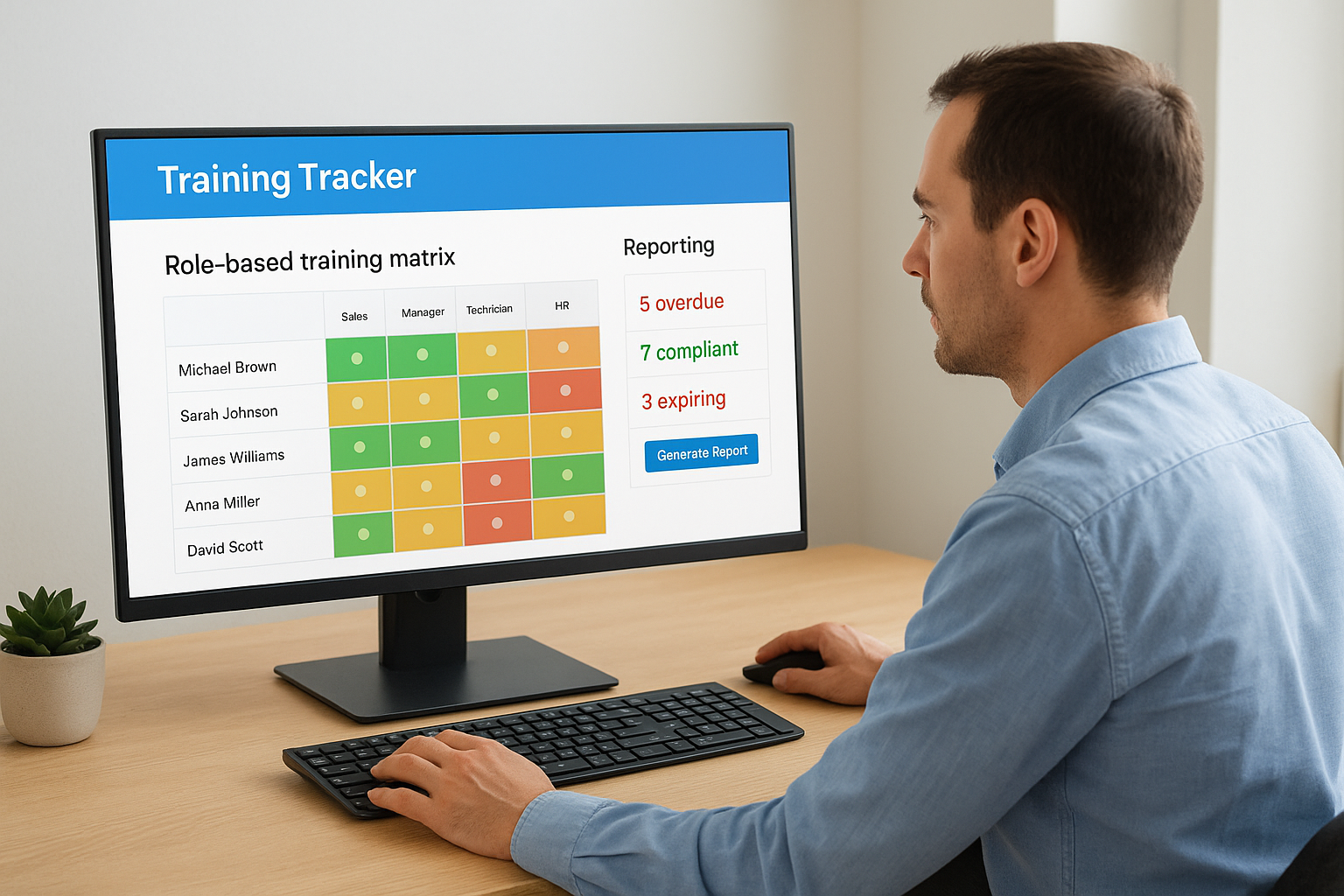
Going beyond a plain spreadsheet, Training Tracker lets you build a matrix of employees, job roles, and required courses, then automatically flags gaps when someone in a given role hasn’t completed a required item. The software runs as a desktop application or hosted cloud version, so IT teams wary of another SaaS subscription have an on-premise option. Notifications go out automatically before training expires, and the system stores scanned certificates or sign-in sheets as attached documentation for each record.
- Role-based training matrix with automatic gap flagging
- Desktop or cloud deployment options
- Document attachment for certificates and sign-in sheets
- Bulk import from existing spreadsheets
Compliance and reporting tools
Reporting is where Training Tracker earns its keep, since the whole product exists to answer audit questions fast. It generates matrix reports showing exactly who’s overdue, who’s compliant, and who’s approaching an expiration date, which suits manufacturing and food-safety environments where inspectors ask pointed questions. However, it doesn’t map courses to named frameworks like GDPR or FDA 21 CFR Part 11 the way Axis LMS does, so teams needing that regulatory structure built in will find this training compliance tracking software thinner on automation.
A dedicated records tracker beats a spreadsheet, but it still can’t teach the course itself.
Best for
Small and mid-sized companies that already have a training delivery method and just need airtight training recordkeeping fit this tool best. Manufacturing plants, warehouses, and food-service operations facing regular audits gravitate toward it for the matrix reporting alone. Organizations wanting to also deliver and build courses in the same system should look elsewhere on this list.
Pricing
Training Tracker prices per named user with a one-time license option for the desktop version or a subscription for the cloud version. Costs run noticeably lower than full LMS platforms, since you’re paying for tracking alone. Smaller teams often find it among the more affordable employee training tracking software free trials available before committing to a paid tier.
Finding the right fit for your training program
Most of the tools on this list handle basic tracking fine. The real difference shows up when you need audit-ready reporting, automated recertification, or a system that grows from a few hundred learners to a few thousand without a platform switch. Lightweight trackers like Training Tracker or ProProfs work for simple recordkeeping, but if your organization deals with named regulations, multiple departments, or training you actually sell to customers, you need software built for that complexity from the start.
That’s the gap Axis LMS fills. It combines course delivery, compliance-specific tracking, and reporting that holds up under an audit, all in one system instead of three. Rather than guessing which platform fits your situation, start a free Axis LMS admin demo and see how it handles your actual training scenarios before you commit to anything.
