Budget is often the first hurdle when you’re picking a training platform, and searching for a learning management system free of licensing fees is a smart place to start. Whether you’re a solo trainer, a nonprofit running training programs, or a small business testing the waters before committing budget, free tools let you build courses, track learners, and prove the concept without a purchase order.
This guide answers the practical question directly: which free LMS platforms actually deliver in 2026, and where do they fall short. We compare course creation features, storage limits, user caps, and support options across the top ten free options, so you can match a platform to your actual training volume instead of guessing, from building online courses to reporting on them. You’ll also see compliance tracking and reporting gaps that matter once training becomes mission-critical.
We’ve spent years building and refining Axis LMS at Atrixware, watching organizations outgrow free tools the moment they need real branding control or deeper integrations. That experience shapes this list: honest notes on when free works and when it’s time to look at paid alternatives built for scale.
1. Axis LMS by Atrixware
Axis LMS earns the top spot because it’s the platform we know best, and because it’s built to grow with you instead of forcing a migration the moment your training program gets serious. You get a full-featured free trial rather than a stripped-down freemium tier, which means you’re testing the actual product, drag-and-drop course builder, reporting engine, and branding tools included, not a watered-down version designed to push you toward an upgrade. For teams comparing a free learning content management system against something built for compliance and scale, this matters.
Key features
Axis LMS packs in the features most free tools save for paid tiers:
- Drag-and-drop course authoring with support for SCORM, xAPI, and virtual classroom sessions
- Compliance management tools for tracking CEUs, recertifications, and standards like GDPR and FDA 21 CFR Part 11
- On-demand and automated reporting for learner progress and training effectiveness
- SSO support through SAML providers including Okta, Azure, and Salesforce
- An LMS integration builder connecting to over 5,000 systems, plus REST API and webhooks
Free plan limits
The trial runs on real usage caps rather than a permanently crippled tier, so you’ll hit limits tied to learner count and trial duration rather than missing features. That’s a deliberate design choice: you evaluate the system administrators actually use, not a demo shell.
A free trial only proves value if it lets you test the features you’ll actually pay for later.
Best for
Organizations that expect to scale past a handful of courses fit best here. HR teams building onboarding programs, compliance officers tracking certifications, and businesses planning to sell training to customers or channel partners all get more out of the trial than a generic course host would offer them. If you’re searching for lms software free of gimmicks and want to see enterprise-grade reporting before you buy, Axis LMS is worth the setup time.
Pricing after the free trial
Pricing shifts to a quote-based model tied to active user counts and feature tier, since compliance tracking, branding depth, and integration needs vary widely between a 50-person nonprofit and a 5,000-employee enterprise. You can request specifics and start your evaluation directly through the Axis LMS pricing page.
2. TalentLMS
TalentLMS built its reputation on simplicity, and its free plan reflects that philosophy: a genuinely usable free learning management system capped by user count rather than crippled by missing tools. Small teams that need to get a handful of courses live without a procurement process gravitate here first, since the setup takes minutes rather than days.
Key features
The free tier includes a course builder, basic gamification badges, and a mobile app for learners on the go. You also get:
- Course creation with video, SCORM, and quiz support
- Basic user groups and course assignment
- Gamification elements like points and leaderboards
- A native mobile app for iOS and Android
Free plan limits
Free access tops out at five users and ten courses, which suits a pilot program but nothing beyond it. Reporting stays basic, and you won’t find branding customization, SSO, or API access until you upgrade to a paid tier.
A five-user cap tells you almost immediately whether an LMS fits your actual training volume.
Best for
TalentLMS suits solo trainers, very small teams, or anyone testing course structure before committing to a bigger platform. It’s a reasonable stop when you’re comparing lms free software options and want a low-friction first course live today, but compliance officers and HR departments managing certifications will outgrow it fast.
Pricing after the free trial
Paid plans start around $69 per month for up to 40 users, scaling with active user count rather than course volume. That pricing model rewards small, stable teams but gets expensive quickly as headcount grows, which is worth mapping against your projected training population before you commit.
3. SafetyCulture (EdApp)
SafetyCulture absorbed EdApp a few years back and kept its mobile-first microlearning engine intact, which makes this one of the more generous free learning management system options for frontline teams. Courses get built as bite-sized "microlessons" meant to be finished in under five minutes, a format that suits warehouse floors and retail shifts better than a traditional course catalog ever could, and one reason microlearning works so well for small teams.

Key features
The platform leans hard into mobile delivery and pre-built content:
- A drag-and-drop microlearning course editor with templates
- An editable content library covering compliance, safety, and soft skills topics
- Spaced repetition quizzes to reinforce retention
- Offline mode for learners without steady connectivity
Free plan limits
The free tier historically allowed unlimited users, which is rare among free lms software options, but SafetyCulture has been tightening that as it folds EdApp into its broader inspection and safety platform. Expect limits on advanced reporting, SCORM uploads, and support response times, with deeper analytics reserved for paid tiers.
A generous user cap means little if the reporting behind it can’t tell you who actually finished training.
Best for
Deskless and frontline workforces fit this tool best: retail, hospitality, manufacturing, and warehousing and logistics teams that need short, mobile-friendly lessons rather than long-form compliance modules. It’s a weaker match for organizations needing detailed audit trails or CEU and recertification tracking, where a learning management system free trial with deeper reporting, like Axis LMS, serves compliance officers better.
Pricing after the free trial
Paid plans move to per-user monthly pricing once you need advanced authoring tools, custom branding, or integration with SafetyCulture’s inspection and audit modules. Costs scale with headcount, so get a quote early if you’re planning past a small frontline pilot.
4. Connecteam
Connecteam started as an all-in-one operations app for deskless teams, and its training module rides along with scheduling, time tracking, and internal communication tools already built for hourly workforces. This makes it a strong pick if you’re searching for the best free lms for small business operations that need more than just a course catalog, since the training piece slots into a broader employee management suite rather than standing alone.
Key features
The platform bundles course creation with operational tools most standalone LMS platforms skip entirely:
- A course builder supporting quizzes, videos, and PDFs
- Built-in scheduling and shift management alongside training
- A company knowledge base for policies and SOPs
- Push notifications to mobile devices for course reminders
Free plan limits
Connecteam’s free tier caps out at ten users, which fits a very small team but nothing beyond it. Course customization stays basic, and advanced reporting, custom branding, and API connections between your LMS and other systems require a paid upgrade.
A ten-user cap works fine for a single location, but multi-site businesses will outgrow it within weeks.
Best for
Small, deskless teams already using Connecteam for scheduling and communication get the most value here, since training lives inside a tool they’re opening daily anyway. Independent retailers, small restaurant groups, and field service crews fit better than organizations needing formal compliance tracking or certification management.
Pricing after the free trial
Paid plans start around $29 per month for the first 30 users on the Basic operations plan, with training features bundled into higher tiers rather than sold separately. Costs climb fast once you add locations or need the full HR and operations suite alongside training.
5. iSpring Learn
iSpring Learn built its reputation on fast course authoring, thanks to its PowerPoint-based content creator that’s popular with training managers who already build slides for live sessions. Unlike some entries on this list, iSpring doesn’t offer a permanent free tier, it runs a full-featured free trial, typically 30 days, giving you the complete authoring and reporting toolkit rather than a stripped-down freemium plan.
Key features
iSpring focuses on quick content conversion and clean reporting rather than a sprawling feature set:
- PowerPoint-to-course conversion with quizzes and interactions built in
- SCORM and xAPI support for imported content
- Automated reporting dashboards for completion and quiz scores
- Mobile app with offline course access for learners
Free plan limits
Because it’s trial-based, limits come from time rather than user count. Once the trial window closes, access to the authoring tool and admin dashboard closes with it, so you’ll want a course plan ready before you start the clock.
A time-boxed trial forces you to test real workflows fast instead of letting evaluation drag on for months.
Best for
Training managers who already build content in PowerPoint get the fastest path to a working course here. It suits mid-sized teams evaluating a free online lms software option with strong authoring but less interested in the compliance depth or CEU tracking that regulated industries need.
Pricing after the free trial
Paid plans are quoted per active user annually, with pricing scaling by course volume and reporting needs. Budget for a quote conversation rather than a published rate card, since iSpring tailors pricing to company size.
6. Moodle
Moodle sits in a different category from every other entry here because it’s genuinely open source, not a freemium product with a paid ceiling. You download the software, host it yourself, and pay nothing in licensing fees, which makes it the closest thing to a true free lms software download on this list. Schools, universities, and nonprofits with in-house IT support have relied on it for two decades precisely because the code is theirs to modify.

Key features
Moodle’s plugin ecosystem is its biggest draw, with thousands of community-built add-ons covering everything from video conferencing to advanced grading.
- Fully customizable course structures with forums, wikis, and quizzes
- A massive plugin directory for extending functionality
- SCORM and xAPI support for imported content
- Multi-language support built into the core platform
Free plan limits
The software itself carries no user caps or feature locks, but that freedom comes with a catch: you’re responsible for hosting, security patches, and server capacity. Underestimate the technical lift and you’ll spend more on IT hours than you’d have spent on a hosted free online lms software subscription.
Open source removes licensing fees but rarely removes cost, it just moves the bill to your IT team.
Best for
Organizations with dedicated developers or IT staff get the most value here, particularly universities and large nonprofits that need deep customization. Small businesses without technical resources typically struggle here, since even minor updates require someone comfortable editing server configurations.
Pricing after the free trial
There’s no trial to graduate from since Moodle itself stays free indefinitely. Costs instead come from hosting providers, premium plugins, or Moodle’s own MoodleCloud hosting plans, which start around $120 per year and scale with user count and storage.
7. Google Classroom
Google Classroom skips the traditional LMS feature set entirely and instead builds training around tools teachers and employees already use every day: Docs, Drive, Meet, and Gmail. It’s not built for corporate compliance tracking, but as a free learning content management system for basic instruction and assignment workflows, it’s hard to beat on cost, since it’s included free with any Google Workspace account, including the free personal tier.
Key features
The platform centers on assignment distribution and grading rather than course authoring:
- Assignment creation with due dates, rubrics, and file attachments via Drive
- Integrated video conferencing through Google Meet for live sessions
- Automatic grading for quiz-style assignments built in Google Forms
- A stream feed for announcements and class discussion
Free plan limits
There’s no learner cap tied to the free tier, but the trade-off shows up in structure: no SCORM support, no certification tracking, and no branded learner portal. You’re working inside Google’s ecosystem, not a dedicated learning management system free of platform lock-in.
A tool built for assignments isn’t the same as a tool built for certifications, and mixing the two up costs you later.
Best for
Schools, universities, and internal teams running simple onboarding or knowledge-sharing sessions get real value here, especially if they’re already on Google Workspace. Businesses needing compliance management or audit trails for regulated training should look elsewhere on this list.
Pricing after the free trial
There’s no trial to convert, since Classroom stays free indefinitely for personal and education Workspace accounts. Business use requires a paid Google Workspace subscription, starting around $6 per user monthly, though Classroom itself adds no separate charge.
8. Bitrix24
Bitrix24 built its name as an all-in-one business suite for CRM, project management, and internal communication, and its training tools ride along as a secondary feature rather than the main event. Companies already running sales, tasks, or HR through Bitrix24 get a workable free lms software option without adding another vendor to the stack, since course materials sit inside the same workspace as everything else.
Key features
Training inside Bitrix24 leans on document sharing and structured knowledge bases more than dedicated course authoring:
- A company knowledge base for onboarding docs and policy files
- Task-based course tracking using the built-in project management tools
- Video calls and group chat for live training sessions
- File storage shared across CRM, tasks, and training materials
Free plan limits
Bitrix24’s free tier allows unlimited users, which stands out among free online lms software options, but storage caps at 5GB and course structuring stays basic compared to a dedicated LMS. There’s no SCORM support, no certification tracking, and reporting on training completion requires manual workarounds through tasks or CRM fields.
Unlimited users mean little when storage and structure run out first.
Best for
Small businesses already using Bitrix24 for CRM or project management get the most value, since training slots into a tool they’re paying nothing extra to access. Organizations needing formal compliance tracking, CEU management, or a branded learner portal will find the training module too thin for regulated industries.
Pricing after the free trial
Paid plans start around $61 per month for the Basic tier covering five users, with pricing scaling by user count and storage across the broader business suite rather than training alone. Budget for the full platform cost, not just the LMS piece, since Bitrix24 doesn’t sell training access separately.
9. TalentCards
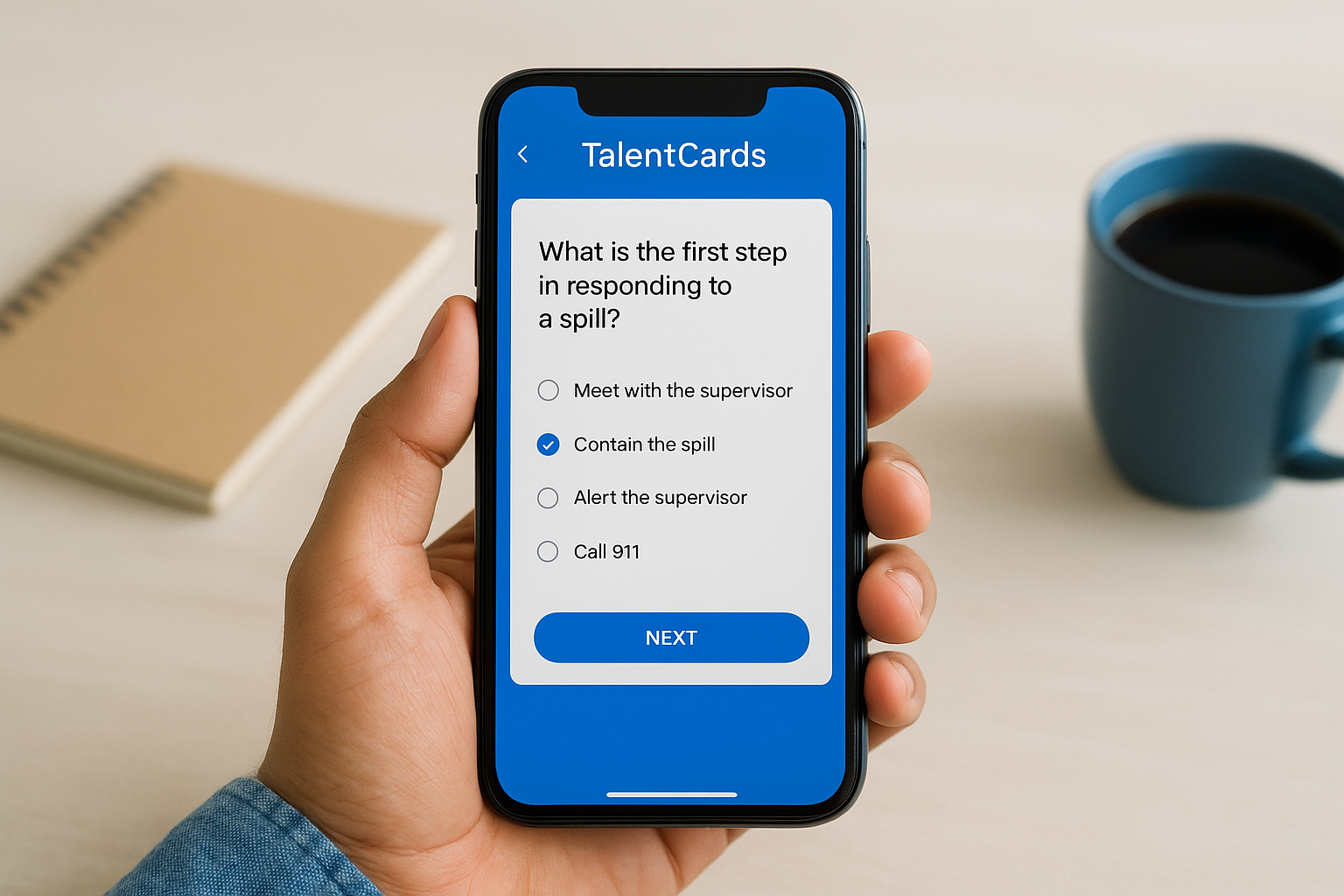
TalentCards takes the microlearning approach even further than SafetyCulture, stripping course delivery down to flashcard-style lessons designed for phones. Frontline teams who need quick knowledge checks rather than long modules find this format easier to finish during a shift break, which is why it shows up often in searches for free lms software built specifically for mobile-first training of a remote workforce.
Key features
Card-based lessons are the whole point here, and the toolset stays narrow but effective:
- Drag-and-drop card creation with images, text, and short quizzes
- Push notifications reminding learners to finish assigned decks
- Bulk user upload via CSV for fast team onboarding
- Basic completion tracking per learner and per deck
Free plan limits
The free tier caps out at a small number of active users and a limited card count per deck, enough to pilot one onboarding sequence but not to run a full training catalog. You won’t find SCORM support, certification tracking, or branding customization until you move to a paid plan.
Flashcard training answers quick knowledge checks well, but it isn’t built to prove compliance.
Best for
Retail, hospitality, and field service teams needing short refreshers on procedures or safety steps get the most out of TalentCards. It’s a poor fit for organizations searching for a learning management system free trial with deep reporting or CEU tracking, since the format simply wasn’t built for that kind of audit trail.
Pricing after the free trial
Paid plans move to per-user monthly pricing once you exceed the free user cap or need advanced analytics and branding. Costs scale with headcount, so request a quote before rolling this out past a single pilot team.
10. Myicourse
Myicourse rounds out this list as a genuinely free, ad-supported LMS built for trainers who need to get a course online without touching a budget line at all. Zoe Media Group runs the platform, and the pitch is straightforward: unlimited courses and users on the free tier, funded by ads shown to learners instead of subscription fees. That trade-off makes it one of the few true free lms software options where the word "free" doesn’t mean a countdown clock or a five-user ceiling.
Key features
The platform keeps its toolset simple but functional for course delivery and basic selling:
- Course builder supporting video, PDF, and quiz content
- Built-in e-commerce tools for selling course access directly to learners
- Certificate generation on course completion
- Discussion boards for learner interaction
Free plan limits
Ads appear throughout the learner experience on the free tier, and removing them requires upgrading. Branding stays minimal, reporting tools are basic, and you won’t find SSO, API access, or compliance management features built for regulated industries.
Free without limits on users usually means a limit somewhere else, and here it’s ads and branding control.
Best for
Independent instructors, small nonprofits, and hobbyist trainers selling a single course or two get real value here without paying anything upfront. It’s a weak match for businesses researching free learning management system examples that need certification tracking, audit trails, or a polished, ad-free learner experience for paying B2B clients.
Pricing after the free trial
There’s no trial to graduate from, since the free ad-supported tier runs indefinitely. Paid plans remove ads and unlock added storage and branding, priced per month rather than per user, though exact tiers require checking current rates directly on the platform.
11. How to choose the right free LMS for your needs
Picking from ten options gets easier once you stop comparing feature lists and start comparing them against your own training volume. Ask yourself how many learners you’ll onboard in the next twelve months, not just this quarter, since a search for the best free LMS for small business needs today can turn into a scaling headache by next year. A five-user cap that feels generous during a pilot becomes a wall the moment a second department wants access.
Before you commit to any platform, run through this checklist and our step-by-step method for comparing LMS platforms:
- Learner count trajectory: will you outgrow the free tier in three months or three years?
- Compliance needs: do you need CEU tracking, audit trails, or standards like GDPR support?
- Content format: does your material fit SCORM courses, microlearning cards, or simple document sharing?
- Integration requirements: does the platform need to connect to your HR, CRM, or e-commerce systems?
- Branding expectations: are you training internal staff only, or presenting a polished experience to paying customers?
Compliance officers and HR managers researching a learning management system free of hidden costs should weigh reporting depth heavily, since basic completion percentages rarely satisfy an auditor. Retail and field service teams, on the other hand, often care more about mobile delivery and quick refreshers than deep analytics.
The right free LMS isn’t the one with the most features, it’s the one that matches where your training program will be in a year.
Small teams testing course structure should prioritize ease of setup over scale. Growing organizations planning to sell training, manage certifications, or integrate with existing business systems need to weigh free plan limits against when and how to upgrade to an enterprise-level LMS, and budget for that transition early rather than scrambling once the cap hits.
12. Free vs. paid LMS: what free really covers
Free tiers cover the basics well: course delivery, learner accounts, and simple progress tracking show up on nearly every platform in this list. What consistently gets stripped out is anything that touches compliance tracking, deep reporting, or a branded experience for paying customers. If you’re evaluating a free learning content management system for internal onboarding only, that gap barely matters. If you’re managing certifications or selling training to clients, it matters immediately.

Storage and integrations tend to disappear first. SSO, REST APIs, and connections to HR or CRM systems almost always sit behind a paywall, since vendors treat integration depth as the clearest signal of a serious buyer. Branding customization follows close behind, since a polished, white-labeled learner portal costs the vendor little to build but a lot to give away for free.
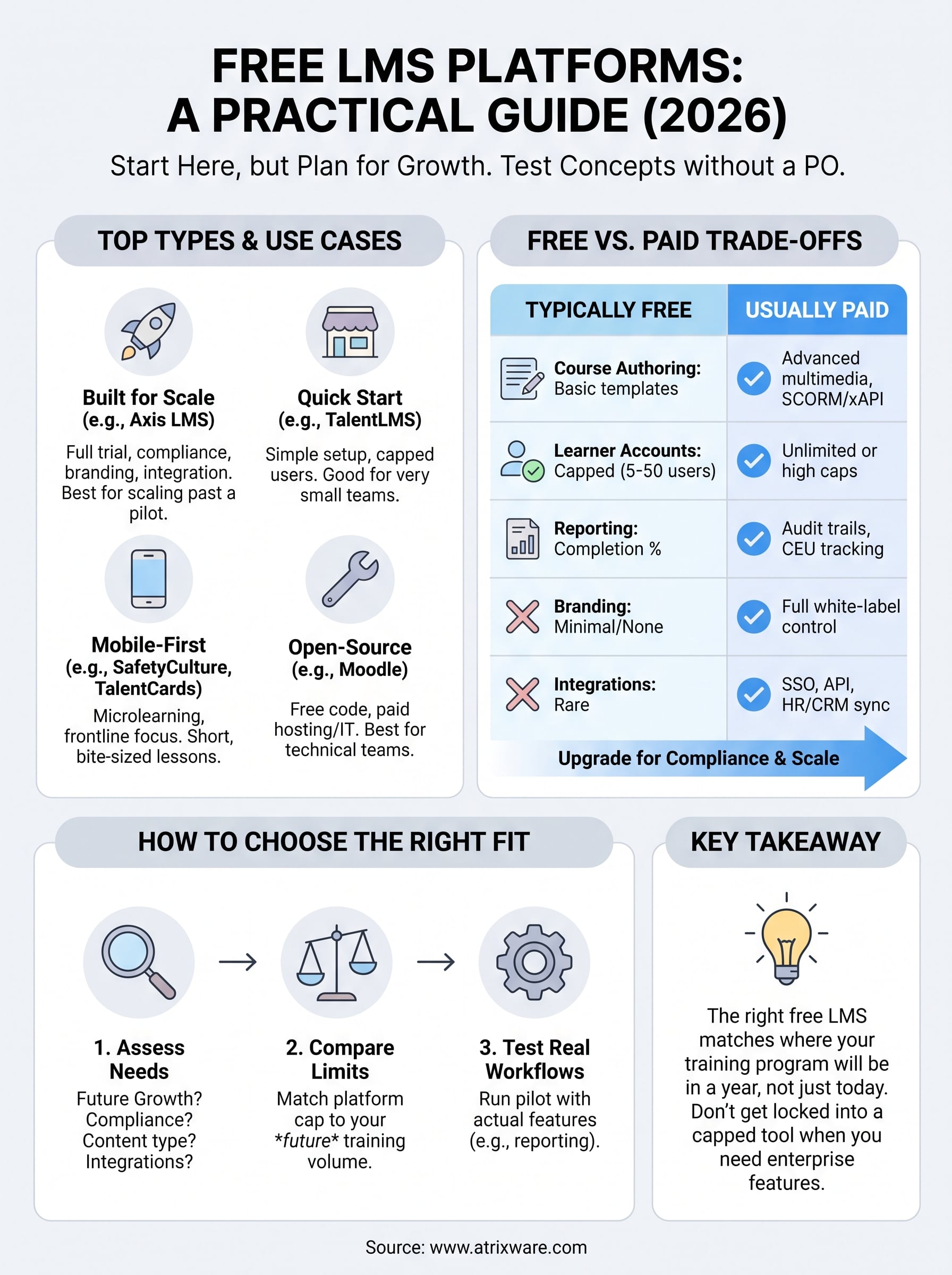
| Capability | Typically free | Usually paid |
|---|---|---|
| Course authoring | Yes, basic templates | Advanced multimedia, SCORM/xAPI |
| Learner accounts | Capped (5-50 users) | Unlimited or high-tier caps |
| Reporting | Completion percentages | Audit trails, CEU tracking |
| Branding | Minimal or none | Full white-label control |
| Integrations | Rare | SSO, API, HR/CRM sync |
Free plans give you a working course, not a working compliance program.
Running the numbers on the real costs of implementing an LMS later saves you from a mid-year migration. A free lms software trial that hides its reporting limits until you’ve built forty courses costs you more time than an honest quote-based system would have upfront. Treat the free tier as a proof of concept, not a permanent home, unless your training needs genuinely stay small.
13. Frequently asked questions about free LMS platforms
Is there truly a 100% free LMS with no hidden costs?
A few platforms, like Moodle and Myicourse, stay free indefinitely without a trial clock running out. Moodle charges nothing for the software itself, but you pay in hosting and IT time, while Myicourse funds its free lms software model through ads shown to learners. Everything else on this list eventually asks for payment once you exceed a user cap or need deeper reporting.
Can a free LMS handle compliance training?
Most free tiers skip compliance management features entirely, since certification tracking and audit trails and standards like GDPR support cost vendors more to build and support. If regulatory reporting matters to your organization, test that specific capability during any trial rather than assuming it’s included.
A platform without audit trails isn’t a compliance solution, no matter how many courses it hosts.
How many users can a free LMS support?
Caps vary widely, from TalentLMS’s five users to Bitrix24’s unlimited accounts paired with tighter storage limits. Searching for a learning management system free of user restrictions usually means trading that freedom for a smaller feature set elsewhere.
Should a small business start with a free LMS?
Yes, if you’re piloting a handful of courses and want proof of concept before spending money. Choosing the best free lms for small business needs means matching your twelve-month learner projection against the platform’s actual limits, not just today’s headcount, so the transition to paid tiers doesn’t catch you off guard.
Choosing the best-fit LMS for your team
Free platforms earn their place on this list because they let you test course structure, learner engagement, and reporting before spending a dollar. But every option here trades something away, whether it’s a five-user cap, missing compliance tools, or ads in front of your learners. The right choice depends on where your training program will be in twelve months, not just where it sits today.
If your organization is outgrowing pilot-stage tools or needs compliance tracking, branding, and integrations a free tier can’t offer, don’t guess at readiness. Take our free LMS readiness assessment to see exactly where you stand in the purchase process, then explore what a platform built for scale actually looks like before you hit a wall with a capped account. Matching the tool to your real training volume now saves you a migration headache later.
