
Becoming an AWS Partner opens doors to co-selling opportunities, technical resources, and credibility that can reshape how your organization competes in the cloud market. But before any of that happens, your team needs to meet specific knowledge benchmarks, and that starts with AWS Partner Training and Certification. Whether you’re aiming for your first AWS foundational certification or working toward a specialization that unlocks a higher-tier partnership, knowing exactly where to begin saves time and frustration.
The challenge most organizations face isn’t motivation, it’s structure. AWS offers a sprawling catalog of courses, learning paths, and exams across its Partner Network portal, and figuring out what applies to your team can feel like untangling a knot. That’s also where having the right internal systems matters. At Atrixware, we build Axis LMS to help businesses manage and track certification training at scale, making it easier to keep your workforce aligned with programs like these.
This guide breaks down the enrollment process, required training paths, certification options, and practical steps to get your team started with AWS partner training from day one.
What AWS partner training and certification includes
AWS partner training and certification covers a structured set of digital courses, classroom options, and official exams that your team completes to meet AWS Partner Network (APN) requirements. The program is delivered through AWS Partner Central, which is the hub where your organization manages learning paths, tracks progress, and accesses partner-exclusive content not available to the general public.
Your organization’s partner tier, whether Registered, Select, Advanced, or Premier, directly determines which training requirements apply to your team.
Partner training courses
The program organizes its partner courses into two main categories: business training and technical training. Business training covers AWS cloud concepts, value propositions, and sales knowledge, making it relevant for account managers and pre-sales staff. Technical training goes deeper into architecture, services, and deployment, targeting solutions architects and engineers. Both categories include self-paced digital courses hosted on AWS Partner Central, and some paths include instructor-led options for more hands-on learning.
Here are three foundational courses most partner organizations start with:
- AWS Partner: Accreditation (Business) – foundational cloud knowledge for non-technical staff
- AWS Partner: Accreditation (Technical) – core cloud concepts for technical team members
- AWS Partner: Cloud Economics Accreditation – cost modeling and business value skills
Certification exams
Unlike internal accreditations, AWS certifications are globally recognized credentials validated through proctored exams. These sit across four tiers: Foundational, Associate, Professional, and Specialty. Your team members schedule and sit for exams through Pearson VUE or PSI, and the certifications your staff earns count directly toward your organization’s partnership score. Holding a minimum number of certified individuals is a hard requirement at the Advanced and Premier partner tiers.
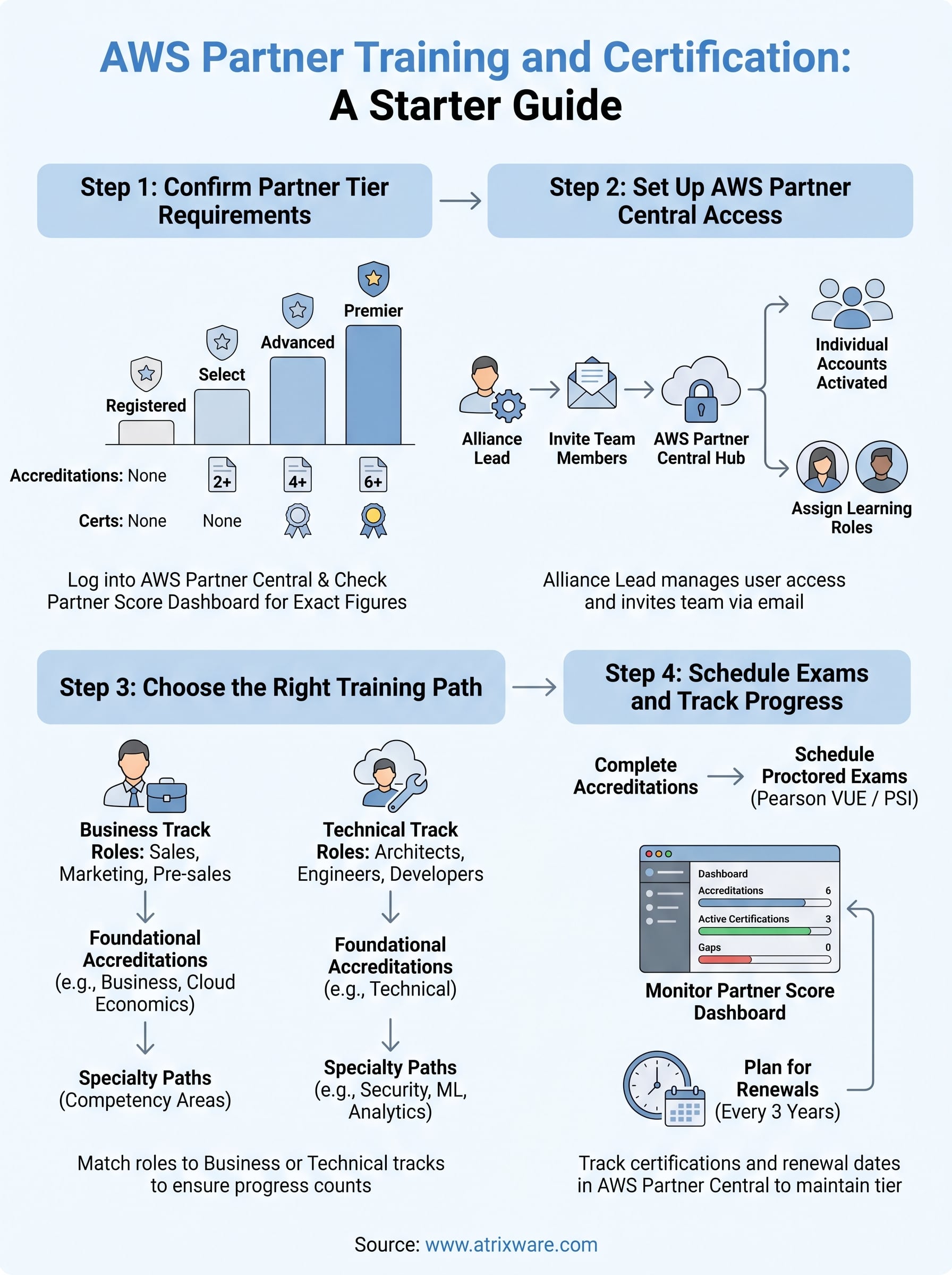
Step 1. Confirm your partner tier requirements
Before you enroll in any AWS partner training and certification course, check which tier your organization currently holds in the AWS Partner Network. Each tier carries distinct training and certification minimums, and starting without this clarity means your team could complete the wrong courses and still fall short of requirements.
Log into AWS Partner Central and navigate to the "Partner Score" dashboard to see exactly where your organization stands before committing to a learning path.
Check the minimum requirements by tier
The four tiers, Registered, Select, Advanced, and Premier, each demand a specific number of accreditations and certified individuals on staff. Select tier requires at least two foundational accreditations across your team. Advanced tier raises the bar significantly, requiring a set number of AWS certifications held by unique individuals. Here is a quick reference to orient your planning:
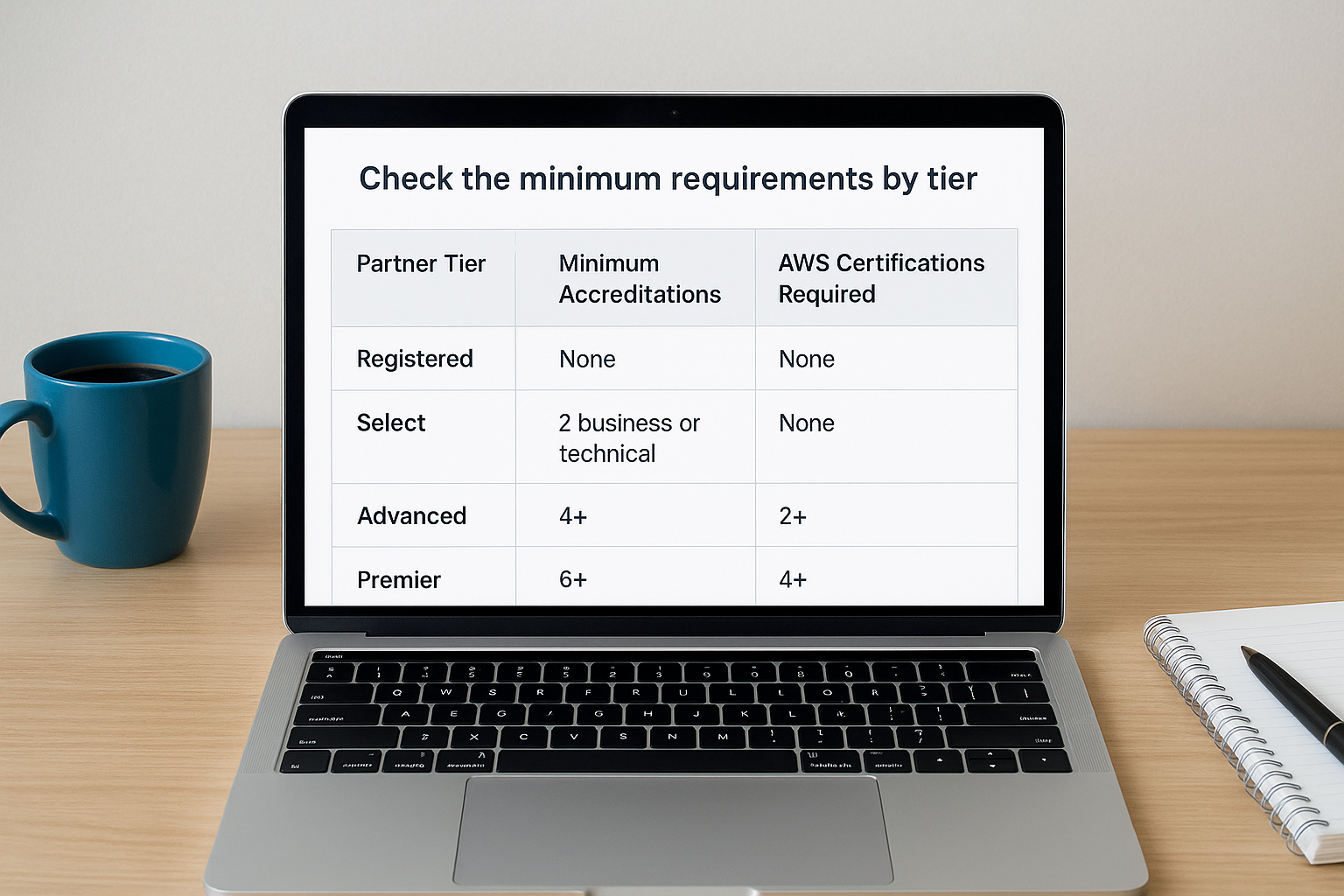
| Partner Tier | Minimum Accreditations | AWS Certifications Required |
|---|---|---|
| Registered | None required | None |
| Select | 2 (business or technical) | None |
| Advanced | 4+ | 2+ |
| Premier | 6+ | 4+ |
Confirm these exact figures directly on the AWS Partner Network page, since requirements update periodically and the numbers above serve as a starting point, not a guarantee.
Step 2. Set up access in AWS Partner Central
Once you know your tier requirements, your next task is getting your team into AWS Partner Central, which serves as the central hub for all AWS partner training and certification activities. Your organization’s primary contact, typically called the Alliance Lead or Administrator, manages user access and must invite team members before they can enroll in any courses or track progress toward your partner score.
Your Alliance Lead should set up all user accounts before your team attempts to access any training materials, since courses only appear after a profile is fully activated.
Add users and assign learning roles
To add team members, your Alliance Lead logs into AWS Partner Central at partnercentral.aws.amazon.com, navigates to the User Management section, and sends invitations by email. Each invited user receives an activation link and creates an individual account tied to your organization’s profile. Once activated, users can access their assigned learning paths, track completed accreditations, and register for certification exams.
Assign roles carefully during setup, because business-track users and technical-track users see different course catalogs based on their profile settings. Getting this right from the start prevents your team from wasting time completing courses that do not count toward your specific tier requirements.
Step 3. Choose the right training path
With your accounts active, match each team member to the correct learning path based on their role. AWS partner training and certification organizes its content into two distinct tracks: one for business-focused staff and one for technical staff. Sending someone down the wrong track does not contribute to your partner score, so get this right before anyone starts a course.
Assign roles in AWS Partner Central before your team begins any courses, because completed courses under the wrong track will not count toward your tier requirements.
Business track vs. technical track
The two tracks serve different staff roles and lead to separate accreditations. Use this breakdown to assign your team correctly:

- Business track: account executives, sales managers, marketing coordinators, and pre-sales staff
- Technical track: solutions architects, cloud engineers, and developers
Specialty and advanced paths
Once your team clears the foundational accreditations, members can pursue specialty paths tied to specific AWS competency areas like security, machine learning, or data analytics. Completing a specialty path strengthens your organization’s competency score in that area and can qualify your company for AWS Competency designations, which carry significant weight when customers evaluate partners.
These advanced paths build directly on the foundational courses, so completing them in order keeps your team’s progress clean and trackable.
Step 4. Schedule exams and track progress
Once your team completes the required accreditation courses, the next step in your aws partner training and certification journey is scheduling proctored exams and keeping a close eye on your organization’s overall certification count. Your team members register for exams through Pearson VUE at pearsonvue.com/aws or through PSI, both of which serve as the official testing providers for AWS certifications.
Schedule exams at least two weeks out to give your team members enough time to review practice materials and avoid last-minute conflicts.
Monitor your partner score in real time
Your Alliance Lead can track both individual certifications and your organization’s total progress directly inside AWS Partner Central. Navigate to the Partner Score section to see a live breakdown of completed accreditations, active certifications, and any gaps standing between your current tier and the next one. Check this dashboard monthly so you catch expiring certifications before they drop your score.
Certifications on AWS typically expire every three years, so build a renewal schedule into your tracking process from the start. Use your Partner Central dashboard to flag upcoming expiration dates and assign renewal courses to the right team members well before deadlines hit.
Next steps
You now have a clear path through AWS partner training and certification: confirm your tier requirements, set up Partner Central access, assign the right learning tracks, and monitor certifications before they expire. The process rewards teams that plan ahead and track progress consistently rather than scrambling when a renewal deadline appears.
Managing certification timelines across multiple employees gets complicated fast, especially as your team grows and renewal dates spread across different quarters. That is where a dedicated LMS helps you stay organized. With Axis LMS, you can assign courses, automate renewal reminders, and run reports that show exactly who holds which credentials at any point in time, giving your Alliance Lead real data instead of spreadsheet guesswork.
If you want to see how that works in practice, start your free Axis LMS admin demo and explore the reporting and assignment tools your team would use to manage an ongoing certification program.
