Most new hires decide whether they made the right choice within their first two weeks. If your onboarding is a scattered mix of PDFs, shadowing, and hallway introductions, you’re losing people before they ever get productive. A solid new hire training program gives you a repeatable process instead of a guessing game every time you fill a role.
This guide walks you through the actual steps: defining role-specific competencies, sequencing content so it doesn’t overwhelm week-one employees, and setting checkpoints that tell you whether training is working or just happening. You’ll also see how to handle compliance requirements and manager sign-offs without turning onboarding into a paperwork exercise.
We built this from what actually works inside a Learning Management System, where courses, tracking, and reporting live in one place instead of scattered across email threads and spreadsheets. Whether you’re onboarding three people a month or three hundred, you’ll walk away with a step-by-step structure you can build this week and a clear sense of what to measure so you know it’s actually improving retention and time to productivity.
Why a structured training program matters
The real cost of winging it
Turnover in the first 90 days almost always traces back to a rocky onboarding experience, not a bad hire. The Society for Human Resource Management estimates that replacing an employee can cost six to nine months of that person’s salary once you count lost productivity, recruiting, and retraining (SHRM). Ad-hoc onboarding, the kind built on scattered PDFs and "figure it out as you go," multiplies that risk because nobody owns the outcome, and the hidden cost of poorly trained workers shows up in productivity long before it shows up in turnover reports. Inconsistent training also means new hires spend their first weeks guessing at expectations instead of doing real work, while managers waste hours repeating the same explanations one employee at a time.
A structured new hire training program turns onboarding from a guessing game into a repeatable process that protects your investment in every hire.
What a structured program fixes
Consistency is the first thing you gain. Every new hire, regardless of which manager or team they land on, works through the same core curriculum, so skill gaps don’t develop based on who happened to train them. Structure also gives you real visibility into progress: with tracked courses and checkpoints, you know within the first week whether someone is on pace or falling behind, instead of finding out during a performance review three months later.
Beyond consistency, a documented employee onboarding process shortens time to productivity, which is the metric most training leaders actually get judged on. New hires who follow a defined path hit full productivity faster because they’re not relying on hallway conversations to piece together the basics. Structure also protects you on the compliance side: when regulators or auditors ask for proof that every employee completed required training, you need trackable compliance training records, not memories.
Here’s what changes when you move from informal onboarding to a documented program:
| Aspect | Ad-hoc onboarding | Structured program |
|---|---|---|
| Consistency | Varies by manager or team | Same curriculum for every hire |
| Progress tracking | Informal, undocumented | Automated reports and checkpoints |
| Time to productivity | Unpredictable | Measurable, and improves over time |
| Compliance proof | Hard to produce on demand | Completion records generated automatically |
Getting this right doesn’t require a massive overhaul, and it helps to see how a repeatable, compliant onboarding program is assembled piece by piece. Running everything through an Axis LMS instance gives you a single place to build courses, assign them by role, and pull completion reports, so the structure lives in the system instead of depending on someone’s memory or a shared spreadsheet that falls out of date the moment a manager forgets to update it.
Step 1. Set clear goals and success metrics
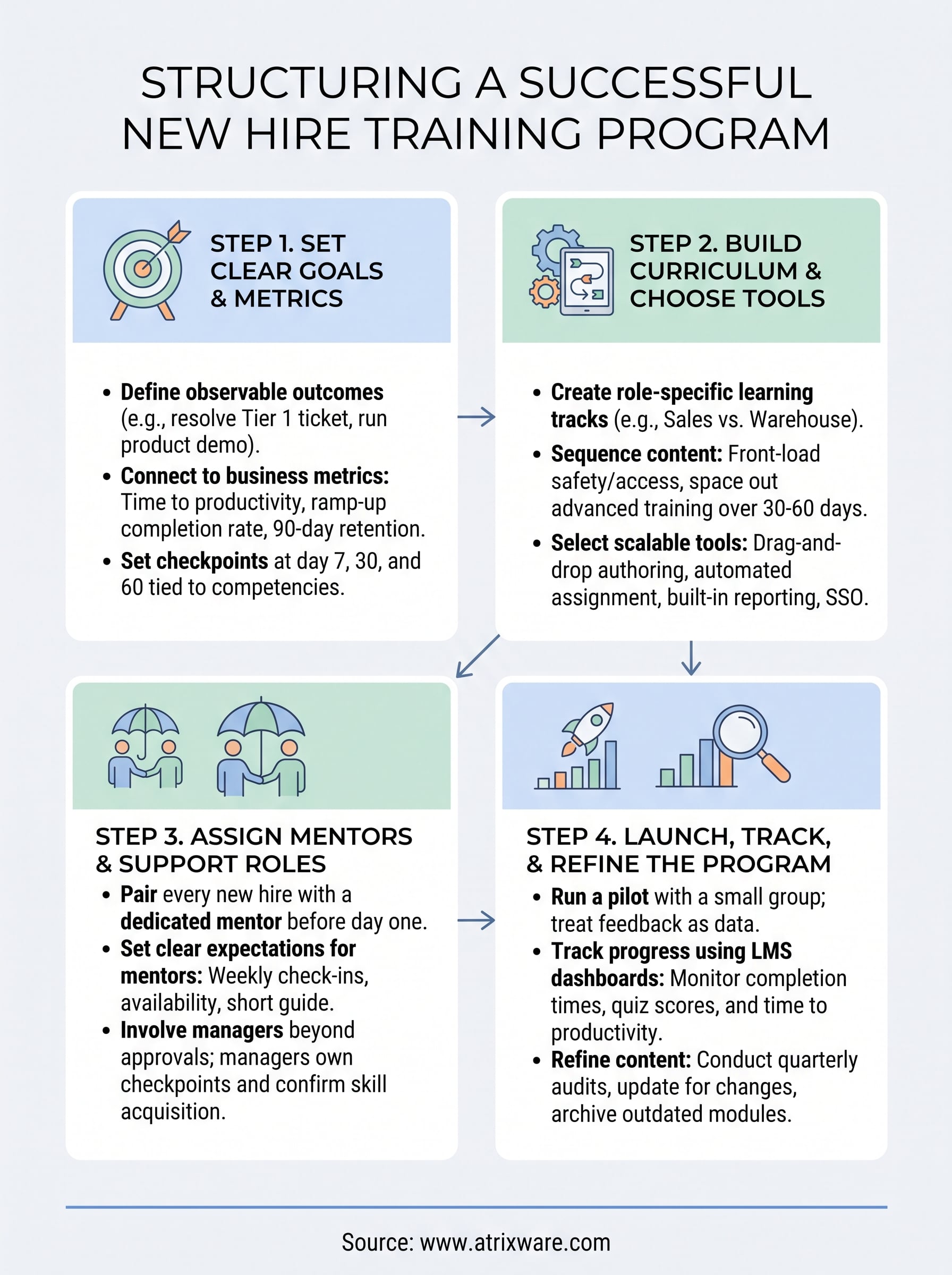
Before you build a single course, decide what "trained" actually means for each role. Vague goals like "get comfortable with the job" don’t give you anything to measure, and they don’t tell a new hire when they’ve actually arrived. Instead, write goals as observable outcomes: a support rep can resolve a Tier 1 ticket without escalation by day 10, a sales rep can run a full product demo solo by week three. These become the backbone of your new hire training program and the yardstick for every course you build afterward.
If you can’t measure it, you can’t tell a new hire they’ve succeeded, and you can’t tell your CFO the program is working.
Pick metrics that connect to the business
Goals only matter if you’re tracking them, so pair each one with a metric your LMS can actually report on, aligning training data with bottom-line performance from the start. Skip vanity numbers like course completion alone and tie tracking to outcomes that managers and finance both care about:
- Time to productivity: days until a new hire hits their first performance benchmark
- Ramp-up completion rate: percentage finishing the onboarding curriculum on schedule
- Quiz and assessment scores: knowledge retention before hires touch live work
- 90-day retention: whether structured onboarding is reducing early turnover
- Manager sign-off rate: how many hires clear each competency checkpoint on the first attempt
Set checkpoints, not just an end date
Rather than waiting until day 90 to find out if training worked, build checkpoints at day 7, 30, and 60 tied to specific competencies. Reporting inside your LMS should flag anyone falling behind automatically, so managers intervene in week two instead of discovering the gap during a quarterly review.
Step 2. Build the curriculum and choose your tools
Once you’ve locked in your metrics, map the actual content that gets a new hire from day one to those checkpoints. Break the curriculum into role-specific tracks rather than one generic onboarding course everyone sits through regardless of job function. A warehouse hire doesn’t need the same modules as a sales rep, so build separate role-based learning paths and assign them automatically based on job title or department inside your LMS.

Sequence content so it doesn’t overwhelm week one
Dumping every policy, tool, and procedure into a single week-one bootcamp guarantees nobody retains it. Space content across the first 30 to 60 days instead, front-loading only what someone needs to be safe and functional on day one: security basics, core systems access, and immediate team introductions. Save deeper product training, compliance modules, and advanced workflows for weeks two through four, once the new hire has enough context to actually absorb them.
Sequencing beats volume. A new hire remembers three well-timed lessons far better than fifteen crammed into orientation week.
Choose tools that scale with your program
Your toolset determines whether this curriculum stays manageable as headcount grows. When you compare LMS platforms, look for one that handles course building without needing a developer, supports both self-paced and virtual classroom sessions, and generates completion reports without manual exports. Here’s what to check for before committing:
- Drag-and-drop course authoring, so subject matter experts can build modules without touching code
- Automated assignment rules that put new hires into the right track based on role or department
- Built-in reporting that tracks quiz scores, completion rates, and time to finish each module
- SSO and HR system integration, so new hire records sync automatically instead of requiring manual entry
A platform like Axis LMS bundles these into one system, which matters once you’re managing multiple role tracks and don’t want training data scattered across five different tools.
Step 3. Assign mentors and support roles
Courses only get a new hire so far. The rest comes from a human safety net, someone they can ask "is this normal?" without feeling like they’re bothering their manager. Skipping this step is one of the most common gaps in a new hire training program, because leaders assume the curriculum alone will carry someone through the first month. It won’t. Pair every new hire with a mentor before day one, and make the assignment visible inside your LMS so managers can see who’s supporting whom.

Pick the right mentor, not just the closest desk
Good mentors aren’t automatically your top performers. Look for people who explain things clearly, remember what it felt like to be new, and actually have bandwidth in their calendar that week. Set expectations up front so mentors know what the role requires:
- Weekly check-ins during the first 30 days, minimum 20 minutes each
- Availability for quick questions during the new hire’s first two weeks on the floor
- A short mentor guide covering what to cover in week one versus week three
- A feedback loop back to the training team if the new hire is stuck on a specific module
A mentor who’s available and clear beats a top performer who’s too busy to answer questions.
Give managers a role beyond approvals
Managers shouldn’t just sign off on completed modules. They should own the checkpoints you built in Step 1, sitting down with the new hire at day 7, 30, and 60 to confirm the skill actually stuck, not just that the course got marked complete. Build this into the manager’s own task list inside the LMS, with automated reminders so it doesn’t slip when their calendar fills up. Documenting these conversations also gives you a record if a competency gap needs to be addressed before it turns into a performance issue three months down the line.
Step 4. Launch, track, and refine the program
Don’t roll out the full program to every new hire on day one. Pilot it with a small group first, ideally the next two or three people scheduled to start, and treat their feedback as data, not complaints. This is where a new hire training program either proves itself or reveals gaps you couldn’t see on paper, like a module that takes twice as long as planned or a checkpoint that lands before the new hire has the context to pass it.
Run a pilot before a full rollout
Give your pilot group a short survey after each checkpoint asking what felt rushed, what felt redundant, and where they got stuck without help. Track employee training progress by pulling completion times and quiz scores straight from your LMS reporting instead of relying on gut feel from managers. If a module has a completion rate under 70% or an unusually low quiz average, that’s a content problem, not a motivation problem, and it needs fixing before you scale the program to the next cohort.
Treat your first cohort as a test group, not a finished launch, and you’ll catch the weak spots before they hit everyone else.
Track the metrics you set in Step 1
Once you’re past the pilot, keep watching the same numbers you defined earlier: time to productivity, ramp-up completion rate, and 90-day retention. Set up automated reports so this doesn’t depend on someone remembering to pull data manually every month.
- Weekly dashboard review: flag anyone behind schedule before day 7
- Quarterly curriculum audit: retire or rewrite modules with consistently low scores
- Manager feedback survey: run it every 90 days to catch problems the data alone won’t show
Refinement isn’t a one-time cleanup. Update content whenever tools, policies, or products change, and archive outdated modules immediately so new hires never train on information that’s already wrong.
Setting new hires up to succeed
A strong new hire training program isn’t a one-time project you finish and forget. It’s goals you can measure, a curriculum sequenced so nobody drowns in week one, mentors who make the first month feel survivable, and a feedback loop that catches problems before they become turnover statistics. Get those four pieces right and you stop losing people in their first 90 days for reasons that had nothing to do with the job itself.
Building all of this on scattered spreadsheets and shared drives works until you’re onboarding more than a handful of people a month, then it falls apart fast. Centralizing courses, tracking, and reporting in one system is what makes the structure actually hold as headcount grows. If you’re ready to see how that looks in practice, book a free Axis LMS demo and walk through building your own onboarding track.
