Picking a platform online training tool feels harder than it should be. You’ve got dozens of vendors promising the same thing: easy course creation, great reporting, seamless integrations. Meanwhile your team still needs onboarding done by next month, your compliance deadlines aren’t moving, and your budget has a ceiling.
If you’re searching for an online training platform, you already know what you need: something that hosts courses, tracks learner progress, and doesn’t require a developer to set up. The real question is which one fits your business size, your compliance requirements, and your existing HR or CRM stack, whether that’s Salesforce, ADP, or BambooHR.
This list breaks down 10 of the best online training platforms for businesses in 2026, from lightweight tools built for small teams to enterprise-grade systems with deep API integrations and advanced compliance tracking. We built Axis LMS to compete directly in this space, so we know exactly what separates a platform that looks good in a demo from one that actually holds up once your training program scales past 500 users.
1. Axis LMS by Atrixware
Axis LMS is our own platform, so we’ll get the bias out of the way up front: we built it because we kept seeing businesses outgrow their first LMS within a year. Axis LMS is a scalable learning management system designed to handle everything from a 20-person onboarding program to a 50,000-user compliance rollout, without forcing you to migrate to a different product as you grow. It supports online and virtual classroom training, drag-and-drop course building, and deep reporting, all wrapped in an interface that doesn’t require a training manual to operate.

Key features
What sets Axis LMS apart isn’t a single flashy feature, it’s the breadth of what’s included without upsells for basic functionality. Here’s what you get:
- Drag-and-drop course builder for rapid content creation, no coding required
- Compliance management tools built for standards like GDPR and FDA 21 CFR Part 11, plus automated re-certification and CEU tracking
- Extensive branding controls so the learner UI matches your organization, not ours
- REST API and webhooks for custom integrations and real-time event updates
- Integration Builder connecting to over 5,000 systems, including CRM, HR, email, and e-commerce platforms
- SAML SSO support for Okta, Azure, Ping Identity, and Salesforce
- User data sync with ADP, BambooHR, Zoho, and Salesforce
- Built-in e-commerce for selling courses to individuals or seat licenses to other businesses
Best for
Axis LMS fits businesses that need one platform to cover multiple training use cases at once, employee onboarding, customer education, compliance tracking, and channel partner training, without stitching together three separate tools. It works well for mid-sized companies that have outgrown a bare-bones LMS but aren’t ready for the price tag or implementation timeline of a bloated enterprise suite. Organizations in regulated industries, healthcare, finance, manufacturing, particularly benefit from the compliance and audit trail features baked into the core product rather than sold as an add-on.
A training platform should scale with your compliance needs, not force you to rebuild your program every time you add a use case.
Pricing
Atrixware doesn’t publish a flat rate because Axis LMS pricing depends on user count, deployment type (cloud or on-premise), and which modules you need, e-commerce, advanced compliance, custom integrations, and so on. That’s typical for LMS vendors at this tier, but it does mean you’ll need to request a quote rather than swipe a credit card. The upside is that you’re not paying for enterprise features you’ll never touch if you’re a 40-person company, and you’re not hitting a user cap that forces an awkward renegotiation if you’re scaling fast. Free trials and live demos are available, which is the fastest way to get a real number for your specific setup.
Pros and cons
| Pros | Cons |
|---|---|
| Scales from small teams to enterprise without switching platforms | No public pricing page, requires a sales conversation |
| Strong compliance and re-certification tracking out of the box | Broad feature set means a slightly longer initial setup than bare-bones tools |
| 5,000+ integrations plus REST API and SSO support | Best suited to teams that want to configure, not just plug-and-play |
| Built-in e-commerce for selling training | |
| Extensive UI branding and customization |
If your evaluation checklist includes compliance tracking, HR system sync, and room to grow past your current headcount, Axis LMS is worth putting on your shortlist alongside the more heavily marketed names below.
2. TalentLMS
TalentLMS built its reputation on being the LMS you can set up in an afternoon. It’s a cloud-based online training course platform aimed at small and mid-sized businesses that want something functional without a steep learning curve. Epignosis, the company behind it, has pushed TalentLMS toward gamification and quick deployment, which makes it a common pick for teams running their first structured training program rather than migrating a complex one.
Key features
TalentLMS keeps its feature set approachable rather than exhaustive, which is part of its appeal for smaller teams.
- Gamification with badges, levels, and leaderboards to boost learner engagement
- Course library marketplace with pre-built content you can license
- Bulk user import and automated notifications for onboarding at scale
- Mobile app for iOS and Android with offline access
- Basic branding through custom domains, logos, and color themes
Best for
Teams under 500 employees who want a straightforward online training platform without heavy configuration typically land here first. It suits companies running one primary use case, usually employee onboarding or basic skills training, rather than organizations juggling compliance, channel partner training, and e-commerce simultaneously. If your integration needs are simple, a few Zapier connections rather than deep HR system sync, TalentLMS won’t slow you down.
A simple platform works great until your training needs get more complex than the platform itself.
Pricing
TalentLMS uses tiered pricing based on active user count, starting around $69/month for up to 40 users and climbing from there. Enterprise pricing requires a custom quote once you pass a few hundred users. A free plan exists for up to 5 users, useful for testing but not for running real programs.
Pros and cons
| Pros | Cons |
|---|---|
| Fast setup, minimal training required | Compliance features are thin compared to enterprise LMS options |
| Gamification drives learner engagement | Advanced integrations require higher-tier plans |
| Affordable at small scale | Pricing climbs quickly as user count grows |
| Mobile app with offline mode | Limited customization for complex org structures |
TalentLMS earns its spot for simplicity, but businesses with compliance mandates or multi-department rollouts often outgrow it faster than expected.
3. Docebo
Docebo positions itself as an AI-powered learning platform for larger organizations that need to manage training across departments, regions, or customer bases at once. It’s a cloud-based online training platform built around its "Learning Impact" analytics and an AI engine that auto-tags content and recommends courses to learners. Companies that outgrow simpler tools often land on Docebo next, though the jump in complexity and cost is real.

Key features
Docebo leans heavily on automation and content discovery rather than manual course curation.
- AI-powered content tagging that auto-organizes course libraries as they grow
- Learning Impact analytics connecting training completion to business outcomes
- Docebo Shape for auto-generating course content from existing documents
- Multi-tenant architecture for managing separate learner audiences under one account
- Extended enterprise features for training external partners and customers separately from employees
Best for
Docebo suits mid-to-large enterprises running training across multiple business units, especially those needing to separate employee training from customer or partner education within a single instance. It’s a strong fit for organizations with dedicated L&D teams who can manage a more configuration-heavy platform, rather than a small HR department wearing five hats.
The more moving parts your training program has, the more you’ll rely on AI-driven organization instead of manual course management.
Pricing
Docebo doesn’t publish flat rates. Pricing is quote-based and scales with active users, which typically starts becoming cost-effective only at higher headcounts, generally 300+ users. Smaller teams often find the platform overbuilt for their needs and priced accordingly.
Pros and cons
| Pros | Cons |
|---|---|
| Strong AI-driven content organization and recommendations | Pricing unclear until you request a quote, and it climbs fast |
| Multi-tenant setup good for separating audiences | Steeper learning curve for administrators |
| Solid analytics tied to business outcomes | Overkill and overpriced for small teams |
| Handles extended enterprise training well | Initial implementation often requires vendor support |
Docebo earns its enterprise reputation, but businesses without a dedicated admin team may find the setup heavier than they bargained for.
4. Absorb LMS
Absorb LMS markets itself as an enterprise-ready online training platform with a polished, consumer-grade interface that doesn’t feel like typical corporate software. Companies pick Absorb when they want strong reporting and a clean learner experience without building everything from scratch through an API. It’s a common choice for mid-market and enterprise teams that need to onboard thousands of employees while keeping the admin side manageable for a lean L&D team.
Key features
Absorb focuses on polish and automation rather than raw configurability, which shows in how it’s built:
- AI-powered course creation assistant that helps generate quizzes and content outlines
- Absorb Amplify for extending training to partners, resellers, and customers
- Robust reporting dashboards with exportable data for compliance audits
- Native e-commerce for selling courses without a third-party plugin
- Automation rules that assign or unenroll learners based on triggers like job role changes
Best for
Organizations that want an online training course platform with strong out-of-box design and don’t want to spend months on implementation tend to fit best here. Absorb suits mid-sized to large companies running employee training alongside partner or customer education, particularly those in retail, healthcare, or franchise-based businesses where consistent branding across audiences matters.
A platform that looks good to learners on day one saves you months of change-management headaches later.
Pricing
Absorb doesn’t list public pricing, and quotes are based on active user count, modules selected, and support tier. Expect implementation fees on top of the subscription, and budget for a sales cycle rather than a same-day signup. Smaller businesses under 100 users sometimes find the entry cost steeper than platforms built specifically for that segment.
Pros and cons
| Pros | Cons |
|---|---|
| Clean, modern interface for learners and admins | No published pricing, quote-based only |
| Strong automation for enrollment and reporting | Implementation costs add up fast |
| Absorb Amplify handles external audience training well | Less suited to very small teams |
| Reliable customer support reputation | Customization requires vendor involvement |
Businesses that value design and automation over deep configurability generally get the most out of Absorb LMS.
5. iSpring Learn
iSpring Learn built its name on fast course authoring, largely because its parent company also sells iSpring Suite, a PowerPoint-based content tool that plugs directly into the LMS. This online training platform appeals to teams that already have a library of PowerPoint decks, PDFs, or video files and want to convert them into trackable courses without rebuilding everything from scratch. It’s a lighter alternative to enterprise suites, aimed at businesses that value speed of content creation over deep configurability.
Key features
Most of iSpring Learn’s strength sits in content authoring and quick deployment rather than complex workflow automation.
- Native integration with iSpring Suite for converting PowerPoint files into interactive courses
- Mobile app with offline sync, useful for field teams and retail staff without steady connectivity
- Automated reporting on quiz scores, course completion, and time spent per learner
- Built-in video course creation with screen recording and talking-head video support
- Multilingual interface supporting course delivery across regions
Best for
Small and mid-sized businesses that already produce training content in PowerPoint or video format tend to get the most value here. Companies without a dedicated instructional design team benefit from how fast they can turn existing slide decks into a working course. If your priority is a training online platform that gets content live in days rather than weeks, iSpring Learn fits that need better than most enterprise-grade competitors on this list.
Fast content conversion matters more than deep configurability when your team needs training live before month-end, not next quarter.
Pricing
Pricing runs on an annual subscription based on active users, starting around $2.87 per user per month when billed yearly for smaller teams, with volume discounts kicking in as headcount grows. A free 30-day trial is available, and there’s no long-term contract requirement for the base plan.
Pros and cons
| Pros | Cons |
|---|---|
| Fast course creation from existing PowerPoint content | Limited depth for complex compliance workflows |
| Affordable per-user pricing at smaller scale | Fewer native integrations than enterprise platforms |
| Offline mobile access for field teams | Reporting is functional but not as granular as competitors |
| Quick implementation, minimal setup time | Less suited to large, multi-department rollouts |
Teams that need speed over scale will likely find iSpring Learn does exactly what they need without extra complexity.
6. Litmos
Litmos, now part of CallidusCloud/SAP lineage but sold as a standalone product, targets companies that need to train employees, customers, and partners at scale without a huge implementation team. It’s a cloud-based online training platform built for speed of deployment, with a content library and course marketplace that gets a program running faster than building everything from scratch. Sales teams and customer-facing businesses gravitate toward Litmos because of its CRM ties and its focus on measurable training outcomes tied to revenue.
Key features
Litmos leans on its content marketplace and integration depth more than deep customization options.
- Litmos Content Library with thousands of off-the-shelf courses on compliance, sales, and soft skills
- Native Salesforce integration for tracking training impact on sales performance
- Automated learning paths that assign content based on role, department, or onboarding stage
- Video-based assessments for coaching and skills verification, not just quizzes
- Gamification and social learning features to boost completion rates
Best for
Litmos suits mid-sized to large businesses running sales enablement or customer education programs where tying training to CRM data matters. Companies already invested in the SAP or Salesforce ecosystem tend to see the fastest wins, since the integrations are built-in rather than bolted on. It’s a weaker fit for organizations whose primary need is heavy compliance documentation and audit trails, since that’s not where the platform’s strength sits.
A content marketplace gets you moving fast, but check whether the licensed courses actually match your industry before you commit.
Pricing
Litmos doesn’t publish flat pricing. Costs scale with active users and which content library tiers you add, and quotes typically require a sales call. Businesses report pricing becomes competitive at higher user counts, but smaller teams sometimes find the content library upsells add up quickly.
Pros and cons
| Pros | Cons |
|---|---|
| Large ready-made content library speeds up launch | Pricing not public, requires a sales conversation |
| Strong Salesforce and CRM integration | Compliance tracking less robust than dedicated platforms |
| Good for sales and customer training use cases | Customization options more limited than enterprise rivals |
| Video-based skills assessment tools | Content library quality varies by topic |
Businesses focused on sales training and customer education get real value from Litmos, though compliance-heavy industries should look closer at the reporting depth first.
7. Academy of Mine
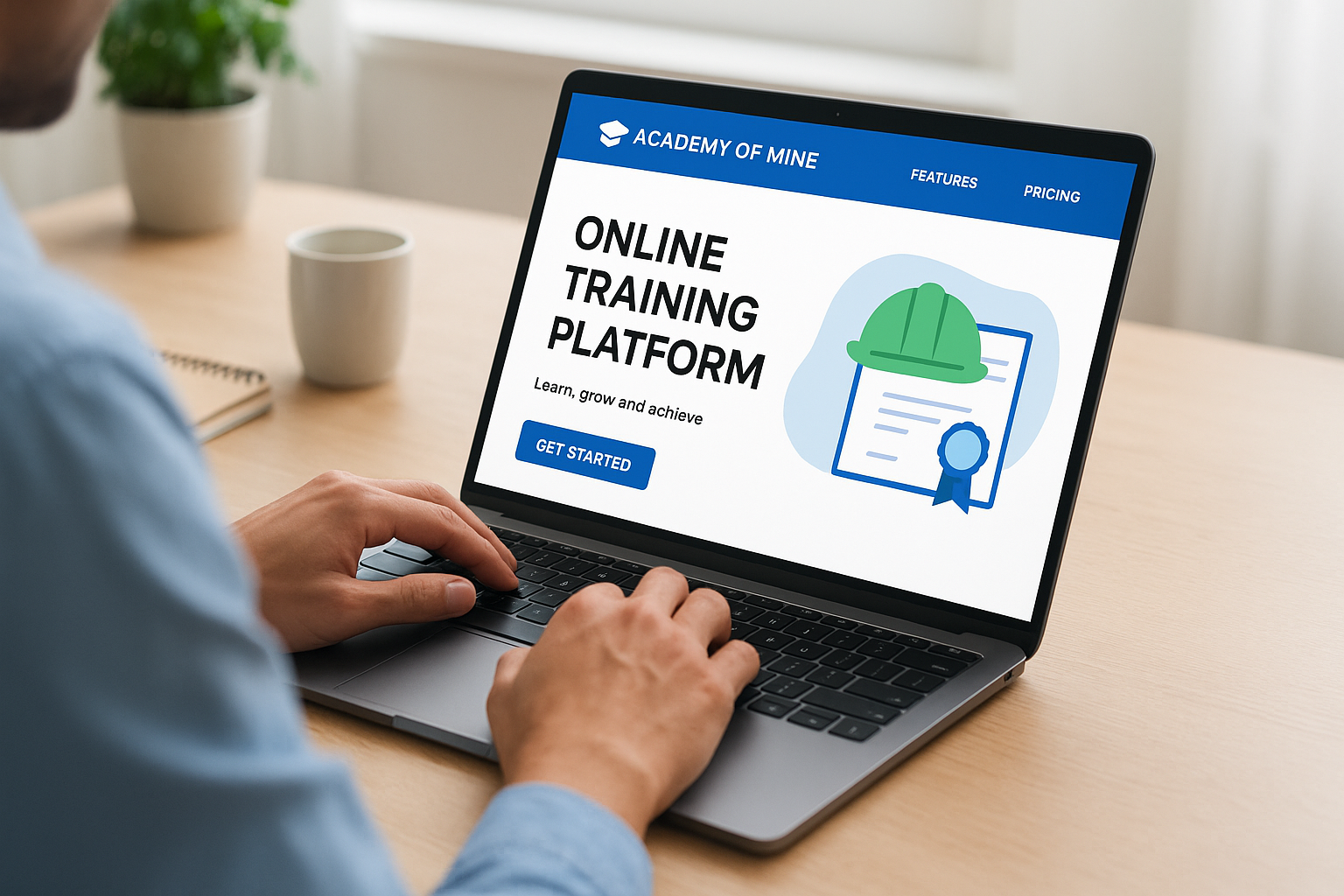
Academy of Mine built its platform specifically for businesses that want to sell training as a product, not just deliver it internally. This online training platform targets companies running certification programs, franchise training, or B2B course sales where the LMS needs to double as an e-commerce storefront. Unlike general-purpose LMS tools that bolt on selling features later, Academy of Mine treats monetization as the core use case from day one.
Key features
Everything here points toward revenue generation and external audience management rather than internal HR workflows.
- White-label e-commerce storefront for selling individual courses, bundles, or subscriptions
- Custom domain and full branding control, so the platform feels like your own product, not a rented tool
- Certification and badge issuance with automated renewal reminders for recurring revenue
- Bulk enrollment and corporate seat sales for B2B customers buying training in volume
- API access for connecting to existing membership sites or marketing stacks
Best for
Businesses that treat training as a revenue line, associations issuing certifications, franchisors training operators, or companies selling technical courses to other businesses, get the most value here. It’s a stronger fit than general LMS platforms when your primary goal is selling training online platforms rather than managing internal employee development. Companies without an e-commerce angle will likely find the feature set narrower than they need.
If your training program needs to generate revenue, not just deliver content, the platform’s e-commerce depth matters more than its course-authoring tools.
Pricing
Academy of Mine uses quote-based pricing tied to user volume and which e-commerce features you need, with plans typically starting in the low thousands per year for smaller catalogs. There’s no free tier, and demos are required before you see real numbers. Implementation support is usually included given the platform’s focus on revenue-generating setups.
Pros and cons
| Pros | Cons |
|---|---|
| Strong built-in e-commerce for selling courses | Less suited to internal-only employee training |
| Full white-label branding | No published pricing or free trial |
| Certification and renewal automation | Smaller integration ecosystem than enterprise LMS rivals |
| Good for B2B bulk seat sales | Limited compliance-specific tooling |
Companies monetizing training directly will find Academy of Mine worth the sales call, but it’s overkill if you’re only training your own staff.
8. LearnDash
LearnDash is a WordPress plugin, not a standalone platform, and that distinction shapes everything about who should use it. If you already run your website on WordPress, LearnDash turns it into a full online training course platform without forcing you onto separate software with its own login and branding rules. It’s a favorite among course creators, coaches, and small training businesses who want full ownership of their content and site rather than renting space inside someone else’s platform.
Key features
LearnDash’s feature set reflects its plugin architecture, everything ties back into WordPress rather than existing as a separate system.
- Drip-feed content scheduling to release lessons on a timed or date-based schedule
- Focus mode for a distraction-free course-taking experience within your existing site
- WooCommerce and payment gateway integration for selling courses directly
- Course prerequisites and dependencies to control learner progression
- ProPanel dashboard for tracking enrollment, completion, and revenue in one view
Best for
Small businesses, solo course creators, and coaches who already have a WordPress site and want to avoid migrating to a hosted online training platform tend to get the most out of LearnDash. It suits teams comfortable managing their own hosting and plugin updates rather than expecting a vendor to handle infrastructure. Organizations needing deep compliance tracking or HR system sync should look elsewhere, since LearnDash wasn’t built for that.
Owning your platform outright appeals to course creators who don’t want a vendor controlling their pricing, branding, or data.
Pricing
LearnDash sells as an annual license rather than a per-user subscription, starting around $199/year for a single site. Higher tiers unlock multiple sites and additional features like the ProPanel analytics dashboard. There’s no free trial, but the one-time-ish annual cost undercuts most SaaS LMS pricing at small scale.
Pros and cons
| Pros | Cons |
|---|---|
| Affordable flat licensing instead of per-user fees | Requires an existing WordPress site to run |
| Full ownership of data, branding, and hosting | No native compliance or CEU tracking tools |
| Strong WooCommerce integration for selling courses | You manage hosting, updates, and security yourself |
| Large plugin ecosystem for added functionality | Not built for large multi-department enterprise training |
Creators who want independence from a vendor’s platform will find LearnDash delivers exactly that, provided they’re comfortable running their own WordPress backend.
9. Thinkific
Thinkific built its name serving independent course creators and small businesses who want a hosted online training platform without touching WordPress or managing their own server. Unlike LearnDash, everything lives on Thinkific’s infrastructure, so you skip hosting headaches but trade away some control over customization. It’s a common pick for consultants, coaches, and small training companies packaging expertise into a sellable course rather than running internal employee compliance programs.

Key features
Thinkific’s toolset centers on course creation and sales rather than enterprise-grade administration.
- Drag-and-drop course builder with templates for video, quizzes, and downloadable content
- Built-in payment processing supporting one-time purchases, subscriptions, and payment plans
- Course completion certificates generated automatically for learners
- Community feature for discussion spaces tied to specific courses
- Thinkific Plus tier adding SSO, bulk enrollment, and API access for larger course businesses
Best for
Solo creators, coaches, and small businesses selling courses to individual customers get the most out of Thinkific. It suits teams whose main goal is packaging knowledge into a product, not managing multi-department compliance training or syncing with an HR system. Businesses that need a best training online platform for external-facing course sales, rather than internal workforce development, will find the setup faster than most enterprise LMS options on this list.
A platform built for selling courses to strangers works differently than one built for training your own employees, know which job you actually need done.
Pricing
Thinkific’s Basic plan starts around $49/month for a single course creator, with Grow and Expand tiers climbing from there as you add team seats and advanced features. Thinkific Plus, aimed at larger course businesses, requires a custom quote. A free plan exists but limits you to one course and caps students, useful for testing before committing.
Pros and cons
| Pros | Cons |
|---|---|
| Fast setup with no hosting to manage | Limited compliance and CEU tracking features |
| Strong built-in payment and subscription tools | Less suited to internal employee training at scale |
| Clean, learner-friendly course pages | Advanced features locked behind higher tiers |
| Community features built in | Customization more limited than self-hosted options |
Businesses selling knowledge as a product will find Thinkific straightforward, but it’s not the right tool for compliance-heavy internal training programs.
10. Kajabi
Kajabi rounds out this list as the option built for entrepreneurs who want courses, marketing, and a website in one subscription rather than stitching together separate tools. Unlike Thinkific or LearnDash, Kajabi positions itself less as an online training platform and more as a full business-in-a-box for anyone selling knowledge products, courses, coaching, memberships, or podcasts, under one login. Businesses drawn to Kajabi usually care more about marketing and sales funnels than compliance tracking or HR integrations.
Key features
Kajabi’s feature set spreads well beyond course hosting into the marketing tools most competitors leave out.
- Built-in email marketing and automation for nurturing leads into paying students
- Landing page and website builder with templates, so you don’t need a separate site tool
- Sales pipelines for tracking a customer from opt-in to purchase inside the same dashboard
- Community and membership features for recurring revenue beyond one-time course sales
- Mobile app builder letting you brand your own app for course delivery
Best for
Solo entrepreneurs, coaches, and small businesses selling courses as their primary product, rather than training their own staff, get the most value from Kajabi. It fits teams that want marketing and course delivery under one roof and don’t want to manage separate tools for email campaigns, checkout, and content hosting. Companies searching for an online it training platform for internal technical staff training will find Kajabi’s marketing focus mismatched to that job.
Kajabi solves the marketing problem course creators usually bolt on later, but it’s not built to manage a corporate training program.
Pricing
Kajabi’s Basic plan starts around $149/month billed annually, with Growth and Pro tiers scaling up in price alongside admin seats, marketing automations, and revenue caps. There’s no free plan, though a trial period lets you test the dashboard before committing. Pricing sits well above course-only platforms like Thinkific, reflecting the added marketing toolkit.
Pros and cons
| Pros | Cons |
|---|---|
| All-in-one marketing, sales, and course hosting | No free tier, pricier than course-only competitors |
| Strong email automation and sales pipelines | Not built for compliance or employee training use cases |
| Community and membership tools for recurring revenue | Limited HR or CRM system integrations |
| Custom mobile app branding | Overkill if you only need course hosting |
Businesses selling courses as a product with marketing baked in will get real value from Kajabi, but corporate training teams should look elsewhere on this list.
Picking the right platform for your team
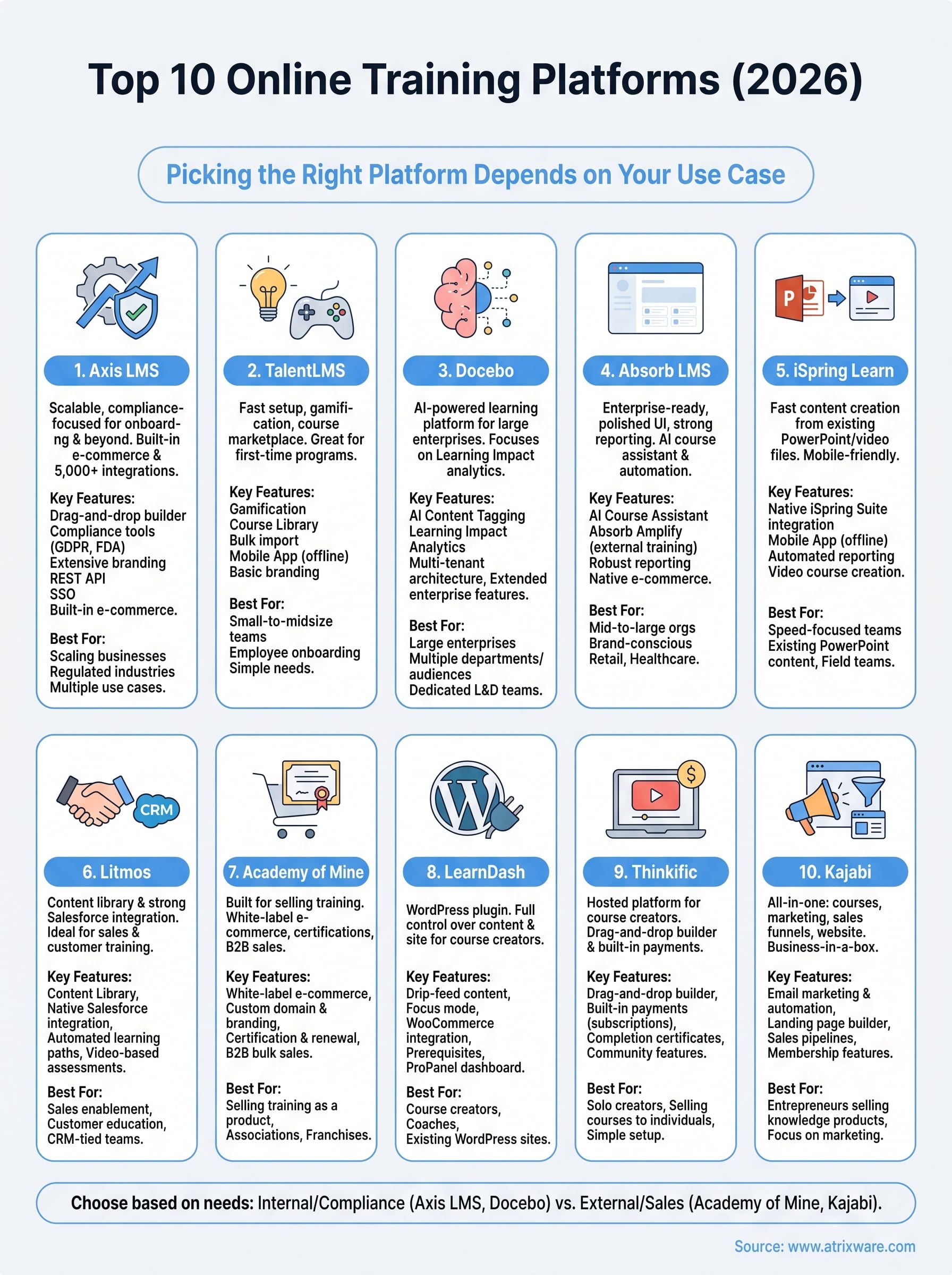
The right online training platform depends on what job you’re actually hiring it to do. Selling courses to strangers is a different problem than tracking CEU renewals for 2,000 employees, and the ten platforms above split cleanly along that line. Course-only tools like Thinkific and Kajabi win on marketing and simplicity, while platforms built for internal training, compliance tracking, and HR system sync need more depth than a plugin or a hosted course builder can offer.
If your team is juggling onboarding, compliance deadlines, and a growing headcount, you need a platform that won’t force a migration in eighteen months. That’s the gap Axis LMS was built to fill. Not sure where your organization stands in the buying process? Take our LMS readiness quiz to find out what to prioritize next.
