If you sell training, memberships, or seat licenses, you’ve probably typed subscription billing vs recurring billing into a search bar trying to figure out which term actually applies to your setup. The two get used interchangeably in vendor pitches and finance docs, but they solve different problems. One is about the payment mechanism, the other is about the pricing model wrapped around it, and mixing them up leads to billing logic that doesn’t match how customers actually buy.
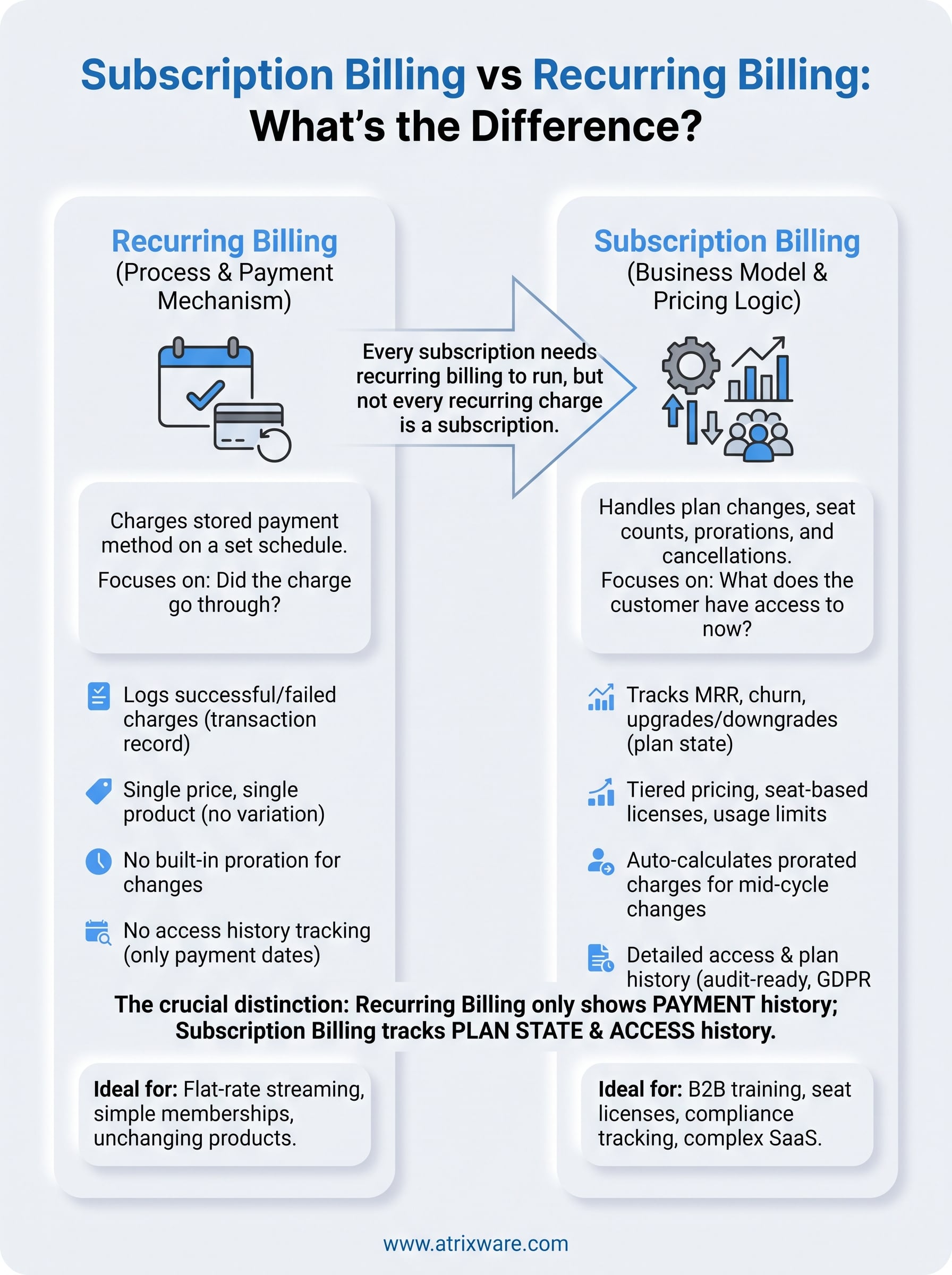
Here’s the short answer: recurring billing is a process, charging a stored payment method on a set schedule, while subscription billing is a business model that often uses recurring billing but also handles plan changes, seat counts, prorations, and cancellations. Every subscription needs recurring billing to run, but not every recurring charge is a subscription.
The rest of this article breaks down each model in plain terms, walks through real billing scenarios, and shows how the distinction affects reporting, compliance, and e-commerce setup, especially if you’re pricing training seat licenses or course access for individuals and teams.
Why the difference matters for your business
Getting this distinction wrong costs you real money. If you build your billing logic around plain recurring billing, charge card on file every 30 days, and your business actually sells subscriptions with seat tiers, upgrades, and prorated add-ons, you’ll end up patching the system with manual invoices and spreadsheet corrections. That’s exactly what happens to training companies that start with a simple monthly charge and then try to bolt on team licensing later. The mismatch shows up first in your books, then in your support queue when a customer asks why their invoice doesn’t reflect the five seats they added last week.
Revenue reporting gets murky fast
Recurring billing systems are built to answer one question: did the charge go through? They log successful and failed transactions on a schedule. Subscription billing has to answer a harder question: what does the customer actually have access to right now, and how did they get there? That means tracking monthly recurring revenue (MRR), churn, upgrades, downgrades, and mid-cycle plan changes as separate data points, not just transaction records. If your finance team is trying to calculate net revenue retention from a table that only stores charge amounts and dates, they’re going to hit a wall.
If your billing system can’t tell you what a customer has access to today, only what they paid last month, you’re not running subscription billing, you’re running recurring charges with extra steps.
Compliance and audit trails diverge
For training and course sellers, this gap gets serious quickly. Compliance training tied to standards like GDPR or FDA 21 CFR Part 11 often requires proof of continuous, unbroken access tied to certification periods, not just proof that a card was charged. Auditors want to see when a learner’s access started, whether it lapsed, and whether re-certification happened on schedule. A recurring billing log alone won’t show that. Subscription billing, when it’s tracking plan state alongside payment history, gives you the audit trail regulators and internal compliance officers actually ask for.
Selling seat licenses breaks pure recurring billing
B2B training sales rarely stay static. A client buys 20 seats in January, adds 15 more in March, then drops to 25 active users in June after a round of layoffs. Recurring billing, on its own, has no concept of a "seat." It just fires a charge. Subscription billing has to calculate prorated amounts, adjust invoices mid-cycle, and reconcile seat counts against actual usage. Here’s how the two models typically handle the same scenario:

| Scenario | Pure Recurring Billing | Subscription Billing |
|---|---|---|
| Customer adds 10 seats mid-month | No built-in proration; requires manual invoice | Auto-calculates prorated charge for remaining days |
| Customer cancels one license in a 50-seat plan | Full charge continues until manually adjusted | Adjusts next invoice, tracks seat count change |
| Compliance officer needs access history | Only shows charge dates | Shows plan changes, access periods, renewal history |
| Finance needs MRR and churn numbers | Requires manual export and calculation | Calculated natively from plan and subscription data |
When you sell training seats to other businesses, this isn’t a nice-to-have. It’s the difference between an accurate invoice and a client calling to dispute charges for seats they never used. The businesses that treat subscription billing as a superset of recurring billing, rather than a synonym for it, are the ones whose finance and compliance teams aren’t constantly firefighting.
How to decide which billing model fits your needs
Start by asking what actually changes about your customer’s access over time. If nothing changes, same price, same product, same schedule, forever, plain recurring billing covers you. If access, pricing, or seat counts shift based on plan level, usage, or team size, you need subscription billing logic underneath it. Most companies overestimate how simple their pricing is until a customer asks for a mid-cycle change and the system has no way to handle it gracefully.
Map your pricing structure first
Before picking a platform or writing billing rules, list out every way a customer’s plan can change after signup. Flat pricing with no tiers points toward recurring billing. Anything involving seat counts, usage limits, or plan upgrades points toward subscription billing.
- Single price, single product, no variation: recurring billing is enough.
- Tiered pricing with upgrade or downgrade paths: you need subscription billing.
- Seat-based licensing sold to teams or departments: you need subscription billing with proration support.
- Usage-based charges on top of a base fee: you need subscription billing with metered add-ons.
- Compliance training requiring certification periods and renewal tracking: you need subscription billing with access-state history, not just payment history.
Weigh your reporting and compliance obligations
Consider who’s going to ask for data six months from now. Finance teams calculating MRR, churn, or net revenue retention need subscription-level data, not a raw transaction log. Compliance officers tracking re-certification deadlines under standards like GDPR need proof of continuous access, not just proof of payment. If you can already picture someone in your organization asking "can you show me when this customer’s access lapsed," you’re describing a subscription billing need, even if your current system only does recurring charges.
The fastest way to know which model you need is to picture the report someone will ask for in six months, then check if your billing system can actually produce it.
Growth trajectory matters too. A five-person training company selling one course at one price can run on recurring billing for years without friction. A company selling seat licenses to enterprise clients, layering in compliance tracking, and planning to add tiered pricing next quarter will outgrow recurring billing fast, often within a single sales cycle. Plan for where your pricing is headed, not just where it sits today, because migrating billing logic after you’ve signed forty enterprise clients is far more painful than building it correctly from the start.
Recurring billing and subscription billing in practice
Numbers on a page only tell half the story, so walk through two real scenarios side by side. A streaming service charges $12.99 every month, same amount, same access, forever. That’s recurring billing doing exactly what it’s built for: fire the charge, log the result, repeat. Now compare that to a mid-sized manufacturer buying course access for its safety training program. It starts with 30 seats, adds 12 more after a new hire wave, then needs to prove to an auditor that every employee’s certification stayed current for the full year. That second scenario needs subscription billing, because the billing system has to track plan state, not just payment state.
A side-by-side look at two common setups
Lining up the two scenarios makes the practical gap obvious. Here’s what each model actually has to handle:
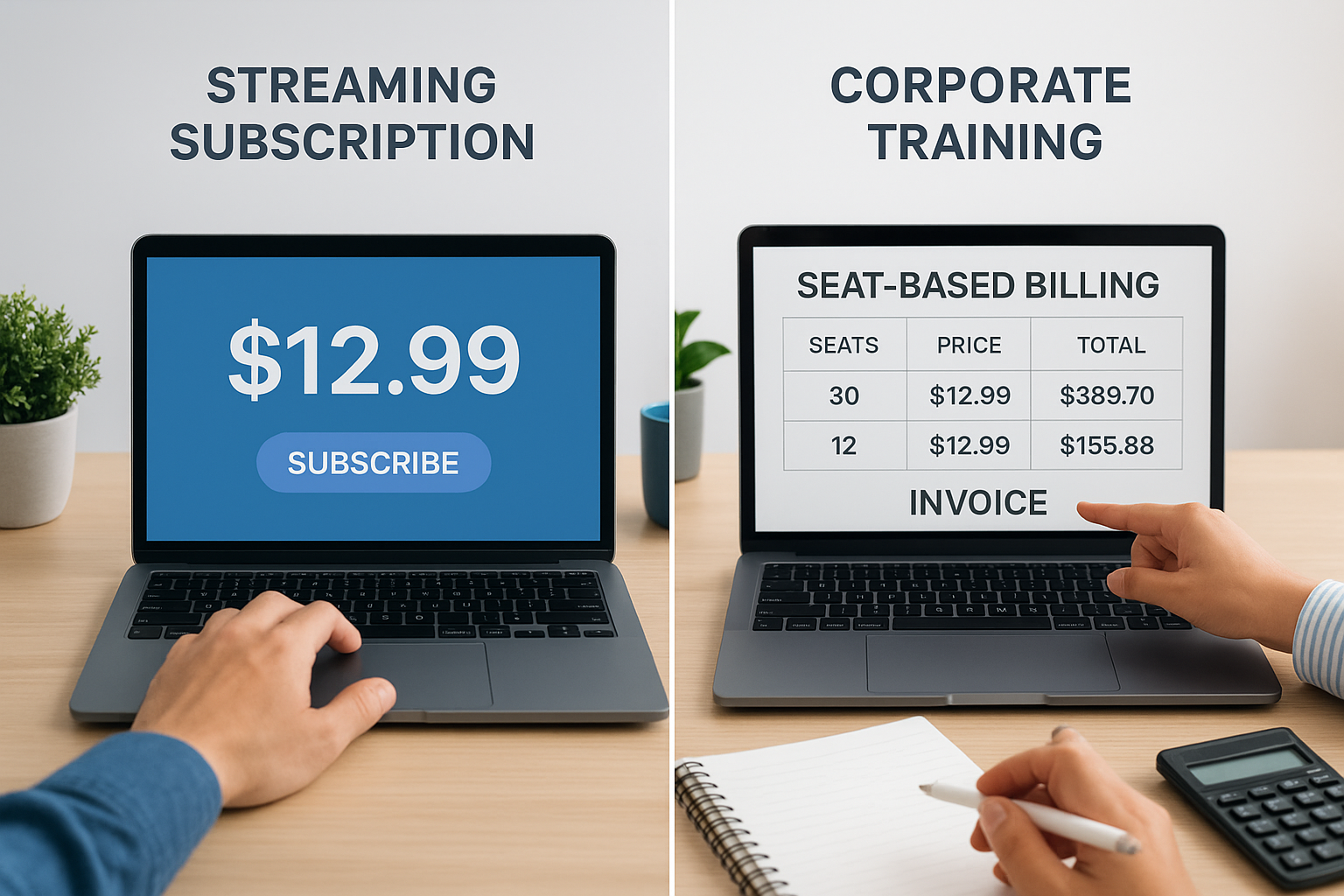
| Requirement | Streaming Subscription (Flat) | Corporate Training (Seat-Based) |
|---|---|---|
| Price changes over time | No | Yes, based on seat count |
| Mid-cycle adjustments | Rare | Frequent (adds, drops, upgrades) |
| Access history needed for audits | No | Yes, for compliance proof |
| Billing complexity | Low, recurring billing alone works | High, needs subscription logic layered on top |
The moment a billing scenario needs proof of access over time, not just proof of payment, you’ve crossed from recurring billing into subscription billing territory.
Where the lines blur in real products
Most training platforms don’t cleanly fall into one category, and that’s where teams get tripped up. A company might sell a flat-rate course to individual learners, running on straightforward recurring billing, while simultaneously selling seat licenses to enterprise clients under a full subscription model with prorated invoices and renewal tracking. Running both side by side means your platform needs to support recurring charges for the simple cases and full subscription logic for the complex ones, without forcing every customer through the same rigid workflow.
Handling this well in practice usually means a few things happening at once:
- Individual course buyers get charged on a simple schedule with no plan-state tracking required.
- Team and enterprise buyers get seat-based invoices that adjust automatically as headcount changes.
- Compliance-tied courses generate access logs tied to certification periods, not just charge dates.
- Finance pulls MRR and churn from subscription data, while simple recurring accounts stay out of that calculation entirely.
Getting this split right from day one saves you from rebuilding your billing logic later, right when you can least afford the disruption.
What to look for in a billing and training platform
Once you know whether you need plain recurring billing or full subscription logic, the next step is picking a platform that actually supports it without duct tape. Most LMS buyers focus on course-building tools and skip past the billing engine, then discover six months later that seat licensing, prorations, or compliance tracking require a separate payment tool bolted on the side. Vendor evaluation should treat billing capability as a core feature, not an afterthought, especially if you plan to sell to both individual learners and enterprise teams.
Seat and proration support
Check whether the platform can add or remove seats mid-cycle and automatically adjust the invoice, rather than forcing you to issue manual credits or corrections. Proration logic is the single feature that separates a platform built for training sales from one built for simple subscriptions. Ask a vendor to walk through exactly what happens when a client adds 15 seats on day 12 of a 30-day billing cycle. If the answer involves a support ticket, keep looking.
A platform that can’t prorate a mid-cycle seat change automatically isn’t ready to sell training to teams, no matter how good its course builder is.
Integrations with HR, CRM, and SSO
Seat counts rarely live only in your billing system. They usually mirror headcount changes in an HR platform or deal changes in a CRM. Look for native integrations with systems like ADP, BambooHR, Salesforce, and Zoho, along with SAML SSO support for identity providers such as Okta, Azure, and Ping Identity. Axis LMS handles this through built-in user data synchronization and an integration builder covering thousands of connections, so seat and access changes stay accurate without manual updates on both sides.
Reporting and audit-ready access history
Reporting is where the gap between recurring billing and subscription billing becomes most visible in daily operations. A platform worth choosing should generate:
- On-demand and scheduled reports covering enrollment, completion, and renewal status
- Access history tied to certification periods, not just payment dates
- MRR, churn, and seat-utilization data pulled directly from plan records
- Exportable audit trails for compliance officers reviewing GDPR or FDA 21 CFR Part 11 training
Without this, your compliance team ends up reconstructing access history by hand from payment logs, which is slow and error-prone during an actual audit.
Security and configurability
Finally, confirm the platform gives you control over security settings, data redundancy, and backups, since training and billing data both carry liability if they’re mishandled. A platform that lets you configure security policies per organization, rather than applying one blanket setting to every account, fits the reality of selling to clients with different compliance requirements. The right combination of seat handling, integrations, reporting, and security turns billing from a recurring headache into a system your finance and compliance teams can actually rely on.
Choosing the right model for your business
Boil this down and the choice is straightforward. Recurring billing works fine when your price and access never change. Subscription billing is what you need the moment seats, tiers, or compliance tracking enter the picture, which happens sooner than most training companies expect. Comparing subscription billing vs recurring billing isn’t really about picking a buzzword, it’s about matching your billing logic to how your customers actually buy and how your compliance team actually reports.
Don’t wait until a client disputes an invoice or an auditor asks for access history you can’t produce. Test your current setup against the seat-change and proration scenarios covered above, and if it comes up short, that’s your answer.
If you’re still not sure which stage of that decision you’re at, take the LMS readiness quiz and see exactly where your billing and training setup stands.
