If you’re chasing down signatures on training agreements, vendor contracts, or compliance sign-offs, you already know how much time paper and PDF workarounds waste. Running an electronic signature software comparison before you commit to a vendor saves you from locking into a tool that can’t handle audit trails, bulk sending, or integrations with the systems you already run.
This guide answers the question you actually came here with: which e-signature tool fits your business, budget, and compliance needs in 2026. We put nine leading platforms side by side and looked past the marketing pages to compare real pricing tiers, security certifications, and how each one handles high-volume or regulated document flows.
Below, you’ll find a breakdown of standout features, limitations worth knowing before you sign a contract, and who each tool actually suits, from solo consultants to enterprise compliance teams managing FDA 21 CFR Part 11 or GDPR requirements. If your signature needs overlap with training records, certifications, or onboarding paperwork, pay close attention to the integration and reporting sections, since that’s where most tools quietly fall short.}
1. Docusign
Docusign is the name most people think of first, and for good reason. It’s the market leader in electronic signature software, with a footprint that spans small businesses signing a handful of contracts a month to Fortune 500 legal and procurement teams processing thousands of agreements. If you need a tool that almost every client, vendor, or partner will already recognize and trust, Docusign removes the friction of explaining what an e-signature platform even is.

Best for
Docusign suits mid-size to large organizations that need broad recognition, deep integration options, and enterprise-grade compliance features. It’s a strong fit for legal, HR, sales, and procurement teams that sign high volumes of contracts and need airtight audit trails. Regulated industries like finance, healthcare, and government also lean on Docusign because of its long track record with standards like HIPAA and 21 CFR Part 11 support.
Docusign wins on trust and reach, not on price, so budget for it accordingly.
Smaller teams with simple, low-volume signing needs may find Docusign more than they need, both in complexity and cost. If your workflow is a handful of NDAs a month, you’ll likely pay for capabilities you never touch.
Key features
Docusign’s core signing experience is fast and familiar, which matters when you’re asking external signers, not just employees, to use it. Beyond the basic send-and-sign flow, the platform has built out a genuinely deep feature set:
- Advanced audit trails: Every action, from open to sign to decline, is timestamped and tamper-sealed for legal defensibility.
- Bulk send: Push the same document to hundreds of recipients at once, useful for onboarding paperwork or policy acknowledgments.
- Templates and reusable fields: Build a document once and reuse it across departments without rebuilding from scratch each time.
- Identity verification: Options include ID checks, SMS authentication, and knowledge-based authentication for higher-stakes documents.
- Extensive integrations: Native connections to Salesforce, Microsoft 365, Google Workspace, and a REST API for custom builds.
- Compliance certifications: SOC 2, ISO 27001, and support for regulated workflows including FDA 21 CFR Part 11 requirements.
These features explain why Docusign shows up so often in enterprise procurement shortlists, even when competitors undercut it on price.
Pricing
Pricing scales with feature depth, and Docusign is transparent about tiers on its website, though enterprise quotes require a sales call.
| Plan | Approximate Price | Best for |
|---|---|---|
| Personal | ~$10/month | Solo users, low volume |
| Standard | ~$25/user/month | Small teams needing basic workflows |
| Business Pro | ~$40/user/month | Teams needing advanced fields, payments |
| Enterprise | Custom quote | Large orgs needing SSO, API, compliance tools |
Watch for add-on costs. Identity verification, advanced authentication, and some integrations carry extra fees beyond the base subscription, so get a full quote before you assume the sticker price is your final bill.
2. PandaDoc
PandaDoc built its reputation on document workflows first, e-signatures second, which shows in how the platform blends proposals, quotes, and contracts into one pipeline. If your sales team spends more time assembling proposals than chasing signatures, PandaDoc solves a different problem than Docusign does, one where the document itself needs building, not just signing.
Best for
Sales-driven teams and small to mid-size businesses that need document creation and e-signing in a single tool get the most out of PandaDoc. Sales enablement teams particularly like it for turning quotes into signed deals without switching platforms. Companies that don’t need heavy compliance certifications but do need slick, branded proposals will find PandaDoc’s design tools worth the subscription.
PandaDoc earns its keep by merging document creation and signing, not by out-featuring dedicated e-signature specialists.
Teams with strict regulatory requirements or massive signing volumes may outgrow PandaDoc’s compliance depth compared to Docusign or Adobe Acrobat Sign.
Key features
PandaDoc leans into content creation alongside signature capture, which sets it apart from pure e-signature tools:
- Drag-and-drop document editor: Build proposals, quotes, and contracts directly in the platform rather than uploading finished PDFs.
- Content library: Store approved clauses, images, and pricing tables for reuse across your sales team.
- CRM integrations: Native connections to Salesforce, HubSpot, and Pipedrive keep signed deals synced automatically.
- Payment collection: Accept payment at the moment of signature, useful for closing deals without a separate invoicing step.
- Analytics on document views: See how long a prospect spent on each page before signing, which sales reps use to time follow-ups.
These features make PandaDoc feel less like a signature tool and more like a lightweight document workflow platform with signing built in.
Pricing
PandaDoc keeps its pricing straightforward, with a free plan covering basic e-signature needs.
| Plan | Approximate Price | Best for |
|---|---|---|
| Free eSign | $0 | Individuals sending simple documents |
| Essentials | ~$19/user/month | Small teams needing templates |
| Business | ~$49/user/month | Sales teams needing CRM sync, payments |
| Enterprise | Custom quote | Larger orgs needing SSO, API access |
The free tier is genuinely usable for occasional signers, though you’ll hit its limits fast once you need templates or integrations.
3. Adobe Acrobat Sign
Adobe Acrobat Sign carries the weight of the Adobe name, and that matters more than you’d think when your documents already live in PDF form. If your organization already runs Acrobat or Creative Cloud, Adobe Acrobat Sign slots into your existing workflow instead of asking you to adopt a whole new document ecosystem.
Best for
Organizations already invested in Adobe’s document tools get the most value here, since Acrobat Sign integrates directly into Acrobat, Microsoft 365, and Adobe Experience Manager. Enterprise IT teams managing document workflows across large departments like the tight coupling with existing PDF processes, and government agencies often choose it for its long history with federal compliance standards. Smaller businesses without existing Adobe licenses may find the value proposition weaker, since you’re partly paying for an ecosystem you’re not using.
Adobe Acrobat Sign makes the most sense when your documents are already PDFs and your team already lives inside Adobe tools.
Key features
Acrobat Sign’s biggest strength is how invisibly it fits into document-heavy workflows that already touch Adobe software:
- Native PDF handling: Documents stay in true PDF format throughout, avoiding conversion issues other tools sometimes introduce.
- Microsoft integration: Deep hooks into Word, Outlook, and SharePoint let users send for signature without leaving their inbox.
- Mobile signing app: A dedicated app handles offline signing, syncing once a connection returns.
- Government-grade compliance: Support for FedRAMP authorization and other public-sector standards.
- Bulk send and reminders: Automated follow-ups reduce the manual chasing that eats into admin time.
These integrations explain why Acrobat Sign shows up so often in large enterprises that standardized on Adobe years ago and never had a reason to switch.
Pricing
Adobe prices Acrobat Sign per user, with tiers that scale toward enterprise needs.
| Plan | Approximate Price | Best for |
|---|---|---|
| Individual | ~$13/month | Freelancers, solo signers |
| Small Business | ~$18/user/month | Small teams needing basic workflows |
| Business Pro | ~$40/user/month | Teams needing advanced authentication |
| Enterprise | Custom quote | Large orgs needing FedRAMP, SSO |
Bundling with existing Adobe Creative Cloud or Acrobat licenses often brings the effective cost down, so check your current contract before buying separately.
4. Dropbox Sign
Dropbox Sign, formerly HelloSign, built its name on simplicity, and that focus still shows. If you already store contracts, proposals, or training records in Dropbox, this tool slots signature requests directly into that existing folder structure instead of asking you to manage documents in yet another platform.
Best for
Small businesses and teams already using Dropbox for file storage get the most value from Dropbox Sign, since documents and signed files stay in one place without manual uploading. Startups and freelancers who want a clean, no-frills signing experience without a steep learning curve also do well here. Larger enterprises needing deep compliance certifications or complex approval chains will likely outgrow it faster than they’d outgrow Docusign or Adobe Acrobat Sign.
Dropbox Sign wins on ease of setup, not on enterprise depth, so match it to teams that value speed over configurability.
Key features
Dropbox Sign keeps its feature set lean but covers the essentials well:
- Simple template builder: Create reusable templates in minutes without a design background.
- Dropbox and Google Drive sync: Signed documents save automatically to the storage service you already use.
- API for developers: A well-documented REST API lets technical teams embed signing into their own apps.
- Audit trail: Every signature request includes a certificate of completion with timestamps.
- In-person signing: Collect signatures on a tablet or shared device for face-to-face transactions.
This stripped-down approach makes Dropbox Sign fast to deploy, even for teams with no dedicated IT support.
Pricing
Dropbox Sign prices competitively against other mid-tier e-signature tools, with a free trial available before you commit.
| Plan | Approximate Price | Best for |
|---|---|---|
| Essentials | ~$20/month | Solo users and freelancers |
| Standard | ~$30/user/month | Small teams needing templates |
| Premium | Custom quote | Larger teams needing API, SSO |
The API pricing sits separately from the standard plans, so factor that in early if you’re planning a custom integration rather than using the out-of-the-box signing flow.
5. SignWell
SignWell, previously known as Docsketch, positions itself as the budget-friendly alternative for teams that just need clean, legally binding signatures without the enterprise overhead. Unlike Docusign or Adobe Acrobat Sign, SignWell skips the bloated feature list and focuses on making the signing experience fast for both the sender and the person signing.
Best for
Small businesses, consultants, and nonprofits with tight budgets get the most out of SignWell, since it delivers legally binding signatures at a fraction of what the big names charge. Real estate agents and freelance service providers often pick it for its flat, predictable pricing rather than per-user fees that punish growing teams. Organizations needing deep compliance certifications, complex approval routing, or heavy CRM integration should look elsewhere, since SignWell intentionally stays lean.
SignWell trades enterprise depth for a lower price and a shorter learning curve, which is exactly what small teams want.
Key features
SignWell keeps its feature set narrow but reliable, covering what most small teams actually need:
- Unlimited templates on paid plans: Build once and reuse contracts, NDAs, and intake forms without extra fees.
- Team management: Add users and assign permissions without the per-seat pricing jumps common elsewhere.
- API access: Available even on lower-tier plans, which is rare among budget e-signature tools.
- Document status tracking: See exactly who’s opened, viewed, and signed in real time.
- Legally binding certificates: Every completed document includes a tamper-evident audit trail.
This lean approach means fewer settings to configure, which suits teams without a dedicated admin managing the platform.
Pricing
SignWell’s pricing structure favors flat rates over per-user charges, which changes the math for growing teams.
| Plan | Approximate Price | Best for |
|---|---|---|
| Free | $0 | Testing with limited documents |
| Personal | ~$8/month | Solo users, low volume |
| Business | ~$24/month | Small teams, unlimited templates |
| Enterprise | Custom quote | Larger teams needing SSO |
Because several plans price per account rather than per seat, adding team members often costs less here than with competitors charging per user.
6. airSlate SignNow
airSlate SignNow built its reputation on affordability without stripping out the features growing teams actually need. Where SignWell keeps things intentionally narrow, SignNow packs in bulk sending, conditional fields, and role-based signing at price points that undercut Docusign and Adobe Acrobat Sign by a wide margin. If you’ve been quoted enterprise pricing for what feels like a mid-size need, SignNow is worth a look before you sign anything.
Best for
Growing small and mid-size businesses that need more than a bare-bones signing tool but don’t want enterprise pricing fit SignNow well. Real estate teams and insurance agencies use it heavily for its conditional logic and multi-party signing flows, since contracts in those industries rarely involve just two signers. Companies needing deep, industry-specific compliance certifications beyond standard security practices should still weigh Docusign or Adobe Acrobat Sign against it first.
SignNow proves you don’t need enterprise pricing to get enterprise-style workflow logic.
Key features
SignNow’s feature set punches above its price tier, especially for teams managing multi-step approvals:
- Conditional fields and smart fillable forms: Fields appear or hide based on earlier answers, cutting down on document versions.
- Role-based signing order: Route documents through multiple approvers in a set sequence automatically.
- Bulk invite: Send one document to many recipients, each getting their own signing session.
- Airtight audit trail: Every action logged with timestamps for legal defensibility.
- Mobile app with offline mode: Sign or send from a phone even without a live connection.
These capabilities make SignNow feel more capable than its price suggests, particularly for teams juggling approval chains.
Pricing
SignNow prices aggressively against competitors, often coming in cheaper for comparable feature depth.
| Plan | Approximate Price | Best for |
|---|---|---|
| Business | ~$8/user/month | Small teams needing basics |
| Business Premium | ~$15/user/month | Teams needing conditional logic |
| Enterprise | Custom quote | Larger orgs needing SSO, API |
Annual billing drops the per-user rate further, so budget-conscious teams should commit yearly rather than paying month to month.
7. GetAccept
GetAccept started as an e-signature tool but grew into a full sales engagement platform, blending video messaging, deal rooms, and document tracking around the signature itself. GetAccept suits teams that treat the signing moment as the last step of a sales conversation, not just a legal formality. If your sales reps already record video pitches or build shared deal rooms with prospects, this tool wraps signatures into that same experience instead of bolting them on separately.
Best for
B2B sales teams, particularly in SaaS and complex-sale industries, get the most value from GetAccept, since it’s built around closing deals rather than just collecting signatures. Sales enablement leaders like the visibility into how prospects interact with proposals before they sign, which helps reps time follow-up calls better. Teams outside sales, like HR or compliance departments handling routine paperwork, will find GetAccept’s sales-focused tools mostly wasted on them.
GetAccept earns its place on this list by treating e-signature as part of the deal, not a separate administrative step.
Key features
GetAccept’s feature set leans hard into sales workflows rather than general-purpose document signing:
- Deal rooms: Shared spaces where buyers and sellers collaborate on proposals, pricing, and contracts before signing.
- Video messaging: Attach short personalized videos to proposals, a tactic reps use to stand out in crowded inboxes.
- Document tracking: See exactly when a prospect opens a document and how long they spend on each section.
- Mutual action plans: Shared checklists that keep both buyer and seller aligned on next steps toward a signed deal.
- CRM integrations: Native connections to Salesforce and HubSpot keep deal data synced without manual entry.
These tools make GetAccept feel more like a sales platform with signing built in than a dedicated e-signature tool.
Pricing
| Plan | Approximate Price | Best for |
|---|---|---|
| eSign | ~$25/user/month | Basic signing needs |
| Professional | ~$49/user/month | Sales teams needing deal rooms, video |
| Enterprise | Custom quote | Large sales orgs needing CRM depth |
Expect the value to drop fast for non-sales use cases, since you’re paying for engagement tools you won’t touch.
8. Scrive
Scrive built its reputation in the Nordic and broader European market, where e-signature laws and identity verification standards differ from what US-based tools default to. Scrive stands out for its focus on Qualified Electronic Signatures (QES) and eID integrations, the kind of verification that Swedish BankID or Norwegian BankID users expect rather than a simple email-click signature. If your business signs contracts with European partners or operates under eIDAS regulation, Scrive speaks that language natively instead of bolting it on as an afterthought.

Best for
Companies doing business across Europe, particularly in the Nordics, get the clearest advantage from Scrive, since it supports national eID schemes that most American e-signature tools ignore entirely. Financial services firms and telecom providers operating under strict identity verification rules lean on Scrive for its QES support, which carries more legal weight than a standard electronic signature in many EU jurisdictions. US-only businesses without European counterparties will find most of Scrive’s specialized identity features irrelevant to their workflow.
Scrive earns its spot by handling European identity verification standards that most American tools simply don’t support.
Key features
Scrive’s feature list centers on identity assurance and regulatory alignment rather than sales or document design tools:
- eID integrations: Native support for BankID, NemID, and other national identity schemes across Europe.
- Qualified Electronic Signatures: Meets the highest tier of legal signature standards under eIDAS.
- Detailed evidence packages: Every signed document includes a comprehensive audit trail formatted for legal proceedings.
- API-first architecture: Built for embedding signing flows directly into existing platforms rather than standalone use.
- Multi-language support: Interfaces and documents render in numerous European languages by default.
These specialized capabilities make Scrive a niche pick, but a strong one for the right audience.
Pricing
Scrive doesn’t publish detailed pricing tiers publicly, requiring a sales conversation for most quotes. Expect pricing to reflect volume and the specific eID integrations your business needs, since those carry separate licensing costs from the base platform. Budget for a longer sales cycle than the self-serve tools earlier on this list.
9. BoldSign
BoldSign takes a different approach than the rest of this list: it’s built primarily for developers who need to embed e-signature functionality directly into their own software rather than send documents from a standalone portal. BoldSign competes on API pricing and white-label flexibility, undercutting the developer tiers of Docusign and Adobe Acrobat Sign by a wide margin. If you’re building a product that needs signing capability baked in, not bolted on, this is the tool worth testing first.
Best for
Software companies and platforms that want to offer e-signature as a native feature inside their own product get the most value from BoldSign. SaaS product teams building HR platforms, real estate portals, or legal tech tools use it to avoid redirecting users to a third-party site to sign. Businesses just looking for a simple standalone signing tool without any development work involved will find better fits elsewhere on this list.
BoldSign wins when your goal is embedding signatures into your own product, not running a standalone signing workflow.
Key features
BoldSign’s feature set centers on developer control and white-label embedding rather than sales or compliance extras:
- Full white-labeling: Remove all BoldSign branding so the signing experience feels native to your product.
- Comprehensive REST API: Well-documented endpoints cover sending, tracking, and template management.
- Embedded signing: Drop the signing widget directly into your own app’s interface using iframes or SDKs.
- Webhooks: Real-time event notifications keep your own systems synced without polling.
- Bulk send and templates: Standard productivity features carry over even in the developer-first setup.
These capabilities make BoldSign a practical alternative for teams that found Docusign’s developer API pricing too steep to justify.
Pricing
| Plan | Approximate Price | Best for |
|---|---|---|
| Free | $0 | Testing, very low volume |
| Standard | ~$15/user/month | Small teams, standalone use |
| Enterprise | Custom quote | Embedded, white-label deployments |
The API and embedding pricing scales by document volume rather than seats, which usually works out cheaper for product teams than per-user licensing.
Choosing the right e-signature tool for your team
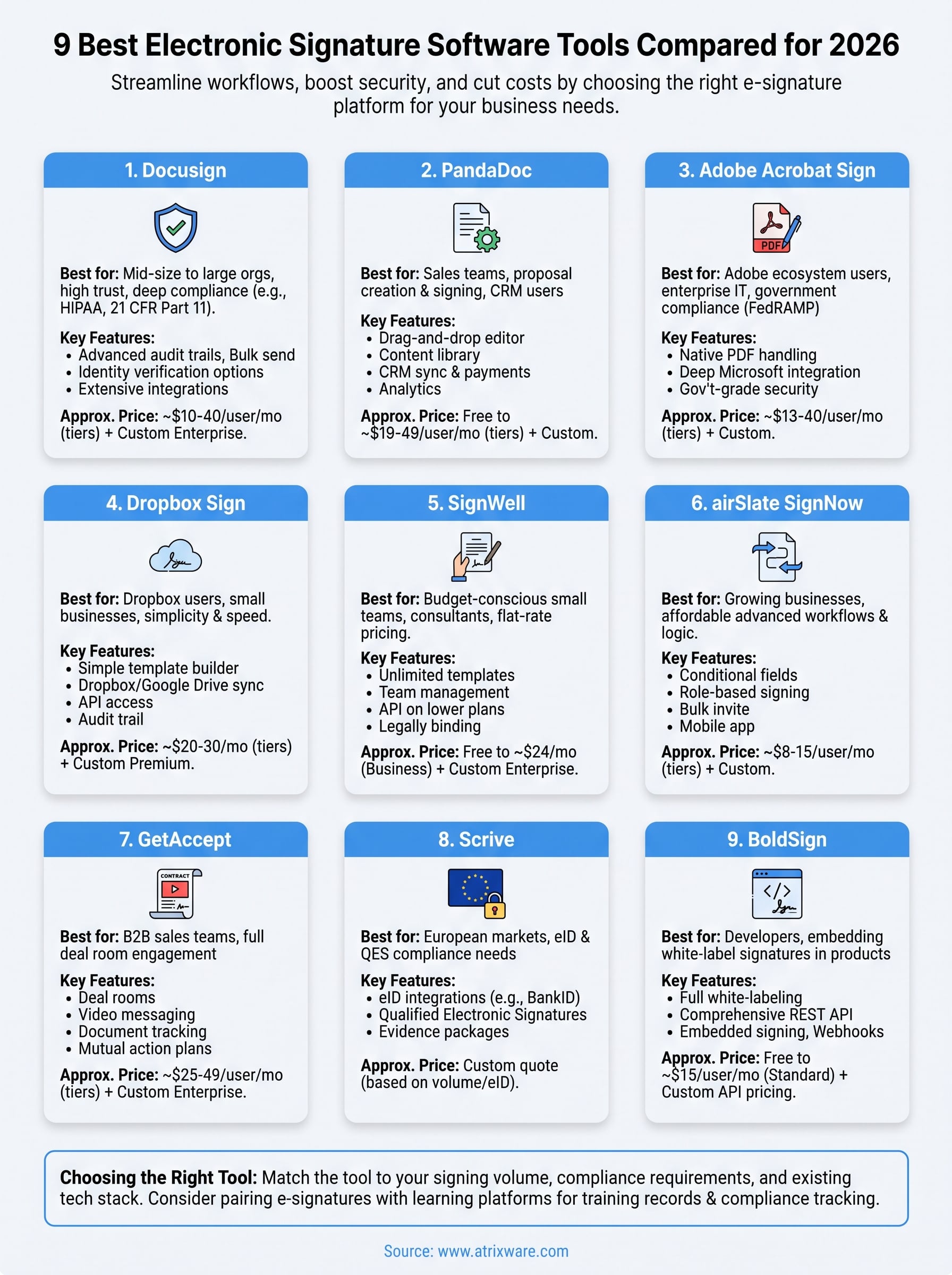
No single tool on this list wins every category. Docusign and Adobe Acrobat Sign fit enterprises with heavy compliance needs, SignWell and SignNow serve budget-conscious small teams, and BoldSign makes sense only if you’re embedding signatures into your own product. Match the tool to your actual signing volume, compliance requirements, and existing tech stack, not to whichever brand you recognize first.
If your signature needs tie back to training records, certifications, or compliance sign-offs rather than sales contracts, the bigger opportunity might be pairing e-signatures with a learning platform that already tracks completions, audit trails, and re-certifications in one place. That’s exactly the gap Axis LMS was built to close for teams juggling compliance training alongside document workflows. Take the LMS readiness quiz to see whether centralizing your training and compliance tracking makes sense for where your organization stands right now.
