If you’ve ever been charged by "Paddle" and had no idea what it was, you’re not alone. Paddle acts as a merchant of record for thousands of SaaS companies, meaning its name, not the software company’s, shows up on bank statements. On the flip side, if you’re a business owner exploring paddle subscription billing as a way to handle recurring payments, you need to understand exactly what you’re signing up for before committing.
At Atrixware, we build Axis LMS, a platform that helps businesses deliver and manage online training. SaaS billing is something we deal with every day, both as a provider and as a company that evaluates tools across the subscription ecosystem. That hands-on experience gives us a practical perspective on how billing platforms like Paddle actually work, what they handle well, and where they fall short for businesses running recurring revenue models.
This article breaks down what Paddle subscription billing is, how it processes payments, what it means when you see a Paddle charge on your statement, and how businesses can use it to manage subscriptions at scale. Whether you’re a customer trying to cancel a charge or a SaaS founder weighing your billing options, you’ll find clear, specific answers below.
What Paddle subscription billing is
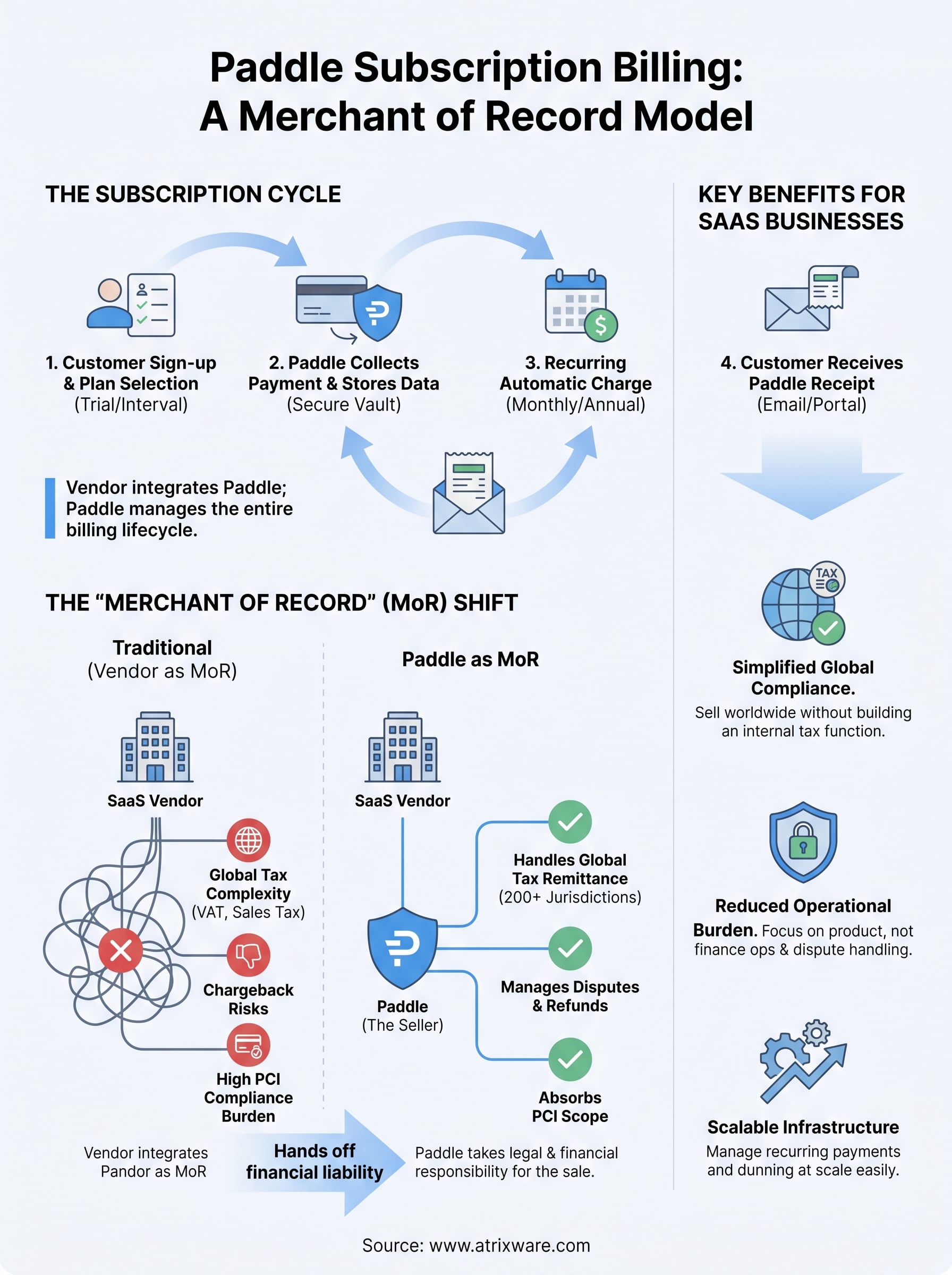
Paddle subscription billing is a payment infrastructure system where Paddle, the platform, manages the entire billing lifecycle for SaaS products on behalf of software vendors. That includes charging customers on a recurring schedule, handling refunds, processing upgrades and downgrades, managing failed payments, and dealing with tax collection and remittance in jurisdictions around the world. The vendor integrates Paddle into their product, and from that point forward, Paddle owns the financial layer of the transaction.
The core components of a Paddle subscription
A Paddle subscription is built around a few moving parts that work together each billing period. When a software company sets up recurring billing through Paddle, it defines pricing plans, billing intervals (monthly or annual are most common), trial periods, and any seat-based or usage-based pricing rules. Customers who sign up then enter into a subscription managed entirely within Paddle’s system.
Here is what a standard Paddle subscription includes:
- Billing interval: how often the customer gets charged (monthly, quarterly, annually)
- Plan price: the amount billed each cycle, which can vary by currency or region
- Trial period: an optional window before the first charge occurs
- Seat count: relevant for B2B software where licenses scale with team size
- Payment method on file: the card or payment method Paddle stores and charges automatically
Paddle stores and processes all payment data directly, meaning the software vendor never touches raw card information, which removes a significant layer of PCI compliance burden.
How Paddle appears to customers
This is where most consumer confusion originates. When you buy access to a SaaS product that uses Paddle as its billing provider, your bank statement will show a charge from Paddle, not the software company itself. The software company’s name may appear in the transaction description, but the actual merchant entity collecting your money is Paddle.
That setup is intentional. Because Paddle acts as the legal seller of record, it takes on responsibility for the transaction, including issuing receipts, handling disputes, and managing VAT or sales tax. You are technically buying from Paddle, which then passes the revenue to the software company after taking its fee. This is fundamentally different from a payment processor like Stripe, where the software company remains the merchant and Stripe only moves the money.
What triggers a recurring charge
Each billing cycle, Paddle’s system automatically attempts to charge the payment method on file for the amount tied to the customer’s active plan. If the charge succeeds, Paddle issues a receipt and logs the transaction. If it fails due to an expired card or insufficient funds, Paddle runs a retry sequence over the following days before flagging the subscription as past due or canceling it depending on how the vendor has configured their dunning settings.
Why Paddle uses the merchant of record model
The merchant of record model is not an accident or a quirk of how Paddle was built. It is a deliberate structural choice that shapes every aspect of how paddle subscription billing works for both software vendors and their customers. To understand why Paddle operates this way, you need to understand the problem it solves for SaaS businesses trying to sell globally.
What "merchant of record" actually means
When a company becomes the merchant of record for a transaction, it takes legal and financial responsibility for that sale. That means it collects the payment, issues the receipt, and stands as the entity the customer purchased from in the eyes of banks, tax authorities, and regulatory bodies. Paddle positions itself in that role so the software vendor does not have to.

For a SaaS founder building a product, handling the legal complexity of selling in 50 countries is a full-time job on its own. Sales tax rules in the United States vary by state. VAT rules in the European Union vary by country. Digital services taxes are appearing in new markets every year. Paddle absorbs all of that complexity by becoming the seller, which means it registers for tax collection in those jurisdictions, not the vendor.
How this shifts tax and compliance responsibility
When you sell through Paddle, you hand off the obligation to collect, report, and remit taxes to Paddle’s legal entities. That is a meaningful shift. Without a merchant of record arrangement, your business would need to register for VAT in each EU member state where you have customers above certain revenue thresholds, and manage similar requirements in other regions.
Paddle files and remits taxes in over 200 jurisdictions, which removes an entire compliance function that most early-stage SaaS companies are not equipped to handle internally.
This model also protects vendors from chargebacks and payment disputes at the banking level, since the dispute is technically between the customer and Paddle, not the software company itself.
How Paddle subscription billing works
Understanding the mechanics helps you troubleshoot issues as a customer or set up billing correctly as a vendor. Paddle subscription billing runs as a continuous cycle that begins at checkout and continues until the subscription is explicitly canceled or payment permanently fails. Every step in that cycle is handled on Paddle’s infrastructure, not the software vendor’s servers.
From signup to first charge
When you complete a checkout on a Paddle-powered storefront, Paddle collects your payment details and creates a subscription record in its system. The software vendor’s platform receives a confirmation via webhook, which triggers account provisioning on their end. Your billing cycle start date is set at that moment, and your next charge date is calculated based on the interval the vendor has configured.

If a trial period is active, Paddle delays the first charge until the trial ends, and most vendors send a reminder email a few days before that date arrives.
After checkout completes, Paddle stores your payment method in its own vault, not on the vendor’s servers. That means the software company you bought from never has direct access to your card details, which is a meaningful security distinction.
What happens mid-subscription
Once your subscription is active, Paddle runs automatic charges on each renewal date without requiring any action from you or the vendor. If your payment method fails, Paddle initiates a dunning sequence, retrying the charge on a schedule defined by the vendor’s settings, typically two to four attempts over several days, with email notifications sent to you in between.
Upgrading or downgrading your plan triggers Paddle to calculate a prorated amount based on where you are in the current billing cycle. That adjustment either applies a credit toward your next invoice or charges the difference immediately, depending on how the vendor has configured proration. Cancellations follow the same logic: Paddle logs the request and ends access either immediately or at the close of the current period, based entirely on vendor-defined settings.
How to manage or cancel a Paddle-billed subscription
If you see a Paddle charge on your bank statement and do not recognize it, the first step is identifying which software product it belongs to. Paddle sends a receipt email every time a charge processes, and that email will include the name of the software company you purchased from along with a link to manage your subscription directly. Start by searching your inbox for "Paddle" or "receipt" from around the date the charge appeared.
Finding your subscription details
Paddle provides a self-serve customer portal where you can review your active subscriptions, update your payment method, and view past receipts without contacting the vendor. You access it by clicking the management link in any receipt email Paddle has sent you. From that portal, you can see your current billing interval, next charge date, and plan details for every active subscription tied to your email address.
If you cannot find a Paddle receipt in your inbox, check your spam folder and search for the charge amount alongside the word "Paddle" since some email clients filter transactional messages automatically.
How to cancel a Paddle subscription
Canceling through paddle subscription billing is straightforward once you are inside the customer portal. Locate the subscription you want to end, select the cancel option, and confirm your decision. Paddle will show you whether access ends immediately or at the close of your current billing period, which is determined by the software vendor’s settings, not by Paddle directly.
If you cannot find the cancellation option in the portal, contact Paddle’s buyer support team through their official support page. Paddle handles all billing disputes and refund requests as the merchant of record, so you do not need to go through the software company for payment-related issues. For disputes about access or product problems, the software vendor is still the right contact point since Paddle only controls the financial side of the transaction.
Paddle vs alternatives and when to choose it
Paddle subscription billing is not the right fit for every business, and choosing the wrong billing infrastructure creates problems that are difficult to undo later. The main alternatives are Stripe Billing, Chargebee, and Recurly, each of which approaches subscription management differently and puts a different set of responsibilities on your team.
How Paddle compares to Stripe and Chargebee
Stripe Billing keeps your company as the merchant of record, which means you collect the revenue directly but also own the tax compliance, dispute management, and cross-border regulatory requirements that come with it. For a US-only business with simple pricing, Stripe’s flexibility and developer tooling make it a strong choice. The tradeoff is that your team handles every compliance obligation that Paddle would otherwise absorb.
Chargebee sits closer to Paddle in terms of subscription management depth, offering sophisticated dunning logic, plan management, and revenue recognition tools. However, Chargebee also leaves you as the merchant of record, so you still need a separate tax compliance layer like Avalara or TaxJar to handle global obligations.
Paddle’s merchant of record model is its clearest differentiator: it bundles tax compliance, payment processing, and dispute handling into one fee, which simplifies operations significantly for global SaaS businesses.
When Paddle makes sense for your business
Paddle is a strong fit when your primary goal is selling software globally without building an internal tax and compliance function. If your customer base spans the EU, UK, Australia, and Canada, the cost of managing VAT and digital services taxes yourself quickly exceeds Paddle’s transaction fee. For early-stage SaaS companies that want to focus on product development rather than finance operations, that tradeoff is usually worth it.
Paddle fits less well when you need highly customized checkout flows, complex usage-based billing tied to real-time data, or direct control over your payment infrastructure for compliance reasons specific to your industry. In those cases, a processor-first model like Stripe with a dedicated tax tool gives you more flexibility over the full stack.
Wrap-up and next step
Paddle subscription billing combines payment processing, tax compliance, and subscription management into a single merchant of record structure. That setup removes a significant operational burden for SaaS businesses selling globally, but it also means customers see Paddle on their statement instead of the vendor’s name. Whether you came to this article to identify a charge or to evaluate Paddle as a billing platform, the core takeaway is the same: Paddle owns the financial layer of the transaction, not the software company behind the product.
For businesses evaluating how to structure their training delivery and billing operations together, choosing the right tools at each layer matters. If you are still figuring out what kind of learning platform fits your organization’s needs, take the LMS readiness quiz to get a clearer picture of where you stand and what to prioritize next.
