Every system that manages people and data needs rules about who can do what. Role based access control examples show exactly how those rules work in practice, assigning permissions based on job function rather than granting access on a person-by-person basis. It’s the difference between a structured, scalable security model and a chaotic mess of one-off permissions that no one can audit.
But understanding RBAC in the abstract only gets you so far. You need to see how it plays out in actual organizations, from healthcare facilities restricting patient records to training platforms controlling who can build courses, manage users, and pull reports. At Atrixware, we build Axis LMS with role-based permissions baked into its core, because when hundreds or thousands of learners, managers, and admins share a system, clear access boundaries aren’t optional.
This article breaks down 12 real-world RBAC scenarios across different industries and use cases. Each example shows how roles are defined, what permissions they carry, and why the structure matters. Whether you’re setting up access controls for the first time or rethinking an existing permission model, these examples will give you a concrete reference point to work from.
RBAC in plain English
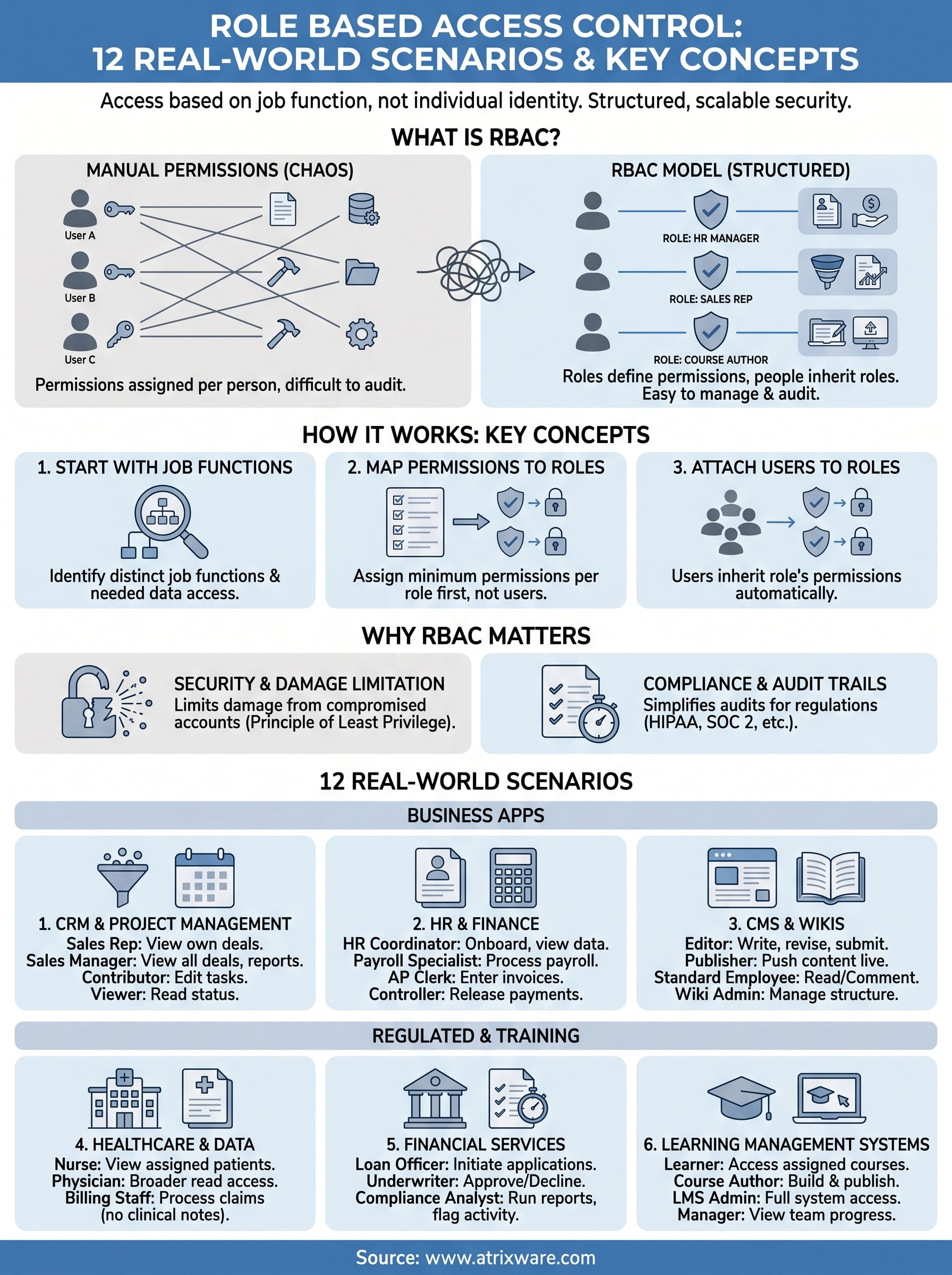
Role based access control is a permission model where your system grants access based on a person’s job function, not their individual identity. Instead of deciding what each user can or can’t do one by one, you define a role, attach a set of permissions to that role, and then assign users to it. Anyone who holds the role inherits its permissions automatically.
Think of it like a key card system in an office building. The card doesn’t know your name, it knows your clearance level. A visitor badge opens the lobby. A staff badge opens the lobby and general work areas. An IT badge opens server rooms. The building doesn’t grant access to individuals; it grants access to roles, and people carry those roles with them.
What a role actually is
A role is a named collection of permissions that maps to a specific job function. "HR Manager," "Sales Rep," "Course Author," and "Learner" are all roles. Each one bundles together the actions a person in that position needs to do their job and nothing more. The goal isn’t to be restrictive for its own sake, it’s to make sure people only touch what they need to touch.
Roles should reflect how your organization actually operates, not how you wish it did. If your permission model doesn’t match real job functions, people will either lack access they need or hold access they shouldn’t.
How permissions attach to roles, not people
This is the core mechanic that separates RBAC from ad hoc permission systems. In an ad hoc model, you manage permissions user by user, which works fine when you have ten people and falls apart when you have ten thousand. With RBAC, you manage permissions at the role level. When someone changes jobs, you update their role. When a role’s responsibilities shift, you update the role once and every user holding it receives the updated permissions instantly.

Consider a concrete example. A training platform might have a "Course Builder" role with permissions to create content, upload media, and publish modules. When a new instructional designer joins, you assign them the Course Builder role rather than manually granting fifteen individual permissions one at a time.
The difference between RBAC and assigning permissions manually
Manual permission assignment puts every access decision on an administrator. RBAC moves those decisions upstream into role design. Looking at role based access control examples across industries, the organizations with the cleanest security posture are the ones who defined their roles carefully upfront rather than patching permissions as problems appeared.
Audit processes also become far more manageable under RBAC. When a security review asks who has access to specific data, you check which roles carry that permission and which users hold those roles, two steps instead of combing through hundreds of individual user records.
Why RBAC matters in security and compliance
Security problems rarely start with sophisticated attacks. Most breaches trace back to overprivileged accounts where someone had access they never needed in the first place. RBAC cuts that risk by ensuring users can only reach data and functions that their role actually requires. The smaller your permission footprint per user, the less damage a compromised account can cause.
Limiting damage when accounts are compromised
When an attacker gains access to a compromised account, they inherit exactly what that account can do. Under a manual permission system, that might be a sprawling set of permissions built up over years as someone changed roles, joined projects, or asked for one-off access that never got revoked. Under RBAC, the attacker hits the ceiling of a clearly defined role with a bounded set of permissions. Looking at role based access control examples from breach post-mortems, the organizations with the least damage are consistently the ones who kept their permission models tight and role-specific.
The principle of least privilege is not just a security best practice; it is the foundational logic behind every well-designed RBAC system.
Meeting compliance requirements
Regulated industries live and die by access documentation and audit trails. Frameworks like HIPAA, SOC 2, and FDA 21 CFR Part 11 all require organizations to demonstrate that sensitive data is accessible only to authorized personnel. RBAC makes that demonstration straightforward because your access model is defined at the role level, not scattered across thousands of individual user records.
Your compliance team can pull a role-to-permission map and a user-to-role list to answer auditor questions in minutes rather than days. When you can show exactly which roles carry access to regulated data and exactly which people hold those roles, compliance audits become a documentation exercise, not a scramble.
How to design and implement RBAC
Good RBAC design starts with your organizational structure, not your software settings. Before you touch any configuration, you need a clear picture of your job functions and the data or actions each one genuinely requires. Most implementation failures happen because teams define roles based on what their system makes easy rather than what their organization actually needs.
Start with job functions, not system features
List every distinct job function in your organization that interacts with the system. For each one, identify:
- What data each role needs to read or view
- What content each role needs to create or edit
- What actions each role needs to approve or delete
This exercise typically reveals far fewer distinct permission profiles than individual users, which is exactly the efficiency RBAC is built to deliver. If you find yourself building dozens of nearly identical roles, you’re modeling individuals rather than functions.
Map permissions to roles before assigning users
Once your roles are defined on paper, assign permissions at the role level first. Resist the urge to onboard users until each role’s permission set is reviewed and approved by someone accountable for data security. Looking at role based access control examples from organizations that implemented this cleanly, the consistent pattern is that they locked down role definitions before a single user account was created.
If two roles carry identical permissions, they are the same role with different names. Merge them before you build anything.
Audit and adjust as your organization changes
RBAC is not a one-time setup. People change jobs, teams restructure, and new features appear in your systems. Schedule quarterly permission reviews to verify that each role’s access still matches its real-world function. Consistent auditing keeps your permission model accurate and your compliance documentation current.
Scenarios 1 to 6 in everyday business apps
These role based access control examples cover the tools most organizations run every day. Each scenario shows how a specific role maps to a specific permission set and why that boundary exists in practice.
CRM and project management
In a CRM like Salesforce, a Sales Rep can view and edit their own deals but can’t access another rep’s pipeline or export the full customer database. A Sales Manager can view all team deals and run pipeline reports but can’t modify system settings or user accounts. In project management tools, a Contributor can create and edit tasks, while a Viewer reads project status without touching any content.
The access gap between a Contributor and a Viewer is often what prevents accidental overwrites on shared project timelines.
HR and finance platforms
An HR Coordinator can onboard new employees, update job titles, and view compensation data for direct reports. A Payroll Specialist can process payroll runs and view salary records but can’t change organizational structure or edit employee profiles outside their scope. On the finance side, an Accounts Payable Clerk can enter invoices and flag payments for approval, but a separate Controller role holds the authority to actually release those payments. Your financial controls stay intact because the approval step belongs to a different role entirely.

Content management and internal wikis
In a CMS, an Editor can write, revise, and submit content for review, but only a Publisher role can push pages live to your public-facing site. Your internal wiki follows the same logic: standard employees read and comment, while a designated Wiki Admin handles page creation, deletion, and permissions structure. Keeping publish rights separate from write rights prevents accidental releases and gives your review process a clear, auditable checkpoint before anything goes public.
Scenarios 7 to 12 in regulated and training
These role based access control examples focus on high-stakes environments where a wrong permission assignment can trigger a compliance violation or expose protected data. The access boundaries here are tighter, and the consequences of getting them wrong are proportionally larger.
Healthcare and regulated data
In a healthcare system, a Nurse can view and update patient charts for assigned patients but cannot access records outside their ward or modify billing entries. A Physician holds broader read access across departments but still cannot change system-level configurations. Billing Staff can process claims and view insurance data without ever touching clinical notes. This separation exists specifically to satisfy HIPAA’s minimum necessary standard, which requires that each person access only the data their job function requires.
Regulatory frameworks like HIPAA don’t just recommend least-privilege access; they require documented evidence that you enforced it.
Financial services and audit trails
A Loan Officer can initiate loan applications and upload supporting documents but needs a separate Underwriter role to approve or decline them. Compliance Analysts can run transaction reports and flag suspicious activity, but they cannot modify transaction records themselves. Keeping those write and approval permissions in distinct roles creates the clean audit trail that financial regulators expect to see during examinations.
Learning management systems
In a training platform like Axis LMS, a Learner can access assigned courses and view their own completion records but cannot see other users’ progress or touch course content. A Course Author can build and publish training modules but cannot manage user accounts or adjust billing settings. An LMS Administrator holds full system access, including user management, reporting, and integration settings, while a Manager role sits in the middle with visibility into their team’s progress reports without touching course configuration. This tiered structure keeps your training platform both functional and secure as your user base scales.
Next steps
The 12 role based access control examples in this article cover everything from CRM pipelines to healthcare systems, but the real work starts when you apply this structure to your own environment. Define your roles based on actual job functions, map the minimum permissions each one requires, and review those assignments on a consistent schedule. That process alone eliminates most of the permission sprawl that causes security gaps and failed compliance audits down the line.
Your training platform deserves the same structured thinking. The permission model you build in your LMS directly affects how well your program runs as it scales. Learners, managers, course authors, and administrators each need clearly bounded access so nothing overlaps and nothing critical gets missed. If you’re working out whether your current setup can support that kind of structured access model, take the LMS readiness quiz to see exactly where you stand before committing to any decisions.
