A coding compliance training program is a recurring, role-based set of lessons, tests, and refreshers. It teaches coders, billers, and providers to assign codes the way the code sets, payers, and the law require, and it records proof that they did. To build one, audit your current accuracy, write measurable goals, design training by role, deliver and track it in one system, and evaluate it against audit results. This guide walks through each of those steps.
The problem is that most coding errors are not careless. Code sets change every year, payers publish their own edits, and providers document in ways that leave coders guessing. A one-time orientation and an annual slideshow cannot keep up with that. The gaps show up as denials, overpayments you must refund, or an audit request. The False Claims Act treats knowingly false claims as costly, and "knowingly" includes reckless disregard for accuracy.
Atrixware builds Axis LMS, a learning management system used to deliver and track compliance training. So this article stays practical: what to teach, how to schedule it, and how to show an auditor that it worked. You will get a curriculum table, a sample training calendar, and a worked example of evaluating results with real numbers.
What a coding compliance training program is for
The purpose of a coding compliance training program is to make accurate, supported coding the normal way your staff works, and to leave a record that proves it. It turns written policy into daily habits, and it gives you evidence of good-faith effort if a payer or regulator asks questions.
The purpose, stated plainly
Training is one of the seven elements of an effective compliance program in the guidance from the HHS Office of Inspector General (OIG). The other six are written policies, a designated compliance officer and committee, open lines of communication, auditing and monitoring, enforcement of standards, and prompt response to problems. You can read the guidance on the OIG compliance guidance page. Every other element depends on training. A policy nobody has been taught is just a document, and an audit finding that triggers no education will repeat itself next quarter.
Both directions of error matter. Upcoding and billing for unsupported services create overpayment and fraud risk. Undercoding leaves legitimate revenue unbilled and distorts your data. Good training teaches coders to code what the record supports, no more and no less.
A training program exists so that accurate coding is routine and provable, not accidental.
What the program must cover
Keep the scope tight and tied to how your claims are actually coded. Most programs need these five blocks.
| Topic | Why it matters | Main audience |
|---|---|---|
| Code set conventions (ICD-10-CM/PCS, CPT, HCPCS Level II) | Wrong or outdated codes cause denials and misreported data | Coders |
| Documentation and query practice | A code is only valid if the record supports it | Providers, coders |
| Payer rules, NCCI edits, medical necessity | Edits and coverage rules drive most claim rejections | Coders, billers |
| Compliance basics (OIG, False Claims Act, reporting, non-retaliation) | Staff must know how to raise a concern safely | Everyone |
| Privacy and security (HIPAA) | Coders handle protected health information daily | Everyone |
What you need before you start
Gather four things first. You need written coding policies to teach from, a named compliance owner who approves content, recent audit or denial data, and a system that can assign, deliver, and record training. Without the last one, you will spend more time chasing sign-in sheets than improving accuracy.
Step 1. Audit your baseline and set goals
Start by measuring how accurate your coding is today. Without a baseline, you cannot choose what to teach and you cannot show that the program worked.
Pull the evidence you already have
Collect the last two to four quarters of denial reports by reason code, any internal or external audit findings, provider query rates, and refunds issued. Check the risk areas in the OIG’s published work plan for your care setting as well. Look for patterns by coder, by specialty, and by payer. A cluster of modifier denials in one specialty is a training topic. A scattering of unrelated errors is more likely a policy or system issue.
Run a baseline audit
Review a sample of coded charts and compare each to the source documentation. A probe sample is a small, focused set that quickly tests for a suspected problem. A statistically valid random sample represents the full population and supports conclusions about the whole. Use a probe to find trouble and a random sample to measure it. Score each chart as fully correct or not, and tag every miss: wrong code, missing or wrong modifier, sequencing, or unsupported documentation.

Here is a worked example. You audit 40 charts for one coding team and 36 are fully correct. That is 36 divided by 40, or 90 percent accuracy. The four misses break down as two modifier errors, one sequencing error, and one unsupported code. Those four tags tell you what the first modules should cover.
If you find errors that led to overpayment, correct the claims and refund through your normal process. Training does not replace that step.
Write measurable goals
Turn the findings into goals that a later audit can confirm. Use targets like these as a model:
- Raise chart-level accuracy from 90 percent to 95 percent within two audit cycles.
- Cut modifier-related denials by a set percentage against last quarter.
- Complete onboarding training within 30 days of hire for every new coder.
- Answer provider queries within an agreed number of business days.
Many organizations use 95 percent as an accuracy target. Set yours from your baseline, your payer contracts, and your compliance officer’s judgment, not from a number you saw elsewhere.
If you cannot state the goal as a number an audit can check, you cannot evaluate the program later.
Step 2. Build a role-based curriculum
Build the curriculum around what each role does with a chart, not around a generic compliance course. Coders, providers, and billers touch different parts of the claim, and each group fails in different ways.
Split the content by role
Assign modules by job so that nobody sits through material that does not apply to them, and nobody misses material that does.
| Role | Focus | Suggested rhythm |
|---|---|---|
| Coders | Code set updates, official guidelines, modifiers, sequencing | Onboarding, then at each code set update |
| Providers | Documentation specificity, E/M support, answering queries | Onboarding, then annually and after audit findings |
| Billers and charge staff | Claim edits, NCCI, charge capture, refund handling | Onboarding, then quarterly edit updates |
| Compliance and coding leads | Audit methods, escalation, corrective action | Annually, plus before each audit cycle |
Source your material from the authoritative references: the official ICD-10-CM and CPT guidelines, AHA Coding Clinic, AMA CPT Assistant, payer bulletins, and the free education the CMS Medicare Learning Network publishes. Then add your own policies and the error patterns from Step 1. Your internal examples are what make the training stick.
Build a calendar tied to real change
Training works best when it lands just before the rules change. ICD-10-CM and ICD-10-PCS updates take effect each October 1, CPT updates each January 1, and HCPCS codes and NCCI edits update on a quarterly cycle. Use this as the backbone of your schedule.
| When | Trigger | Training |
|---|---|---|
| September | ICD-10 update takes effect October 1 | Short update module on new, revised, and deleted codes |
| December | CPT update takes effect January 1 | Update module plus a scored case set |
| Each quarter | HCPCS and NCCI edit changes | Brief edit review for coders and billers |
| After each audit | Findings by error type | Targeted remediation for the people and topics involved |
| Annually | Program review | Compliance refresher for all staff |
Add assessments and real cases
Use de-identified chart scenarios so coders practice on realistic documentation without exposing patient information. Ask them to assign codes, justify the choice, and decide when a query is needed. Set a pass mark, such as 80 percent, and require a retake with feedback below it. Short, frequent assessments beat one long final exam, because they show you who is struggling while there is still time to help.
Teach from your own error patterns and scheduled rule changes, not from a generic course.
Step 3. Deliver and track the training
Deliver training in a system that assigns it automatically, reminds people, and keeps the records. The coding compliance training program only counts as evidence if you can show who completed what, when, and with what score.
Pick the delivery format
Mix formats according to the content. Self-paced modules suit code set updates and policy refreshers, because staff can complete them between tasks. Live virtual sessions suit provider education and complex topics, because people can ask questions. Chart review huddles suit remediation, because the team works through real misses together. Whatever the format, give each lesson a clear learning objective, so the later assessment has something to measure.

Automate enrollment and reminders
Manual tracking breaks down at around the point where you have several coders, two locations, and quarterly updates. A learning management system fixes this. In Axis LMS, you can build courses with a drag-and-drop interface and send automated communications. Axis LMS also connects with HR systems such as ADP and BambooHR. For coders who hold credentials that require continuing education, it tracks Continuing Education Units and re-certifications, so required learning and credential upkeep sit in one place.
The Axis LMS reporting tools let you run on-demand and automated reports. That matters in Step 4, when you need completion and score data by person, role, and module.
Keep records an auditor will accept
Record the following for every learner and every module:
- Name, role, and assignment date
- Completion date and score
- Module version, so you can show which rules were taught
- A signed or electronic attestation that the person understands the policy
- Remediation assigned and completed after any audit finding
HIPAA expects workforce training to be documented, and the documentation is generally retained for six years. Keep your compliance officer involved in setting retention. If your training content ever includes protected health information, host it appropriately. Atrixware offers HIPAA compliant hosting for Axis LMS through its Platinum Secure LMS Hosting service. Using de-identified cases avoids most of that exposure.
A training record that cannot show who learned what, and when, will not hold up in an audit.
Step 4. Evaluate and improve the program
Evaluate the program by comparing what people learned and how they code on the job before and after training, then checking whether business results moved. Completion rates alone prove only that people clicked through the course.
Measure at four levels
A common way to judge training is the Kirkpatrick model, which looks at reaction, learning, behavior, and results. Applied to a coding compliance training program, it looks like this.
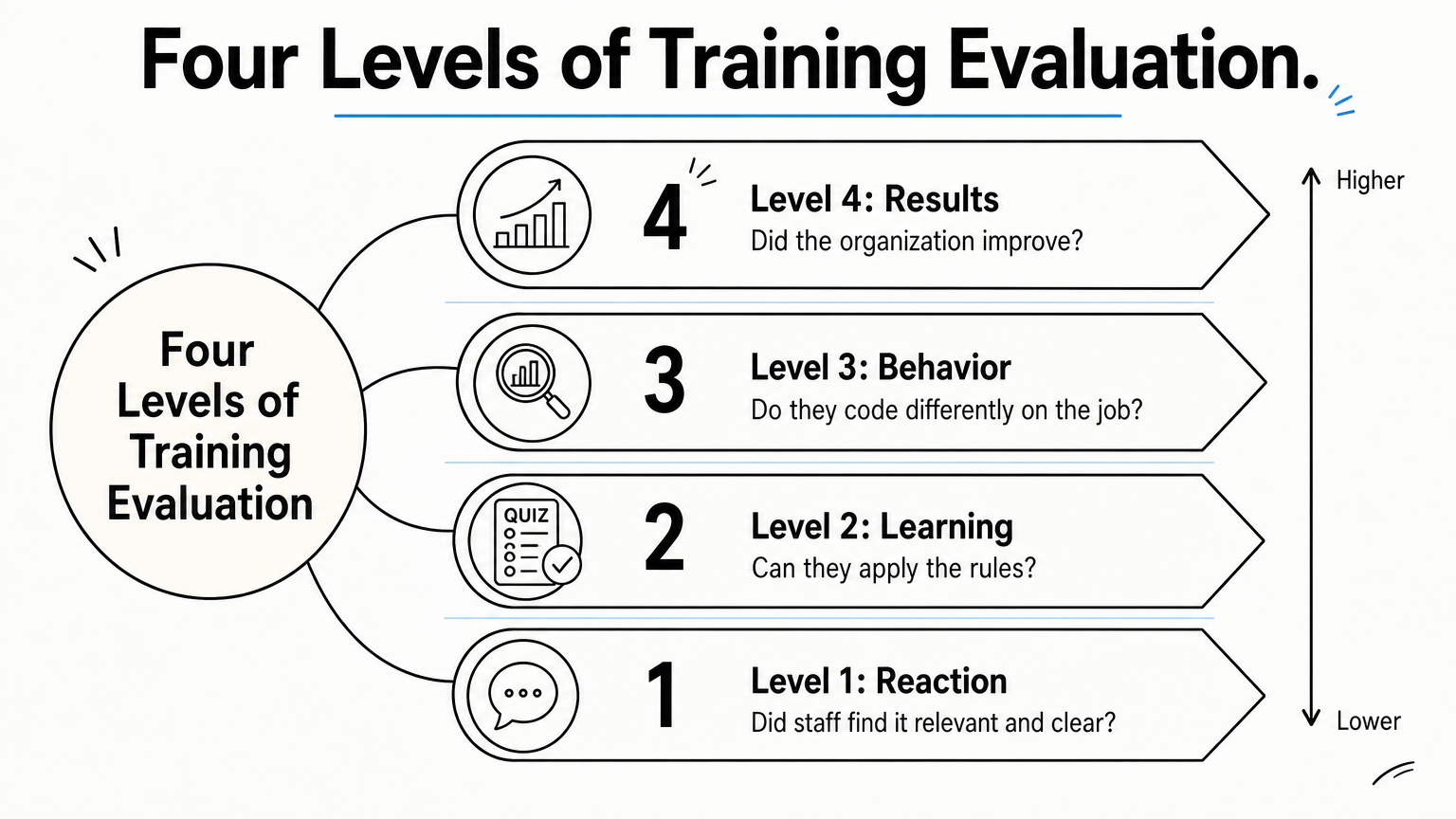
| Level | Question | Evidence | When to check |
|---|---|---|---|
| Reaction | Did staff find it relevant and clear? | Short survey ratings and comments | Right after each module |
| Learning | Can they apply the rules? | Quiz and case scores against your pass mark | End of module, and again after 30 days |
| Behavior | Do they code differently on the job? | Audit accuracy, modifier errors, query quality | Next audit cycle |
| Results | Did the organization improve? | Denial rate, refunds, audit findings, days in A/R | Quarterly |
Levels 3 and 4 are the ones that justify the program. A high quiz score with unchanged audit accuracy means the training is not transferring to the work.
Run the before-and-after comparison
Return to the baseline from Step 1. After training, audit another sample using the same method and scoring rules. In the example, the team scored 36 of 40 charts correct, or 90 percent. Suppose the follow-up audit finds 38 of 40 correct. That is 95 percent, and the misses fell from four to two. The two remaining errors are the next training topic.
Be honest about sample size. With 40 charts, one chart equals 2.5 percentage points, so a five-point gain is two charts. That is encouraging but not conclusive. Use larger or repeated samples before you declare success, and compare denial trends over a full quarter alongside the audit results. Also look at the whole picture. If accuracy rose but provider queries went unanswered, the documentation side of the program needs work.
Close the loop
Review the data in your regular compliance committee meeting. Decide what to change, record the decision, and assign an owner. Typical outcomes include rewriting a module that scored poorly, adding a targeted session for one specialty, retiring content for rules that no longer apply, or revising a policy that confused people. Document each corrective action, because that trail shows regulators the program responds to evidence.
Judge the program by what changes in your audits and denials, not by how many people finished the course.
Where to go from here
A coding compliance training program earns its keep when it makes accurate coding routine and provable. Start with a baseline audit, set goals you can measure, teach by role on a calendar tied to real rule changes, track every completion, and evaluate against audit and denial data. Then repeat the cycle, because the rules and your error patterns keep changing.
If you want to see how course assignment, reminders, CEU tracking, and reporting work in one system, book an Axis LMS admin demo and bring your own curriculum and audit goals to the conversation.
