Picking an open learning management system looks simple until you price it out. The software is free to download. The servers, developers, security patches, and support are not. Many teams pick a platform on its feature list and discover six months later that they are running a small IT project.
Here is the short answer. For schools and education programs, Moodle is the safest default, and Open edX fits large public course catalogs. Canvas and Open LMS are strong if you want a familiar interface and can accept tradeoffs in hosting or support. Most free open source LMS software suits teams with in-house technical staff. If you have none, expect to pay for hosting or managed services.
Below, we compare nine platforms on features, real hosting costs, and how far you can customize them. We also note where each one struggles, such as compliance reporting, integrations, and upgrades. At Atrixware, we build Axis LMS, so we see why organizations outgrow free tools. We will say when that happens, and when it does not.
What open source LMS means and what it really costs
Open source means you can read, change, and run the code yourself under a license such as GPL or AGPL. It does not mean the platform costs nothing to operate, and the operational challenges of open source platforms are real. You get the source code for free, but you pay for everything required to keep it running safely and reliably.

What "open source" actually gives you
Any lms software open source license lets you download the code, host it where you like, and modify it. You are not tied to one vendor’s roadmap. If a company disappears, your site keeps running. That control over your data and code is the real benefit, and it matters more than the missing license fee.
Some vendors blur the label. Open LMS sells hosted, supported versions built on open code, and Canvas offers a community edition while most institutions buy the hosted product. Before you compare, check which edition a vendor means and what the paid tier adds.
Free software is a license, not a budget line.
Where the money goes
Budget for people before servers. A part-time administrator, a developer for theming, and a plan for support usually cost more than hosting. These are rough ranges we see for a mid-sized deployment, so treat them as estimates and get real quotes before you commit.
| Cost area | Typical range | What drives it |
|---|---|---|
| Hosting | $20 to $150 per month for light platforms, $300 or more for Open edX | Learner count, concurrent load, video |
| Setup and theming | $2,000 to $15,000 one time | Branding, SSO, data import |
| Maintenance | 5 to 20 admin hours per month | Patches, backups, plugin updates |
| Support | $0 community, or a paid contract | Response time, SLA |
Upgrades and compliance work are the costs people miss. Major version upgrades often break custom plugins, so each one can mean days of testing. Audit trails and validated records, needed for GDPR or FDA 21 CFR Part 11, rarely come out of the box, so you may pay a developer to build them.
1. Moodle
Overview and key features
Moodle is the most widely used open learning management system in education. It runs on PHP, uses a GPL license, and has been in development since 2002. The core gives you courses, quizzes, assignments, and a gradebook without extra plugins, plus completion tracking and an official mobile app.
- Forums, workshops, and peer assessment
- BigBlueButton and H5P integration
- Roles and permissions at course and site level
Hosting and total cost
Hosting a small Moodle site on a VPS costs about $20 to $60 per month. Large sites need separate database and caching servers. The bigger expense is the administrator time for upgrades, security patches, and backups.
Moodle is free to download and costly to neglect.
- Self-hosted: your server plus 5 to 20 admin hours monthly
- MoodleCloud: the official hosted option, priced by user count
- Moodle Partners: certified hosts that sell support contracts
Customization and plugins
The plugin directory lists roughly 2,000 plugins for quizzes, reports, and authentication. Themes control branding, though deep layout changes need a developer who knows PHP and Mustache templates.
Plugins are also the weak point. Third-party code often lags behind new releases, so check compatibility before every upgrade and keep a staging site for testing.
Best for and limitations
Universities, K-12 districts, and training teams with a technical admin on staff get the most from Moodle. Corporate teams often struggle because the interface feels academic and business reporting needs custom work.
- Compliance audit trails require development
- Selling courses depends on third-party plugins
- Navigation can overwhelm first-time learners
2. Open edX
Overview and key features

Open edX powers many of the world’s large public course catalogs. It runs on Python and Django, uses the AGPL license, and grew out of the edX project started by MIT and Harvard. It is built for self-paced and instructor-led courses at massive scale, and its authoring tool, Studio, gives course teams a structured editor for video, graded problems, and certificates.
- Cohorts, discussion forums, and verified learner tracks
- Mobile apps and React-based front ends
- Strong support for large, open enrollments
Hosting and total cost
This is a heavy platform. Tutor, the official Docker-based installer, calls for at least 4 GB of RAM, and 8 GB is realistic for a small site. A production setup usually runs $300 per month or more before you count staff time.
Open edX is free software that expects a real engineering team.
- Self-hosted with Tutor: you handle upgrades, backups, and monitoring
- Managed hosting: provided by independent Open edX service companies, usually quoted per project
Customization and plugins
Customization happens through XBlocks, which are small Python components that add new content types, and through Tutor plugins and themes. Nearly everything is changeable, but you need developers who know Python, React, and Docker.
Upgrades arrive twice a year as named releases. Custom code needs retesting each time, so plan a staging environment and budget developer hours for every release.
Best for and limitations
Universities, MOOC providers, and companies with in-house engineers get the most from Open edX. It is a poor fit for a small team that wants a working LMS this month.
- Reporting and compliance tracking need extra development
- Setup and upgrades are complex
- Corporate features like seat licensing and e-commerce take work
3. Canvas LMS
Overview and key features
Canvas, built by Instructure, is the LMS many students already know from college. The open source edition runs on Ruby on Rails under the AGPL license. Clean navigation and SpeedGrader make it easy to learn, and Modules let instructors sequence content without fuss.
- Assignments, quizzes, rubrics, and learning outcomes
- Solid REST API and LTI support
- Some features, such as advanced analytics, appear only in the paid hosted product
Hosting and total cost
Self-hosting is the catch. The stack needs Ruby, PostgreSQL, Redis, and Node, and a stable install calls for 8 GB of RAM or more. Expect $80 to $200 per month in server costs for a modest site, plus a developer who knows Rails.
The free Canvas is a code release, not a supported product.
Instructure does not support the community edition. Its hosted Canvas is sold by quote, so budget for a sales conversation and a per-user annual price.
Customization and plugins
Branding runs through the Theme Editor, with custom CSS and JavaScript for finer control. Canvas has no plugin directory like Moodle’s. Instead, you extend it with LTI tools for video, proctoring, or publisher content.
Deep changes mean editing Rails code, and every fork makes upgrades harder. Keep customizations in themes and LTI tools so you can update without rebuilding your work.
Best for and limitations
Colleges and school districts with Rails developers on staff get the most from the community edition. Everyone else should price the hosted product instead, because the free version leaves you alone with installs and updates.
- Installation is harder than Moodle’s
- No official support or service agreement
- Corporate needs like e-commerce and compliance records require outside tools
4. Open LMS
Overview and key features
Open LMS is a company, not a separate code base. It sells hosted, supported platforms built on Moodle, so you get the familiar gradebook, quizzes, and forums with a vendor behind them. Its corporate edition, built on Moodle Workplace, adds multi-tenancy, programs, and automated rules for business training.
- Vendor-managed hosting, upgrades, and backups
- Separate education and corporate editions
- Support and reporting tools added on top of Moodle core
Hosting and total cost
Pricing is by quote and usually scales with active users. You pay a subscription instead of running servers, so patching and uptime become the vendor’s job. Plan for a recurring annual contract rather than a monthly server bill, and get quotes before comparing.
Open LMS trades the free license for someone else’s pager.
Strictly speaking, this is not free open source LMS software. Only the Moodle core underneath is open.
Customization and plugins
Because it is Moodle underneath, most Moodle skills transfer. Theming and branding are available, and the vendor’s team can handle design work for you.
Hosted sites limit what you can install. Ask for the list of approved plugins and the policy on custom code before you sign, since a plugin you depend on may not be allowed.
Best for and limitations
Organizations that like Moodle but have no technical staff get the most from Open LMS. You keep the familiar platform and skip the server work. The tradeoff is less freedom and a recurring fee.
- You depend on one vendor’s roadmap and pricing
- Plugin and code changes are restricted
- Moving off the platform takes planning, since content and records must be exported
5. Chamilo
Overview and key features
Chamilo is a lightweight PHP platform that forked from Dokeos in 2010 and ships under the GPL. A non-profit association guides development. It stresses simplicity for learners and teachers, and it imports SCORM packages, so you can reuse existing course content.
- Learning paths, tests, and certificates
- Course sessions with attendance tracking
- Skills and competency tracking
- BigBlueButton videoconferencing
Hosting and total cost
Resource needs are modest. A standard LAMP stack runs it, and a small site works on a $10 to $40 per month VPS. You still pay for administrator time, but a smaller platform has fewer moving parts to patch.
Chamilo is easy on servers and thin on community.
- Self-hosted: your server plus a few admin hours monthly
- Official providers: certified companies that sell hosting and support, priced by quote
Customization and plugins
Themes and CSS handle branding. Bundled plugins add extras such as Zoom meetings and paid course sales, which most platforms in this list leave to third parties.
The catch is ecosystem size. Chamilo has far fewer plugins and outside developers than Moodle, so custom work is harder to hire for. Confirm which release line is current and supported before you install.
Best for and limitations
Small schools, nonprofits, and training teams that want a simple, low-cost platform get the most from Chamilo. Larger organizations tend to outgrow it, since reporting and integrations stay basic.
- Smaller community and thinner documentation
- Few ready-made integrations for HR or CRM systems
- Compliance audit trails need custom development
6. ILIAS
Overview and key features
ILIAS is a PHP platform under the GPL, developed since 1998 at the University of Cologne. It is a heavyweight in German-speaking universities and public agencies. The core ships with detailed test and assessment tools, SCORM support, and competence management that ties skills to learning goals.
- Learning sequences, portfolios, and wikis
- Fine-grained role-based permissions
- Surveys, certificates, and LTI support
Hosting and total cost
Requirements are moderate. A standard PHP and MariaDB stack runs it, and a small site fits a $20 to $60 per month VPS. As with Moodle, the larger cost is administrator time, and ILIAS has a steeper learning curve.
- Self-hosted: your server plus several admin hours monthly
- Certified providers: companies listed by the ILIAS Society sell hosting and support, priced by quote
Customization and plugins
Developers extend ILIAS through plugin slots, which add new content types, repository objects, and user interface elements. Skins handle branding. The ecosystem is far smaller than Moodle’s, so line up a developer before you commit to custom work.
Plugins follow the core release cycle. Test every plugin on a staging copy before you upgrade a live site.
Best for and limitations
Universities, public agencies, and organizations that need rigorous testing and granular permissions get the most from ILIAS. Small teams without a dedicated admin usually find it heavy.
ILIAS rewards admins who read the manual and punishes those who skip it.
- Dated interface compared with Canvas
- Smaller English-language community and documentation
- E-commerce and CRM integrations need custom work
7. Sakai
Overview and key features
Sakai is a Java-based platform released under the Educational Community License, an Apache-style open license. It began in 2004 at universities including Michigan, Indiana, MIT, and Stanford, and the Apereo Foundation now guides it. Its strength is collaboration and group work, built around course and project sites where teams share files, forums, and assignments.
- Lessons, assignments, gradebook, and tests
- Rubrics, forums, and wikis
- Responsive, mobile-friendly interface
Hosting and total cost
Java changes the hosting picture. Sakai runs on Tomcat with MySQL or Oracle, so plan for 8 GB of RAM on a small site and roughly $60 to $150 per month in server costs. The harder requirement is staff who know Java application servers.
Sakai is only free to run if you already have Java people.
- Self-hosted: your server plus regular admin hours
- Commercial affiliates: companies listed by Apereo sell hosting and support, priced by quote
Customization and plugins
Sakai is built from separate tools, and developers add new ones in Java using Spring. Skins handle branding, and LTI support connects outside content. Expect to hire Java developers for anything beyond a theme.
The plugin ecosystem is small compared with Moodle’s. Test every custom tool against each new release, because upgrades can break local code and the community has fewer shared fixes to lean on.
Best for and limitations
Colleges and universities with Java developers on staff get the most from Sakai, especially where group projects and team sites matter. Corporate trainers will find little built for them, since business reporting and selling courses are not part of the core.
- Smaller community, concentrated in higher education
- Few ready-made HR or CRM integrations
- Compliance audit trails need custom development
8. Forma LMS
Overview and key features
Forma LMS is an open source platform aimed at business training rather than classrooms. It descends from Docebo’s old community edition, runs on PHP, and ships under the GPL. Among the open learning management system options here, it is one of the few built around corporate training with course catalogs, learning plans, and classroom sessions.
- SCORM courses and blended learning
- Certificates and automated email notifications
- Built-in report builder
Hosting and total cost
A standard LAMP stack runs Forma, and a small site fits a $10 to $40 per month VPS. You still pay for administrator time, and the project is small, so you carry more of the maintenance yourself. Check how often it ships releases before you install.
Check the release history before you trust a small project with your training records.
- Self-hosted: your server plus a few admin hours monthly
- Third-party hosts: independent providers, priced by quote
Customization and plugins
Templates handle branding, and a plugin system adds features. The catch is size. The ecosystem is far smaller than Moodle’s, so few developers know the codebase and documentation can be thin. Budget for a PHP developer if you want more than a theme.
Test every upgrade on a staging copy. Local changes can break when the core updates.
Best for and limitations
Small and mid-sized companies that want business-style course management without license fees get the most from Forma. It suits teams with a PHP-capable admin who can handle updates and fixes.
- Smaller community and fewer integrations with HR or CRM systems
- Compliance audit trails need custom work
- Interface looks dated next to Canvas
9. Tutor LMS
Overview and key features
Tutor LMS is a WordPress plugin from Themeum, so it turns an existing site into a course platform. The GPL-licensed core includes a drag-and-drop course builder, quizzes, and a student dashboard. Selling courses runs through WooCommerce.
- Multi-instructor support and course reviews
- Pro tier adds certificates, content drip, and assignments, so check which features sit behind the paywall
Hosting and total cost
Anything that runs WordPress can host it. A small catalog fits $10 to $50 per month on managed WordPress hosting. Costs climb with learner counts, because WordPress under heavy load needs caching and a bigger server.
The Pro license is a yearly fee that depends on how many sites you run, so price it before you call the setup free.
Customization and plugins
Themes and page builders such as Elementor handle design, and developers can use standard WordPress hooks. Thousands of WordPress plugins add membership levels, email marketing, and CRM connections, which is a real edge over most platforms here.
Every added plugin is another update to track. Plugin conflicts are the usual cause of broken checkouts, so test updates on a staging copy first.
Best for and limitations
Course creators, small businesses, and teams that already run WordPress get the most from Tutor LMS, especially when the goal is to sell courses quickly. It is the easiest platform in this list to start and the first to strain at scale.
Tutor LMS is the fastest way to launch and the first to outgrow.
- Basic reporting for corporate training
- SCORM and xAPI support is limited, so verify before you commit
- Compliance audit trails require custom development
Open source LMS comparison table
Here is the whole list on one screen. Use it to narrow nine options to two or three, then reread the matching sections above before you commit.
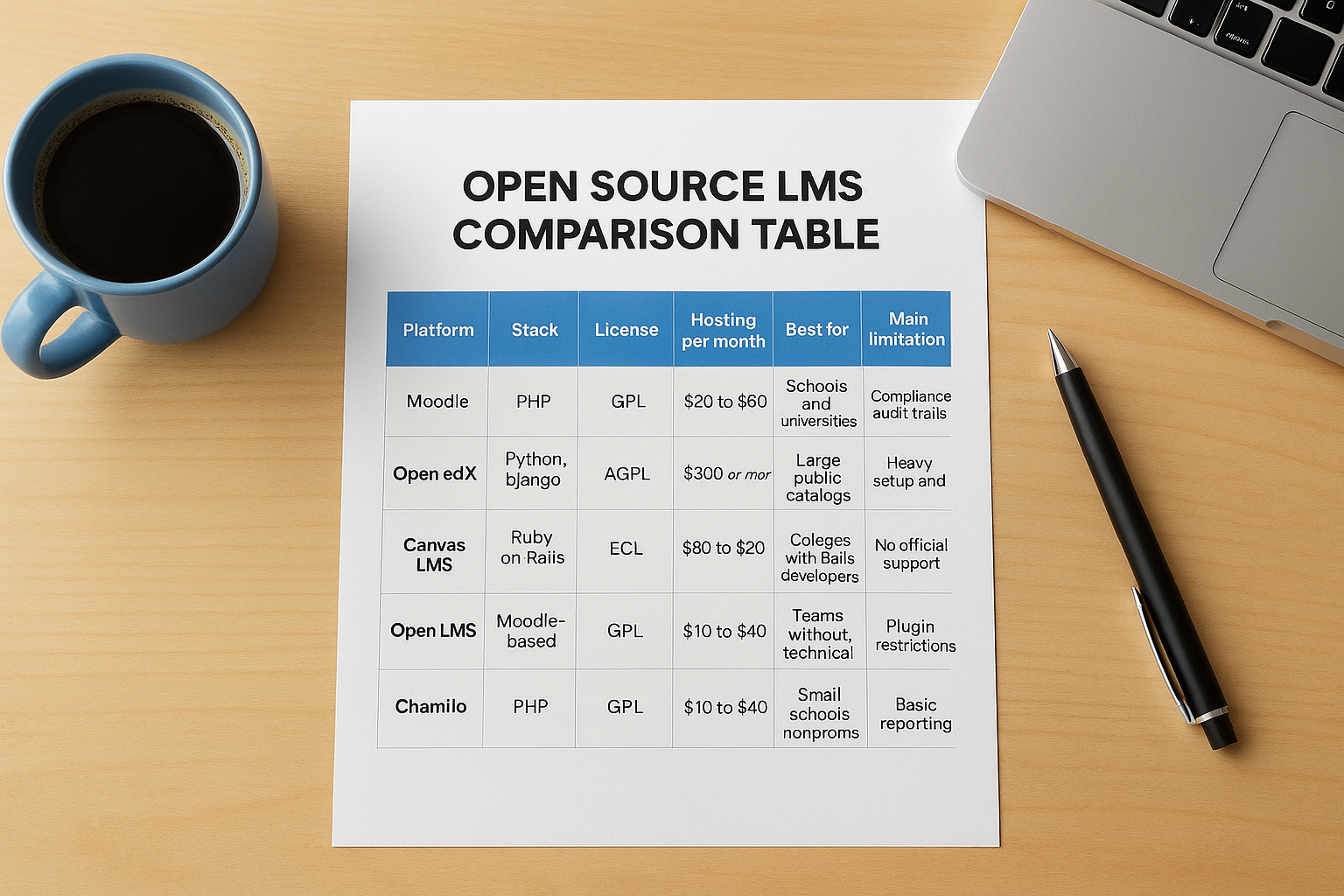
Platform specs and costs
Monthly costs are the small-site ranges quoted above, so treat them as estimates and confirm with real quotes.
| Platform | Stack | License | Hosting per month | Best for | Main limitation |
|---|---|---|---|---|---|
| Moodle | PHP | GPL | $20 to $60 | Schools and universities | Compliance audit trails need development |
| Open edX | Python, Django | AGPL | $300 or more | Large public catalogs | Heavy setup and upgrades |
| Canvas LMS | Ruby on Rails | AGPL | $80 to $200 | Colleges with Rails developers | No official support |
| Open LMS | Moodle-based | Hosted, by quote | Annual contract | Teams without technical staff | Plugin restrictions |
| Chamilo | PHP | GPL | $10 to $40 | Small schools, nonprofits | Basic reporting |
| ILIAS | PHP | GPL | $20 to $60 | Rigorous testing, permissions | Steep learning curve |
| Sakai | Java | ECL | $60 to $150 | Colleges with Java staff | Java skills required |
| Forma LMS | PHP | GPL | $10 to $40 | Small company training | Thin documentation |
| Tutor LMS | WordPress plugin | GPL | $10 to $50 | Course creators | Strains at scale |
What the table does not show
Prices tell only part of the story. Staff skills decide the real cost. Open edX needs Python and Docker, Canvas needs Rails, and Sakai needs Java. If your team knows none of these, Open LMS or a WordPress-based option is likelier to fit.
Notice the last column too. Most platforms here leave compliance audit trails and corporate reporting to custom development, and that gap is where free open source LMS software often costs the most later.
The cheapest server is rarely the cheapest platform.
How to choose the right open source LMS
Choosing an open learning management system comes down to three questions, asked in order: who will run it, what must it do, and what will it cost in year two. Features come last, because most platforms in this list cover the basics.
Match the platform to your team’s skills
Skills decide more than features do. Pick the stack your people already know, or you will pay someone to learn it for you.
- PHP: Moodle, Chamilo, ILIAS, Forma LMS
- Python and Docker: Open edX
- Ruby on Rails: Canvas
- Java: Sakai
- WordPress: Tutor LMS
- No technical staff: Open LMS, with a paid hosting contract
Choose the stack your team already knows, not the longest feature list.
Match the platform to your use case
Next, check the job you are hiring the software to do. Schools and universities fit Moodle, ILIAS, Sakai, or Canvas. Public course catalogs suit Open edX, and selling courses suits Tutor LMS. For internal business training, Forma LMS comes closest.
Then price year two, not year one. Upgrades, plugin testing, and compliance reporting are where a free platform quietly gets expensive. If you need audit trails or CRM and HR syncing, count the developer hours now.
Pilot before you commit
Before you decide, install your top two choices on a staging server for two weeks. Let real instructors and learners use them, and test the tasks that matter, not the demo course.
- Import one real course, including its SCORM files
- Run the report your manager would actually ask for
- Connect single sign-on or your HR system
- Apply a version update and see what breaks
When a commercial LMS like Axis LMS makes more sense
Free software wins when you have engineers and time to spare. It loses when training is a daily business function that simply has to work. If that sounds like you, a commercial platform is often cheaper than building the missing pieces on top of an open learning management system.
Signs you have outgrown free software
Look for these signals. Each one matches a gap we flagged earlier, and each is expensive to fix with custom code.
- Compliance: GDPR or FDA 21 CFR Part 11 audit trails, CEU tracking, and re-certifications
- Revenue: selling courses to individuals or seat licenses to business buyers
- Integrations: HR and CRM sync with ADP, Salesforce, BambooHR, or Zoho, plus SAML SSO
- Staffing: nobody owns patches, backups, and upgrades
Any one of these can justify a switch. Together, they make a subscription the cheaper path once you count developer hours and admin time.
If compliance, integrations, or revenue depend on your LMS, buy support instead of building it.
What Axis LMS covers out of the box
Axis LMS, built by Atrixware, ships with those pieces already working. You get a drag-and-drop course builder, automated reports, e-commerce for individual and seat-license sales, and SAML SSO with Okta, Azure, and Ping Identity. An integration builder reaches over 5,000 systems, and a REST API with webhooks covers custom work. Security, backups, and data redundancy are handled for you.
Be clear about the tradeoff. You pay a subscription and give up access to the source code. If you must modify the platform itself, or you have engineers and a tight budget, open source is still the better choice. For everyone else, predictable pricing and vendor support beat a free download.
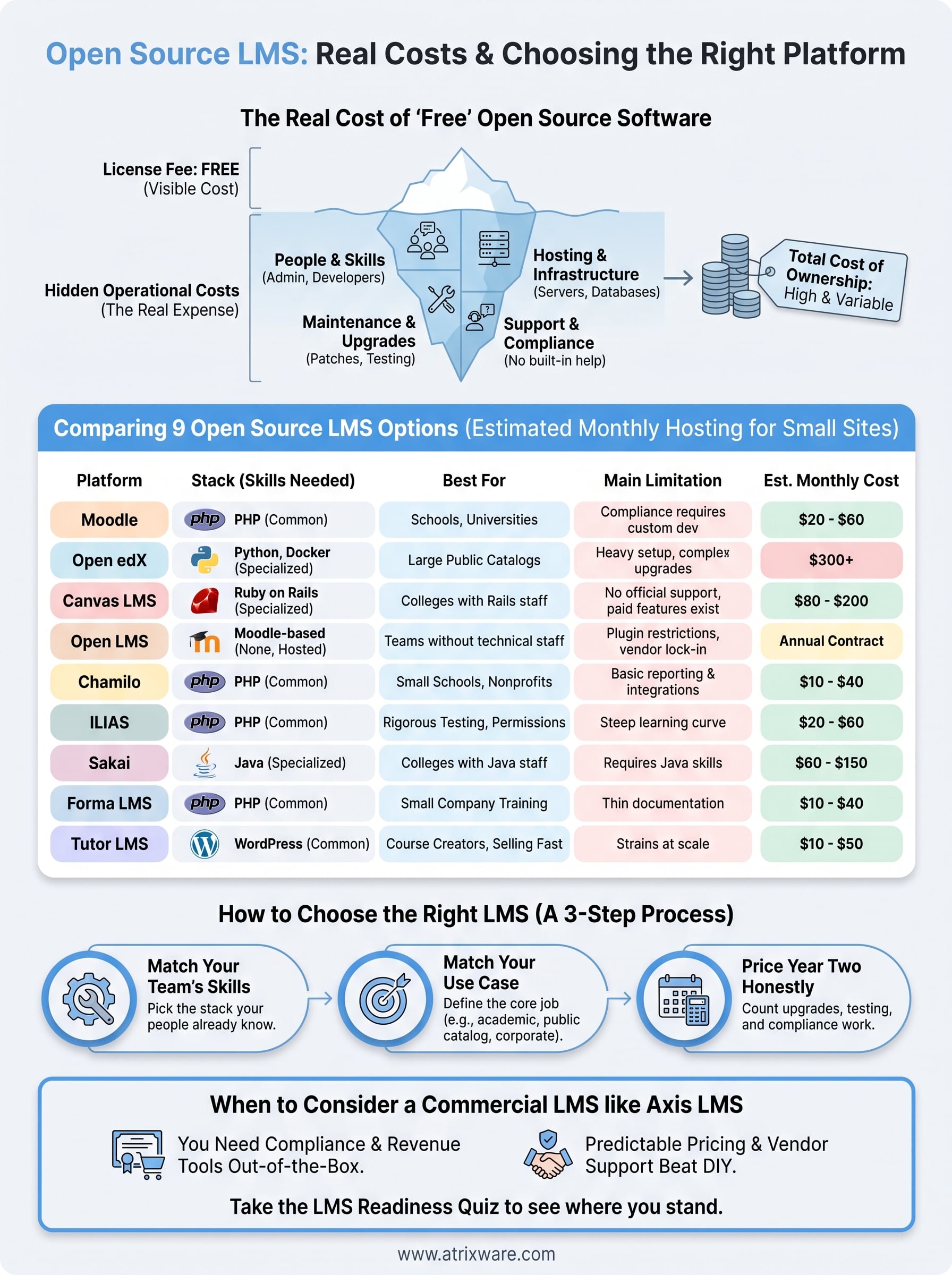
Picking the platform that fits your team
Every open learning management system on this list is free to download, and none is free to run. The right pick is the one your team can actually operate, not the one with the longest feature list. Moodle suits most schools, Open edX suits large public catalogs, and Tutor LMS suits course creators who want to launch fast.
Before you commit, pilot your top two on a staging server and price year two honestly. Count admin hours, upgrades, and any compliance work. If the numbers favor free software, you now know which platform to choose and what it will demand from your people.
If the numbers do not add up, you may be ready for a supported platform. Take the LMS readiness quiz to see where you stand in the buying process and whether Axis LMS deserves a closer look.
