Picking a cloud based learning management system lms feels harder than it should be. Every vendor claims to be the easiest to use, the most secure, and the best value, yet your team still has to sit through demos, compare pricing tiers, and guess which platform will actually hold up once you’ve loaded in a thousand employees or customers.
Here’s the short answer: a cloud LMS hosts your courses, learner data, and reporting on remote servers instead of your own hardware, so you get automatic updates, built-in backups, and access from anywhere without an IT team babysitting a server. That structure is exactly why most businesses have ditched on-premise systems for a cloud-based LMS in the first place.
We’ve spent years building and supporting Axis LMS, so we know what separates a genuinely useful platform from one that just looks good in a sales deck. In this list, we break down seven of the best cloud-based LMS options for 2026, covering pricing, integrations, compliance tools, and who each platform actually fits best, so you can shortlist the right one for your training program instead of guessing.
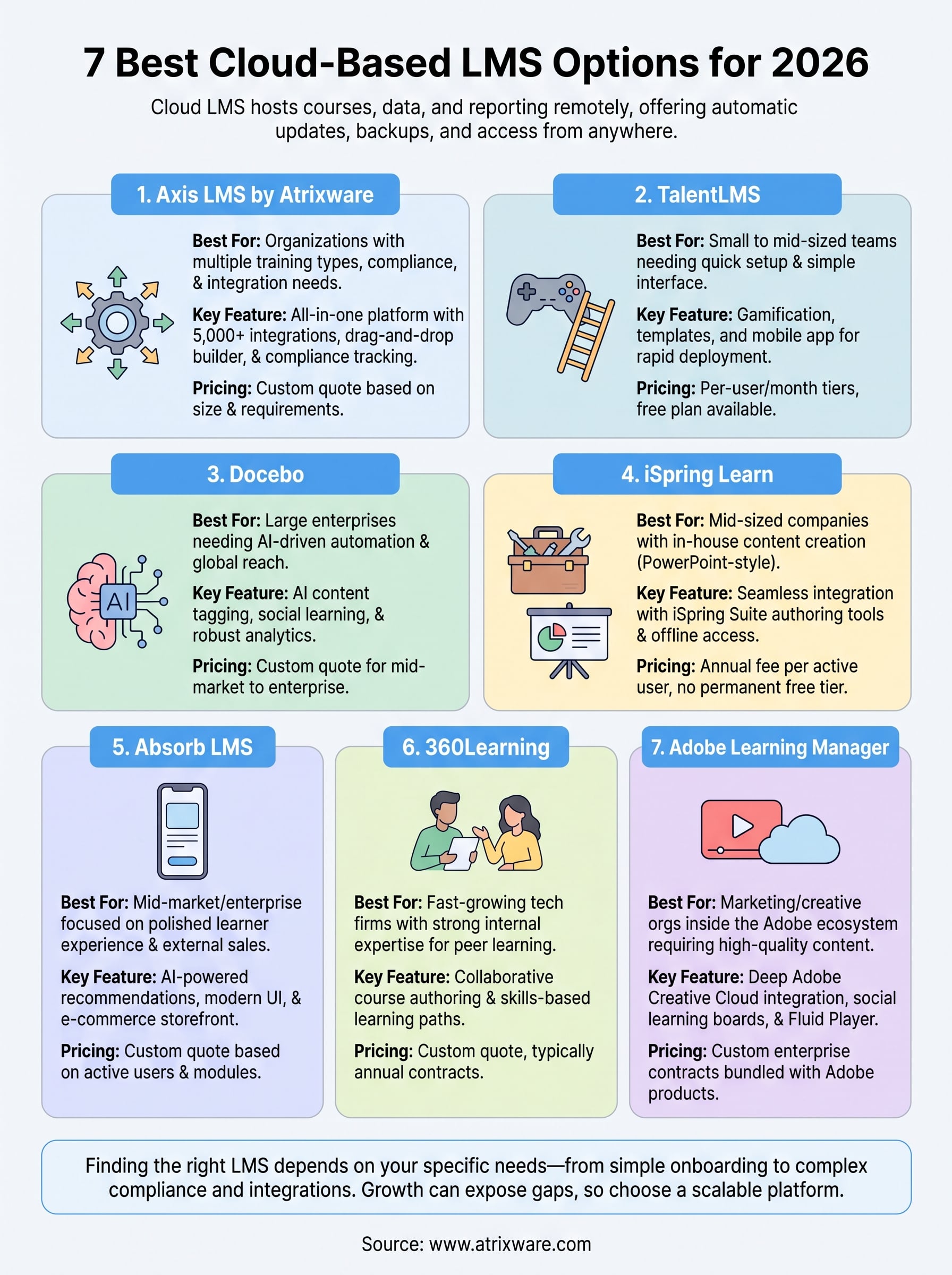
1. Axis LMS by Atrixware
Axis LMS is our own platform, so we’ll say upfront that we’re biased, but we built it because we saw gaps in what other cloud based learning management system lms vendors offered administrators who need more than a course catalog. It runs entirely in the cloud, scales from a 20-person team to an enterprise with tens of thousands of users, and hands you the reporting depth that compliance officers and training managers actually need instead of vanity dashboards.

Key features
Axis LMS covers the full spectrum of corporate training needs, not just course delivery:
- Drag-and-drop course builder for rapid content creation without a developer
- Virtual classroom support alongside self-paced online courses
- Compliance tracking for GDPR, FDA 21 CFR Part 11, CEUs, and re-certifications
- Deep branding controls so the learner UI matches your organization
- 5,000+ system integrations plus REST API, webhooks, and SAML SSO (Okta, Azure, Salesforce, Ping Identity)
- Built-in e-commerce for selling courses and seat licenses
A cloud LMS is only as useful as the reporting behind it, and that’s where most platforms fall short.
Who it’s for
Axis LMS fits organizations juggling more than one training use case at once, employee onboarding, customer education, channel partner training, and compliance, often all inside the same account. HR managers and L&D teams who need to sync with systems like ADP, BambooHR, or Salesforce lean on the integration builder heavily, while businesses that want to monetize training benefit from the native e-commerce tools. It’s also a strong match for IT and security teams who need configurable permissions and audit trails rather than a one-size-fits-all setup.
Pricing
Atrixware doesn’t publish a flat price list because deployments vary so much by user count, hosting needs, and feature set. Instead, you request a quote based on your organization’s size and requirements, and the team walks you through which Axis LMS pricing tier fits your budget. That approach means smaller teams aren’t subsidizing enterprise features they’ll never touch, and larger organizations get pricing scaled to actual usage instead of a generic per-seat number.
2. TalentLMS
TalentLMS built its reputation on simplicity, and that’s still the pitch: a cloud LMS software platform that small and mid-sized teams can set up in an afternoon without a training department dedicated to running it. It leans on templates and a gamified learner experience rather than deep configuration, which makes it approachable but occasionally limiting once your training program grows more complex.
Key features
TalentLMS keeps its feature set focused on speed and ease of use:
- Course library and templates to launch training fast
- Gamification tools like badges, points, and leaderboards
- Bulk user import and basic branching scenarios
- Mobile app for iOS and Android learners
- Integrations with Zoom, Slack, and Salesforce, though fewer than enterprise-grade platforms
Simplicity is TalentLMS’s strength right up until your compliance or reporting needs outgrow it.
Who it’s for
Small businesses, startups, and teams running straightforward onboarding or product training tend to get the most value here. It suits organizations that want something running quickly without heavy customization, but larger enterprises with layered compliance requirements often find themselves capped by what the platform offers out of the box.
Pricing
TalentLMS prices by active users per month, with tiers starting around $69/month for up to 40 users and scaling upward from there. A free plan exists for very small teams, and enterprise pricing requires a custom quote once user counts climb into the thousands.
3. Docebo
Docebo positions itself as an AI-powered learning platform for larger organizations that want automation baked into every corner of their training program. It’s a cloud based learning management system lms built for companies that have outgrown simpler tools and need machine learning to handle content tagging, learner recommendations, and skill gap analysis at scale.
Key features
Docebo’s strength lies in automation and content intelligence:
- AI content tagging that organizes and recommends courses automatically
- Social and collaborative learning tools for peer-driven training
- Multi-language support across dozens of languages for global teams
- Robust analytics dashboards built for learning impact reporting
- Marketplace integrations with Salesforce, Microsoft Teams, and Zoom
Automation only pays off once you have enough content and users to justify the setup time.
Who it’s for
Docebo suits mid-market and enterprise organizations with global workforces, multiple languages, and enough training volume to make AI-driven recommendations worthwhile. Companies without dedicated L&D staff to manage the platform’s configuration options often find the learning curve steeper than expected, so it fits teams that can invest time upfront to get the automation tuned correctly.
Pricing
Docebo doesn’t list public pricing and requires a custom quote based on active users and modules selected. Most reviews and third-party comparisons put entry costs well above budget-friendly platforms, positioning it firmly in the mid-market to enterprise price range rather than for small teams testing their first LMS.
4. iSpring Learn
iSpring Learn trades complexity for speed, and it pairs that simplicity with one of the strongest course authoring toolkits in the industry. Teams that already use iSpring Suite for content creation get a tight loop between building a course in PowerPoint-style tools and publishing it straight into this cloud LMS software, which cuts out a lot of the back-and-forth other platforms require.

Key features
iSpring Learn focuses on fast content creation and straightforward tracking:
- Native authoring integration with iSpring Suite for quizzes, dialogue simulations, and interactive video
- Offline mobile access so learners can finish courses without a connection
- Automated reminders for course deadlines and re-certifications
- Simple reporting dashboards covering completion rates and quiz scores
- SCORM and Tin Can (xAPI) support for imported content
Authoring and delivery living in one workflow saves teams real hours every month.
Who it’s for
Organizations that build a lot of their own training content, rather than buying off-the-shelf courses, get the most value from iSpring Learn. It fits mid-sized companies with a training coordinator who wears the authoring hat and the LMS admin hat at once, since the two tools were clearly designed to work together rather than bolted on afterward.
Pricing
iSpring Learn charges an annual fee based on the number of active users, starting around $2.87 per user per month when billed yearly, with volume discounts kicking in above 300 users. There’s no permanent free tier, though a 14-day trial lets you test the authoring-to-LMS workflow before committing.
5. Absorb LMS
Absorb LMS markets itself as an enterprise-grade platform with a polished, consumer-style interface, and it delivers on that promise better than most competitors in this price range. Built as a true cloud based learning management system lms, it leans on AI-driven course recommendations and a resource center that behaves more like a content library than a static course catalog, which keeps learners browsing instead of clicking away after one module.
Key features
Absorb’s feature set targets organizations that care as much about learner experience as admin control:
- AI-powered course recommendations based on learner behavior and role
- Absorb Create for in-platform authoring without third-party tools
- E-commerce storefront for selling courses externally
- Custom reporting builder with scheduled exports
- White-label branding down to the login page and certificates
A polished learner experience keeps completion rates up long after the novelty of a new LMS wears off.
Who it’s for
Mid-market and enterprise companies that sell training externally, alongside internal employee programs, tend to get the most mileage from Absorb. Companies prioritizing a modern, mobile-friendly learner interface over deep backend customization will feel at home here, though smaller teams with tight budgets may find the platform more than they need.
Pricing
Absorb doesn’t publish flat pricing and instead quotes based on active users and selected modules, typically starting in the low thousands annually for smaller deployments. Larger enterprise contracts scale well beyond that, and prospective buyers should expect a sales call before getting real numbers.
6. 360Learning
360Learning takes a different angle than most platforms on this list, betting on collaborative learning instead of top-down course delivery. It’s built around the idea that your subject matter experts, not a training department, should create most of the content, which makes this cloud LMS software feel more like a knowledge-sharing platform than a traditional course library.
Key features
360Learning’s toolkit centers on peer-driven content creation and skill development:
- Collaborative course authoring where employees and experts co-create training
- Skills-based learning paths tied to role progression
- Built-in feedback loops so learners can rate and improve courses
- Onboarding templates designed for fast new-hire ramp-up
- Integrations with Slack, Salesforce, and BambooHR for HR data sync
Letting your own experts build the courses only works if someone owns the quality control.
Who it’s for
Companies with strong internal expertise, think fast-growing tech firms or organizations with deep product knowledge scattered across teams, benefit most from 360Learning’s model. It suits L&D teams that want to decentralize course creation rather than centralize it, though organizations that need heavy compliance tracking or rigid certification workflows may find the collaborative model works against them.
Pricing
360Learning doesn’t post public pricing and requires a quote based on user count and features selected. Reviews generally place it in the mid-market range, comparable to Docebo, with contracts typically running annually rather than month to month.
7. Adobe Learning Manager
Adobe Learning Manager (formerly Adobe Captivate Prime) rounds out this list as the pick for companies already living inside the Adobe ecosystem. Built as a cloud based learning management system lms with deep ties to Adobe Creative Cloud and Experience Manager, it fits organizations that already produce polished content and want their training platform to match that production quality rather than feel like an afterthought.
Key features
Adobe Learning Manager leans on content quality and social learning:
- Fluid Player for adaptive video and interactive content across devices
- Social learning boards where learners can discuss and share resources
- Skills-based recommendations tied to individual learner profiles
- Native integrations with Adobe Creative Cloud, Workfront, and Microsoft Teams
- Gamification and leaderboards to drive engagement in longer programs
Content quality only carries a training program so far without solid completion tracking behind it.
Who it’s for
Marketing-heavy and creative organizations that already run on Adobe products get the smoothest experience here, since the LMS slots into workflows they use daily. Enterprises running large-scale customer education programs also gravitate toward it, though teams outside the Adobe ecosystem may find less reason to choose it over more integration-flexible cloud lms software options like Axis LMS or Docebo.
Pricing
Adobe doesn’t publish flat pricing for Learning Manager and instead sells it through custom enterprise contracts, typically bundled with other Adobe Experience Cloud products. Expect a sales conversation and a quote scaled to active users, with costs landing solidly in enterprise territory rather than small-business budgets.
Finding the right cloud LMS for your team
Every platform on this list handles the basics of a cloud based learning management system lms, but the right fit depends on what your training program actually needs. Small teams launching simple onboarding will lean toward TalentLMS or iSpring Learn, while enterprises with compliance mandates, multiple training types, or heavy integration needs will outgrow those options fast.
Growth tends to expose the gaps first: a platform that felt fine at 50 users can buckle once you add compliance tracking, e-commerce, or partner training to the mix. That’s the moment most buyers start comparing platforms again instead of scaling the one they picked.
If you’re still weighing where your organization stands, take the free LMS readiness quiz to see what stage you’re actually at before you commit to a platform, a demo, or a contract.
