The fastest way to put an electronic signature policy template to work is to copy the sample clauses in this guide, replace the bracketed fields with your own details, and have an attorney review the result. The job takes four steps: define purpose and scope, match signature methods to document risk, add consent, record, and exception rules, and assign owners before you roll the policy out.
Most teams adopt a signing tool long before they write any rules. Then a customer disputes a contract, an auditor asks who approved a form, or a manager signs for a colleague, and nobody can point to a written standard. The sample policies you find online rarely help. Many are written for one university or agency, and they assume approval systems you may not have.
This guide gives you a plain policy in ten numbered clauses, built on the legal basics of US law. You will also see how to sort documents by risk and how to roll the policy out. At Atrixware, we build Axis LMS for compliance training, so we know a policy only works when people are trained on it.
What an e-signature policy covers and why it matters
An electronic signature policy is a short internal standard that says when e-signatures count, which methods you accept, and who may sign. It matters because US law accepts e-signatures only when certain conditions are met, and your records must be able to prove them.
What the policy covers
A useful policy runs two to four pages and answers six questions. Without written answers, each department invents its own process, and the weakest process sets your risk. Each question maps to a clause in the template below:
- Who signed? Authentication method (clause 4).
- Did they mean to sign? Intent (clause 5).
- Did they agree to sign electronically? Consent (clause 5).
- Can you prove what was signed? Audit trail and storage (clause 6).
- Which documents are excluded? Exceptions (clause 7).
- How long do you keep the records? Retention (clause 6).
The legal basis in the US
The federal ESIGN Act and the Uniform Electronic Transactions Act (UETA) give electronic signatures the same legal effect as ink when the process is sound. Nearly every state has adopted UETA, and New York has its own similar statute.
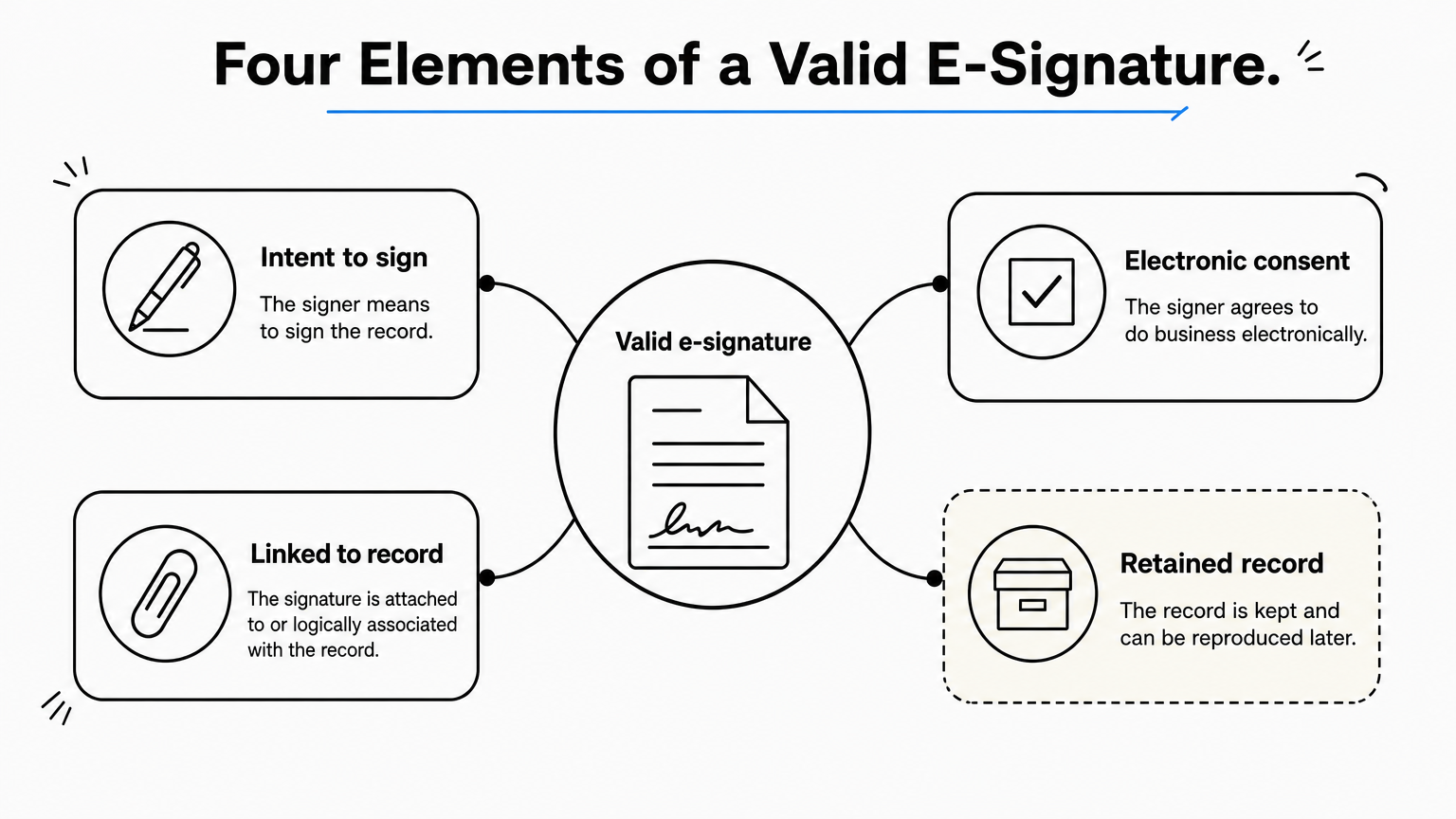
If you wonder what makes an e-signature valid, courts look at four elements: the signer’s intent to sign, consent to do business electronically, a signature attached to or logically associated with the record, and a record that is retained and can be reproduced later. No particular format is required, so a typed name, a drawn signature, or a click on a "Sign" button can all qualify. A digital signature is a stricter option that relies on a certificate-based ID from a certificate authority. You cannot make your own certificate that other parties will trust.
Treat the template as a starting point. Have an attorney check it against your state, your industry, and any country where you sign.
Your policy exists to prove four things on demand: intent, consent, association, and retention.
Step 1. Define purpose, scope, and terms
Start with three short clauses that say why the policy exists, who it covers, and what your terms mean. Every later clause leans on them, so keep the wording plain.
Write the purpose and scope
State the purpose in one or two sentences, then name everyone covered, contractors included. Add a line saying the policy does not force anyone to sign electronically and does not ban paper. If some internal systems already have built-in approval workflows, carve them out so the two don’t conflict.
1. PURPOSE
This policy sets the rules for using electronic signatures at [COMPANY NAME] ("the Company"). It defines when electronic signatures and electronic records are accepted as legally binding and equal to handwritten signatures and paper records.

2. SCOPE
This policy applies to all employees, contractors, and authorized agents who sign or request signatures on Company documents. It does not require anyone to sign electronically, and it does not prohibit signing on paper. It does not apply to [SYSTEMS WITH BUILT-IN APPROVAL WORKFLOWS] or to documents that the law requires to be signed on paper.
Define the terms
Define only the terms you use. Five definitions cover most companies, and they track the wording of federal law closely. Add industry terms if you work under rules such as HIPAA, and keep each definition to one sentence.
3. DEFINITIONS
Electronic signature: An electronic sound, symbol, or process attached to or logically associated with a record and adopted by a person with the intent to sign the record.
Electronic record: A record created, sent, received, or stored by electronic means.
Authentication: The process of verifying the identity of the signer.
Audit trail: A time-stamped log of each step in the signing process.
Digital signature: An electronic signature that uses a certificate-based digital ID to bind the signer to the document with encryption.
Clear scope and definitions settle most arguments about the policy before they start.
Step 2. Match signature methods to risk
Sort your documents into three risk levels and give each level a signature method. Risk, not habit, should decide how strongly you verify a signer.
Classify documents by risk
Use the table as a default and swap in your own examples. To place a document, ask four questions. Does a law or regulation require a specific form? How likely is a challenge? What would you lose if it succeeded? Would a digital ID block ordinary customers?
| Risk level | Method | Typical documents | How the signer is verified |
|---|---|---|---|
| Low | Standard e-signature | NDAs, vendor forms, training acknowledgments | Unique link sent to the signer’s email |
| Moderate | Enhanced e-signature | Customer contracts, employment agreements | Email link plus a second factor, such as a phone code or password |
| High | Digital signature | Records where a regulator or counterparty requires it | Certificate-based digital ID from a certificate authority |
Here is a worked example. A training acknowledgment form is low risk. A $250,000 customer contract is moderate risk, so the signer also confirms a code sent to a phone. A filing where a regulator or counterparty demands a certificate-based ID is high risk. Rules such as FDA 21 CFR Part 11 set specific controls for electronic signatures, so have counsel confirm what your regulated records need.
Set the approved methods
The clause below turns the table into a rule. It also limits signing to tools your IT team has approved, which keeps audit trails in one place. It lists accepted signature formats so nobody wonders whether a typed name counts.

4. APPROVED SIGNATURE METHODS
4.1 Standard e-signatures may be used for documents classified Low risk in Appendix A.
4.2 Enhanced e-signatures, which add a second authentication factor to an email link, are required for documents classified Moderate risk.
4.3 Digital signatures using certificate-based IDs are required for documents classified High risk, or when law, regulation, or a counterparty requires them.
4.4 Only tools approved by [DEPARTMENT] may be used to sign Company agreements. An approved tool must use current security protocols, verify signer identity, store records in a retrievable format, and produce an audit trail.
4.5 Accepted signature formats are a typed name, a drawn signature, or a click-to-sign action, as supported by the approved tool.
Build Appendix A from the table above, with your own document types.
Match the strength of signer verification to the cost of a dispute, not to the convenience of the tool.
Step 3. Add consent, records, and exceptions
Add three clauses that make signatures defensible: consent and intent, record retention, and exceptions. These carry most of the legal weight of the policy.
Capture consent and intent
Offer a paper option, require a clear signing action, and place a consent sentence above the signature block. The sample wording works for most commercial agreements. Consumer documents that the law requires you to provide in writing carry stricter consent rules under ESIGN, so check those with counsel.
5. CONSENT AND INTENT
5.1 Before a signer receives a Company document electronically, the signer must be offered the option to sign on paper instead.
5.2 The signing process must require a clear action, such as clicking "Sign" or typing a name, to show intent to be bound.
5.3 Agreements must include this clause above the signature block: "By signing, you confirm that you have reviewed this document, consent to do business electronically, and agree that your electronic signature has the same legal effect as a handwritten signature. You may request a paper copy and may withdraw your consent."
Set record retention rules
Treat signed files like paper originals. Keep the signed document and its audit trail together, for the period your retention schedule sets for the same document on paper. Fill in the numbers from your own schedule rather than guessing, because some laws set minimum periods.
6. RECORDS
6.1 Each signed document must be stored with its audit trail in [SYSTEM NAME].
6.2 Signed records must be kept for the same period as paper originals under the Company's Record Retention Policy.
6.3 Records must remain accessible and reproducible for anyone entitled to access them.
6.4 A signed document must not be altered after signing.
List your exceptions
Name the documents that must stay on paper. Federal law excludes several categories, including wills and testamentary trusts, family law matters such as adoption and divorce, and certain notices, such as default, foreclosure, or eviction involving a primary residence. Add exclusions from your own industry, and let Legal approve any exception.

7. EXCEPTIONS
The following must be signed on paper unless Legal approves otherwise: wills and testamentary trusts; adoption, divorce, and other family law documents; court orders and court filings that require original signatures; notices of default, foreclosure, or eviction involving a primary residence; [ADD INDUSTRY-SPECIFIC EXCEPTIONS].
A signature is only as strong as your proof of consent and your ability to produce the record.
Step 4. Assign owners and roll it out
Finish by naming who owns the policy, stating what happens when someone breaks it, and setting a review date. Then publish it and train people on it.
Assign roles and consequences
Tie signing authority to the approval limits you already have, so e-signatures do not widen who can bind the company. Name one policy owner, usually Legal, and one tool owner, usually IT. State that falsifying a signature is a violation, and tell people where to report it.
8. ROLES AND RESPONSIBILITIES
8.1 Only employees with signing authority under the Company's [DELEGATION OF AUTHORITY POLICY] may sign on behalf of the Company.
8.2 [LEGAL] owns this policy and approves exceptions.
8.3 [IT] approves tools, manages signer access, and maintains audit trails.
8.4 Managers ensure their teams complete e-signature training.

9. VIOLATIONS
Falsifying an electronic signature, signing for another person, or sharing signing credentials violates this policy and may lead to disciplinary action. Report suspected misuse to [CONTACT].

10. REVIEW
This policy is reviewed every [12] months and whenever relevant laws change.
Effective date: [DATE]. Policy owner: [TITLE]. Approved by: [NAME, TITLE].
Publish, train, and review
A policy that sits in a shared folder changes nothing. Work through this checklist in order:
- Publish the policy where employees already look for rules.
- Update your contract and form templates so they carry the consent clause.
- Walk managers through the risk table in a live session and answer questions.
- Assign a short course on the policy to everyone with signing authority, and record who completes it. In Axis LMS, for example, you can deliver the course and run reports on completion.
- Put the review date from clause 10 on a calendar.
A policy nobody has read protects nobody, so train on it and keep the completion record.
Put your policy to work
You now have a complete policy: purpose and scope, risk-based signature methods, consent and intent, records, exceptions, owners, and a review cycle. Fill in the brackets, build Appendix A from your own documents, and send the draft to an attorney before you publish it.
The policy only protects you when people follow it. If you want to deliver it as a short course and keep proof of who completed it, see how Axis LMS handles compliance training in a demo.
