The best 508 compliance training online depends on your job. Testers should start with the free DHS Trusted Tester program. Federal staff who write content or buy technology should use the free Section508.gov courses. Developers can learn from Google’s web.dev, and content authors get the most from a document-focused course. Organizations that must train many people and keep completion records need a learning management system, such as Axis LMS. Paid instructor-led classes make sense when you want a live expert and have the budget for one.
The problem is that search results for this topic mix agency pages, vendor catalogs, and long course lists. There is no single "508 certificate" that every employer recognizes. It is hard to tell which course teaches the actual standard and which only mentions it in a slide.
This article ranks 10 options and describes each one the same way: what you learn, what it costs and what you get at the end, and who it suits. Atrixware builds Axis LMS, so our own accessibility course collection comes first, with a plain statement of what it does and does not cover. After the list you will find what Section 508 requires, which certifications exist, and a way to choose.
1. Atrixware Accessibility and Inclusion courses
Atrixware’s Accessibility and Inclusion collection is a set of 36 courses that you load into Axis LMS to teach accessibility awareness across your whole workforce. It is the only option here that is about delivering and tracking training for many people rather than learning for yourself.
What you learn
The collection is a curated set of courses that integrates with Axis LMS, offered so you can get running fast with minimal expense. It covers accessibility and inclusion broadly. It is not a federal Section 508 testing course, and we would not sell it as one. Think of it as the awareness layer that every employee needs before specialists take over.
- Staff who write emails, documents, and web copy learn why accessibility matters and how it affects colleagues and customers.
- Managers get a shared vocabulary for requests to fix inaccessible content.
- Specialists still need a technical course, such as DHS Trusted Tester or a developer course, on top.
Awareness training reaches everyone, and specialist training reaches the few people who test and fix.
Cost, format, and credential
Axis LMS is sold as a subscription or license. Atrixware usually sets up a system within 1 to 3 business days after purchase. Contracts run 1 to 3 years, and tech support and updates are included. The system records completions and supports tracking of continuing education units and re-certifications, so you can show an auditor who finished what and when.
Government buyers can choose a GOV tier.
| Plan | Included users | Support level | Free onboarding sessions | Free training sessions per 1-year term |
|---|---|---|---|---|
| GOV Core | 150-3,000 | Standard | 1 | 3 |
| GOV Pro | 250-4,000 | Enhanced | 2 | 5 |
| GOV Enterprise | 500-100,000 | Priority | 5 | 10 |
Who it suits
Choose this if you run training for a federal agency, a contractor, or any organization that must train hundreds of people and keep records. Axis LMS for Government comes standard with Gold Secure LMS Hosting for Government and scales from 150 to 100,000 employees and contractors. It is a poor fit for an individual who wants a personal certificate, because you would buy the platform, not a single course.
2. Section508.gov training courses
Section508.gov offers free training on creating, buying, and maintaining accessible technology, and it is the primary source for federal requirements. If you work anywhere near federal IT, start here before you spend money.
What you learn
The site groups training by what you do with technology. Its training page lists courses, tools, and events built to help federal employees meet legal and usability standards. The online courses are self-paced. One current example teaches you how to plan, prepare, and host accessible meetings that support full participation.
- Content creators learn accessible authoring habits.
- Buyers and program managers learn how accessibility enters procurement.
- System owners learn how to keep technology accessible after launch.
The cheapest way to learn what the federal government expects is to read what the federal government teaches.
Cost, format, and credential
Everything is free, and the courses are online and on demand. Completion records and certificates vary by course, so check each course page before you assume you will receive one. Some agencies publish their own training pages as well. The USDA page on Section 508 training and testing is one example, and it aims to improve your understanding of IT accessibility and the law.
Who it suits
This suits federal employees, contractors who support federal programs, and procurement staff. It also helps anyone who wants the government’s own framing instead of a vendor’s summary. The depth is strongest on policy and process. If you need hands-on testing skill, move on to the next item.
3. DHS Trusted Tester training
The Trusted Tester program from the Department of Homeland Security is the most recognized free route to a Section 508 testing credential. It teaches a repeatable way to test web content for conformance.

What you learn
DHS describes its Section 508 training as free online training to help you create and test accessible digital content. The Trusted Tester test process, now at version 5, is a code-inspection based approach to deciding whether web content meets the Section 508 standards. It incorporates the ICT Testing Baseline, which sets the minimum steps to determine compliance with the Revised 508 Standards and WCAG 2.0 Level A and AA. The official Trusted Tester page explains the process.
- You learn to inspect page code instead of trusting what a tool reports.
- You learn to follow written test instructions so two testers reach the same result.
- You practice reporting failures in a form developers can fix.
Trusted Tester teaches you to test the same way every time, which is why agencies trust its results.
Cost, format, and credential
Training is free and self-paced through the DHS training portal. Earning the certification involves passing an exam, and eligibility and exam rules can change, so confirm them on the DHS page. People often call this the 40-hour DHS course. Budget about a work week of study and confirm the current hours before you commit.
Who it suits
This suits accessibility testers, QA staff, 508 coordinators, and contractors who need to show federal customers that a qualified person tested their work. It is heavy for writers who only publish documents. For them, a document-focused course will pay off faster.
4. W3C Digital Accessibility Foundations
The W3C Web Accessibility Initiative offers a free Digital Accessibility Foundations course that teaches the standards behind Section 508’s web requirements. It is the best free starting point if you are new to the subject.
What you learn
The Foundations course aims to give you what you need to make digital technology work well for people with disabilities, meet international standards, and improve the experience for everyone. The course is not written around Section 508. It teaches WCAG, and the Revised 508 Standards build on WCAG 2.0 Level A and AA. Once you understand WCAG, the 508 requirements read as a subset you already know.
- You see how disabilities affect the way people use the web.
- You learn the structure of WCAG and how to read a success criterion.
- You learn how accessibility ties into project goals.
Learn WCAG once and you can read nearly every Section 508 web requirement with confidence.
Cost, format, and credential
The course is free and self-paced. A version is also listed on edX as an introduction to web accessibility. Check the course page for current completion options, since certificate rules differ by platform. Expect to pay nothing for the learning itself.
Who it suits
This suits beginners, managers, project leads, and career changers. It is also a good prerequisite before a technical program such as Trusted Tester. It will not teach you federal procurement or agency reporting, so pair it with Section508.gov if you work with government.
5. Learn Accessibility on web.dev
Google’s web.dev hosts a free, text-based Learn Accessibility course that teaches developers how to build accessible pages. It is the strongest free option for people who write code.
What you learn
The Learn Accessibility course works as both a course and a reference. It covers semantic HTML, keyboard focus, ARIA, color and contrast, images, forms, and testing. Section 508 for web content comes down to these building blocks, so developers who master them avoid most common failures.
- Use native HTML elements before reaching for ARIA.
- Make every interactive control reachable and visible by keyboard.
- Test with a keyboard and a screen reader, not only an automated scanner.
Most 508 web failures trace back to markup choices, and this course teaches the choices.
Cost, format, and credential
It is free and open, and you read at your own pace. There is no certificate or exam, so you cannot show a credential. You can show a working site instead. Developers often learn faster from examples they can try in a browser.
Who it suits
This suits front-end developers, full-stack engineers, and technical designers. It does not cover federal policy, procurement, or document remediation. Pair it with Section508.gov for the rules and with a testing program if you need proof of skill.
6. WebAIM accessible documents training
WebAIM’s accessible documents training is a paid, independent-study course on Word, PowerPoint, and Acrobat. It addresses the content that most agencies publish by the thousands.

What you learn
The online course covers creating accessible content and structure in Word and PowerPoint, and evaluating how accessible well-structured documents are. It also covers optimizing PDFs exported from those files in Acrobat. A bonus module covers creating accessible content in Excel. Documents count as ICT under Section 508, so inaccessible PDFs are a real compliance gap.
- Build headings, lists, and tables so assistive technology can read them.
- Check documents before export, not after.
- Fix PDF tags and reading order in Acrobat.
Fixing a PDF at the Word stage takes minutes, and fixing it afterward takes hours.
Cost, format, and credential
The course is paid, and the provider’s site lists the current fee. It runs as independent study, so you set your own pace. Scholarships are available for people with disabilities. WebAIM also runs a two-day virtual training session for teams that want a live format.
Who it suits
This suits communications staff, HR and policy writers, grant teams, and anyone who publishes PDFs. If your job is mostly web development, skip it and take the developer course instead.
7. Pluralsight Section 508 and WCAG course
Pluralsight offers a subscription course named for the topic: Meeting Web Accessibility Guidelines (Section 508/WCAG 2.1). It is the easiest paid option to start with if you already have a subscription.
What you learn
The course focuses on meeting web accessibility guidelines under both Section 508 and WCAG 2.1. Pluralsight also lists a narrower course on making a web form accessible. Forms are a common failure point, because labels, error messages, and focus order often break. The platform aims at technical learners, so expect web-focused examples rather than document or procurement content.
- Compare the 508 and WCAG 2.1 requirements side by side.
- Work through a form that screen readers can actually use.
- Apply the guidelines to real page patterns.
A course that names both 508 and WCAG tells you it will map the law to the technical criteria.
Cost, format, and credential
Access is by subscription. Pricing and trial terms change, so check the current plans before you commit. Lessons are on-demand video, and the platform tracks your progress. Treat any completion badge as personal evidence of learning, not as a federal credential.
Who it suits
This suits individual developers and designers whose employer already pays for a learning subscription. Teams that need audit-ready completion records for an agency will usually want a learning management system on top.
8. Deque accessibility training
Deque offers a broad paid catalog of accessibility courses, and it is a reasonable choice when you are building a program rather than taking one class. The catalog serves several roles under one provider.
What you learn
Deque markets its training as comprehensive digital accessibility education. When you review any large catalog, look for role-based tracks for developers, designers, testers, and managers. Check that each track names current WCAG versions and includes hands-on practice with assistive technology. Those checks matter more than the catalog size.
- Developers need code-level patterns and testing.
- Designers need contrast, focus, and layout guidance.
- Managers need program, policy, and risk coverage.
A good catalog trains each role on its own tasks instead of giving everyone the same slides.
Cost, format, and credential
Pricing is set by the provider and depends on the plan, so request current figures. Formats typically include self-paced and instructor-led options. Ask whether the courses prepare you for an industry exam and whether completion is recorded for your team. If you need a tracked record of who finished what, that is a question for your own learning platform too.
Who it suits
This suits mid-size and large organizations that want one provider for developers, designers, and testers. It is more than a solo learner needs. If you are exploring the field, the free options earlier in this list cost nothing and make a better first step.
9. AGI Training 508 classes
AGI Training sells instructor-led Section 508 classes online. You choose it for live teaching, questions in real time, and a fixed schedule.
What you learn
AGI describes its offering as learning Section 508 from experienced professionals, with hands-on learning from expert instructors. Specific class outlines and durations are on the provider’s site, so read the current syllabus before you register. Compare the outline with the topic list in the requirements section below.
- Ask whether the class covers web content, documents, or both.
- Ask which version of the standards it teaches.
- Ask what testing practice you do in class.
A live class earns its price only if you leave with practice, not just slides.
Cost, format, and credential
Classes are paid and run on set dates, so you plan around the calendar. Fees are listed with each class, and group rates may be available. Ask what proof of completion you receive. A certificate of attendance shows effort but is not a federal credential.
Who it suits
This suits agency teams with a training budget and staff who learn best by asking questions. It also suits managers who want a team to work through the same material together. A self-motivated individual can get much of the same knowledge free from the federal programs above.
10. The 508 Institute
The 508 Institute combines training with audits and remediation, so it suits organizations that have a backlog of inaccessible content. You buy training and fixes from the same provider.
What you learn
The Institute positions itself around ADA and Section 508 compliance support, with accessibility training, audits, and remediation services aimed at improving usability and meeting WCAG standards. The training connects to real findings from your own content. That makes it different from a general course, because staff learn on the problems they actually have.
- An audit identifies what fails today.
- Training teaches your team to avoid repeating the failures.
- Remediation clears the backlog so you can start from a clean baseline.
Training works best when your own failures are the examples.
Cost, format, and credential
Pricing is custom, since it depends on the size of your site and document inventory. Ask for a scope and a quote that separates training, audit, and remediation. A credential is not the point of this option. The deliverable is working compliance.
Who it suits
This suits organizations that received a complaint, face a procurement review, or inherited thousands of inaccessible files. If you only want to learn the basics, a service engagement is more than you need.
What Section 508 compliance requires
Section 508 of the Rehabilitation Act of 1973 requires federal agencies to make their information and communication technology accessible to people with disabilities. Good training teaches what the standards say and how to check your own work against them.
What the standards say
The Revised 508 Standards, finalized in 2017 and effective in 2018, incorporate WCAG 2.0 Level A and AA for web content and for many documents. They also cover software, hardware, support documentation, and services. Agencies buying ICT must ask vendors to show conformance, and vendors usually respond with an accessibility conformance report. Contractors who sell to the government therefore feel the rule even though it binds agencies directly. Many states, universities, and federally funded programs adopt similar requirements by policy or contract.
Topics a good course covers
A course that teaches 508 should cover more than web pages. Use this list to compare outlines.
- Web content and the WCAG success criteria
- Documents: Word, PowerPoint, Excel, and PDF
- Captions, transcripts, and audio description for video
- Keyboard and screen reader testing
- Procurement and conformance reports
- Accessible meetings and events
- A repeatable test process for reporting results
Where newer WCAG versions fit
Many courses teach WCAG 2.1 or 2.2, which are newer than the 2.0 baseline in the 508 standards. That is fine. The newer versions build on 2.0, so learning them covers the 508 baseline and more. Just make sure the course says which version it teaches, so you know what the exam or the audit measures.
Section 508 is a rule about outcomes, so choose training that teaches you to test outcomes.
Section 508 certification: what exists
There is no single universal Section 508 certificate. You can earn certificates of completion from almost any course, and a small number of credentials carry real weight with employers and agencies.
Completion certificates versus credentials
A certificate of completion proves you finished a course. It is useful on a résumé and for internal records, but it does not prove you can test or fix content. A credential requires an exam or a demonstrated skill. When someone asks for "508 certification," ask which one they mean before you choose training.
Trusted Tester and IAAP
The DHS Trusted Tester certification is the credential most tied to Section 508 testing. It is earned by completing DHS training and passing its exam. The International Association of Accessibility Professionals, or IAAP, offers broader credentials that are not specific to Section 508. Several paid providers sell exam preparation for them.
| Credential | Issuer | Focus | Cost |
|---|---|---|---|
| Trusted Tester | DHS | Testing web content against the 508 standards | Training is free |
| CPACC | IAAP | Conceptual accessibility knowledge | Exam fee set by IAAP |
| WAS | IAAP | Technical web accessibility | Exam fee set by IAAP |
| CPWA | IAAP | Both CPACC and WAS | Exam fee set by IAAP |
What certification costs
The question of Section 508 certification cost has two answers. The federal route is free to study, and IAAP sets its own exam fees, so check its current price list. Paid prep courses add their own fees on top.
Pay for a credential only if someone will actually ask to see it.
How to choose 508 compliance training online
Choose by role first, price second, and credential last. Most people can complete useful 508 training for free, and paid options earn their price through live teaching, team tracking, or hands-on fixes.
Side-by-side comparison
| Option | Cost | Format | Best for |
|---|---|---|---|
| Atrixware Accessibility and Inclusion | – | LMS courses, tracked | Training many staff |
| Section508.gov | Free | Self-paced | Federal policy and process |
| DHS Trusted Tester | Free | Self-paced, exam | Testers |
| W3C Foundations | Free | Self-paced | Beginners |
| web.dev Learn Accessibility | Free | Text, self-paced | Developers |
| WebAIM documents | Paid | Independent study | Document authors |
| Pluralsight | Subscription | Video | Developers, designers |
| Deque | Paid | Mixed | Role-based programs |
| AGI Training | Paid | Live online | Teams wanting an instructor |
| The 508 Institute | Custom | Training plus services | Backlog cleanup |
Free or paid
Free courses are legitimate. They come from the agencies and standards bodies that write the rules. Choose paid training when you want an instructor, a structured team program, or support for a specific tool. Choose free training when you are exploring the field or your budget is thin. Many people combine both, using a free federal course for the rules and a paid course for practice.
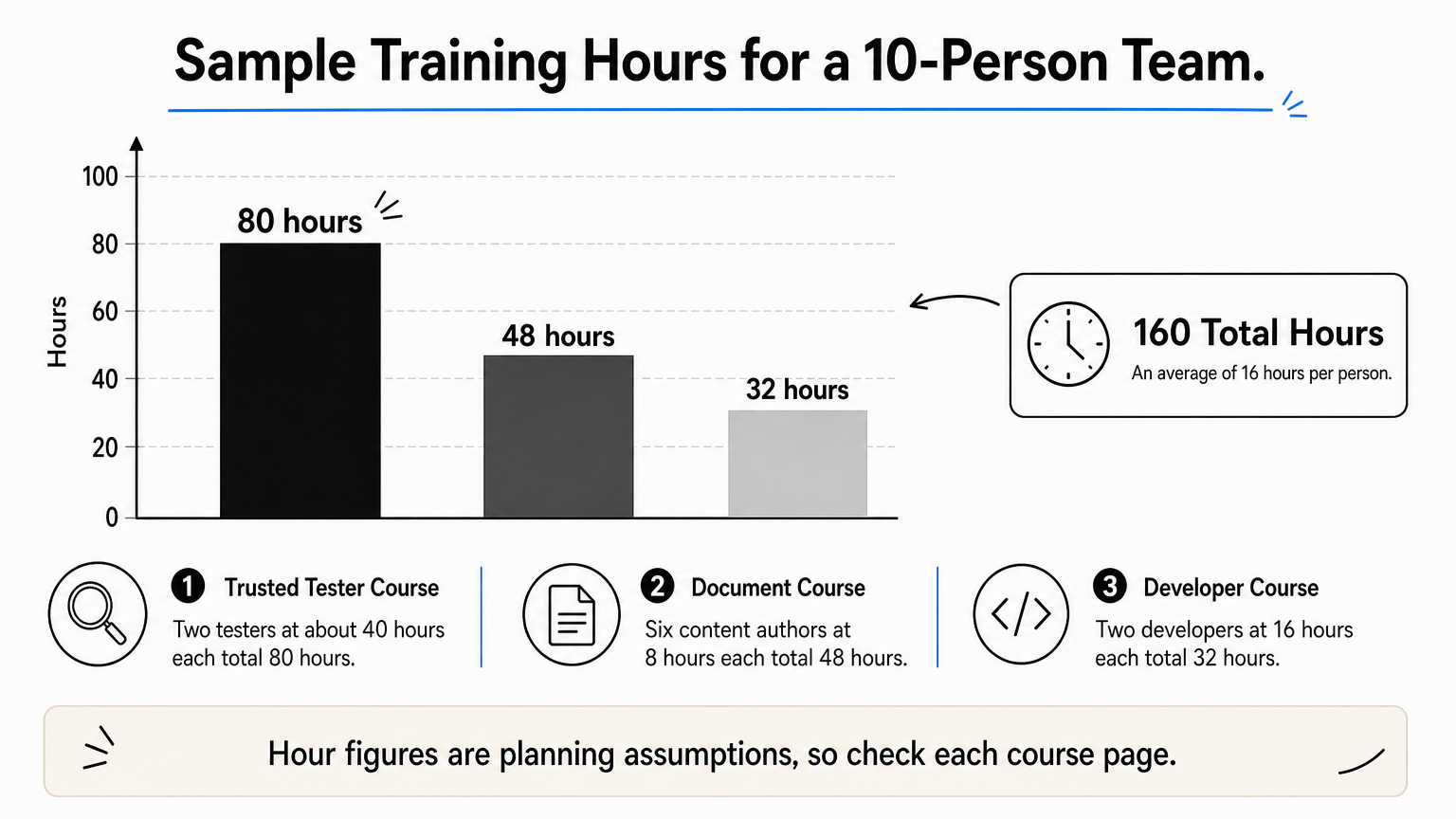
A sample plan for a 10-person team
Say you lead a web team of 10. Send 2 testers through Trusted Tester at about 40 hours each, which is 80 hours. Send 6 content authors through a document course, assuming 8 hours each, which is 48 hours. Send 2 developers through a developer course, assuming 16 hours each, which is 32 hours. The total is 160 hours, or an average of 16 hours per person. Those hour figures are planning assumptions, so replace them with the numbers on each course page.
Red flags
Online compliance training is legitimate when it is current, practical, and honest about its credential. Watch for these warning signs:
- No mention of the current WCAG version or the Revised 508 Standards
- No hands-on practice or testing exercise
- Claims of an "official 508 certificate" that no agency recognizes
- Content that has not been updated in years
A legitimate course tells you what it teaches, which standard it uses, and what you receive at the end.
Where to start with 508 training
Start with the free federal programs, match each person’s course to their role, and pay only when live teaching, team tracking, or remediation help saves you more time than it costs. Testers belong in Trusted Tester, authors in a document course, and developers in a technical course. Everyone else benefits from an awareness layer.
If you need to assign that training to hundreds of people and prove completion, a learning platform does the tracking for you. You can book an Axis LMS admin demo to see how courses are assigned, tracked, and reported.
