You’ve outgrown your spreadsheet-and-webinar approach to training, and off-the-shelf tools keep forcing you to bend your process to fit their limits. That’s usually the moment custom LMS software development comes up in a vendor call or a budget meeting, and you’re left wondering if it’s actually worth the investment or just an expensive detour.
Here’s the short answer: custom LMS software means building or heavily tailoring a learning platform around your exact workflows, branding, integrations, and compliance rules, instead of adapting your training program to a rigid template. It costs more upfront than a subscription tool, takes longer to launch, and requires real technical planning, but it pays off when your training needs are complex or your existing systems (HR, CRM, e-commerce) need to talk to your LMS without workarounds.
In this article, you’ll get a clear picture of what the development process actually looks like, what it typically costs, and how to tell whether you need a fully custom build or a highly configurable platform like Axis LMS that gives you most of the same flexibility without starting from scratch.
Why custom LMS software development matters
Training isn’t a side project anymore. It’s tied directly to revenue when you sell courses, to risk when compliance deadlines slip, and to retention when new hires quit because onboarding felt clunky. Off-the-shelf platforms are built to serve thousands of customers at once, which means every feature is a compromise designed to satisfy the average buyer, not you. When your workflows, your branding rules, or your reporting requirements fall outside that average, you start paying in wasted staff hours, workaround plugins, and frustrated learners long before you ever calculate a licensing fee.
A rigid LMS doesn’t just limit your features, it quietly reshapes how your whole training program runs.
When off-the-shelf platforms hit their limits
Generic systems tend to fail in the same predictable spots. You need a specific certification renewal cycle for regulated staff, and the platform only offers a generic "expiration date" field. You need your LMS to pull employee records automatically from BambooHR or Salesforce, and the vendor tells you that’s an enterprise add-on you can’t afford. You need the training portal to look and feel like your own product, not a rebranded vendor tool, and you’re stuck with a logo swap and a color picker. None of these are dealbreakers on their own, but stacked together they turn your training team into full-time system babysitters instead of people building better courses.

The real cost of forcing a fit
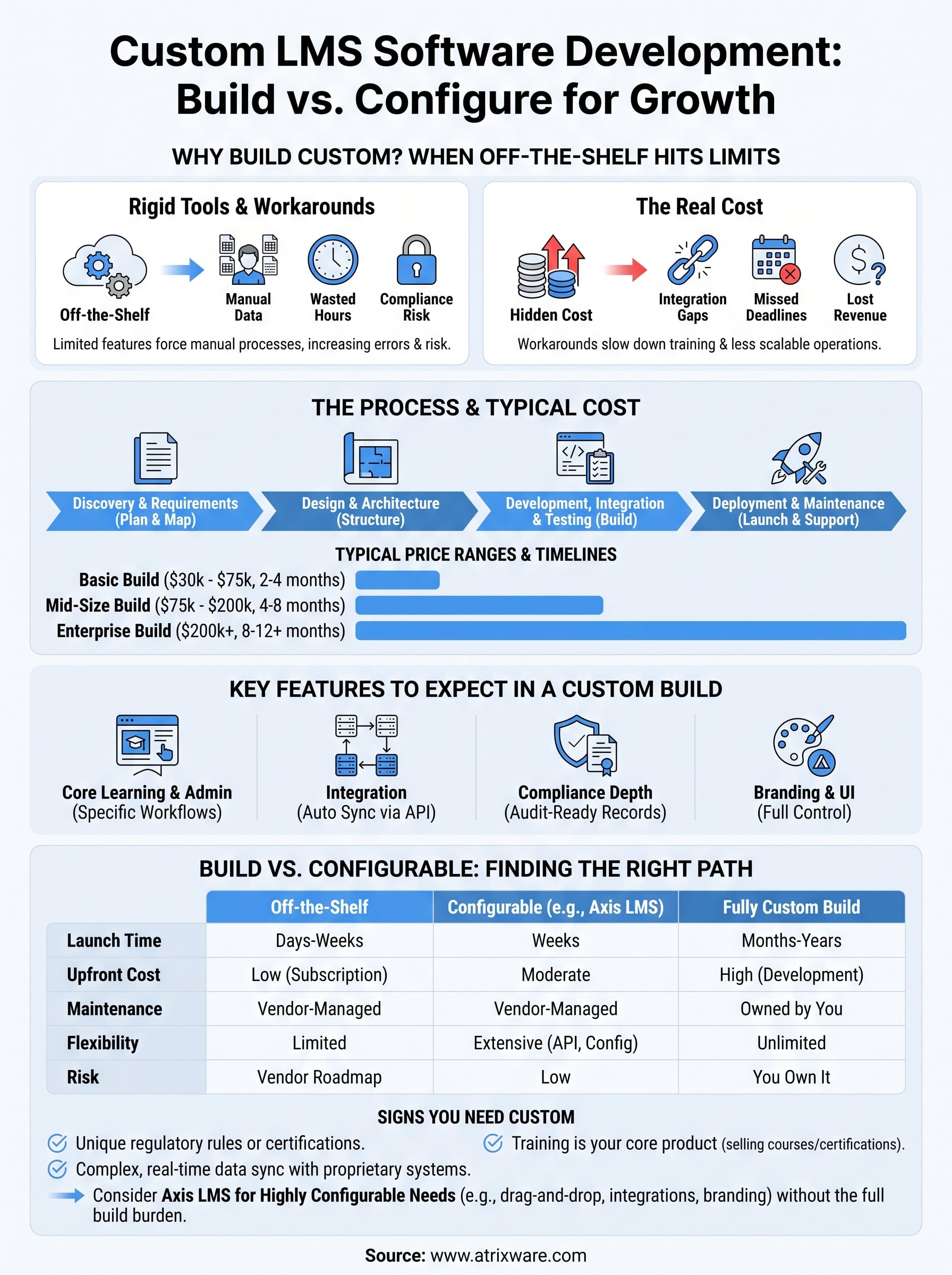
Organizations often underestimate what it costs to keep bending their process around a tool that wasn’t built for them. Manual data entry between HR systems and the LMS introduces errors and burns hours every week. Compliance teams build spreadsheets on the side to track what the platform can’t, which defeats the purpose of having an LMS built for regulated training as your system of record in the first place. Sales teams selling training content hit a wall when the built-in e-commerce options can’t handle bulk seat licensing or tiered pricing. Each of these workarounds seems minor in isolation, but they add up to a slower, riskier, less scalable training operation.
| Limitation in a rigid LMS | Typical workaround | Hidden cost |
|---|---|---|
| No native compliance/re-certification tracking | Manual spreadsheets, calendar reminders | Audit risk, staff time |
| Limited HR/CRM sync | Manual user uploads | Data errors, delayed access |
| Basic branding controls | External landing pages | Inconsistent learner experience |
| Rigid e-commerce rules | Third-party checkout tools | Lost revenue, integration gaps |
Why flexibility becomes a growth issue, not just a convenience
As your organization scales, so does the mismatch between what a generic platform offers and what your business actually needs. A company running employee onboarding today might be training channel partners, certifying customers, or selling courses externally within a year or two. Custom LMS software development matters because it lets the platform grow alongside those new use cases instead of forcing you to bolt on unrelated tools or migrate to a new system every time your needs shift. That’s a real advantage for HR managers, compliance officers, and sales enablement teams who all pull from the same training data but need it presented and reported differently.
The payoff isn’t abstract either. Companies that invest in tailoring their LMS to their actual workflows typically see fewer support tickets, faster onboarding cycles, and cleaner compliance audits because the system was designed to track exactly what regulators or internal auditors ask for. It’s worth noting that the U.S. Department of Labor and industry regulators increasingly expect documented, auditable training records, which is a strong argument for a platform built to your compliance framework rather than one that treats it as an afterthought. That’s the underlying reason this conversation keeps coming up in budget meetings: it’s rarely about wanting more features for their own sake, it’s about removing friction that’s already costing you time and money.
How custom LMS software development works
Building a custom LMS isn’t a single event, it’s a structured project that moves through discovery, design, development, and testing before anyone logs in to take a course. Understanding this sequence helps you budget realistically and spot where delays usually creep in. Most vendors and in-house teams follow a version of the same five-stage process, even if the terminology changes from one proposal to the next, and the same implementation best practices apply either way.
A custom LMS is only as good as the requirements gathered before a single line of code gets written.
Discovery and requirements gathering
Every serious build starts here, and skipping it is the single biggest reason custom projects run over budget. Your team maps out who needs access, what compliance rules apply, which systems (HR, CRM, e-commerce) need to sync data, and what reporting your auditors or executives actually expect to see. This stage typically produces a requirements document, a rough architecture plan, and a cost estimate you can hold the vendor to later.
Design and architecture planning
Once requirements are locked, the technical team designs the database structure, user roles, and integration points before touching the interface. This is where decisions get made about SSO providers like Okta or Azure, API endpoints for real-time data sync, and how the system will scale as your user count grows. Skipping architecture planning to save time almost always costs more later in rework.
Development, integration, and testing
Development happens in phases, usually starting with core course delivery and user management before layering in integrations and reporting tools. A typical build sequence looks like this:
- Core LMS functionality: course delivery, user accounts, basic reporting
- Branding and UI customization to match your organization’s look and feel
- Integrations with HR, CRM, or SSO systems via API or webhook
- Compliance and certification tracking modules
- E-commerce functionality, if you’re selling training externally
- Quality assurance testing across devices, browsers, and user roles
Each phase gets tested before the next begins, since integration bugs are far cheaper to fix early than after launch.
Deployment and ongoing maintenance
Launch isn’t the finish line. Someone has to patch security vulnerabilities, update integrations when partner APIs change, and add features as your training program grows, which is really a question of ongoing success after launch. This is exactly why platforms like Axis LMS exist as a middle path: you get the deep configuration and integration options that a custom build offers, without owning the maintenance burden of a fully bespoke system. That distinction matters more than most buyers realize until they’re six months into supporting custom code with no in-house developer to call.
Key features to expect in a custom-built LMS
When you commission a custom-built LMS, you’re not just buying course delivery, you’re specifying exactly which capabilities matter for your organization and skipping the ones that don’t. That specificity is the whole point. A well-scoped build typically groups must-have corporate LMS capabilities into four categories: core learning tools, integration architecture, compliance tracking, and branding controls. Knowing what belongs in each category helps you write a requirements document that a developer can actually estimate against, instead of a vague wish list.
The value of a custom LMS isn’t the feature count, it’s how precisely each feature matches a workflow you already run.
Core learning and administration tools
Every build starts with the fundamentals: course creation, learner enrollment, progress tracking, and role-based access for admins, managers, and learners. Beyond that baseline, custom builds often add features off-the-shelf tools bundle poorly or not at all, such as virtual classroom scheduling, drag-and-drop course authoring, and automated notification triggers tied to specific learner actions. These aren’t exotic requests. They’re the kind of thing a training and development manager asks for after watching staff manually chase overdue learners for months.
Integration and data synchronization
Data flow is where custom development earns its cost. Instead of exporting spreadsheets between systems, a properly built LMS pulls and pushes data automatically through a REST API or webhooks, so it’s worth knowing what to look for in LMS integrations. Common integration targets include:
- HR platforms like ADP or BambooHR for automatic user provisioning
- CRM systems like Salesforce for customer training records
- SSO providers such as Okta, Azure, or Ping Identity for secure login
- E-commerce systems for seat licensing and bulk purchasing
Each connection removes a manual step someone on your team currently owns, which is usually where the return on investment shows up fastest.
Compliance, certification, and reporting depth
Regulated industries need more than a course completion checkbox. A custom LMS can track certification expiration dates, trigger renewal reminders automatically, and generate audit-ready reports formatted the way your compliance officer already presents them internally. For organizations bound by rules like GDPR or FDA 21 CFR Part 11, this level of tracking isn’t a nice-to-have, it’s the difference between passing an audit smoothly and scrambling to reconstruct records after the fact.
Branding and learner experience
Finally, a custom build gives you full control over how the platform looks and feels, down to navigation structure, color schemes, and domain names. Learners interacting with a portal that looks like your product, not a vendor’s, trust it more and disengage less. That trust translates directly into completion rates, which is ultimately what every feature on this list is meant to support.
Custom LMS vs customizable vs off-the-shelf platforms
Most buyers assume the choice is binary: build everything from scratch or accept a rigid, one-size-fits-all tool. In reality, there’s a middle tier that gets overlooked in almost every vendor comparison, and it’s often the smarter buy. Highly configurable platforms let you adjust workflows, branding, integrations, and reporting through settings and APIs rather than custom code, giving you most of the flexibility of a bespoke system without the build timeline or the maintenance burden that comes with owning source code.
The real question isn’t custom versus off-the-shelf, it’s how much configuration you actually need before writing new code makes sense.
Comparing the three approaches
Seeing the tradeoffs side by side makes the decision easier than reading another feature list, especially if you compare platforms against a structured requirements guide. Here’s how the three paths typically stack up across the factors that matter most to HR managers, compliance officers, and IT teams evaluating a training platform:

| Factor | Off-the-shelf | Configurable (e.g., Axis LMS) | Fully custom build |
|---|---|---|---|
| Time to launch | Days to weeks | Weeks | Months to a year+ |
| Upfront cost | Low (subscription) | Moderate | High (development fees) |
| Ongoing maintenance | Vendor-managed | Vendor-managed | Owned by you or a contractor |
| Branding depth | Limited | Extensive | Unlimited |
| Integration flexibility | Fixed set | API/webhook plus 5,000+ integrations | Whatever you build |
| Compliance customization | Basic fields | Configurable workflows | Fully bespoke |
| Risk if provider changes course | Locked into vendor roadmap | Low, since core stays configurable | You own all risk and reward |
Where each option makes sense
Off-the-shelf tools work fine when your training program is simple: one type of course, one audience, no regulatory pressure, and no need to sync with HR or CRM systems. Fully custom builds make sense when your requirements are genuinely unusual, such as a proprietary certification process tied to physical equipment or a training model no existing platform anticipates. Somewhere between those two extremes sits the option most growing organizations actually need.
Specifically, a platform like Axis LMS gives you drag-and-drop course building, deep branding controls, SSO support, and a REST API with thousands of pre-built integrations, all without the months-long build cycle or the risk of maintaining custom code with no in-house developer. That combination covers the vast majority of use cases people assume require a from-scratch build, which is worth testing against your own requirements list before you commit budget to a fully custom project.
What custom LMS development typically costes
Budgeting for custom LMS software development is where most projects stall, because the range you’ll hear from vendors is genuinely wide. A simple internal training tool with basic reporting can run tens of thousands of dollars, while a fully bespoke platform with deep HR integrations, compliance workflows, and custom e-commerce can climb well past six figures before you factor in the ongoing costs of implementing an LMS. The variance isn’t vendors being cagey, it’s that project scope and integration complexity swing the final number more than anything else.
The price tag on a custom LMS isn’t set by features on a wish list, it’s set by how many systems that LMS has to talk to.
What drives the price
Several factors push the estimate up or down before a developer writes a single line of code. Understanding these ahead of your first vendor call keeps you from getting blindsided by a quote that’s double what you expected.
- Number of integrations: syncing with HR, CRM, and SSO systems each adds development and testing time
- Compliance depth: certification tracking, re-certification workflows, and audit-ready reporting take longer to build than a basic completion checkbox
- Branding and UI complexity: a fully custom interface costs more than adjusting an existing template
- E-commerce needs: seat licensing, tiered pricing, and bulk purchasing require custom checkout logic
- Developer location and experience: agencies in the US typically charge more per hour than offshore teams, though quality and communication often track with that difference
Typical price ranges by project size
Most proposals fall into one of three tiers, and knowing which tier your requirements fit helps you sanity-check a quote before signing anything.
| Project type | Typical cost range | Timeline |
|---|---|---|
| Basic internal LMS, minimal integrations | $30,000 – $75,000 | 2 – 4 months |
| Mid-size build with HR/CRM sync and compliance tracking | $75,000 – $200,000 | 4 – 8 months |
| Enterprise-grade custom platform with e-commerce and full SSO | $200,000+ | 8 – 12+ months |
Costs beyond the initial build
Ongoing expenses catch a lot of buyers off guard, since the number in the initial proposal only covers the build itself. Hosting, security patching, API updates when partner systems change their endpoints, and feature additions as your program grows all land on you or a contractor you retain after launch. That’s the tradeoff worth weighing against a configurable platform like Axis LMS, where those maintenance costs are already built into your Axis LMS subscription plan instead of billed hourly every time something breaks.
Signs your organization needs a custom LMS
Not every training program needs a bespoke build, and pretending otherwise wastes money you could spend elsewhere. But certain patterns show up again and again in organizations that eventually commission custom LMS software, and recognizing them early saves you months of forcing a generic tool to do something it was never designed for.
If your compliance team keeps a shadow spreadsheet next to your LMS, that’s already your answer.
Clear indicators it’s time to build
Check your situation against this list. If you’re nodding at three or more, a fully custom build deserves a serious look instead of another workaround:
- Regulatory requirements are unique enough that no existing platform tracks your specific certification cycles, renewal rules, or audit formats out of the box
- Data synchronization with HR, CRM, or proprietary internal systems requires more than a standard API connection, such as real-time bidirectional sync with a legacy database
- Your business model depends on training itself, meaning you’re selling courses or certifications as a core product, not just supporting internal staff
- Physical or equipment-based certification processes need to integrate with hardware, sensors, or proprietary testing systems no vendor anticipates
- Multiple business units need radically different workflows, branding, and reporting from the same underlying platform
- You’ve already outgrown two or three vendors and keep hitting the same integration or compliance wall each time
Organizations juggling channel partner training, customer certification, and internal onboarding simultaneously tend to hit this threshold faster than a single-audience company ever will, simply because each audience pulls the platform in a different direction.
When configurable platforms still win
Here’s the honest counterpoint: most of the signs above describe edge cases, not the average training program. If your real problem is limited branding, clunky HR sync, or basic compliance tracking, a highly configurable platform solves that without the twelve-month build cycle. Test your requirements against what a system like Axis LMS already supports before assuming you need custom code, because the gap between "configurable" and "custom" has narrowed considerably over the past few years.
In practice, the deciding factor usually isn’t feature count at all, it’s whether your workflow is genuinely unprecedented or just underserved by the tools you’ve tried so far. Genuinely unprecedented workflows justify a custom build. Underserved workflows almost always have a configurable answer waiting, and finding it first can save you six figures and a year of development risk you didn’t need to take on.
Finding the right path for your training platform
Building a bespoke system makes sense when your workflows are genuinely unprecedented: proprietary certification processes, unusual regulatory demands, or a training program that’s your actual product. Custom LMS software development gives you full control in those cases, but it also means owning the build timeline, the maintenance burden, and every bug that shows up after launch.
For most organizations, though, the real problem is narrower than it looks. Limited branding, clunky HR sync, or basic compliance tracking rarely require a year-long build when a configurable platform already covers that ground. Testing your requirements against what’s already available saves you six figures and months of risk you didn’t need to take on.
Not sure which category you fall into? Take our quick LMS readiness assessment to see exactly where your organization stands before you commit budget to either path.
