Picking a learning management system for corporate training is harder than it looks. You’ve got dozens of vendors promising the same buzzwords, but your actual needs are specific: onboarding new hires faster, keeping compliance records audit-ready, or rolling out product training to a distributed sales team. A bad choice means low completion rates, frustrated admins, and reports nobody trusts.
This list answers a direct question: which corporate training platforms actually deliver in 2026, and for whom. We looked at course-building tools, reporting depth, integration options with systems like Salesforce and ADP, and how each platform handles compliance tracking and re-certifications, since those factors separate a system that gets used from one that gets abandoned after month two.
Below you’ll find 10 options, including Axis LMS from Atrixware, broken down by strengths, pricing approach, and ideal use case. Whether you’re comparing the best lms software for business with a few hundred employees or evaluating the best lms systems for business at enterprise scale, you’ll see exactly where each platform fits before you commit to a demo or a contract.
1. What is a corporate LMS and why it matters
A corporate LMS is software that lets a company deliver, track, and manage training for employees, customers, or partners from one central platform. Instead of emailing PDFs, tracking spreadsheets of who finished what, or running the same live session five times for five departments, you upload a course once and the system handles enrollment, delivery, testing, and reporting automatically. Most platforms support both self-paced e-learning and live virtual classrooms, so you can mix a compliance module with a scheduled Zoom-style workshop inside the same catalog.
Businesses turn to an LMS for reasons that go beyond convenience. Onboarding programs get new hires productive faster because every step, from paperwork to product training, is sequenced and tracked, which is why onboarding training best practices for new hires start with the system itself. Compliance teams need an audit-ready compliance training platform that proves who completed mandatory training and when, which matters under regulations like GDPR or FDA 21 CFR Part 11. Sales and channel teams need a way to certify partners on new products without flying trainers around the country. And some organizations use their LMS to sell training courses online, turning internal content into a revenue stream through built-in e-commerce.
The right LMS turns training from a scattered obligation into a measurable, repeatable business process.
Without a dedicated system, training data lives in silos: a training log here, a certificate folder there, a spreadsheet nobody trusts. That gap creates real risk. An auditor asks for proof of annual safety training and you’re digging through email threads. A manager wants to know why a region’s onboarding completion rate lags and there’s no report to pull. A corporate LMS closes that gap by centralizing records, automating reminders, and generating reports on demand instead of on request.
Different platforms solve this problem in different ways, and that’s exactly why comparison shopping against a list of must-have corporate LMS capabilities matters. Some, like Docebo or Cornerstone, lean into large enterprise workflows and AI-driven content recommendations. Others, like Axis LMS, focus on giving mid-market and growing businesses enterprise-grade features (branding, compliance tracking, deep integrations) without enterprise-level complexity or price. Knowing what
2. Axis LMS by Atrixware
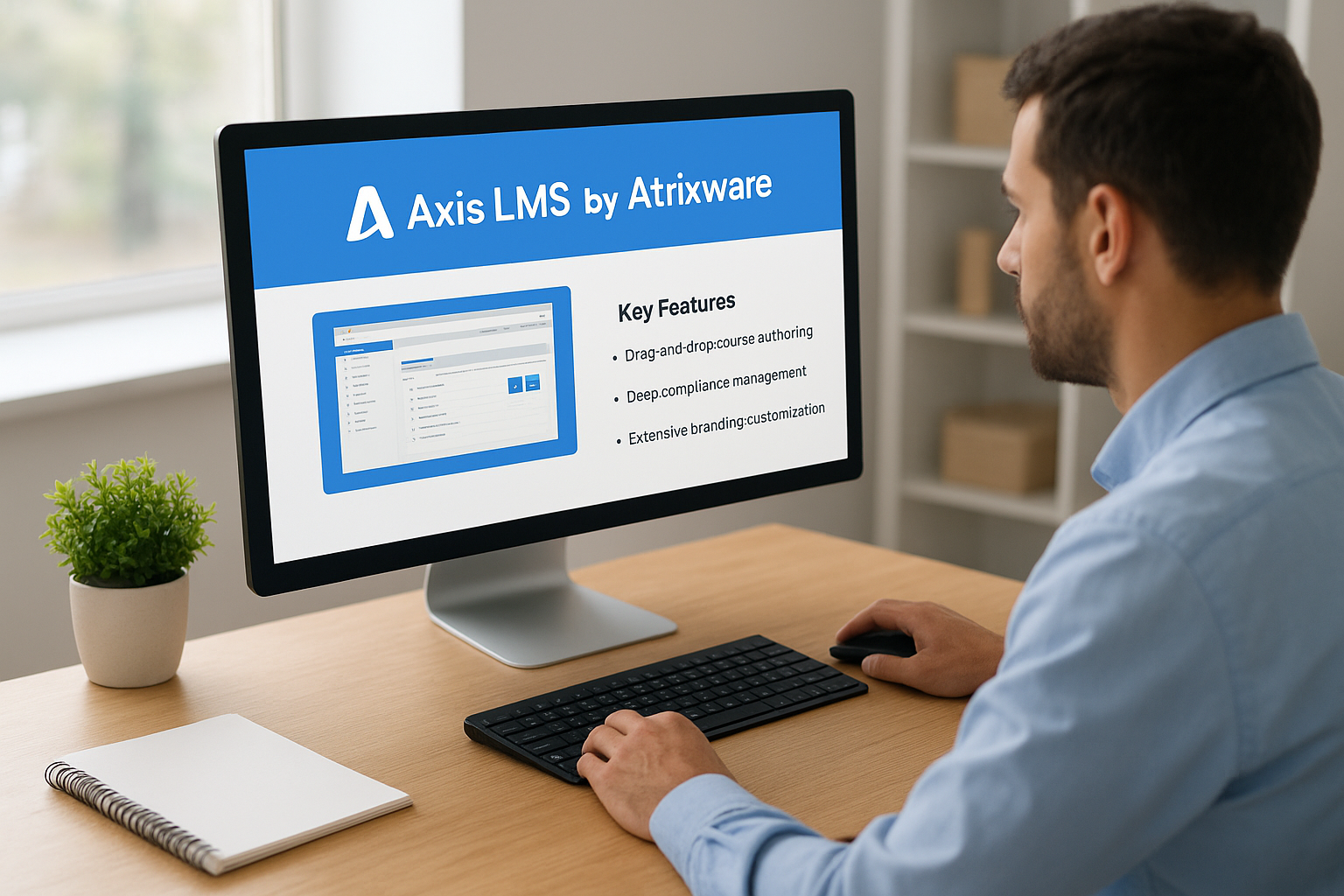
Axis LMS is Atrixware’s flagship platform, built for organizations that want enterprise-grade training tools without an enterprise-grade learning curve. Administrators get a drag-and-drop course builder, automated communication workflows, and reporting that runs on-demand or on a schedule, so you’re not chasing down completion data manually. The interface stays clean for learners too, which keeps adoption rates high compared to clunkier legacy systems.
A corporate LMS only pays off if your team actually uses it, and Axis LMS is built around that reality.
Key features
- Drag-and-drop course authoring with support for SCORM, virtual classrooms, and blended learning, so you can build online courses without extra software
- Deep compliance management for GDPR, FDA 21 CFR Part 11 electronic records, CEUs, and re-certification tracking
- Extensive branding customization and white-labeling for corporate training so the portal matches your organization, not the vendor’s
- Integration builder connecting to over 5,000 systems, plus native links to Salesforce, ADP, BambooHR, and Zoho
- REST API, webhooks, and SAML SSO through Okta, Azure, and Ping Identity
- Built-in e-commerce for selling courses or seat licenses to external customers
Best for
Organizations that need serious compliance tracking, branding control, and integration depth but don’t want the price tag or implementation timeline of a big enterprise suite. That covers mid-market companies scaling their training programs and larger enterprises that value flexibility over rigid, one-size-fits-all workflows.
Pricing
Axis LMS pricing is quote-based and scales with active users and hosting needs. Atrixware offers a free trial and demo so you can test course building and reporting before signing anything.
3. Docebo
Docebo built its reputation on AI-powered learning for large, complex organizations, an area where AI tools inside an LMS have moved quickly. The platform uses machine learning to tag content automatically, recommend courses to learners based on role and behavior, and surface skill gaps before they become performance problems. Its Learning Impact dashboard ties training completion to measurable business outcomes, which resonates with L&D teams under pressure to prove ROI to executives.
When your training program needs to prove its value in a boardroom, AI-driven reporting becomes the deciding factor.
Key features
- Content curation engine that pulls in external resources and auto-tags internal courses
- AI-based recommendations for personalized learning paths
- Docebo Shape for turning existing documents and slides into interactive courses
- Social and collaborative learning tools, including forums and coaching
- Extensive integration marketplace covering Salesforce, Microsoft Teams, and major HRIS platforms
Best for
Enterprise organizations with dedicated L&D departments that want AI-driven personalization and are prepared to invest time in configuration. Docebo suits companies training thousands of employees across multiple business units, especially where leadership wants hard data connecting training to performance metrics rather than just completion percentages.
Pricing
Docebo doesn’t publish flat pricing. Costs are quote-based, tied to active user counts, and typically land in enterprise territory once you add modules like Shape or advanced analytics. Smaller teams often find the platform more capable, and more expensive, than what a straightforward compliance or onboarding program actually requires.
4. TalentLMS
TalentLMS built its name on simplicity, and that reputation still holds. The platform strips away unnecessary configuration so a training manager with no technical background can build a course, assign it, and pull a completion report in an afternoon. Gamification is baked in from the start, with points, badges, and leaderboards that keep learners engaged without extra setup work, much like a gamified learning management system for small teams. That combination makes it one of the more approachable best corporate lms software picks for teams that don’t have a dedicated IT resource babysitting the platform.

Simplicity isn’t a compromise when it gets more employees to actually finish their training.
Key features
- Fast course creation with templates, quizzes, and a built-in content library
- Gamification elements including badges, points, and levels to boost engagement
- Multi-portal support for training different audiences (employees, partners, customers) from one account
- Mobile app for iOS and Android with offline access
- Basic integrations with Zoom, Slack, Salesforce, and Zapier
Best for
Small to mid-sized businesses that want a straightforward, low-maintenance LMS up and running within days. It also suits companies training multiple distinct audiences, since the multi-portal setup avoids the cost of separate licenses per group.
Pricing
TalentLMS uses tiered, per-active-user pricing starting around $69 a month for small teams, scaling up through higher tiers for advanced reporting and custom domains. A free plan exists for very small teams, and a free trial covers the paid tiers.
5. Absorb LMS
Absorb LMS positions itself as an enterprise platform with a genuinely modern interface, something a lot of older systems in this space still struggle with. The AI-powered admin assistant can generate course descriptions, quiz questions, and even translate content, cutting down the hours instructors spend on setup. Reporting goes deep too, with a dedicated analytics module (Absorb Analyze) that lets you build custom dashboards instead of settling for canned reports.
A polished interface matters less than whether admins can build a course without opening a support ticket, and Absorb clears that bar.
Key features
- AI content assistant for generating descriptions, assessments, and translations
- Absorb Analyze for custom, drillable reporting dashboards
- E-commerce module for selling courses and managing seat licenses
- Mobile app with offline course access
- Marketplace of pre-built integrations plus open API access
Best for
Mid-market and enterprise companies that want a modern, visually clean platform and are willing to pay for it. Absorb fits organizations selling training externally as well as internal L&D teams that need flexible, custom reporting rather than fixed templates.
Pricing
Absorb doesn’t list public pricing. Quotes depend on active user counts and which modules you add, and most reviews place it in the mid-to-upper range among corporate training platforms. Demos are available, but expect a sales conversation before you see a real number, which can slow down evaluation for teams that want quick, transparent comparisons.
6. LearnUpon
LearnUpon built its platform around a specific problem: training multiple audiences, employees, customers, and partners, without juggling three separate systems, the same case an LMS for customer and partner education has to cover. Its Portals feature lets you spin up distinct, branded training environments from one back end, so a customer education program and internal onboarding can run side by side without bleeding into each other. Support tends to score high in reviews too, with a dedicated customer success manager assigned to most accounts rather than a generic ticket queue, which matters once you’re mid-rollout and something breaks.
Training three different audiences shouldn’t require three different logins, and that’s the exact gap LearnUpon fills.
Key features
- Multi-portal architecture for separating employee, partner, and customer training under one account
- Built-in e-commerce for selling courses to external learners
- Automated enrollment rules based on user groups, dates, or completion of prerequisite courses
- Reporting suite with scheduled exports and completion certificates
- Integrations with Salesforce, Zoom, and major HR systems via API
Best for
Companies juggling more than one training audience, particularly those running both internal employee training and external customer or partner education programs. LearnUpon also suits organizations that value hands-on implementation support over a fully self-serve setup.
Pricing
LearnUpon prices in tiers based on active users and number of portals, with plans generally starting in the low four figures monthly for small-to-mid deployments. Custom quotes apply once you add extra portals or advanced reporting, and a demo is required before you get exact numbers, since public pricing isn’t listed on the site.
7. iSpring Learn
iSpring Learn pairs a straightforward LMS with iSpring Suite, a PowerPoint-based authoring tool that subject matter experts already know how to use. That combination matters if your training content comes from people who’ve never touched one of the usual e-learning authoring tools for corporate trainers: a sales manager building a product update or an HR lead assembling a policy refresher can create a course without learning new software. The platform also handles offline learning well, syncing progress once a device reconnects, which suits field teams and retail staff who aren’t always at a desk.
When course creators already know PowerPoint, adoption stops being a training problem and starts being a five-minute task.
Key features
- PowerPoint-based authoring through iSpring Suite, including quizzes, dialogue simulations, and screen recordings
- Offline mobile access with automatic progress syncing once learners reconnect
- Built-in content library of templates, characters, and icons for faster course design
- Automated reporting on completions, quiz scores, and certification expiry dates
- Support for SCORM, xAPI, and blended learning with instructor-led sessions
Best for
Companies with subject matter experts who need to build courses themselves rather than routing everything through instructional designers. iSpring Learn also fits organizations with field-based or offline workforces, like retail chains or manufacturing sites, where reliable mobile access matters more than deep AI features.
Pricing
iSpring Learn is priced per active user with published tiers rather than a pure quote-based model, which is unusual among corporate training platforms at this level. Plans typically start in the low four figures annually for smaller teams, with iSpring Suite authoring sold as an add-on or bundled package depending on the tier.
8. 360Learning
360Learning takes a different angle than most platforms on this list: instead of top-down course assignment, it’s built around collaborative learning, where employees who know the work create and refine the training. Subject matter experts co-author courses, peers upvote or flag content that’s outdated, and the system uses that feedback loop to keep courses relevant without a training team rewriting everything every quarter. This model suits fast-moving companies with a knowledge-sharing culture, where the person who knows the process best isn’t the same person who builds slide decks for a living.

Training stays accurate longest when the people doing the work also help maintain it.
Key features
- Collaborative course creation with built-in peer review and feedback loops
- Skills-based learning paths that adapt based on role and performance gaps
- Academies feature for organizing courses by team, department, or topic
- Built-in authoring tool for quick course assembly without external software
- Integrations with Slack, Salesforce, and major HRIS platforms via API
Best for
Companies with a strong internal culture of knowledge sharing, particularly fast-growing tech companies and organizations where frontline employees or managers are expected to help build training content. It’s a weaker fit for organizations that need heavy top-down compliance workflows, since the collaborative model prioritizes speed and relevance over rigid approval chains.
Pricing
360Learning uses quote-based pricing tied to active user counts, with most reviews placing costs in the mid-range among corporate training platforms. A free trial is available, but detailed pricing requires a sales conversation rather than a public rate card.
9. Adobe Learning Manager
Adobe Learning Manager (formerly Adobe Captivate Prime) plugs into the Adobe ecosystem in a way no other platform on this list can match. If your organization already uses Adobe Creative Cloud or Experience Manager, that integration alone can justify a look, since course creators can pull assets straight from Photoshop or Illustrator without exporting and re-uploading files. Beyond that connection, the platform leans hard into social learning, with fluidic player interfaces that recommend content based on peer activity and skill gaps rather than a fixed catalog structure.
An LMS that already lives inside your creative and marketing stack removes a whole layer of file-shuffling most teams don’t even notice they’re doing.
Key features
- Native integration with Adobe Creative Cloud and Experience Manager assets
- Fluidic player with AI-driven content recommendations based on peer behavior
- Gamification through badges, points, and leaderboards
- Support for extended enterprise training, including partners and customers
- Detailed reporting with custom dashboards and scheduled exports
Best for
Companies already invested in the Adobe product suite, particularly marketing-heavy or creative organizations that produce a lot of internal video and design content. It also suits enterprises running extended training programs for external partners alongside internal employee development.
Pricing
Adobe Learning Manager is quote-based, priced by active users and modules like extended enterprise access. Expect enterprise-level costs once you factor in Adobe’s broader licensing structure, and a sales conversation before you see real numbers, since Adobe doesn’t publish a public rate card for this product.
10. SAP Litmos
SAP Litmos built its name on a massive, ready-made course library and a simple, no-friction interface that gets non-technical admins up and running fast. The platform ships with thousands of off-the-shelf courses covering compliance topics like sexual harassment prevention and workplace safety, which saves smaller training teams from building that content from scratch, though you still need a plan for delivering trackable compliance training. Its tight connection to the broader SAP ecosystem, including SuccessFactors, also makes it a natural pick for companies already running SAP for HR or finance, since user data and reporting can flow between systems without a custom integration project.

A prebuilt compliance library beats a blank course editor when your training team is small and the deadline is next month.
Key features
- Extensive prebuilt course library covering compliance, safety, and soft skills
- Native integration with SAP SuccessFactors and other SAP HR modules
- Virtual classroom tools for scheduling and tracking live sessions
- Built-in video assessments for role-play or skills demonstrations
- Reporting dashboards with scheduled exports and certification tracking
Best for
Mid-market to enterprise companies that already run SAP for HR or ERP and want their training data connected to that system without extra engineering work. It also suits organizations that need broad compliance coverage fast and would rather license existing content than build a course library from zero.
Pricing
SAP Litmos pricing is quote-based, tied to active user counts and whether you license the prebuilt course library as an add-on. Most quotes fall in the mid-range among corporate training platforms, and a demo is required to see actual numbers.
11. Cornerstone
Cornerstone (Cornerstone OnDemand) sits at the enterprise end of this list, built for organizations that treat learning as one piece of a much bigger talent management puzzle. The platform bundles LMS functionality with performance reviews, succession planning, and skills management, so training data connects directly to career development and workforce planning rather than living in its own silo. That scope makes Cornerstone less of a standalone corporate LMS and more of a talent suite where learning is a core module.
Cornerstone works best when training decisions need to connect directly to promotion, performance, and succession data.
Key features
- Unified talent management suite covering learning, performance, and succession planning
- AI-powered skills graph that maps employee capabilities against role requirements
- Extended enterprise support for training partners, franchisees, and customers
- Content marketplace with thousands of third-party courses from providers like LinkedIn Learning
- Advanced reporting connecting completion data to performance and retention metrics
Best for
Large enterprises with dedicated HR and L&D departments that want learning tied directly to broader talent decisions, not managed as a separate system. Cornerstone suits organizations already running complex succession planning or skills initiatives, where a standalone best lms systems for business pick would leave a data gap between training and career progression.
Pricing
Cornerstone is quote-based, priced by active users and which modules you license beyond core learning. Because it’s positioned as a full talent suite, costs typically run higher than dedicated LMS competitors, and smaller companies often find far more platform than their training program actually needs.
12. How to choose the right corporate LMS
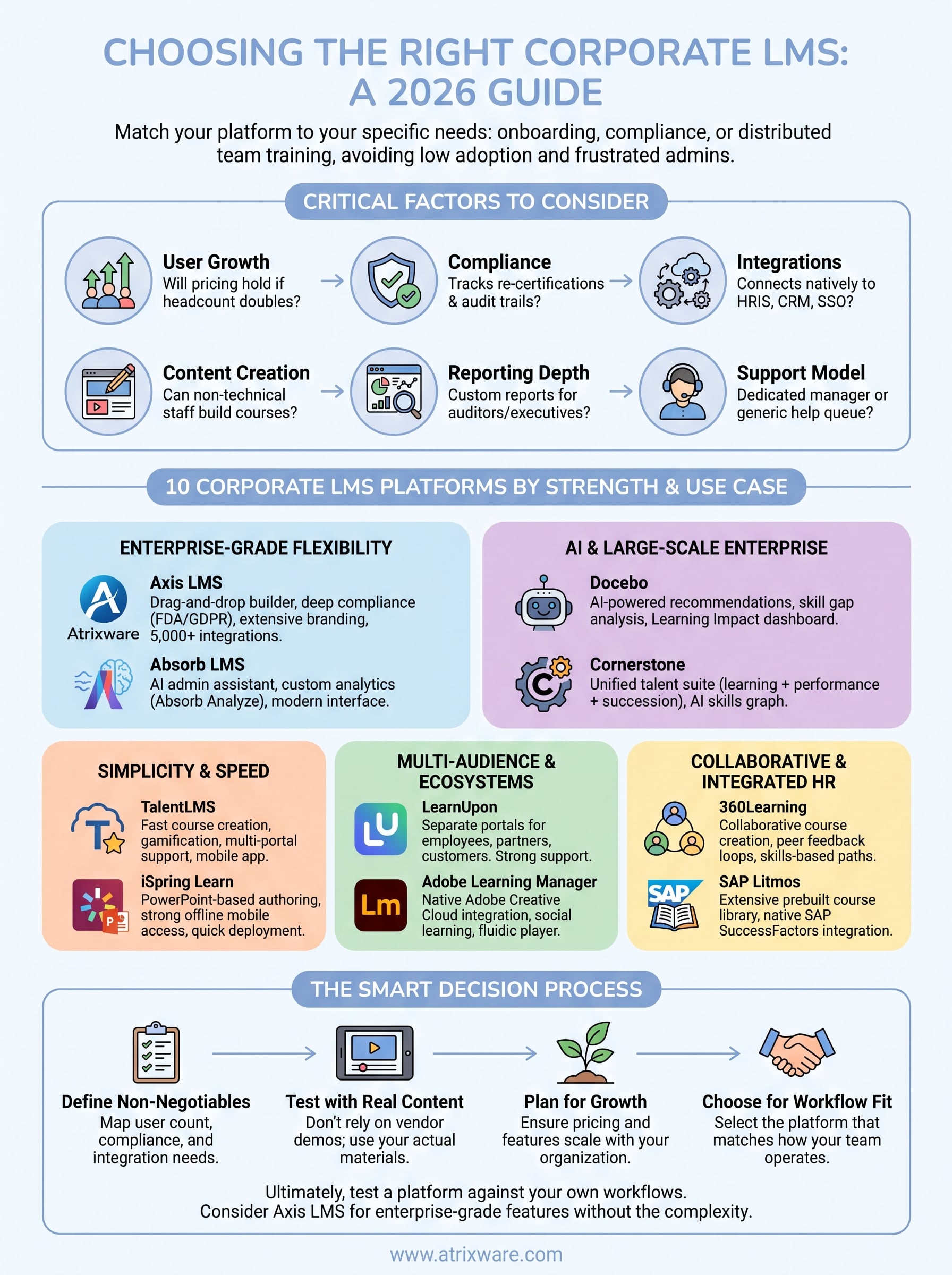
Comparing feature lists only gets you so far. The real test of a learning management system for corporate training is whether it fits how your organization actually operates, day one and three years from now. Before you request a demo, map out your non-negotiables with a step-by-step method for comparing LMS platforms, so vendors are answering your questions instead of steering the conversation toward their strengths.
The best LMS isn’t the one with the longest feature list, it’s the one that matches how your team already works.
Start with these questions:
- User count and growth: Will pricing hold up if headcount doubles in two years?
- Compliance requirements: Does the platform track re-certifications, expiry dates, and audit trails out of the box?
- Integration needs: Does it connect natively to your HRIS, CRM, and SSO provider, or does that require custom development?
- Content creation: Can non-technical staff build courses, or does every update route through IT?
- Reporting depth: Can managers pull the exact reports auditors or executives ask for, without a support ticket?
- Support model: Is there a dedicated account manager, or a generic help queue?
Organizations evaluating best lms software for business options often skip the growth question and regret it within a year, once seat costs balloon or a compliance gap surfaces during an audit. Talk to procurement early too, since quote-based pricing (the norm across most of this list) can hide costs until you’re deep into a sales cycle. Finally, insist on a working trial with your own content loaded, not just a scripted vendor demo. A platform that looks great with sample courses can behave very differently once your actual compliance modules and branding are in play.
13. Frequently asked questions about corporate LMS platforms
How much does a corporate LMS typically cost?
Most vendors on this list use quote-based pricing tied to active user counts, so the real cost of implementing an LMS depends on your headcount and which modules you need. Budget-friendly options like TalentLMS start around $69 a month for small teams, while enterprise suites like Cornerstone or Docebo often run into five figures annually once you add compliance or analytics modules. Always ask what happens to per-user rates if your team doubles, since that’s where surprise costs tend to hide.
Can a small business justify an LMS, or is this only for enterprises?
Small businesses benefit just as much as large ones, often more, since manual tracking breaks down fast once you’re managing more than a handful of employees. A learning management system for corporate training doesn’t require enterprise budgets; an LMS for small business like Axis LMS or TalentLMS scales down cleanly for smaller teams without stripping out compliance or reporting features.
An LMS pays for itself the moment it saves one HR manager from rebuilding a training log by hand.
How long does implementation usually take?
Timelines vary widely. Simple platforms can go live within days, while systems tied to talent suites or heavy SSO configuration can take several weeks. Ask vendors for a realistic rollout timeline before signing, not just a sales estimate, and plan your own LMS launch and adoption strategy alongside it.
Do these platforms support mobile and offline learning?
Most do, though depth varies. iSpring Learn and TalentLMS handle offline sync particularly well, which matters for field or retail teams without constant connectivity.
Choosing the best LMS for your team
Ten platforms, ten different strengths, but the decision still comes down to fit. A learning management system for corporate training only earns its cost if it matches your compliance load, your headcount growth, and the technical skill of the people building courses day to day. Enterprise suites like Cornerstone and Docebo bring depth that most mid-market teams never touch, while lighter tools like TalentLMS trade power for speed. Somewhere between those extremes sits the real question: do you need enterprise-grade compliance and branding without an enterprise-grade price tag and rollout?
Ultimately, the smartest move is testing a platform against your own content and workflows before committing. If you’re still weighing options, try the Axis LMS admin demo and see how it handles your compliance tracking, branding, and reporting needs firsthand.
