The fastest way to complete your municipal employee online training program is to confirm which course your state or town requires, register on the official government site with your work email, finish the course, and hand the completion certificate to your clerk or HR office. Most courses take about an hour. Many carry a deadline measured in weeks from your start date.
The hard part is rarely the course itself. It is working out which course applies to you. Requirements differ by state, by job title, and sometimes by town. Search results fill up with look-alike vendors, old PDFs, and answer-key pages, and none of them tell you whether your employer will accept the certificate you earn.
This guide covers the job in four steps, for employees who need to enroll and for the HR staff who track them. Atrixware builds Axis LMS, a learning management system used for compliance training, so the last step explains when a spreadsheet stops working and a system starts to make sense.
Who must take required municipal employee training
Required municipal training is any course that a state law, a state agency, or your own employer says you must finish, usually on a deadline. The most common topic is ethics and conflict of interest. Other topics include harassment prevention, cybersecurity awareness, and open meetings and public records.
What these programs usually cover
Which topics apply depends on your state. A state ethics agency typically sets the ethics course. A labor or civil rights agency may set harassment training. Your insurance pool or municipal league may require safety or cyber courses to keep your coverage.
Most programs share a format. They are self-paced, run in a web browser, and end with a short quiz and a certificate. Some states set a deadline such as 30 days after hire, with a refresher every two years. Treat those numbers as an example of the pattern, not as the rule in your state.
Who is covered
Coverage is often wider than full-time staff. Many programs also reach elected officials, appointed board and commission members, and part-time or seasonal employees. Some states also cover volunteers and contractors who serve in a public role.
Do not assume you are exempt because you are part-time or unpaid. Ask your clerk or HR office whether your position is covered before the deadline passes.
If your title carries any public duty, assume the requirement applies until your clerk tells you otherwise in writing.
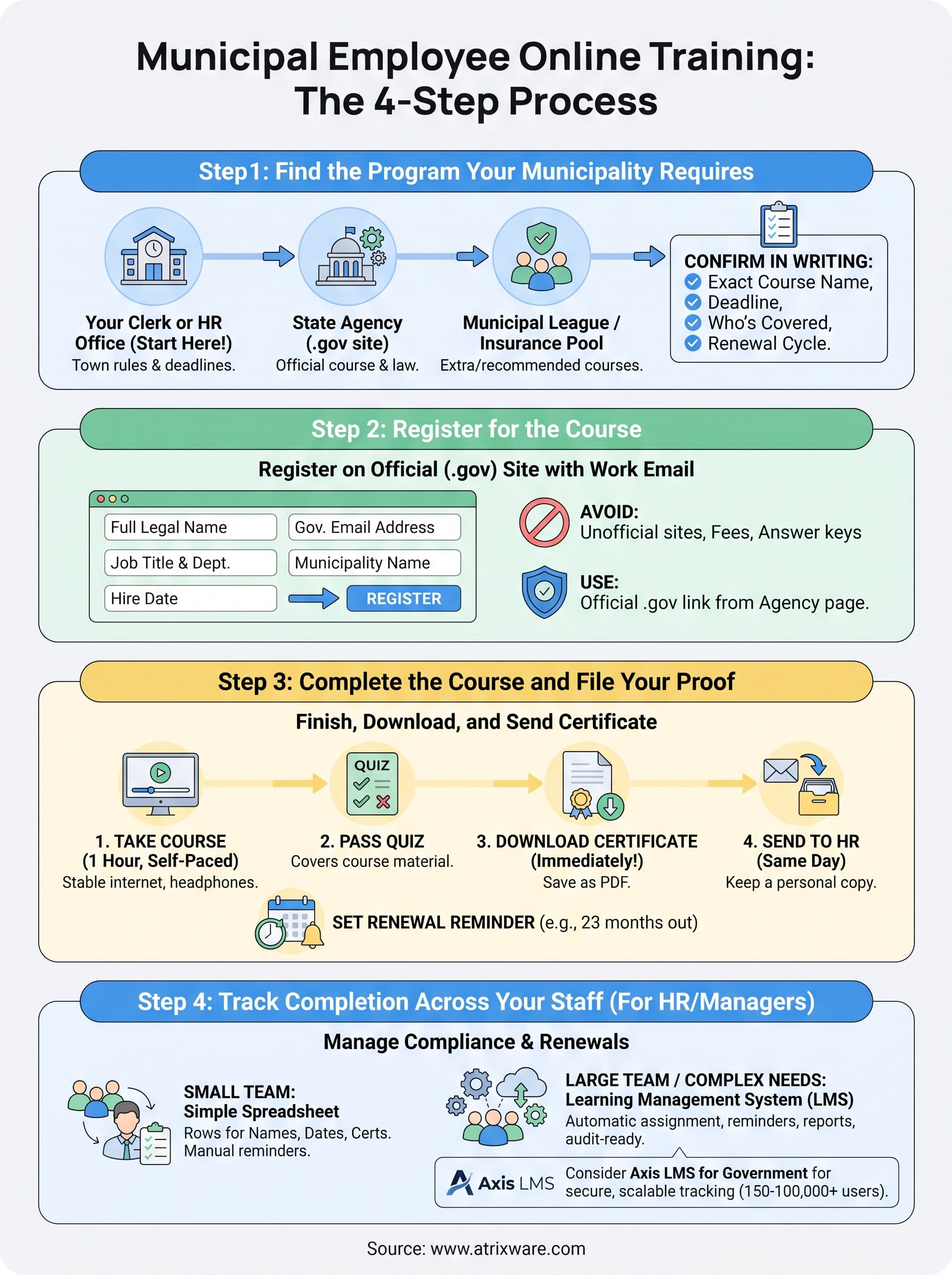
Step 1. Find the program your municipality requires
Start with the people who set the requirement, not with a search engine. Three sources can settle it in a day, and each one answers a different part of the question.

Ask these three sources
| Source | What it tells you | How to reach it |
|---|---|---|
| Your clerk or HR office | Which courses your town mandates and your deadline | Email or ask in person |
| The state agency for your topic | The official course and the legal requirement | The agency’s .gov website |
| Your state municipal league or insurance pool | Extra or recommended courses, and who may register | Member portal or training page |
Ask your clerk first. They know your town’s rules and often hold the registration link. Then confirm on the state agency’s site. For ethics, that is usually the state ethics commission or board.
Confirm scope and deadline
Before you register, write down four facts: the exact course name, who must take it, the deadline, and how often it repeats. Get them in writing, even as a one-line email reply.
This matters because states often run separate programs for municipal employees and for state or county employees. Taking the wrong one costs you an hour and may not count.
Confirm the course name and deadline in writing before you spend an hour on the wrong program.
Step 2. Register for the course
Register through the official state or municipal site, using your government email address and your full legal name. That keeps your certificate tied to your record and avoids rejected proof later.
Check that the site is official
Official state courses are hosted on a .gov site or linked directly from one. Some states do use an outside vendor to run the course, so a non-.gov address is not automatically a problem. The test is simple: the link should appear on the agency’s own .gov page.
Be careful with sites that charge a fee for a course your state offers for free. State-mandated courses for public employees are often free to the employee, but confirm that with your clerk before you pay anyone. Also skip pages offering answer keys. Your name goes on the certificate, and the quiz usually covers the same material you will need on the job.
Gather what registration asks for
Have these ready before you start:
- Your full legal name, as it appears in HR records
- Your official government email address
- Your job title and department
- Your municipality’s name
- Your hire or appointment date, since it sets your deadline
Some leagues and associations limit certain courses to elected officials, even when other courses are open to any municipal employee. If a course refuses your registration, ask your clerk which version applies to your role.
Register with your work email and legal name, because your certificate is only as useful as the record it attaches to.
Step 3. Complete the course and file your proof
Set aside an uninterrupted hour, finish the course in one sitting if you can, and save the certificate the moment it appears. Most courses need a stable internet connection, and many have audio, so keep headphones handy.
Take the course
- Open the course from the official link and sign in.
- Check whether the course lets you pause and resume. Many do, but confirm before you start.
- Work through each module without skipping, since modules often unlock in order.
- Take the quiz. Courses usually show which topics you missed.
- Download the certificate as a PDF and save a second copy outside your work computer.

Keep proof and set the renewal reminder
Send the certificate to your clerk or HR office the same day, and keep your own copy. If your employer asks for proof during an audit or after a complaint, you want it in one place.
Then put the renewal date in your calendar. If your state uses a two-year cycle, set a reminder for 23 months out, not 24. Most late completions happen because nobody remembered the refresher.
Download the certificate before you close the browser tab, then send it to HR the same day.
Step 4. Track completion across your staff
If you manage training for a town, this step is yours. A shared spreadsheet can track completions for a small team. A system becomes worth it when deadlines overlap, new hires arrive constantly, or an auditor asks for records by department.
Start with a simple tracker
Build one row per person. Include the course name, hire date, due date, completion date, certificate location, and next renewal date. Add a column for reminders sent.
The workload grows faster than you expect. Take a city with 400 employees on a two-year cycle. About 200 people come due each year, roughly 17 per month, before you count new hires. At one hour per course, that is about 200 staff hours a year, plus the chasing.
When to use an LMS
A learning management system helps once the chasing becomes a job of its own. Look for automatic assignment by role, reminders before deadlines, reports by department, and tracking of re-certifications. Also ask whether it can log completions of outside courses, since a state may host its own required course.
Axis LMS for Government is built for public organizations that need strict security. It comes standard with Gold Secure LMS Hosting for Government and can train 150 to 100,000 employees and contractors. It offers three plan tiers:
| Plan | Included users | Tech support | Free onboarding sessions |
|---|---|---|---|
| GOV Core | 150 to 3,000 | Standard | 1 |
| GOV Pro | 250 to 4,000 | Enhanced | 2 |
| GOV Enterprise | 500 to 100,000 | Priority | 5 |
The 400-employee city above falls within the GOV Core user range. A larger county with several departments might look at Pro or Enterprise for the added administrator roles and workflows.
Move off the spreadsheet when chasing deadlines costs more hours than the course itself.
Finish the course, then make it easy to prove
The process is the same in every state: confirm the required course with your clerk, register on the official site, complete it, and file the certificate before the deadline. Then set the renewal reminder so the next cycle does not surprise you.
If you run training for a municipality, the same steps scale up with better tracking. To see how a system handles assignments, reminders, and reports for public employees, try the Axis LMS admin demo and test it against your own training calendar.
