Picking a platform for online employee training shouldn’t take weeks of demos and back-and-forth with vendors. Yet that’s exactly what happens when you don’t know which features actually matter versus which ones are just sales pitches. Whether you’re onboarding new hires, rolling out compliance training, or trying to standardize skills across a growing team, the wrong employee training platform means wasted budget and frustrated employees who abandon courses halfway through.
This guide cuts through the noise. We’ve evaluated the top employee training courses online based on ease of use, reporting depth, integration options, and pricing, so you can match a platform to your actual training needs instead of guessing. Some platforms shine for compliance-heavy industries, others for fast-growing sales teams, and a few work well for companies that also want to sell training externally.
Below you’ll find 8 platforms worth your attention in 2026, including where each online employee training vendor fits best and what to watch out for before you sign a contract. By the end, you’ll have a shortlist ready for your next internal review.
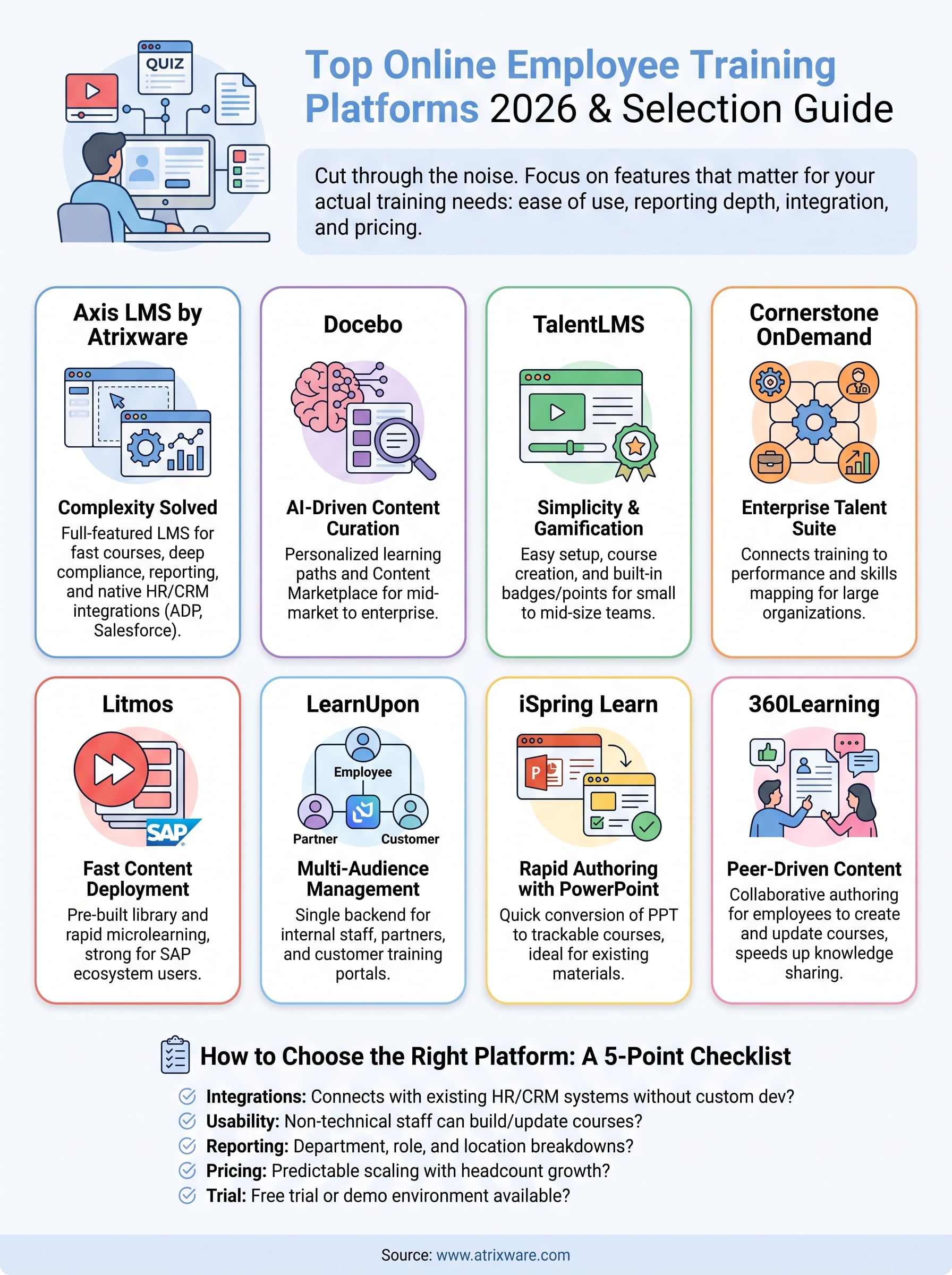
1. Axis LMS by Atrixware
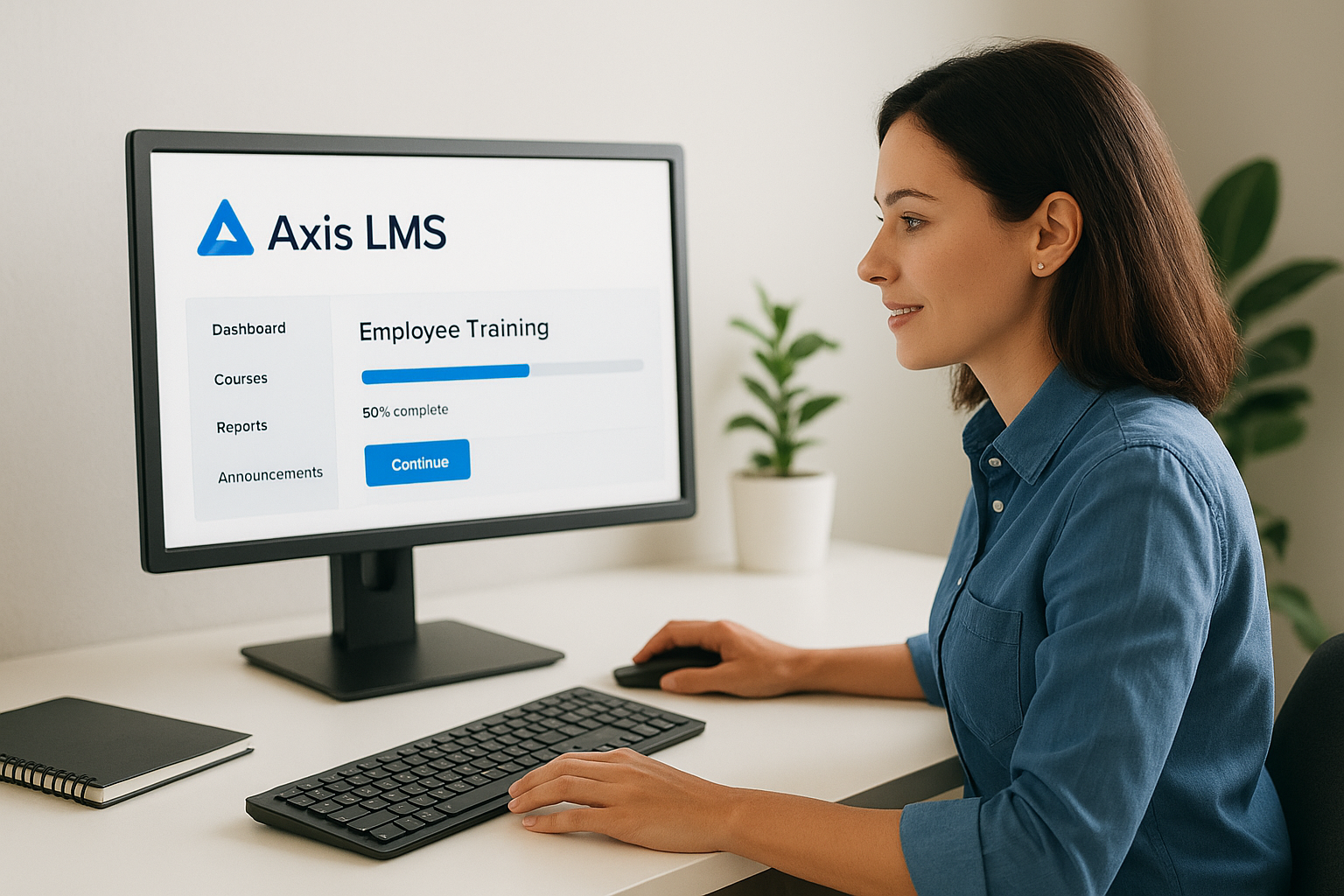
Axis LMS tops this list because it solves the problem most platforms create: complexity. Built by Atrixware, it’s a full-featured learning management system designed for organizations that need online employee training courses up and running in days, not months, while still supporting the deeper compliance and reporting needs that show up as a company scales.
How it works
Admins build online courses using a drag-and-drop course builder, mixing SCORM content, video, quizzes, and live virtual classroom sessions into a single learning path. The Axis LMS platform automates enrollment, sends reminders, and tracks completion in real time, so training managers aren’t chasing spreadsheets to figure out who finished what. Its reporting suite goes deeper than most competitors, letting you generate on-demand or scheduled reports on learner progress, course effectiveness, and compliance status by department, location, or job role. Integration is where Axis LMS separates itself: it connects natively with HR and CRM systems like ADP, Salesforce, BambooHR, and Zoho, supports SAML SSO through Okta, Azure, and Ping Identity, and offers a REST API with webhooks for teams that need custom workflows.
The platforms that win long-term aren’t the ones with the flashiest demo, they’re the ones your team still uses without complaint a year in.
Who it’s for
Axis LMS suits mid-size to large organizations running employee training programs online across HR, compliance, sales enablement, and channel partner training simultaneously. It’s a strong fit for regulated industries because of its built-in support for standards like GDPR and FDA 21 CFR Part 11, plus compliance training tools for tracking CEUs and recertifications. Companies that also want to sell training online benefit from its e-commerce functionality, which handles both individual purchases and B2B seat licensing without needing a separate storefront. If your organization needs one system to handle internal training and external revenue-generating courses, Axis LMS covers both without forcing you into two platforms.
Pricing
Atrixware doesn’t publish flat pricing because Axis LMS scales with user count and feature needs, from small teams to enterprise deployments. Instead, they offer a free trial and custom quotes based on your organization’s size and requirements. Expect a sales conversation focused on your actual use case rather than a one-size-fits-all price sheet, which tends to work better for organizations with unusual compliance or integration requirements.
2. Docebo
Docebo built its reputation on AI-driven content curation, and it remains one of the most recognizable names in online employee training courses. It targets mid-market and enterprise companies that want a system smart enough to recommend the right course to the right employee without an admin manually assigning everything.
How it works
Docebo’s platform uses machine learning to tag content and suggest personalized learning paths based on role, past activity, and skill gaps. Its Content Marketplace lets admins pull in ready-made courses instead of building everything from scratch, which speeds up launch for teams without instructional designers on staff. Reporting covers completion rates, skill development, and engagement trends, though customizing reports beyond the standard templates often requires more clicks than you’d expect.
A platform that recommends training well still needs to prove people finish what it recommends.
Who it’s for
Docebo fits companies already comfortable with AI-assisted learning tools and willing to invest time tuning the recommendation engine. It works best for organizations with large, varied content libraries where manual curation isn’t realistic, particularly in tech, retail, and franchise-heavy businesses. Smaller teams with straightforward training needs often find the AI layer adds complexity they don’t need.
Pricing
Docebo doesn’t list public pricing and requires a sales call for a quote. Costs scale with active users and selected modules, and most reviews put entry pricing well above budget-friendly LMS options, making it a harder sell for smaller organizations watching training spend closely.
3. TalentLMS
TalentLMS built its name on simplicity, and it’s often the platform smaller teams try first when searching for employee training courses online without a steep learning curve. It keeps setup light while still covering the basics most companies need: course creation, tracking, and gamification to keep learners engaged.
How it works
Courses go together through a straightforward editor that supports video, SCORM files, quizzes, and surveys, with templates that cut down build time for common training types like onboarding or safety compliance. Gamification features, badges, points, and leaderboards, are built in rather than bolted on, which helps with completion rates on optional courses, much like a gamified LMS helps small teams upskill affordably. Reporting covers the essentials: completion status, quiz scores, and time spent, though it lacks the department-level drill-down that larger organizations often need.
Gamification only works if the training underneath it is worth finishing.
Who it’s for
TalentLMS suits small to mid-size businesses running online training for employee groups that don’t require heavy compliance tracking or complex integrations. It’s a common choice for startups and growing teams that want a small business training platform live within a day, not one that needs a dedicated administrator to manage. Companies with multiple business units or strict regulatory reporting needs tend to outgrow it faster than expected.
Pricing
TalentLMS publishes tiered pricing based on active user count, starting around $89 per month for small teams and scaling up through Core, Grow, and Pro plans. A free plan exists for very small teams, capped at a handful of users and limited features, making it easy to test before committing.
4. Cornerstone OnDemand
Cornerstone OnDemand is built for large enterprises that need a full talent management suite, not just a place to host courses. It’s one of the oldest names in employee training programs online, and that maturity shows in both its depth of features and its enterprise-grade complexity.
How it works
Cornerstone combines learning management with performance reviews, succession planning, and skills tracking in one connected system, so training ties directly to strategic workforce development plans rather than sitting in isolation. Content delivery supports SCORM, video, and instructor-led sessions, and its skills-mapping engine flags gaps between an employee’s current abilities and what their role requires. Reporting is extensive, covering compliance status, skill progression, and workforce-wide trends, but the sheer number of settings means new admins need real onboarding time before they’re confident running it solo.
A platform that ties training to career growth keeps employees engaged longer than one that treats courses as a checkbox.
Who it’s for
Enterprises with dedicated learning and development teams, and a need to connect training to broader HR and talent strategy, get the most value here. Smaller companies without the staff to manage its configuration options often find it more platform than they need.
Pricing
Cornerstone requires a custom quote, and costs typically run higher than most competitors on this list, reflecting its enterprise focus and talent management add-ons.
5. Litmos
Litmos built its reputation inside the SAP ecosystem, and it remains a go-to pick for companies already running SAP SuccessFactors or other enterprise HR tools. It focuses on fast content deployment over deep customization, which appeals to sales and customer-facing teams that need training turned around quickly.
How it works
Content creation leans on a library of over 2,000 pre-built courses covering compliance, sales skills, and leadership topics, so admins can launch employee training courses online without building from scratch. Litmos also supports video-based microlearning, letting teams break content into short segments that fit into a busy workday instead of hour-long sessions nobody finishes. Its reporting dashboard tracks completion, quiz results, and certification status, with native SAP integration pulling employee data automatically instead of requiring manual uploads.
Fast deployment only pays off if the content library actually matches what your team needs to learn.
Who it’s for
Litmos suits mid-size to large organizations already invested in the SAP ecosystem, particularly sales teams and customer training programs that need content live within days. Companies without SAP infrastructure can still use it, but they lose some of the integration advantage that makes Litmos worth the switch for existing SAP customers, so it pays to know what to look for in LMS integrations first.
Pricing
Litmos doesn’t publish flat rates and requires a custom quote based on user count and modules selected. Expect pricing conversations to focus heavily on which bundle, sales enablement, compliance, or customer training, fits your primary use case.
6. LearnUpon
LearnUpon built its platform around the idea that training shouldn’t stop at employees, and it’s become a favorite for companies that need to manage internal staff, partners, and customers from one dashboard. That multi-audience approach makes it a practical pick for businesses juggling several online employee training programs at once without paying for three separate systems.

How it works
Portals sit at the center of LearnUpon’s design, letting admins create separate branded learning environments for employees, resellers, and customers while managing all of them from a single backend. Course building supports SCORM, video, and quizzes through a clean editor, and the platform automates enrollment rules based on group membership or role. Reporting covers completion, certification status, and engagement by portal, which helps when you need to prove compliance for staff separately from partner training results.
Managing three audiences from one login beats juggling three logins for one training team.
Who it’s for
Companies running employee training courses online alongside partner or customer education programs get the most value from LearnUpon’s portal structure. It suits mid-size organizations in franchising, software, and manufacturing where training extends beyond payroll into the broader partner network.
Pricing
LearnUpon prices by active user tiers rather than publishing a flat rate, and quotes typically start higher than budget LMS options once you add multiple portals. Annual contracts are standard, and discounts often depend on committing to a longer term upfront.
7. iSpring Learn
ISpring Learn built its name on speed of authoring, pairing its LMS with the widely used iSpring Suite PowerPoint-to-course converter. It appeals to companies that already have subject matter experts creating slides and just need a fast path to turning those into trackable online employee training courses without hiring instructional designers.
How it works
Courses come together fastest when built in iSpring Suite, then published straight into iSpring Learn with quizzes, branching scenarios, and voiceover already attached. The platform supports SCORM, video, and PDF uploads too, so teams aren’t locked into PowerPoint if they don’t want to be. Its rapid course authoring workflow is the real differentiator here, cutting the time between "we need training on this" and a live course to hours instead of weeks. Reporting covers completion, quiz scores, and time spent, with mobile access built in for offline viewing.
The fastest course builder in the world doesn’t matter if the finished course still bores your team.
Who it’s for
ISpring Learn suits small to mid-size businesses that already lean on PowerPoint for training materials and want a low-friction way to make that content trackable. Companies without SCORM expertise on staff benefit most, since the course authoring tool handles the technical packaging automatically.
Pricing
ISpring Learn prices per active user annually, with published tiers starting around $2.87 per user per month for larger teams, though smaller organizations pay a higher per-seat rate. A free trial is available before committing to a contract.
8. 360Learning
360Learning built its platform around peer-driven content, betting that employees learn faster from colleagues who’ve already solved a problem than from a corporate slide deck. It targets companies that want to scale online employee training without funneling every course through a small L&D team, letting subject matter experts across the business create and update content directly.
How it works
Collaborative authoring sits at the core here, with built-in tools for reviewing, commenting on, and upvoting courses before they go live, similar to how a team might edit a shared document. The platform’s peer-to-peer learning engine surfaces skill gaps by tracking quiz performance and completion patterns, then routes relevant content to employees automatically instead of waiting for a manager to assign it. Reporting tracks engagement, completion, and skill validation, giving L&D teams a clearer picture of which internally created courses actually move the needle.
Training built by the people doing the job often beats training built by people who used to do it.
Who it’s for
Fast-growing companies without a large dedicated training department benefit most, especially ones closing skills gaps where knowledge lives in the heads of experienced staff rather than in a course catalog. Teams building online employee training programs around onboarding, sales enablement, or product knowledge find the collaborative model speeds up content creation considerably.
Pricing
360Learning requires a custom quote based on user count and features, with no published flat-rate pricing. A free trial lets teams test the collaborative authoring workflow before committing to an annual contract.
9. How to choose the right training platform for your team
Narrowing eight strong options down to one starts with an honest look at your compliance requirements before you get distracted by feature lists. A platform that excels at gamified sales training won’t necessarily hold up when an auditor asks for a timestamped audit trail of who completed FDA-mandated training and when. Match the platform to your actual regulatory exposure first, then layer in the nice-to-haves.
Budget conversations should happen early too, since most vendors on this list hide pricing behind a sales call rather than a price sheet. Ask for a quote based on your real user count, not a padded enterprise estimate, and compare total cost of ownership across at least three vendors before signing anything.
The best online employee training vendor is the one your admins can run without calling support every week.
Use this quick checklist, alongside a fuller step-by-step guide to comparing LMS platforms, when weighing finalists:
- Does it integrate with your existing HR or CRM system without custom development?
- Can non-technical staff build and update courses without IT involvement?
- Does reporting break down by department, role, or location, not just company-wide totals?
- Does pricing scale predictably as your headcount grows?
- Is there a free trial or demo environment you can test with real content before committing?
Teams juggling internal, partner, and customer training should weight portal flexibility heavily. Organizations in regulated industries should weight compliance tracking and audit trails above almost everything else on the list.
Building a smarter training program
The right online employee training platform should disappear into your workflow, not become another system your team fights with daily. Whether you need deep compliance tracking, AI-driven recommendations, or a fast way to turn PowerPoint slides into trackable courses, the eight platforms above cover most scenarios you’ll run into as a training manager or HR lead. What matters most is matching the tool to your actual constraints: regulatory exposure, headcount growth, and how many hands touch course creation day to day.
Axis LMS earns its top spot because it doesn’t force you to choose between ease of use and enterprise-grade reporting, compliance, and integrations. If you’re still weighing options, find out where your organization stands in the LMS buying process and get a clearer picture of what to prioritize before you sign with any vendor.
