If you’re still tracking who finished onboarding in a spreadsheet or chasing down compliance certificates by email, you already know the problem. Employee online training replaces that chaos with a structured system that delivers, tracks, and proves learning happened, without pulling people into a conference room or flying them to a regional office.
At its core, employee online training is any structured learning program delivered through a digital platform rather than a live classroom. That includes self-paced courses, virtual instructor-led sessions, video modules, and quizzes, all managed through software that records who completed what and when. Well-built employee online training programs don’t just push content out, they automate reminders, route approvals, and generate reports your compliance officer can hand to an auditor without a scramble.
This article breaks down what employee online training actually looks like in practice: how the technology works behind the scenes, what separates strong online employee training courses from a pile of PDFs on a shared drive, and what features matter most whether you’re onboarding new hires, running annual compliance refreshers, or training a distributed sales team. By the end, you’ll know exactly what to look for before choosing a platform.
Why employee online training matters for your business
Traditional training drains money and time in ways most companies never fully calculate. Employee online training cuts travel costs, venue rentals, printed materials, and the lost productivity of pulling ten people off the floor for a half-day session. A 2023 IBM study found companies using digital learning platforms saw measurable gains in employee retention and performance compared to those relying on classroom-only models, and the pattern holds across industries because the math is simple: fewer logistics, more repetitions, faster rollout.
The real cost gap between classroom and digital training
Break down what a single in-person training day actually costs and the gap becomes obvious. You’re paying for trainer time, room rental, printed handouts, and every hour employees spend traveling instead of working. Online delivery eliminates most of that overhead while letting you train unlimited employees at the same fixed platform cost.
| Cost Factor | In-Person Training | Employee Online Training |
|---|---|---|
| Trainer/facilitator fees | Recurring per session | One-time content creation |
| Travel and lodging | Often required | None |
| Materials and printing | Per attendee | Digital, reusable |
| Scheduling flexibility | Fixed session times | Self-paced, 24/7 access |
| Scalability | Limited by room size | Unlimited learners |
Compliance risk drops when everything is tracked automatically
Regulated industries can’t afford gaps in training records. When an auditor asks for proof that every employee completed GDPR awareness training or FDA 21 CFR Part 11 certification, "I think everyone did it" isn’t an answer that holds up. Platforms built for online employee training courses log completion dates, quiz scores, and certification expirations automatically, then generate reports on demand instead of forcing your compliance team to reconstruct history from email threads.
A training program you can’t prove happened is, from a compliance standpoint, a training program that didn’t happen.
This matters even more once you factor in re-certification cycles. Continuing education requirements don’t pause because your HR team is busy, and a system that flags expiring certifications weeks in advance saves you from the scramble that happens when someone’s license lapses mid-project.
Scaling training without scaling your training department
Organizations expanding across states or countries hit a wall fast with in-person models. Sending a trainer to five regional offices burns budget and weeks of calendar time that a distributed sales team or seasonal workforce simply doesn’t have. Online delivery removes the geography problem entirely: a new hire in Denver and one in Manila can complete the same onboarding module on the same day, with identical content and identical tracking.
Growth also means constant turnover in what needs teaching. New product launches, updated safety procedures, and shifting regulations all require retraining, and rebuilding a classroom curriculum every quarter isn’t realistic for most training teams. Digital courses get updated once and redeployed instantly across the entire workforce, which keeps your employee online training programs current without draining your L&D budget on repeated redesign work.
Engagement and retention improve with the right format
Employees forget classroom lectures fast, often within days, because passive listening doesn’t stick. Structured digital courses that mix video, short quizzes, and scenario-based exercises push learners to actively engage with material rather than sit through it, and spaced repetition built into automated reminder sequences reinforces what they learned weeks after the initial session ended.
Better retention translates directly into fewer mistakes on the job, fewer repeated questions to managers, and stronger performance metrics tied to whatever the training covered, whether that’s a new sales process or a safety protocol. Companies that treat training as a one-time event see knowledge decay fast; companies that build ongoing digital reinforcement into their culture see the opposite. That difference alone justifies the investment for most HR and compliance leaders evaluating a switch.
Ultimately, the business case isn’t abstract. Reduced costs, defensible compliance records, faster scaling, and measurably better retention all point the same direction, and each of those outcomes depends on how the underlying system actually works, which is where the mechanics come in next.
How employee online training programs work
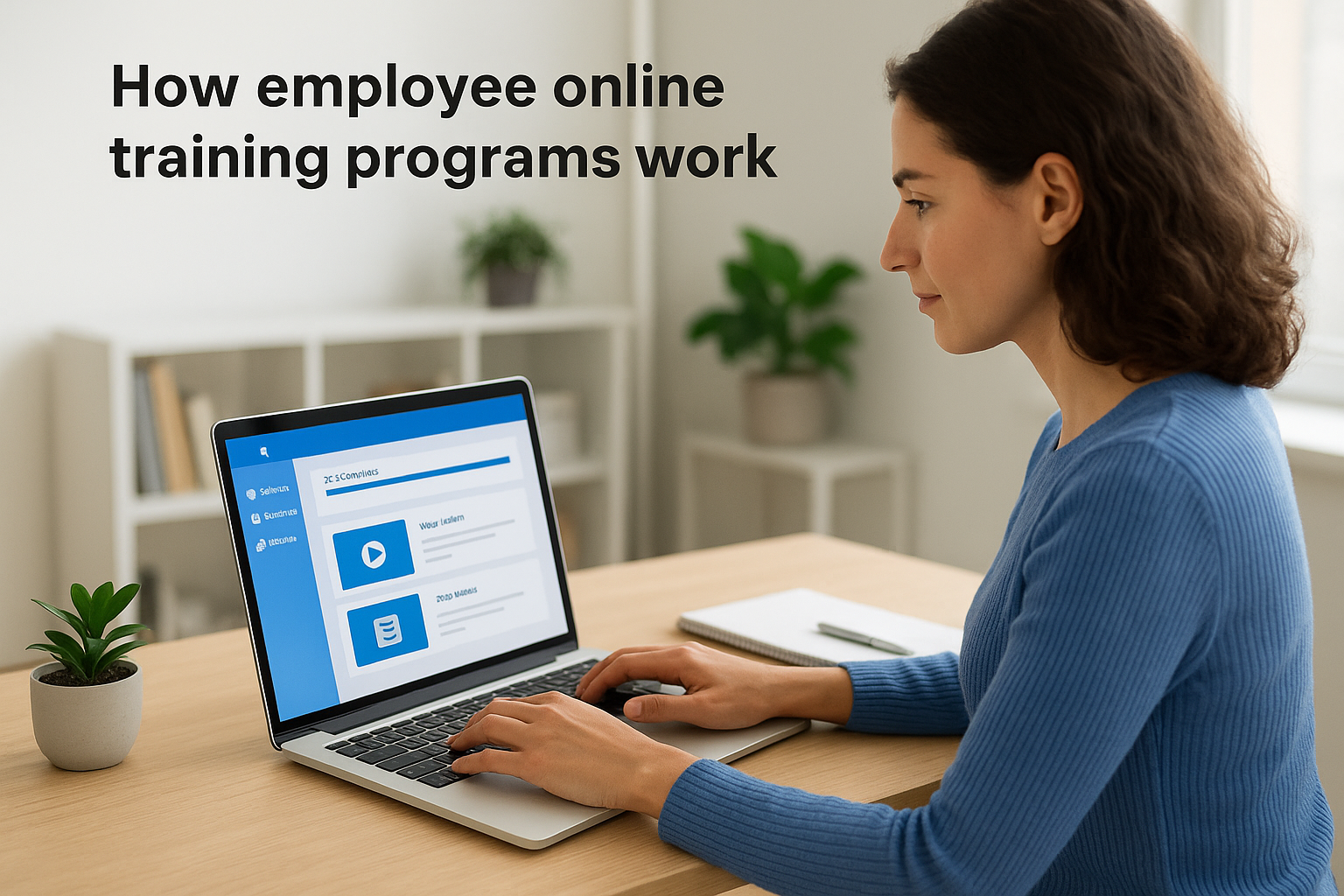
Underneath every polished course sits a Learning Management System (LMS), the software that hosts content, tracks progress, and enforces whatever rules your training program needs. Think of it as the engine room: learners never see most of what it does, but nothing runs without it. When you understand the pieces working together, evaluating a platform stops being guesswork.
The learner-facing side
Employees log into a portal, see assigned courses, and work through material at their own pace or on a schedule you set. Content shows up as video lessons, slide-based modules, downloadable PDFs, or live virtual classroom sessions scheduled through the platform. Quizzes and knowledge checks sit between modules to confirm understanding before someone moves forward, and a progress bar or dashboard shows exactly what’s left to finish.
If a learner can’t tell what they’ve completed and what’s still pending, the platform is already failing its main job.
Good design here matters more than most buyers expect. A confusing interface leads to support tickets and abandoned courses, while a clean one gets employees through required training without friction.
The administrative side
Behind the learner view, administrators build courses using drag-and-drop tools, assign them to specific users or groups, and set deadlines tied to onboarding dates, job roles, or compliance cycles. Automated rules do the heavy lifting: new hires get auto-enrolled in onboarding tracks the day they’re added to the system, managers get notified when a direct report falls behind, and reminder emails go out on a schedule without anyone manually sending them.
Reporting ties it all together. Administrators pull completion rates, quiz scores, and certification statuses on demand, or schedule reports to land in an inbox weekly without asking. That reporting layer is what turns online employee training courses from a content library into a system you can actually manage at scale.
Integration with the systems you already run
Most mid-size and large organizations don’t want training sitting in isolation. Modern platforms sync user data with HR systems like BambooHR or ADP and CRM tools like Salesforce, so new employees or customers get enrolled automatically instead of through manual data entry. Single sign-on through providers like Okta, Azure, or Ping Identity lets employees access training with the same credentials they use for everything else, which removes a login barrier that kills adoption faster than almost anything else.
A REST API and webhook support let developers build custom connections when the built-in integrations don’t cover a specific tool. For a company running thousands of integrations across HR, e-commerce, and email systems, that flexibility determines whether training data flows automatically or someone spends hours each month reconciling spreadsheets by hand.
The result, when all three layers work together, is a system where content delivery, progress tracking, and reporting happen with almost no manual intervention. That’s the operational backbone that makes the different course formats covered next actually usable at scale.
Types of employee online training courses
Not every training need fits the same format, and forcing everything into one course style is why so many employee online training programs stall out. Picking the right type for the content and the audience is what separates a course people actually finish from one they click through just to satisfy a checkbox.

Self-paced courses
Self-paced courses let employees work through material on their own schedule, which works well for onboarding, product knowledge, and general skills training that doesn’t require live interaction. Learners move through video lessons, slides, and quizzes whenever they have time, and the online employee training courses built this way tend to have the highest completion rates simply because nobody’s fighting a calendar conflict to finish them.
Virtual instructor-led training (VILT)
Virtual instructor-led sessions bring a live trainer into a scheduled online classroom, which suits topics that need real-time discussion, like leadership development or hands-on software walkthroughs. Attendance gets logged automatically, and recordings give anyone who missed the live session a way to catch up without losing tracking data.
Microlearning modules
Short, focused lessons under ten minutes each define microlearning, and they work best for reinforcing a single skill or updating employees on a policy change without requiring a full course rebuild. Sales teams and frontline staff respond especially well to this format because it fits into gaps between calls or shifts rather than demanding a dedicated block of time.
The best training format is the one your employees will actually finish, not the one that looks most sophisticated on paper.
Compliance and certification courses
Compliance training carries its own requirements: mandatory completion deadlines, quiz scores that prove comprehension, and certificates that expire on a fixed schedule. GDPR awareness, FDA 21 CFR Part 11 training, and workplace safety courses all fall here, and the system needs to track re-certification dates automatically rather than relying on someone remembering a renewal deadline months out.
Blended and hybrid programs
Blended programs combine self-paced digital content with occasional live sessions, which gives you the scale of online delivery alongside the depth of real discussion when a topic genuinely needs it. Many onboarding tracks use this model: employees complete foundational modules independently, then join a live Q&A or role-play session to apply what they learned.
| Course Type | Best For | Typical Length |
|---|---|---|
| Self-paced | Onboarding, product knowledge | 30-90 minutes |
| Virtual instructor-led | Leadership, complex software | 1-3 hours |
| Microlearning | Policy updates, skill reinforcement | 3-10 minutes |
| Compliance/certification | Regulatory training | Varies by requirement |
| Blended/hybrid | Onboarding, skills application | Multi-week |
Mixing these formats inside a single training plan, rather than defaulting to one, is usually what separates programs employees respect from ones they tolerate. Choosing which combination fits your organization comes down to the platform underneath them, which is exactly what to evaluate next.
How to choose the right online training platform
Picking a platform is where most training initiatives succeed or fail before a single course gets built. The wrong choice locks you into rigid course formats, weak reporting, or integrations that don’t cover the HR and CRM tools you already run, and you won’t discover the gaps until you’re months into rollout. Before signing a contract, walk through what your organization actually needs against what the vendor demos in a sales call, because those two things don’t always match.
Match features to your actual use case
Course-building tools matter, but only if they fit how your team creates content. A drag-and-drop interface lets non-technical trainers build modules without waiting on IT, which speeds up how fast new employee online training programs get off the ground. Check whether the platform supports the mix of formats your organization needs (self-paced modules, live virtual classrooms, quizzes with scored results) rather than just one of them, since defaulting to a single format was already covered as a common failure point above.
Verify compliance and reporting depth
If regulatory training is part of your plan, ask specific questions before you buy, not after. Vague answers here are a warning sign, not a technicality.
- Does the platform automatically track certification expiration dates and trigger renewal reminders?
- Can administrators generate audit-ready reports on demand, without exporting and reformatting raw data?
- Does it support the specific frameworks you need, such as GDPR or FDA 21 CFR Part 11?
- Are quiz scores and completion timestamps stored in a format that holds up if an auditor requests records years later?
A platform that can’t produce a clean compliance report on demand isn’t ready for regulated training, no matter how polished its course builder looks.
Test the integration and security fit
Check whether the platform connects natively to your HR and CRM systems, whether that’s ADP, BambooHR, Salesforce, or Zoho, so new hires and customers get enrolled automatically instead of through manual uploads. Confirm SSO support for whatever identity provider your company already uses, since forcing employees to remember a separate login is a proven way to tank adoption. If your integration needs go beyond what’s built in, ask about REST API and webhook access, because a platform locked to a fixed list of connectors will eventually box you in as your tech stack grows.
Security deserves the same scrutiny as features. Ask vendors directly about data redundancy, backup frequency, and configurable security settings, and don’t accept a generic "we’re secure" answer without specifics. For guidance on what baseline security practices to expect from any SaaS vendor handling employee data, the Cybersecurity and Infrastructure Security Agency publishes practical resources worth checking against a vendor’s claims.
Run a real pilot before committing
Demos show a platform at its best; a pilot shows how it performs with your actual content and your actual employees. Roll out one course to a small group, track completion friction, and ask for direct feedback on the learner experience before rolling out online employee training courses company-wide. A short pilot catches interface problems, reporting gaps, and integration hiccups that a sales demo will never surface, and it costs far less than discovering those problems after a full rollout.
Best practices for effective employee training programs
Having the right platform solves half the problem. The other half comes down to how you actually build and run the training inside it, and this is where plenty of otherwise well-funded programs quietly underperform. Employee online training only pays off if employees finish it, retain it, and apply it, so the practices below focus on what drives all three.
Keep courses short and focused
Long, dense modules are where completion rates collapse. Break content into segments under fifteen minutes wherever possible, each covering one clear objective rather than stacking three topics into a single session. Employees are far more likely to finish a short module during a break than commit to an hour-long course that demands a dedicated block of time they rarely have.
Set clear deadlines and automate the follow-up
Open-ended "complete this sometime" assignments get ignored. Give every course a specific due date tied to onboarding, a compliance cycle, or a role change, then let the platform handle reminders instead of relying on a manager to chase people down manually.
- Set an automatic reminder at the 50% mark of the deadline window
- Escalate to the employee’s manager if a course is still incomplete a few days before it’s due
- Send a final notice 24 hours before the deadline
- Flag overdue courses in a report your compliance team reviews weekly
Mix formats instead of defaulting to one
Relying entirely on self-paced video for every topic wastes the flexibility a good LMS gives you. Pair self-paced modules for foundational knowledge with short live sessions for anything that benefits from real discussion, like handling a difficult customer scenario or walking through new software. This blended approach, covered earlier as one of the stronger course types, tends to outperform single-format programs on both completion and retention.
Measure results, not just completion
A 100% completion rate means nothing if nobody retained the material. Track quiz scores, time-to-completion, and post-training performance metrics tied to the actual job, whether that’s fewer safety incidents or faster sales onboarding. If a course consistently produces low quiz scores, that’s a signal the content needs revision, not the employees.
Completion is a checkbox; comprehension is the actual goal.
Refresh content on a schedule, not just when something breaks
Outdated training erodes trust fast. Employees notice when a course references a tool the company stopped using two years ago, and they start skimming through everything else as a result. Build a review cycle, quarterly for fast-changing content like product training, annually for stable material like general compliance, so employee online training programs stay accurate without waiting for a complaint to trigger an update.
Ask employees what’s actually working
Surveys after course completion catch friction points a completion report never will. A short three-question survey (Was this clear? Was it too long? Did you learn something applicable?) gives you direct feedback to fix before rolling the same course out to the next cohort.
Making online training work for your team
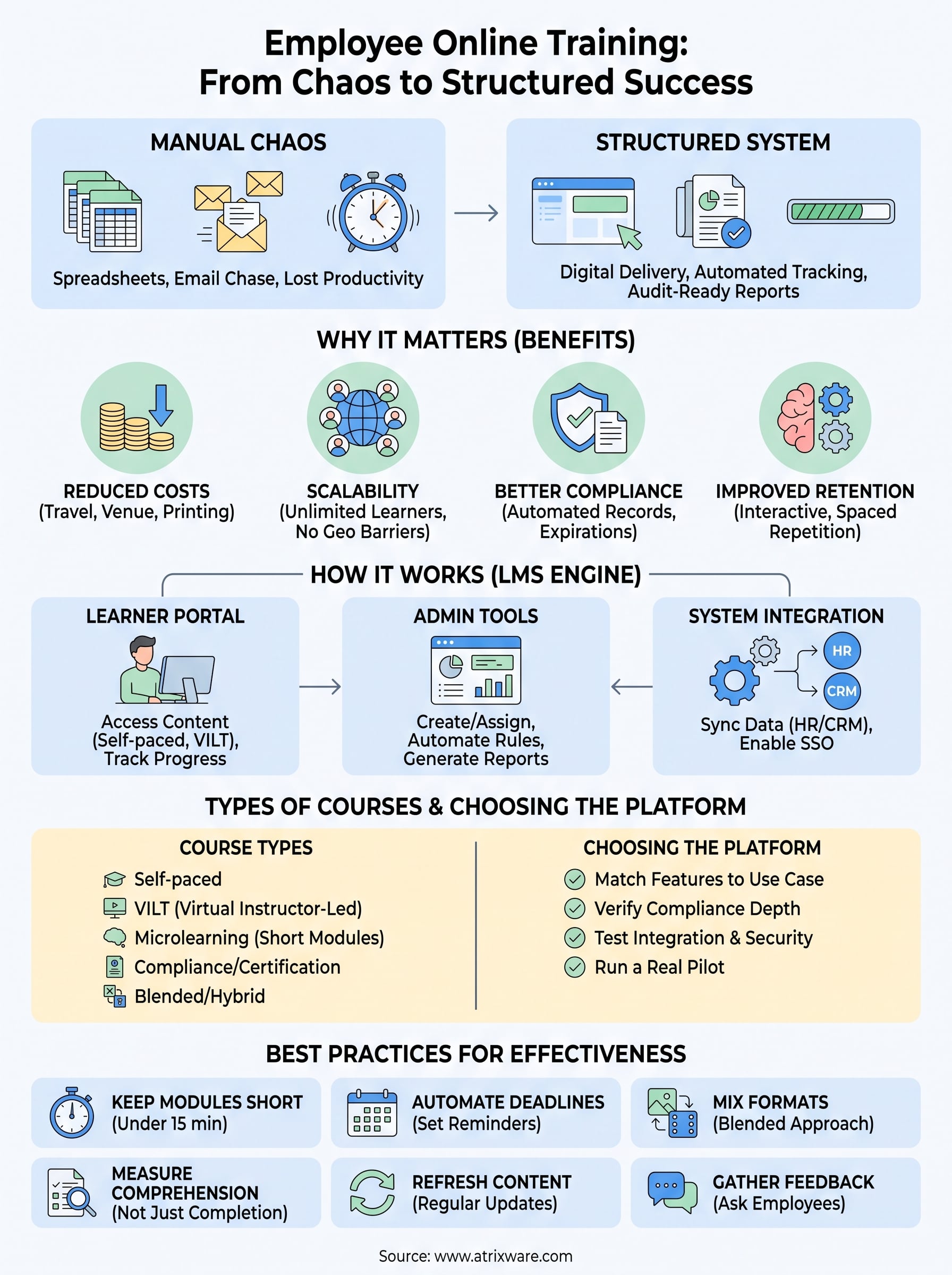
Good employee online training isn’t about buying the flashiest platform, it’s about matching the right course format, tracking, and integrations to how your organization actually operates. Get the mechanics right, from automated enrollment to compliance reporting, and the day-to-day headaches of chasing certificates and reconstructing training records disappear.
Start small if you’re unsure where your organization stands. Review what’s covered above against your current setup: your compliance requirements, your HR and CRM systems, and how your team actually learns. That comparison alone usually reveals whether you need a full platform overhaul or just better use of what you already have.
If you want a clearer picture of where you stand before talking to a vendor, take the LMS readiness quiz and see exactly what stage of the process you’re in.
