Staring at a blank storyboard, trying to figure out what a good corporate training video actually looks like, is one of the most common walls training teams hit. You know video beats a 40-page PDF for retention, but knowing that doesn’t tell you how to structure a scenario-based safety module or a product walkthrough that new hires actually finish watching.
This article gives you nine real examples spanning different formats, from animated explainers to live-action role-play scenarios, so you can see what works before you spend a dime on production. Each one breaks down the style, the use case, and why it holds attention, giving you a shortcut past the guesswork that slows most corporate training videos down.
Whether you’re building onboarding content, compliance modules, or customer-facing product training, these examples will help you pick a format that fits your team and your budget. Once you’ve settled on a direction, a platform like Axis LMS makes it simple to host, track, and report on how learners actually engage with the videos you create.
1. Onboarding and new hire welcome videos
A new hire’s first week sets the tone for their entire tenure, and a well-made welcome video does more heavy lifting than any handbook. This style of corporate training video usually opens with a message from leadership, walks through company history and values, and introduces the teams a new employee will work alongside. It replaces the awkward first-day tour with something consistent, repeatable, and available on demand, which matters when you’re hiring across multiple locations or time zones.
How it works
Most onboarding videos run five to fifteen minutes and combine a few segments: a leadership welcome, a culture and values overview, and a practical walkthrough of tools, benefits, or org structure. Some teams break this into a short series instead of one long video, so new hires can watch a segment, complete a task, then move to the next. That structure keeps corporate training videos from feeling like a lecture and turns onboarding into a paced experience instead of a single information dump.
Who it’s for
HR teams and people operations managers rely on this format most, especially at companies that hire in volume or across distributed offices. It also suits organizations with high seasonal turnover, like retail or hospitality, where a repeatable video means managers don’t have to deliver the same welcome speech every week. If your onboarding currently depends on one person’s calendar, this is the format that removes that bottleneck.
A good onboarding video does the same job on day one for every hire, no matter who’s in the room to greet them.
Tips for creating one
Keep the tone genuine rather than scripted. New hires notice when a video feels like a corporate brochure instead of an honest introduction to the people they’ll work with.
- Feature real employees and real workspaces, not stock footage
- Break long content into a short series rather than one continuous video
- End each segment with a clear next step, like a task or a link to a policy document
- Update the video whenever leadership, benefits, or major processes change
Once you’ve filmed it, upload it into your LMS so you can track completion and flag any new hire who hasn’t finished the series by day three. That single data point often predicts who needs a manager check-in before problems start.
2. Screen recording and software tutorial videos
Software rollouts fail more often from confusion than resistance, and screen recordings solve that problem directly. This type of corporate training video captures an actual screen, cursor movements, clicks, and all, while a narrator walks through a task in the tool employees need to learn. It’s the fastest way to turn "how do I use this new CRM" tickets into a self-serve resource that never gets tired of answering the same question.
How it works
A screen recording usually runs three to eight minutes and focuses on one task or workflow at a time, like submitting an expense report or updating a customer record. Tools like Camtasia or Loom capture the screen while a narrator explains each step in real time, and many teams add callout boxes or zoom effects to highlight where to click. Keeping each recording tied to a single task makes it easy to slot into a searchable library inside your LMS.
Who it’s for
IT teams, software trainers, and department leads rolling out new systems get the most value here. It also fits customer training teams documenting how to use a product, since the same recording format works for external users as well as internal staff.
A screen recording answers the exact question a confused employee is typing into a help ticket right now.
Tips for creating one
- Script the steps before recording so you don’t ramble or backtrack
- Zoom in on small UI elements like buttons or menus
- Keep each video under eight minutes and split longer processes into a series
- Re-record after major software updates so instructions stay accurate
3. Microlearning videos
Attention spans on a factory floor or a sales call are short, and microlearning videos meet employees exactly where they are. This format packages a single idea, like a safety reminder or a product update, into a video that runs under three minutes. Instead of asking someone to sit through a full course, you hand them a quick refresher they can watch between tasks, on a phone, without losing their place in the workday.
How it works
Each microlearning video isolates one concept and drops the intro, outro, and filler that pad longer courses. Producers often build these as part of a training video corporate library, tagging each clip by topic so learners or managers can pull up the exact one they need instead of scrolling through a full course. Many teams pair the video with a one-question quiz to confirm the point landed.
Who it’s for
Frontline teams, field technicians, and anyone learning on a mobile device benefit most from this format. It also suits compliance teams pushing frequent policy updates, since a two-minute clip gets watched far more reliably than a memo buried in an inbox.
A three-minute video gets watched. A thirty-minute one gets postponed.
Tips for creating one
- Cover exactly one idea per video, no exceptions
- Keep runtime under three minutes
- Tag videos by topic so they’re searchable inside your LMS
- Pair each clip with a short quiz or task to confirm retention
4. How-to and step-by-step tutorial videos
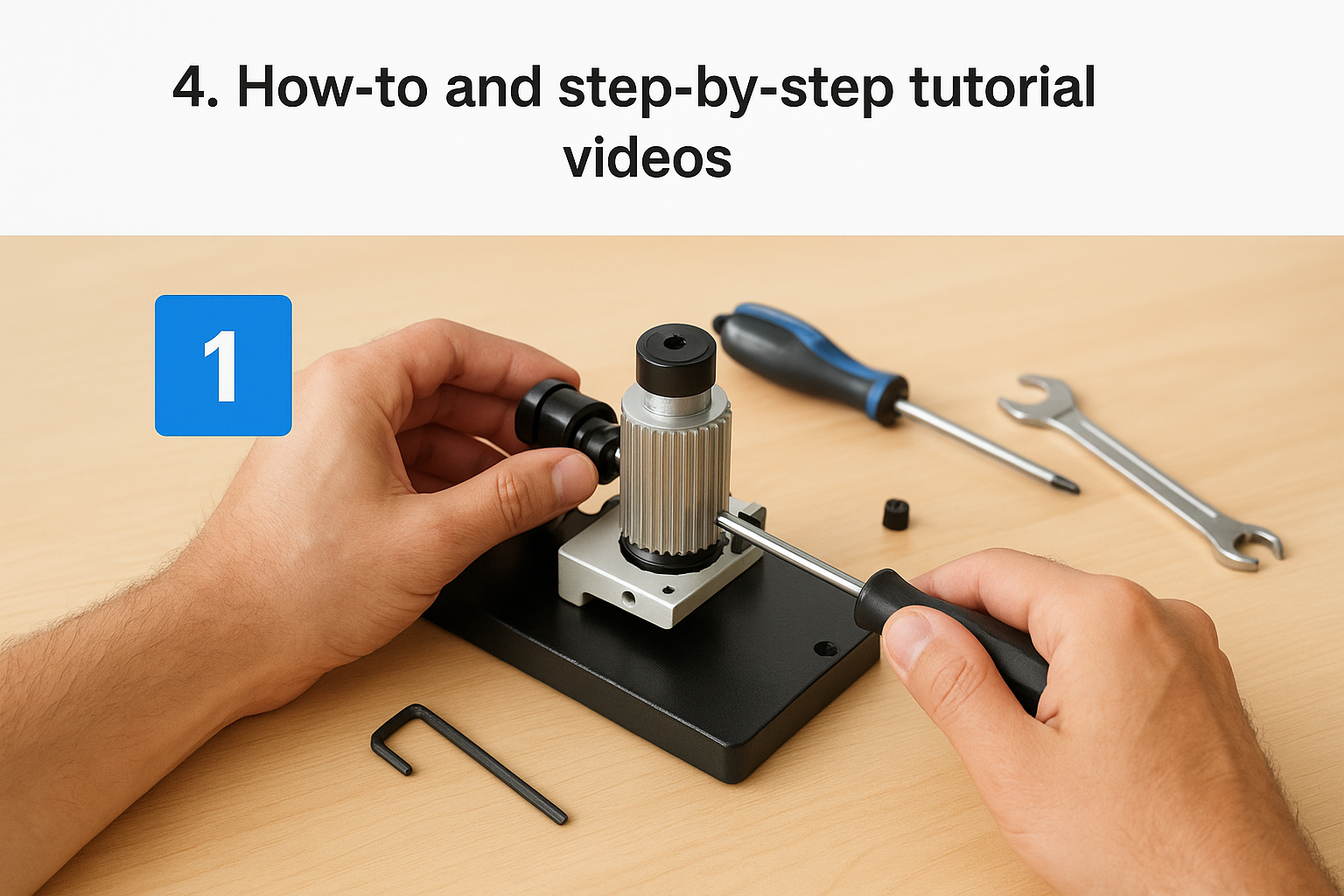
Process-heavy tasks, like assembling equipment, following a quality checklist, or completing a multi-step form, rarely stick from written instructions alone. This style of corporate training video breaks a task into a sequence of numbered steps, often filmed live-action with close-ups of hands, tools, or physical materials. Unlike a screen recording, it usually happens in the physical world rather than on a monitor, which makes it the go-to format for manufacturing, healthcare, and field service training.
How it works
Producers film each step in order, often with on-screen text numbering the sequence so viewers can pause and catch up mid-task. Some teams shoot from a first-person or over-the-shoulder angle so the video mirrors exactly what the employee will see when they do the task themselves. Runtime varies with complexity, but most step-by-step tutorial videos stay under ten minutes by cutting dead air between steps.
Who it’s for
Operations managers, quality assurance teams, and trainers in physical work environments rely on this format most. It also works well for customer-facing product setup guides, where a buyer needs to follow along at home without a support rep on the line.
A step-by-step video should let someone follow along with their hands, not just their eyes.
Tips for creating one
- Number each step visually, on screen and in the video title
- Film from the viewer’s perspective whenever the task involves manual dexterity
- Cut dead time between steps to keep pacing tight
- Test the video with someone unfamiliar with the task before publishing it
5. Animated and motion graphics videos
Some topics have no physical footage to film, like explaining a data privacy policy, a company org chart, or an abstract process flowing through several departments. Animated corporate training videos solve that gap by illustrating ideas with characters, icons, and motion graphics instead of a camera. This format also works well when you need to disguise sensitive real-world details, like anonymizing a customer complaint scenario without hiring actors.
How it works
Teams typically script the narration first, then build a storyboard before an animator or a template-based tool like Vyond or Powtoon brings it to life. Most run three to six minutes, since animation gets expensive and repetitive past that length, and the visuals lean on metaphor, like a funnel for a sales process or a maze for a compliance decision tree. Voiceover carries most of the explanation while the graphics reinforce the point visually.
Who it’s for
L&D teams explaining abstract policies, data flows, or systems thinking get the most mileage from animation. It also suits organizations that want a consistent, polished look across a global training video corporate library without depending on filming schedules or actor availability.
Animation lets you explain what a camera never could.
Tips for creating one
- Keep the visual metaphor simple and consistent throughout the video
- Write narration tight, since animation timing is expensive to revise
- Use a limited color palette that matches your brand guide
- Avoid packing too many concepts into one animated sequence
6. Compliance and safety training videos
Regulators don’t accept "we sent an email" as proof that employees understood a policy, and this is where compliance video earns its keep. This type of corporate training video documents required training on topics like workplace safety, harassment prevention, or data handling, paired with a quiz and a timestamped completion record. It exists as much for the audit trail as for the learning itself, which changes how you script and structure it.
How it works
Compliance videos usually run five to ten minutes and follow a strict format: policy explanation, real-world scenario, then a knowledge check tied to a passing score. Because regulations like GDPR or FDA 21 CFR Part 11 require proof of training, the video needs to link directly to a record in your LMS showing who watched it, when, and whether they passed the quiz. Skipping this pairing turns a good video into an unenforceable one.
Who it’s for
Compliance officers, safety managers, and HR teams in regulated industries like healthcare, manufacturing, and finance depend on this format most. Any organization facing recurring safety training video requirements, like annual OSHA refreshers, benefits from building a reusable library instead of recreating content every cycle.
If a compliance video can’t prove who watched it and what they scored, it isn’t compliance, it’s just content.
Tips for creating one
- Build the quiz before scripting the video, so every question has clear supporting content
- Keep legal or compliance staff involved in review before publishing
- Store completion records inside your LMS, not a spreadsheet
- Refresh the video whenever the underlying regulation changes
7. Role-play and soft skills scenario videos
Difficult conversations, like giving critical feedback or de-escalating an angry customer, rarely improve from reading a script. This corporate training video format dramatizes real workplace situations with actors or employees, showing both a flawed approach and a stronger one side by side. Watching someone else fumble a conversation, then recover, sticks with viewers far longer than a bullet list of communication tips ever could.

How it works
Most scenario videos run four to eight minutes and follow a simple structure: set up the situation, show the interaction play out, then pause for reflection or a branching choice. Some teams build these inside interactive video tools so learners pick a response and see the consequence unfold, turning a passive watch into a decision exercise. Pairing a "wrong way" and "right way" version in the same corporate training video gives viewers a clear contrast to reference later.
Who it’s for
Sales managers, customer service leads, and HR teams teaching conflict resolution or interviewing skills get the most use from this format. It also fits leadership pipelines where new managers need practice spotting tone, body language, and word choice before facing the real thing.
People remember how a conversation felt more than what a slide told them to do.
Tips for creating one
- Cast real employees when possible, since authentic reactions beat polished acting
- Show the flawed version first, then the improved version
- Keep scenarios specific to situations your teams actually face
- Add a short debrief prompt after each scenario to spark discussion
8. Product and sales enablement demo videos
Sales reps who don’t understand a product deeply enough lose deals to reps who do, and that gap usually comes from thin onboarding rather than lack of talent. This corporate training video format walks new hires through product features, pricing tiers, and competitive positioning so they can talk to prospects without stumbling over basic questions. It also gives existing reps a fast refresher whenever a product update changes what they’re selling.
How it works
Demo videos typically run five to twelve minutes and combine screen capture of the actual product with a narrator explaining the value behind each feature, not just the mechanics of clicking through it. Many teams record a version aimed at internal reps and a shorter, polished version for prospects, reusing footage but adjusting the script for each audience. Sales enablement teams often organize these into a library by product line or objection type, so a rep can pull up the right clip minutes before a call.
Who it’s for
Sales enablement managers, product marketing teams, and channel partner trainers rely on this format most. It also suits customer success teams who need reps to explain features accurately without looping in an engineer for every question.
A rep who can explain the product on video should be able to explain it on a live call without notes.
Tips for creating one
- Lead with the customer problem before showing the feature
- Keep internal and external versions separate, even if footage overlaps
- Update clips immediately after a product release, not weeks later
- Include objection-handling language reps can repeat almost word for word
9. Leadership and manager coaching videos
Most new managers get promoted for being good at their old job, not for knowing how to run a difficult review or coach a struggling report. This corporate training video format targets that gap directly, walking managers through real coaching moments like delivering feedback, running a one-on-one, or handling a performance conversation before it escalates into HR territory.
How it works
Leadership videos typically run six to ten minutes and mix short expert commentary with a modeled scenario, often the same manager narrating their own thought process during a tough conversation. Some series build around a single skill per episode, like active listening or setting expectations, so a manager can watch one clip right before a meeting instead of sitting through a full leadership course. Framing each video around a manager coaching video skill keeps the library easy to browse by situation rather than by title alone.
Who it’s for
L&D teams building leadership pipelines and HR business partners supporting first-time managers get the most value here. It also fits organizations promoting from within frequently, where new supervisors need practical guidance fast rather than a semester-long management program.
Managers don’t need a leadership theory lecture, they need to see what a good conversation actually sounds like.
Tips for creating one
- Base scenarios on real situations your managers report struggling with
- Keep each video focused on a single coaching skill
- Feature respected internal leaders when possible for credibility
- Pair videos with a short reflection prompt managers can use before their next one-on-one
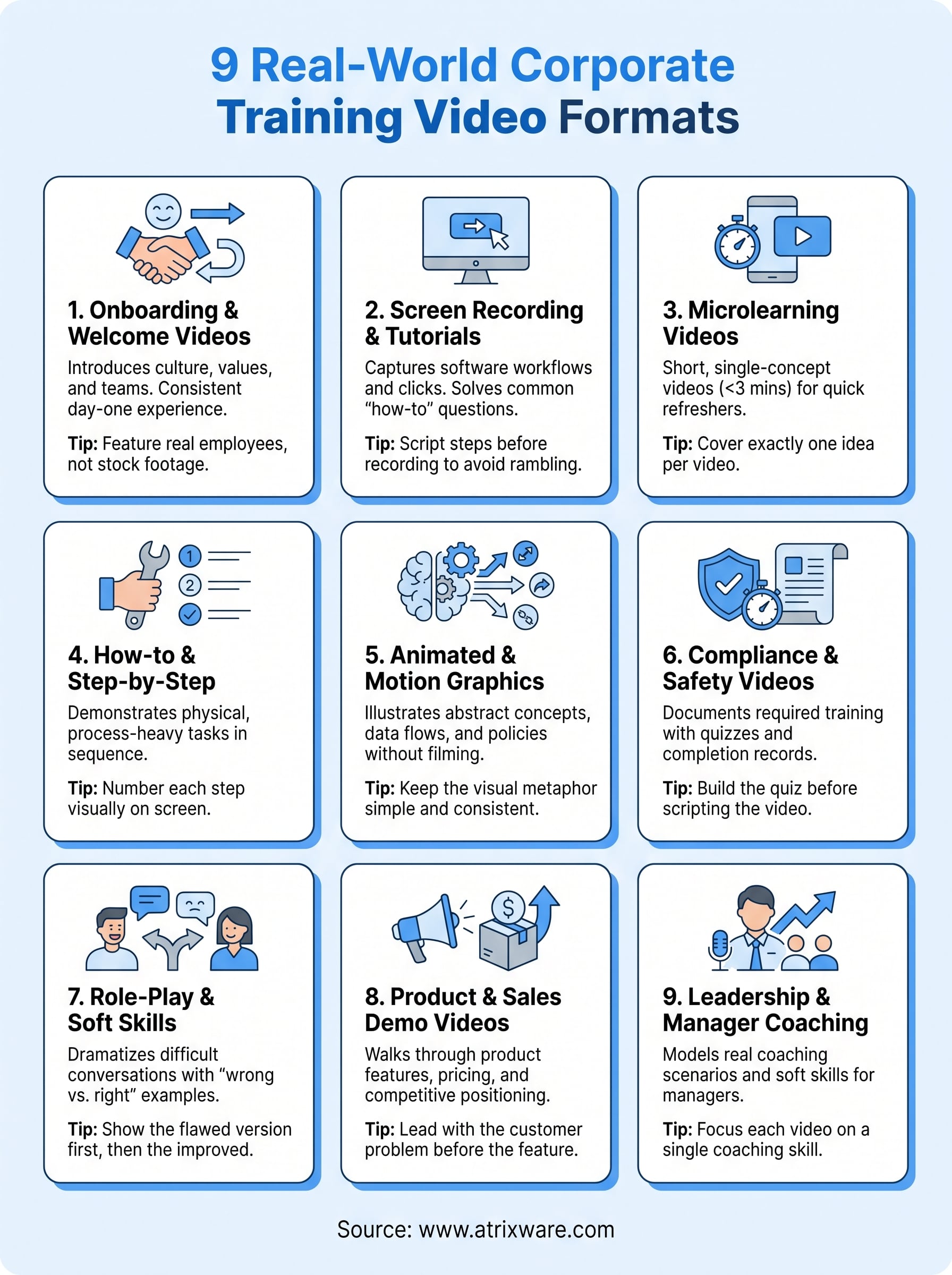
Putting these examples to work in your own training
None of these nine formats matter much if you can’t track whether anyone actually watched them. A great corporate training video sitting on a shared drive with no completion data is just a file, not a training program. The real value comes from pairing the right format to the right problem, then measuring whether it moved the needle on onboarding time, compliance scores, or sales readiness.
Start small. Pick one gap, maybe a shaky onboarding process or a compliance requirement you’re currently tracking in a spreadsheet, and build a single video around it before committing to a full library. Once you see how learners respond, expanding into microlearning, scenario videos, or leadership coaching gets a lot easier to justify. If you’re still figuring out where your training program stands, take the LMS readiness quiz to see what to tackle first.
