Picking a platform to build, manage, and reuse training content is harder than it sounds. Every vendor claims to be the best option, and the line between an LMS and an LCMS gets blurry fast. If you’re searching for learning content management system examples, you’re probably trying to figure out which tools actually let you create modular, reusable content instead of just hosting static courses.
This article gives you a straight answer: ten real platforms, what each one does well, and where it falls short. You’ll see how systems differ in content authoring capabilities, version control, and reuse across courses, along with which ones handle compliance tracking and reporting without extra plugins. That’s the comparison most buyer’s guides skip.
We built this list from firsthand experience working with training teams who needed more than a course catalog. They needed a way to author once and deploy everywhere. Axis LMS by Atrixware is one of the examples covered here, built around drag-and-drop course creation, branded delivery, and integrations with HR and CRM systems. Read through the list, then match each platform’s strengths against your own content strategy and team size before you commit to one.
Trying}]{
2. Axis LMS by Atrixware
Axis LMS sits closer to the LCMS end of the spectrum than most traditional learning management systems because it treats content creation as a first-class feature, not an afterthought. Built by Atrixware, it gives training teams a drag-and-drop authoring interface that lets non-developers build, edit, and reuse course material without touching code. For organizations comparing learning content management system examples, Axis LMS stands out because it pairs content authoring with the reporting and compliance depth usually reserved for enterprise-only tools.

Key features
Content teams get a modular build process, meaning a single lesson, quiz, or media asset can be dropped into multiple courses instead of rebuilt from scratch each time. That reuse model is exactly what separates an LCMS from a plain course host.
Reusable content blocks save training teams from rebuilding the same lesson five different times for five different audiences.
- Drag-and-drop course builder with support for SCORM, xAPI, and virtual classroom sessions
- Automated and on-demand reporting for compliance tracking, CEUs, and re-certifications
- Deep branding customization across the learner and admin interface
- REST API, webhooks, and SSO support (SAML, Okta, Azure, Ping Identity)
- Native integrations with ADP, Salesforce, BambooHR, and Zoho, plus 5,000+ integrations through its builder
Best for
Midsize to large organizations running employee training, compliance programs, or customer education alongside internal learning fit Axis LMS well. Teams that need to sell training through built-in e-commerce functionality while still controlling content reuse and branding get the most value here.
Pricing
Atrixware doesn’t publish flat rate cards since pricing scales with user count, hosting model, and integration needs. Prospective buyers request a quote directly, and the vendor offers a live demo before signing anything, which matters when you’re evaluating authoring tools you’ll actually use daily.
3. Xyleme
Xyleme built its reputation as one of the purest learning content management system examples on the market, since it was designed from the ground up around component content management rather than course hosting. Instead of building monolithic courses, teams create small, tagged content components that assemble into courses, job aids, or documentation on demand. That structure makes Xyleme a favorite among organizations with large technical libraries that need to update once and push changes everywhere instantly.

Key features
Xerte-style course builders can’t match Xyleme’s single-source publishing model, which lets one content component update across every course, PDF, and microlearning module that references it. Content gets tagged with metadata and taxonomy, so structured authoring replaces the copy-paste chaos most teams deal with when content lives in scattered files.
Update a component once in Xyleme, and every course that uses it updates automatically, no rebuild required.
- Component content management with metadata tagging and taxonomy
- Dynamic content assembly for courses, documents, and microlearning
- Multi-channel publishing to SCORM, xAPI, PDF, and mobile formats
- Version control and content governance for regulated industries
- Analytics on content performance and reuse across the library
Best for
Large enterprises and regulated industries with content-heavy training needs get the most out of Xyleme. Pharmaceutical, manufacturing, and technical documentation teams managing thousands of interconnected content pieces benefit from its reuse architecture more than a small business running a handful of onboarding courses ever would.
Pricing
Xyleme doesn’t publish pricing publicly. Quotes depend on user count, content volume, and implementation scope, and most deployments involve a sales consultation plus a guided demo before the vendor issues a proposal. Expect an enterprise-level commitment, both in cost and onboarding time, since the platform’s power comes from upfront content architecture work.
4. dominKnow | ONE
dominKnow | ONE combines an LCMS with a full authoring suite, so content teams can build, store, and translate learning material inside a single system instead of stitching together separate tools. Unlike a hosted course library, it treats every slide, image, and interaction as a reusable object that lives in a shared content repository. Teams researching learning content management system examples often land on dominKnow because it covers responsive design, translation management, and rapid authoring in one license, which cuts down on the tool-switching that slows most content teams down.
Key features
Authors work inside a shared media library, so a graphic or interaction built for one course shows up instantly in the next without re-uploading anything. That shared object model is what makes dominKnow function as a true LCMS rather than a course builder with extra storage.
A shared media library means one image update reaches every course using it, instead of forcing a manual fix across a dozen files.
- Responsive authoring for desktop, tablet, and mobile output
- Built-in translation and localization workflow for global teams
- Object-based content library shared across every author and course
- Version history and rollback for collaborative editing
- Publishing to SCORM, xAPI, and HTML5 output
Best for
Organizations with distributed authoring teams, especially those localizing content into multiple languages, get the most value from dominKnow | ONE. It suits companies that produce a high volume of visually polished courses and need several people editing the same content library without version conflicts.
Pricing
dominKnow prices by named author seats rather than learner count, which matters if your content team is small but your learner base is large. The vendor doesn’t list public rates, so buyers request a quote based on author seats, cloud hosting needs, and translation volume, typically after a guided demo.
5. eXact learning solutions
eXact learning solutions built its platform around competency-based training, which makes it a distinct entry among learning content management system examples aimed at regulated industries like pharma, finance, and life sciences. Rather than organizing content around courses alone, the system ties every learning object to specific skills and compliance requirements, so training maps directly to what a role or regulation demands. Organizations that need to prove competency, not just course completion, find that structure hard to replicate with a standard course host.
Key features
Content objects in eXact carry metadata tied to competencies, so a single asset can satisfy multiple regulatory requirements without duplicating the file. That link between content taxonomy and skill mapping is what separates eXact from platforms that just track completion percentages.
Tying content directly to competencies means training records prove skill, not just attendance.
- Competency and skills-gap mapping tied to individual content objects
- Multi-format authoring for SCORM, xAPI, and AICC packages
- Multilingual content management for global regulatory teams
- Automated compliance workflows with audit trail reporting
- Content reuse across certification and recertification programs
Best for
Life sciences, pharmaceutical, and financial services organizations with strict regulatory training obligations get the most from eXact. Teams tracking recertification cycles or mapping training to job competencies rather than generic course catalogs will find the platform’s structure matches their compliance workflow more closely than a general-purpose LMS would.
Pricing
Pricing isn’t published on the vendor’s site, and quotes depend on user volume, content migration needs, and the scope of competency frameworks you’re building. Expect a sales consultation and a scoped implementation plan before you see a number, since most deployments involve mapping existing compliance requirements into the platform’s competency structure before launch.
6. Informetica by Sencia Canada
Informetica takes a different angle among learning content management system examples by focusing on the training-to-revenue pipeline. Sencia Canada built it for organizations that need to author content, deliver certification programs, and sell training to external audiences from one system. Rather than treating e-commerce as a bolt-on module, Informetica bakes content monetization into the same workflow authors use to build and update courses, which appeals to associations and certifying bodies running paid programs at scale.

Key features
Every course object in Informetica connects to a catalog entry, so pricing, bundling, and access rules live next to the content itself instead of a separate storefront. That tight link between authoring and catalog management cuts down on the manual syncing most platforms require between content updates and store listings.
When content and commerce live in the same system, a price change doesn’t mean a separate trip to the storefront platform.
- Integrated e-commerce with bundling, coupons, and subscription pricing
- Certification and recertification tracking with automated renewal reminders
- Content authoring with reuse across public and internal course catalogs
- Multi-tenant support for associations managing chapters or member groups
- Detailed sales and completion reporting tied to individual course objects
Best for
Associations, certifying bodies, and training companies that sell courses to members or the public fit Informetica’s model closely. Organizations juggling certification tracking alongside public sales, rather than pure internal employee training, get more out of this platform than a general corporate LMS buyer would.
Pricing
Sencia Canada quotes Informetica based on catalog size, transaction volume, and the number of member organizations or chapters using the system. Public pricing isn’t listed, and most deals start with a scoped conversation about how the e-commerce and certification pieces need to work together before the vendor proposes a number.
7. Xerte
Xerte stands apart from the other learning content management system examples on this list because it’s free and open source, built by the University of Nottingham for educators who need authoring power without a licensing bill. Rather than chasing enterprise features like e-commerce or CRM sync, Xerte focuses entirely on accessible, interactive content creation, which makes it a favorite in higher education and public sector training teams working with tight budgets and strict accessibility mandates.
Key features
Authors build interactive pages, quizzes, and simulations using a template-based editor that doesn’t require coding knowledge, and every template ships with accessibility compliance baked in to meet WCAG standards. That built-in focus on accessible design is what pulls in public institutions that can’t risk a platform failing an audit.
Free and open source doesn’t mean stripped down. Xerte still delivers accessible, interactive authoring most paid tools charge extra for.
- Template-based authoring for interactive pages, quizzes, and branching scenarios
- Built-in accessibility features aligned with WCAG guidelines
- Self-hosted deployment, giving institutions full control over data and servers
- SCORM and xAPI export for use in any standard-compliant LMS
- Active open-source community contributing templates and plugins
Best for
Educational institutions, government agencies, and nonprofits with limited software budgets fit Xerte best. Teams that have IT staff capable of self-hosting and maintaining an open-source platform will get more long-term value than organizations expecting vendor support on demand.
Pricing
Xerte costs nothing to download and use, since it’s released under an open-source license. The real cost sits in hosting, server maintenance, and the internal staff time needed to manage updates, so budget for that infrastructure rather than a subscription fee when you’re weighing this option against paid platforms.
8. Docebo
Docebo leans more toward a full-featured LMS than a pure LCMS, but it earns a spot among learning content management system examples because of its AI-powered content tagging and reuse tools. Instead of manually organizing a growing course library, Docebo’s engine auto-tags content and suggests related material to learners, which cuts the manual curation work most content teams get stuck doing. Organizations already running a large mix of internal and third-party content find that automation saves real hours every month.
Key features
Content teams get an AI-driven content discovery engine that scans uploaded material and automatically recommends it to relevant learner groups, reducing the manual tagging work admins would otherwise do by hand.
Automated content tagging means new material reaches the right learners without an admin manually sorting every upload.
- AI-powered content tagging and personalized learning recommendations
- Marketplace integration for licensed third-party content libraries
- Social and collaborative learning tools built into the learner experience
- Robust reporting dashboards with custom fields and scheduled exports
- Mobile app support with offline content access
Best for
Midsize to enterprise organizations that mix internally authored content with licensed course libraries get the most value from Docebo. Companies prioritizing learner engagement through social features and AI recommendations over deep component-level authoring will find the platform matches their workflow better than a strict LCMS would.
Pricing
Docebo doesn’t publish flat pricing, and costs scale with active user count and the modules you add, such as the content marketplace or advanced reporting. Buyers typically go through a sales call and demo before receiving a quote, and enterprise deployments often involve a separate conversation about implementation support and onboarding timelines before the contract gets signed.
9. Litmos
Litmos positions itself as a fast-to-deploy LMS with content authoring bolted on, which makes it a lighter entry among learning content management system examples compared to component-based platforms like Xyleme or dominKnow. SAP owns Litmos, and that backing shows in its polish and its library of off-the-shelf courses covering compliance, sales, and soft skills. Buyers who want something running in days rather than months tend to gravitate here, since the setup skips the heavy content architecture work other LCMS platforms require upfront.
Key features
Out-of-the-box content is Litmos’s strongest card, with a prebuilt course library covering harassment prevention, safety, and sales enablement topics that most companies would otherwise pay a third party to develop.
A ready-made compliance course library gets training live fast, but it can’t replace deep content reuse for custom material.
- Built-in authoring tool with video, quiz, and scenario support
- Prebuilt course library across compliance, sales, and leadership topics
- Salesforce and Microsoft Teams integrations for embedded learning
- Gamification features including points, badges, and leaderboards
- Mobile app with offline course access
Best for
Small and midsize businesses that need training live quickly, without building a custom content taxonomy from scratch, fit Litmos well. Sales teams already living inside Salesforce also benefit from how tightly the two systems connect.
Pricing
SAP Litmos prices per active user on a tiered basis, with published starting points around a few dollars per user per month for smaller teams, though enterprise tiers require a custom quote. Costs climb once you add the prebuilt content library or advanced integrations, so confirm what’s bundled before comparing the sticker price against other platforms on this list.
10. Moodle
Moodle earns its place among learning content management system examples as the open-source standard that schools, universities, and plenty of corporate training teams have leaned on for two decades. It started as an academic project and grew into a platform flexible enough to run everything from a single classroom to a multinational compliance program, provided you have the technical staff to configure it. Unlike the vendor-hosted platforms on this list, Moodle hands you the source code, which means you get total control over how content gets built, stored, and reused, at the cost of doing that setup work yourself.

Key features
Extensibility is Moodle’s real strength, since a plugin ecosystem built by thousands of contributors covers everything from H5P interactive content to advanced reporting dashboards that don’t ship in the core install.
Moodle gives you full control over your training data and content structure, but that control comes with real setup and maintenance work.
- Open-source core with thousands of community-built plugins and themes
- H5P integration for interactive content authoring inside courses
- Flexible course formats supporting cohorts, badges, and competency frameworks
- SCORM and xAPI support for importing content built elsewhere
- Self-hosted or Moodle Cloud deployment options
Best for
Educational institutions and organizations with in-house developers who want full control over hosting and customization get the most from Moodle. Teams without dedicated IT support usually struggle with the setup curve, so it suits groups already comfortable managing open-source software rather than those wanting a plug-and-play LCMS.
Pricing
Moodle’s core software is free under its open-source license, but self-hosting means covering server costs, security patching, and plugin maintenance yourself. Moodle Cloud offers paid hosting tiers billed by user count, and many organizations instead pay a Moodle Partner for implementation and support, which adds cost but removes the maintenance burden.
11. TalentLMS
TalentLMS rounds out this list of learning content management system examples as the simplest option for teams that just need to get training online without a steep learning curve. Epignosis owns the platform, and it’s built with a self-serve mindset, so admins can sign up, build a course, and invite learners the same afternoon. It doesn’t chase the component-based architecture that Xyleme or dominKnow offer, but that trade-off is exactly why small teams and startups pick it over heavier LCMS platforms.
Key features
Course creation in TalentLMS leans on a straightforward editor that imports existing files, embeds video, and builds quizzes without requiring any instructional design background. That simplicity keeps the platform approachable for admins who are managing training as one part of a much bigger job.
A tool that’s easy enough for a non-specialist to run training on day one beats a powerful system nobody on staff knows how to configure.
- Drag-and-drop course builder with file, video, and SCORM support
- Course store for buying and reselling ready-made content
- Gamification with points, badges, and levels built into the learner experience
- Zoom and Microsoft Teams integration for virtual sessions
- Custom reports and a free forever plan for very small teams
Best for
Startups, small businesses, and teams running their first formal training program fit TalentLMS best. Organizations that want fast course deployment over deep content reuse or complex compliance mapping will get more value here than from an enterprise-grade LCMS.
Pricing
TalentLMS publishes its pricing openly, unlike most platforms on this list, with tiers based on active user count starting at a free plan capped at five users. Paid plans scale up from roughly $89 a month for small teams to custom enterprise pricing for larger deployments, making it one of the easiest platforms here to budget for without a sales call.
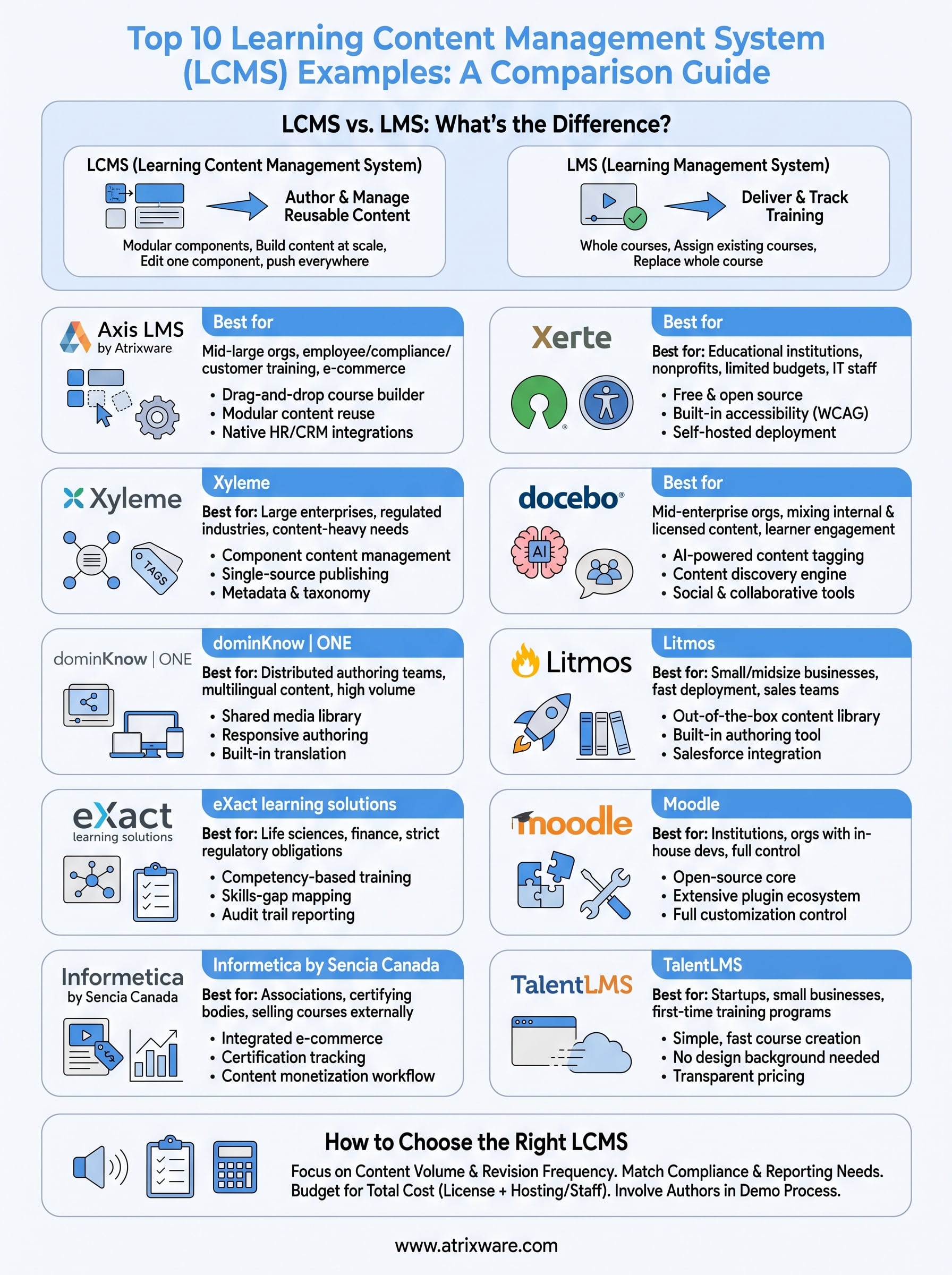
12. LCMS vs. LMS: what’s the difference?
Confusing these two acronyms is the fastest way to buy the wrong platform. An LMS (Learning Management System) focuses on delivering, tracking, and reporting on training, treating each course as a finished package you upload and assign. An LCMS (Learning Content Management System) goes a step further upstream: it’s built for creating and managing the content itself, breaking courses into reusable objects that get authored once and deployed across multiple programs. Every one of the learning content management system examples covered above leans harder into that authoring and reuse layer than a typical LMS does.
Deciding which one you need comes down to a single question: are you mostly delivering existing content, or are you constantly building and updating it? Teams that license off-the-shelf courses and just need tracking usually do fine with a pure LMS. Teams producing their own training material, especially at volume or across multiple languages, need the component-based structure an LCMS provides.
If you’re rebuilding the same lesson for every new course, you don’t have an LMS problem, you have an LCMS gap.
| Factor | LMS | LCMS |
|---|---|---|
| Primary job | Deliver and track training | Author and manage reusable content |
| Content structure | Whole courses | Modular components |
| Best for | Assigning existing courses | Building content at scale |
| Update workflow | Replace the whole course | Edit one component, push everywhere |
Many vendors, including Axis LMS, blur that line on purpose by pairing LMS-grade reporting with LCMS-style authoring, so read specs closely rather than trusting the label alone.
13. How to choose the right LCMS for your organization
Start with your content volume, not your feature wishlist. A team producing five onboarding modules a year doesn’t need Xyleme’s component architecture, and a pharmaceutical company managing thousands of regulated assets can’t get by on TalentLMS’s simple editor. Match the platform’s content authoring capabilities to how much material you actually create and revise, since that’s the real driver behind every learning content management system examples list, including this one.
Next, map your compliance and reporting needs against what each vendor ships natively. Some platforms, like eXact and Informetica, build competency and certification tracking into the core system. Others require third-party add-ons to hit the same compliance tracking bar, which adds cost and complexity you won’t see until implementation starts.
Budget for the total cost, not just the license fee. Open-source options like Moodle and Xerte look free upfront but shift cost into hosting and staff time. Enterprise LCMS platforms quote custom pricing that scales with authors, users, and content volume.
The right LCMS isn’t the one with the most features, it’s the one your team will actually use to build and reuse content every week.
Run a short checklist before you sign anything:
- Can your non-technical staff author content without developer help?
- Does the platform support the file formats and integrations you already rely on (SCORM, xAPI, HR/CRM systems)?
- Will it scale from your current headcount to your growth projections without a platform switch?
- Does the vendor offer a live demo or trial before you commit budget?
Finally, involve the people who’ll build content daily in the demo process. Their feedback on the authoring interface matters more than any spec sheet, since team size and technical comfort determine whether a powerful LCMS gets adopted or ignored.
Finding the platform that fits your training goals
None of these ten platforms is universally "best." Xyleme and dominKnow win on component-level reuse, Xerte and Moodle win on cost control, and TalentLMS wins on speed. The right pick depends on your content volume, compliance load, and how much authoring your team actually handles day to day. What matters most is matching a platform’s strengths to the problem you’re actually solving, not the longest feature list.
If you’re still weighing learning content management system examples against your own requirements, Axis LMS covers most of what showed up across this list: drag-and-drop authoring, compliance reporting, and integrations that connect to the HR and CRM tools you already run. Take the LMS readiness quiz to see where your organization stands before you commit budget to any platform on this list.
