Spreadsheets fall apart the moment you have more than a handful of employees, multiple certifications, and renewal dates to track. One missed expiration date on a compliance certificate can mean fines, failed audits, or worse. That’s why so many HR and training managers go looking for software for tracking employee training that actually keeps up with their team’s pace instead of creating more manual work.
The right tool should do more than store completion dates. It needs to automate reminders, generate audit-ready reports, and give you a clear view of who’s certified, who’s overdue, and who’s about to fall behind. Whether you’re comparing employee training tracking software for a 20-person team or a multi-department enterprise, the features that matter most are automated recertification tracking, real-time reporting, and integrations with the HR systems you already use.
Below, we’ve broken down nine platforms worth considering in 2026, including options built for compliance-heavy industries and a few free employee training tracker tools for smaller budgets. You’ll get a straight look at what each one does well, where it falls short, and which type of organization it fits best, so you can pick a system that matches your actual training needs rather than a generic feature list.
1. What is employee training tracking software?
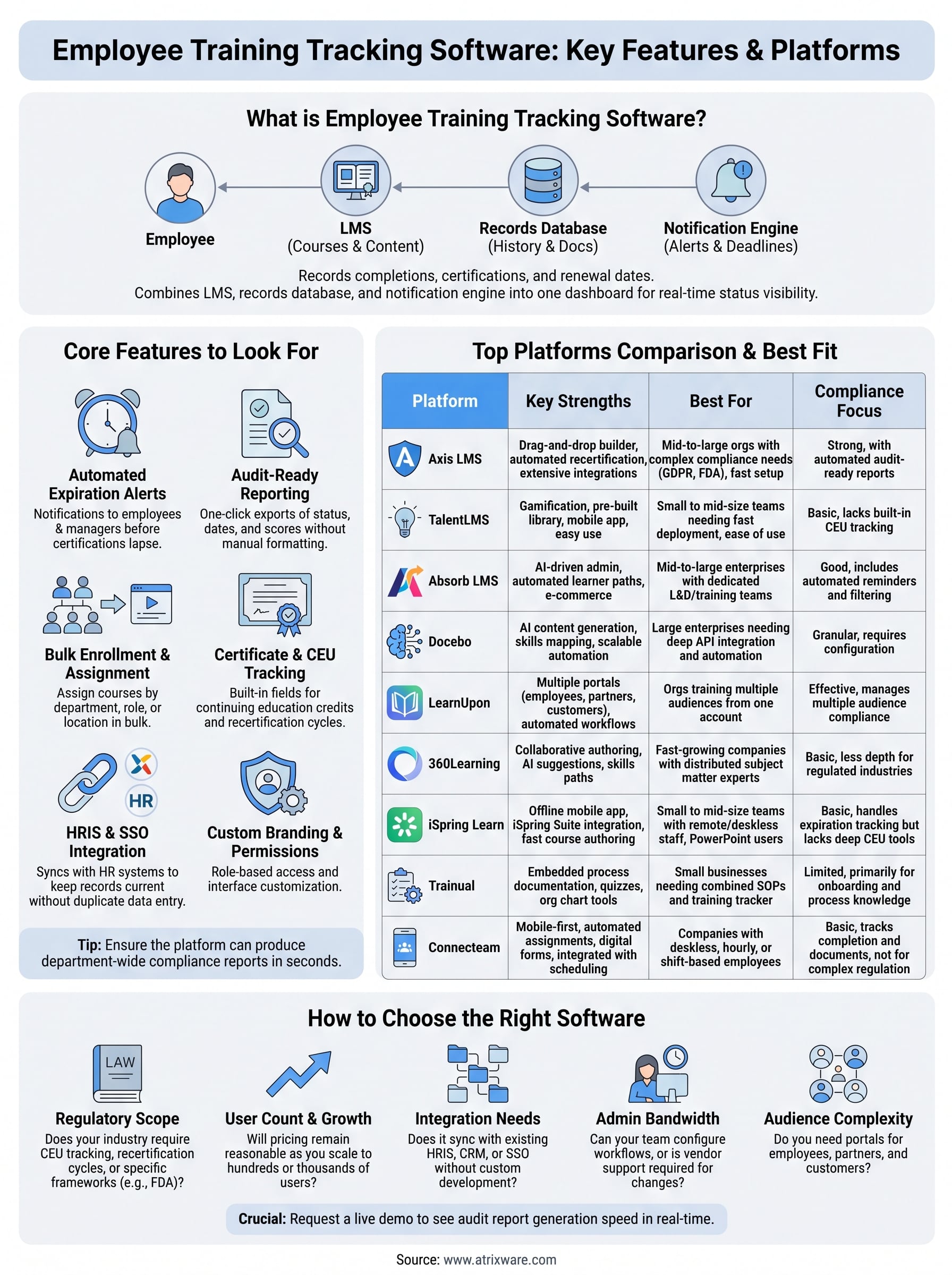
Employee training tracking software is a system that records what training your staff has completed, what they still owe, and when certifications expire. Instead of chasing down spreadsheets or paper sign-in sheets, you get one dashboard that shows the status of every employee’s training history in real time. Most platforms in this category double as a full employee training record software solution, storing certificates, quiz scores, attendance logs, and renewal dates in a single searchable database that HR, managers, and auditors can all pull from without digging through email threads.
Underneath the dashboard, these tools typically combine three functions: a learning management system (LMS) for delivering courses, a records database for storing completion history, and a notification engine that flags upcoming deadlines. Some vendors sell these as separate modules; others, like Axis LMS, bundle them into one platform so you’re not stitching together three logins to answer a simple question like
2. Core features to look for in a training tracker
Before you compare vendors, get clear on what actually separates a useful system from a glorified spreadsheet. Not every platform marketed as tracking employee training software handles compliance deadlines or audit prep the same way, and the gaps usually show up at the worst possible time, like mid-audit or right after a certification lapses. Look past the marketing page and check whether the platform covers these fundamentals.
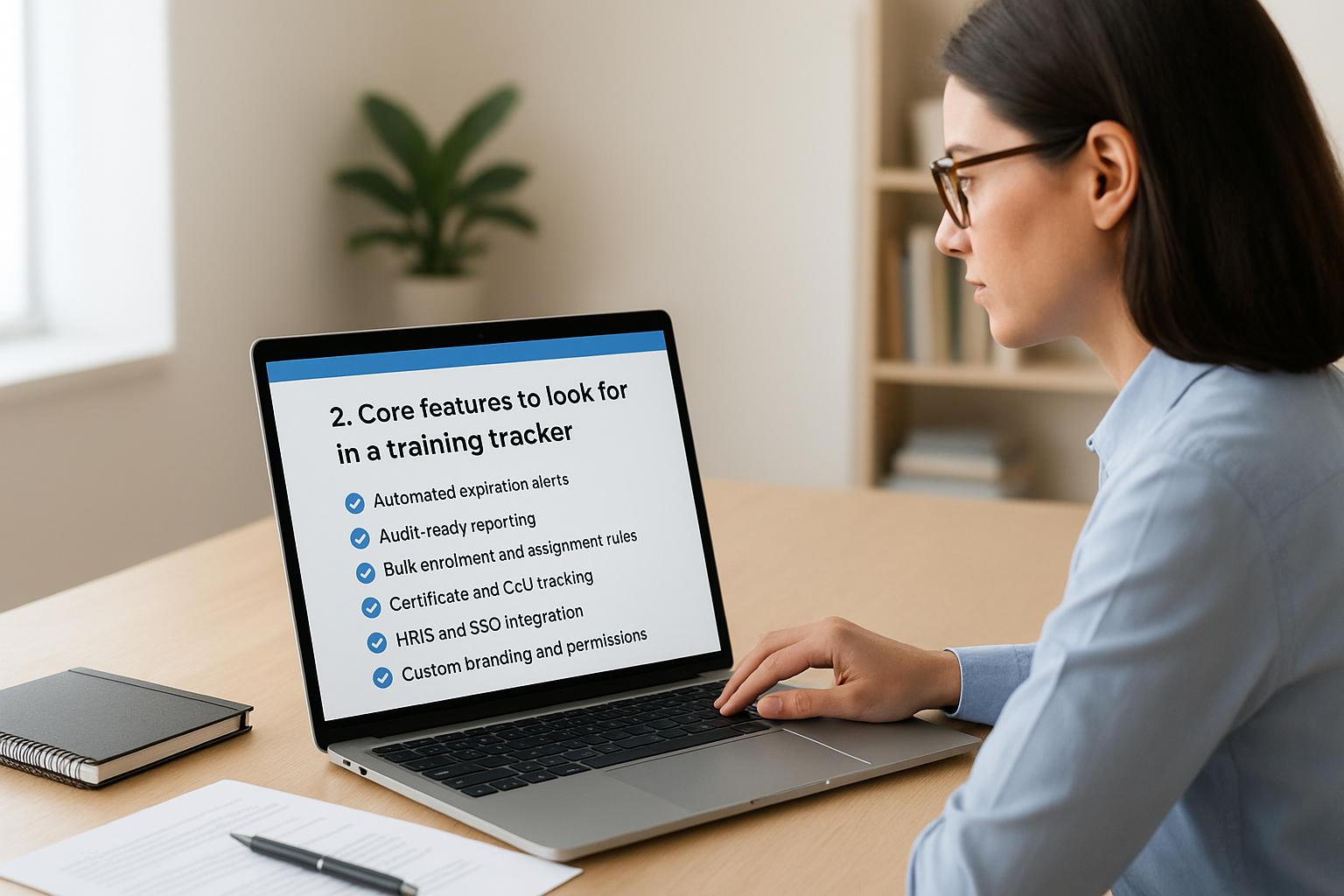
- Automated expiration alerts: Notifications to employees and managers before a certification lapses, not after.
- Audit-ready reporting: One-click exports that show completion status, dates, and scores without manual formatting.
- Bulk enrollment and assignment rules: The ability to assign courses by department, role, or location instead of one person at a time.
- Certificate and CEU tracking: Built-in fields for continuing education credits and recertification cycles.
- HRIS and SSO integration: Syncing with systems like ADP, BambooHR, or Azure AD so records stay current without duplicate data entry.
- Custom branding and permissions: Role-based access so managers only see their own team’s data.
Reporting deserves extra scrutiny. Many employee training records software tools can show you a single learner’s history, but far fewer can generate a department-wide compliance snapshot on demand, which is exactly what an auditor or regulator will ask for. If the platform can’t produce that report in under a minute, it’s going to cost you time during the exact moment you can least afford it.
A training tracker that can’t produce an audit-ready report in seconds isn’t saving you any time at all.
Security settings and data redundancy matter just as much, especially if your organization handles regulated data under frameworks like GDPR or FDA 21 CFR Part 11. Verify how the vendor handles backups and access controls before you commit, since migrating training records later is far more painful than checking this upfront.
3. Axis LMS by Atrixware
Axis LMS built its reputation on being the platform you don’t need a consultant to configure. It combines course delivery, records storage, and compliance tracking in one system, so you’re not paying for three separate tools that barely talk to each other. For organizations that want software for tracking employee training without a six-month implementation timeline, Axis LMS is worth putting at the top of your shortlist.
Key features
Axis LMS ships with a drag-and-drop course builder, automated recertification workflows, and a communication engine that handles reminders without manual follow-up.
- Drag-and-drop course and content builder for rapid rollout
- Automated CEU and recertification tracking with expiration alerts
- REST API, webhooks, and over 5,000 integration options through its integration builder
- SAML SSO support for Okta, Azure, Salesforce, and Ping Identity
- Deep UI branding controls so the portal matches your company identity
Best for
Mid-size to large organizations juggling compliance training software needs across multiple departments will get the most value here, especially companies that also want to resell training or manage channel partner certifications through the same portal.
Compliance and reporting
Compliance is where Axis LMS separates itself from generic LMS platforms. It’s built to support frameworks like GDPR and FDA 21 CFR Part 11, with on-demand and automated reports that show exactly who’s certified, who’s overdue, and who’s approaching a renewal deadline.
If your training program touches regulated industries, the reporting engine needs to work as hard as your compliance team does.
Pricing
Atrixware doesn’t publish flat-rate pricing since costs scale with user count and feature needs. You’ll need to request a quote, but the vendor offers a free demo so you can test the interface before committing budget.
4. TalentLMS
TalentLMS built its name on simplicity, and that’s still its biggest selling point. It’s a cloud-based LMS aimed at teams that want to get a course live in an afternoon, not after weeks of configuration. Companies searching for employee training tracking software that doesn’t require a dedicated admin will find the interface refreshingly light, though that simplicity comes with tradeoffs once your compliance needs get more complex.
Key features
Gamification badges, a course library of pre-built content, and a mobile app round out the core offering. The platform also supports branching scenarios and video-based lessons, which helps for skills training but matters less for straightforward compliance modules.
- Pre-built course library with instructional design templates
- Gamification (badges, leaderboards, levels) to boost completion rates
- Mobile app for learning on the go
- Basic branching scenarios for interactive content
- Zapier integration for connecting to other business tools
Best for
Small to mid-size teams that need fast course deployment and don’t have heavy regulatory requirements will get the most out of TalentLMS. It suits companies prioritizing ease of use over deep compliance workflows.
Compliance and reporting
Reporting here covers the basics: completion rates, quiz scores, and time spent per course. It lacks the built-in CEU tracking and automated recertification workflows you’d get from a platform built specifically around employee training record keeping software requirements, so compliance-heavy industries often need workarounds or manual tracking on top of it.
A tool that’s easy to launch isn’t always the one that can carry you through an audit.
Pricing
TalentLMS uses tiered pricing based on active user count, starting around $89 per month for smaller teams, with higher tiers unlocking API access and custom reporting. A free plan exists but caps out at five users, making it more of a trial than a real long-term option.
5. Absorb LMS
Absorb LMS positions itself as an enterprise-grade platform with an AI-driven admin experience that cuts down the manual work of building and assigning courses. It’s built for organizations that have outgrown simpler tools but aren’t ready for a fully custom build. If you’re comparing best software to track employee training at scale, Absorb earns its spot because of how much of the grunt work it automates on the backend.

Key features
Absorb’s standout feature is Absorb Intelligent Assist, which uses AI to auto-generate course descriptions, quiz questions, and learning paths from existing content. That alone can save an admin team hours per week on content upkeep.
- AI-assisted course and quiz generation
- Automated learner path assignment based on role or department
- Native e-commerce module for selling external training
- Custom reporting dashboards with scheduled exports
- Salesforce and HRIS integrations out of the box
Best for
Mid-size to large enterprises with dedicated L&D or training operations teams will get the most value here, particularly organizations that also sell training externally and need e-commerce baked into the same system.
Compliance and reporting
Absorb includes automated recertification reminders and a reporting suite that can filter by department, course, or completion status. It handles most compliance scenarios well, though some users report the deeper compliance configurations require onboarding support rather than a simple self-serve setup.
A platform that automates content creation still needs to make compliance reporting just as effortless.
Pricing
Absorb doesn’t list public pricing. Costs are quoted based on active users and selected modules, and most contracts run annually. Expect a sales call and a demo before you get a real number, which can slow down evaluation if you’re comparing several vendors at once.
6. Docebo
Docebo markets itself as an AI-powered learning platform built for enterprises that need to scale training across thousands of employees without multiplying admin workload. It leans heavily on machine learning to suggest content, tag skills, and predict where learners might fall behind. For teams evaluating employee training tracking software at true enterprise scale, Docebo’s automation layer is the main draw, though it comes with a learning curve of its own.
Key features
Docebo’s Shape feature uses AI to generate course content from existing documents, cutting down the time admins spend building modules from scratch. The platform also includes a robust skills-mapping engine that ties training directly to job competencies.
- AI-generated course content via Docebo Shape
- Skills and competency mapping across roles
- Social and collaborative learning tools
- Mobile app with offline access
- Extensive API for custom system integrations
Best for
Large, multi-department organizations with dedicated learning teams and complex reporting needs will get the most value here. It suits companies already running other enterprise software that needs deep API integration rather than a plug-and-play setup.
Compliance and reporting
Reporting in Docebo is granular, with custom dashboards that filter by team, certification, or course completion status. It supports recertification workflows, but configuring them properly usually requires help from Docebo’s implementation team rather than a quick self-serve setup.
Enterprise-grade automation only pays off if your team has the bandwidth to configure it properly.
Pricing
Docebo doesn’t publish flat pricing, and quotes depend on active users, modules, and contract length. Expect a sales-driven process with a demo before you see real numbers, which makes it harder to compare quickly against simpler platforms.
7. LearnUpon
LearnUpon built its platform around multi-audience training, meaning one account can manage employee onboarding, partner certification, and customer education without forcing you into separate portals. That structure makes it a strong fit for companies searching for employee training tracking software that needs to serve more than just internal staff. The interface stays clean even as you add audiences, which is rare among platforms trying to do this much at once.
Key features
Portals are the core differentiator here, letting you spin up a branded training hub for each audience group while managing everything from one admin backend.
- Multiple branded portals from a single account
- Automated certification and recertification workflows
- Bulk user upload and group-based enrollment rules
- Native e-commerce for selling courses to external customers
- Salesforce, HubSpot, and Zendesk integrations
Best for
Organizations training more than one audience, employees, partners, and customers, will get the most out of LearnUpon. It’s also a solid choice for companies that want compliance training software without a heavy IT lift during setup.
Compliance and reporting
Reporting covers completion status, quiz results, and certification expiration across every portal from one dashboard, which saves you from logging into separate systems to check compliance status by audience.
Managing employees, partners, and customers in one system only works if compliance reporting doesn’t fragment across portals.
LearnUpon’s recertification alerts fire automatically, though customizing the notification cadence requires admin-level access rather than manager self-service.
Pricing
LearnUpon doesn’t publish self-serve pricing online. Plans are quoted based on active users and number of portals needed, and the vendor typically requires a demo call before releasing numbers, which stretches out the evaluation process if you’re comparing several vendors on a deadline.
8. 360Learning
360Learning takes a different approach than most platforms on this list by centering everything on peer-created content instead of top-down course design. The idea is that your subject matter experts, not a dedicated instructional designer, build and update training material directly in the platform. For companies searching for employee training tracking software that keeps pace with fast-changing internal processes, this collaborative model cuts down the lag between a process changing and the training reflecting it.
Key features
Collaborative course authoring sits at the center of 360Learning, letting multiple contributors edit, comment, and approve content before it goes live.
- Collaborative course authoring with built-in review workflows
- AI-assisted content suggestions based on existing documents
- Skills-based learning paths tied to role requirements
- Automated onboarding sequences for new hires
- Native integrations with Slack, Salesforce, and major HRIS platforms
Best for
Fast-growing companies with subject matter experts scattered across departments will get the most value here, particularly organizations that update processes often enough that a slow content pipeline becomes a real liability.
Compliance and reporting
360Learning includes completion tracking and automated reminders, but its compliance tooling isn’t as deep as platforms purpose-built for regulated industries. Reporting covers course completion, quiz scores, and skill progress, though dedicated CEU tracking and recertification cycles require more manual setup than you’d find in a compliance-first system.
A platform built for fast-moving content isn’t always built for slow-moving regulatory deadlines.
Pricing
360Learning offers tiered pricing starting around $8 per user per month for smaller teams, with enterprise tiers unlocking advanced reporting and API access. A free trial is available, but you’ll need a custom quote once you’re past the entry-level tier.
9. iSpring Learn
iSpring Learn built its reputation on speed, both for admins building courses and for employees completing them on any device. The platform pairs a lightweight LMS with iSpring Suite, a separate authoring tool many training teams already use to build PowerPoint-style courses and quizzes. For companies that want employee training record keeping software without a steep learning curve, iSpring Learn delivers a straightforward setup that most admins can manage without IT support.
Key features
Mobile-first design sits at the center of iSpring Learn, with an offline app that syncs progress once a device reconnects, useful for field teams and distributed workforces.
- Offline mobile app with automatic sync
- Built-in content authoring through iSpring Suite integration
- Automated course assignment based on employee groups
- Dialogue simulations for soft-skills and sales training
- Multilingual interface supporting over 30 languages
Best for
Small to mid-size companies with remote or field-based staff will get the most out of iSpring Learn, especially teams already producing PowerPoint-based training content that needs a home in a proper LMS.
Compliance and reporting
Reporting covers course completion, quiz scores, and time spent per module, with automated reminders for upcoming deadlines. Built-in certificate generation and expiration tracking make it usable for basic employee training record software needs, though it lacks the deep CEU management and multi-framework compliance tooling found in platforms built specifically for regulated industries.
Fast course deployment matters less if your reporting can’t survive a compliance review.
Pricing
Monthly pricing starts around $2.87 per user per month for the Learn plan, billed annually, with the Learn+Author bundle available at a higher per-user rate. A 14-day free trial lets you test the interface before committing to a subscription.
10. Trainual
Trainual built its platform around documenting processes first and training second, which makes it less of a traditional LMS and more of an operations manual that happens to track completion. Businesses that struggle to keep policies and procedures updated will find this approach solves two problems at once: standard operating procedures live in the same place as the quizzes that confirm employees actually read them. For companies searching for employee training tracking software that doubles as a knowledge base, Trainual fills a gap most LMS platforms leave open.
Key features
Embedded process documentation sits at the center of Trainual, letting you turn a written SOP into a trackable training item without rebuilding it in a separate course tool.
- Process and policy documentation with built-in quizzes
- Org chart and role-mapping tools tied to training assignments
- Automated onboarding checklists for new hires
- Screen recording tool for capturing how-to videos directly in the platform
- Slack and Google Workspace integrations
Best for
Small businesses without a dedicated training team will get the most value here, especially companies that need employee training record software that also serves as their central operations manual.
Compliance and reporting
Reporting shows who’s completed each process document and quiz, with basic alerts for outstanding items. Trainual doesn’t include CEU tracking or recertification cycles built for regulated industries, so it works better as an onboarding and SOP tool than a compliance system for licensed professions.
Documenting a process and proving regulatory compliance are two different jobs, and Trainual is built mainly for the first one.
Pricing
Trainual’s Build plan starts around $348 per month for up to 25 users, with higher tiers adding advanced permissions and reporting. A free trial is available, but there’s no permanent free tier for ongoing use.
11. Connecteam
Connecteam built its reputation as an all-in-one operations app for deskless and mobile workforces, with training as one module inside a much larger toolkit that also covers scheduling, time clocks, and internal communication. Retailers, field service crews, and hospitality teams often adopt Connecteam because their staff never sit at a desk, so a mobile employee training tracking software approach fits the way they actually work better than a browser-based LMS does.

Key features
Connecteam’s training module lives alongside its scheduling and communication tools, so course assignments can trigger automatically based on shift or role.
- Mobile-first course builder with quizzes and video content
- Automated course assignment tied to job role or location
- Digital forms for sign-offs and safety checklists
- Employee document storage for certificates and licenses
- Built-in chat and updates feed for training announcements
Best for
Companies with hourly, field, or shift-based employees will get the most value here, particularly businesses already using Connecteam for scheduling that want online employee training checker functionality without adding a separate system.
Compliance and reporting
Reporting shows completion status and quiz scores per employee, with a document repository for storing licenses and certificates alongside expiration dates. It lacks the automated recertification workflows and multi-framework compliance tooling you’d find in a dedicated LMS, so regulated industries with strict audit requirements may need a more specialized platform.
A scheduling app that also tracks training works well until your compliance needs outgrow what it was built to handle.
Pricing
Connecteam offers a free plan for teams under 10 users, with paid plans starting around $29 per month for the first 30 users. Larger teams pay per additional user, and a free trial is available on paid tiers.
12. How to choose the right training tracking software
Matching a platform to your actual needs matters more than chasing the longest feature list. Start by mapping your compliance requirements against what each vendor actually builds for, since a tool designed for fast course launches won’t necessarily handle CEU cycles or multi-framework audits the way a dedicated system does. If you’re comparing best software to track employee training options, weigh your industry’s regulatory load before you weigh price.
Budget and team size narrow the field fast. A 15-person company doesn’t need Docebo’s skills-mapping engine, and a multi-site manufacturer with FDA obligations shouldn’t settle for Trainual’s SOP-first design. Consider these factors before you request a demo:
- Regulatory scope: Does your industry require CEU tracking, recertification cycles, or specific frameworks like GDPR or FDA 21 CFR Part 11?
- User count and growth: Will pricing stay reasonable as you add 50, 100, or 500 more employees?
- Integration needs: Does it sync with your existing HRIS, CRM, or SSO provider without custom development?
- Admin bandwidth: Can your team configure recertification workflows themselves, or does every change require vendor support?
- Audience complexity: Do you only train employees, or do you also need partner and customer portals?
The best training tracking software is the one that fits your compliance load today, not the one with the most features on a sales page.
Audit trails deserve one more look before you sign anything. Vendors differ wildly in how fast they can produce a department-wide compliance snapshot, and that gap only surfaces when an auditor is already asking questions. Request a live demo where you ask the sales rep to pull a real report on the spot, not a prepared screenshot, so you know exactly what you’re buying before the contract locks you in for a year.
13. Free and open-source training tracking options
Budget-conscious teams often start their search with free employee training tracking software before committing to a paid platform, and that’s a reasonable place to begin if your team is small and your compliance needs are light. Moodle remains the best-known employee training tracking software open source option, and since it’s self-hosted, you control the data entirely, but you’ll also need someone comfortable installing plugins and maintaining a server, which rules it out for teams without in-house IT support.
Spreadsheet templates are the next tier down, and plenty of HR teams still rely on a shared Google Sheet or Smartsheet template as their free employee training tracker software by default. This works fine for a handful of employees and a short list of certifications, but it falls apart fast once you’re tracking recertification dates across multiple departments, since nothing alerts anyone automatically and one typo in a date field can hide an expired certification from everyone until an audit catches it.
Free tools work until the moment a missed renewal costs you an audit finding, and by then the savings are gone.
Most vendors on this list also offer a free tier or trial worth testing before you rule out paid software entirely. TalentLMS caps its free plan at five users, Connecteam offers a free plan for teams under ten, and Atrixware provides a free demo of Axis LMS so you can compare the real interface against a spreadsheet before deciding. Reviewing genuine employee training tracking software reviews from current users on sites like G2 or Capterra will tell you faster than any vendor page whether a free option can actually carry your compliance load or whether you’ll outgrow it within a year.
14. FAQs about employee training tracking software
What’s the difference between an LMS and training tracking software?
An LMS focuses on delivering courses, quizzes, and content, while dedicated employee training tracking software focuses on recording completions, certifications, and renewal dates. Most modern platforms, including Axis LMS, blend both functions so you don’t need separate systems to deliver a course and prove someone finished it.
Is free employee training tracking software good enough for compliance?
Basically, it depends on how regulated your industry is. A free employee training tracker software option like a spreadsheet or Moodle install can handle a small team with light requirements, but neither one sends automated alerts before a certification lapses, which is the exact gap that causes audit failures.
How much does employee training tracking software cost?
Costs vary widely based on user count and feature depth. Entry-level plans start under $10 per user monthly, while enterprise platforms with compliance management and API access often require custom quotes. Expect to pay more for automated recertification workflows and multi-framework compliance support than for basic course delivery.
Can I track training without an LMS?
Certainly, small teams sometimes get by with spreadsheets or shared drives for a while. That approach works until you’re managing recertification dates across departments, at which point missed renewals become a real liability rather than an inconvenience.
If your spreadsheet can’t tell you who’s overdue right now, it’s not really tracking training, it’s just storing it.
What should I check before switching platforms?
Data migration deserves attention first. Confirm the new vendor can import your existing certification history and CEU records without manual re-entry, since losing historical training data during a switch creates its own compliance gap.
Finding the right fit for your team
Nine platforms, nine different strengths, but the decision boils down to one question: what happens the day an auditor asks for proof? Software for tracking employee training earns its cost when it can answer that question in seconds, not when it looks polished on a sales call. Match the platform to your regulatory load, your team size, and how much configuration your admins can realistically handle without vendor support.
If you’re still weighing options, don’t guess. A live demo shows you things a features page never will, like how fast the system actually pulls a compliance report or how much setup a recertification workflow really takes. Atrixware built Axis LMS around exactly the compliance and reporting gaps this list keeps flagging in other tools, so if that’s the piece you’re missing, book a free Axis LMS demo and test it against your actual training records before you commit to anything.
