Picking a saas learning management system in 2026 means wading through dozens of vendors that all claim to be the easiest, most scalable, most feature-rich option on the market. Most of them aren’t wrong, exactly, but they aren’t right for your training program either. The gap between a platform that looks good in a sales demo and one that actually fits your compliance requirements, your integrations, and your budget is where most buying decisions go sideways.
This article cuts through that noise. If you’re comparing a learning management system saas platform for employee onboarding, customer education, compliance tracking, or selling courses, you’ll find a straight rundown of the tools worth your time, what each one does well, and where it falls short.
We built this list from a practitioner’s perspective, not a marketing one. You’ll see how each platform handles course delivery, reporting, branding, and system integrations like SSO and HR/CRM sync, including where Axis LMS fits among the field. By the end, you’ll have enough to shortlist two or three platforms and start a real evaluation instead of another demo call.
1. Axis LMS by Atrixware
Axis LMS is the platform we build and support at Atrixware, so consider that upfront. That said, it earns its spot on this list because it solves a specific problem well: giving mid-size and large organizations a saas learning management system that handles employee training, customer education, and compliance tracking without forcing them to stitch together three separate tools. The drag-and-drop course builder gets non-technical admins publishing content fast, while the backend reporting and integration options satisfy IT and compliance teams who need real audit trails.

Key features
What sets Axis LMS apart is how much of the platform you can reshape around your own workflows instead of adapting your training program to fit the software. The branding customization goes deep enough that learners often don’t realize they’re using a third-party LMS at all, and the compliance tooling was built with regulated industries in mind from the start.
- Drag-and-drop course authoring plus support for virtual classroom (webinar) delivery
- Compliance management built for standards like GDPR and FDA 21 CFR Part 11, including CEU and recertification tracking
- On-demand and automated reporting dashboards for tracking learner progress and training ROI
- REST API, webhooks, and an integration builder connecting to over 5,000 systems, including ADP, Salesforce, BambooHR, and Zoho
- SAML SSO support for Okta, Azure, Ping Identity, and Salesforce
- Built-in e-commerce for selling courses to individuals or issuing bulk seat licenses to other businesses
A platform is only as useful as its ability to fit your existing systems, and Axis LMS is built to plug into the tools you already run rather than replace them.
Best for
Organizations juggling multiple training use cases at once tend to get the most value here. If your team needs to onboard employees, certify customers, track compliance deadlines, and maybe sell a course or two on the side, Axis LMS covers that ground without requiring separate software for each function. It also suits companies with strict data security or regulatory obligations, since the compliance and reporting features aren’t bolted on as an afterthought. Smaller teams that just need a bare-bones course host might find it more than they need, but anyone scaling past that stage usually outgrows simpler tools within a year or two anyway.
Pricing
Atrixware doesn’t publish a flat per-seat rate because pricing depends on active user count, hosting preference (cloud or on-premise), and which modules you turn on, like e-commerce or advanced integrations. That flexibility means smaller organizations aren’t subsidizing enterprise features they don’t use. You’ll need to request a quote directly, but the sales process is straightforward: describe your learner count and use case, and you get pricing without a scripted demo pitch.
2. Docebo
Docebo built its reputation on artificial intelligence baked into the actual learning workflow, not bolted on as a marketing checkbox. The platform auto-tags content, recommends courses to learners based on role and history, and uses machine learning to surface skill gaps before they become performance problems. It’s a strong pick if your organization already runs at enterprise scale and wants a learning management system saas platform that keeps pace with a large, distributed workforce.
Key features
Docebo’s strength lies in automation that reduces the manual work admins usually do to keep a catalog relevant.
- AI-powered content tagging and personalized course recommendations
- Docebo Shape, which auto-generates microlearning content from existing documents and videos
- Social and collaborative learning tools, including forums and peer-to-peer content sharing
- Native integrations with Salesforce, Microsoft Teams, and Zoom
- Multi-tenant architecture for managing distinct learner audiences (employees, partners, customers) from one account
Automation only helps if it saves your admins real hours each week, and Docebo’s AI tools are built specifically around that goal.
Best for
Large enterprises with multiple learner audiences get the most out of Docebo, especially companies already running complex training operations across regions or business units. Global teams also benefit from its multi-language support and the multi-tenant setup, which keeps employee training, partner certification, and customer education cleanly separated without needing three different accounts.
Pricing
Enterprise-first positioning shows up clearly in Docebo’s pricing model, which is quote-based and typically starts in the range of a few thousand dollars monthly depending on active users and modules selected. Smaller teams often find the entry cost steep compared to lighter competitors, and Docebo doesn’t publish self-serve rates on its site. You’ll need a sales conversation to get real numbers, and implementation timelines tend to run longer given the platform’s depth.
3. TalentLMS
TalentLMS built its name on simplicity, and it still shows. Small and mid-size teams that need to get a course online this week, not next quarter, gravitate here because the setup takes hours instead of weeks. It’s a lighter saas learning management system than Docebo or Axis LMS, but that’s the point: TalentLMS trades some depth for speed and a genuinely low learning curve for admins who’ve never run training software before.
Key features
Speed to launch is the whole pitch, and TalentLMS backs it up with a course library and templates that get you publishing without a developer or instructional designer on staff.
- Ready-made course library covering compliance, sales, and soft-skills topics
- Gamification tools like badges, points, and leaderboards to boost learner engagement
- Branded academy portals with custom domains and logos
- Native integrations with Zoom, Salesforce, Slack, and Zapier for lighter-weight system connections
- Mobile app for iOS and Android with offline course access
Not every training team needs enterprise depth on day one; sometimes the right platform is the one that gets a course live by Friday.
Best for
Small businesses and lean HR teams without dedicated LMS administrators tend to be happiest here. It also fits companies that mostly need pre-built compliance or onboarding content rather than heavily custom course design, since the template library covers a lot of common ground out of the box. Organizations with complex compliance auditing needs or deep HR/CRM sync requirements will likely outgrow it faster than they expect.
Pricing
TalentLMS publishes its rates openly, starting around $89 monthly for small teams on the Core plan, with tiers scaling up by active user count. Higher tiers add features like custom reports and extended API access. A free plan exists for up to five users, useful for testing the interface before committing, though it drops most of the branding and integration options you’d want for real deployment.
4. iSpring LMS
iSpring built its reputation on authoring tools first and the LMS second, and that history still shapes the product. If your training program leans heavily on PowerPoint-based courses, video tutorials, or quizzes built by subject matter experts rather than instructional designers, iSpring LMS gives you a saas learning management system that pairs naturally with its own course-creation software. Teams already using iSpring Suite for content tend to adopt the LMS almost by default, since content moves between the two without conversion headaches.
Key features
Content creation and quick deployment define the platform more than deep enterprise workflow automation.
- Tight integration with iSpring Suite for converting PowerPoint decks into interactive courses
- Built-in quiz and assessment builder with branching scenarios
- Video lecture hosting with automatic transcription and interactive elements
- Detailed learner statistics down to individual quiz question performance
- Mobile app supporting offline course completion, syncing progress once reconnected
A learning management system saas platform earns its keep fastest when the content-creation tools and the delivery system speak the same language, and iSpring built both to do exactly that.
Best for
Organizations with an existing library of PowerPoint training materials get the fastest return here, since converting old slide decks into trackable courses takes minutes rather than a redesign project. It also suits mid-size companies training on technical or procedural content, where quiz-based assessment matters more than social or collaborative learning features. Teams needing heavy CRM integration or advanced compliance certification tracking will likely need to supplement it with other tools.
Pricing
iSpring LMS starts around $2.87 per user monthly on annual billing, with a minimum user count that keeps entry costs predictable for smaller teams. Higher tiers add features like custom user fields and extended reporting. A 30-day free trial lets you test the authoring-to-LMS workflow before committing, which is worth doing given how much of the value depends on that pairing.
5. 360Learning
360Learning built its platform around a simple bet: the people who know the work best should be the ones creating the training. Its collaborative learning model puts course creation in the hands of subject matter experts and managers, not just a central L&D team, and peer feedback loops let learners flag outdated content before it becomes a liability. This makes it a distinct kind of saas learning management system, one built for organizations that want training to evolve from the bottom up rather than trickle down from a single admin.
Key features
Collaboration tools sit at the center of everything 360Learning does, and that shows up across the feature set rather than in one bolted-on module.
- Collaborative course authoring with built-in peer review and comment threads
- Skills-based learning paths that adapt based on role and performance data
- AI-assisted content suggestions to fill gaps in existing course libraries
- Native integrations with Slack, Salesforce, and Workday for HR and communication sync
- Academies feature for organizing training by team, department, or product line
Training content stays useful longer when the people closest to the work can update it directly instead of routing every change through a bottleneck.
Best for
Fast-growing companies with strong internal expertise but limited instructional design resources tend to get the most value here. It also suits organizations building a learning management system saas strategy around onboarding new managers or scaling internal knowledge sharing, since the collaborative model rewards teams that already document their own processes well.
Pricing
360Learning doesn’t publish flat rates publicly, requiring a quote based on user count and feature tier. Reported starting costs generally fall in the range of a few thousand dollars annually for smaller teams, climbing with added AI and integration features. A free trial is available for testing the authoring workflow before committing to a contract.
6. LearnUpon
LearnUpon positions itself around a specific pain point: training three different audiences (employees, partners, and customers) without juggling three different systems or logins. The platform’s portal architecture lets you spin up separate branded training environments from a single backend, which appeals to companies selling software or equipment that need to onboard both internal staff and external customers on the same product. LearnUpon also leans hard into its onboarding and support model, pairing every account with a dedicated customer success manager rather than leaving admins to figure things out through a help center.

Key features
Multi-portal management is the feature that gets LearnUpon on most shortlists, and the rest of the platform builds around supporting that structure well.
- Unlimited portals for separating employee, partner, and customer training under one account
- Built-in e-commerce for selling courses or bundling training with product purchases
- Automated user enrollment rules based on group, role, or purchase history
- Native integrations with Salesforce, HubSpot, and Zoom, plus a REST API for custom connections
- Certification and compliance tracking with automated renewal reminders
A saas learning management system that handles three audiences under one roof saves you from paying for three separate subscriptions and reconciling three sets of reports.
Best for
Companies selling technical products or software get real mileage here, since customer training and internal employee training rarely overlap in content but often need to live under one brand. Organizations with active partner or reseller networks also do well, given how cleanly LearnUpon separates each portal’s branding, permissions, and reporting.
Pricing
Quoted pricing depends on active users and the number of portals you need, with published starting estimates in the $600 to $700 monthly range for smaller accounts. Larger deployments with multiple portals and advanced integrations run considerably higher, and you’ll need a sales call to get exact numbers for your use case.
7. Absorb LMS
Absorb LMS built its name on enterprise-grade reporting and a genuinely modern interface, which sounds like table stakes until you’ve used platforms that still feel like 2012. The dashboard gives admins a clean, visual read on completion rates and learner engagement without exporting spreadsheets first. Absorb also invested early in AI-driven search, letting learners find relevant content across a large catalog the same way they’d search Google rather than digging through nested folders. That focus on polish makes it a strong saas learning management system for companies where the platform itself becomes part of the brand experience for customers or partners.
Key features
Reporting depth and interface quality carry most of the weight in Absorb’s pitch, backed by a feature set built for larger, more complex training operations.
- AI-powered content search and personalized learner recommendations
- Absorb Create, a built-in authoring tool for building courses without third-party software
- Advanced reporting with customizable dashboards and scheduled report delivery
- Native integrations with Salesforce, Workday, and Microsoft Teams
- Multi-language support across the admin interface and learner-facing portal
An LMS that looks and feels modern tends to get used more often, and Absorb built its whole interface around that assumption.
Best for
Mid-size to large organizations that care about learner experience as much as backend reporting fit well here, especially companies training external customers or partners who judge the brand partly by the software they’re handed. Teams needing polished, presentation-ready reports for executives or clients also benefit from the dashboard customization.
Pricing
Absorb doesn’t list public rates, requiring a quote based on active users, modules, and support tier. Reported starting costs generally run in the low thousands monthly for smaller deployments, with enterprise contracts climbing well beyond that depending on integrations and custom authoring needs.
8. SC Training
SC Training, formerly known as EdApp, built its entire platform around one idea: training should fit into the gaps in someone’s day, not require a dedicated hour at a desk. The mobile-first design breaks courses into short, swipeable lessons that work well for frontline and deskless workers, retail staff, restaurant crews, and field teams who rarely sit in front of a computer. As a saas learning management system, it skips most of the enterprise complexity other platforms chase and instead optimizes for speed of content creation and learner completion rates on a phone screen.

Key features
Microlearning and mobile delivery shape every part of SC Training, right down to how courses get built and translated for global teams.
- AI-powered course creation tool that generates draft lessons from a topic or document
- Gamified microlearning format with swipeable cards, quizzes, and leaderboards
- Built-in translation supporting over 100 languages for global deskless teams
- Spaced repetition tool that resurfaces key content to improve retention
- Practical assessments feature for evaluating hands-on skills, not just quiz answers
Training only works if people actually finish it, and SC Training bets everything on making lessons short enough that they do.
Best for
Companies with large frontline or deskless workforces get the clearest benefit here, especially retail chains, hospitality groups, and healthcare staffing operations where most employees never touch a company laptop. It also suits organizations that need training translated across many languages quickly, since the built-in translation tool handles that without a separate localization vendor. Teams needing deep compliance auditing or complex HR integrations will likely find it thinner than platforms like Axis LMS or Docebo.
Pricing
SC Training offers a genuinely usable free plan for up to 10 users, which sets it apart from most competitors on this list. Paid plans start around $2.95 per user monthly on the Growth tier, with an Enterprise tier for custom integrations, dedicated support, and advanced reporting priced through a quote.
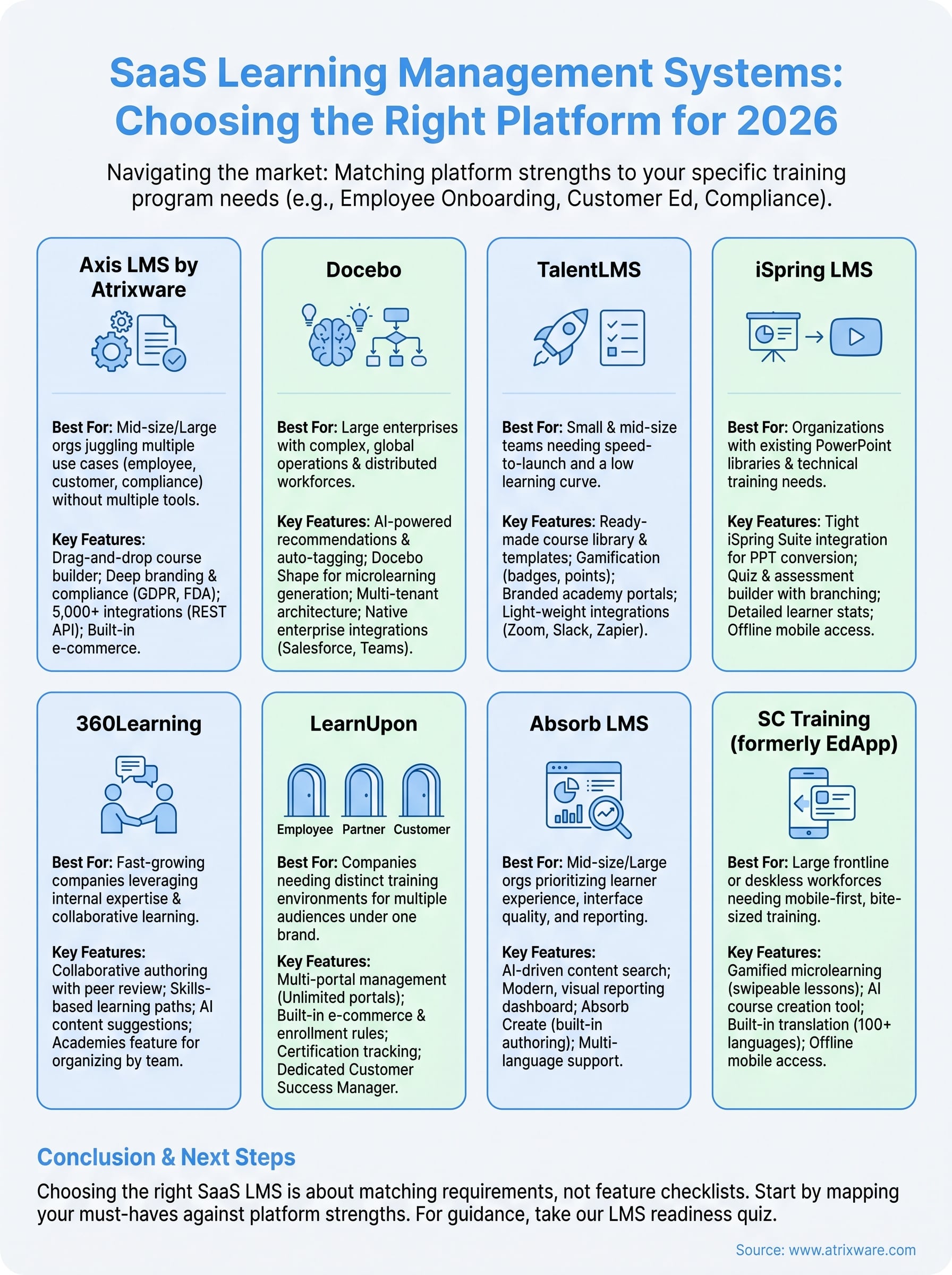
Choosing the right SaaS LMS for your team
Every platform on this list solves a real problem for someone, but not for everyone. TalentLMS and iSpring win on speed and simplicity, Docebo and Absorb win on enterprise polish, and SC Training wins on reaching deskless workers. If your organization needs a saas learning management system that handles employee training, compliance tracking, and customer or partner education without stitching together separate tools, that’s the exact gap Axis LMS was built to close.
Matching a platform to your actual requirements, not a feature checklist, is what separates a good LMS purchase from one you’re renegotiating in eighteen months. Start by mapping your must-haves against the tables and pricing above, then narrow to two or three real candidates.
If you’re still not sure where you land in that process, take our LMS readiness quiz to see what stage you’re actually at before you book another demo.
